Cooper Copilot: What MSPs need to know about Kaseya's AI assistant
Cooper Copilot is Kaseya's answer to the AI wave hitting the MSP industry. It's an AI assistant built into Autotask PSA and IT Glue that promises to help technicians work faster and document better. But what does it actually do, and is it worth the investment?
Here's the full breakdown.
What is Cooper Copilot?
Cooper Copilot is Kaseya's AI assistant embedded across their MSP product suite. It comes in two flavors: one for Autotask PSA (their professional services automation platform) and another for IT Glue (their documentation platform).
The core pitch is familiar: AI that augments your technicians rather than replacing them. It handles the repetitive, time-consuming parts of ticket management and documentation so your team can focus on actual problem-solving.
Here's the short version: Cooper Copilot uses generative AI, natural language processing, and machine learning to automate tasks that used to eat up technician hours. For Autotask users, that means summarizing tickets and improving communication. For IT Glue users, it means automatically documenting relationships between assets and keeping your documentation clean.
One important distinction: Cooper Copilot suggests and assists, but it doesn't execute. It'll write a summary or draft a response, but a human still needs to review and approve. This is worth keeping in mind when comparing it to alternatives that take a more hands-off approach to automation.
For context on where the MSP industry is heading with AI that actually executes rather than just suggests, see our analysis of MSP AI in 2026: from hype to actual execution.
Cooper Copilot for Autotask PSA
If you're running Autotask PSA, Cooper Copilot shows up as three core features (with a fourth on the way).
Smart Ticket Summary
This feature tackles the "catching up" problem. When a technician opens a ticket that's been bouncing around for days, they used to spend 10-15 minutes reading through notes, emails, and time entries to understand what happened. Smart Ticket Summary compiles all of that into a concise overview: what the issue is, what actions have already been taken, and what the suggested next steps are.
Source: Datto Cooper Copilot blog
Smart Writing Assistant
Not every technician is a natural writer. Smart Writing Assistant takes rough notes, technical jargon, and shorthand and converts them into professional, customer-friendly communication. You write "user can't print, restarted spooler, works now" and it produces something your client actually wants to read.
This matters because clear communication directly impacts customer satisfaction scores. The feature works when adding notes, resolving tickets, assigning tickets, or adding time entries.
Source: Kaseya Help Documentation
Smart Resolution Summary
When a ticket closes, someone needs to document what fixed it. Smart Resolution Summary auto-generates step-by-step resolution notes based on the ticket's activity. This builds your knowledge base without anyone having to manually write entries.
You can also write your own summary and have the AI polish it, or generate from scratch. Either way, your future self (or the next technician) has a searchable record of what worked.
Source: Datto Cooper Copilot blog
Smart Ticket Triage (with more coming)
The newest addition uses historical data to categorize incoming tickets and find related or duplicate issues. It currently includes:
- Smart Ticket Assessment: Evaluates incoming tickets and suggests categorization
- Smart Ticket Association: Identifies related tickets and suggests solutions based on past resolutions
Smart Ticket Assignment, which will automatically route tickets to the most qualified technician based on workload and expertise, is listed as "coming soon."
Source: Datto Cooper Copilot blog
Multilingual support
Cooper Copilot for Autotask supports 12+ languages: Danish, Dutch, English, Finnish, French, German, Italian, Norwegian, Portuguese, Spanish, and Swedish. The system detects the input language automatically and responds in kind.
Source: Datto Cooper Copilot blog
Cooper Copilot for IT Glue
The IT Glue implementation is different. Where Autotask focuses on communication and ticket flow, IT Glue's Cooper Copilot is all about documentation automation.
Smart Relate
This is the flagship feature. Smart Relate automatically suggests and creates relationships between assets. Link a password asset to a user's device with a click. The system also deletes outdated relationships it created, so your documentation stays accurate over time.
On average, mature IT Glue accounts form around 14,000 relationships. Doing that manually is a full-time job. Smart Relate handles it in the background.
The feature has expanded to automatically document relationships between Microsoft users and their Intune devices, plus Datto Networking Access Points to Wireless Networks and Datto BCDR Appliances to Agents.
Source: IT Glue Cooper Copilot blog
Smart Create
Smart Create uses flexible asset templates to compile critical information into organized views. Instead of hunting through multiple pages to check backup health, you get a single tab with everything relevant pulled together automatically.
For new technicians, this is huge. They get a comprehensive view of the IT ecosystem without needing to know where everything lives. For established teams, it eliminates the busywork of manually gathering data.
Source: IT Glue Cooper Copilot blog
Smart Assist
Documentation gets stale. Smart Assist identifies outdated documents, flags duplicates, and marks expired items for cleanup. It also tracks which documents your team uses most, letting you replicate successful processes across other organizations.
This matters for compliance. Auditors want current, accurate documentation. Smart Assist keeps you audit-ready without manual cleanup campaigns.
Source: IT Glue Cooper Copilot blog
Document-as-you-work
Perhaps the most ambitious feature: Cooper Copilot can capture clicks, keystrokes, and steps as you work, then transform them into structured SOPs. The promise is 100% accuracy in generated documentation because it's recording what you actually did, not what you remember doing.
Source: IT Glue Copilot product page
Pricing and availability
Here's where things get complicated.
Autotask PSA
Cooper Copilot is only available with the Ultimate edition of Autotask PSA. Datto doesn't publish pricing publicly, you'll need to request a quote through their sales team.
What we know: there's a significant cost jump between Autotask tiers, and Ultimate is the top tier. If you're on a lower tier, upgrading just for Cooper Copilot means paying for a lot of other features you may not need.
IT Glue
Cooper Copilot is included with all IT Glue plans:
| Plan | Price | Cooper Copilot |
|---|---|---|
| Basic | $29/user/month | Included |
| Select | $38/user/month | Included |
| Enterprise | $44/user/month | Included |
Prices are based on a 36-month term with a 5-user minimum. A one-time onboarding fee applies.
Source: IT Glue Pricing
Regional availability
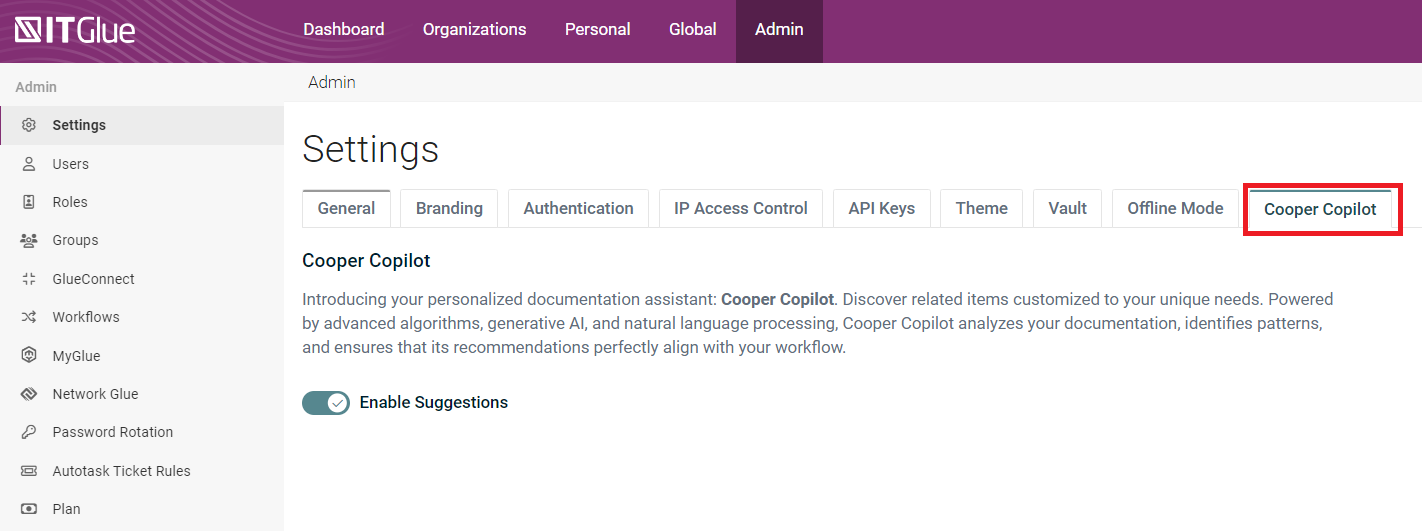
For Autotask, Cooper Copilot is enabled by default for US and Canada-based users. Everyone else needs to opt in through the admin panel. IT Glue's Cooper Copilot is auto-enabled globally but can be toggled off.
Data privacy notes
Kaseya developed Cooper Copilot for IT Glue entirely in-house using proprietary models. Your data stays within IT Glue's AWS infrastructure and doesn't leave the environment. Analytics are conducted on a per-account basis only, no cross-tenant learning.
For Autotask, the picture is more complex. Some features use third-party Generative AI models. Kaseya states they've directed third-party providers not to use customer data for model training, but ticket information is processed externally. You have to opt in to acknowledge this.
Sources: IT Glue Smart Relate Help, Kaseya Help Documentation
How Cooper Copilot fits into MSP workflows
Let's look at three scenarios where Cooper Copilot changes how work gets done.
Service desk ticket flow
A ticket comes in: "Email not working." The technician opens it and clicks Generate Summary. Cooper Copilot reads through 15 previous notes and summarizes: "User reported Outlook freezing. Previous tech restarted application. Issue recurred. Suggest checking add-ins or creating new profile."
The technician fixes the issue, writes "deleted corrupt profile, recreated, working now" and clicks Enhance Note. The Writing Assistant produces: "I've resolved the Outlook issue by removing a corrupted mail profile and creating a new one. Your email is now functioning normally. Please let us know if you experience any further issues."
On resolution, Smart Resolution Summary auto-generates the documentation for the knowledge base.
New technician onboarding
A junior tech joins the team. Instead of spending weeks learning where everything lives, they open IT Glue and see organized flexible assets with Smart Create. Backup health, network diagrams, and key contacts are all compiled in one view. Smart Relate shows them exactly which assets connect to which users and devices.
They can start contributing meaningfully in days instead of months.
Audit preparation
Compliance audit coming up? Smart Assist has been flagging stale documentation for months. Your team runs a quick cleanup of flagged items, replicates your best documentation templates across all clients, and produces organized, current records. The auditor sees professional documentation that actually reflects your environment.
This is where documentation moves from overhead to competitive advantage.
For MSPs looking to go further with automation, Rallied offers AI that actually executes fixes rather than just suggesting them. The distinction between assistance and execution matters when you're trying to reduce ticket volume, not just handle it faster.
If you're drowning in L1 tickets and want to understand the real cost, read our breakdown of why L1 tickets are killing your MSP.
Limitations and considerations
Cooper Copilot isn't perfect. Here are the constraints to factor into your decision.
Autotask tier lock-in. You need Ultimate edition. If you're on Pro or lower, the upgrade cost may not justify the AI features alone.
Third-party AI for some features. Autotask's Cooper Copilot uses external Generative AI models. While Kaseya says they've directed providers not to train on your data, the processing happens outside Kaseya's infrastructure. Some MSPs with strict data requirements may prefer solutions that keep everything in-house.
IT Glue asset type limits. Smart Relate only works with specific asset types: Documents, Passwords, Configurations, Contacts, Locations, Domains, and SSLs. If your documentation strategy relies heavily on other asset types, you'll see less value.
No cross-tenant learning. Cooper Copilot analyzes your account only. It won't benefit from patterns across Kaseya's entire customer base. This is good for privacy but means the AI won't improve from aggregate data.
Regional opt-in friction. Outside the US and Canada, you have to explicitly enable Cooper Copilot and acknowledge the AI processing terms. It's a small step, but it adds friction.
Content review required. Kaseya explicitly states that AI-generated content may contain errors and should be reviewed before use. This is honest, but it means you're not fully hands-off.
Sources: Datto Cooper Copilot blog, Kaseya Help Documentation, IT Glue Smart Relate Help
Is Cooper Copilot right for your MSP?
Bottom line? Cooper Copilot makes sense if:
- You're already on Autotask Ultimate or IT Glue
- Your technicians spend significant time on ticket summaries and documentation
- You want AI assistance without leaving your existing tools
- Data stays within Kaseya's infrastructure (for IT Glue) or you're comfortable with third-party AI processing (for Autotask)
It makes less sense if:
- You're on a lower Autotask tier and don't need other Ultimate features
- You want AI that executes fixes, not just suggests them
- You need broader automation across your entire stack (PSA, RMM, Identity, procurement)
- You have strict data requirements that rule out third-party AI processing
The distinction between assistance and execution is important. Cooper Copilot helps technicians work faster. It doesn't reduce the number of tickets they need to touch.
If you're looking for AI that actually resolves L1 tickets (password resets, account unlocks, mailbox permissions) without human intervention, that's a different category of tool. Rallied executes fixes directly and updates tickets automatically, which changes the math on staffing and response times.
Want to see how much you could save? Calculate your ROI or request a demo to see Rallied in action.
Frequently Asked Questions
Is Cooper Copilot included with all Autotask PSA plans?
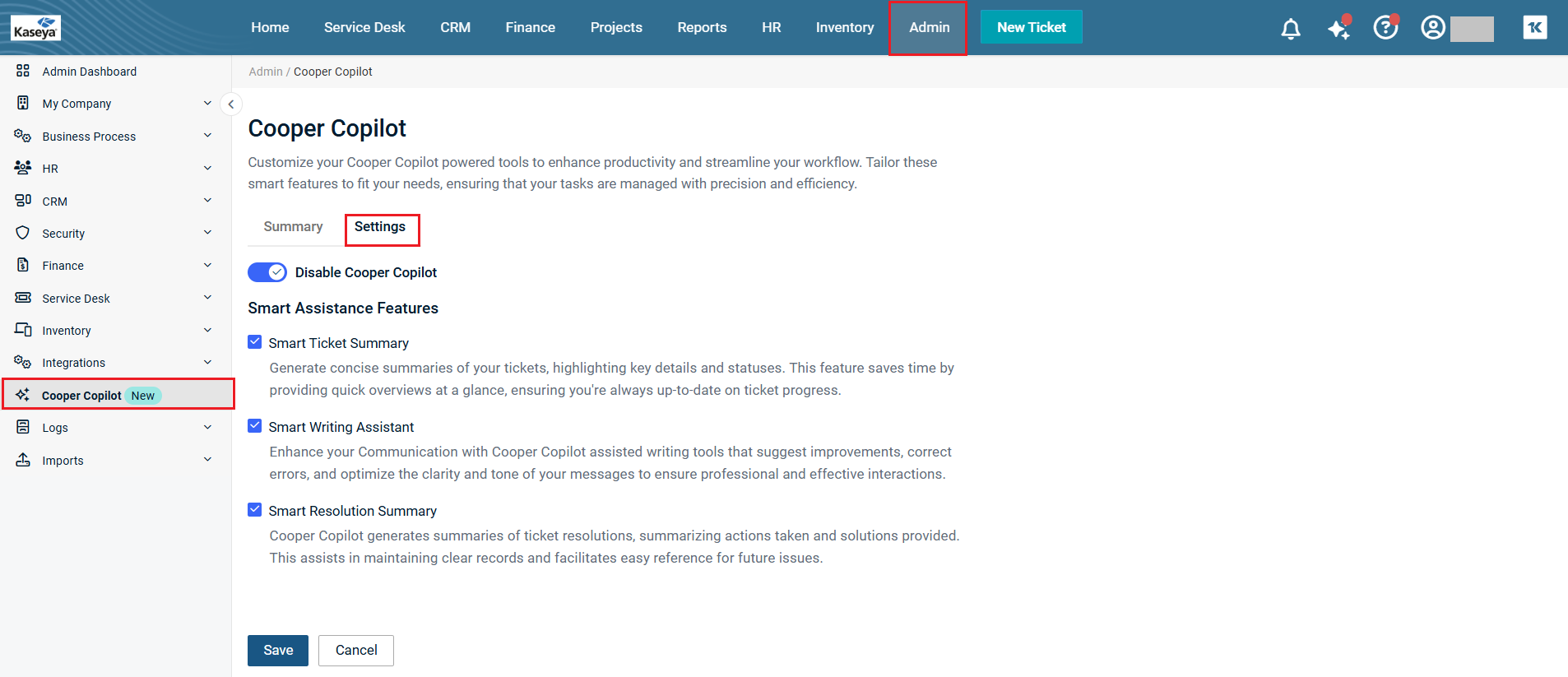
No. Cooper Copilot for Autotask is only available with the Ultimate edition. Lower tiers do not include access to these AI features.
Does Cooper Copilot for IT Glue cost extra?
No. Cooper Copilot is included with all IT Glue plans (Basic, Select, and Enterprise) at no additional charge.
Can I disable Cooper Copilot if I don't want to use it?
Yes. In Autotask, admins can disable it at Admin > Cooper Copilot. In IT Glue, toggle it off at Admin > Settings > Cooper Copilot.
Does Cooper Copilot work outside the US and Canada?
Yes, but with different defaults. For Autotask, US and Canada users have it enabled by default. Users in other regions must opt in. IT Glue's Cooper Copilot is auto-enabled globally.
Is my data used to train AI models?
For IT Glue, no. Cooper Copilot uses proprietary in-house models and your data never leaves Kaseya's AWS infrastructure. For Autotask, some features use third-party AI models, but Kaseya states they've directed providers not to use customer data for training.
What's the difference between Cooper Copilot and other MSP AI tools?
Cooper Copilot assists technicians by summarizing, suggesting, and drafting content. It doesn't execute fixes automatically. Other tools like Rallied take a different approach by actually performing actions (resetting passwords, unlocking accounts) without human intervention.
How accurate is Cooper Copilot's output?
Kaseya states that AI-generated content may contain errors and should be reviewed before use. The Document-as-you-work feature claims 100% accuracy because it records actual actions rather than generating content.
