Managed Service Providers (MSPs) Industry Guide: Key Challenges and Solutions
Most MSP owners don’t have a ticket problem. They’ve got a margin problem, caused by the wrong kind of “AI” and way too much manual L1 work. Call this a Managed Service Providers (MSPs) Industry Guide: Key Challenges and Solutions if you want, but the real story is simpler. Tickets that should close themselves still chew up 10 to 15 minutes each, every single day, while bots write pretty summaries that change nothing.
I’ve watched the same arc repeat. You try a tool. You spend months setting it up. You borrow an “automation” person. And you still end up with humans logging into Entra, Okta, Google, your RMM, and your PSA to push buttons. Nights and weekends hurt most. Your best people get dragged into basic diagnosis because the handoff lacks context. That’s the cost center hiding in plain sight.
Key Takeaways:
- L1 tickets drain margin because the work stays manual while “AI” tools mostly summarize
- Setup tax is the trap, not volume, because months of workflow building delay outcomes
- The expensive gap is suggestion vs execution; every extra click burns minutes and morale
- Cross‑stack diagnosis in seconds flips ambiguous tickets from “guess” to “decide and act”
- Same‑week autonomy is the unlock: learn from ticket history and act across your stack
- Guardrails matter: least‑privilege accounts, approval gates, full audit trails, hypercare
- Adopt the approach, then let an AI technician execute it end to end
Why Managed Service Providers Lose Margin On L1 Work
L1 tickets burn margin because humans still gather context, make simple changes, and document closeout. The volume clusters around the same tasks, so the waste compounds fast. Password resets, unlocks, license tweaks, basic permissions, and light triage repeat all day.
Where Minutes Disappear In Your Queue
You know the pattern. A user locks themselves out. Someone checks the IdP, performs the reset, DMs instructions, updates the PSA, moves on. Ten to fifteen minutes gone on a task that requires zero judgment. Do that 200 to 400 times a month and the math gets ugly.
I’m not saying you should never touch L1 tickets. I’m saying most of them should never touch a human. The reason they still do isn’t capability, it’s approach. Tools that speed words without taking actions keep your cost per ticket glued to payroll. Wrong lever.
You feel it most after hours. Tickets stack. SLAs wobble. You wake up to a wall of “urgent” that could have resolved itself in 90 seconds.
- Common L1 drains: resets, unlocks, MFA re‑enrollments, mailbox/group permissions, simple license flips
- Hidden tax: intake ping‑pong, context switches across 4–6 consoles, duplicated notes
Why “Smarter Notes” Do Not Move the Needle
Summaries read well. They rarely change outcomes. A tidy paragraph in your PSA still leaves someone to click through Entra or Okta, confirm group membership, change a license, or push a remediation script. The gap between suggestion and execution is where you lose margin.
If the tool can’t act across your PSA, IdP, RMM, and chat, you won’t see the shift you want. Most MSP “AI” is a workflow engine with a chatbot on top. The AI is the demo, not the product.
The Real MSP Problem: Setup Tax, Not Ticket Volume
The real problem is the setup tax that delays value, not the number of tickets in your queue. Workflow platforms can be powerful, but they demand months of modeling before they do anything useful. Small and mid‑sized MSPs rarely have a full‑time admin to feed that machine.
The Setup Tax That Drags You Back
You’ve lived this. You buy the platform, assign a smart tech to “own” it, and six weeks later you’re still chasing edge cases and approvals. Some processes go live. Many don’t. Meanwhile, your queue looks the same and your people work nights.
Most MSPs aren’t under‑automated. They’re over‑managed by tools that require babysitting. Another dashboard. Another vendor to wrangle. Another backlog of “we’ll automate this next quarter.” That’s not leverage. That’s drift.
The fix isn’t “work harder on workflows.” It’s adopting autonomy that starts from your ticket history, learns who approves what, and executes end to end on day one.
- Warning signs: a growing library of SOPs, brittle flows breaking on minor changes, a tool you log into more than it logs work for you
- Reality check: if you can’t name the hours saved this week, you’re paying the setup tax
What Volume Really Hides
High ticket volume is obvious. The hidden cost is rework. Intake without context spawns back‑and‑forth. Thin documentation triggers reopen rates. Serial checks across tools burn time. When nothing connects the dots, your people play detective on problems a system could diagnose in seconds.
Use this litmus test: ambiguous tickets. “Nothing works.” “I can’t access files.” “VPN is flaky.” When those hit your queue, you either guess or you correlate. Guessing is expensive. Correlation is speed.
Counting The Cost: Minutes, Dollars, And Missed SLAs For MSPs
L1 work burns 50 to 100 technician hours per month in many MSPs because each ticket steals 10 to 15 minutes for basic steps. The direct labor cost sits around 7 to 15 thousand dollars monthly, with after‑hours pressure inflating the real cost. Missed SLAs and frustration stack on top.
The Simple Math You Cannot Ignore
Take 300 L1 tickets at 12 minutes each. That’s 60 hours. Load that at 40 to 50 dollars per hour and you’re spending 2,400 to 3,000 dollars on just one category, often password resets and unlocks alone. Add MFA re‑enrollments, mailbox permissions, group changes, and your monthly total jumps quickly.
You also pay in delay. Tickets opened at 11 pm sit until morning, which dings SLAs and annoys users who can’t work. Those users pile on duplicate tickets. During broad outages, duplicates flood your queue unless you link them under a parent incident and communicate clearly. Even vendors admit this, which is why the Microsoft 365 Service health and the Google Workspace Status Dashboard exist. If your system isn’t checking them, your people will.
Specific costs add up:
- 5 to 10 minutes of intake ping‑pong when key info is missing
- 3 to 5 minutes per console hop, with 3 to 6 hops per ticket
- 2 to 4 minutes to document, with reopen risk if guidance is unclear
The Risk You Run With Identity Hygiene
Identity resets and MFA changes are routine, but not trivial, and time sensitive. Good hygiene reduces risk, but only if you act fast and follow policy. Standards like the NIST SP 800‑63B Digital Identity Guidelines call for consistent, auditable flows around enrollment, recovery, and lockouts. If you’re improvising those steps under pressure, you’ll make mistakes.
I’m not trying to scare you. Just calling out the hidden cost of slow, manual identity work. Every extra minute is risk and waste.
What It Feels Like To Run An MSP Help Desk At 11 PM
Running a help desk at 11 pm is a mix of adrenaline and dread. You want to serve well, but the queue fills with issues that shouldn’t need a human. Even when a tech jumps in, half the time is spent gathering context you already have in your tools.
The Human Side Of Repetition
Repetition isn’t just boring, it’s corrosive. Your good people joined to solve interesting problems. Instead, they reset passwords and paste the same instructions ten times a night. That’s how you burn out talent and slow down project work that actually grows the business.
I’ve watched teams lose weekends to duplicate outage tickets. Same symptoms, slightly different wording, five clients all hitting the queue at once. Without correlation and parent incidents, everyone plays whack‑a‑mole and no one breathes.
Small shift, big relief:
- Users get clear instructions without waiting for a human
- Approvals move inside Slack or Teams instead of email limbo
- Techs start with correlated findings, not a blank page
The Approval Ping‑Pong That Wastes Days
Approvals are a silent killer. Mailbox access. License upgrades. Group changes. If those require managers to dig into email, find a thread, reply, and hope the right tech sees it, you lose a day. If you’ve chased a director for a simple yes while a user sits blocked, you know the pain.
Approvals should meet people where they work, and the system should remember the patterns. The approver for Finance in Client A isn’t the same as Marketing in Client B. You already know this. Your tools should too.
A Better Way For MSPs: Cross‑Stack Diagnosis And Same‑Week Autonomy
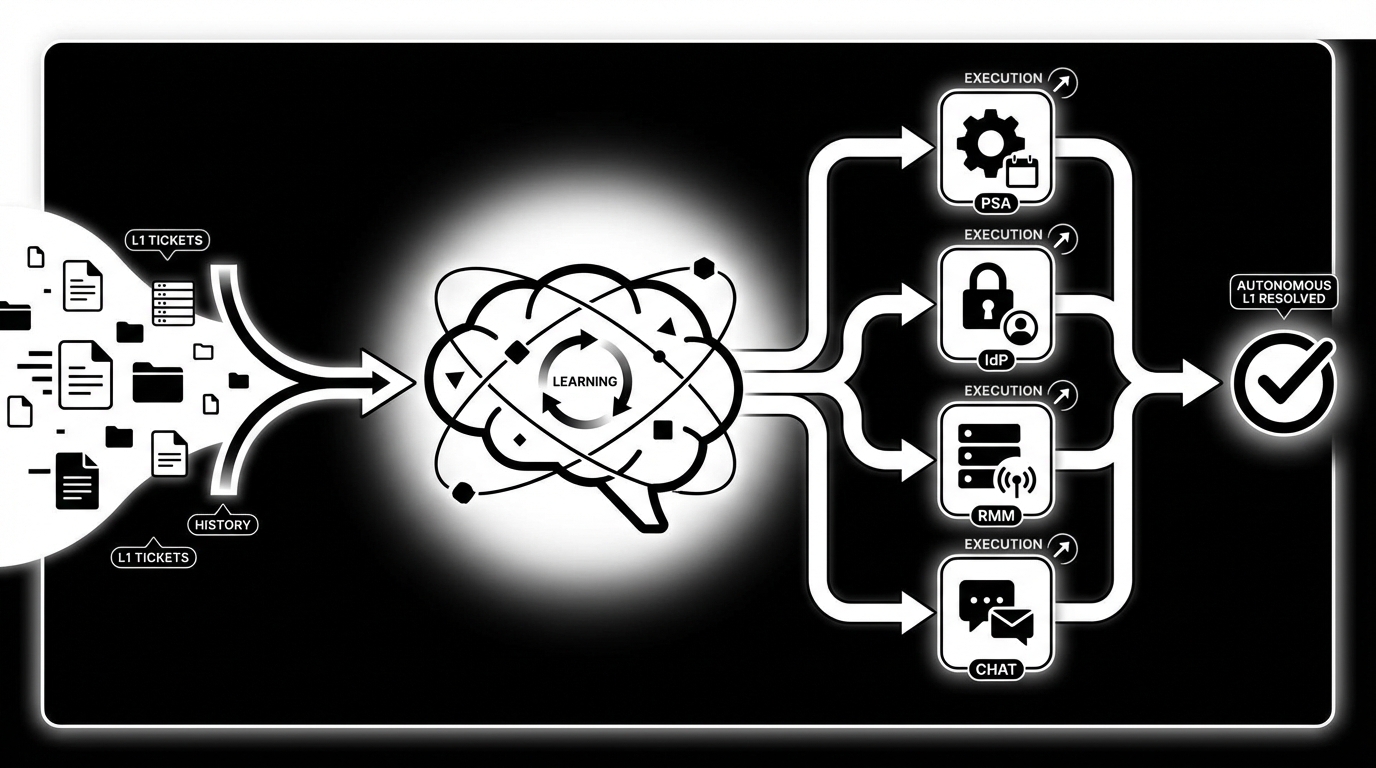
The better way is simple. Learn from ticket history, act across your stack, and close the loop automatically. Cross‑stack diagnosis should run checks in parallel, correlate results, and propose a likely root cause in seconds. Routine L1 actions should execute with guardrails, approvals inline, and full audit.
Cross‑Stack Checks First, Then Targeted Remediation
Ambiguous tickets stop being expensive when your system pulls identity status, device telemetry, and service health at the same time, and correlates the signals. VPN split tunnel misconfig? Printer service crashed? MFA failed enrollment? The point is answers in seconds, not guesses in 30 minutes.
Once a fix is safe and within scope, deploy it via your RMM, validate the outcome, and capture the result in your PSA. If human work is required, hand the ticket to a tech with everything attached, including next steps.
In practice, your flow should look like this:
- Intake in PSA or chat with targeted follow‑ups to fill gaps
- Parallel checks across IdP, RMM, and service health
- Correlation and recommended action, plus confidence score
- Execute safe fixes; ask for approval when policy requires it
- Notify the user, update the ticket, and close or dispatch
Same‑Week Autonomy, Not Next‑Quarter Promises
Time to value matters. You don’t have quarters to wait. The system should learn from your tickets, infer who approves what, and mirror how you already work. Start narrow, resets, unlocks, MFA, then expand as trust builds. Use a short hypercare period to tune guardrails and permissions.
If you can get to 24×7 coverage on routine L1 in a week, your weekends change. So does your margin. Honestly, the surprise is how fast this flips when autonomy lives in Slack or Teams and policy is encoded in least‑privilege accounts and clear approval gates.
Ready to see what that looks like in practice? See how Rallied AI works: Learn more about Rallied AI
How Rallied Enables Autonomous L1 For MSPs
Rallied turns the methodology above into daily outcomes by acting as an AI technician that learns from your ticket history and executes across your PSA, IdP, RMM, and chat. It targets the L1 tickets that waste 10 to 15 minutes each, closes them in about 60 to 120 seconds, and documents everything in your PSA.
What Rallied Automates Out Of The Box
Rallied’s Autonomous L1 Ticket Resolution handles the high‑volume, low‑judgment work you’re tired of assigning. It reads the ticket, matches the user in Entra, Okta, JumpCloud, or Google Workspace, checks account and policy state, performs the change, and messages the user with next steps. No human required for resets, unlocks, MFA re‑enrollments, mailbox permissions, and simple license changes.
Cross‑Stack Diagnosis and Remediation addresses the ambiguous tickets. It queries RMM telemetry, IdP status, and service health in parallel, correlates findings, and when a fix is safe, deploys it through your RMM and validates the result. If a human needs to step in, the ticket arrives with full context and suggested next actions.
Zero‑Config Learning from Ticket History bypasses the setup tax. Rallied ingests historical PSA tickets to learn how your team handles each request by client and department, including who usually approves. Where policy requires a human decision, Approval Routing prompts the right manager in Slack or Teams and waits for an explicit yes before proceeding.
Rallied puts guardrails first. Safety Controls, Guardrails, and Hypercare let you define where it acts autonomously and where it must ask, per client and per action. Least‑privilege service accounts, SOC 2 controls, and a full audit trail give leaders confidence while results start to land in the first week.
- Autonomous L1 Ticket Resolution cuts 10 to 15 minute tickets down to about 90 seconds
- Cross‑Stack Diagnosis finds likely root causes in seconds, then acts when safe
- Zero‑Config Learning from Ticket History removes the months‑long setup burden
- Approval Routing keeps decisions in Slack or Teams with a full audit trail
- Safety Controls and Hypercare protect scope while you expand coverage
Want to go from manual L1 to autonomous outcomes without hiring? Get started with Rallied AI: Learn more about Rallied AI
Closing The Loop On The Costs You Counted
Earlier, we put numbers to the waste. Sixty hours a month on L1 is normal. With Rallied, those 10 to 15 minute resets and unlocks take about 60 to 120 seconds, users get instructions immediately, and the PSA closes cleanly. During outages, Proactive Pattern Detection and Incident Linking consolidate duplicates under a parent incident and keep end users informed, which cuts rework and noise. The transformation isn’t abstract. It’s fewer handoffs, fewer reopen tickets, better SLAs, and weekends that don’t start with a wall of basics.
Conclusion
You don’t fix L1 overload by writing better notes. You fix it by shrinking the gap between suggestion and execution. Learn from your own ticket history, run cross‑stack checks in seconds, act with guardrails, and keep approvals inline where people work. That’s the path off the setup tax treadmill.
If your goal is higher margins, fewer nights on call, and a help desk that doesn’t drown in repeats, autonomy is the move. Rallied was built to do that from week one, without a dedicated admin and without another dashboard to babysit. Curious what this looks like against your queue right now? Learn more about Rallied AI