Rewst vs Pia: What MSPs Actually Need to Know in 2026
TL;DR
Rewst and Pia are both legitimate MSP automation tools - but they both solve the workflow problem, not the execution problem. Rewst is a powerful workflow engine you build yourself; Pia is a pre-built automation platform that's faster to stand up. Neither one autonomously closes tickets without a human somewhere in the loop, and both carry meaningful setup and admin overhead.
If you're comparing them because you want to cut L1 tech time, you're going to be disappointed by what either actually delivers in month one. The execution gap - someone actually doing the work - is where Rallied lives.
The honest take: use Rewst for complex, multi-step business process automation. Use Pia if you want PSA-native pre-builts and don't have a developer on staff. Use Rallied when you want L1 tickets to close themselves - password resets, account unlocks, onboarding, offboarding - without anyone touching them.
Why MSPs compare these two
The comparison makes sense on the surface. Both Rewst and Pia show up in the same MSP automation conversation. Both promise to reduce technician time on repetitive work. Both integrate with ConnectWise, Autotask, and HaloPSA. Both have made real inroads with mid-market MSPs in the last two years.
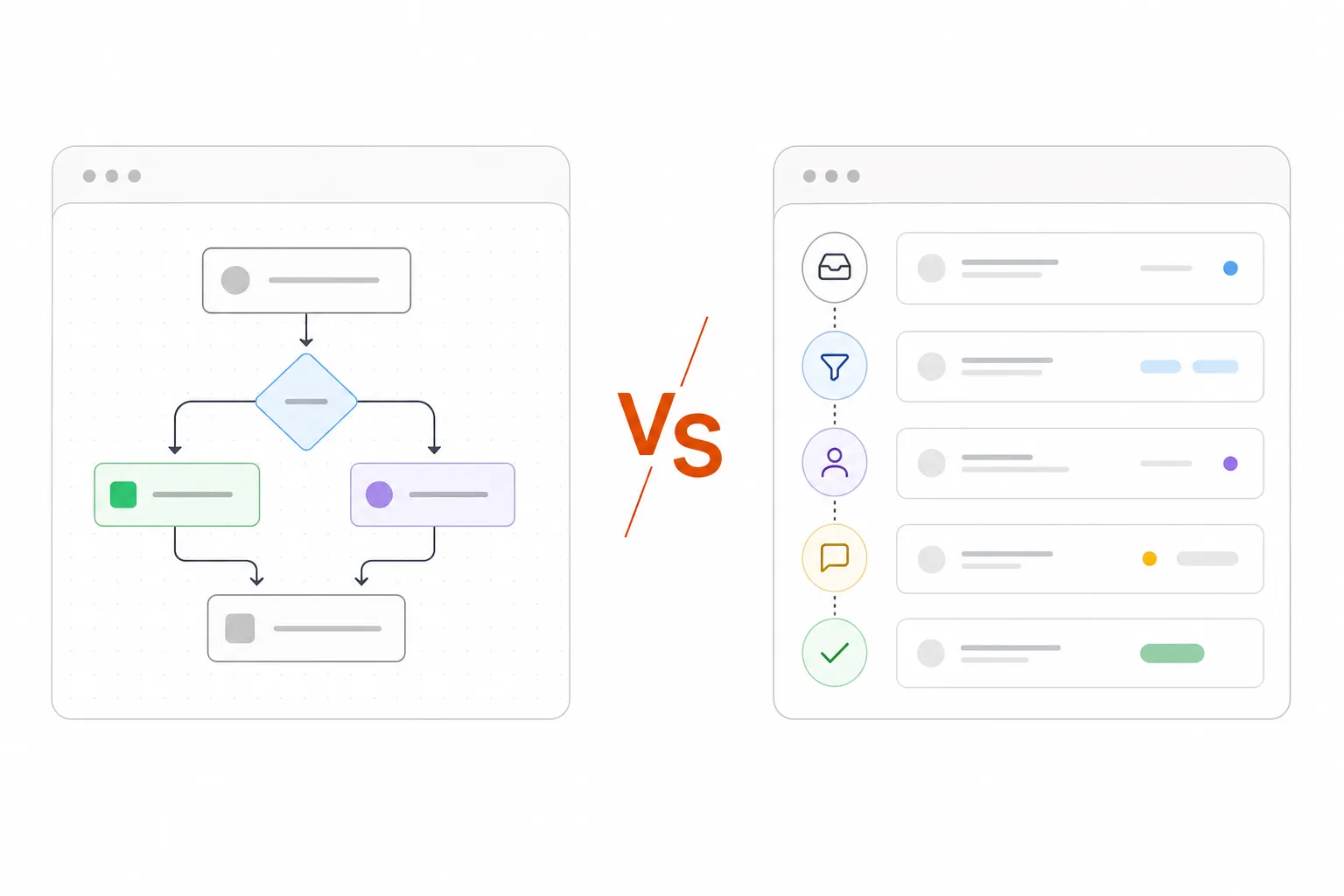
But underneath the similar positioning, they're structurally different tools built for different buyers. Rewst is a platform you build on. Pia is a platform you configure. And both assume that "automation" means connecting workflow steps - not that an AI agent actually closes a ticket without anyone touching it.
That distinction matters a lot if your goal is reducing L1 tech time. It's less important if your goal is eliminating manual handoffs in more complex multi-system processes.
Rewst: the workflow engine
Rewst is a workflow automation platform built specifically for MSPs. The core model: you connect your stack - PSA, RMM, identity systems, documentation tools - and then build automations that orchestrate multi-step processes across all of them. New hire onboarding, billing reconciliation, security alert handling, documentation sync. Anything you could describe as "when X happens, do Y, then Z, then notify A" is something Rewst can automate once you've built the workflow.
The prebuilt Crates library - 100+ ready-to-deploy automations - lowers the barrier to entry. And RoboRewsty, Rewst's in-platform AI assistant, lets you describe a workflow in plain English and have it built for you. In practice, most MSPs start with the Crates and customize from there.
The ROI, when it materializes, is real. Rewst's case studies include Network IT Easy averaging 75-80 hours of time savings per week once fully deployed; Marcus Networking reporting $120K+ per year in automated billing reconciliation; and Dustin Bolander at Clear Guidance Partners noting that Rewst automates "processes we never had time to do ourselves."
Where Rewst earns its keep
Rewst's strongest use cases are the complex, multi-system, multi-step processes that don't fit neatly into "just reset the password." The things that have historically required a senior tech to coordinate across four systems and three communication threads:
- Security alert handling - filter, classify, remediate, notify, document, close
- Billing reconciliation - find unused seats, flag renewals, sync to PSA, generate report
- Complex onboarding - account creation, license assignment, device provisioning, vendor notification, documentation update, manager sign-off
- Documentation automation - sync runbooks, keep PSA records consistent, capture session notes
These workflows have a lot of steps. They touch a lot of systems. Rewst is genuinely good at this layer - Dustin Lepi at Network IT Easy and Matt Rose at Tech Rage IT both credit Rewst with transforming what used to be hours of manual coordination into a few seconds of automated execution.
The honest trade-offs
There's a reason nearly every MSP that tries Rewst says some version of the same thing: it's powerful, but it takes a while. Rewst's own pricing page doesn't publish rates - custom-quoted, demo-first - and the setup model assumes you have someone who will own the platform. Not a full-time engineer necessarily, but someone who can learn the workflow builder, build and test automations, maintain them as APIs change, and troubleshoot failures. That's real overhead.
Most MSPs I've talked to describe a 2-4 month ramp before they're seeing meaningful ticket deflection. Some get there faster with Crates. A few never really get there because the person designated to own Rewst got pulled onto other projects. The platform is only as good as the workflows you build in it - and building good workflows takes time.
"Rewst is helping us quickly automate processes we never had time to do ourselves"
- Dustin Bolander, CIO, Clear Guidance Partners
Pricing is opaque but typically runs in the thousands per month once you account for platform costs and the admin overhead of maintaining the system. For an MSP that's all-in, the ROI math pencils out. For one that's evaluating whether to make that commitment, the upfront investment is non-trivial.
Pia: the PSA-native pre-built platform
Pia takes a different approach. Rather than giving you a workflow engine to build on, it gives you a library of pre-built automations that run inside your PSA - native to ConnectWise, HaloPSA, or Autotask rather than layered on top of them. Client self-service via SmartForms, AI ticket triage and classification, pre-built workflows for the most common L1 and L2 request types.
Pia's marketing claim is aggressive: 90% faster ticket resolution, 3x more tickets closed per technician, 500 endpoints managed per technician vs the industry average of 250. Take those numbers with the usual grain of salt - they're best-case outcomes with full deployment. But the underlying value proposition is real: a team that automates 60% of incoming service requests really does change the unit economics of an MSP.
Where Pia earns its keep
Pia's strength is speed-to-value for the standard L1/L2 use cases: password resets, account provisioning, mailbox access, onboarding and offboarding workflows. If your ticket queue is dominated by request types that fit these pre-built templates, you can be automating them within weeks rather than months.
The PSA-native architecture is a genuine differentiator. Because Pia runs inside ConnectWise or HaloPSA rather than via a separate interface, you don't have to export tickets to a third system, manage API connections, or maintain a parallel workflow engine. Everything stays in the PSA your team already lives in.
The Pia Chat feature - Microsoft Teams-based AI resolution launching Q3 2026 - extends this further: clients describe issues in Teams, Pia classifies and acts, and the ticket closes before a technician ever sees it. On paper, that's the closest Pia gets to truly autonomous execution.
The honest trade-offs
Pia's pre-built approach is faster than Rewst's build-it-yourself model. But "pre-built" doesn't mean "zero configuration." You still need to map your PSA workflows to Pia's templates, configure integration credentials, test automations in your specific environment, and handle exceptions. And if you need something outside the pre-built library - a custom integration, a bespoke workflow for a specific client's environment - you're back in the workflow editor, writing APIs, or waiting for Pia to add the integration "this quarter."
Pricing isn't public. Market estimates put it in the $500-$2,000 per month range for typical MSP deployments, depending on feature tier and endpoint count. That's meaningful monthly overhead before you've seen a single ticket resolved.
The community feedback - where it surfaces - includes mentions of the expected "dedicated admin" tax. Pre-built automations still require ongoing tuning, troubleshooting when clients' environments differ from template assumptions, and version management when PSA or identity platform APIs change. Lighter than Rewst, but not zero.
Head to head
| Rewst | Pia | |
|---|---|---|
| Model | Workflow engine you build | Pre-built automations you configure |
| PSA-native | No (connects via API) | Yes (runs inside your PSA) |
| Deployment time | 2-6 months | 4-8 weeks |
| Admin overhead | High (dedicated person recommended) | Medium (configuration + tuning) |
| Pricing | Custom (opaque, usage or per-endpoint) | Custom (~$500-$2,000/mo est.) |
| Breadth of integrations | 90+ MSP integrations | ConnectWise, HaloPSA, Autotask + M365 |
| Complex workflows | Excellent | Good (within templates) |
| Autonomous L1 execution | Partial (requires built workflow) | Partial (pre-built but still requires config) |
| Time to first ticket resolved | 2-4 months | 2-6 weeks |
| Best for | Complex multi-system processes | PSA-native pre-built L1/L2 automation |
Both are good products. Neither is a scam. And neither one closes L1 tickets autonomously, same week, without someone building something first.
The gap neither fills
Here's the thing that takes a while to surface when you're evaluating either platform: they're both automation builders, not automation executors. Rewst gives you a canvas; Pia gives you templates. In both cases, the actual ticket resolution depends on a workflow that was configured, tested, and maintained by a human.
That's not a criticism - it's the right architecture for complex, variable processes that need to be customized to your client's environment. But it means neither tool is the right answer if your goal is: I want L1 tickets to stop touching my techs entirely, starting this week.
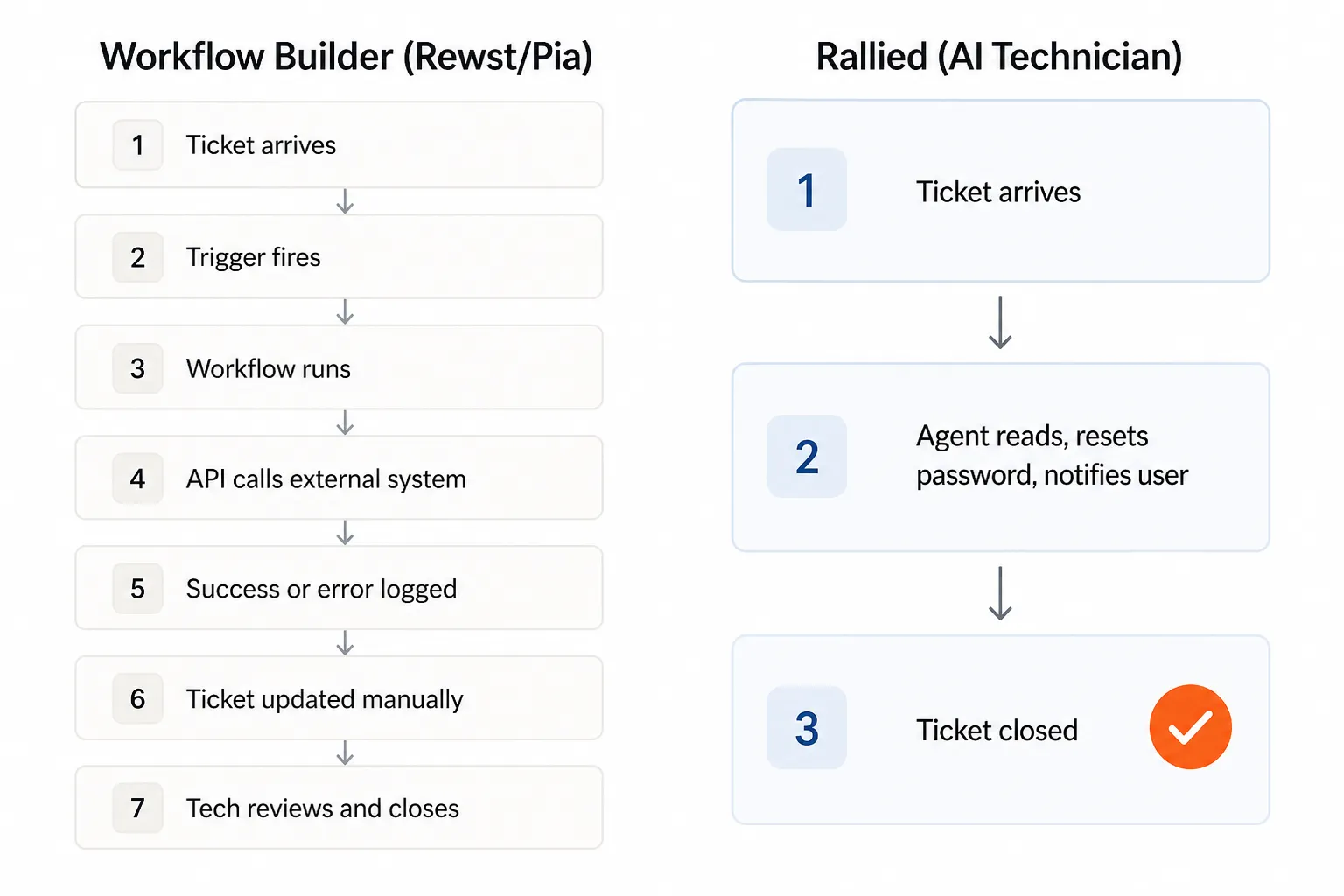
A password reset in a workflow builder goes something like: trigger fires, workflow checks identity platform, calls reset API, logs outcome, updates ticket, flags for tech review. That's six or seven steps, and every one of them requires the workflow to have been built, tested, and maintained. If the API changes, the workflow breaks. If a client's environment has a non-standard setup, the workflow fails silently.
A password reset in an AI execution layer goes: ticket arrives, agent reads it, resets the password in the connected identity platform, verifies access is restored, notifies the user, closes the ticket. No workflow to build. No API to maintain. The agent reads the ticket the way a technician would - and executes accordingly.
Where Rallied fits
Rallied is not a workflow builder. It's an AI technician - an agent that connects directly to your PSA, RMM, identity systems, and documentation tools, reads incoming tickets the way a human L1 tech would, and resolves them end-to-end.
Password reset? The agent resets the password, verifies access, notifies the user, closes the ticket. Account unlock? Same. Onboarding a new hire? Agent reads the ticket, creates the AD account, assigns M365 licenses, adds the user to the right security groups, triggers the RMM to deploy the base image, notifies the manager, closes the ticket. Offboarding? Agent disables the account, revokes licenses, removes group memberships, reclaims resources, documents the audit trail.
Rallied connects to ConnectWise, Autotask, HaloPSA, SuperOps, NinjaOne, Datto RMM, ConnectWise Automate, Atera, Kaseya, Microsoft 365, Entra ID, Okta, JumpCloud, Google Workspace, IT Glue, and Hudu. Not via a generic API wrapper - native integrations with read/write access, policy-based controls per client, and multi-tenant isolation so Client A's environment stays completely separate from Client B's.
Where it sits in the stack
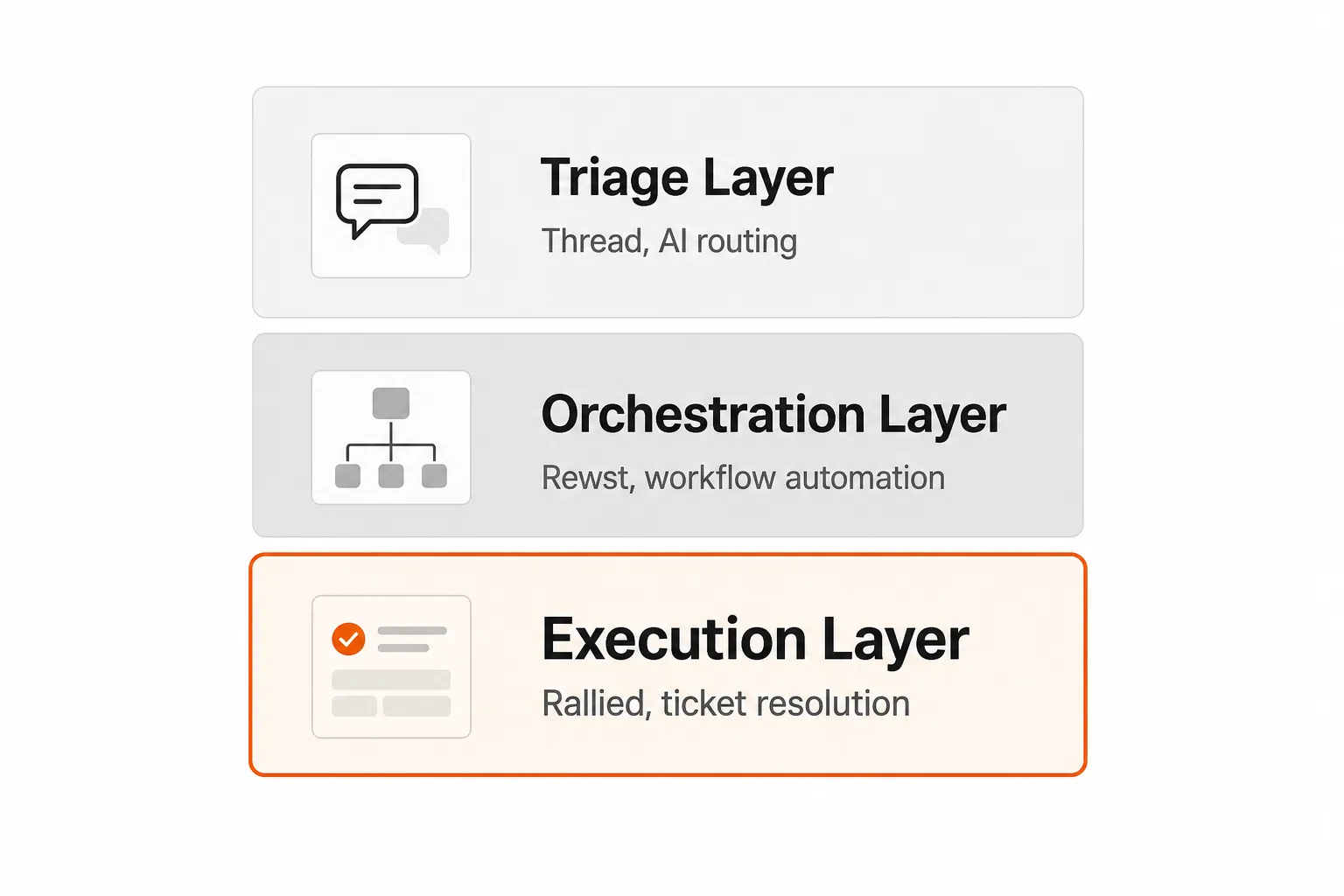
The Rev.io blog's "AI Agent Stack" framing is a useful way to think about this. There are three distinct layers in a modern MSP automation stack:
- Triage layer - reads tickets, classifies them, routes them to the right place. Tools like Thread.
- Orchestration layer - coordinates multi-step processes across systems, handles complex workflow logic. This is Rewst's home territory.
- Execution layer - actually does the work. Reads the ticket. Resolves it. Closes it. No human touch.
Rewst is excellent at the orchestration layer. It's not designed to be the execution layer - it orchestrates workflows that call other systems, but those workflows need to be built. Pia sits between triage and orchestration - it classifies tickets and runs pre-built workflows, but it's not truly autonomous execution.
Rallied is the execution layer. It's designed to close 40-60% of typical MSP ticket volume - the high-frequency L1 work that doesn't require human judgment.
These tools complement each other. A well-equipped MSP might use Rewst for billing reconciliation and complex security workflows, Rallied for the L1 execution volume, and Thread for smart triage and routing. They're not in competition - they're in different parts of the stack.
Total cost of ownership: the number that matters
The headline price comparison is misleading without accounting for deployment time and admin overhead.
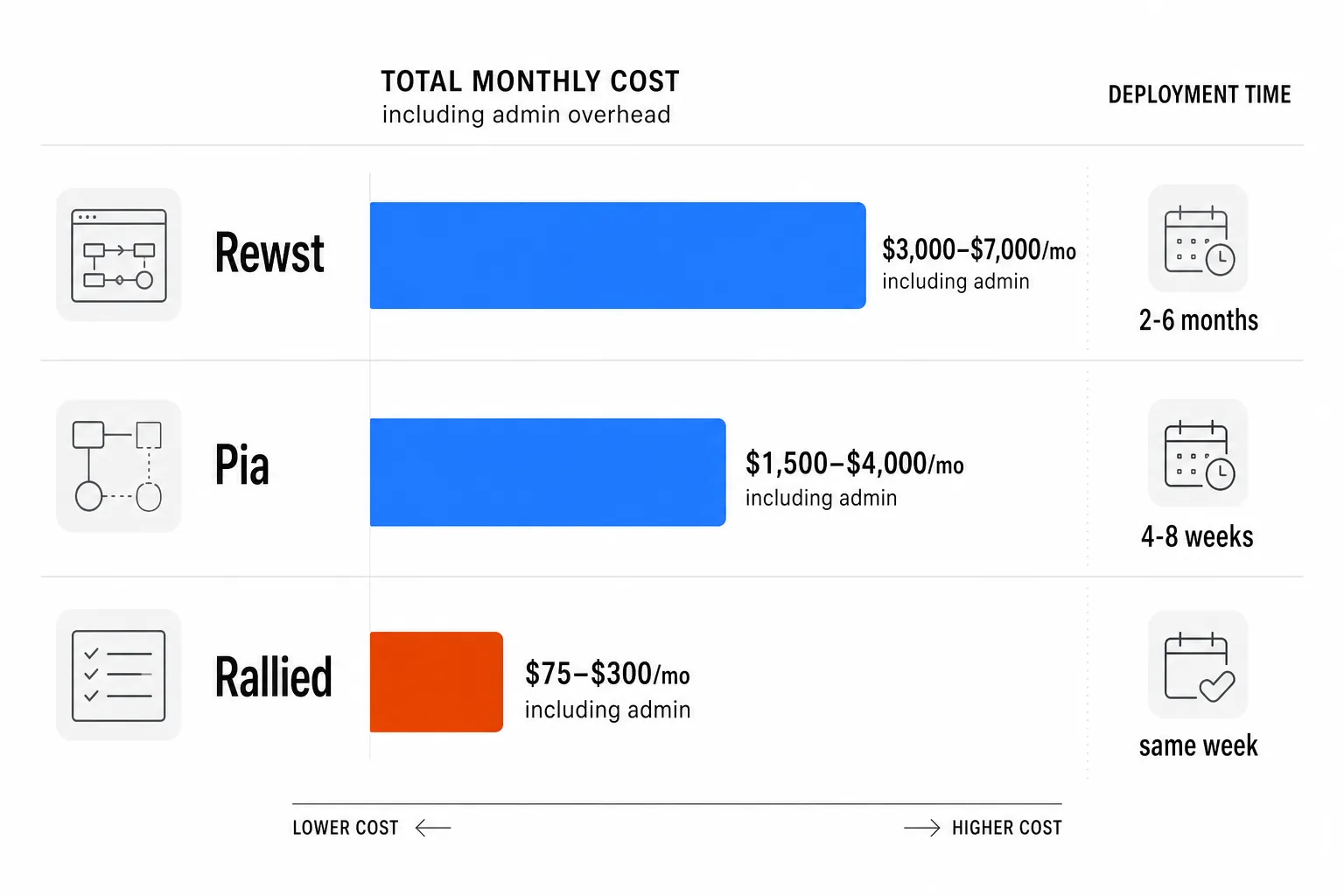
Rewst doesn't publish pricing, but the realistic all-in cost for a mid-sized MSP - platform cost plus the admin overhead to build and maintain workflows - runs somewhere in the $3,000-$7,000/month range once you factor in the staff time. The platform ROI is real, but it accrues over months, not weeks.
Pia runs roughly $500-$2,000/month in platform cost (market estimates), plus the ongoing admin load of configuration and tuning. Lighter than Rewst, but still meaningful.
Rallied charges $3 per ticket outcome against a $150/month minimum - $450 if you do 150 L1 tickets, $1,800 if you do 600, and the $150 floor if you're at 50 or fewer. No contract. You're charged once per ticket regardless of how much work it took, and tickets Rallied couldn't move cost nothing.
For a mid-sized MSP running 200-400 tickets per month with 40-60% L1 mix, that's 80-240 L1 tickets. At $3 each, that's $240-$720 per month in Rallied costs. The tech time those 80-240 tickets would have consumed - at 15 minutes per ticket and $30/hour - runs $600-$1,800/month. Even against that conservative a labor rate, you're paying less than half, and against Rewst or Pia platform costs it isn't close.
A 14-day free trial, no credit card required, lets you see exactly how many tickets Rallied resolves before you spend a dollar.
Who should pick what
Pick Rewst if:
- You have someone who will own the platform - building workflows, maintaining integrations, debugging failures
- Your highest-value automation opportunities are complex, multi-system processes (billing reconciliation, security alert handling, documentation sync)
- You're willing to invest 3-6 months to see the full ROI
- You want the flexibility to automate anything, not just L1 ticket types
Pick Pia if:
- You're heavily invested in ConnectWise, HaloPSA, or Autotask and want automation that runs natively inside those platforms
- Your L1/L2 request mix fits the standard pre-built templates (password resets, access requests, provisioning)
- You want faster time-to-value than Rewst but still want pre-built templates as a starting point
- You're planning to lean into Microsoft Teams as a client-facing service channel (Pia Chat, Q3 2026)
Add Rallied when:
- You want L1 tickets to stop touching your techs, starting this week - not next quarter
- Your team is burning hours on the same 10 ticket types (password resets, account unlocks, permission changes, onboarding, offboarding)
- You don't want to pay for a platform when no tickets resolve
- You're using Rewst or Pia for their orchestration strength and need the execution layer to complement it
Rewst and Pia are not in competition with Rallied. They solve different parts of the automation problem. The MSPs we see getting the most out of their automation stack typically use both a workflow layer (Rewst or Pia) and an execution layer (Rallied) - each doing what it's actually designed to do.
Try Rallied
Rallied is the AI technician layer that connects to your PSA, RMM, identity systems, and documentation tools and starts closing L1 tickets the same week - not the same quarter. Password resets, account unlocks, onboarding, offboarding, permission changes: the work your techs know by heart and wish they could stop doing.
$3 per ticket outcome against a $150/month minimum, with no implementation project and no per-tech licensing. 14-day free trial, no credit card required. The first week tells you more than any demo will. And if you're still deciding between the two platforms above, the Rewst vs Pia comparison page has the full feature table.
Frequently Asked Questions
Is Rewst or Pia better for a small MSP with limited staff?
For a small MSP with no dedicated automation admin, neither Rewst nor Pia is the right first move. Rewst requires someone to build and maintain workflows - that's a real time commitment. Pia is faster to deploy but still requires PSA configuration and ongoing tuning. If you want L1 work done without adding headcount, Rallied is the more honest starting point: same-week deployment, no admin overhead, and you only pay per ticket resolved.
How long does it take to see ROI from Rewst?
Most MSPs running Rewst report seeing meaningful time savings after 2-4 months of setup and workflow development. Some case studies cite $60K-$120K per year in savings once fully deployed, but the upfront investment - dedicated admin time, training, workflow building - is substantial. If you want faster ROI, Rallied starts resolving tickets the same week you connect your PSA.
Does Pia actually close tickets automatically, or does a tech still have to approve?
Pia can execute pre-built automations without a human in the loop for defined workflows like password resets and account provisioning. However, its AI triage layer routes and classifies tickets rather than resolving them outright - a human still reviews many outcomes. For truly autonomous ticket resolution (read, diagnose, execute, close), Rallied is designed to close the ticket end-to-end without a tech touching it.
Can I use Rewst and Rallied together?
Yes - they serve different layers. Rewst is excellent for complex, multi-step business process automation (billing reconciliation, documentation sync, security alert handling). Rallied handles the high-volume L1 execution work (password resets, account unlocks, onboarding, offboarding). Many MSPs use a combination: Rewst for the orchestration layer, Rallied for the execution layer.
What does Rewst cost for a typical MSP?
Rewst does not publish pricing - it's custom-quoted after a demo, using either a usage-based model (pay when workflow tasks execute) or a per-endpoint model. In practice, platform costs plus the admin time to build and maintain workflows typically runs $2,000-$7,000+ per month for a mid-sized MSP. By contrast, Rallied charges $3 per ticket outcome with a $150/month minimum, making TCO much more predictable.
