Stop Asking What Can AI Suggest Ask What It Can Do
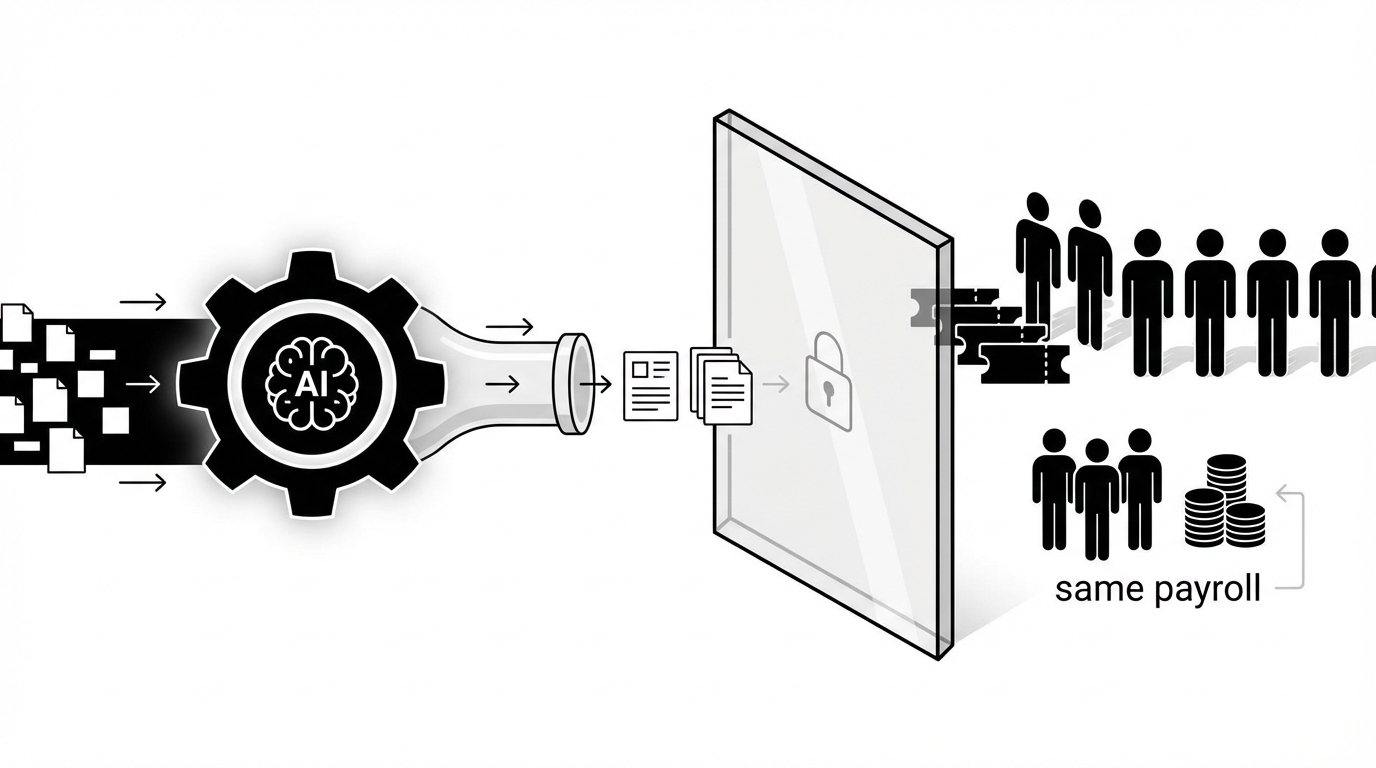
Stop asking what can AI suggest. Start asking what it can do.
AI technician for MSPs (Autonomous L1) is an MSP-native service operations category that resolves routine support tickets end to end by understanding requests, gathering cross-tool context, executing approved actions, and closing the loop with users without requiring workflow builders, runbooks, or months of setup. Unlike chat assistants, summarizers, or workflow software, this category is built to complete routine service work across the stack, not just recommend the next step.
This category showed up because the old approach stopped making sense. Ticket volume kept rising. SaaS sprawl kept growing. Clients kept expecting faster responses in chat. But most AI tools still asked MSPs to do a bunch of unpaid implementation labor before anything useful happened. That gap has a name. Setup Tax. And I think it's the real reason so many MSP owners got cynical about AI in the first place. If you want the short version, it's this: stop asking what can AI suggest and start measuring whether it can actually finish the work.
Key Takeaways:
- Most MSP AI tools improve wording and triage, but still leave the actual labor with your technicians
- Setup Tax is the real market problem: months of workflow building, SOP writing, and brittle maintenance before value shows up
- MSPs should evaluate AI by one standard: can it close routine tickets safely across the stack
- The category shift is simple: stop buying configuration-heavy assistance, start buying bounded execution
- The strongest buyers in this market won't ask what AI can suggest, they'll ask what work it can finish
Why MSP AI Keeps Improving Output But Not Margins
Most MSP AI teams say they help the queue. Fair. But for a lot of MSPs, the queue still behaves the same after the demo glow wears off. Better summaries. Better notes. Same payroll. Same technician touches. Same bottlenecks. That disconnect is exactly why more buyers are starting to stop asking what can AI suggest and ask what it can actually do.
Most MSP AI Products Make The Notes Better While The Work Stays Manual
Most MSP AI products are solving the wrong problem. They make ticket summaries cleaner. They draft nicer responses. They route faster. They may even surface the right next step. But if a technician still has to open the ticket, jump into the IdP, make the change, update the PSA, and message the user, the labor didn't really move.
That's the hidden issue. Suggestion-led AI improves optics. Execution-led AI changes the math. And the math is what matters when you're trying to hold margin, hit SLAs, and avoid hiring another person for work that probably shouldn't need a person anymore.
You can see this in the most common L1 tickets. Password resets. Account unlocks. MFA re-enrollment. Simple permission changes. Group updates. Basic onboarding steps. None of these are intellectually hard most of the time. They're just repetitive, cross-tool, and annoying at volume. So when an AI tool gives you a good summary of the issue but your tech still does the fix, you've made the handoff prettier. You haven't removed the cost.
I've seen this pattern in software markets a lot. Buyers start by being impressed with the demo. Then they live with the workflow. And the workflow tells the truth.
Setup Tax Is Why Buyers Stopped Trusting The Pitch
This is where the old category really loses people. Not on vision. On economics. Buyers stop trusting the pitch when they realize the product expects them to become unpaid implementers before they ever see value.
Setup Tax is the upfront burden of designing workflows, writing runbooks, training the system, testing edge cases, and maintaining brittle logic across tools before the thing can act. That's what wears people out. Not the idea of AI itself. The homework that comes before any result.
One MSP owner described having a nearly full-time AI trainer on staff for more than two years. Another called their tool a trainwreck of fail that couldn't do half of what was promised in the sale. That's not just frustration talking. That's a rational response to buying software that demanded a new operational job before it delivered the old operational result.
And this is where a lot of vendors lose the plot. They think skepticism means the buyer is anti-AI. Usually they aren't. They're anti getting burned again. Different thing.
The Market Doesn't Need More AI To Talk About The Work
The market is getting more direct now. Less impressed by polished language. More interested in finished tickets. That's healthy. It means buyers are finally asking the question that matters.
Most MSPs don't need another dashboard to babysit. They don't need another assistant that makes the ticket look organized while a human still carries it across the finish line. They need work to get done.
Workflow builders have a place. So do SOP systems. So do PSA add-ons. Fair point, some larger teams do have the internal admin talent and the patience to build everything out. But a huge part of the market doesn't. Small MSPs have the same L1 problem as larger ones, and often less room for implementation drag, not more.
That's why the market is shifting, even if the language hasn't fully caught up yet. The real question isn't whether the AI can summarize the request well. The real question is whether it can actually take the request, gather context, perform the change, document it, and notify the user without turning your team into part-time workflow engineers.
Why The Old Category Still Keeps Buyers Stuck
The old category keeps buyers stuck because it sells capability in theory while preserving labor in practice. It offers tools to design the work, describe the work, and route the work. But not always tools to finish the work. That's the trap. And it's why more MSPs are starting to stop asking what can and start asking what actually closes tickets.
Workflow Builders Can Speed Design While Tickets Still Sit There
Workflow builders can absolutely make process design faster. But speeding design isn't the same as resolving tickets.
That's the category mistake buyers keep getting pushed into. They get sold power, flexibility, and customization. Which sounds good. Until they realize all that flexibility means they now own the burden of mapping paths, maintaining logic, handling exceptions, updating SOPs, and testing what breaks when one vendor changes an API or an internal process changes. So the software may be useful, but it's useful in a way that creates more admin responsibility before it reduces service labor.
That's why Setup Tax sticks around. The product isn't failing because automation is bad. It's failing because the buyer purchased a system for building automation, not a system for doing routine work.
You can build a lot with enough time. The question is whether you should have to.
PSA-Centric AI Stops Where The Stack Starts
This is one of those category boundaries that sounds minor until you live it. A PSA-only view can organize the ticket. It usually can't finish the job across the environment. And MSP work is cross-stack by default.
A lot of MSP AI tools live mostly inside the PSA. That's useful up to a point. The PSA is where the ticket sits. It is not where the work ends.
Routine support work crosses tools constantly. The request starts in chat or email. The user data sits in the IdP. Device details may live in the RMM. Context sits in documentation. Approvals may happen in Slack, Teams, or email. The closeout belongs in the PSA. If your AI only sees one layer, it can only own one layer.
And that means it becomes a traffic cop. Not a technician.
This is one of those overlooked category boundaries that matters more than it sounds. A tool that can't see across the stack can still categorize, summarize, or suggest. It can't fully complete the job. So buyers end up comparing assistants to assistants, when what they really need is a different operating model.
Autonomous L1 Is A Different Standard, Not A Better Chatbot
This is the reframe. Not better prompts. Not cleaner replies. A different standard entirely. Once you see it that way, a lot of buying criteria start to look outdated.
Autonomous L1 is not better triage. It's not a prettier interface. It's not a chatbot with stronger copy.
It's a different standard for what the product is supposed to be. Instead of helping a human do the task a little faster, it should be able to finish bounded L1 work from intake through action, notes, and user communication. That's the line.
For MSP owners and service managers, especially in the 5 to 50 employee range, this matters a lot. They usually don't have a dedicated engineer sitting around to model workflows for months. They need something that can fit into real operating conditions. Busy queue. Thin bench. Lots of endpoints. Clients expecting fast answers. No appetite for another software maintenance project.
So the category shift is simple. Stop comparing AI by how smart it sounds. Start comparing it by whether routine tickets can close without a technician touching them.
Three principles define this category:
1. Context across the stack, not just inside the ticket
2. Bounded action, not open-ended suggestion
3. Clean closeout, not partial assistance
Explore how autonomous L1 changes MSP service delivery
How Setup Tax Turns A Useful Idea Into Bad Economics
This is where the conversation gets practical. Setup Tax isn't just annoying. It changes the whole ROI equation. It delays labor removal, adds implementation overhead, and makes decent ideas feel like failed investments. That's why smart operators now stop asking what can and ask how fast useful work actually starts.
Slow Time To Value Quietly Breaks The ROI Story
Setup Tax makes bad economics look like bad AI. That's why this market feels so muddy.
Let's pretend you're handling 300 L1 tickets a month. That's a normal number for a lot of MSPs. If those tickets average 10 to 15 minutes each, you're looking at 50 to 75 hours a month of technician time on repetitive work. At a loaded cost of $35 to $50 an hour, that's about $1,750 to $3,750 on the low side monthly, and it can climb much higher as volume goes up.
Now stack implementation delay on top of that. If the AI project takes three months before it handles meaningful work, you've kept the full labor cost in place during those three months. You've probably added internal admin time too. Maybe a service manager. Maybe an engineer. Maybe the owner. So your ROI window keeps sliding right while your costs stay very real in the present.
That doesn't feel like progress. It feels like buying a second problem.
Rallied is built to attack that exact delay. Instead of requiring months of workflow design, it connects to your PSA, identity tools, chat, and the rest of the MSP stack, then uses ticket history to learn how your team already handles common requests and approvals. That means scoped autonomy can start delivering outcomes the same week you connect your tools, with a hypercare period to tune coverage as trust builds.
Every Month Of Setup Leaves The Same Payroll In Place
This is the piece buyers understand in their gut. Every month of setup means the old workload is still alive and well. The queue doesn't care that implementation is underway.
This is the part vendors tend to skip over. Payroll doesn't pause while you configure software.
Every month of setup means the same password resets, account unlocks, MFA re-enrollments, mailbox permissions, license changes, and status updates still land on your team. You don't get margin relief later just because the deck said automation was coming. You need the work to actually come off the board.
That's where Rallied is more useful than another suggestion layer. For the highest-volume, lowest-judgment L1 work, Rallied doesn't just recommend the next step. It performs the actual change across your identity and SaaS stack, communicates with the user in Slack or Teams, updates the PSA, and closes the ticket. Routine tickets that normally consume 10 to 15 minutes of technician time can resolve in about 60 to 120 seconds with no technician involvement.
And you may still have to hire. Or keep the person you were hoping not to hire. Or keep pushing L2 and L3 people into low-value queue work, which is its own cost because now your better people are stuck doing repetitive fixes instead of project work.
This is why time to value matters so much more than feature sprawl in this category. A maybe useful platform in six months can lose to a narrower but usable system in one week. Some people don't like that tradeoff. I do. Because operating reality usually wins over architecture purity.
Cynicism Is Usually Earned
A lot of buyer skepticism gets misread. It isn't fear of AI. It's pattern recognition. They remember the implementation burden. They remember the wait. They remember paying for promise instead of outcome.
Leadership cynicism doesn't come out of nowhere. It's what happens after a few false starts.
You buy the tool. You assign someone to own it. You sit through kickoff calls. You define paths. You adjust rules. You test tickets. You fix exceptions. You keep hearing that once it's dialed in, the benefits will show up. Meanwhile the queue still looks the same. The after-hours tickets still wait until morning. And your best technician is still resetting passwords.
Rallied takes a different path. It works inside Slack and Teams, routes approvals inline, learns from historical tickets, and applies safety controls so only scoped actions run autonomously while higher-risk steps stay approval-gated. That gives MSPs a way to remove real work from the board without taking on a giant workflow-building project first.
So when MSP owners say they're tired of AI, I don't think they're rejecting the category. I think they're rejecting the cost structure of the old category. Big difference.
| Dimension | Old Way | Category Way |
|---|---|---|
| Time To Value | Weeks or months of setup before useful output | Useful work begins in the same week |
| Operating Model | Admins model paths and maintain brittle logic | Historical patterns and scoped rules shape bounded execution |
| Scope | Suggestions, summaries, or one-system actions | Cross-stack ticket handling from intake to closeout |
| Labor Impact | Humans still perform the core work | Routine L1 work can close without technician effort |
| Maintenance Burden | Ongoing workflow upkeep and SOP rewrites | Guardrails and live operating context reduce rebuild work |
| Buyer Outcome | Another platform to manage | A technician-like layer that can perform work |
What Setup Tax Feels Like Inside A Real MSP for Stop asking what can
This is the lived experience part. Not the slideware version. The version where the team is already busy, clients still expect speed, and one more half-working system just creates more drag. When MSP leaders stop asking what can in abstract terms, this is usually why.
The Worst Part Is The False Start, Not Just The Queue
The worst part isn't even the ticket volume. It's the false start.
You bought something because you thought it would take pressure off the team. Instead, it created a new kind of pressure. Someone now has to own the implementation. Someone has to watch it. Someone has to answer for why the promised value still hasn't shown up. And while all that is happening, the same repetitive tickets keep filling the queue.
If you've lived through this before, you know the feeling. 11 p.m. ticket comes in. Password reset. MFA lockout. Mailbox access issue. Nothing fancy. But it still waits until morning because no one is online, or because the AI can explain the issue but not finish it. Then your client sees delay on something that should've been fast. And your team starts the next day already behind.
Another Dashboard Usually Feels Like More Work
This is where category fatigue shows up fast. Buyers hear “AI platform” and translate it into “another thing my team has to manage.” That's not irrational. That's learned behavior from the old way.
A lot of buyers are done with software that claims to reduce work while quietly creating software work. That's why another AI dashboard often lands with a thud.
You don't want another login. You don't want another admin project. You don't want another tool whose biggest requirement is that your team become better at operating the tool. You want the headache gone.
Honestly, that's the category opening. Not smarter wording. Less busywork. Less babysitting. More finished tickets.
What Smart Buyers Ask Instead Of Asking What AI Can Suggest
This is the pivot. Once buyers see that suggestion quality and execution quality are not the same thing, their checklist changes. Good. It should. Because if you still evaluate these tools like polished assistants, you'll keep buying labor-preserving software and hoping it somehow acts like labor-removing software.
The Right Test Is Whether The Ticket Actually Closes
The right question is whether AI can close the ticket. Everything else is secondary.
If the product can summarize beautifully but the technician still has to do the fix, update the PSA, and message the user, you're still paying for the labor. If the product can suggest a path but needs weeks of design before it touches production work, you're still paying the Setup Tax. If the product can only operate inside one tool, you're still carrying the coordination burden outside that tool.
So what should buyers ask instead?
They should ask whether the system can act on day one, whether it can work across PSA, IdP, RMM, documentation, and chat, whether it can handle approvals safely, and whether it can complete the closeout with notes and end-user communication. That's a better buying checklist because it maps to the actual work.
- Day-One Execution: The system should start doing useful bounded work in the same week, not after months of design, especially when evaluating stop asking what can.
- Cross-Stack Action: It should work across the tools your technicians already bounce between all day.
- Guardrailed Closeout: It should finish the task properly, with approvals, notes, and user updates included.
Short version. Don't buy potential energy. Buy finished work.
Learn how Rallied AI turns routine tickets into completed work
Configurability Is Nice, But Early Usefulness Wins
A lot of software buyers overvalue possibility and undervalue immediacy. In MSP operations, that usually backfires. What matters first is usefulness under real conditions, with a real queue, this week.
Unlimited configurability sounds attractive in software. In service operations, it can become a trap.
The broader the builder, the more likely the buyer becomes the implementer. And once that happens, your ROI depends on internal bandwidth, process maturity, documentation quality, API behavior, and whether someone has the patience to keep the whole thing current. Plenty of teams don't. That's not incompetence. That's normal operating pressure.
Category leaders buy differently. They'd rather start with bounded, repeatable L1 work that produces results quickly, then expand. Password resets first. Account unlocks. MFA re-enrollment. Permissions. Onboarding steps. Offboarding steps. They want the system to prove itself on routine tasks before widening scope.
I think that's the healthier model. Value first. Expansion second.
Real Autonomy Needs Context, Action, And Clean Closeout
This is the simplest way to evaluate whether autonomy is real or just branded assistance. You need all three pieces. Miss one, and you're back in partial-help land.
For this category to matter, it needs all three pieces.
Context first. The system has to understand the request, identify the user, pull the right background from the stack, and determine whether approval is needed.
Action second. It has to make the actual change in the right system, or systems, not just point a human to what should happen next.
Closeout last. It has to document what happened, keep an audit trail, and tell the end user what changed or what they need to do next. Without that, you don't have completed service work. You have partial assistance.
And this is where the category becomes useful to MSP owners and service managers. It fits the real shape of the job. Not the demo shape.
See how Rallied AI works in real MSP environments
What This Looks Like When Autonomous L1 Is Real
Once the category clicks, the next question is obvious: okay, what does this actually look like in production? Not in theory. Not in a polished storyboard. In the real world, with messy environments and repetitive tickets coming in all day.
Rallied AI Shows What Same-Week Execution Actually Means
Rallied AI is a good example of what this category looks like when it gets operationalized. It joins Slack or Teams, connects to the MSP stack, reads historical ticket patterns, works within guardrails, and starts handling routine L1 work the same week you sign up.
That matters because it avoids the Setup Tax that has burned so many buyers already. Instead of asking you to build workflows and write runbooks before anything happens, it uses zero-config learning from ticket history, full-stack integrations, and safety controls to start with bounded work and expand carefully. If a task should be approval-gated, approval routing handles that. If human work is still needed, triage and dispatch can route the ticket with context attached.
That's a very different buyer promise. You're not buying an automation project. You're buying a technician-like layer for routine work.
A 90-Second Password Reset Is A Better Demo Than A Pretty Summary
This is the kind of example that cuts through the noise fast. Not because it's flashy. Because it's boring and valuable. Exactly the kind of work that should disappear from the human queue.
One Meridian Law scenario makes the point fast. A user got locked out after failed sign-in attempts. Rallied AI matched the user to the M365 account, found the lockout, unlocked the account, reset the password, sent temporary credentials by DM, and notified the user with next steps. Total resolution time was 90 seconds. Human tech time saved was 100 percent for that ticket.
That's what autonomous L1 ticket resolution looks like when it's doing the job instead of narrating the job.
Same pattern with MFA re-enrollment at Apex. The user got a new phone, couldn't get past the MFA prompt, and was locked out. Rallied AI identified the user in Okta, cleared the old MFA registration, and sent a re-enrollment walkthrough link. That resolved in under 2 minutes without technician involvement.
Those are boring tickets. Which is exactly why they matter. High volume. Low judgment. Real cost.
End-To-End Ticket Work Should Be The New Standard
This is where the category really separates itself. End-to-end means the system doesn't just start the task. It carries it through the finish line. That's the bar smart buyers should use from here forward.
The stronger example may be onboarding. From one ticket, Rallied AI handled user onboarding automation across six systems: Okta user creation, Google Workspace sync, M365 licensing, Adobe Creative Cloud through browser agent, NinjaOne laptop tagging, and PSA contact creation. Credentials went to the new hire's personal email before the start date.
That matters because onboarding is where checklist drag shows up hard. Multiple consoles. Approval lag. Missed steps. Frustrating rework. And the new hire feels it immediately if anything goes wrong.
Rallied AI also covers user offboarding automation, cross-stack diagnosis and remediation, proactive pattern detection and incident linking, conversational interface in Slack and Teams, knowledge lookup and channel answer, and security and compliance backed by audit logs, least-privilege service accounts, SOC 2 controls, and a 14-day hypercare period. In practice, that means routine tickets can resolve in roughly 60 to 120 seconds, ambiguous issues can be checked across multiple tools in parallel, and MSPs can get 50 to 100 hours a month back for higher-value work.
Could every ticket be autonomous? No. And it shouldn't be. Bounded autonomy with clear approvals is the point.
Ready to transform routine service work? Get started with Rallied AI
Stop Buying AI That Needs You To Become Its Admin
This is really the whole thing. The old category trained buyers to admire assistance and tolerate implementation drag. The new category asks a simpler question: did the work get done? Once you adopt that lens, it's pretty hard to go back.
This market is changing. Buyers are getting sharper. They don't just want AI that sounds useful. They want AI that takes work off the board.
That's why I think this category matters. Setup Tax trained MSPs to ask the wrong evaluation questions. Can it summarize well. Can it draft nicely. Can it fit into our workflows. Those aren't useless questions. They're just not the main one. The main one is simpler and harder. Can it do the work.
If your AI still needs a technician to finish the ticket, or an internal admin to spend months setting it up, you probably haven't escaped the old category. You've just bought a more polished version of it.
So stop asking what can AI suggest. Ask what it can do. That's where the market is headed. And honestly, it probably should've been headed there from the start.