CIPP for Microsoft 365: The MSP's Guide to Multi-Tenant Management

TL;DR
CIPP (CyberDrain Improved Partner Portal) is an open-source M365 management platform built specifically for MSPs. It consolidates multi-tenant administration - standards deployment, GDAP, identity lifecycle, security monitoring, email management - into one interface. Free to use, $99/month hosted if you don't want the Azure headache. 8,000+ MSPs run it in production. The catch: it surfaces what's broken and automates the config work. It doesn't resolve the ticket that lands when a user's account gets locked. That's where something like Rallied picks up.
The Problem: You're Managing 50 Tenants Across 30 Portals
If you've been managing Microsoft 365 at scale for more than about six months, you've developed a muscle memory you wish you didn't have: tab to the partner portal, switch tenant context, dig three menus deep to find the setting you need, copy it, switch to the next tenant, repeat.
Multiply that by 50 clients. Multiply that by every security standard, every license change, every conditional access policy that needs updating after a Microsoft change. Multiply it by the compliance audit that just landed in your inbox.
This is what the MSP community calls portal fatigue - and it's not a minor annoyance. It's a genuine operational cost. A tech spending four hours a week on tenant-switching and manual policy work is four hours that isn't going to billable projects, actual client problems, or the documentation backlog that's been sitting at 400 items since 2023.
CIPP was built to fix exactly this.
What Is CIPP?
CIPP (CyberDrain Improved Partner Portal) is an open-source Microsoft 365 and Azure management platform built in 2021 by Kelvin Tegelaar, a Dutch MSP owner who got frustrated enough with the existing tooling to build his own.
The project has grown into something the MSP community clearly needed: 1.2k GitHub stars, 7,000 forks, 90+ contributors, and over 8,000 active MSPs running it in production. The community claims it saves 50,000+ hours per month across the user base - a number that sounds like marketing until you actually start using it and watch your tenant administration time collapse.
The core premise is simple: instead of every MSP admin logging into dozens of Microsoft partner portals individually, CIPP provides a single unified interface to manage users, tenants, security policies, email settings, and compliance standards across all your clients simultaneously.
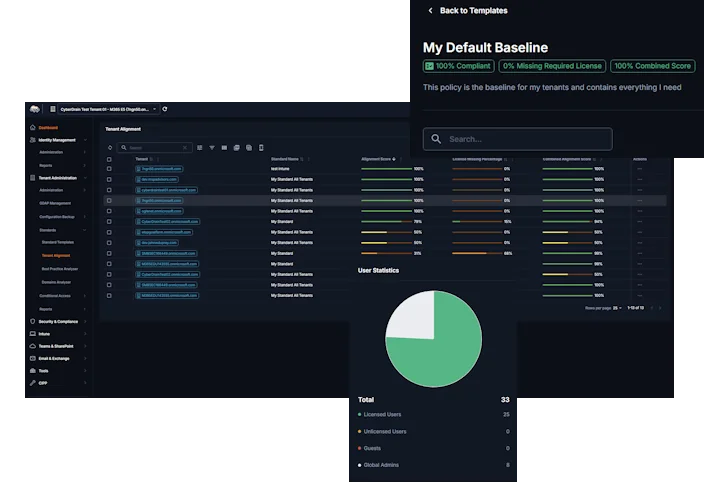
What makes CIPP different from Microsoft's own tooling (like Microsoft 365 Lighthouse) isn't just the interface - it's the depth. CIPP was built by someone managing MSP tenants, not by a product team trying to anticipate what MSPs need. That difference shows in every feature.
Five Capabilities That Actually Matter
1. Standards and Drift Detection - Set It and Forget It (For Real)
The Standards engine is the feature MSPs talk about most, and for good reason.
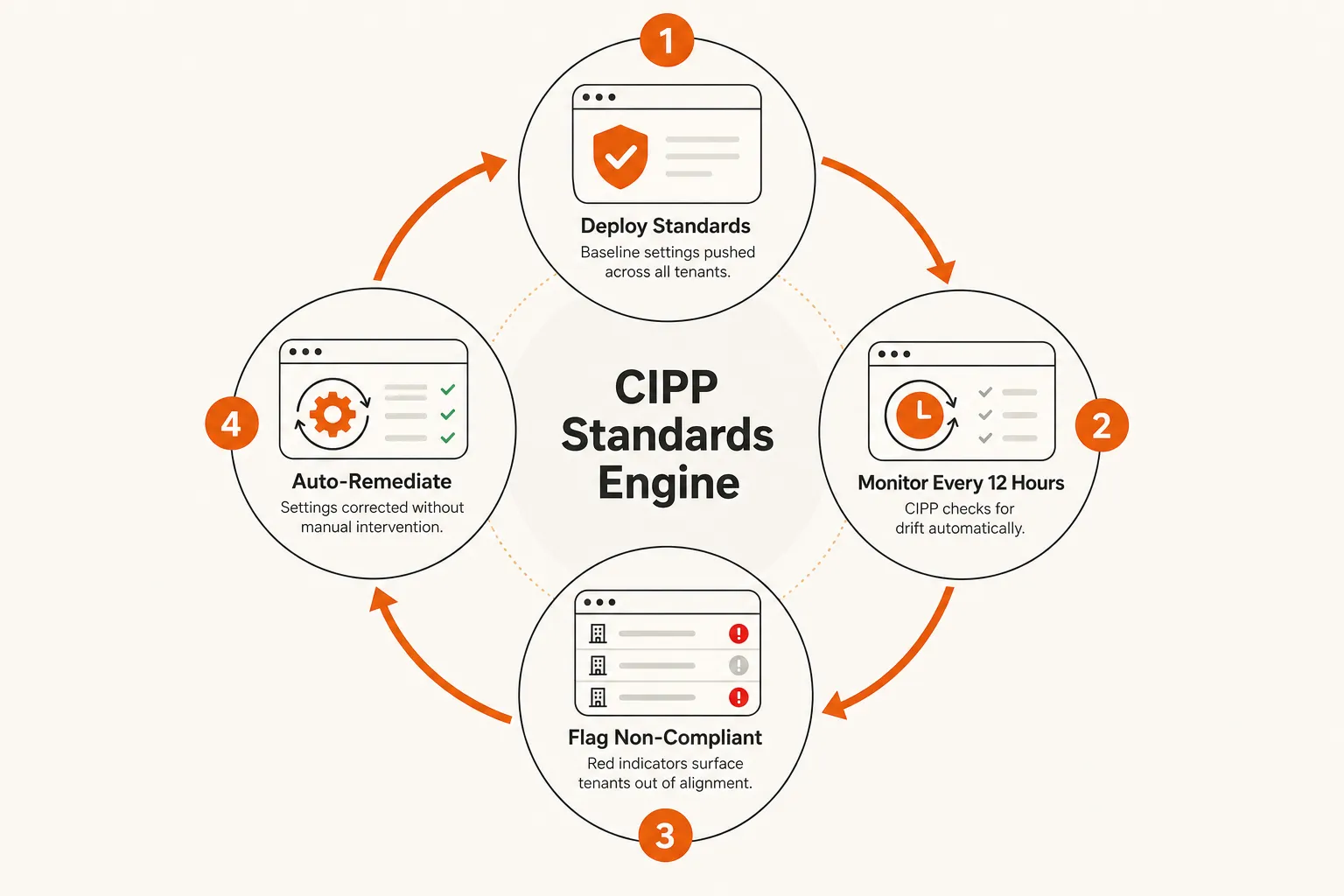
CIPP ships with 150+ pre-built standards covering security baselines, license configurations, conditional access policies, and tenant settings. You pick which standards apply to which clients, deploy them in a few clicks, and CIPP checks compliance every 12 hours - automatically remediating anything that drifts out of your baseline without a tech touching it.
The practical impact: you set a security baseline once. When a user accidentally disables MFA, or a Microsoft update shifts a default, or someone makes a manual change that violates policy - CIPP catches it and fixes it on the next sweep. You don't find out via an incident. You don't find out at all, because it was already handled.
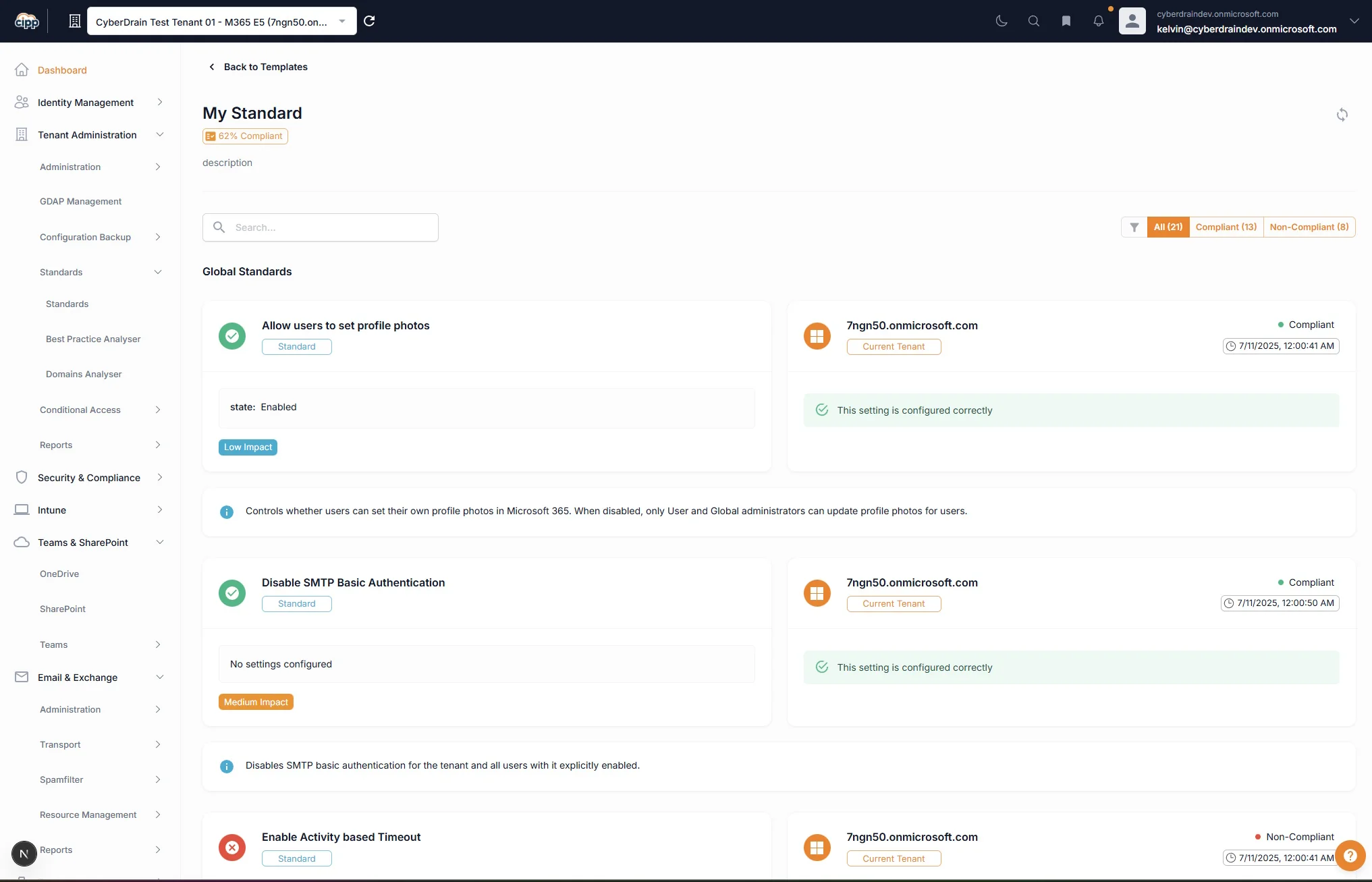
The before/after here is stark. Before CIPP, maintaining consistent standards across 50 tenants means either running a manual audit process that nobody has time to run properly, or accepting that tenants will drift and hoping it doesn't cause a problem before someone notices.
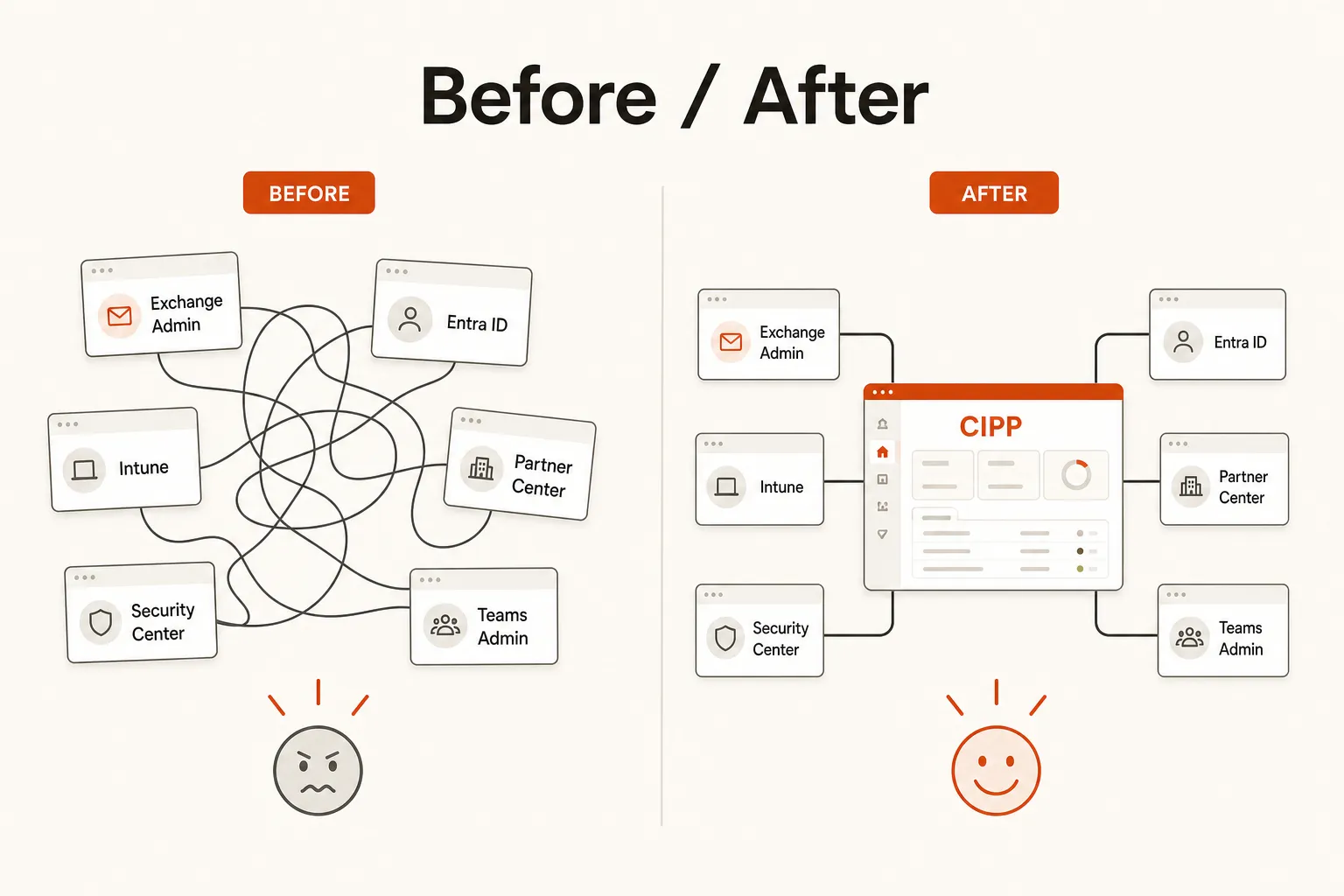
2. Identity and User Lifecycle - The Features Microsoft Should Have Built
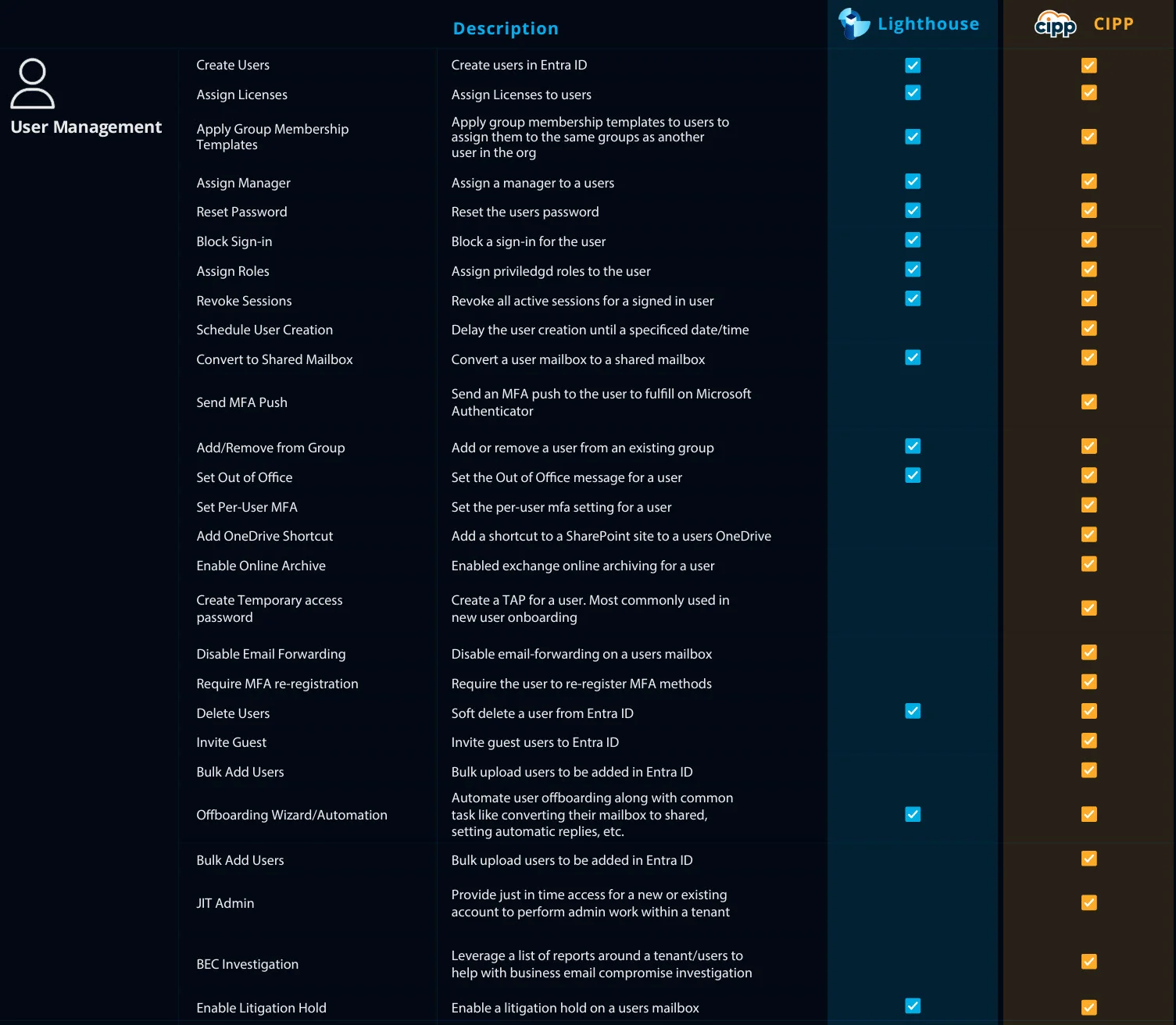
CIPP's identity tools go well beyond what Microsoft gives you natively. A few worth calling out specifically:
Temporary Access Passwords (TAP) are a compliance unlock that the Reddit MSP community has genuinely gotten excited about - which tells you something, because that community gets excited about almost nothing. TAP lets you create short-lived passwordless credentials for onboarding and recovery flows, so you're never in the business of holding or transmitting client global admin credentials. Onboarding a new user? TAP. MFA recovery? TAP. Auditor asking about your credential handling procedures? TAP + vault, and you have a real answer.
JIT (Just-In-Time) Admin Elevation lets you provision temporary admin access that automatically expires. Tier-2 tech needs elevated permissions for a specific task - they get it for 4 hours and it's gone. No lingering admin accounts sitting in the tenant waiting to be compromised.
The Offboarding Wizard handles the full offboarding sequence - license reclamation, group removal, mailbox conversion, out-of-office, manager delegation - across all relevant systems in one workflow. Compare that to the average MSP offboarding process, which involves a checklist, three portals, and a 40% chance something gets missed because the tech was context-switching.
Bulk operations let you manage users across multiple tenants in a single action. Add 50 users to a security group across 30 tenants? One operation. This is the kind of thing that normally takes a tech most of their day.
3. GDAP Management - The Part Nobody Wants to Deal With
Granular Delegated Admin Privileges (GDAP) is Microsoft's replacement for the old DAP model, and the migration process has been a headache for most MSPs. CIPP has turned it into something manageable.
CIPP handles the full GDAP workflow: relationship creation, role assignment, credential management, and tenant onboarding. The Tenant Administration Passwords feature is particularly useful here - it generates random global admin credentials at setup, stores them in your vault, and resets them regularly. Your techs use CIPP for access rather than holding GA credentials themselves. This isn't just an operational convenience; it's a legitimate security posture and an answer to the "how do you manage client admin credentials" question on any security questionnaire.
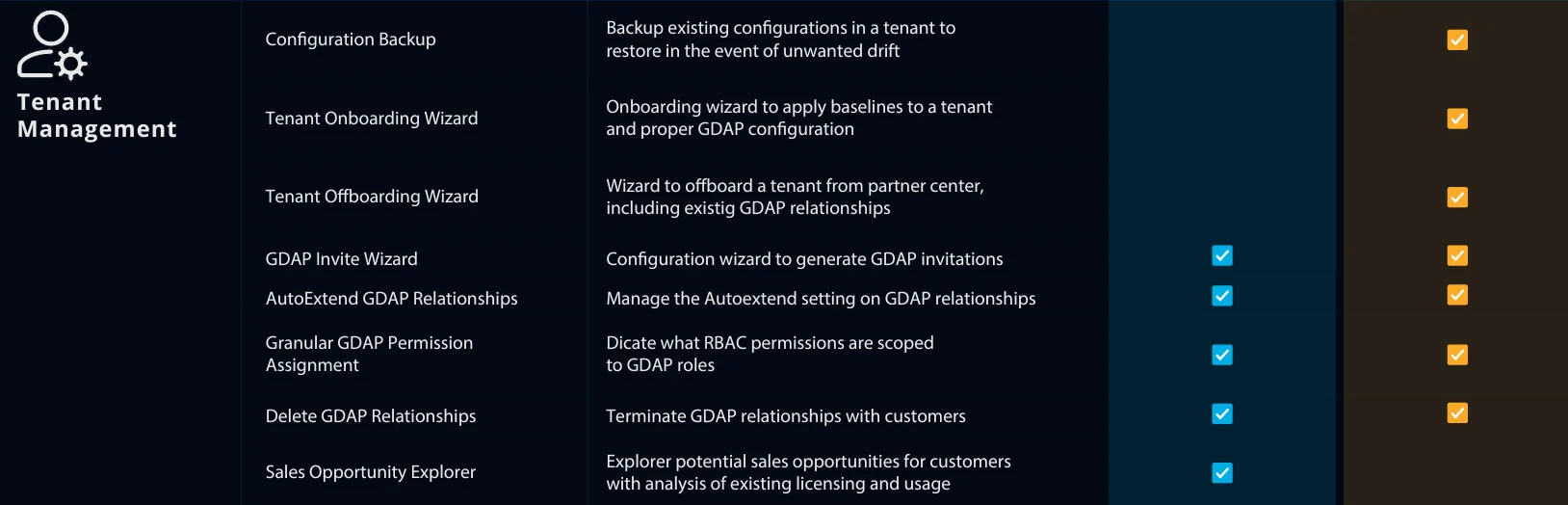
The drift detection loop applies here too - CIPP monitors your GDAP relationships, flags expiration, and surfaces tenants where admin relationships need attention before they become an incident.
4. Security and Compliance Monitoring
CIPP provides a unified security dashboard across all tenants: Microsoft Defender alerts, Secure Score tracking, Conditional Access policy status, and compliance reporting in one place.
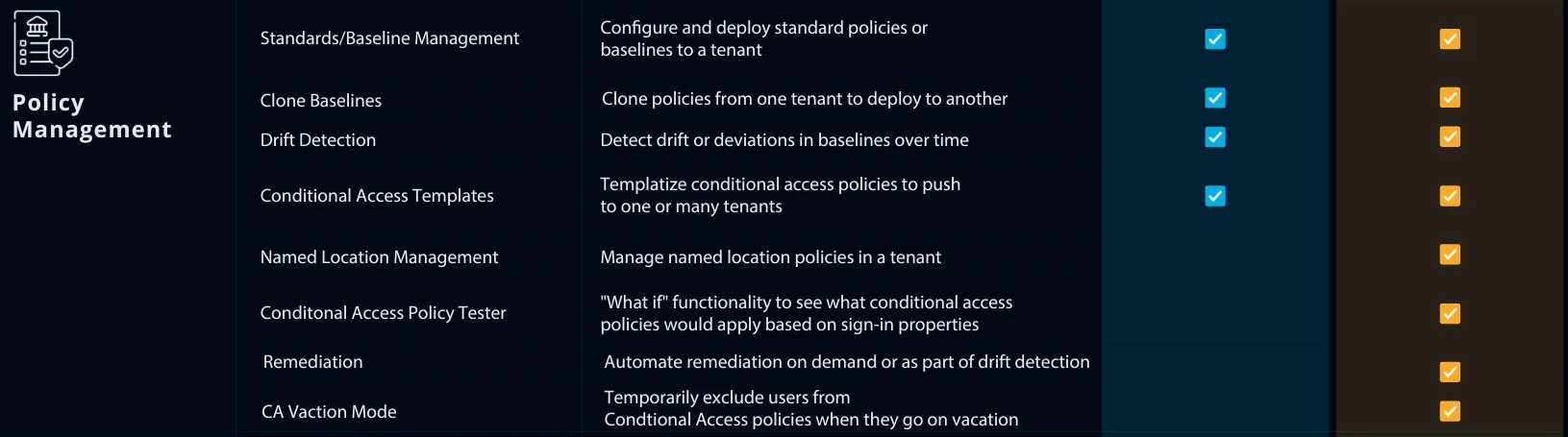
Conditional Access Vacation Mode is a feature that's easy to overlook but genuinely useful. When a user is traveling to a location that would normally trigger a CA block (a foreign country, an unusual IP range), you can temporarily exempt them without permanently modifying your CA policies. The exemption expires automatically. No more "add a CA exclusion, forget to remove it, explain it to the auditor six months later."
The incident tracking surface lets you see Defender alerts and security events across all tenants without logging into each one's Defender portal individually. For MSPs running 30+ tenants, this alone saves hours per week.
5. Email and Exchange Management
CIPP consolidates Exchange management - mailbox conversions, out-of-office automation, email forwarding, spam filter management, Microsoft Defender for Office 365 alerts - across all tenants. The day-to-day email requests that normally require logging into a specific tenant's Exchange admin center can be handled from a single CIPP interface.
Shared mailbox provisioning, distribution list management, email forwarding rules - all manageable at scale. And the MDO alert surface means you're seeing phishing detections and mail flow issues across your entire client base without manually checking each one.
Self-Hosted vs. Sponsor-Hosted: The Honest Take
CIPP has two deployment options, and the choice is more meaningful than it might seem at first.
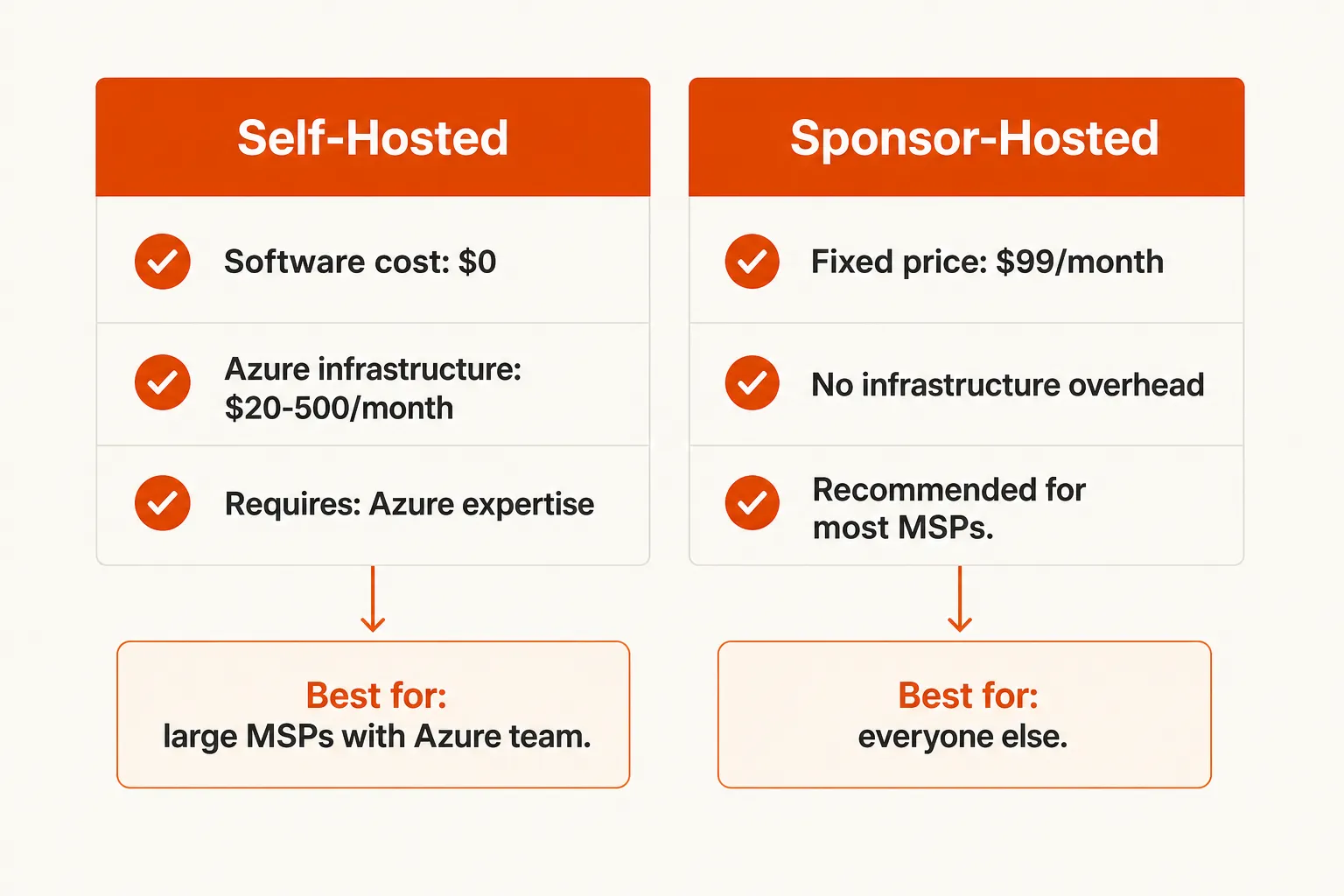
Self-hosted runs on your own Azure subscription using an ARM template deployment. The software is free. You pay for Azure infrastructure - estimates run $20–500/month depending on how many tenants you're managing and how aggressively you've right-sized the Azure resources.
Sponsor-hosted is $99/month flat, paid via GitHub Sponsors, managed by Kelvin Tegelaar himself. You don't touch the Azure infrastructure. Updates are handled. Performance is consistently good.
The community consensus on Reddit is pretty clear: self-hosted CIPP can be slow, and slow enough that your service desk stops using it. The sponsor-hosted version fixes this. Multiple MSPs report that switching to hosted is what finally made their teams actually adopt it day-to-day.
"Moved to hosted version, service desk actually started using it."
That's the real calculus here: $99/month is cheap if it means your team actually uses the tool. The Azure infrastructure savings from self-hosting can easily be eaten by the time cost of managing it and the productivity cost of techs working around a slow interface.
How CIPP Compares to Alternatives
Microsoft 365 Lighthouse
Lighthouse is Microsoft's own multi-tenant management tool. It's free, it's native, and it's improving. But CIPP consistently wins on feature depth - particularly TAP, JIT Admin, CA Vacation Mode, auto-remediation, the Offboarding Wizard, and config backup. Lighthouse is a reasonable starting point if you're just getting into multi-tenant management; CIPP is what you graduate to when the limitations start showing.
Nerdio Manager
Nerdio is a strong platform for Azure Virtual Desktop and Windows 365 environments. If your MSP practice has significant AVD deployment, Nerdio is worth serious consideration. For general M365 multi-tenant admin, CIPP covers more ground at a much lower price point.
SkyKick, CoreView
Both are paid platforms with more enterprise features and more enterprise pricing. If you're running a very large MSP with complex reporting requirements and a budget to match, they're worth evaluating. For most MSPs, CIPP delivers most of the value at a fraction of the cost.
The Gap CIPP Doesn't Fill
Here's where we'll be direct with you, because CIPP is genuinely good and it deserves an honest accounting.
CIPP is a management and compliance platform. It finds the problems, enforces the standards, and surfaces the alerts. What it doesn't do is resolve the tickets those problems generate.
When CIPP flags that a user's MFA is misconfigured, a tech still has to fix it. When a new-hire onboarding kicks off, someone still has to work the ticket. When a user calls the service desk because they're locked out - CIPP gave you the tools to configure their environment correctly, but it's not answering that call.
The ticket volume that CIPP surfaces - password resets, account unlocks, MFA enrollments, license assignments, group membership changes - is exactly the category of L1 work that eats 40–60% of a typical MSP service desk's time. CIPP optimizes the admin side. The service desk side still needs a different solution.
Pairing CIPP with Rallied
This is where Rallied comes in.
Rallied is an autonomous AI technician that resolves L1 and L2 support tickets end-to-end. It connects directly to your PSA (ConnectWise, Autotask, HaloPSA, SuperOps), RMM (Datto, NinjaOne, ConnectWise Automate), and M365/Entra ID - and it actually executes the work. Password resets, account unlocks, MFA re-enrollment, license assignment, group changes, onboarding and offboarding workflows - all handled without a tech touching it.
The pairing with CIPP makes sense: CIPP handles the configuration management and compliance layer (what should your M365 environment look like, and is it staying that way?). Rallied handles the ticket layer (when something breaks or a user needs help, fix it without queuing it to a human).
For a typical MSP with 200–400 tickets per month, that's $7K–$15K in L1 tech time that becomes $100–$200 in Rallied costs. No base fee, no implementation project, no six-month ramp. You connect it to your PSA, and it's running the same week.
If you're using CIPP to keep your tenants clean and compliant - and you should be - Rallied is the piece that handles what walks in the door after that.
Frequently Asked Questions
Is CIPP really free? The software itself is free and open-source under AGPL-3.0. You'll pay for Azure infrastructure if you self-host ($20–500/month depending on scale), or $99/month flat for the sponsor-hosted option managed by the creator. No per-tenant licensing.
How long does it take to set up CIPP? Self-hosted deployments use an ARM template and typically take a few hours if you're comfortable with Azure. The sponsor-hosted option is faster - you're not managing infrastructure. Either way, you're not looking at a weeks-long onboarding project.
Does CIPP replace my PSA or RMM? No. CIPP is an M365 and Azure management layer - it handles identity, compliance, tenant admin, and security across all your Microsoft tenants. It doesn't do ticketing, device management beyond M365, or billing. Think of it as the missing Microsoft admin panel MSPs never got.
What's the difference between self-hosted and sponsor-hosted CIPP? Self-hosted means you run CIPP on your own Azure subscription - full control, full cost variability ($20–500/month). Sponsor-hosted is $99/month flat, managed by Kelvin Tegelaar (the creator), with better performance and no infra overhead. Most MSPs end up on sponsor-hosted once they try both.
Can CIPP automatically fix compliance drift? Yes. The Standards engine checks tenant compliance every 12 hours and auto-remediates anything that drifts out of your baseline - no manual review needed. You set the standard once, CIPP enforces it across every tenant continuously.
