IT process automation for MSPs: a practical guide
TL;DR
IT process automation isn't a single thing - it's a spectrum from simple rule-based workflows to AI agents that close tickets end-to-end. Most MSPs are still stuck in the middle: they've tried a workflow builder, spent months configuring it, and get partial coverage at best. The shift happening in 2026 is that agentic AI - tools that actually read context, make decisions, and execute across PSA, RMM, and identity - is making the workflow-builder era look expensive and slow. The best place to start is password resets and ticket triage; the best outcome is 50-100 hours of technician time back per month. If you're running a $2M+ MSP and your techs are still manually resetting passwords, that's not a people problem - it's an automation sequencing problem.
IT process automation - sometimes written ITPA - is broadly defined as the automation of IT services, support, and administration into workflows to avoid time and cost associated with manual tasks. That's the textbook version. The MSP version is sharper: it's the difference between a ticket sitting in a queue for 20 minutes while a tech gets to it, and that same ticket being resolved, documented, and closed before the tech sees it.
The concept has been around for years. What's changed in 2026 is the quality of the execution layer - and the gap between "orchestration that requires a full-time trainer" and "agents that actually do the work" has never been wider.
What IT process automation actually means
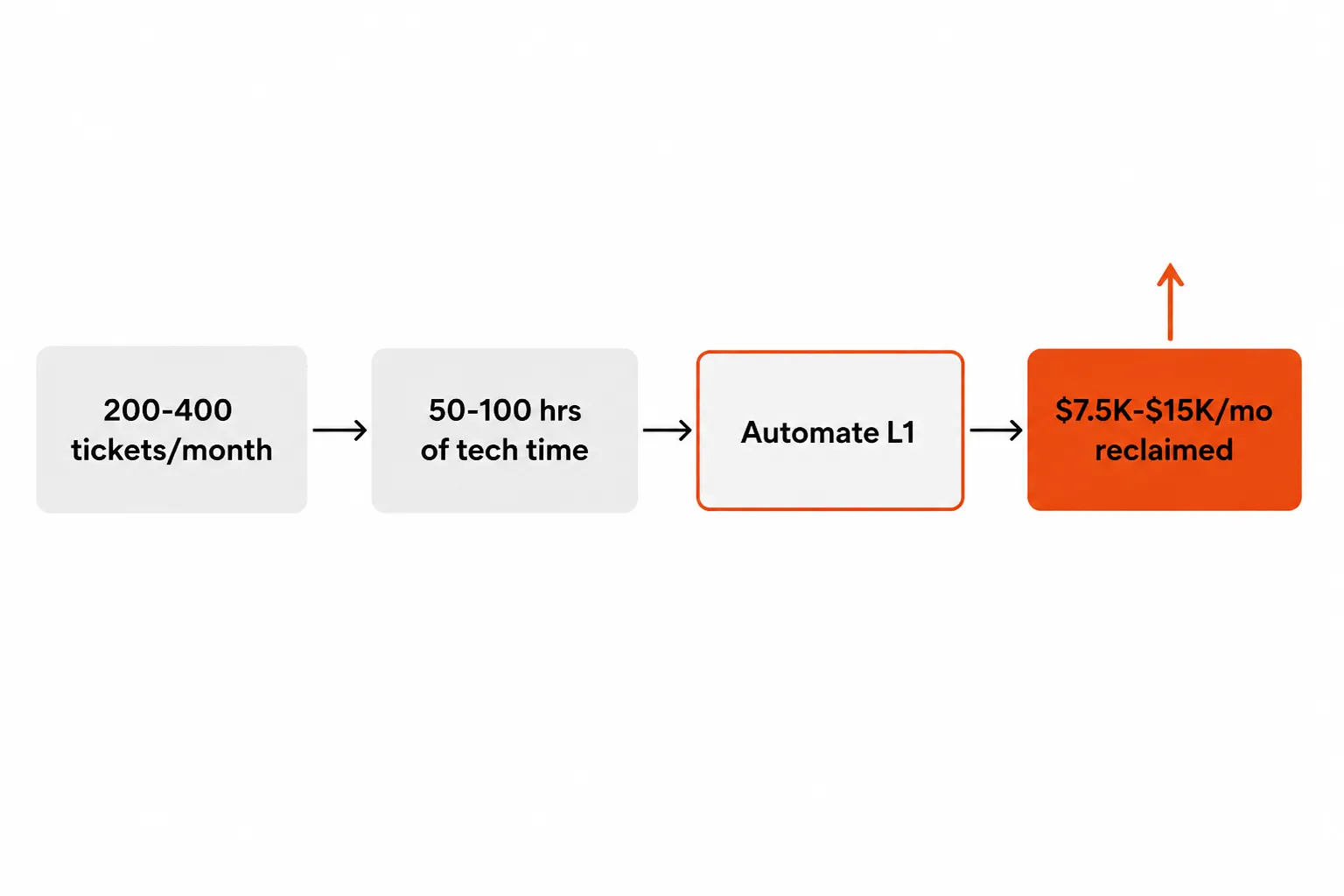
For enterprise IT teams, ITPA usually means workflow orchestration: connecting systems, building conditional logic, automating approvals. For MSPs, the stakes are different. MSPs run on technician margin. A mid-market shop managing 200-400 tickets per month, at 15 minutes of touch time per ticket, burns 50-100 hours monthly on work that follows a predictable resolution path. At $50-150/hr in blended technician cost, that's $2,500-15,000 per month in automatable labor - before you account for the opportunity cost of those hours not being applied to higher-margin consulting and strategic work.
The automation landscape breaks into three approaches, and understanding the difference is worth the two minutes it takes:
Rule-based workflow automation is the if-then-else layer. Tools like Power Automate, n8n, or Zapier let you define explicit steps: if ticket category is "password reset," reset in AD, reset in M365, log the action, notify the user, close the ticket. It works well when the process is predictable. It breaks when the user's situation doesn't match the pre-mapped path - and in MSP support, edge cases are the job.
Robotic Process Automation (RPA) extends this by mimicking human actions in UIs - a bot that literally logs into a system, clicks the right buttons, and submits forms. RPA platforms like UiPath and Automation Anywhere are powerful for legacy systems without APIs, but they're slow to build, fragile to UI changes, and expensive to maintain.
Agentic AI is the third approach and the one changing the conversation. An agent reads the ticket, understands context, decides what to execute, calls the relevant APIs (Entra ID, Okta, JumpCloud, the PSA), logs what it did, and closes the ticket. No flowchart required for every scenario. The agent handles the known cases and escalates the genuinely ambiguous ones to a human.
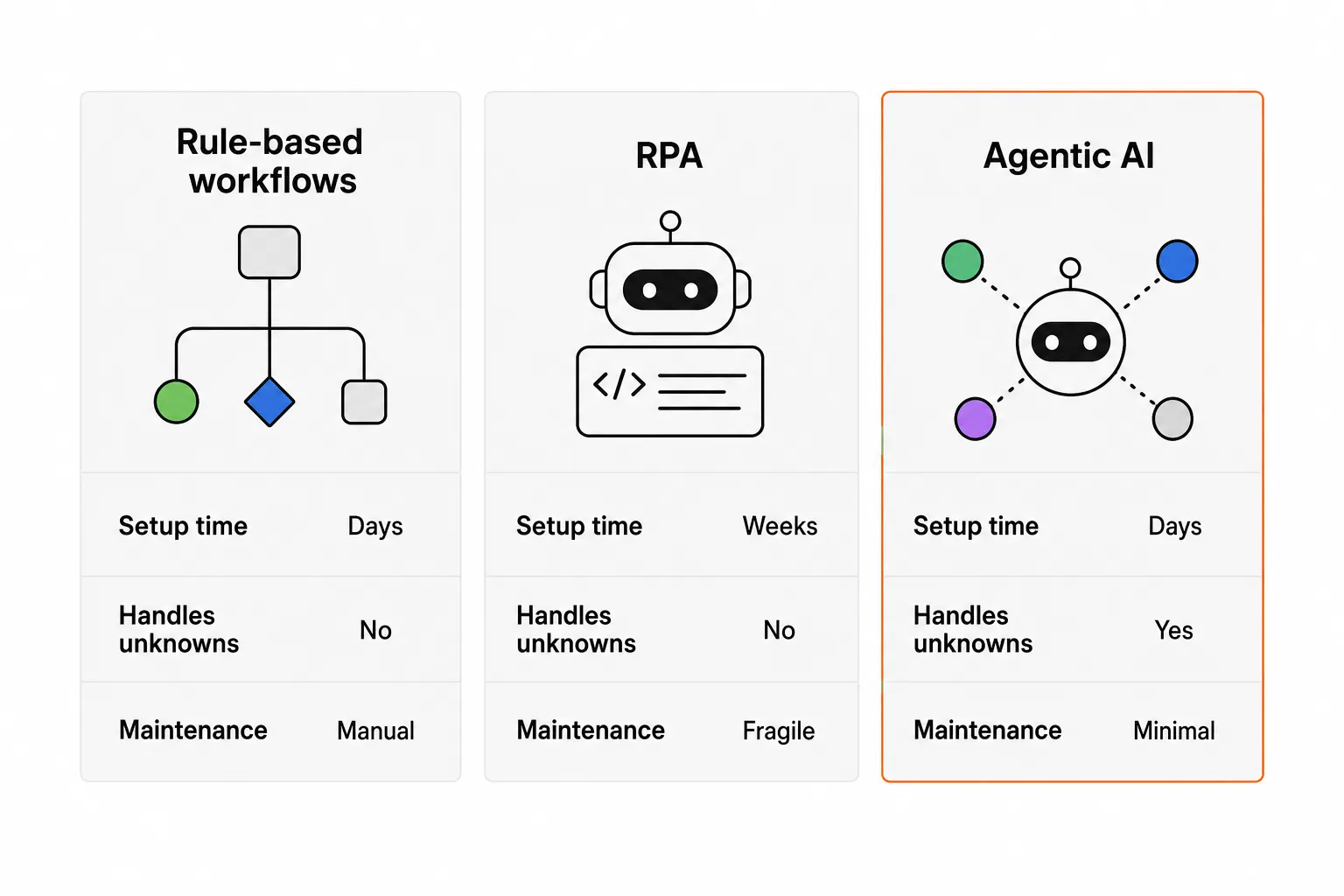
The practical difference between these approaches shows up in three dimensions:
| Dimension | Rule-based | RPA | Agentic AI |
|---|---|---|---|
| Setup time | Hours to days | Weeks to months | Days to a week |
| Handles edge cases | No | No | Yes |
| Maintenance | Manual rule updates | Frequent (UI changes break it) | Minimal |
| Cost per resolved ticket | ~$0.10 | ~$0.10-0.50 | ~$0.50-3 |
| Who manages it | IT staff or MSP ops | Dedicated RPA dev | Minimal admin |
Why MSPs have more at stake than anyone
Enterprise IT can absorb inefficiency in ways MSPs can't. An enterprise IT team resetting 20 passwords a week is annoying; the same 20 passwords across 30 clients is a significant portion of a technician's billable week.
The MSP business model compounds the pressure. You're billing a flat managed rate, so every hour a tech spends on a password reset is margin gone. You can't just charge more for individual tickets without disrupting the agreement. And you can't easily add headcount without compressing margin further - a new L1 hire at $55K/year costs $26/hr in salary alone, before benefits, management overhead, and onboarding.
The math Rallied surfaces on their ROI calculator is worth running if you haven't: 50 password resets per week at 10 minutes each is 500 minutes - over 8 hours - of pure technician time. At a blended $50/hr technician cost, that's $400/week. Automated, it's less than $25/month in API call costs.
The aggregate across a full automation stack is substantial. For a mid-market MSP:
| Use case | Annual savings estimate |
|---|---|
| Password resets (50/week) | ~$21,000 |
| Ticket triage and routing | ~$15,000 |
| Onboarding / offboarding (15 hires/mo) | ~$6,500 |
| Access management (50 requests/mo) | ~$7,000 |
| Monitoring alert response (50% deflected) | ~$18,000 |
| Software provisioning (20 requests/mo) | ~$5,900 |
| Total | ~$73,000+ |
These aren't marketing numbers - they're back-of-envelope math based on typical ticket volumes and blended MSP technician rates. The actual savings depend on your volume and rate; the structure of the math doesn't change.
The five use cases worth automating first
Not all automation is equally tractable. Some processes are well-defined and high-volume - automation ROI is immediate. Others require more context-handling or carry more risk, making them better candidates for a second pass once you've built confidence in the automation layer.
Here's how we'd sequence it.
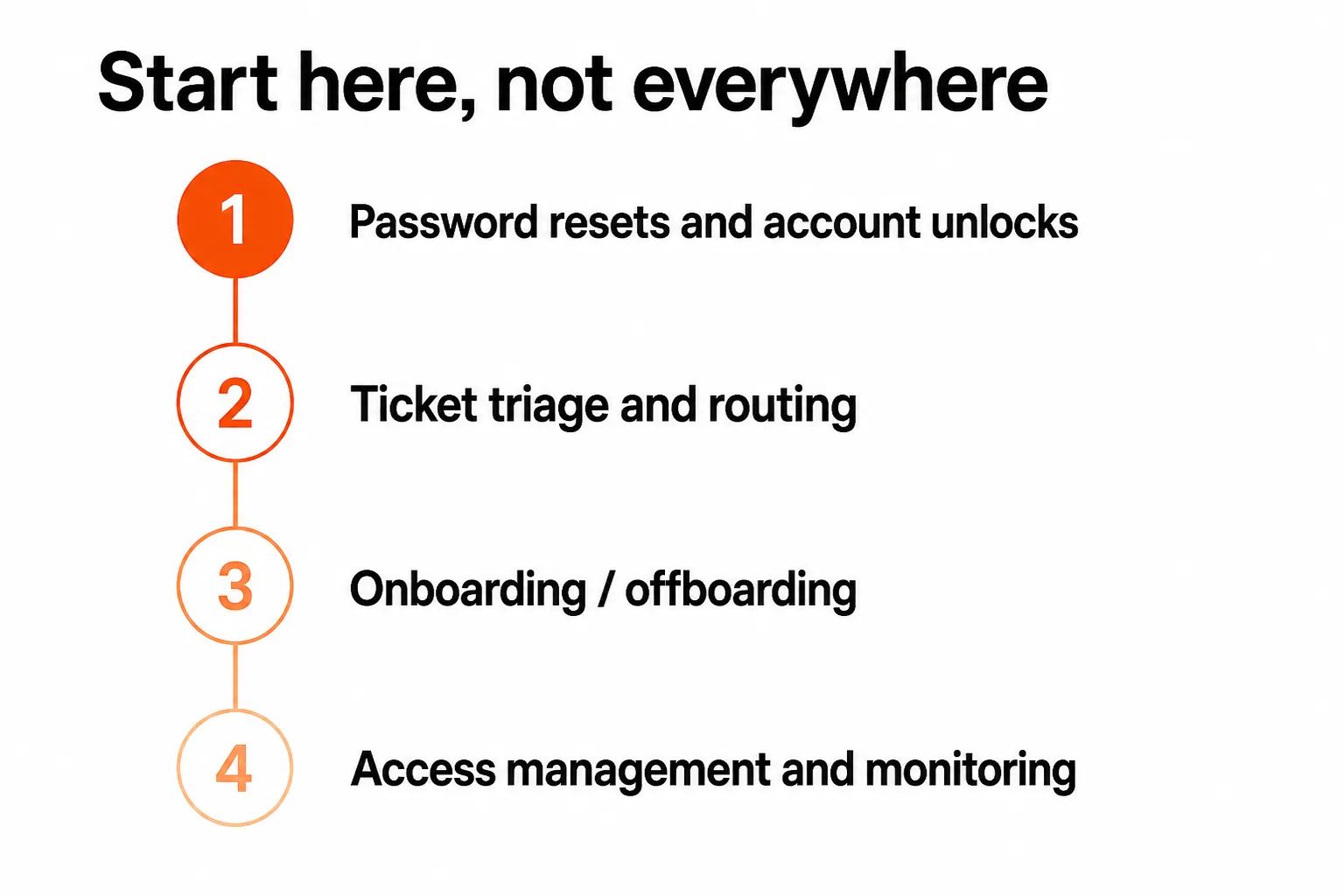
1. Password resets and account unlocks
This is the unambiguous starting point. Password resets represent 10-30% of all helpdesk tickets across most organizations, the decision tree is simple (verify identity, reset in the relevant system, notify user, log, close), and the blast radius of a mistake is low.
An automated reset via Entra ID, Okta, or JumpCloud takes seconds and costs cents. A manual reset takes 10-15 minutes by the time the tech reads the ticket, verifies the user, executes in the identity platform, and follows up. Automation doesn't just cut the cost - it cuts the wait time, which is where user satisfaction actually lives.
One note: MFA-locked accounts are slightly more complex (re-enrollment required), but still well within what an agentic system handles. Account unlocks tied to security investigations - where the lock was intentional - are the edge case that should stay with a human.
2. Ticket triage and intelligent routing
Before you can automate resolution, you need reliable categorization. Triage automation reads the inbound ticket, classifies it (category, urgency, client, service type), pulls relevant runbook or documentation context, and routes it - either to the automation layer for resolution or to the right human queue.
The r/msp community has been debating this for two years, and the consensus is consistent:
"The key is being able to control exactly what it automates, so you can start with just ticket triage and build confidence from there." - r/msp, "Automation Automation Automation"
Triage automation alone - even without touching resolution - saves 3-5 minutes per ticket in manual reading and routing time. At 100 tickets/week, that's 300-500 minutes (5-8 hours) of recovered technician attention per week.
3. User onboarding and offboarding
New hire onboarding in a well-run MSP touches 6-10 systems: Active Directory or Entra ID, email (M365 or Google Workspace), security groups, RMM agent deployment, PSA record creation, software licensing, and often a Slack or Teams setup. Done manually, it's 30-60 minutes of technician time per user. Done with an agentic system connected to the right integrations, it's a single trigger - a ticket or a message - that kicks off the whole chain.
Offboarding is the higher-stakes direction. Access revocation needs to be complete and fast; a missed deprovisioning step is a security exposure. Automation here removes the checklist from human memory and makes it a guaranteed, auditable sequence.
4. Access management
Access requests - "add me to this SharePoint group," "I need admin rights on this server," "can you give the new contractor access to the client's VPN" - are high-volume, low-complexity, and almost universally handled manually. Each one requires a tech to verify the request is legitimate, execute in the identity platform, log the change, and notify the requester.
At 50 access requests per month at 15 minutes each, that's 12.5 hours of technician time - plus the compliance risk of inconsistent execution. Automation standardizes the process and creates an audit trail that matters when clients ask for evidence of access governance.
5. Monitoring and alert response
This one has the widest range. Simple automated responses - restart a failed service, clear a cache, retry a backup job - resolve 40-60% of monitoring alerts without human touch. For MSPs managing client infrastructure at scale, that's a significant reduction in overnight on-call burden and morning alert triage.
The riskier actions (disk space remediation, rolling back a deployment, isolating a potentially-compromised endpoint) still deserve a human in the loop. The smart move is automation that resolves the clear cases and escalates the ambiguous ones, rather than trying to automate everything and hoping the edge cases don't bite.
Why workflow builders frustrate so many MSPs
Rewst, Pia, and similar tools are genuinely capable platforms. They've helped plenty of MSPs automate meaningful workflows. But if you talk to MSP owners who've been through a workflow automation project, you hear a consistent pattern: the implementation takes longer than expected, the maintenance overhead is real, and the coverage is narrower than promised.
The pattern shows up across r/msp automation discussions: months of workflow building, reasonable coverage for the common cases, and then manual handling for anything that falls outside the pre-mapped paths. Rallied's own customers describe previous tools requiring "nearly full-time trainers for 2+ years" before hitting acceptable autonomous coverage.
The problem isn't the tools - it's the model. Workflow builders require you to pre-define every path through every process. That works for the 80% of tickets that follow a predictable pattern. The other 20% - the ones where the user's situation is slightly different, or the system state is unexpected, or the ticket comes in with missing information - fall through to a human. And because MSP support is inherently variable (different clients, different stacks, different edge cases), that 20% tends to be higher in practice.
The other issue is maintenance. Every time a client's environment changes, every time a vendor updates an API, every time a new ticket category emerges, someone has to update the workflow. In a busy MSP, that maintenance often gets deferred - and deferred maintenance means the automation coverage slowly degrades.
Some MSPs describe needing "nearly full-time trainers for 2+ years" to keep workflow-based automation running at acceptable coverage. That's not a failure of effort; it's a structural limitation of the rule-based model.
What agentic AI actually changes
The shift from workflow builders to agentic AI isn't about replacing one tool with another. It's a different model of how automation handles the variation that real MSP environments produce.
A workflow builder needs a pre-defined path for every scenario. An agent needs context: the ticket, the client environment, the documentation in IT Glue or Hudu, and the permissions it's been granted to act. Given that context, it can handle variations that would require a new workflow to be built in a rule-based system.
This matters for MSPs specifically because the client portfolio is inherently heterogeneous. Client A runs Entra ID; client B runs Okta with a legacy AD setup; client C is Google Workspace. A workflow tool needs separate flows for each. An agent reads the client's environment and adapts.
The other difference is deployment speed. Agentic tools built for MSPs - with pre-built integrations for ConnectWise, Autotask, Halo PSA, Datto, NinjaRMM, Entra ID, Okta, JumpCloud - can go from kickoff to live ticket resolution in days, not months. That changes the risk calculus: you're not committing to a six-month implementation before you see any return.
"We are building a new operating model: tickets get triaged automatically, and many issues get resolved before a human ever sees them." - Peter Doyle (@PeterdoyleX) on X
The r/msp community's posture toward autonomous resolution has shifted noticeably in the past 12 months. A few years ago, the debate was whether AI should be involved in ticketing at all. Today, the practical 2026 MSP playbook, as summarized by practitioners on X, is: "use AI to cut Tier-1 ticket load, accelerate resolution, and standardize runbooks across RMM/PSA." The question has moved from "should we" to "how do we sequence this."
How to start (and what to skip)
The failure mode for MSP automation projects is scope. You try to automate everything at once - or you build a comprehensive workflow engine that takes months to configure - and by the time it's "ready," you've spent more in engineering time than you've saved.
The right sequence:
Start narrow, prove it works, expand. Password resets first. They're high-volume, low-risk, immediately measurable. Once you can see the automation closing 40-50 resets per week without issues, you have the proof point to expand.
Connect to your actual stack. Automation is only as good as its integrations. A tool that connects natively to ConnectWise, Entra ID, and NinjaRMM will cover your environment with minimal configuration. A tool that requires custom API connections for each will cost you the implementation time you were trying to avoid.
Set guardrails before expanding scope. Spend limits, approval requirements for high-risk actions (adding someone to a Domain Admins group, for example), and escalation paths for unrecognized scenarios are not bureaucratic overhead - they're the thing that keeps automation from becoming a liability. Any credible agentic platform will let you set these; use them.
Measure from day one. Tickets closed without human touch, time-to-resolution, escalation rate. These numbers tell you whether the automation is actually working and where the coverage gaps are. If you're not measuring, you're guessing.
Skip the 12-month implementation projects. If a vendor's timeline starts with "we'll have you live in four to six months," that's a red flag in 2026. The tools that require that much setup time are solving a complexity that the better platforms have already abstracted away.
Try Rallied
Rallied is an AI technician built specifically for MSPs - not adapted from an enterprise workflow tool, not a triage layer that hands off to humans, but an agent that connects to your PSA (ConnectWise, Autotask, Halo PSA, SuperOps), your RMM (Datto, NinjaRMM), and your identity stack (M365, Entra ID, Okta, JumpCloud, Google Workspace) and resolves tickets end-to-end.
It handles password resets, account unlocks, MFA resets, onboarding, offboarding, access requests, and inbound phone L1 triage without a technician in the loop. When it encounters a ticket it can't confidently resolve, it escalates with full context - triage questions answered, relevant documentation pulled from IT Glue or Hudu, PSA fields populated.
The deployment model is different from what most MSPs have encountered. Rallied deploys the same week - no implementation fee, no 30-day setup sprint, no dedicated trainer required. The 14-day trial includes a tuning period where the team catches edge cases and expands autonomous resolution scope. After that, it runs on its own.
Pricing is $3 per ticket outcome, with a $150/month minimum and nothing charged for tickets Rallied couldn't move. For an MSP closing 500 L1 tickets per month through automation, that's $1,500/month - against $7,500+ in reclaimed technician time. The trial runs 14 days and needs no card.
If you've been burned by a workflow automation project before - or you're still deciding whether any of this is worth the investment - it's worth talking to the team. They're used to the skepticism. Built by the same people who automated IT for Indeed, Webflow, OpenGov, and National Geographic.
Frequently Asked Questions
What is IT process automation?
IT process automation (ITPA) is the use of software to handle routine IT operations - password resets, ticket triage, user provisioning, access management - without manual technician intervention. It ranges from simple rule-based workflows (if X then Y) to agentic AI systems that read context, make decisions, and execute across multiple integrated tools. For MSPs, the most impactful use cases are L1 ticket resolution, onboarding and offboarding, and monitoring alert response.
What's the difference between workflow automation and agentic AI?
Workflow automation requires someone to pre-define every step: if the ticket says 'password reset,' then do these six steps in order. It works well for predictable, well-mapped processes but breaks on edge cases. Agentic AI reads the ticket, understands context, makes judgment calls, and executes across tools without a hand-coded flowchart for every scenario. The practical difference: workflow tools like Rewst need months of configuration and a dedicated trainer; agentic AI tools like Rallied deploy in days and adapt as they encounter new cases.
How much can an MSP save by automating L1 tickets?
A mid-market MSP handling 200-400 tickets per month, with 15 minutes of technician time per ticket, spends 50-100 hours per month on automatable work. At $150/hr in billable technician time, that's $7,500-$15,000 per month walking out the door. Password resets alone (typically 10-30% of all tickets) account for $20,000+ per year at 50 resets per week. Full L1 automation across password resets, triage, onboarding, and access management can free $76,000+ per year for a typical mid-market MSP.
What IT processes should MSPs automate first?
Start with password resets and account unlocks - they're the highest-volume, most predictable use case, and automation ROI is immediate. Then move to ticket triage and routing (consistent, fast, no misrouted tickets), then onboarding and offboarding (multi-system but rule-driven), then access management. Monitoring alert response is high-value but requires RMM integration and is best tackled once the identity and PSA integrations are stable.
How long does it take to set up IT process automation?
It depends heavily on the tool. Traditional workflow builders like Rewst or Power Automate require weeks to months of configuration, often with a dedicated internal resource - MSP owners on Reddit describe needing 'nearly full-time trainers for 2+ years.' Agentic AI platforms purpose-built for MSPs, like Rallied, connect to your existing PSA, RMM, and identity stack and can resolve real tickets within the same week. The difference is that agentic tools adapt to your environment rather than requiring you to pre-map every workflow.
