7 Atera Alternatives for MSPs in 2026

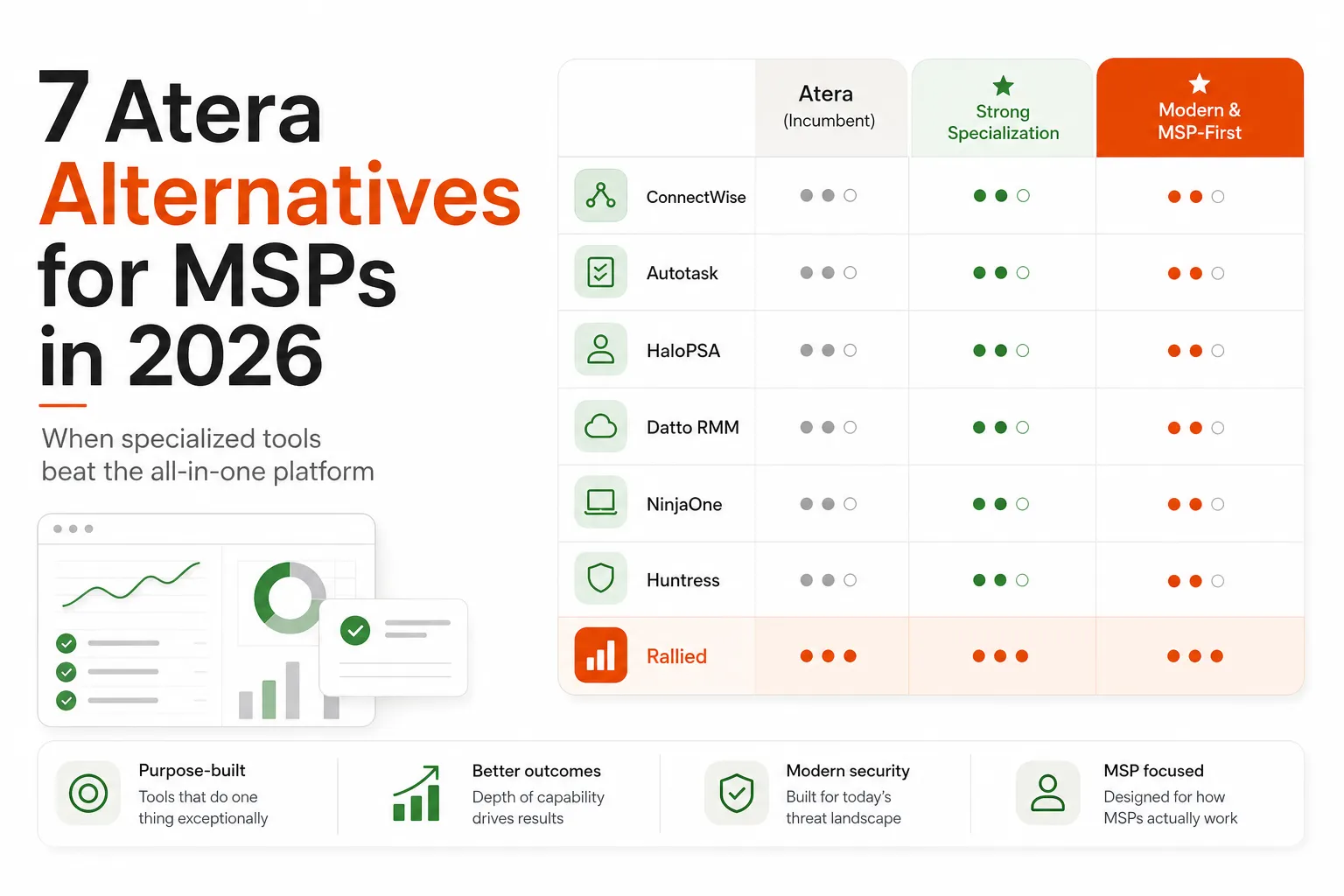
The strongest Atera alternatives for MSPs in 2026 are ConnectWise Manage and Autotask for heavy PSA and contract billing, HaloPSA for customization, NinjaOne for patching, Syncro if you want to keep per-technician pricing with a deeper PSA, and SuperOps if you would rather pay per endpoint. Rallied fits when the real problem is L1 ticket volume.
Atera is still well rated. Syncro's comparison reports 4.6 out of 5 across 1,287 G2 reviews and notes it was named a Visionary in the 2026 Gartner Magic Quadrant for Endpoint Management Tools. Most MSPs who leave have outgrown a plan tier or a billing model, so the right alternative depends on which one pinched first.
Why MSPs look for Atera alternatives in 2026
Atera bundles RMM, ticketing, PSA and automation into one console and charges per technician with unlimited endpoints. That model is a real strength for a small team running a big fleet. The friction shows up in a few specific places.
Plan tiers gate features you might assume are standard. Syncro's October 2026 comparison points out that Mac and Linux support starts on Atera's Growth plan at $159 per technician per month, and Flamingo reports that custom reports (up to 10) arrive on the Power plan at $209.
Every console user needs a paid seat. Flamingo cites Atera's own licensing article, which says anyone who needs console access needs a technician license, so a vCIO or account manager who only reads dashboards still takes a seat.
The per-technician math flips as you hire. Motadata puts the crossover at roughly 100 devices per technician: below that, per-device pricing usually costs less, and above roughly 150, per-technician pricing pulls ahead.
Legacy accounts are moving to current pricing. According to Syncro, Atera is realigning older accounts onto published prices from June 2026 billing for monthly plans and from renewals on or after 28 July 2026 for annual ones, so check your renewal before you compare anything.
PSA depth runs out for some shops. Flamingo names complex billing rules, project workflows and multi-tier SLAs as the point where MSPs start comparing PSAs. If you need enterprise contract management, patching depth or 24/7 SOC coverage, Atera makes you compromise somewhere.
What Atera costs now
Atera's MSP plans run $129 to $209 per technician per month billed annually, and its IT department plans run $149 to $219, according to Flamingo's reading of atera.com on November 4, 2026. Since June 2026, AI Copilot has been included in every plan. Robin, Atera's autonomous agent, is priced by quote, and Flamingo reports that Atera doesn't publish a rate for it. Our Atera pricing breakdown covers each tier, and the Atera review covers how the platform holds up day to day.
Hold those numbers against your own device-to-technician ratio as you read the options below, because "cheaper than Atera" depends on it.
1. ConnectWise Manage: best for larger MSPs consolidating tools

If you run 50 or more technicians and glue together separate tools for tickets, time, CRM and an RMM, ConnectWise Manage pulls the business side into one place: ticketing, project management, CRM, time tracking, billing and procurement. Atera covers tickets and billing well for straightforward shops, while ConnectWise is built for multi-service MSPs running projects and recurring revenue across different service types.
Billing is the main reason MSPs pick ConnectWise. Agreements can be time and materials, fixed fee or subscription, and the reporting covers profitability by client, technician utilization and project margin.
The cost is weight. Implementation commonly takes 3 to 6 months, the UI takes a lot of clicking for simple things, and pricing is negotiated per deal, so read the renewal terms closely.
Pricing: Negotiated per user. See ConnectWise PSA pricing for what MSPs report paying.
Our take: Pick ConnectWise if you're past $5M ARR with complex billing across service types. Under $2M ARR the overhead usually isn't worth it yet. The Atera vs ConnectWise comparison goes feature by feature.
2. Autotask PSA and Datto RMM: best for MSPs that bill by contract

Autotask PSA and Datto RMM are both Kaseya products, sold alongside IT Glue and Datto backup. Autotask is a PSA first: contracts, SLA tracking, time and materials billing, project profitability and multi-company billing rules. If you spend hours each month fixing invoices by hand, the contract engine is the reason to look.
You define overages, discount tiers and bundled hours, and Autotask calculates what each client owes. The ticketing is solid rather than new, and the UI is older and less intuitive than Atera's.

Datto RMM is the RMM half: monitoring, patching, remote access, Microsoft 365 management and scripting. Running it with Autotask gives you one work queue and one vendor relationship, and Datto backup agents show up in the same monitoring dashboard. As a standalone Atera replacement Datto RMM is harder to justify, because MSPs whose main pain is patching usually trial NinjaOne first.
Pricing: Autotask is priced per user and Datto RMM is custom priced per device. See Autotask pricing and what MSPs pay for Datto RMM, and ask about contract length before you sign.
Our take: Pick this pair if invoicing and contract management is your biggest pain and you're comfortable becoming an Autotask and Datto RMM shop. More detail in Atera vs Datto RMM.
3. HaloPSA: best for MSPs that want deep customization

HaloPSA suits MSPs tired of Atera's opinionated design. Halo now markets one platform across ITSM, PSA and CRM and pitches itself directly as an Atera alternative. The automation engine lets you wire up multi-step workflows, so one ticket can check a custom field, look something up in IT Glue, trigger an RMM script, update a Salesforce record and send a notification.
If your MSP has unusual billing models, custom integrations or demanding clients, that flexibility pays off, and 250+ pre-built integrations cover most stacks.
The catch is that HaloPSA needs a person whose job is the tool. Plan on someone spending 20+ hours over the first 3 months configuring workflows, then 5 to 10 hours a month after that. The mobile app is weak, and billing sync with QuickBooks has had issues in the past, though HaloPSA says it has improved.
Pricing: Per user. Syncro's comparison lists HaloPSA as one of the vendors that publishes a rate you can read without a sales call, and our HaloPSA pricing guide has the numbers.
Our take: Pick HaloPSA if your team can own the configuration. Skip it if you want something that works on day one with no admin time.
4. NinjaOne: best for MSPs that live in patch management

G2 lists NinjaOne as the best overall alternative to Atera, rated about 4.7 from 5,810+ reviewers, and reviewers there rate NinjaOne better than Atera at meeting requirements and at support. NinjaOne describes its platform as endpoint management, autonomous patching, backup and remote access in one console, used by 35,000+ customers in 140+ countries.
Patching is where NinjaOne earns its place. If unpatched endpoints are your biggest operational burden, policy-based patch deployment and a cleaner interface than Datto RMM are the reasons to switch.
Watch the pricing model. NinjaOne charges per device, so a lean team covering a large fleet can pay more than on Atera's per-technician plans. Vulnerability scanning costs extra, and most MSPs pair NinjaOne with a dedicated PSA.
Pricing: Per device, and NinjaOne publishes its rate. See NinjaOne pricing and the Atera vs NinjaOne comparison.
Our take: Pick NinjaOne if patching is your top goal and you already have a PSA you like. If you want one platform for everything, you'll be building a stack instead.
5. Syncro: best for keeping per-technician pricing with a deeper PSA
Syncro prices per technician with unlimited endpoints, the same model as Atera, and publishes its rate. Syncro's own comparison makes the case that MSPs leaving Atera get deeper PSA, billing and Microsoft 365 management without changing how they pay. That comparison is written by Syncro and ranks Syncro first, so treat it like any vendor claim and test it with your own clients' billing.
Flamingo's roundup also mentions a Syncro contract buyout offer for MSPs switching platforms, which is worth asking about if you're mid-term on Atera.
Pricing: Per technician, published. See Syncro pricing and Syncro vs Atera.
Our take: Pick Syncro if per-technician pricing still suits your device ratio and the PSA side is what you've outgrown.
6. SuperOps: best for MSPs that want per-endpoint pricing
SuperOps has long been compared to Atera. One r/msp commenter called it "VERY close to Atera" in pricing and functionality. The pricing has since moved apart: Syncro reports that SuperOps now prices its MSP plans per endpoint, quote only, with a 150-endpoint minimum and unlimited technicians.
That flips the Atera math. Adding technicians doesn't raise the bill, so SuperOps makes sense for MSPs whose headcount is growing faster than their fleet. SuperOps' own roundup leans on stronger automation and PSA features as the reasons to switch.
Pricing: Per endpoint, by quote, with a 150-endpoint minimum. See SuperOps pricing and Atera vs SuperOps.
Our take: Pick SuperOps if you want an RMM and PSA in one product like Atera but your device-to-technician ratio is below the crossover Motadata describes.
7. Rallied: best for MSPs whose real problem is L1 ticket volume

Rallied doesn't replace a PSA or an RMM, so it sits on this list for a different reason. Rallied is an AI agent that closes tickets in ConnectWise, HaloPSA or Autotask: Rallied runs the fix in Microsoft 365 or Google Workspace and your RMM, then writes the notes and time entry back to the ticket. If your move off Atera lands on one of those three PSAs, Rallied can work the L1 queue from the first week.
Take a "Locked out of Outlook" ticket. Rallied pulls the client's docs from IT Glue or Hudu, sends the requester an MFA push through Microsoft Authenticator, Duo or Traceless to confirm identity, and unlocks the account in Entra. With default settings, a technician approves that change on the ticket before Rallied makes it.
You set each action to Auto, Approval needed or Disabled, and most writes start at Approval needed. Plan Mode posts a read-only diagnosis as an internal note, so you can check behind Rallied before letting it act. RMM scripts run through NinjaOne or ConnectWise RMM only after a technician approves them. Rallied is SOC 2 Type II certified, and setup takes under an hour.
The limits are plain. Rallied is an add-on, so you still need a PSA and an RMM from the list above, and you need to be comfortable with an AI agent writing to client tenants, even with approvals in place.
Pricing: $300 a month, billed monthly, with 2,000 credits included. A ticket uses 1, 3 or 8 credits depending on the work, and a charged ticket averages about 2.7 credits, so 2,000 credits covers roughly 700 tickets in a typical month. Tickets Rallied couldn't finish or wasn't allowed to act on are never charged, and the free 14-day trial includes 2,000 credits with no card.
Our take: Pick Rallied if password resets, unlocks and new-user setups eat your techs' day and you'd rather spend that time on L2, L3 and project work. More on how this works in autonomous L1 resolution.
Huntress: the security layer to add on top

Huntress doesn't replace Atera or any RMM. Huntress runs alongside whichever platform you choose and adds managed EDR, identity threat protection for Microsoft 365 and Google Workspace, SIEM and a 24/7 human-led SOC. When Huntress detects suspicious behavior, a SOC analyst investigates instead of leaving an alert in a queue.
Pricing: $8.99 per endpoint per month direct, lower for MSP partners with volume. See Huntress pricing.
Add Huntress if security is how you differentiate or you've had a close call with ransomware. If you're trying to cut tools this year, it can wait.
Other Atera alternatives on MSP shortlists
A few more names come up in other comparisons. Syncro's list includes N-able and Kaseya VSA, Guardz's list includes Pulseway and Action1, and G2 shows Action1 at about 4.9 stars for patch management and easy setup. Start with Atera vs N-able, Kaseya VSA pricing, the Action1 RMM review or the Pulseway review if those are on your list.
Atera alternatives pricing compared
| Tool | Pricing model | Price | Best for |
|---|---|---|---|
| Atera | Per technician, unlimited endpoints | $129 to $209 per tech/month, billed annually (MSP plans) | All-in-one simplicity |
| ConnectWise Manage | Per user | Negotiated per deal | Larger MSPs, complex billing |
| Autotask PSA + Datto RMM | Per user (PSA), per device (RMM) | Custom (Datto RMM) | Contract billing |
| HaloPSA | Per user | Published | Deep customization |
| NinjaOne | Per device | Published | Patching |
| Syncro | Per technician, unlimited endpoints | Published | Per-tech pricing with a deeper PSA |
| SuperOps | Per endpoint, unlimited technicians | Quote only, 150-endpoint minimum | Per-endpoint pricing |
| Huntress | Per endpoint | $8.99/endpoint direct | Security layer |
| Rallied | One plan, credits per ticket | $300/month with 2,000 credits | L1 tickets closed in the PSA |
Switching from Atera without breaking client service
Start with your Atera renewal date, because the legacy pricing realignment may change your current bill before any alternative does. Then price the tier you actually need on Atera, including Mac and Linux support, reporting and read-only seats, so you compare like with like.
Trial on two or three real clients rather than a lab. Export your asset list, ticket history and contracts early, run the new RMM agent next to Atera's until patch and monitoring coverage match, and only then move billing. Billing is the step that hurts clients when it goes wrong, so do it last.
How to pick an Atera alternative
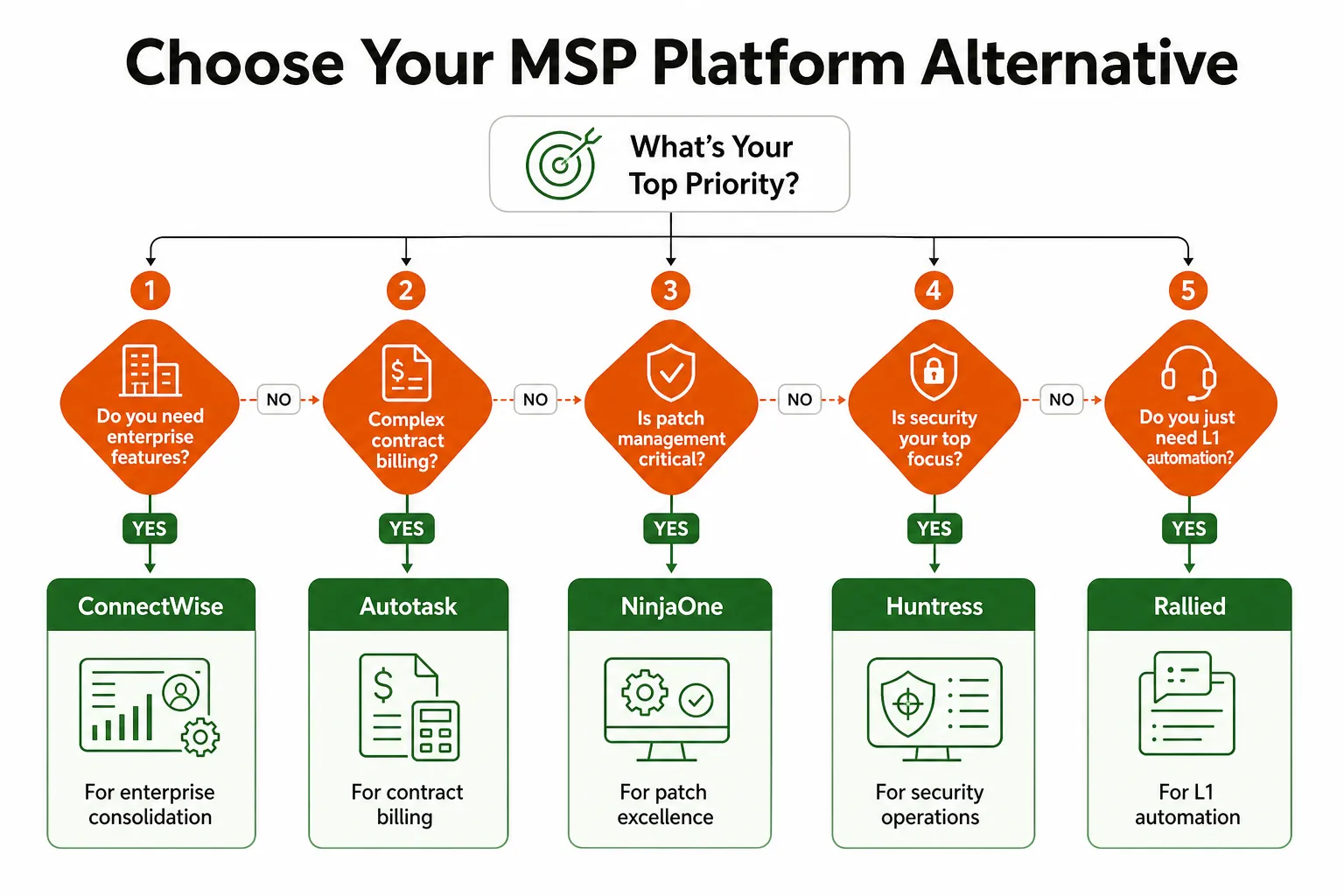
Match the alternative to whatever pushed you to look:
- If Atera feels rigid, HaloPSA gives you workflow depth.
- If billing is the limit, look at Autotask or ConnectWise.
- If per-technician cost is climbing and you have fewer than about 100 devices per tech, NinjaOne or SuperOps price per device or endpoint.
- If you like per-technician pricing but need more PSA, try Syncro.
- If security is the gap, add Huntress on top of whatever you run.
- If the queue is full of password resets and unlocks, add Rallied on ConnectWise, HaloPSA or Autotask.
For the wider picture, read Best MSP Software in 2026, or compare PSAs directly in best PSA software for MSPs.
Pricing and features change often. Verify current details with each vendor before committing.
Frequently Asked Questions
Is Atera expensive compared to alternatives?
It depends on your device-to-technician ratio. Atera's MSP plans run $129 to $209 per technician per month billed annually, with unlimited endpoints, which is cheap for a small team covering a big fleet. Motadata puts the crossover at roughly 100 devices per technician, below which per-device tools such as NinjaOne usually cost less. Rallied is one plan at $300 a month for 2,000 credits, roughly 700 tickets in a typical month.
What is the closest alternative to Atera?
Syncro is the closest on pricing, because Syncro also charges per technician with unlimited endpoints and adds a deeper PSA. SuperOps is close on product shape, combining RMM and PSA in one platform, but Syncro reports SuperOps now prices per endpoint by quote with a 150-endpoint minimum. Which one is closer for you depends on whether you care more about the pricing model or the product.
Is Atera's Robin included in every plan?
Since June 2026, Atera includes AI Copilot in every plan, according to Flamingo. Robin, Atera's autonomous agent, is priced by quote, and Flamingo reports Atera doesn't publish a rate for it. Ask for a Robin quote alongside your plan quote so you compare the full cost.
How long does it take to switch from Atera to an alternative?
Specialized tools such as NinjaOne or Huntress usually take 2 to 4 weeks. Full suites such as ConnectWise or Autotask typically need 6 to 12 weeks for full setup, and ConnectWise implementations can run longer. Rallied setup takes under an hour once you are on ConnectWise, HaloPSA or Autotask.
Can I use Rallied with Atera?
Rallied's listed PSA integrations are ConnectWise, HaloPSA and Autotask, plus Microsoft 365, Google Workspace, RMMs including NinjaOne, and IT Glue or Hudu for documentation. If you plan to stay on Atera, ask Rallied about your setup before planning around it. If you are moving to one of those three PSAs, Rallied can work the L1 queue there from the first week.
Which Atera alternative is best for a 10-person MSP?
For a small team, Syncro keeps Atera's per-technician model with a deeper PSA, and NinjaOne suits you if patching is the main pain and you already have a PSA. ConnectWise and Autotask usually carry more setup and admin than a 10-person shop needs unless you expect to grow fast. Rallied works for small teams on ConnectWise, HaloPSA or Autotask that want L1 tickets closed without adding headcount to the queue.
Do Atera read-only users need a paid license?
Yes, according to Atera's licensing article as cited by Flamingo, anyone who needs console access needs a technician license, whatever their role. That means vCIOs, account managers or clients who only view dashboards each take a paid seat. Count those seats when you compare Atera with per-device or per-endpoint alternatives.