Autotask AI and MSP ticket resolution in 2026
TL;DR
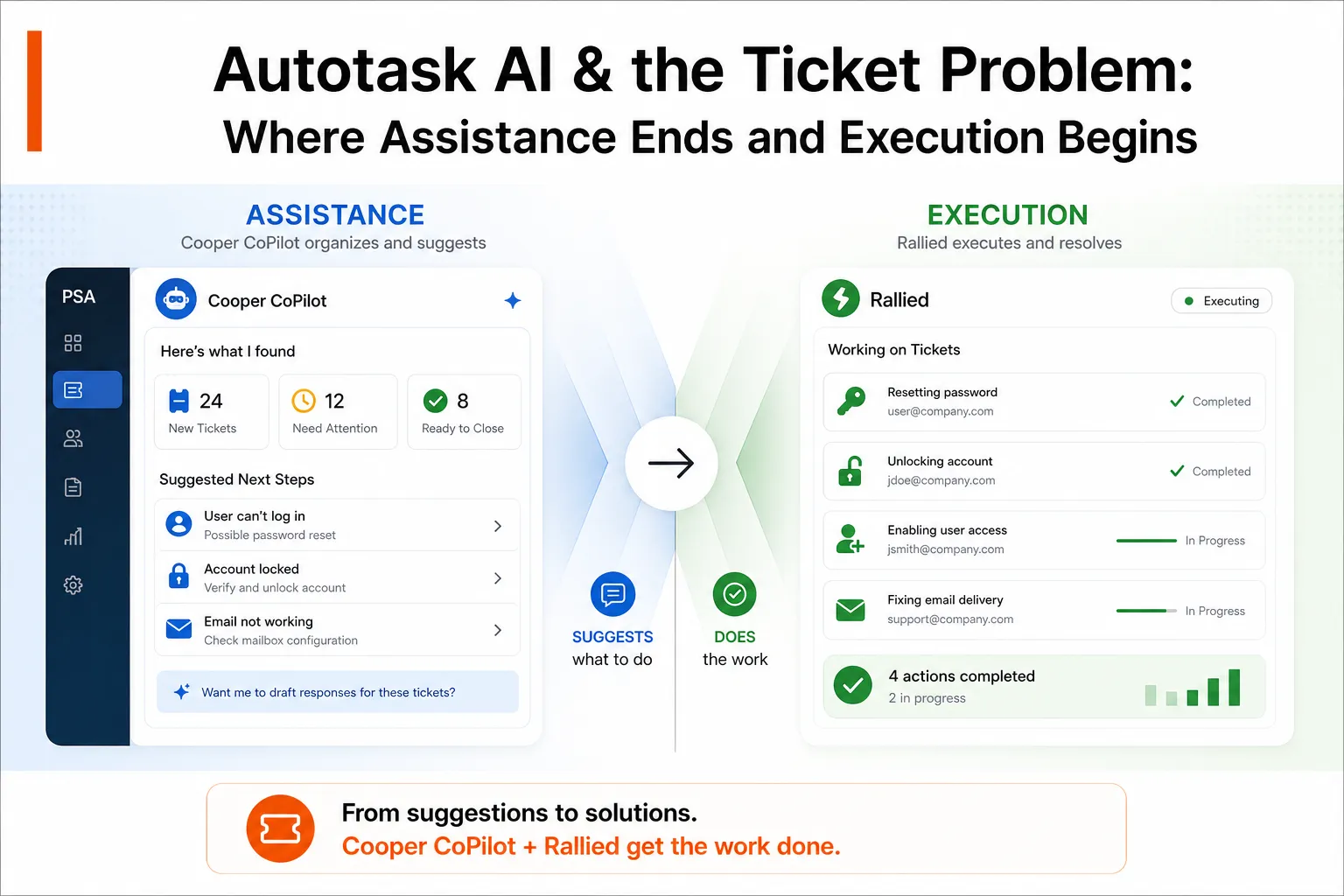
Autotask's Cooper CoPilot AI improves ticket organization and response drafting, but MSPs treating it as ticket resolution will hit a ceiling fast. It's an assistant-it suggests categorization and helps write summaries, not a system that actually resolves the ticket. If you're using Autotask as your PSA, pair it with an autonomous resolution layer (like Rallied) that can execute password resets, account unlocks, permission changes, and M365/identity provisioning end-to-end. You keep Autotask for business logic, contracts, and billing; the AI agent handles the grind of L1 and L2 execution. That combo-PSA organization + autonomous execution-is where MSPs actually cut tech labor in half.
What Autotask AI actually is (and what it isn't)
Autotask released Cooper CoPilot AI in 2025 as part of its broader modernization push. Here's what you actually get:
Cooper CoPilot: The Ticket-Assist Layer
- Smart Ticket Triage: Automatically categorizes incoming tickets and flags duplicates, so you're not wading through chaos.
- Ticket Summarization: Pulls the key details from customer messages and tech notes, so your team sees the essentials immediately.
- Response Drafting: Suggests resolution language or next steps based on the ticket content and historical resolutions.
- Assignment Hints: Coming soon-route tickets to the technician most likely to resolve them based on past performance.
Real user feedback on G2: "Cooper CoPilot has been especially valuable, providing tools that help us summarize customer tickets, create clearer timesheets, and write stronger resolutions."
What this means: Autotask AI makes your queue visible and your technicians faster at writing up work. It's organizational-think of it as a smart inbox that filters noise and preps context.
What It Doesn't Do
It doesn't resolve tickets. Period.
Cooper CoPilot will not:
- Reset a password (you still type it in or trigger a password reset workflow).
- Unlock an account after failed login attempts (a technician still has to navigate AD or Azure and do it).
- Provision a new user (you're still building the account, assigning licenses, adding groups).
- Modify M365, RMM agents, or identity providers on your customer's behalf.
- Close the ticket automatically when the work is done.
Users are already flagging this gap. From G2 reviews: "If Cooper AI could analyze all past tickets across customers, it would help us identify recurring issues. We want agentic AI, but Cooper is still limited to ticket assistance."
MSPs are asking for something Autotask isn't designed to be: a full execution engine. Autotask is a PSA-it's built to manage the business of IT services (ticketing, contracts, billing, reporting), not to be the technician doing the work.
Where Autotask AI Wins
Autotask's Smart Triage and Cooper CoPilot shine in three places:
1. Inbox Sanity
Tickets land constantly. Autotask AI categorizes them, flags near-duplicates, and routes them to the right team automatically. You're not dealing with a 200-ticket backlog that all looks the same anymore. The queue is organized.
A real MSP workflow: Customer submits a password reset request. Smart Triage categorizes it as "Authentication" and flags that three similar tickets came in that morning. Instead of triaging manually, your team sees the pattern and can batch the work or hand it to automation. That alone saves an hour a day in larger shops.
2. Response Consistency
Cooper CoPilot learns your resolution language and suggests templates or next-step text for common issues. A tech no longer has to remember exactly how you phrase a "we've reset your password and sent you a temporary one" email. The AI suggests it-they review and send.
Why this matters: documentation improves, closure language is cleaner, customers see consistent professionalism. For a shop that bills by the ticket or values SLA compliance, that consistency is worth real money.
3. Technician Focus
When the AI handles summarization and categorization, your technician goes straight to solving the problem instead of reading three emails and hunting for context. That's a small time-saver per ticket, but across 200–500 tickets a month, it adds up to real hours reclaimed.
Where the wall hits: the execution gap
Here's the hard truth that Autotask AI users discover around month four of implementation:
Organizing tickets faster doesn't solve the fundamental L1 problem: you still have to execute the fix.
The Real Bottleneck
A typical L1 queue for a 10-tech MSP:
- 20–30% password resets
- 10–15% account unlocks
- 8–12% license assignments or permission changes
- 5–8% MFA enrollments
- Remainder: misc requests, vendor tickets, edge cases
That first 40–50% of your queue is pure drudgework. Autotask AI can categorize it, prioritize it, and suggest a response template. But a technician still has to:
- Open Active Directory or Azure AD
- Navigate to the user's account
- Reset the password
- Generate a temporary password
- Paste it into the email
- Wait for confirmation
- Update the ticket with resolution steps
- Close the ticket
That's 10–15 minutes of a technician's time per password reset. Times 50 resets a month, that's 8–12 hours of technician time spent on something a script could handle-if the AI had execution permissions.
Autotask AI speeds up steps 5 and 7 (templates, summaries). It doesn't touch steps 1–4 and 6–8.
Where Autonomous Resolution Starts
This is where the category changes. Tools like Rallied are built to execute that entire workflow:
- Read the ticket ("Password reset for john@customer.com")
- Connect directly to the customer's Azure AD, M365, or Okta instance
- Find the user
- Issue a password reset
- Generate a temporary password
- Compose and send the notification email
- Update the Autotask ticket with the resolution
- Close the ticket
No technician touches it. The ticket is closed by the time your team sees it in the resolved queue-or they never see it at all because the agent handled it autonomously.
And here's the key: your Autotask instance doesn't change. Rallied connects to your PSA and executes work within it. Autotask stays the system of record for contracts, billing, and business reporting. The AI agent just does the L1/L2 legwork.
Autotask AI + Autonomous Resolution = The Real Stack
If you're running Autotask today, you should be thinking about a two-layer setup:
Layer 1: Autotask (Business Logic)
- Ticketing, contracts, service-level agreements, billing, reporting
- Customer data, technician schedules, vendor management
- Cooper CoPilot for triage, categorization, and response drafting
Layer 2: Autonomous AI (Execution)
- L1 and L2 resolution: password resets, account unlocks, permission management, onboarding, offboarding
- Direct execution across M365, identity providers (Entra, Okta, JumpCloud, Google Workspace), RMM, and documentation platforms
- Ticket updates and closures written back to Autotask
When a ticket lands in Autotask, Cooper CoPilot categorizes it and suggests next steps. If it's a password reset or account unlock, the autonomous agent picks it up immediately, executes the fix, and closes the ticket in Autotask. If it's something edge-casey or needs human judgment, it escalates back to your team. Autotask records the resolved work, and billing happens automatically.
The result: 50–100 hours of tech time freed up per month, depending on your ticket volume and L1 ratio.
Why This Works
No rip-and-replace: You keep your Autotask setup, your contracts, your billing logic, your reporting. Nothing changes operationally except that more tickets resolve without human intervention.
True autonomy: The agent has execution permissions-it's not suggesting what to do, it's doing it. A password reset takes 2 minutes of agent time, not 15 of a technician's time.
Execution + Organization: Autotask's triage and response help keeps the human team sharp on the tickets they do handle. The agent takes the commodity work; your team handles escalations, vendor issues, and strategic requests.
Multi-tenant safety: The agent respects your customer isolation. Each customer's agent instance is scoped to that customer's tenant, directory, and documentation. One customer's data never leaks into another's queue.
Speed and compliance: A password reset closes the ticket in minutes, not hours. SLAs stay green, customer satisfaction stays high, and you're not paying a senior engineer $80/hour to reset passwords.
The Numbers
Let's say you're a 10-tech MSP averaging 200 tickets a month:
- 50 tickets (25%) are password resets
- 30 tickets (15%) are account unlocks or permission changes
- 20 tickets (10%) are license assignments
- 100 tickets (50%) are other work (vendor, edge cases, escalations)
That first 100 tickets (password resets + account work) take your average technician 12–18 minutes each = 20–30 hours of tech labor per month on commodity work.
If an autonomous agent handles those 100 tickets and closes 80 of them autonomously (20 escalate back to the team), you've reclaimed 16–24 hours of tech time per month.
At a fully-loaded cost of $40–60/hour for a senior tech, that's $640–$1,440 per month. Annually: $7,680–$17,280 in labor freed.
An agent like Rallied costs ~$4,000–$6,000/month for that ticket volume (200 tickets × $0.50/ticket). You're saving $2K–$12K per month in net labor and your team is suddenly happy because they're not spending their day on password resets.
And here's the quiet part: your Autotask bill doesn't change. Rallied works with Autotask, not instead of it.
Putting it together: your Autotask AI stack in action
Here's what a real workflow looks like:
- Customer submits ticket: "Can't log in to my email"
- Autotask receives it: Cooper CoPilot auto-categorizes it as "Authentication Issue" and spots that three similar tickets came in that morning.
- The autonomous agent picks it up: Reads the ticket, connects to the customer's M365 instance, finds the user account, checks last sign-in and failed attempts.
- Agent makes a decision: Account is locked from failed login attempts. Agent unlocks the account, sends an email to the customer, and updates the Autotask ticket with resolution steps.
- Ticket closes: Marked as resolved in Autotask. Billing happens automatically (or is flagged as complimentary, depending on your SLA). Your technician never saw it.
- 30 seconds of your team's time spent: A senior tech glances at the resolved queue, spots the unlock, confirms it's legit, moves on.
For a password reset, it's even faster:
- Ticket lands, Autotask categorizes it.
- Agent resets password, generates temporary, sends email.
- Ticket closes.
- Your team sees "resolved" in the queue.
The work is done before you'd even have time to assign it to a technician.
When You Actually Need Human Judgment
Not every ticket is a password reset. The agent knows when to escalate:
- Edge cases: "I can't log in to Salesforce and my password reset didn't work." Agent can't see Salesforce, escalates.
- Multi-step issues: "My VPN won't connect and I think my certificate expired." Agent tries the quick fixes (client restart), escalates if it's deeper.
- Vendor issues: Anything that requires a vendor ticket or account access the agent doesn't have.
- Approval gates: Your policy says "changes to this group require manager approval"-agent flags it and routes to the manager for sign-off.
This is why you still have a team. But your team is now handling the interesting work and the edge cases instead of drowning in commodity resets.
What Happens If You Stay With Autotask AI Alone
You get a better-organized queue and faster response drafting. That's real value-it's maybe 10–15% of the time-savings you could get, but it's not nothing.
But here's what doesn't change:
- A technician still has to execute every ticket.
- Password resets still take 15 minutes each.
- Your backlog doesn't shrink on its own.
- You can't hire one fewer technician because the queue is better organized.
- Scaling requires hiring more hands.
Autotask AI makes the human technician's job less miserable. It doesn't change the unit economics of your labor model.
The Rallied Angle
Rallied is built for exactly this scenario: MSPs who've standardized on Autotask (or ConnectWise, or HaloPSA) and need the execution layer that the PSA itself can't provide.
Rallied connects directly to your Autotask instance and your stack (M365, RMM, identity provider, documentation platform) and autonomously resolves L1/L2 tickets end-to-end. Cooper CoPilot organizes your queue; Rallied executes the work.
The pitch is dead simple: Same week deployment. No implementation fee. Pay per ticket resolved. You keep Autotask exactly as-is. Rallied just does the work that currently eats 20+ hours of your month.
The Bottom Line
Autotask's AI is real and it helps. But it's assistance, not execution. If you're looking at Autotask AI as your automation strategy, you're halfway there. You've got a smarter queue and faster response drafting. But you haven't solved the core problem: L1 technicians spending half their day on commodity resets and unlocks.
For that, you need a layer that can actually do the work-autonomously, at scale, without a technician in the loop. Pair Autotask with an autonomous resolution agent and you've got a stack that actually cuts tech labor in half. Cooper CoPilot handles the smart side of triage; an agent like Rallied handles the execution side. Together, they're the MSP stack that actually works.
Try Rallied with Autotask
If you're running Autotask today, Rallied is ready to go. We connect in under an hour, and you'll see resolved tickets by day one. No forms, no implementation project, no training required-just real ticket resolution running on top of your existing Autotask instance.
Learn more about Rallied for Autotask MSPs.
Frequently Asked Questions
What is Cooper CoPilot in Autotask?
Cooper CoPilot is Autotask's AI assistant that helps summarize customer tickets, draft responses, categorize issues, and spot duplicates. It's ticket-assist AI-it improves how technicians handle work, but doesn't execute the actual resolution on its own.
Can Autotask AI fully automate ticket resolution?
No. Autotask AI is limited to assistance-summarization, categorization, and suggestions. It doesn't autonomously reset passwords, unlock accounts, change permissions, or execute fixes across your M365, RMM, or identity stacks. That's where autonomous tools like Rallied come in.
What's the difference between Autotask AI and an autonomous AI agent?
Autotask AI suggests next steps and organizes your queue. An autonomous agent like Rallied executes the full workflow end-to-end: diagnoses, fixes the issue, updates the ticket, notifies the user, and closes it-without a technician touching it. Entirely different scope.
Can I use Autotask with an autonomous AI resolution tool?
Yes-they work perfectly together. Autotask provides the PSA backbone (business logic, billing, reporting, contracts). Rallied connects to your Autotask instance and resolves tickets end-to-end. When the ticket lands, Rallied reads it, executes the fix, and updates Autotask. Autotask tracks the resolved work and handles invoicing.
What L1 work can Autotask AI actually automate?
Autotask AI can: summarize and categorize tickets, spot duplicates, route to teams, suggest responses, and draft resolution language. It cannot: reset passwords, unlock accounts, manage licenses, provision users, change permissions, or execute M365/RMM changes. Those require an agent with actual execution permissions.
