EDR vs antivirus: what MSPs actually need in 2026
TL;DR
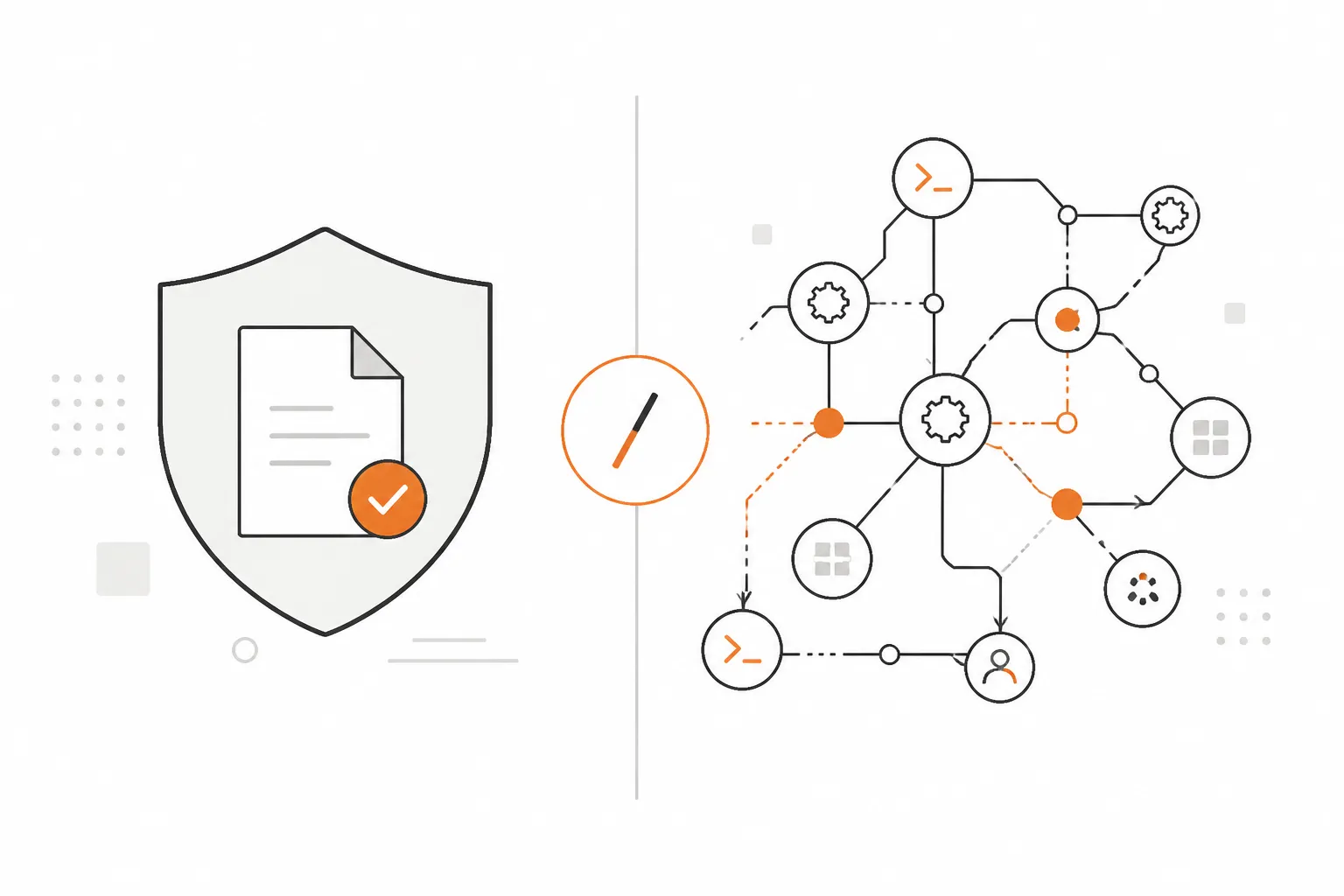
Antivirus catches threats it's seen before. EDR catches threats it hasn't. That distinction matters more in 2026 than it ever has: the attacks landing on your clients' networks - ransomware, credential theft, living-off-the-land intrusions - don't use malware files that antivirus can match against a database. They use your clients' own tools against them.
For MSPs, the practical upshot is this: antivirus is still worth running as a baseline layer, but it's not your defense against the things that will actually cost you clients. EDR is. The question isn't whether to move to EDR - it's which platform fits your stack and your clients' risk profiles, and whether you need the managed threat hunting layer on top. This guide walks through both questions, with pricing, real MSP community takes, and honest verdicts on the tools worth considering.
Ransomware doesn't care about your AV signatures. EDR does.
We've been having this conversation in the MSP community for a few years now, and the consensus is pretty clear: traditional antivirus is necessary but not sufficient. It catches the low-hanging fruit - commodity malware, accidental infections, script kiddies using known exploit kits. What it doesn't catch is everything sophisticated attackers use once they have a foothold: PowerShell scripts that never touch disk, lateral movement via stolen credentials, ransomware that runs entirely in memory using legitimate Windows tools.
If that sentence made you want to check when you last reviewed your endpoint security stack, good. Let's get into it.
What traditional antivirus actually does
Traditional antivirus has three core detection mechanisms, and understanding each one explains exactly where the gaps are.
Signature-based detection is the original and still-primary method. The AV engine maintains a database of known malware fingerprints - hashes, byte sequences, structural patterns unique to malicious files - and compares incoming files against that database. When there's a match, the file is blocked or quarantined. The accuracy on known threats is excellent, and the false positive rate is near-zero for well-maintained signature databases.
Heuristics extend that logic to catch suspicious file characteristics even without a known signature. A file that's packed or obfuscated unusually, that contains suspicious API call sequences, or that self-modifies at runtime might get flagged even if its hash doesn't match anything in the database. Heuristics catch more than signatures alone, but they also generate more false positives.
Cloud lookups (reputation-based detection) add a third layer: the AV engine queries a cloud service to check if a file or URL has been seen and classified as malicious by other users. This gives vendors a chance to block new threats quickly after they're first observed - sometimes within hours of initial detection - without waiting for a full signature update cycle.
The combination works well for a specific threat model: malware that uses known techniques, that writes malicious files to disk, and that hasn't been specifically engineered to evade signature detection. That describes most opportunistic attacks. It describes very few targeted ones.
The three gaps antivirus can't close
The limitations aren't theoretical - they're the mechanisms behind every major MSP incident story you've heard in the last three years.
Gap 1: Zero-day threats. A novel malware variant carries no signature and may pass heuristic checks if it's been engineered carefully. There's a window between when a threat is first deployed in the wild and when security vendors reverse-engineer it, write a signature, and push an update. For targeted attacks, that window can be days or weeks - and the attackers know it.
Gap 2: Fileless malware and living-off-the-land attacks. These are the techniques that have made traditional AV largely irrelevant against sophisticated attackers. Living-off-the-land (LotL) attacks abuse legitimate, pre-installed system tools - PowerShell, Windows Management Instrumentation (WMI), certutil, regsvr32 - to carry out malicious actions. No malicious file is written to disk. No signature can be matched. The attacker uses the operating system's own trusted binaries, which AV engines whitelist by default, to move laterally, dump credentials, and establish persistence.
Conti, LockBit, and most serious ransomware operations in the last several years have used LotL techniques as standard operating procedure. Your AV engine won't see them.
Gap 3: No response capability. When AV detects and blocks a threat, that's the end of its involvement. It doesn't answer the question: what else happened before this file was blocked? Did the attacker already dump Active Directory hashes? Were credentials exfiltrated? Did lateral movement establish footholds on other machines? AV can't tell you. Investigation requires manual forensic work - and in a real incident, you usually don't have time.
How EDR works differently
Endpoint Detection and Response - EDR - was built specifically to close those three gaps. The architecture is fundamentally different.
EDR agents deploy on endpoints and stream continuous behavioral telemetry to a cloud backend: every process created, every network connection opened, every file written, every registry key modified, every command-line argument executed. This isn't sampling - it's a complete record of everything that happens on the endpoint in real time.
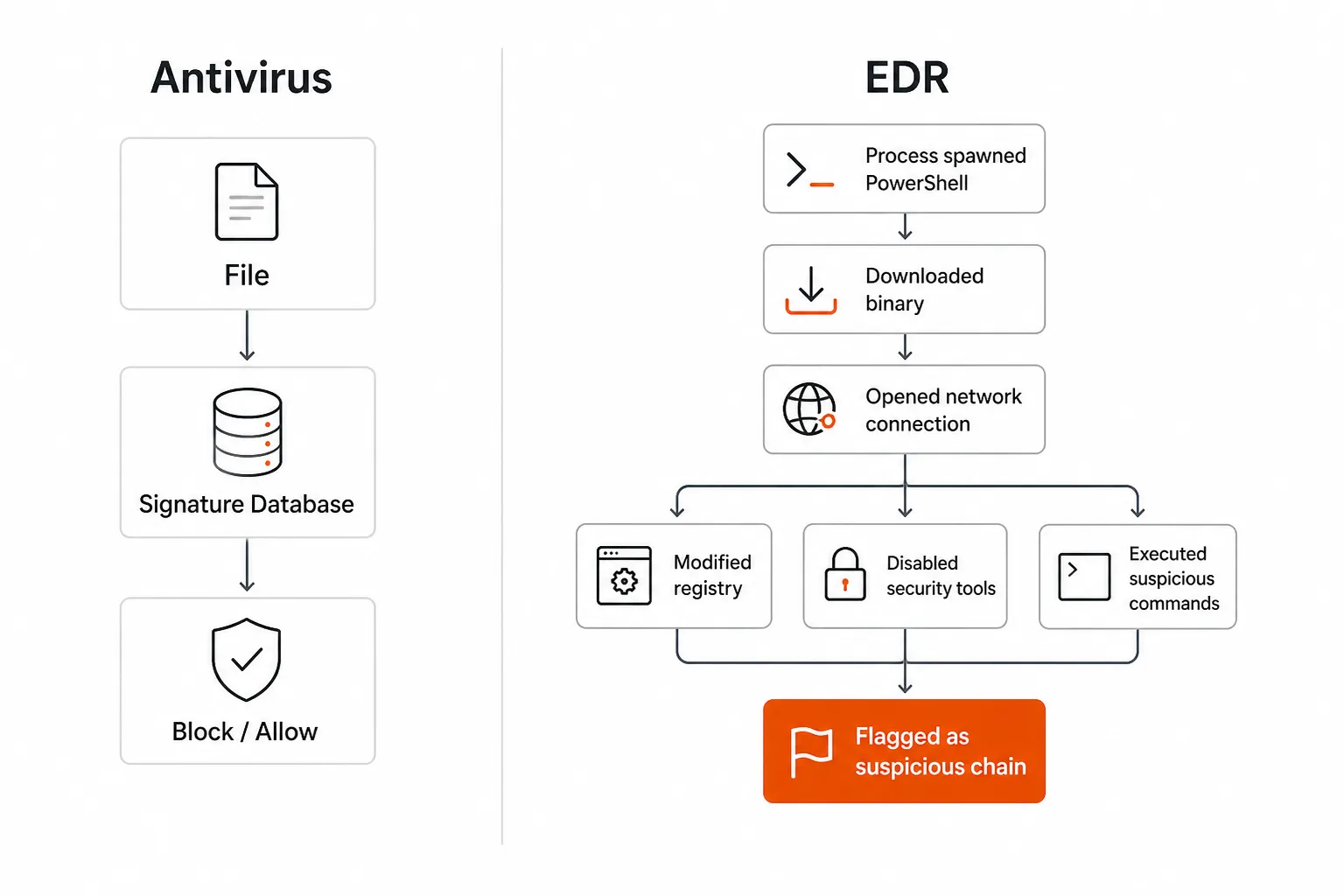
Process trees are the core detection mechanism. Rather than evaluating a file in isolation, EDR tracks the chain of execution: cmd.exe spawned PowerShell.exe, which downloaded a binary from an external IP, which opened a network socket and injected into explorer.exe. Each of those actions might be innocent in isolation. Together, they're a recognizable attack pattern - and EDR platforms match these chains against thousands of known attack techniques, including the full MITRE ATT&CK framework.
Machine learning models run continuously on the telemetry stream, flagging behavioral anomalies that don't match known attack patterns but look statistically unusual for the environment. This is how EDR catches genuine zero-days - not by matching signatures, but by recognizing that a process is doing something it's never done before.
Response capabilities are what separate EDR from traditional AV most concretely. When a threat is confirmed, EDR platforms can: isolate the compromised device from the network (while keeping it manageable), terminate the malicious process chain, collect forensic artifacts for investigation, and in many cases roll back changes (file encryption, registry modifications) made before the threat was detected. All of this from a central console, often automated by playbook.
Threat hunting becomes possible with EDR data in ways that simply aren't with AV. A security analyst (or a managed SOC team) can query historical telemetry across your entire client base: "Show me every process that executed from a temp directory and touched the credential store in the last 30 days." That query surfaces attacker footholds that signature-based scanning would never catch.
AV vs EDR: side by side
| Dimension | Traditional AV | EDR |
|---|---|---|
| Primary detection method | Signature matching + heuristics | Behavioral monitoring + ML |
| What it scans | Files at rest and on access | Processes, network, registry, memory |
| Zero-day effectiveness | Poor | Good |
| Fileless/LotL malware | Blind | Detected via process chains |
| Response capability | File blocking only | Isolate, terminate, forensics, rollback |
| Forensic visibility | File-level | Full attack timeline |
| False positive rate | Near-zero for known threats | Higher (behavioral rules can be noisy) |
| Deployment complexity | Lightweight agent | Heavier agent + cloud infrastructure |
| Typical MSP cost | $1-3/seat/month | $8-20/seat/month |
| Managed hunting option | No | Yes (MDR services) |
The cost delta is the most common objection. At $1-3 vs $8-20 per seat per month, the math feels unfavorable - until you price one ransomware incident. Recovery from a serious ransomware event at a 100-seat client runs $5,000 to $50,000 in labor, downtime, potential client churn, and reputational cost. EDR on that same 100-seat client at $15/seat/month is $1,500/year. The argument against EDR is only financially coherent if you think your clients will never be targeted.
The evolution: from AV to XDR
The endpoint security landscape didn't jump from basic AV to modern EDR overnight - it evolved through several distinct generations.
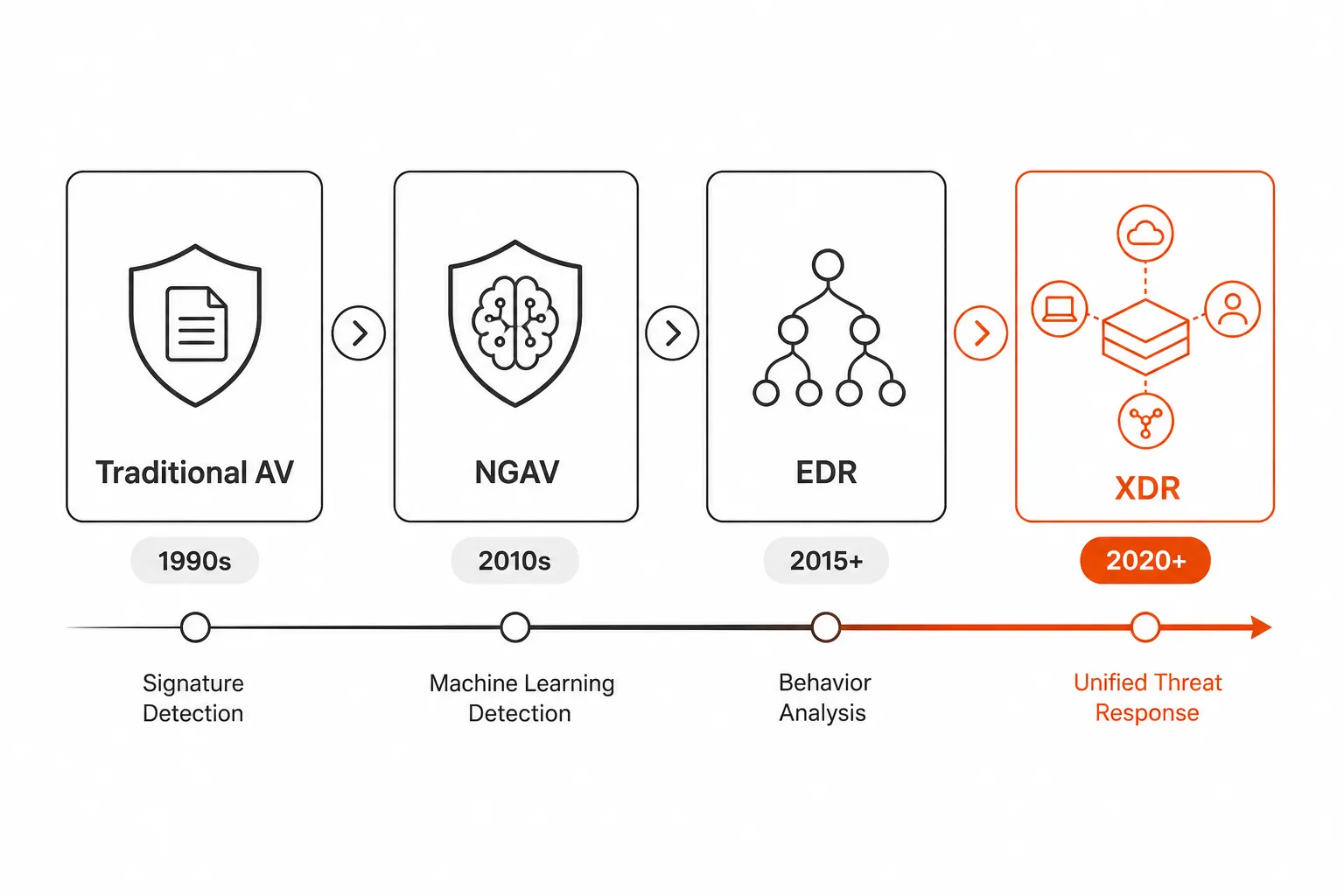
Traditional AV (1990s-2010s): Signature databases and heuristics. The standard for two decades, effective against commodity threats, increasingly irrelevant against sophisticated attacks.
Next-Generation Antivirus / NGAV (early 2010s): Added machine learning and sandboxing to traditional signature detection. Better against unknown threats, but still primarily file-focused. CrowdStrike Falcon Prevent was one of the early NGAV products.
EDR (2015-present): The shift to process-level telemetry, behavioral detection, and response capabilities. This is where endpoint security became genuinely useful against modern attack techniques.
XDR (2020-present): Extended Detection and Response unifies visibility across endpoints, cloud, identity, email, and network into a single correlated view. An XDR platform like CrowdStrike Falcon or SentinelOne Singularity sees a compromised user account move from email to cloud apps to an endpoint as one coherent incident - rather than three separate alerts in three separate consoles.
For most MSPs, EDR is the practical pivot point. XDR adds value at scale, but the foundational investment is getting EDR deployed consistently across your client base.
What this looks like in your MSP stack
Here are the four platforms MSPs are most actively deploying, with honest takes on who each one actually fits.
CrowdStrike Falcon
CrowdStrike Falcon is the 7-time Gartner Magic Quadrant Leader for Endpoint Protection Platforms and the benchmark against which everything else gets measured. The Falcon platform is cloud-native, single-agent, and covers 14+ security modules including EDR, XDR, identity, cloud security, and next-gen SIEM.
For MSPs, CrowdStrike offers a dedicated service providers partner channel, multi-tenant console, and Falcon Flex for flexible deployments across customer environments.
Pricing: Falcon Go starts at $7.99/endpoint/month (up to 100 devices); Falcon Pro at $14.99; Falcon Enterprise at $19.99. Falcon Complete (fully managed MDR) is contact-for-pricing.
The real CrowdStrike experience: G2 reviewers give it 4.6/5 across 438+ reviews, consistently praising the lightweight sensor and detection depth. The consistent complaint is cost - it's the most expensive option on this list - and the learning curve on advanced features.
"CrowdStrike is the right answer if you have clients who would be genuinely targeted - healthcare, finance, law firms handling sensitive matters. For your 15-person landscaping client, it's overkill and they'll push back on the cost." - MSP community consensus
Our take: Best-in-class for MSPs serving regulated industries or high-value targets. Harder to justify for the SMB-heavy MSP whose clients won't pay for the top tier. The Falcon Complete MDR option is compelling if you don't have security staff - you pay more, but you get a real SOC.
SentinelOne Singularity
SentinelOne is CrowdStrike's closest peer in the Gartner Magic Quadrant, with 9,250+ enterprise customers and 100% detection rate in the MITRE ATT&CK Evaluation 2024 with 88% less noise than competitors. Where it differentiates from CrowdStrike is autonomous response - SentinelOne's behavioral AI acts automatically when threats are detected, terminating processes and isolating devices without waiting for analyst intervention.
Pricing: The Core tier is $69.99/endpoint/year; Control (adds PurpleAI assistant) is $79.99; Complete is $179.99/year. Enterprise is custom.
The MSP community view: SentinelOne is "EDR without needing a SOC team." The autonomous response means threats get contained even at 2am when nobody is watching the console.
"SentinelOne is what we deploy for mid-market clients who want real EDR but don't want to pay for Falcon Complete. The Storyline feature - the visual attack timeline - has saved us hours on every incident we've investigated." - r/msp
Verdict: Excellent choice for MSPs who want enterprise-grade EDR at a price point that works for mid-market clients, without needing in-house security analysts on call. The autonomous response is the key differentiator.
Huntress
Huntress is the most MSP-native EDR on this list - built for the channel, priced for SMB customers, and structured around the reality that most MSPs don't have a security operations team. The philosophy is "last line of defense": antivirus and firewalls do their job, Huntress watches for the sophisticated threats that slip through.
What makes Huntress different from CrowdStrike and SentinelOne is the managed layer. The 24/7 Huntress SOC handles detection, investigation, and remediation - when something serious happens, you get a direct call from a human analyst who has already contained the threat. 4.8/5 on G2 across 1,200+ verified reviews, 99% satisfaction score.
The Huntress MSP Reddit reputation is earned:
"During the trial we made enough money in saved incidents to pay for Huntress for three months - it paid for itself in two days." - r/msp
"Huntress catches stuff frequently that other AV products don't catch. And it's affordable." - r/msp
Pricing: $8.99/endpoint/month direct; MSP partner pricing is typically ~50% less. Huntress ITDR (identity threat detection for M365/Google Workspace) is $4.80/identity/month.
Verdict: The natural choice for smaller and mid-sized MSPs who want real EDR with managed threat hunting, without the operational overhead of running your own SOC. The MSP-first pricing model and the human-in-the-loop response make it the easiest sell to clients who want security without complexity.
Microsoft Defender for Business
Microsoft Defender for Business is the value play - $3/user/month standalone, or bundled with M365 Business Premium at $22/user/month - and the IDC MarketScape Leader for Modern Endpoint Security for SMBs (2024). For M365-first clients, it's built into the stack they're already paying for.
Defender for Business includes genuine EDR, automated attack disruption, and vulnerability management - not just upgraded Windows Defender. The automatic attack disruption feature, which interrupts in-progress ransomware attacks in real time without waiting for analyst action, is the standout capability at this price point.
The common MSP pattern is Defender for Business as the primary EDR layer, paired with Huntress for the managed threat hunting layer that Microsoft doesn't provide. G2 gives it 4.5/5 across 30 reviews.
Verdict: The right answer for M365-first MSPs whose clients are already in the Microsoft ecosystem and don't need the full depth of CrowdStrike or SentinelOne. The $3/user price makes it easy to bundle into any managed services agreement without a separate conversation.
Do you still need antivirus if you have EDR?
This is the "AV tax" question, and MSPs land in different places on it.
Modern EDR platforms include NGAV built in. Running SentinelOne Singularity alongside a separate traditional AV engine is redundant - you're paying twice, creating duplicate alert noise, and putting two agents on the endpoint competing for system resources.
The practical MSP answer varies by platform:
- CrowdStrike Falcon: Includes Falcon Prevent (NGAV). You don't need separate AV.
- SentinelOne: Includes NGAV at all tiers. Disable or uninstall traditional AV.
- Huntress: This is important - Huntress is designed to work alongside your existing antivirus, not replace it. Huntress explicitly recommends Windows Defender (or Defender for Business) as the primary AV layer, with Huntress watching for the things that slip through.
- Defender for Business: Includes NGAV. No separate AV needed for Windows endpoints.
The "keep a lightweight AV as fallback" argument exists for one reason: if your EDR agent crashes or loses connectivity, you want some layer of protection. On that logic, keeping Windows Defender enabled alongside a third-party EDR is cheap insurance - it consumes almost no resources when the EDR is actively running. Most MSPs doing this do it as a "belt and suspenders" call, not because they think the AV adds detection value.
When security tools generate support tickets
Here's the operational reality that doesn't get talked about enough: EDR and ITDR tools generate L1 support tickets.
When Huntress ITDR flags a suspicious login pattern and forces MFA re-enrollment, the user opens a ticket: "I can't log in." When an EDR agent isolates a device after behavioral detection, the user calls your helpdesk: "My laptop won't connect to anything." When a security policy triggers an account lockout after repeated failed authentications, your technicians get a queue of "reset my password" tickets - entirely because your security tools are working correctly.
This is a good problem to have. The security layer is doing its job. The ticket volume it generates is the operational overhead that most MSPs absorb manually.
Rallied handles those downstream tickets autonomously. When an EDR event triggers an account lockout or MFA issue, Rallied connects directly to your identity providers - M365 Entra ID, Okta, JumpCloud, Google Workspace - and resolves the ticket without a tech touching it. Password resets, account unlocks, MFA re-enrollment: the same L1 work that typically runs 40-60 minutes per technician per day, resolved before the user finishes typing their complaint.
The combination makes sense: your EDR layer catches the threat, your Rallied AI technician handles the support tickets the threat response generates. Security engineers stay focused on the actual incident. Techs stop drowning in lockout queue.
Try Rallied
Rallied is an AI technician built for MSPs. It connects to your PSA (ConnectWise, Autotask, Halo PSA, SuperOps), RMM (Datto, NinjaRMM), identity providers (M365, Entra ID, Okta, JumpCloud, Google Workspace), and documentation (IT Glue, Hudu), then autonomously handles the L1 and L2 ticket volume that would otherwise consume your team's day - password resets, MFA unlocks, account lockouts, user onboarding and offboarding.
When your EDR stack is generating containment events and your helpdesk is filling up with lockout tickets, Rallied handles that queue without a tech touching it. Same-week deployment, no dedicated admin overhead, $0.50/ticket on a usage model that scales with your workload. Start your 14-day free trial with $50 in credit - no card required.
Frequently Asked Questions
What is the difference between EDR and antivirus?
Traditional antivirus works by matching files against a database of known malware signatures. It's fast and accurate for known threats, but blind to anything it hasn't seen before. EDR (Endpoint Detection and Response) monitors behavioral telemetry in real time - every process, network connection, registry change, and command-line execution - and uses machine learning to spot suspicious chains of behavior, even when no individual action looks malicious in isolation. EDR also provides response capabilities (process termination, device isolation, forensic collection) that antivirus simply doesn't.
Can EDR replace antivirus, or do I need both?
Modern EDR platforms include next-generation antivirus (NGAV) built in, so deploying a full EDR stack like SentinelOne Singularity or CrowdStrike Falcon alongside a separate AV engine often creates redundancy. Many MSPs disable signature-based AV scanning once EDR is running to reduce system overhead and false positive noise. That said, a thin AV layer provides a useful fallback if your EDR agent crashes or loses cloud connectivity - so the practical answer for most MSPs is: EDR as your primary layer, lightweight AV as your safety net.
Which EDR tool is best for MSPs?
Huntress is the most MSP-native EDR on the market - it's purpose-built for the channel, priced for SMB customers ($8.99/endpoint/month with MSP discounts), and includes 24/7 managed threat hunting so you don't need an in-house SOC. For MSPs serving larger or higher-risk clients, SentinelOne Singularity offers autonomous response without requiring a dedicated security team. CrowdStrike Falcon leads on threat intelligence and detection depth, but comes with a steeper price and learning curve. Microsoft Defender for Business at $3/user/month is hard to beat for M365-first clients who want baseline EDR without a separate line item.
How much does EDR cost for MSPs?
Costs vary significantly by vendor and tier. Huntress starts at $8.99/endpoint/month (MSP pricing is typically around half that). Microsoft Defender for Business is $3/user/month as a standalone, or bundled with M365 Business Premium at $22/user/month. CrowdStrike Falcon starts at $7.99/endpoint/month (Falcon Go tier, up to 100 devices). SentinelOne starts at $69.99/endpoint/year for the Core tier. The relevant comparison isn't AV vs EDR pricing - it's the cost of a single ransomware incident (typically $5,000-$50,000 in recovery, downtime, and client churn) against $10-20/seat/year for EDR coverage.
What happens operationally when an EDR tool detects a threat?
When an EDR platform flags suspicious behavior, it typically: isolates the affected device from the network, terminates the suspicious process chain, preserves forensic artifacts for investigation, and generates an alert in your security console. With managed EDR (MDR) services like Huntress, a human SOC team handles the investigation and remediation steps - and often calls you directly when something serious is happening. On the ticket side, EDR events frequently generate L1 support requests: account lockouts from security isolation, MFA challenges triggered by suspicious login patterns, or users locked out of devices after automated containment. AI-powered IT tools like Rallied handle those follow-on tickets automatically, so your techs focus on the security incident rather than the password reset queue it created.