IT Glue AI: What IT Glue's AI Features Actually Do for MSPs in 2026
TL;DR
IT Glue's AI-powered documentation suite is real - and unlike most vendor AI announcements, some of it is actually useful. The Smart SOP Generator is the standout: it records what technicians do and structures it into a proper SOP automatically, no manual documentation required. Over 100,000 SOPs created in six months is a real number that suggests real adoption. The AI also auto-maps asset relationships (mature accounts average 14,000+ connections), which is a genuine time sink eliminated. Kaseya Assist - the conversational search layer - is useful when your docs are actually current. What IT Glue's AI doesn't do is resolve tickets. It's a documentation and knowledge layer, not an execution engine. If you're reading this because you want AI that fixes the ticket rather than documents the fix, that's a different problem - and a different tool.
What IT Glue actually is (before we talk about the AI)
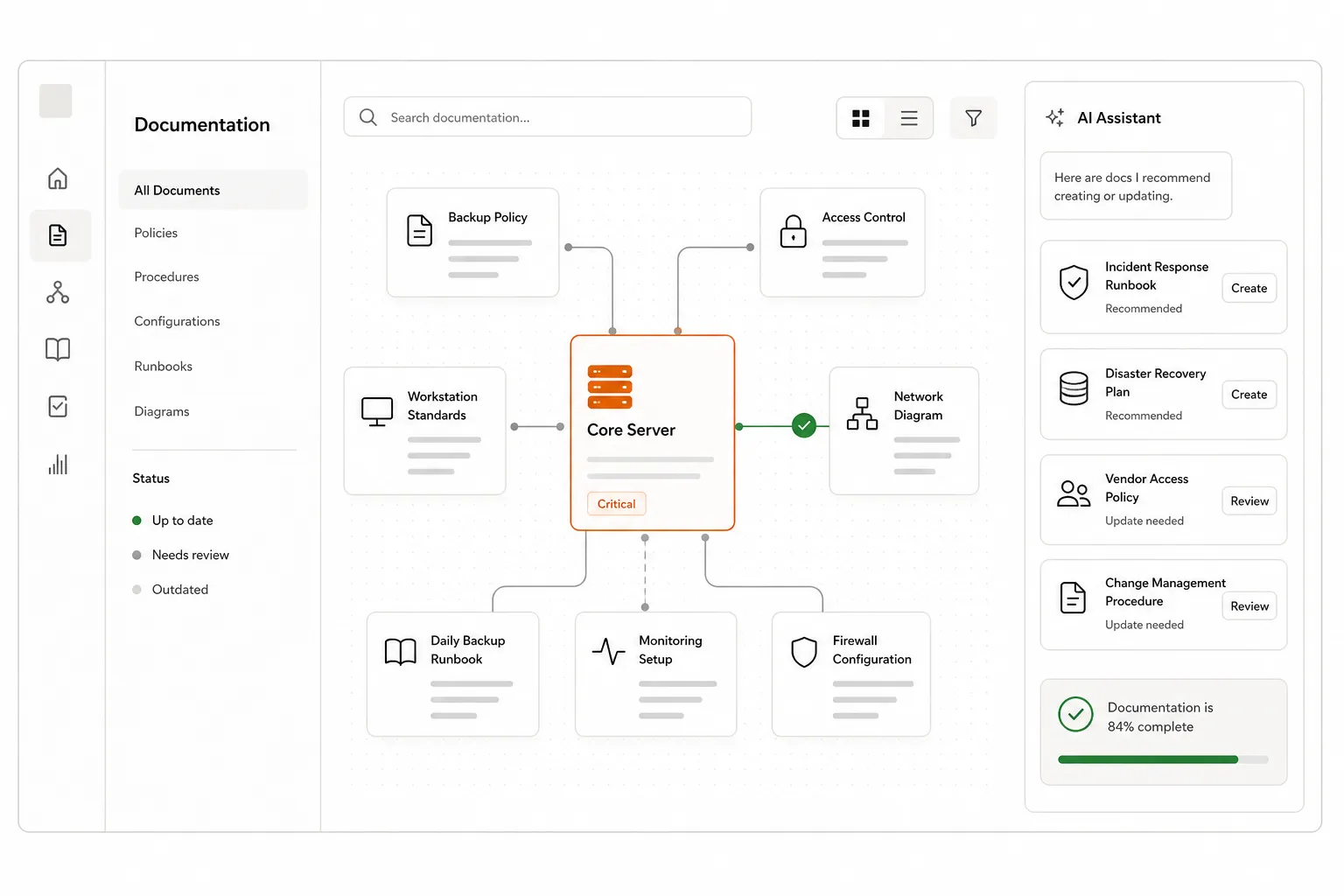
IT Glue is the documentation platform that most MSPs either use or feel they should be using. 350,000+ users across 13,000+ organizations in 70 countries - it's genuinely the default choice for centralized IT documentation, password management, and asset tracking in the MSP space.
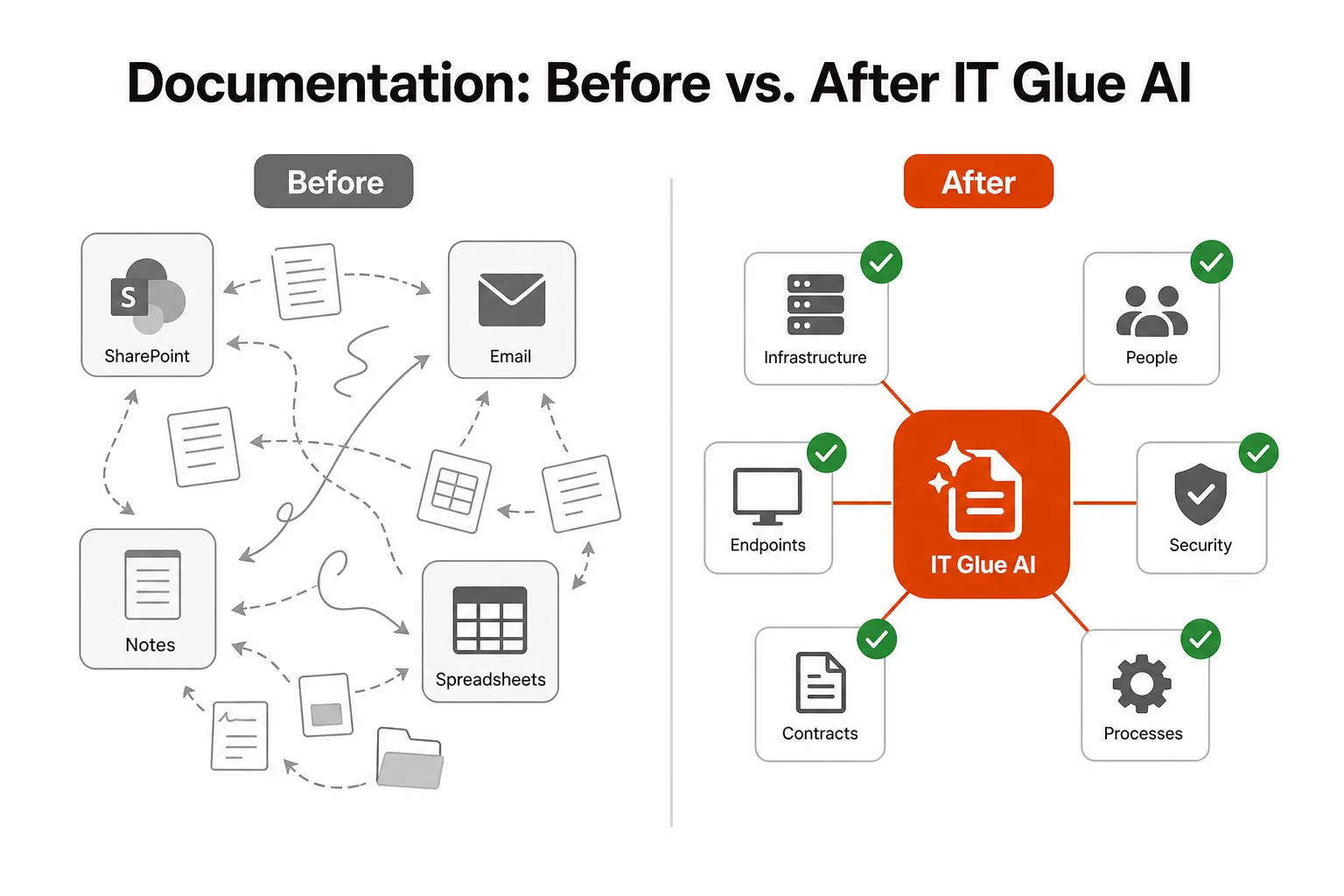
Founded in 2013, acquired by Kaseya in 2016, IT Glue has since received $50M in R&D investment and shipped 1,625+ software releases. The core product does what it says: one place for runbooks, SOPs, network documentation, password vaults, configuration records, and the web of relationships between all of it. For MSPs managing 20+ clients, the alternative - SharePoint folders, email threads, sticky notes, LastPass accounts nobody can access - is genuinely terrible. IT Glue is the organized version.
The AI story is built on top of this foundation. IT Glue's AI features aren't a bolt-on chatbot sitting outside the platform - they're woven into the documentation workflow itself. That matters, because AI tools that operate outside your existing data are mostly performing a party trick.
IT Glue AI: not one thing, but four
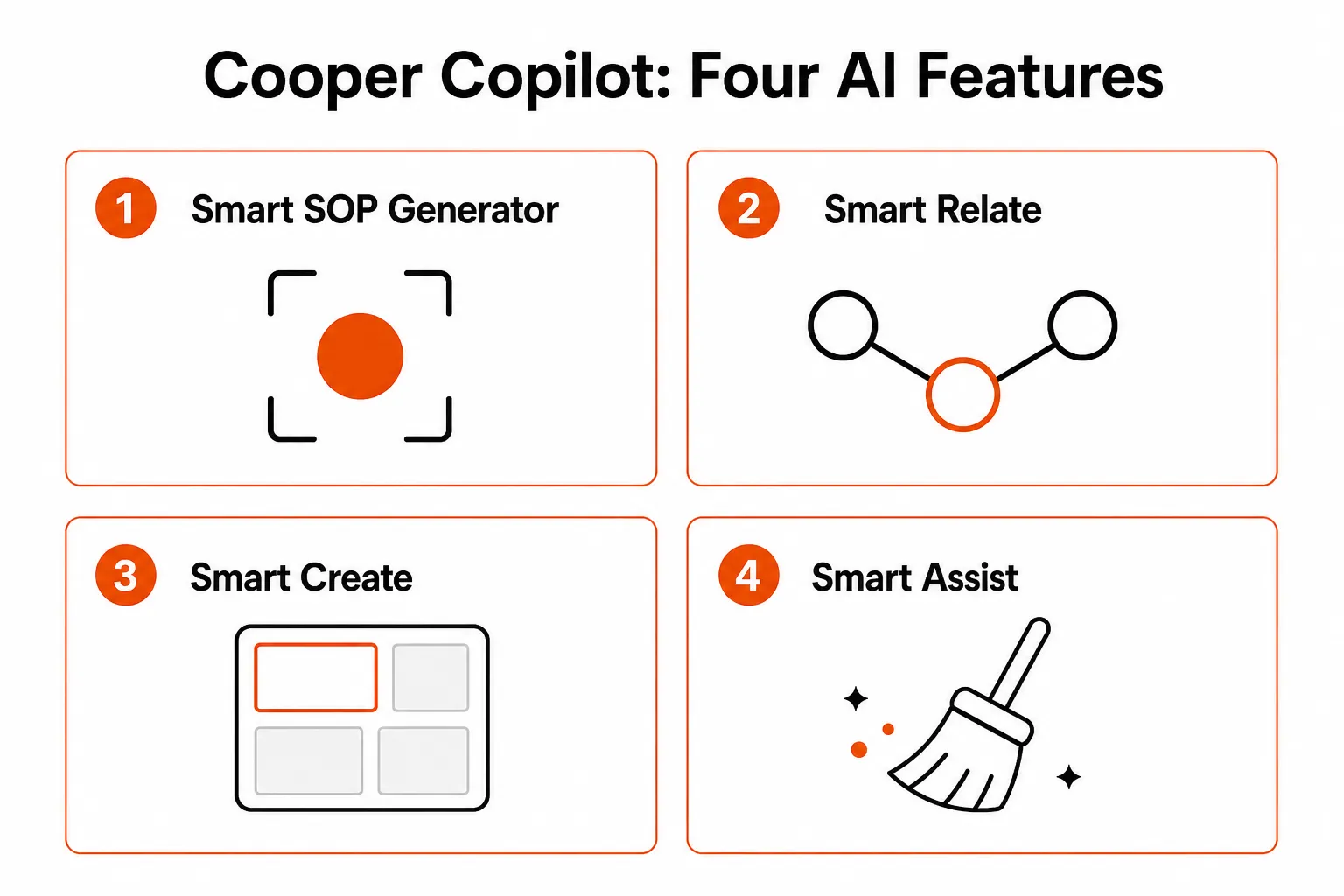
IT Glue's AI-powered documentation page covers four distinct capabilities. They do different things, have different adoption rates, and solve different problems. Lumping them together into "IT Glue has AI" is the kind of thing vendor press releases do - let's be more precise.
Smart SOP Generator: the one that actually moves the needle
The Smart SOP Generator is the IT Glue AI feature most worth your attention. Here's the actual mechanism: a technician installs the IT Glue browser extension, hits record, and then just does the work. Every click, keystroke, and tab switch gets captured in real time. When they stop recording, the AI structures those raw actions into a numbered, screenshot-illustrated SOP - automatically organized into logical sections, saved directly to IT Glue.
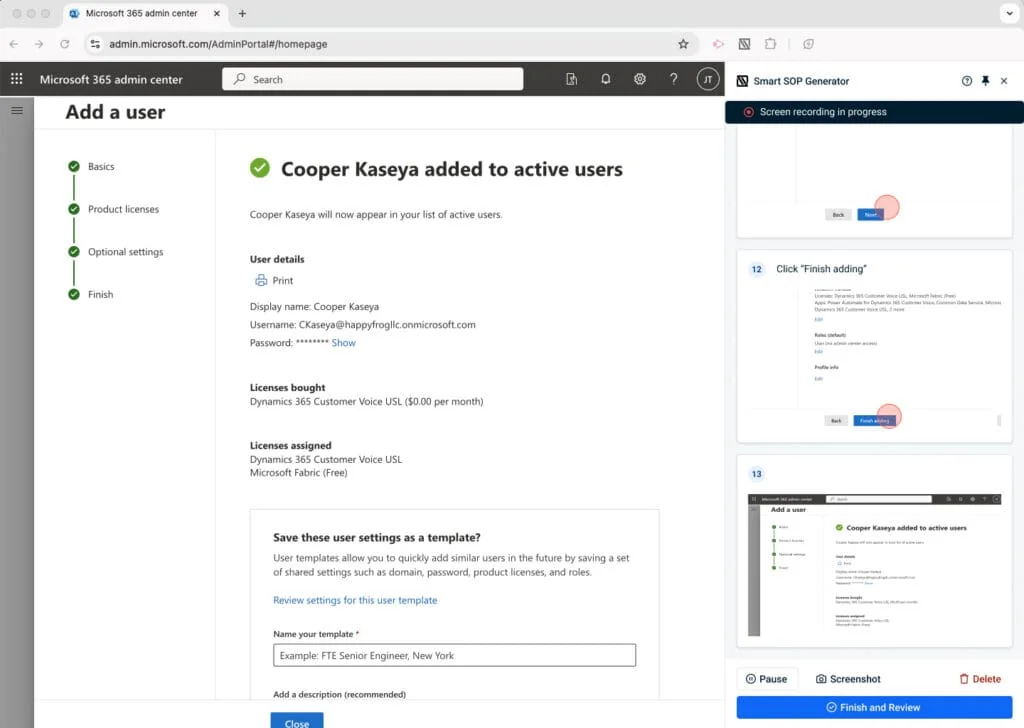
The August 2025 update added screenshot editing (blur sensitive data, annotate steps), step reordering, multi-tab recording, and smart section detection. The result is documentation that reflects what actually happened - not what someone remembered three days later, not a theoretical best practice, not a checklist that's been wrong for eight months.
100,000+ SOPs created in the first six months tells you adoption is real. Parlay Technology's documented result - "It's a game changer. It keeps our processes up to date and stops tickets from piling up" - is a specific, attributable outcome, not a press release quote.
The limit worth knowing: the SOP Generator captures browser-based workflows. Desktop application actions and direct RMM console work aren't captured (though RMM session support has been added). For most L1-L2 documentation, that's not a showstopper - but for deep endpoint work, expect gaps.
AI-powered documentation organization: eliminating the asset relationship tax
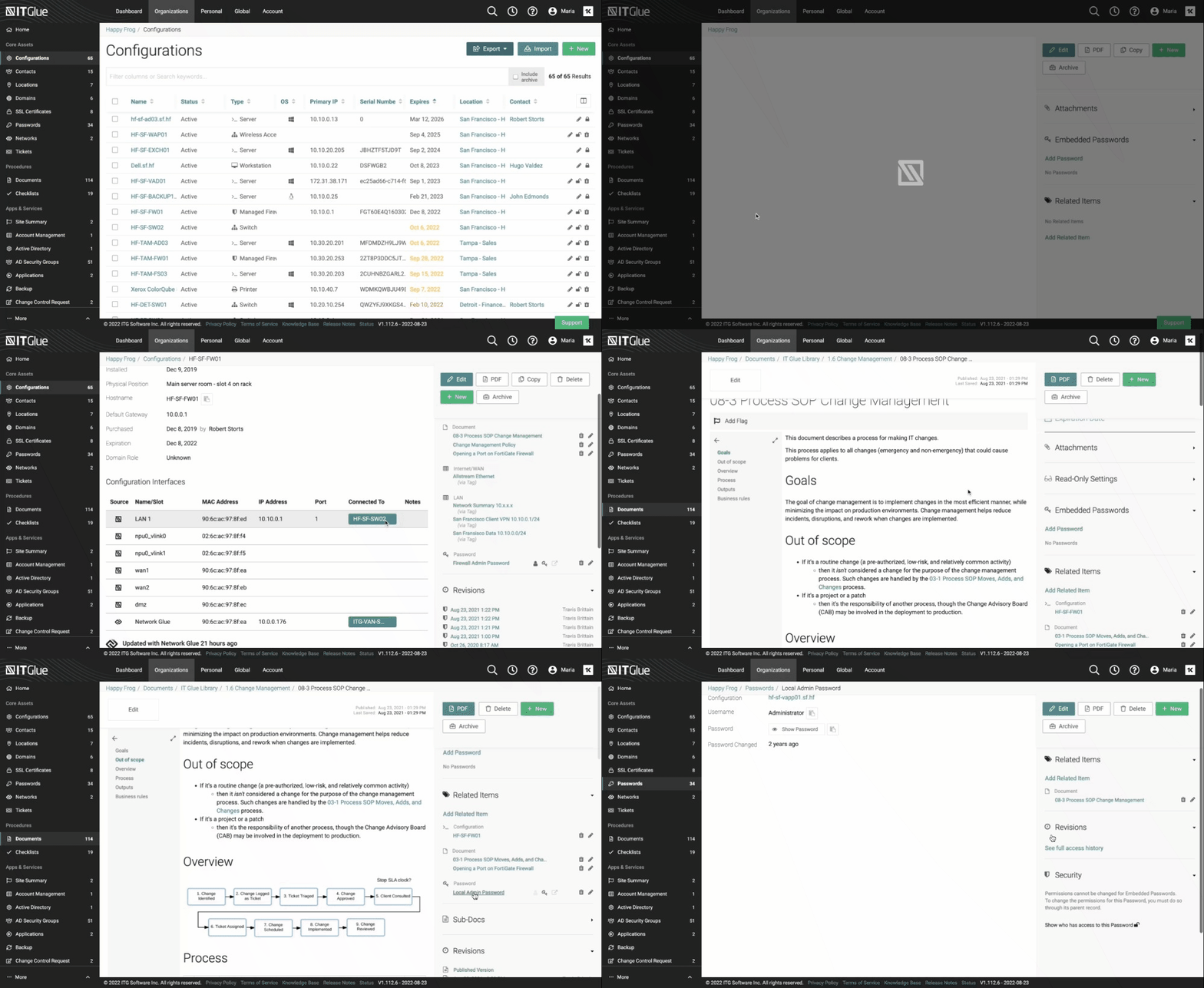
IT Glue's AI automates the documentation of relationships between assets - the links between a user and their device, a password and the service it unlocks, a configuration and the client it belongs to. In a mature IT Glue account, there are 14,000+ of these relationships on average. Before the AI landed, every one was a manual entry.
The AI suggests and creates relationships with a single click. It also cleans up outdated ones - so the relationship graph stays accurate rather than becoming a graveyard of stale links. Extended integrations cover Microsoft Intune user-to-device mapping, Datto Networking access points to wireless networks, and Datto BCDR appliance-to-agent relationships.
The practical payoff: when a technician opens a ticket, they can follow relationships to spot which other assets might be affected. That's the difference between "password reset done" and "password reset done, and I noticed the linked device certificate expires next week."
IT Glue's AI documentation tools also consolidate critical infrastructure information into structured overviews - backup health reports (pulling from multiple Datto sources into one view), Wi-Fi credential documentation during network setups, and infrastructure summaries using flexible asset templates. Genuinely useful for new technicians who need a clear picture of an unfamiliar environment.
Kaseya Assist: natural language search for IT Glue
Kaseya Assist is the conversational AI layer - technicians type plain-English questions and get relevant documentation and contextual answers back. "What assets are related to this user?" "Summarize the backup health for this client." "Show me Wi-Fi credentials for this location."
It transforms IT Glue from a place you navigate into a place you query. The constraint is real: Kaseya Assist searches IT Glue documentation and connected assets only. It doesn't query external sources, the public web, or Kaseya products outside the IT Glue ecosystem. If your IT Glue documentation is complete, Kaseya Assist is genuinely useful. If your documentation is sparse, you'll get sparse answers back - garbage in, garbage out applies here.
Documentation cleanup: keeping the platform honest over time
IT Glue's AI also identifies and manages documentation debt - the inevitable accumulation of outdated, duplicate, and expired records that makes every documentation platform slow and unreliable over time. It flags documents that haven't been viewed or modified in a long time, surfaces duplicate entries, and identifies expired records.
On the replication side, it highlights frequently-used processes that could be standardized across the team, making it easier to copy proven workflows into new client environments without reinventing them.
For compliance-focused MSPs, this is particularly useful: audit-ready documentation requires documentation that's actually current.
Smart Ticket Triage in Autotask: a different (weaker) product
IT Glue's parent company Kaseya also offers AI-powered ticket triage inside Autotask PSA under the "Cooper Copilot" brand. It automatically categorizes inbound tickets, identifies duplicates, and surfaces related historical tickets.
The honest community signal: one enterprise user with hands-on experience in both products is direct about it: "The AI features in IT Glue are pretty good. Cooper CoPilot in Autotask is next to useless." If you're evaluating Kaseya AI features, keep the IT Glue AI and the Autotask Cooper Copilot separate - they're different products with different results.
How the AI is trained (and what it needs from you)
IT Glue's AI works out of the box with no external training required. It reads from IT Glue's own asset library, historical documentation patterns within the account, Kaseya suite integrations (Autotask, Datto RMM), and connected infrastructure (Microsoft Intune, Azure AD, Datto products). The Smart SOP Generator doesn't need to be trained - it records actions and structures them directly. The relationship mapping learns from the asset data already in IT Glue. Kaseya Assist answers from the documentation already present.
The honest implication: IT Glue AI's ceiling is your documentation quality. If you have well-maintained IT Glue data, the AI amplifies it. If your IT Glue is a wasteland of stale records and empty fields - which is the reality for a lot of MSPs who bought the platform but never got full adoption - the AI reflects that right back at you.
What IT Glue AI costs (the full picture)
This is one of the more pleasant surprises: IT Glue's AI features are bundled into the base plan. No separate AI tier, no premium add-on.
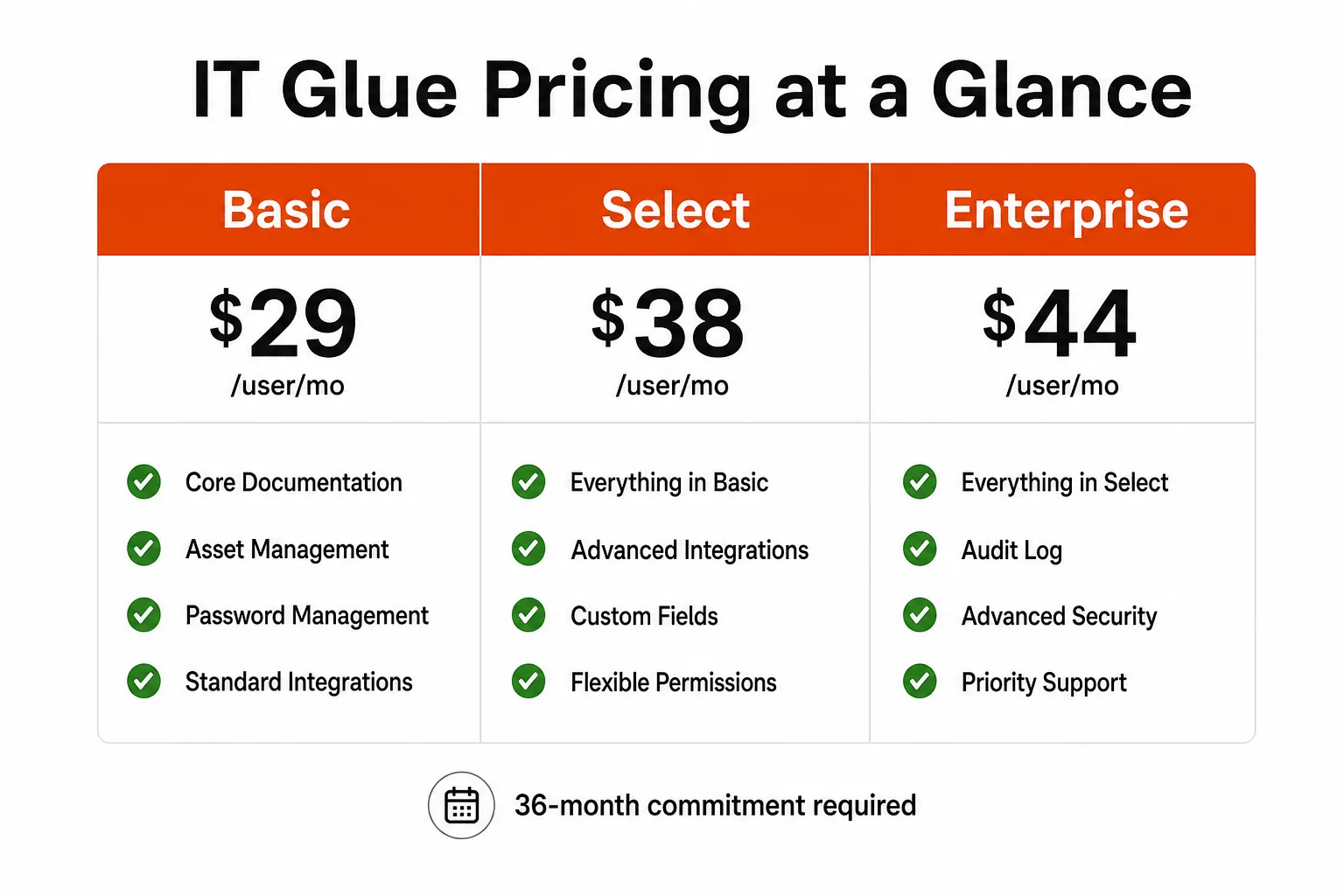
| Plan | Price | Key difference |
|---|---|---|
| Basic | $29/user/month | 1 integration, one-way PSA/RMM sync |
| Select | $38/user/month | 2 integrations, two-way sync |
| Enterprise | $44/user/month | Unlimited integrations |
All three tiers include IT Glue's AI features and the Smart SOP Generator. The 36-month commitment is non-negotiable (a legitimate criticism - it's a long lock-in for a platform you're still evaluating), and there's a one-time onboarding fee that can't be waived.
Add-ons worth knowing about:
- Ninja Glue ($453/month): automated device and password documentation, auto-discovery of ports, Microsoft users, BitLocker keys. Significant time savings for larger shops.
- My IT Glue / MyGlue ($407/month): the client-facing portal, secure password manager for end users, custom branding.
- myITprocess ($199-299/month): QBR builder and strategic roadmap tool. Can be purchased independently without an IT Glue subscription.
For a 10-person MSP team on the Basic plan: $290/month for the platform, AI included. That's a reasonable number relative to the documentation overhead it eliminates - Appalachia Technologies reported 87% reduction in response times and 6+ hours freed per technician per month after implementing IT Glue's AI features.
What IT Glue AI doesn't do
Being straight about the limits is the useful thing here.
It doesn't execute work. IT Glue's AI helps technicians find information, document what they've done, and keep records clean. It doesn't reset passwords, unlock accounts, run RMM scripts, or complete L1 tasks autonomously. It's a knowledge layer, not an execution engine. If a technician still needs to touch the ticket, the AI is helping them work faster - it's not replacing the work.
It's browser-based first. The Smart SOP Generator captures browser workflows. Deep desktop or endpoint work (RMM direct console sessions, certain legacy tools) isn't captured, though RMM session support has been added.
Kaseya Assist is only as good as your docs. The conversational search feature doesn't pull from external knowledge - it queries your IT Glue instance. A well-documented environment gets smart answers. An under-documented environment gets nothing useful.
The Autotask AI is a different product. If you're evaluating Kaseya's AI specifically for documentation, isolate the IT Glue side. The Autotask Cooper Copilot (Smart Ticket Triage) gets consistently weaker reviews from people who've used both.
36-month commitment is real lock-in. At $29-44/user/month on a 3-year contract, you're committing to a meaningful spend before you've proven adoption internally. The 30-day free trial helps, but the conversion terms are worth scrutinizing before signing.
Real MSP results from IT Glue's AI features
The Appalachia Technologies case study is the most documented outcome in IT Glue's AI story:
"IT Glue has this feature that allows you to basically record the steps you take for a procedure and automatically document it. This is an amazing feature and creates an easy way to create documentation that can easily be shared with team members."
- Verified reviewer, Software Advice
Specific numbers from Appalachia: 95% automation rate, 62% reduction in ticket resolution times, 87% reduction in response times. These are big claims - and they're attached to an actual named customer with documented implementation, not an anonymous testimonial.
Even in r/sysadmin threads where IT Glue takes criticism for broader product stagnation under Kaseya ownership, the AI documentation features get called out as "one of the last updates I liked the most." That's a specific positive exception in an otherwise critical discussion - the kind of signal worth paying attention to.
The IT Glue AI features page (and what the platform looks like)
For those who want to see the full feature set in motion before committing to a trial, IT Glue's AI-powered documentation page walks through each capability with demos and documented outcomes.
The Smart SOP Generator free trial via the Chrome Web Store is the fastest way to see the documentation automation in practice without committing to a full platform evaluation.
Where IT Glue AI fits in the MSP stack (and where it doesn't)
IT Glue with its AI features is a documentation and knowledge management platform. It makes documentation happen automatically, keeps it organized, and makes it searchable. For MSPs who have historically struggled to get techs to document anything - which is most of them - that's a legitimate ROI.
What it doesn't address is the execution problem. A well-documented MSP with IT Glue AI still has a tech manually resetting passwords, manually unlocking accounts, manually running the onboarding checklist. The documentation is better; the tickets still land on a human.
For MSPs evaluating the full L1/L2 automation picture, IT Glue handles the documentation layer. The ticket execution layer - the part where an AI reads the ticket and fixes the issue without anyone touching it - is a separate problem that separate tools are built to solve.
Try Rallied
If what you're really after is AI that handles the ticket itself - reads the inbound request, executes the fix across your PSA, RMM, and identity stack, updates the ticket, notifies the user, and closes it - Rallied is built specifically for that use case.
Rallied integrates directly with ConnectWise, Autotask, HaloPSA, and SuperOps on the PSA side, Datto RMM and NinjaOne for endpoint work, and Entra ID, Okta, JumpCloud, and Google Workspace for identity. It also connects to IT Glue and Hudu to read documentation as context for the work it's executing.
The pricing model is different too: $0.50 per ticket resolved, no monthly base fee, no lock-in. A 10-tech MSP handling 300 L1 tickets per month typically spends $7K-$15K in tech time on that work. At $0.50 per ticket, the math changes significantly. It deploys in the same week you connect your stack - no six-month implementation, no dedicated admin, no workflow builder overhead.
IT Glue AI and Rallied solve adjacent but different problems in the MSP stack. IT Glue keeps the knowledge organized. Rallied uses that knowledge to execute the work. They're not competitors - they integrate.
Frequently Asked Questions
What AI features does IT Glue have?
IT Glue's AI-powered documentation suite includes several distinct capabilities: the Smart SOP Generator (automatic procedure documentation from recorded clicks), AI-powered asset relationship mapping and documentation organization, Kaseya Assist (natural-language search and Q&A), and Cooper Copilot (documentation cleanup and decluttering). All are included at no extra cost across all IT Glue plans. See IT Glue's AI features.
Does IT Glue AI cost extra?
No. IT Glue's AI features are bundled into the core plans - Basic ($29/user/month), Select ($38/user/month), and Enterprise ($44/user/month). There's no separate AI pricing tier or add-on fee. The 36-month commitment and one-time onboarding fee still apply to all plans. See full pricing at itglue.com/pricing.
How does the IT Glue Smart SOP Generator work?
The Smart SOP Generator records a technician's actions in real time via the IT Glue browser extension - every click, keystroke, and tab switch gets captured. When you stop recording, the AI structures those actions into a numbered, step-by-step SOP with screenshots, auto-saved directly to IT Glue. Over 100,000 SOPs have been created using the feature since its launch. Try the Smart SOP Generator.
What is Kaseya Assist in IT Glue?
Kaseya Assist is IT Glue's conversational AI assistant. Technicians type plain-English questions and get relevant documentation and contextual answers back - things like 'What assets are related to this user?' or 'Summarize the backup health for this client.' It transforms IT Glue from a place you navigate into a place you query. The constraint: Kaseya Assist searches IT Glue documentation only, not external sources. Good docs in, good answers out - sparse docs in, not much back.
Can IT Glue AI handle ticket resolution automatically?
Not in IT Glue itself. IT Glue's AI is built for documentation, asset management, and knowledge retrieval - it helps technicians find information and keep docs current, but it doesn't resolve tickets autonomously. If you want an AI that actually executes ticket work (password resets, account unlocks, onboarding workflows) without a tech touching it, that's a different category of tool entirely. Rallied is built for that use case.
