MSP service desk automation: what actually works in 2026
TL;DR
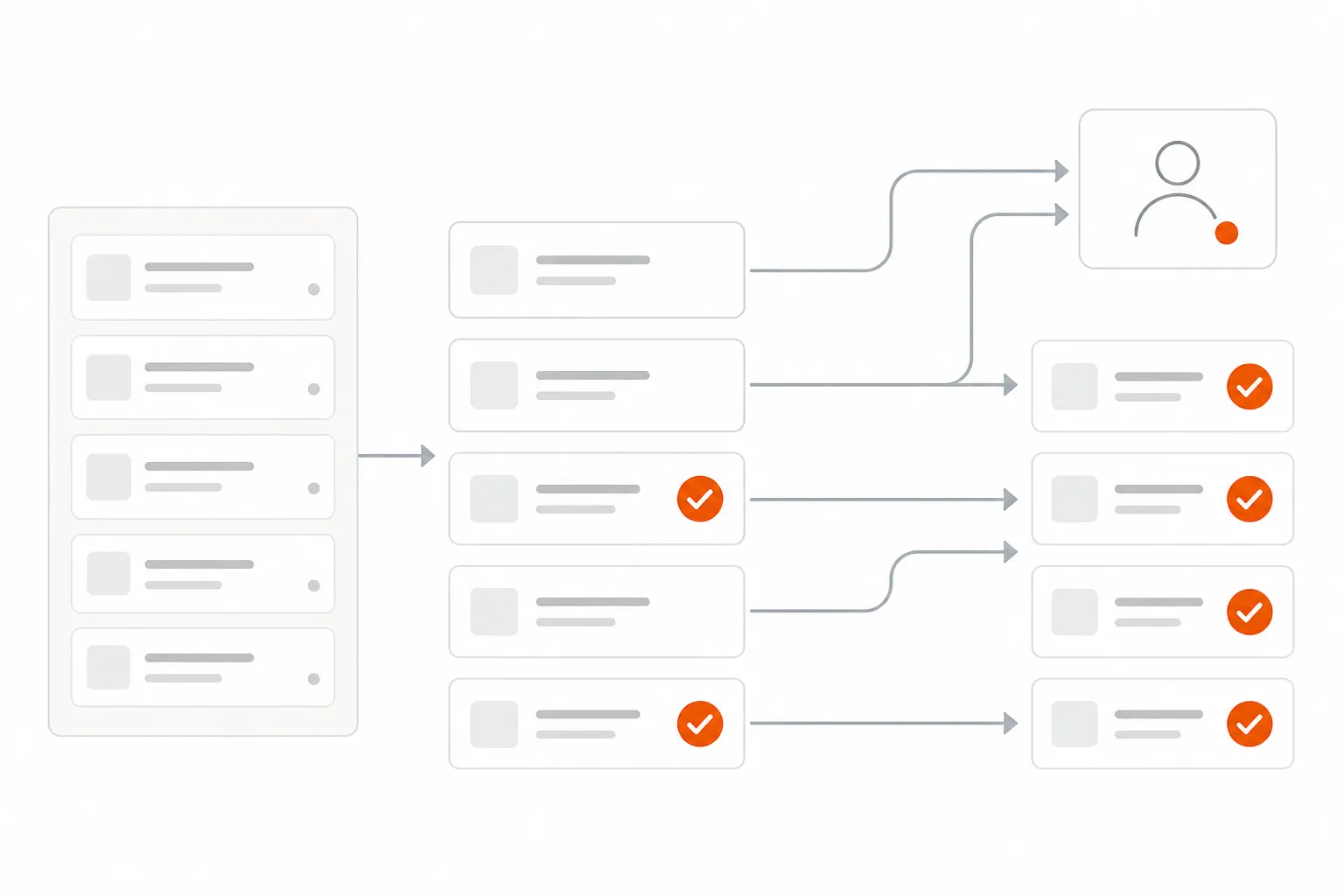
Most MSP service desk automation tools suggest what a technician should do. The ones that actually matter do it for them. Password resets, account unlocks, user onboarding - these account for 40–60% of L1 ticket volume and are fully automatable today. A mid-market MSP running real execution-based automation recovers $7K–$15K/month in technician time. The catch: workflow builders (Rewst, Power Automate) take months to stand up and require constant maintenance. Agentic AI platforms deploy in a week, handle edge cases, and get better over time. Start with password resets, run in observation mode for two weeks, then expand scope. That's the playbook.
If you run an MSP, you know the math doesn't add up. More clients means more tickets. More tickets means more technicians. More technicians means squeezed margins. The promise of automation is that it breaks this equation - and in 2026, it finally can.
But there's a distinction worth drawing early, because it changes everything about how you evaluate tools: there's automation that suggests what to do, and automation that does it.
Most of what's sold as "MSP service desk automation" is the first kind. An AI reads a password reset ticket and posts a note: "I recommend resetting this user's password in Entra ID." A technician reads the note, opens Entra ID, clicks reset, and closes the ticket. That's not automation - that's a slightly faster version of the same manual process.
Real service desk automation does the other thing. It reads the ticket, resets the password, verifies access is restored, notifies the user, and closes the ticket. The technician never opens it.
That distinction - execution vs. suggestion - is the entire ballgame. The rest of this guide is about how to get to execution.
Three ways to automate a service desk (and why most MSPs pick the wrong one)
Not all automation approaches are equal. There are three main paths, and they have very different cost structures, setup times, and ceilings.
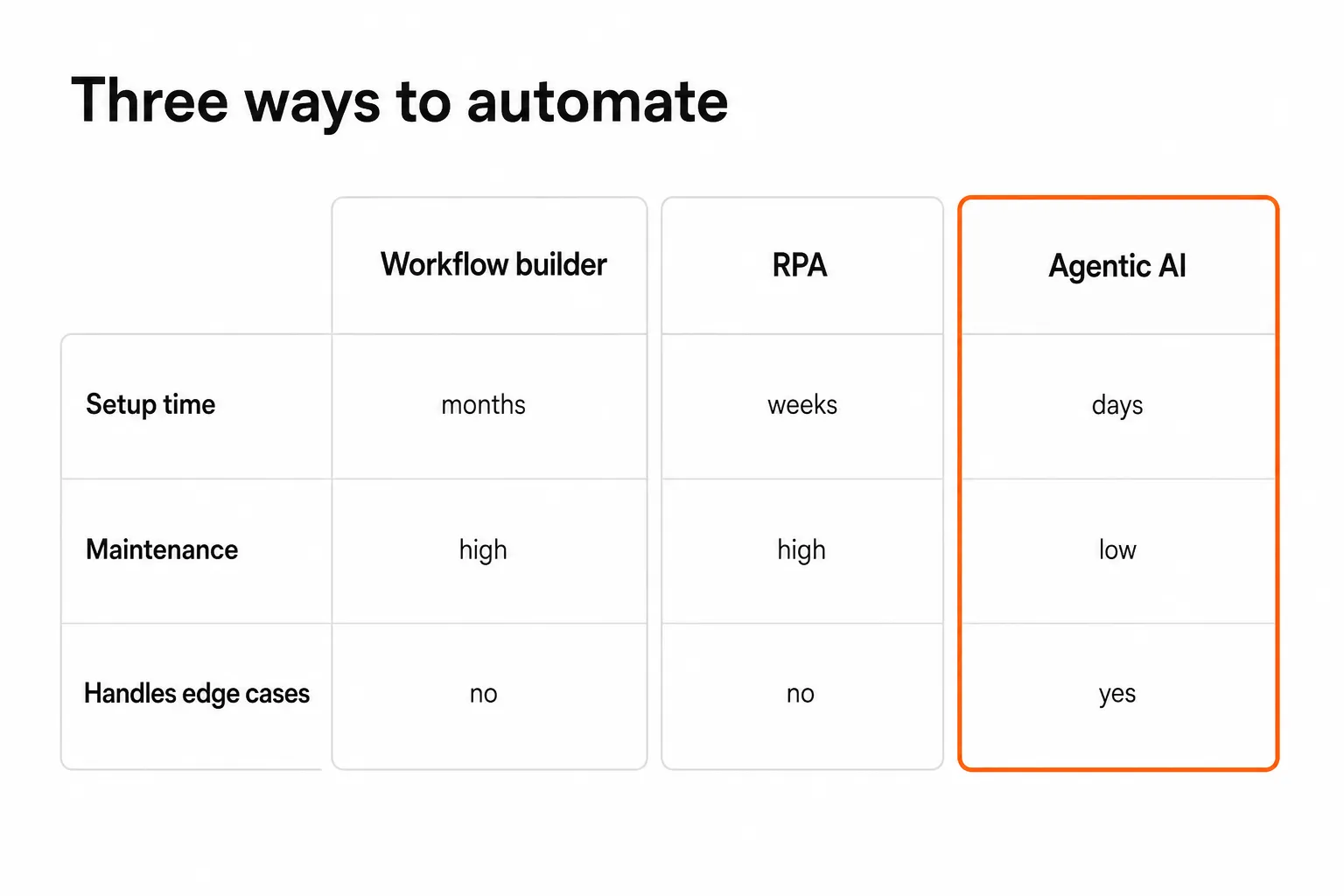
Rule-based workflow builders - tools like Rewst, Microsoft Power Automate, or n8n - are the most common starting point. You design explicit logic: if this ticket type arrives, do these steps in this order. They're flexible for well-defined cases and fast to build for simple flows. The problem is maintenance. Every time a system changes, every time an edge case arrives that your workflow didn't anticipate, someone has to update the rules. At scale, you end up with an MSP employee whose full-time job is maintaining workflows. That's expensive, and it's not what you hired an automation tool to create.
RPA (Robotic Process Automation) - platforms that mimic human actions on UIs - has been around for years and has real strengths for legacy systems without APIs. It's brittle (UI changes break scripts) and slow to set up, but it can reach places that APIs can't. For MSPs, it's mostly relevant for edge-case integrations where better options don't exist.
Agentic AI - AI systems that read context, make judgment calls, and execute actions across multiple integrated systems - is the new category. Rather than explicit if-then logic, the agent understands intent. A ticket that says "Hey, my laptop keeps crashing when I open Excel" isn't a standard template, but an agent can read it, check device status in your RMM, pull relevant documentation from IT Glue, and either resolve it or route it with full context attached. Edge cases, which break rule-based systems, are where agents shine.
The practical difference for MSPs:
| Rule-based workflow | RPA | Agentic AI | |
|---|---|---|---|
| Setup time | Weeks–months | Weeks | Days |
| Handles edge cases | Rarely | Rarely | Yes |
| Maintenance burden | High | High | Low |
| Escalates intelligently | No | No | Yes |
| Example tools | Rewst, Power Automate | UiPath, Automation Anywhere | Rallied, NeoAgent, Pia |
Most MSPs in 2026 are still at rule-based workflows. The ones moving to agentic AI are finding they can get to execution faster, with less maintenance, at lower total cost.
What to automate first
Not everything on your service desk has the same ROI profile. Some categories are fully automatable today with minimal risk. Others still need human judgment. Start with the high-ROI, low-risk work - prove the value, build trust, then expand.
Here's where the math is clearest:
Password resets and account unlocks
This is the bread and butter. Password resets account for 10–30% of all L1 ticket volume across most MSPs. Each one takes a technician 5–15 minutes - find the user, navigate the identity provider, reset, email the user, update the ticket. Automated, it takes seconds.
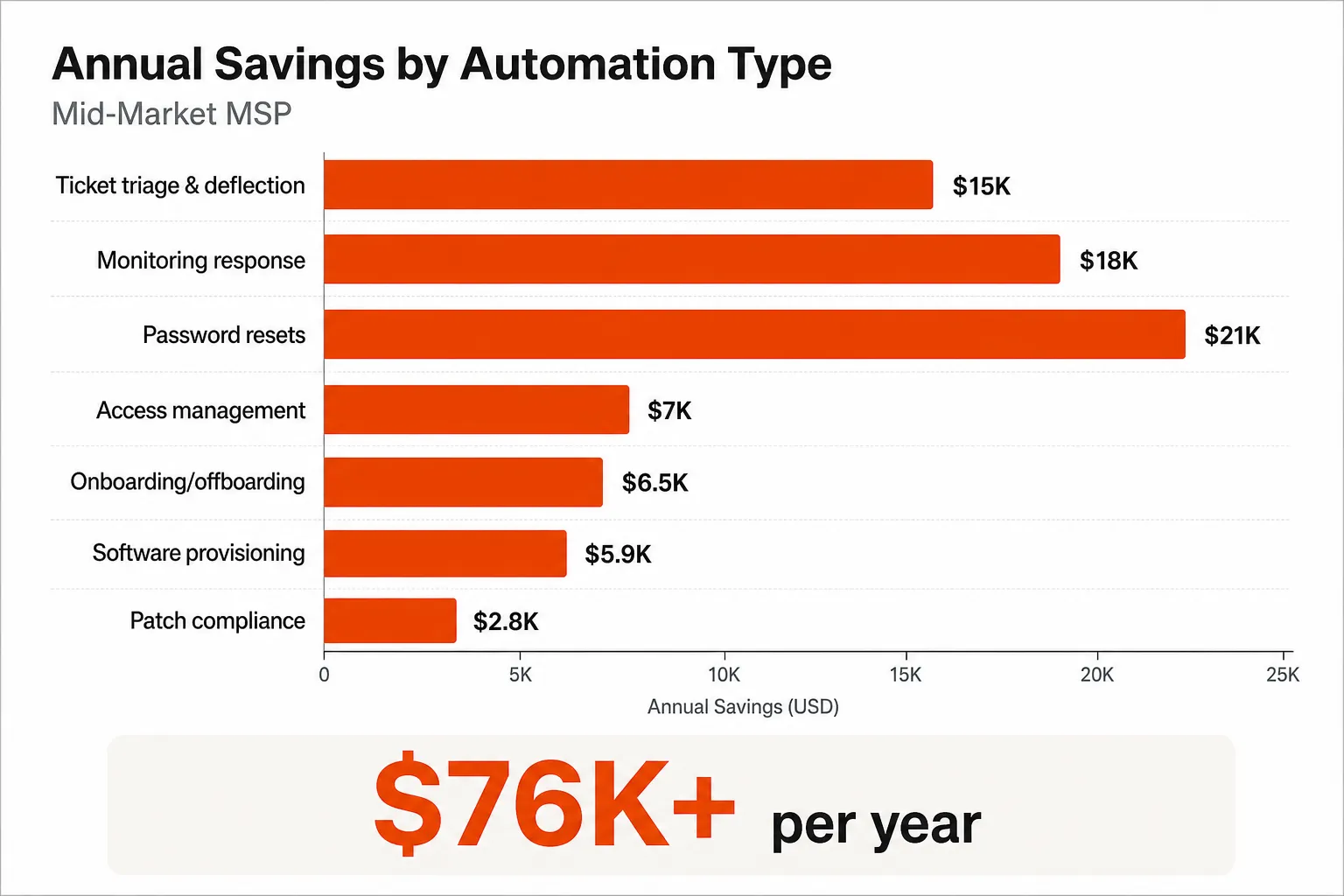
The ROI math: 50 resets per week × 10 minutes each = 8+ hours/week of technician time. At a $50/hour loaded cost, that's $400/week, or roughly $21,000/year from this one ticket category alone.
And it's low-risk. Password resets are the most well-defined use case in the book. The inputs are clear, the outputs are clear, and verification is easy (did the user regain access?). Policy gates - requiring MFA verification before executing, requiring manager approval for sensitive accounts - let you set the right guardrails without breaking the automation.
User onboarding and offboarding
Manual onboarding takes 30–90 minutes per new hire: create the AD account, assign M365 licenses, add to security groups, set up the mailbox, trigger device deployment, notify the manager. Each step touches a different system. Each step is an opportunity for a human to forget something.
Offboarding is even more important to get right. A missed deprovisioning step leaves a former employee with system access. That's not just an embarrassing oversight - it's a security incident. Automation doesn't forget steps.
For a mid-market MSP with 10 onboardings and 5 offboardings per month, automating this flow saves roughly $6,500/year in direct technician time. The security risk mitigation on offboarding is worth as much again.
Ticket triage and intelligent routing
A misrouted ticket is a double-cost: the wrong technician spends time on it before routing it correctly, and the resolution is delayed. Manual triage by junior staff is error-prone and inconsistent.
Automated triage - reading the ticket, understanding intent, pulling relevant docs from IT Glue or Hudu, routing to the right queue - saves 3–5 minutes per ticket. At 100 tickets/week, that's 300–500 minutes of triage time recovered. But the bigger win is deflection: when triage connects the ticket to a self-service resolution (e.g., "this is a password reset - here's the self-service link" or just doing it automatically), 15–20% of tickets never need a human at all.
Combined, intelligent triage is worth roughly $15,000/year for a mid-market MSP.
Monitoring alert response
Most monitoring alerts get looked at by a human, resolved in 5–10 minutes, and closed. Many of those resolutions are identical: restart the service, clear the cache, trigger the backup retry. Automating the response to known alert types - with escalation for anything that can't be auto-resolved - saves 40–60% of alert-handling time and eliminates the "eyes-on-screen at 3 AM" tax on your on-call rotation.
At 500 alerts per month, 50% automated, the savings run $12,000–24,000/year depending on your loaded technician cost.
The combined picture
For a mid-market MSP managing 200–400 tickets per month across a typical client base, the realistic savings across all automation categories add up to $76,000+ per year - roughly 50–100 hours per month of technician time freed. That's the equivalent of hiring a full-time technician without the salary, benefits, or training overhead. Most MSPs redeploy that time into higher-value work: strategic consulting, client QBRs, vCIO services, proactive monitoring.
"A practical 2026 playbook for MSPs and internal IT teams: use AI to cut Tier-1 ticket load, accelerate resolution, and standardize runbooks across RMM/PSA." - Valk (@AdValoremGP) on X
The workflow-builder trap
Here's the problem: most MSPs that try to automate their service desk reach for a workflow builder first. Rewst is the most common one in the MSP space. It's a good product. It can do a lot. The issue is what it costs to get there.
A real Rewst implementation takes 6+ months and typically requires either a dedicated internal admin or a forward-deployed engineer. You're not configuring a setting - you're building and maintaining a library of workflows, each of which breaks when a system changes, each of which has to be manually updated to handle edge cases.
Rallied's founder Amaresh Ray has been direct about this in public: "I know that low-code, no-code tools like Rewst are not long..." - the argument being that the maintenance burden of workflow builders grows with your client base, creating exactly the kind of dedicated-admin overhead that automation was supposed to eliminate.
This isn't unique to Rewst. Every rule-based workflow tool has this ceiling. The workflows are only as good as the rules you write, the rules break when systems change, and someone has to keep them current. For a large MSP with dedicated internal engineers, that can work. For a 10–50-person shop, it's often too expensive to maintain.
The alternative isn't to give up on automation. It's to pick tools that don't require you to be the engineer.
Why agentic AI changes the math
The shift from rule-based to agentic automation changes three things that matter to an MSP owner:
Setup time goes from months to days. An AI agent doesn't need you to define every if-then branch upfront. You connect your PSA, your RMM, and your identity provider. The agent reads tickets, understands intent from natural language, and figures out the execution path. There's no workflow library to build from scratch.
Edge cases don't break the system. A workflow breaks when it encounters something its rules didn't cover. An agent handles ambiguity by asking a clarifying question, pulling relevant documentation, or escalating intelligently with full context. The service desk doesn't freeze - it degrades gracefully.
Maintenance stays low. When Entra ID changes an API endpoint, or you add a new PSA, the agent adapts rather than requiring you to rewrite a library of workflows. The model generalizes; the rule set doesn't.
The practical result: an MSP running agentic AI automation can cover 40–60% of ticket volume autonomously within weeks, not months. The tickets that do reach technicians arrive with full context, relevant documentation already attached, and a clear escalation path.
"The key is being able to control exactly what it automates, so you can start with just ticket triage and build confidence from there." - r/msp community member
Plan mode and Execute mode: how to build trust without burning anything down
The MSP community is appropriately skeptical about autonomous AI touching production systems. A tool that confidently resets the wrong account or grants access to the wrong group creates more work than it saves - and erodes client trust in ways that take months to recover.
The right rollout isn't "flip the switch and hope." It's a two-phase approach that lets you watch the agent work before it works alone.
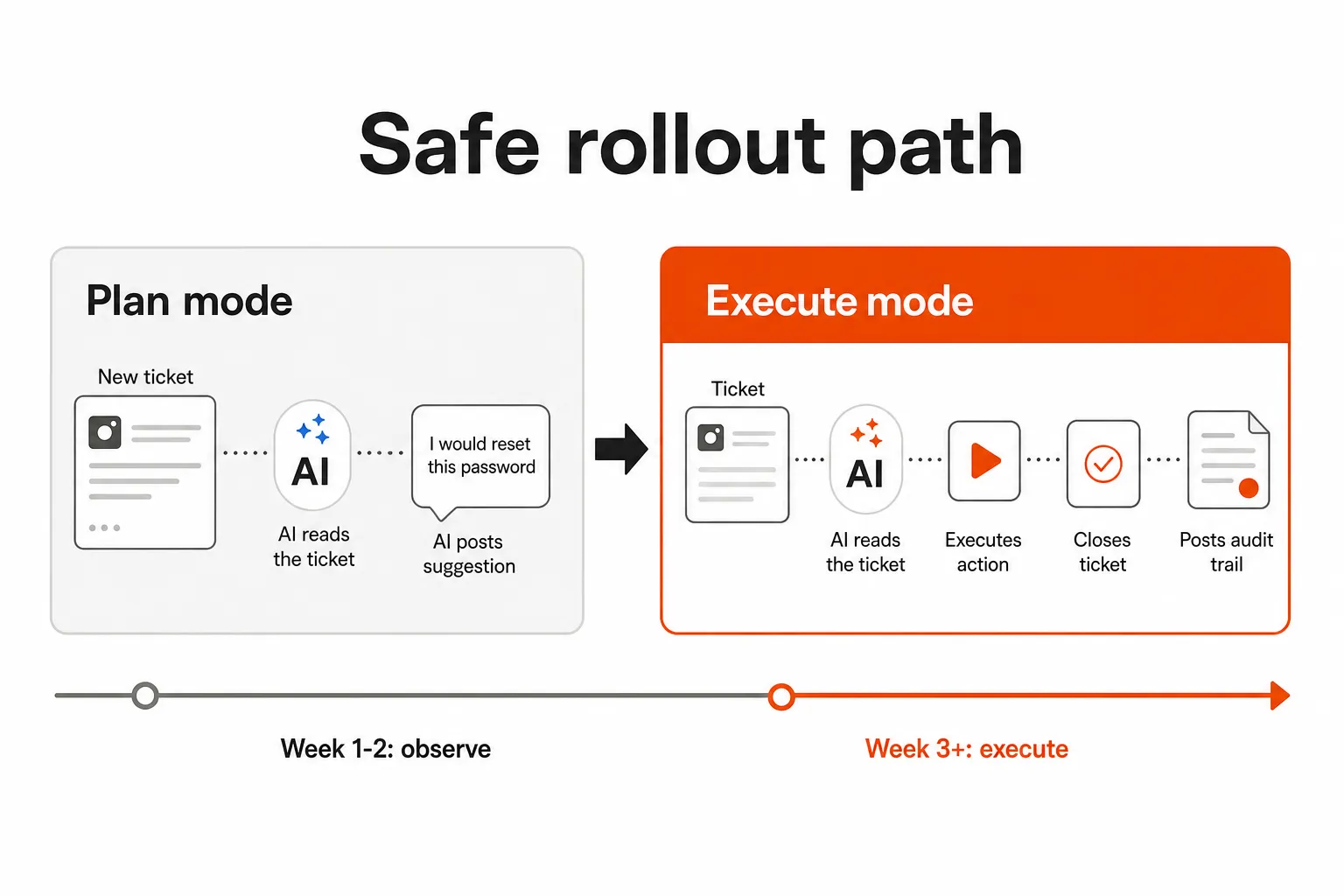
Plan mode (weeks 1–2): The agent reads every ticket and diagnoses the issue, but doesn't execute. Instead, it posts a detailed internal note: "I would reset this password now - here's exactly what I'd do and why." Your technicians review each recommendation. You're watching the agent think, not watching it act. This is where you catch misconfiguration, edge cases the agent doesn't handle well, and clients with unusual setups.
Execute mode (week 3+): Once you've seen the agent's reasoning on a few hundred tickets and it's landing correctly, you flip categories to Execute mode. Password resets go fully autonomous. Account unlocks go autonomous. Each action is logged with a complete audit trail: what happened, when, why, and verification that it worked. Human approval gates stay in place for sensitive actions (C-suite accounts, shared admin credentials, anything your team flags as high-risk).
Most MSPs run in Plan mode for one to two weeks before expanding to Execute. Some categories - monitoring alert response, basic triage - can go to Execute faster. Others - complex onboarding for roles with custom app requirements, offboarding for sensitive roles - might stay in Plan mode longer while you tune the policies.
The audit trail throughout both modes is non-negotiable. Every action the agent takes is documented in the ticket: what it did, the timestamp, the policy applied, and verification of success or failure. That paper trail matters for your clients and for your own QA process.
What automation still won't handle
Worth being honest about this: agentic AI in 2026 is good at high-volume, well-defined L1 and some L2 work. It's not a substitute for experienced technician judgment on complex issues.
Complex troubleshooting - intermittent crashes, network architecture problems, vendor-specific edge cases - still needs a human. Strategic questions ("should we migrate this client to Azure?") definitely do. Physical work - device imaging, hardware replacement, on-site installs - can't be automated remotely.
The goal isn't to eliminate your service desk team. It's to get them off the password reset hamster wheel so they can do the work that actually requires their expertise. The MSPs getting this right in 2026 aren't shrinking their teams - they're growing revenue per technician by redeploying that recovered time into consulting, vCIO work, and proactive managed services that command higher margins.
"48% of MSPs say AI and automation will be the top IT or service need for their clients in 2026. At the same time, only 13% say they've turned it into meaningful revenue." - Flexpoint MSP Survey, 2026
That gap - between MSPs who've heard the pitch and MSPs who've actually captured the value - is the opportunity.
Try Rallied
Rallied is an AI technician built specifically for MSPs. It connects to your PSA (ConnectWise, Autotask, Halo PSA, SuperOps), RMM (Datto, NinjaRMM), identity providers (M365, Entra ID, Okta, JumpCloud, Google Workspace), and documentation (IT Glue, Hudu) - and actually resolves tickets, not just categorizes them.
Pricing is $0.50 per ticket worked, with a 500-ticket/month plan at $250/month. No base fee, no implementation consulting, no dedicated admin required. 14-day free trial with $50 in credit, no card needed. Most MSPs are running in Execute mode on their first ticket category within a week of connecting their stack.
If you're spending more than you should on L1 grunt work, it's worth a look: rallied.ai.
Frequently Asked Questions
What is service desk automation for MSPs?
Service desk automation for MSPs refers to using software - whether rule-based workflows, RPA, or agentic AI - to resolve support tickets without manual technician intervention. The most valuable version doesn't just route or suggest actions; it executes them: resetting passwords, unlocking accounts, onboarding users, and closing tickets end-to-end. Tools like Rallied are purpose-built for this kind of execution-first automation at MSP scale.
How much does service desk automation cost for an MSP?
Costs vary widely by approach. Workflow builders like Rewst start around $300–500/month for smaller MSPs but require significant internal setup time (often 6+ months and a dedicated admin). AI agent platforms like Rallied charge $0.50 per ticket worked, with a 500-ticket/month plan at $250/month - no base fee, no seat licenses, no implementation consulting. For a mid-market MSP automating 200–400 L1 tickets per month, the math on per-ticket pricing often wins.
What should MSPs automate on their service desk first?
Password resets and account unlocks are the single highest-ROI starting point - they represent 10–30% of all L1 ticket volume, each takes 5–15 minutes manually, and they're fully automatable with no edge cases. After that: user onboarding and offboarding (30–90 minutes per event, high error risk), ticket triage and intelligent routing, and monitoring alert response. See the full Rallied use case breakdown for each category's expected ROI.
How long does it take to set up service desk automation?
It depends heavily on the approach. Traditional workflow builders (Rewst, Power Automate) take 3–6 months to stand up meaningfully, often requiring a dedicated admin or forward-deployed engineer. AI agent platforms built for MSPs - like Rallied - are designed for same-week deployment: connect your PSA, RMM, and identity provider, run in Plan mode for a week to validate, then flip to Execute. No 6-month implementation project.
Will AI replace MSP service desk technicians?
Not entirely, and not in the near term - but it will fundamentally change how service desk teams spend their time. AI handles the high-volume, low-complexity L1 work (password resets, access requests, triage). That frees technicians for L2/L3 work, client relationship management, and strategic consulting - higher-value work that's harder to automate and more profitable. The MSPs winning in 2026 aren't replacing headcount; they're redeploying it.