HaloPSA AI automation: what works and what doesn't

TL;DR
Halo PSA is a solid system of record for MSPs-great at ticketing, triage, and workflows. But when it comes to autonomous ticket resolution, its native AI sits somewhere between "helpful suggestions" and "actually fixing the problem." Most MSPs find themselves asking the same question: How do we get tickets resolved without human approval on every single action? Halo excels at the intake side. It's weaker on the execution side. That gap is where a lot of MSPs look for a second layer. Rallied fills it by connecting to Halo, executing L1/L2 tickets autonomously (password resets, account unlocks, onboarding, access provisioning), and closing them back in Halo with audit trails intact. If you're running Halo and wondering why you're still burning 60+ hours a month on password resets, this is the answer.
What is Halo PSA, and why MSPs choose it
Halo PSA is positioned as the modern, straightforward alternative to the heavyweight PSAs (ConnectWise, Autotask). It does what a PSA should: ticketing, client management, RMM integration, time tracking, invoicing. It's used by MSPs ranging from 5-person shops to 100+ tech teams, and the pitch is consistent: deploy fast, keep it lean, automate what you can.
MSPs choose Halo for three reasons. First, speed-you're live in a week, not six months. Second, simplicity-the UI doesn't require a dedicated PSA admin to keep it running. Third, integration-it connects to the RMM, M365, identity providers, and documentation platforms most MSPs already own. It's pragmatic, not feature-heavy.
Halo PSA pricing breakdown
| Plan | Price per Tech | Billed | Best for |
|---|---|---|---|
| Starter | $25/month | Monthly per technician | Solo techs, part-time support |
| Professional | $40/month | Monthly per technician | Growing teams (5–20 techs) |
| Enterprise | Custom | Custom terms | 20+ techs, custom workflows |
The pricing model is per-technician (roughly $25–$50/tech/month), which scales predictably and doesn't penalize you for ticket volume. That appeals to shops running high-volume support-they're not paying per ticket like some competitors. Halo's community on Reddit and in MSP forums is generally positive. People like the speed of deployment and the straightforward feature set. The most common complaint? It doesn't do as much automation as we hoped.
Halo's native AI and automation: the honest take
Halo has leaned into GenAI over the last 18 months. The native capabilities include:
Email generation and drafting. Halo can suggest customer-facing responses based on ticket content. This works well for routine replies-it saves typing, catches typos, and generally sounds professional. Most MSPs appreciate this for its ability to speed up communication without requiring manual review on every ticket.
Ticket classification and triage. Halo's AI categorizes incoming tickets (password reset, hardware issue, software install, etc.) with decent accuracy. This feeds into auto-routing, so tickets land with the right tech. Works especially well for high-volume, predictable ticket types.
Workflow automation. You can build if-then rules: if a ticket comes in tagged "password," assign to tier 1, set priority to routine, add a template response. Halo executes these rules reliably. It's not particularly deep, but it's stable.
Knowledge suggestions. When a ticket lands, Halo can suggest relevant help docs or previous solutions. This is useful for newer techs and helps surface tribal knowledge.
Where Halo's native automation doesn't go: it doesn't execute actions outside the PSA itself. It won't reset passwords in Active Directory. It won't unlock M365 accounts. It won't provision cloud resources. It won't change RMM settings. It will suggest that a human do those things, but it doesn't do them. This is the crucial limitation.
Why is that a problem? Because 40–60% of L1/L2 tickets in most MSP shops are account resets, unlocks, provisioning, and similar administrative actions. These are the tickets that should be getting resolved in 30 seconds, not handed to a junior tech for 10 minutes of manual work. Halo's native automation handles the intake beautifully. It falls short on the execution.
Community feedback on Reddit and G2 reflects this. MSPs say things like: "Halo is great until I actually need to fix something," and "We love the UI, but we still need another tool to actually resolve tickets." The sentiment isn't negative-it's recognition of the gap.
How Halo handles ticket automation: the workflow
Here's what actually happens in a typical Halo ticket flow:
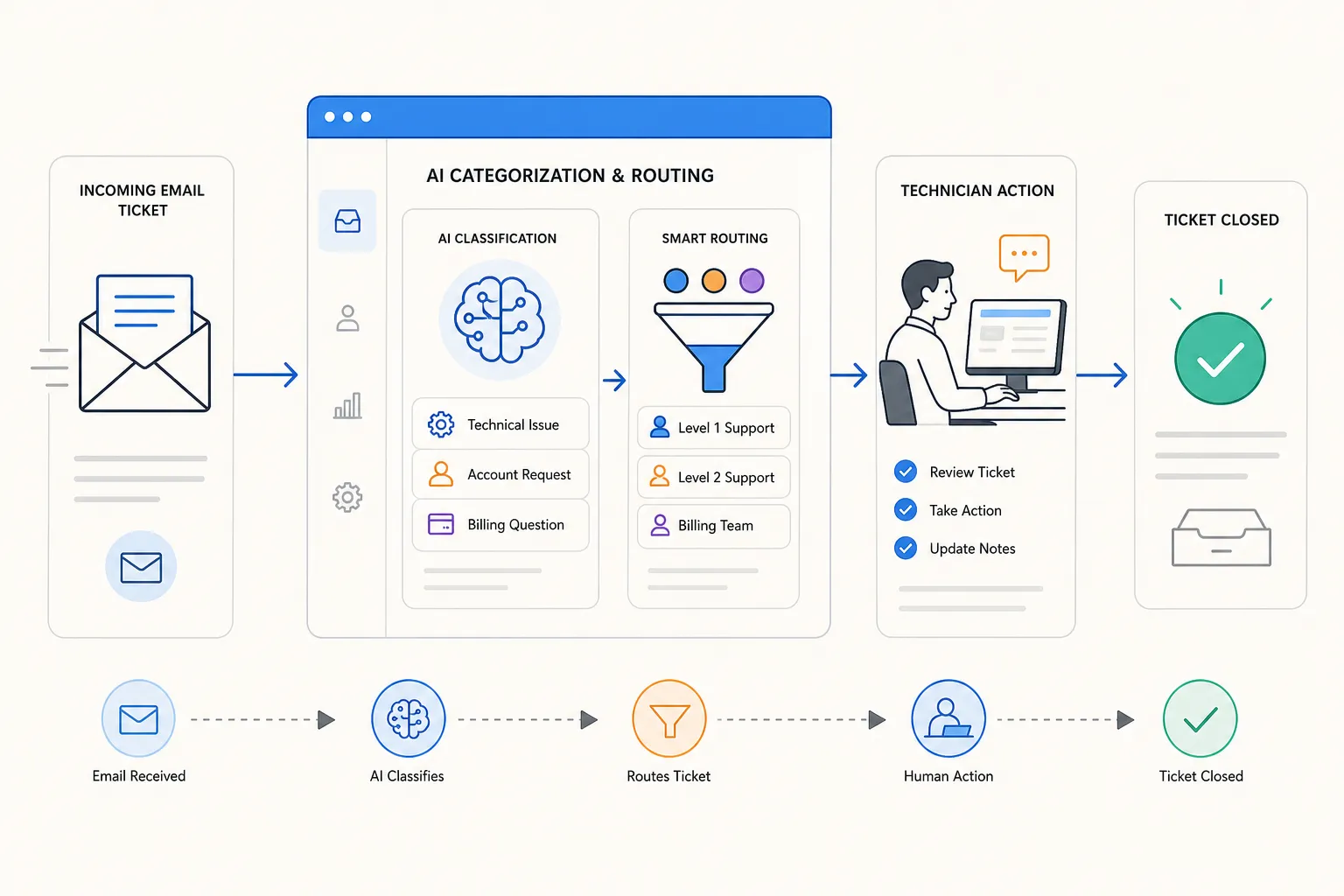 Ticket intake. A customer emails the helpdesk address. Halo's email connector pulls it in, categorizes it (usually correctly), and assigns it to a queue.
Initial triage. AI suggests a priority level and category. A routing rule sends it to the right tech or queue.
Assignment. The tech gets notified. They open the ticket.
Suggestion. Halo suggests a response template and maybe a help doc. The tech reviews the suggestion, edits it if needed, sends a reply.
Manual action. If the ticket needs something done outside Halo-reset a password, unlock an account, add a user to a group-the tech manually does it in another system. This is where the time actually goes.
Closure and billing. The tech closes the ticket in Halo (logging time), which triggers invoicing.
This workflow works. It's not slow. But it requires human judgment and manual actions at multiple points. The human isn't sitting idle-they're actively doing the work. That's the honest limitation.
What this means: Halo's automation is really task delegation (figuring out what to do and who should do it). It's not autonomous execution (actually doing it without human approval). These are fundamentally different things.
Real MSP use cases on Halo: Where it shines, where it doesn't
| Use Case | Halo's Strength | The Gap | Fully Resolved With? |
|---|---|---|---|
| Password resets | Routes correctly, tracks ticket | Tech still manually resets in AD/M365 | Autonomous execution layer |
| Account unlocks | Detects & categorizes | Manual unlock in identity system | Autonomous execution layer |
| Onboarding | Excellent checklist tracking | Can't execute provisioning steps (licenses, groups, email) | M365 integration + execution |
| After-hours tickets | Can triage & draft reply | No one there to approve/execute | Autonomous 24/5 execution |
| VPN troubleshooting | Can suggest solutions | Can't check RMM or VPN settings directly | RMM + automation layer |
| Complex multi-step issues | Can create workflow checklist | Requires judgment + cross-system actions | Human judgment + execution tools |
The execution gap: Halo vs. Halo + Rallied
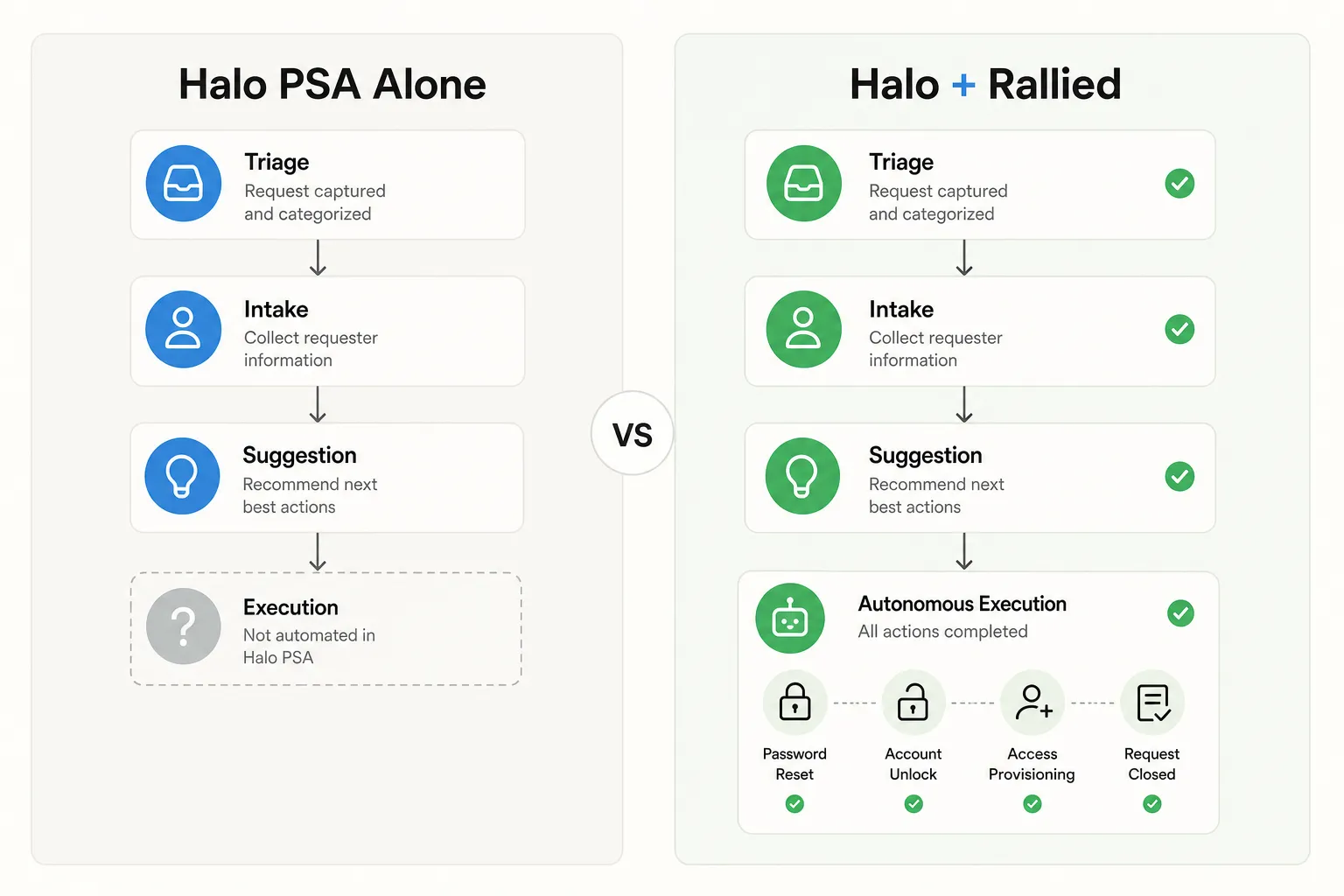 Halo PSA alone:
- ✅ Intake & triage
- ✅ Routing & assignment
- ✅ Suggestion & drafting
- ❌ Autonomous action execution
- ❌ Cross-system orchestration
Halo PSA + Rallied:
- ✅ Intake & triage (Halo)
- ✅ Routing & assignment (Halo)
- ✅ Suggestion & drafting (Halo)
- ✅ Autonomous execution (Rallied)
- ✅ Cross-system orchestration (Rallied)
- ✅ Billing & audit trails (Halo)
Where Halo automation hits its limits
Three concrete gaps emerge from talking to MSPs and reading community feedback:
No direct action execution. Halo can't log into external systems. It can't make API calls to change state in AD, M365, RMM, identity platforms, or cloud services. This means every action that matters still requires a human on the other end.
No judgment or investigation. When a ticket comes in with incomplete information ("I can't log in"), Halo can suggest questions to ask the customer. It can't independently investigate (check if the account is locked, if the password is expired, if MFA is misconfigured, if the device is on the VPN). A human has to do that investigative work.
Approval bottlenecks at scale. Even with automation rules, approval still happens at the action level. If you've set up rules correctly, maybe 30–40% of tickets auto-resolve. The rest need at least one human touch. As your volume grows, this becomes a ceiling.
Limited third-party action chains. Halo integrates with RMM and M365, but the integration is mostly read-only (pull data, populate fields). Actually changing things in those systems via Halo automation is limited. You can't script a complex cross-system action in Halo the way you can in a dedicated automation platform.
Honest take: Halo is a fantastic PSA. It's not a comprehensive automation platform. That's not a flaw-it's a design choice. Halo prioritizes speed of deployment and ease of use. Full automation complexity would work against that.
Real numbers: MSP ROI with and without autonomous execution
Let's put concrete numbers on what changes when you add autonomous execution:
| Metric | Without Autonomous Layer | With Rallied | Change |
|---|---|---|---|
| Daily tickets | 80 | 80 | - |
| L1/L2 resolvable | 35 | 35 | - |
| Manually handled | 35 | 7-10 | -25–28 tickets |
| Tech time on L1/L2 | 280 min/day (4.7 hrs) | 56–80 min/day | -3.3–3.7 hrs/day |
| Monthly tech time saved | - | 70–80 hours | - |
| Cost of tool | - | ~$500/month | - |
| Value of time (at $50/hr billing) | - | $3,500–$4,000/month | +$3,000–$3,500 net/month |
| Payback period | - | 2–3 months | - |
This is why MSPs add a second layer. It's not complexity for complexity's sake. It's math.
Competitive context: Halo vs. ConnectWise, Autotask, and native AI
How does Halo's automation compare to competitors?
ConnectWise + Sidekick. ConnectWise's Sidekick AI can do more sophisticated automation out of the box-it can suggest actions and, in some cases, execute them. But Sidekick also has a steeper learning curve and requires more setup. Halo is simpler but less autonomous.
Autotask. Autotask has solid workflow automation but similar constraints-it's great at orchestrating tasks within the PSA, weaker at executing actions in external systems without human approval.
Freshservice, Jira Service Management. These lean even more heavily on the integration layer. They're not PSA-specific, so automation often requires third-party connectors.
Where Halo stands. In the middle. Simpler to deploy than ConnectWise, less automation overhead than Autotask, but also not the most ambitious in terms of autonomous action execution. It's the pragmatist's choice if you want PSA functionality without a 6-month implementation and a dedicated admin.
The pairing: Halo PSA + Rallied
After 6–12 months running Halo, MSPs typically realize the same thing: Our PSA is good. Our ticketing works. But we're still manually fixing most of the actual problems.
This is where tools like Rallied come in. The pairing works like this:
- Halo's job: System of record. Intake, triage, routing, invoicing, client management.
- Rallied's job: Autonomous execution. Connect to the ticket, gather context (pull user info from AD, check M365 status, query RMM), make decisions (is the password expired or locked? is the license valid?), execute actions (reset password, unlock account, assign license, reboot the device), and close the ticket in Halo.
The workflow:
- Customer emails. Halo receives it, categorizes it as "password reset," assigns it to a queue.
- Rallied sees the new ticket, evaluates if it's something it can handle autonomously (yes-it's a password reset for a known user with valid credentials).
- Rallied connects to AD/M365, performs the reset, logs the action, and closes the ticket in Halo.
- Halo invoices the customer; no human touched the ticket.
This pairing is powerful because:
- Halo stays the source of truth. Client data, ticket history, billing-it's all in Halo. No rip-and-replace.
- Rallied handles the execution gap. It can do things Halo can't without requiring human approval on every action.
- They're complementary, not competing. Rallied doesn't need to be a full PSA; Halo doesn't need to be a full automation platform. They each do one thing well.
- Cost is predictable. Rallied typically runs $0.50–$1.00 per ticket resolved. On a 50-ticket-per-day shop, that's $12.50–$25/day, or $300–$600/month. Most MSPs see ROI within 90 days because they're recovering 50–100 hours of tech time.
The bottom line
Halo PSA is a legitimately good platform. It's fast to deploy, well-integrated with the MSP stack, and delivers real value on the intake and triage side. MSPs like it. Community feedback is solid.
But-and this is the key insight-Halo is best in class at asking "What do we need to do?" and worst in class at answering "How do we do it without a human?" The intake gap has closed (Halo's got that). The execution gap is wider than most MSPs expect.
If your team is small and you're okay with moderate automation, Halo + manual execution is fine. If you're scaling, running higher volume, or competing on speed, the gap becomes painful. That's when a complementary layer like Rallied makes sense.
The pairing isn't either-or. It's Halo doing what it does best (being the PSA) and Rallied doing what it does best (executing actions autonomously). Together, they close the loop.
Try Rallied
Rallied is an autonomous AI technician for MSPs. It connects to your existing stack-Halo PSA, ConnectWise, Autotask, Datto RMM, NinjaRMM, M365, Entra ID, Okta, JumpCloud, IT Glue, Hudu-and autonomously resolves L1/L2 tickets. No workflows to build. No dedicated admin. Deploy in a week, start resolving tickets immediately.
What Rallied does that Halo doesn't: Actually fix the problem. Password resets, account unlocks, access provisioning, onboarding, offboarding, cross-system orchestration. It sits between your PSA and your identity/cloud/RMM stack, gathering context and executing actions that would otherwise require human approval.
Pricing: $0.50 per ticket resolved. No base fee. No long-term contract. Pay only for tickets it actually closes.
Request a demo | See how it works
Frequently Asked Questions
Does Halo PSA have built-in AI for ticket resolution?
Halo PSA has native AI features for email generation, ticket classification, and workflow automation. However, most capabilities are advisory (suggesting actions) rather than autonomous (executing them). For full autonomous resolution—actually changing passwords, unlocking accounts, provisioning access—MSPs typically layer a second solution like Rallied on top.
What ticket types can Halo PSA automate fully?
Halo handles triage, categorization, email drafting, and routing extremely well. It can execute simple automation rules (like auto-assigning by category). Full autonomous execution of complex actions (identity management, M365 provisioning, cross-system orchestration) requires integration with external automation tools designed for that depth.
How do MSPs actually feel about Halo's automation?
MSPs praise Halo's core PSA and triage capabilities. Community feedback shows they appreciate native automation for common workflows but consistently mention gaps: after-hours handling, judgment calls, actions requiring external system access, and multi-step resolution chains. These gaps drive interest in complementary autonomous layers.
Can I use Halo PSA with an autonomous execution layer like Rallied?
Yes. Halo stays the system of record (tickets, clients, billing), while a tool like Rallied connects as the execution layer. Halo triages and routes; Rallied resolves autonomously; Halo closes and invoices. This pairing addresses the limits of native automation while keeping your PSA as the single source of truth.
What's the typical ROI of adding autonomous execution to Halo PSA?
MSPs see 50–100 hours/month freed up from L1/L2 grunt work (password resets, unlocks, provisioning), translating to $7K–$15K/month in billable time recaptured. Cost typically runs $0.50–$1.00 per ticket resolved autonomously. Payback is usually 2–3 months on a 50-ticket-per-day shop.
