Weekly release: Oct 28, 2026

See what the agent is working on, and where it needs you
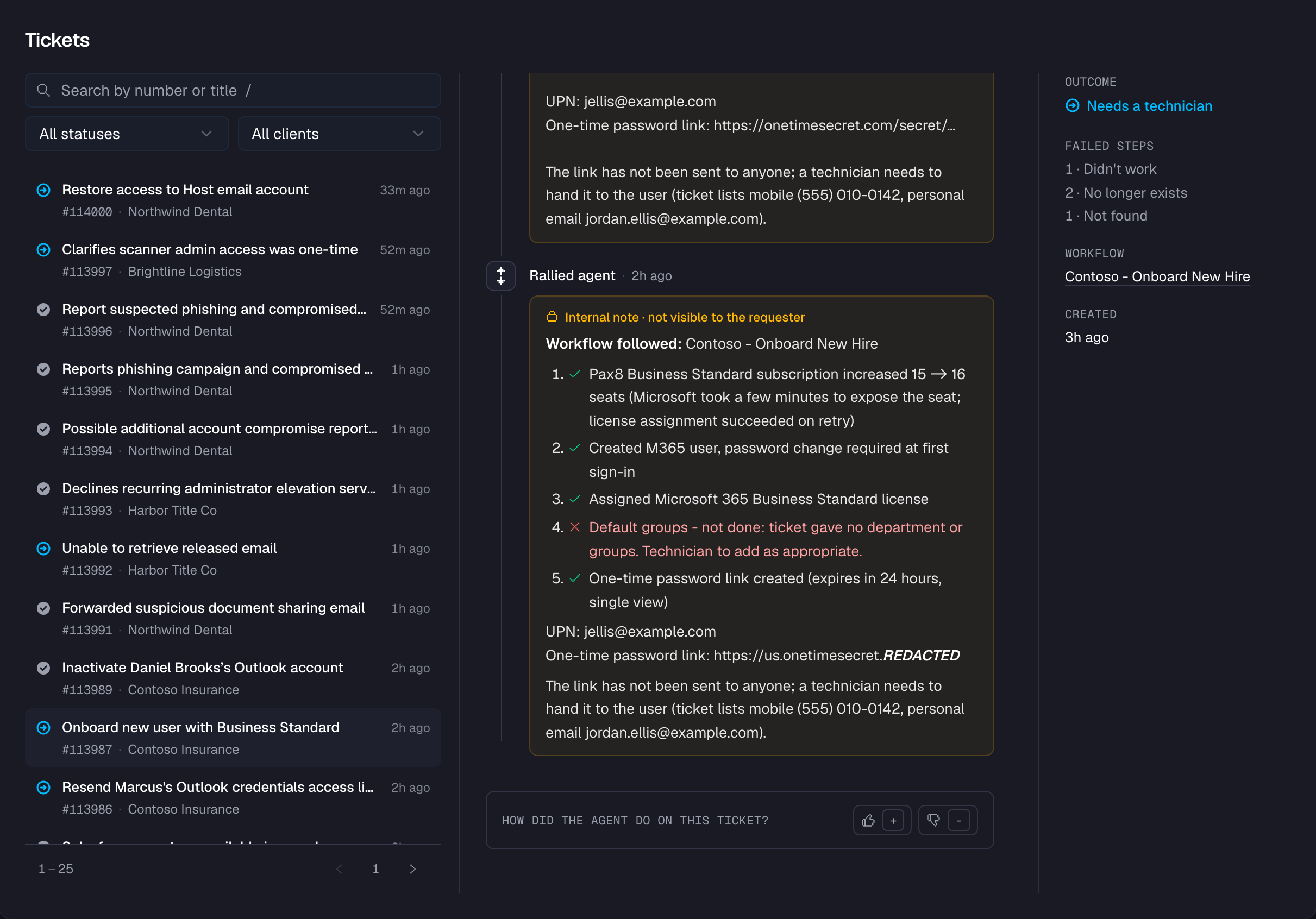
The new Tickets page lists every ticket the agent has worked and where each one landed: closed, waiting on your approval, handed off, or still going. Filter by client or status to find the ones that need you, then open a ticket to see what the agent found, what it did, and what it told the client. If it got something wrong, give it a thumbs down and say what it should have done. It remembers that for the client next time.
New Microsoft 365 tools for the agent
The agent can now do more in your clients' Microsoft 365 tenants. Anything that deletes or blocks waits for your approval.
- Pull a phishing email out of every inbox it reached.
- Block or allow senders.
- Show what is filling a SharePoint site and clear out old file versions.
- Check Defender alerts and a user's recent sign-ins.
- Set auto-replies and calendar permissions in Exchange.
More improvements
- Chat now shows its sources.
- Chat can list every company in Autotask, SuperOps, HaloPSA, Pax8 and Axcient in one go.
- Pick which companies to import from ConnectWise, Autotask or HaloPSA on one screen.
- In HaloPSA, choose which actions and statuses the agent uses.
- In Autotask, client replies no longer land in internal notes.