ConnectWise Manage review 2026: powerful PSA, painful UX
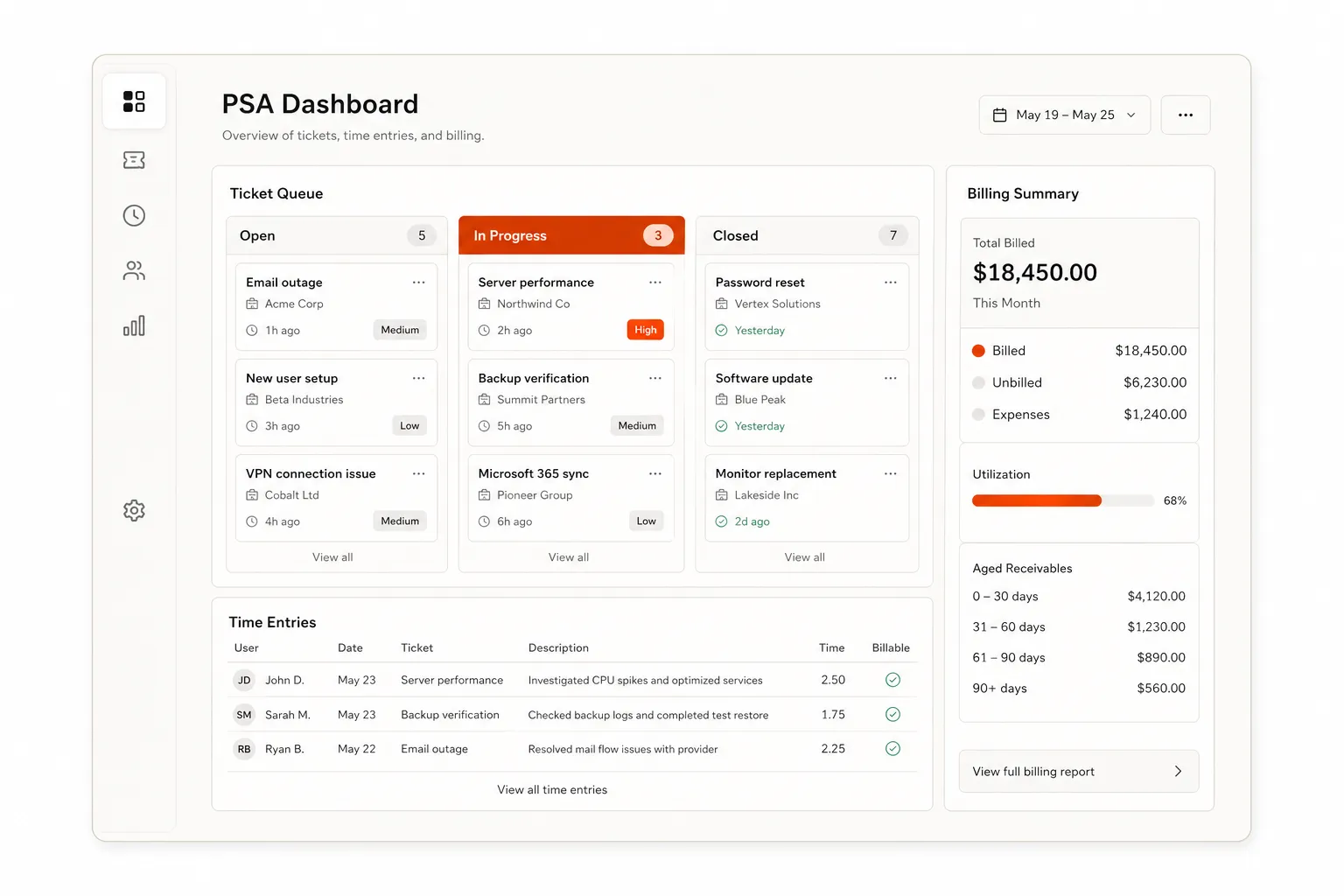
ConnectWise Manage has been the de facto PSA for MSPs for over two decades. At this point, roughly half the shops in the industry either run it or have run it - which means when you ask around, you get honest, unfiltered opinions. The 3.9 out of 5 stars across 525 G2 reviews captures that duality pretty well: nearly half are five-star, but a real chunk sit at three or below.
That spread isn't random noise. It tells you something specific about who this platform works for and who it doesn't.
This review is based on verified user feedback from G2 and MSP community discussions on Reddit's r/msp and r/ConnectWise, plus ConnectWise's own product documentation. No affiliate relationship.
What ConnectWise Manage is
ConnectWise Manage (rebranded as ConnectWise PSA) is a Professional Services Automation platform built exclusively for managed service providers. The core promise: replace the patchwork of tools most MSPs cobble together - a helpdesk here, a spreadsheet for time, an invoicing tool there - with a single platform that handles all of it.
It's built for MSPs with 10 to 200 technicians. Enterprise-scale IT operations tend to outgrow it; pure helpdesks like Zendesk or Freshdesk aren't a comparison - ConnectWise Manage is purpose-built for recurring managed services contracts, not general-purpose ticket queues.
Who it's for
66% of G2 reviewers are from small businesses (50 or fewer employees), with another 27% from mid-market. Enterprise adoption is real but thin at 6%. The product's DNA is small-to-mid MSP: recurring contracts, tech-heavy teams, multi-client environments.
It's the natural choice if:
- You're already running ConnectWise Automate (RMM) and want the integration depth that comes with the same vendor
- Your workflows are complex enough to benefit from serious automation, contract billing, and project management in one place
- You're hiring technicians who already know the platform - a meaningful advantage in the MSP job market, where ConnectWise experience is a common resume line
It's the wrong tool if:
- You want a modern UI your techs won't complain about
- You're not willing to invest two months of configuration before extracting real value
- You're a solo op or sub-10-person shop where the overhead outweighs the benefit
Key features
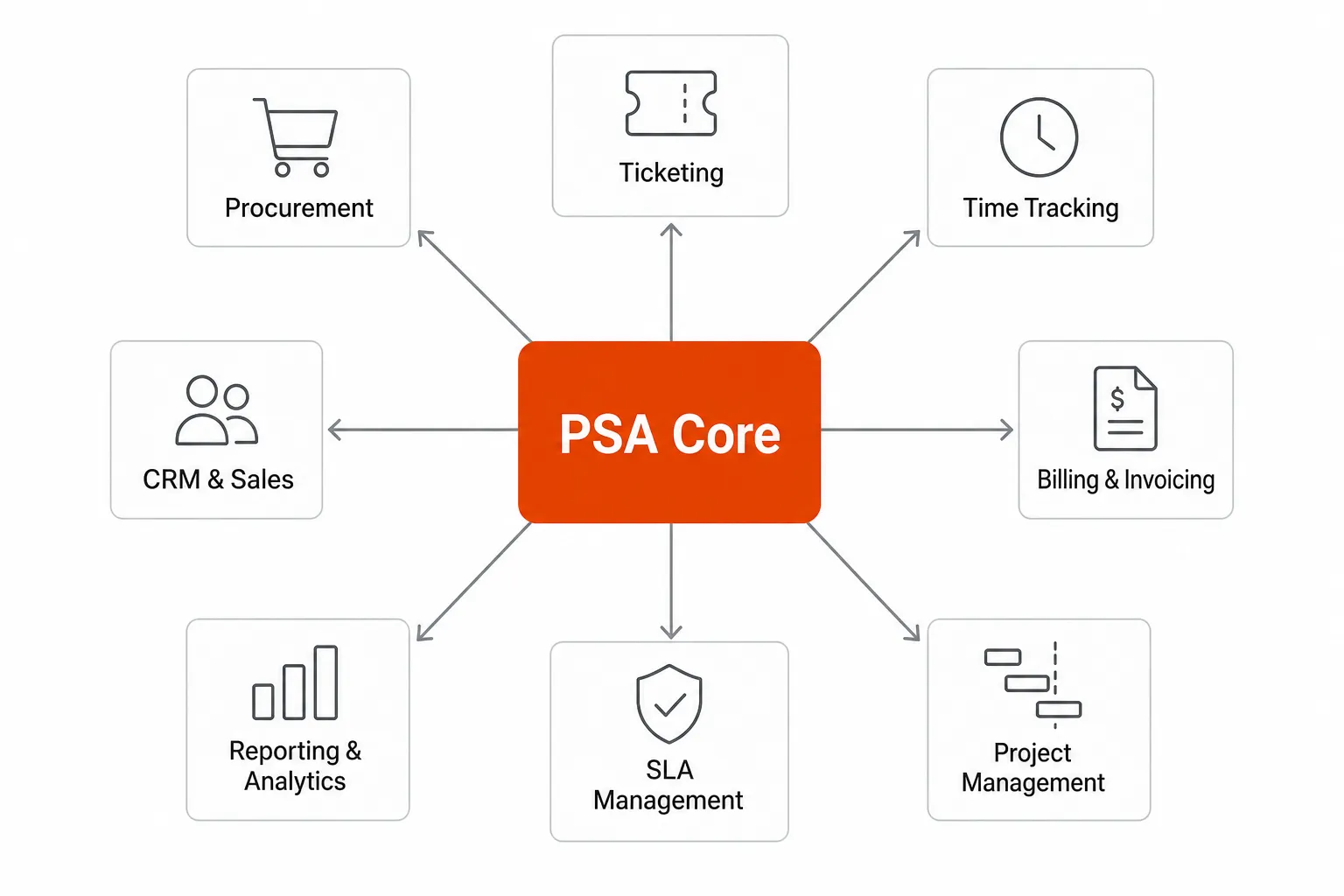
Ticketing and help desk
The core of the platform. Tickets can be routed automatically, assigned by rules, and tracked against SLA commitments. Role-based access means different team members see what they need without noise.
ConnectWise Sidekick, the AI layer built on top of the PSA, integrates with Microsoft Teams and brings ticket context, PSA records, and business insights into the chat interface. It uses ML to accelerate triage and resolution - though community feedback on Sidekick is mixed; the underlying ticketing engine gets more consistent praise.
Time tracking
Enter time by the minute, tagged to a client, project, or task. On paper, this is exactly what billing accuracy requires. In practice, it's where the platform earns its loudest complaints - more on that in the cons section.
Billing and invoicing
Automated recurring billing is genuinely strong here. Contracts feed into invoicing workflows, so what would otherwise be a manual monthly reconciliation becomes largely hands-off once it's configured. For MSPs running fixed-fee contracts across 30+ clients, this alone justifies the platform.
Project management
Multi-phase project tracking with milestone management, resource allocation, and deadline tracking. Not as robust as dedicated project management tools, but functional enough for most MSP delivery work and meaningfully better than a shared spreadsheet.
SLA management
Centralized SLA tracking across clients, with automated escalation workflows when thresholds are approaching. Compliance reporting is built in. This is table stakes for any MSP, and ConnectWise Manage handles it reliably.
Reporting and analytics
Business intelligence dashboards covering KPIs, utilization, revenue, and profitability. Reviewers flag this as a weaker point relative to the ticketing and billing capabilities - the dashboards exist, but some users find them less flexible than they'd like.
Sales and CRM
Integrated pipeline tracking and opportunity management, with data sync between the PSA and CRM workflows. Less feature-rich than a dedicated CRM, but useful for MSPs that don't want a separate Salesforce instance and need basic sales pipeline visibility.
Integrations
This is ConnectWise's strongest card. The integration ecosystem is the broadest in the MSP space: native connectors to ConnectWise Automate, ScreenConnect, QuickBooks, Microsoft 365, Teams, Slack, IT Glue, Hudu, N-able, NinjaOne, and a long list of security and documentation tools. If it's in an MSP's stack, ConnectWise Manage probably connects to it.
Pricing
ConnectWise does not publish public pricing for Manage. Pricing is custom-quoted based on your business size and requirements. G2 data shows an average discount of 10% off list. A free trial is available.
The opacity on pricing is a known frustration in the community. You'll need a sales call to get a number, and several Reddit users flag billing complexity as an ongoing pain point once you're a customer.
What MSPs actually say
The G2 data tells a story of two user populations. Average implementation time is two months; average time to ROI is 16 months. Those numbers suggest the platform rewards patience and upfront investment - and punishes shortcuts.
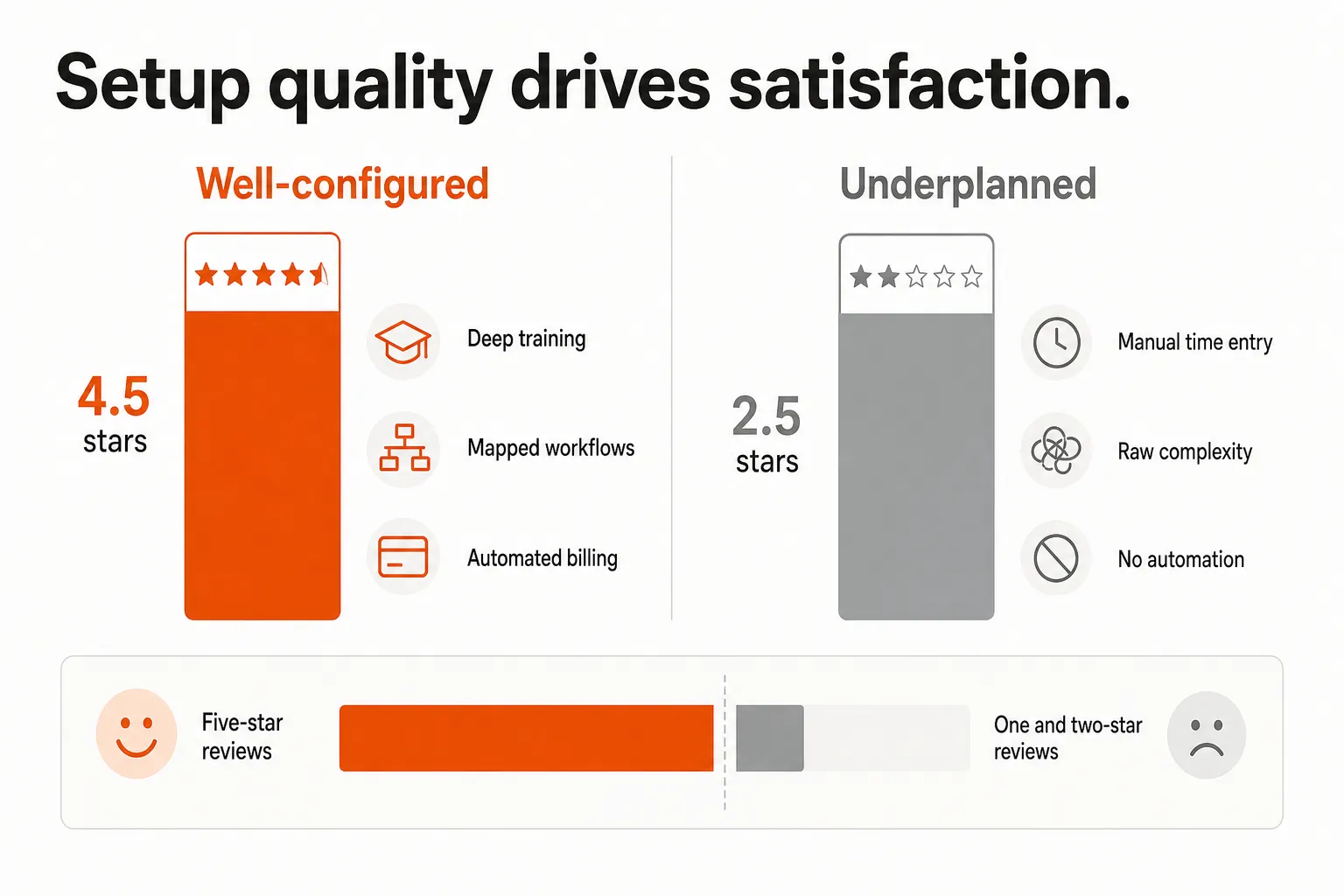
The five-star reviewers tend to describe a platform they've configured carefully:
"What I like most about ConnectWise PSA is that it brings everything into one place. It simplifies ticketing, time tracking, projects, and billing, which cuts down on manual work and keeps things organized." - G2 review
"Automation Automation Automation! Love how flexible the workflows are. Easy to setup schedules/tasks/customer follow ups, etc." - G2 review
The three-star and below reviewers usually describe a platform they underestimated:
"The platform feels clunky and somewhat outdated. Both the backend and frontend could benefit from a full refresh to improve performance, usability, and overall user experience." - G2 review
"I find ConnectWise PSA too bloated with features that aren't used, which causes it to run slower and makes it cumbersome." - G2 review
Reddit is less forgiving. r/ConnectWise has a few threads that are difficult to read if you're about to sign a contract:
"Connectwise manage is literally the worst thing I've ever worked with in my career. I hate every minute I have to spend on this pile of..." - r/ConnectWise
"I purchased ConnectWise June of last year. It has been nothing but problems. I'm almost about to lose my business because of them." - r/ConnectWise
That said, the same subreddit also has plenty of seasoned MSPs who simply acknowledge the trade-off:
"Can't deny that ConnectWise Manage/PSA can look dated compared to some counterparts. But best to focus on the functionality over the UI." - r/msp
The pattern is consistent: MSPs who plan the implementation, configure workflows from day one, and train their team properly rate it significantly higher than those who don't.
Pros
Everything in one place. The all-in-one value is real. Tickets, time, billing, projects, SLAs, and CRM in a single system eliminates the reconciliation overhead that comes from stitching separate tools together.
Integration breadth is unmatched. No other PSA connects to as many MSP tools out of the box. If you run ConnectWise Automate as your RMM, the native integration is particularly tight.
Billing automation is strong. Recurring contract billing - once configured - runs largely without intervention. For fixed-fee MSPs with high client counts, this is a genuine time saver.
Workflow automation has real depth. The automation engine is flexible: ticket routing, escalation chains, customer follow-ups, and scheduled tasks can all run automatically. Power users who invest here get noticeably more from the platform.
Network effect. After 20 years as the industry standard, ConnectWise experience is table stakes for many MSP job candidates. Hiring technicians who already know the platform isn't nothing.
G2 Highest User Adoption awards (2026) across small business, mid-market, and enterprise categories - a signal that despite the UX complaints, teams are actually using it once deployed.
Cons
The time entry interface is genuinely bad. This isn't a minor gripe - it's the most consistently reported pain point in the community. One thread on r/msp with 70+ comments is specifically titled "ConnectWise time entry is driving my techs insane":
"We use ConnectWise Manage for everything but the time entry interface is so clunky that my techs wait until Friday afternoon to log time entries because they dread it." - r/msp
Techs who batch their time entries aren't giving you accurate billing data. That's not just a UX complaint - it's a revenue problem.
The codebase is aging. This is the honest structural issue ConnectWise is dealing with:
"One of the challenges Connectwise has had in recent years is that the current code stack is old and really hard to develop around. What may take hours or days in other systems takes much longer in ConnectWise." - r/ConnectWise
This directly affects how fast new features land and how cleanly customizations work.
Steep learning curve. Even fans of the platform acknowledge it: "set it up right from the start and you are good!" is technically reassurance, but it's also a warning. Initial configuration choices have cascading downstream effects.
Pricing opacity. No public pricing, no published plan names, no way to benchmark without a sales call. For budget-constrained MSPs comparing options, this is friction.
Support is inconsistent. 16 reviewers on G2 cite "poor customer support" as a specific con - though others praise it. The inconsistency itself is the problem.
Weak inventory tracking. Multiple reviewers note this as an area where ConnectWise Manage falls short compared to alternatives:
"We kind of gave up using it for inventory tracking. Coming from a different PSA, it really needs work in comparison." - G2 review
How it stacks up against alternatives
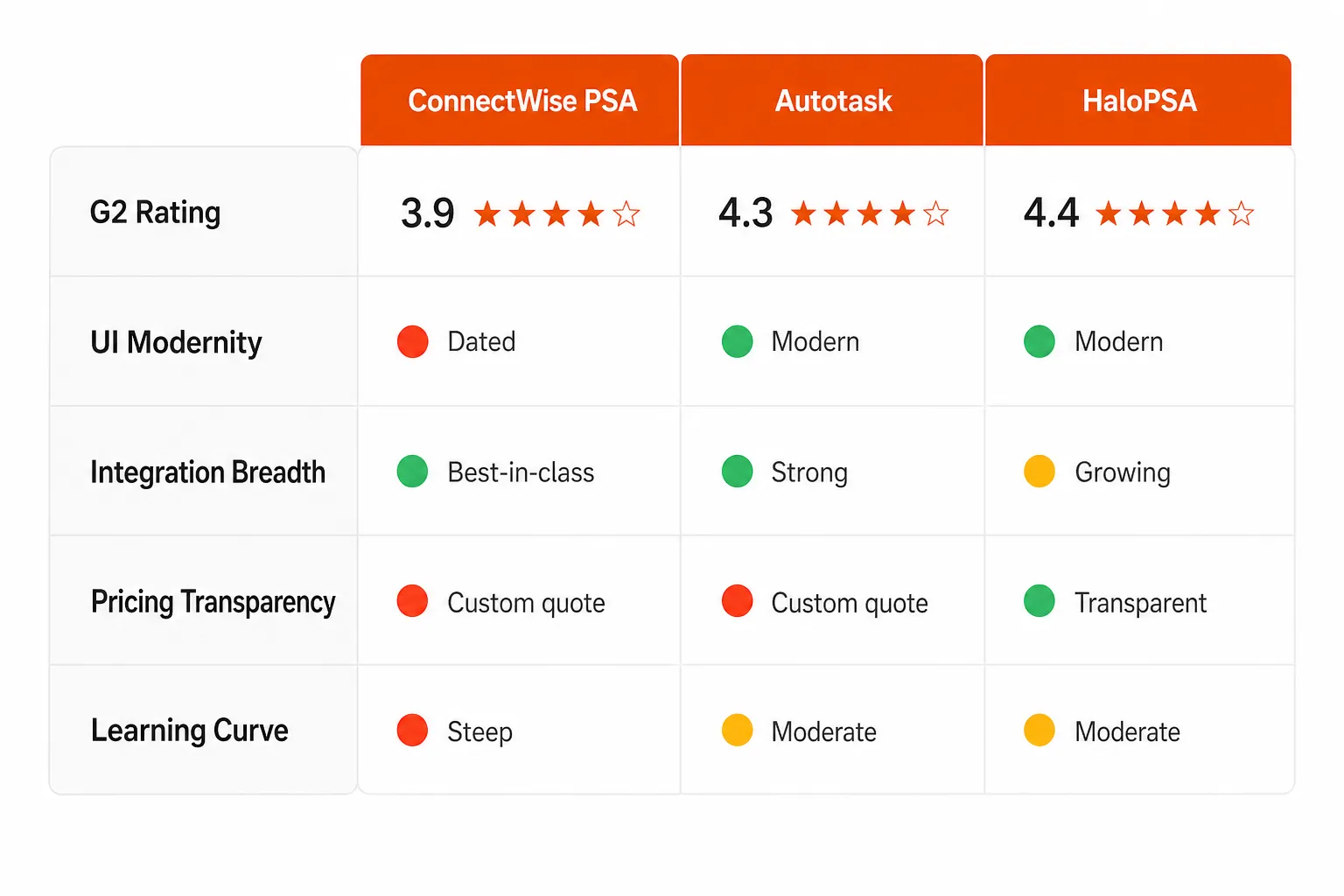
Autotask scores 4.3 out of 5 on G2 from 589 reviews - higher than ConnectWise on both score and volume. Users typically describe Autotask as more modern and easier to navigate, particularly for smaller teams. The integration story is narrower than ConnectWise Manage, and teams already embedded in the ConnectWise ecosystem often find Autotask's RMM integrations less seamless.
HaloPSA comes up repeatedly in r/msp threads as the modern alternative people switch to when they've hit their limit with ConnectWise. It has a more contemporary interface, transparent pricing, and faster iteration. The trade-off is a smaller integration ecosystem and a shorter track record in the industry.
SuperOps is the name that surfaces most often when newer MSPs ask what to run instead. Modern UI, RMM and PSA combined, clearer pricing - but a younger platform with a narrower integration library.
The honest read on ConnectWise Manage's competitive position: it stays dominant because switching costs are high and the integration breadth is hard to replicate, not because it's clearly the best product. As one Reddit commenter put it, the question worth asking is "Is ConnectWise Manage still viable, and is ConnectWise as a company just around because they are a 'default' in the industry?"
The verdict
ConnectWise Manage is powerful and genuinely earns its place in a well-run MSP's stack - if that MSP is willing to invest in the setup and accept an interface that hasn't kept up with modern UX standards.
Buy it if: You're already in the ConnectWise ecosystem (especially if you run ConnectWise Automate), you have the patience for a two-month implementation, and you have a team lead who will own the configuration properly.
Look elsewhere if: You're starting fresh, your techs care about day-to-day UX, or you want pricing transparency before talking to sales.
The time entry problem, specifically, is worth taking seriously. Techs who batch entries aren't giving you accurate data, and that bleeds directly into billing accuracy. If ConnectWise Manage is your PSA and time logging is a problem, adding a layer of automation that removes the manual step from tech workflows is the practical fix - which is where tools like Rallied come in. Rallied's ConnectWise Manage integration writes the note and the time entry as it closes each ticket, so the entry lands at the moment the work happens.
Try Rallied
Rallied is an AI technician that connects directly to ConnectWise PSA and resolves L1 and L2 tickets end-to-end - password resets, account unlocks, onboarding, offboarding - without a human ever opening the ticket. It integrates natively with ConnectWise alongside Datto RMM, NinjaRMM, M365, and your documentation stack.
The average MSP handles 200-400 tickets per month that don't need a human. Rallied handles those autonomously, closes them in the PSA, and logs what it did - so your ConnectWise Manage data actually reflects what's happening in your environment. Deploys the same week, no implementation fee, 30-day free trial.

Frequently Asked Questions
Is ConnectWise Manage still worth using in 2026?
Yes, for the right MSP. ConnectWise Manage remains the most-integrated PSA in the industry, with connectors to virtually every RMM, accounting, and documentation tool an MSP runs. If your team is already trained on it and your workflows are well-configured, it delivers real operational value. The honest caveat: if you're starting fresh and care about modern UX, ConnectWise Manage's interface will frustrate your technicians - especially around time entry.
How much does ConnectWise Manage cost?
ConnectWise does not publish per-user pricing for Manage. Pricing is custom-quoted through their sales team. G2 data reports an average 10% discount off list price. A free trial is available at connectwise.com/trials, and you can request a quote at connectwise.com/platform/psa/request-pricing.
What's the biggest complaint about ConnectWise Manage?
Time entry. It's consistently the top frustration in both G2 reviews and Reddit threads: techs batch their time entries to Friday because logging time in real-time feels so cumbersome. The broader issue is an aging interface that hasn't kept pace with how modern helpdesk and ticketing UX has evolved.
How does ConnectWise Manage compare to Autotask?
Autotask scores higher on G2 (4.3 vs 3.9) and is generally rated more favorably for UI and ease of use. ConnectWise Manage tends to win on raw integration breadth, especially with other ConnectWise products like ConnectWise Automate (RMM) and ScreenConnect. The choice often comes down to your existing tech stack and whether your team is already trained on one or the other.
Can ConnectWise Manage automate ticket handling?
Yes - workflow automation is one of its strongest features and the area where power users extract the most value. You can automate ticket routing, customer follow-ups, SLA escalations, and billing workflows. ConnectWise Sidekick also adds AI-driven ticket triaging via Microsoft Teams integration. However, building and maintaining those automations requires upfront configuration effort. Teams that invest in this from day one consistently rate the platform higher than those who treat it as a static ticket queue. If you want autonomous ticket resolution rather than just routing, Rallied layers end-to-end execution on top of your ConnectWise PSA setup.