Conversational AI for Customer Service: Why 'Answering' Isn't Enough
TL;DR
Conversational AI for customer service is a genuinely big deal - Gartner projects it will save $80 billion in contact center labor by 2026. But there's a critical distinction most coverage glosses over: AI that answers versus AI that resolves. Most tools land on the wrong side of that line. They summarize tickets, suggest knowledge base articles, and draft responses for agents to review - which saves some time but still leaves a human doing the actual work. For MSPs specifically, this is the wrong answer. Your billable unit is hours. AI that suggests things doesn't return margin. AI that resolves tickets autonomously does. Rallied is built for the resolution side: it connects to your full MSP stack (PSA, RMM, identity, docs) and closes L1 tickets end-to-end - password resets, account unlocks, onboarding, offboarding - without a technician touching them. The ROI is real: 50-100 hours/month of L1 grunt work removed from your queue.
The answer vs. resolution gap that nobody talks about
We've all sat through the vendor demos. The AI "handles" customer inquiries. The chatbot "deflects" tickets. The dashboard shows impressive-looking resolution rates. Then you look closer and realize the AI drafted a reply suggesting the customer check their settings - and a technician still had to review and send it. That's not resolution. That's a faster draft.
The market has spent the last decade selling "conversational AI" that's really just better-formatted suggestions. And MSPs - who've been burned by Fin, by workflow-builder complexity, by 6-month implementations that never shipped - have gotten justifiably skeptical.
Here's the honest version of the landscape: there are two fundamentally different things calling themselves conversational AI for customer service, and they have almost nothing in common.
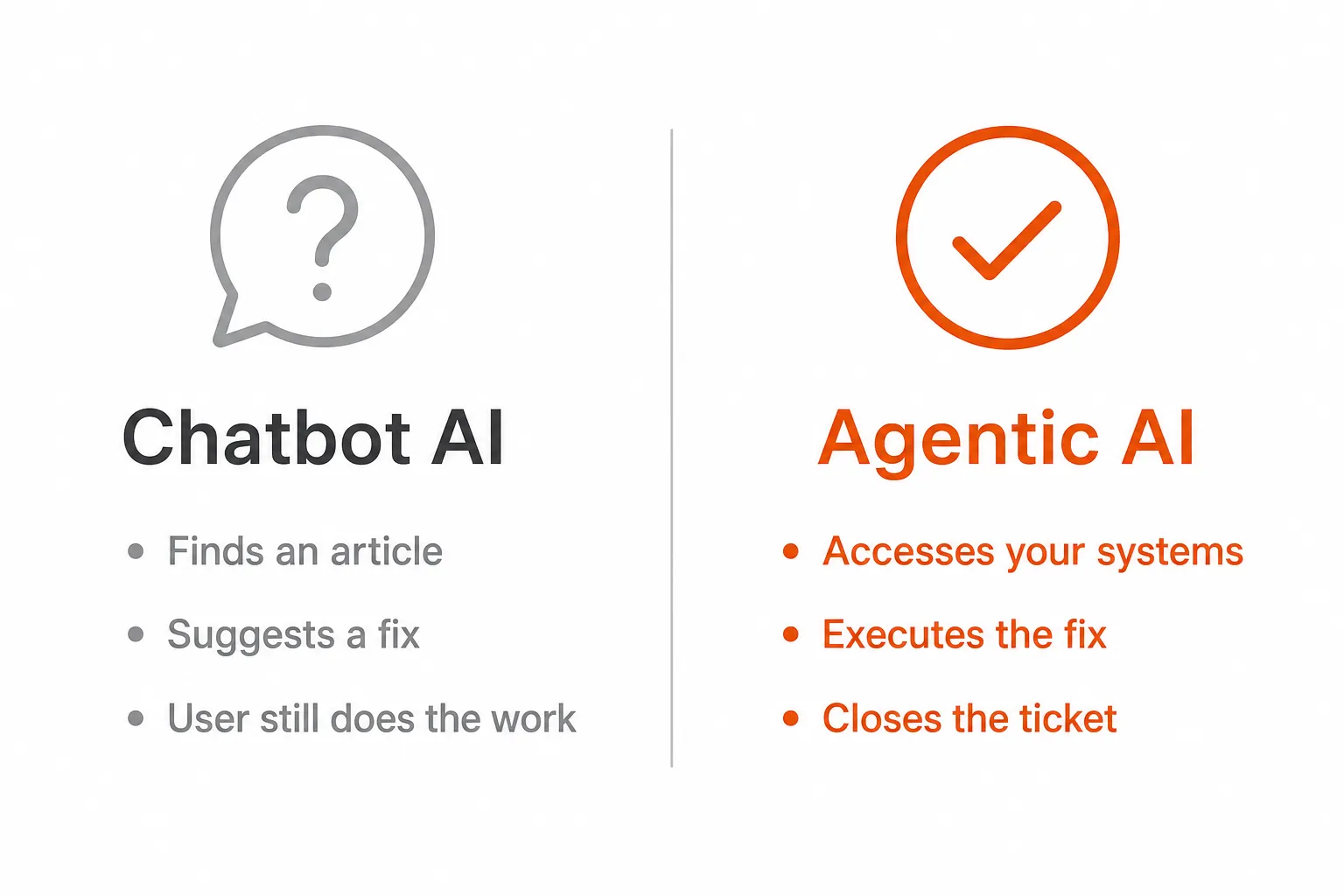
Answer-focused systems query a knowledge base, pull relevant content, and surface a suggested response. The user or technician still has to act on that response. These systems are genuinely useful for reducing research time - they can save 5-10 hours/month per technician by making it faster to find the right answer. Deflection rates hover around 20-40%, and that's when the knowledge base is comprehensive and current (which it rarely is).
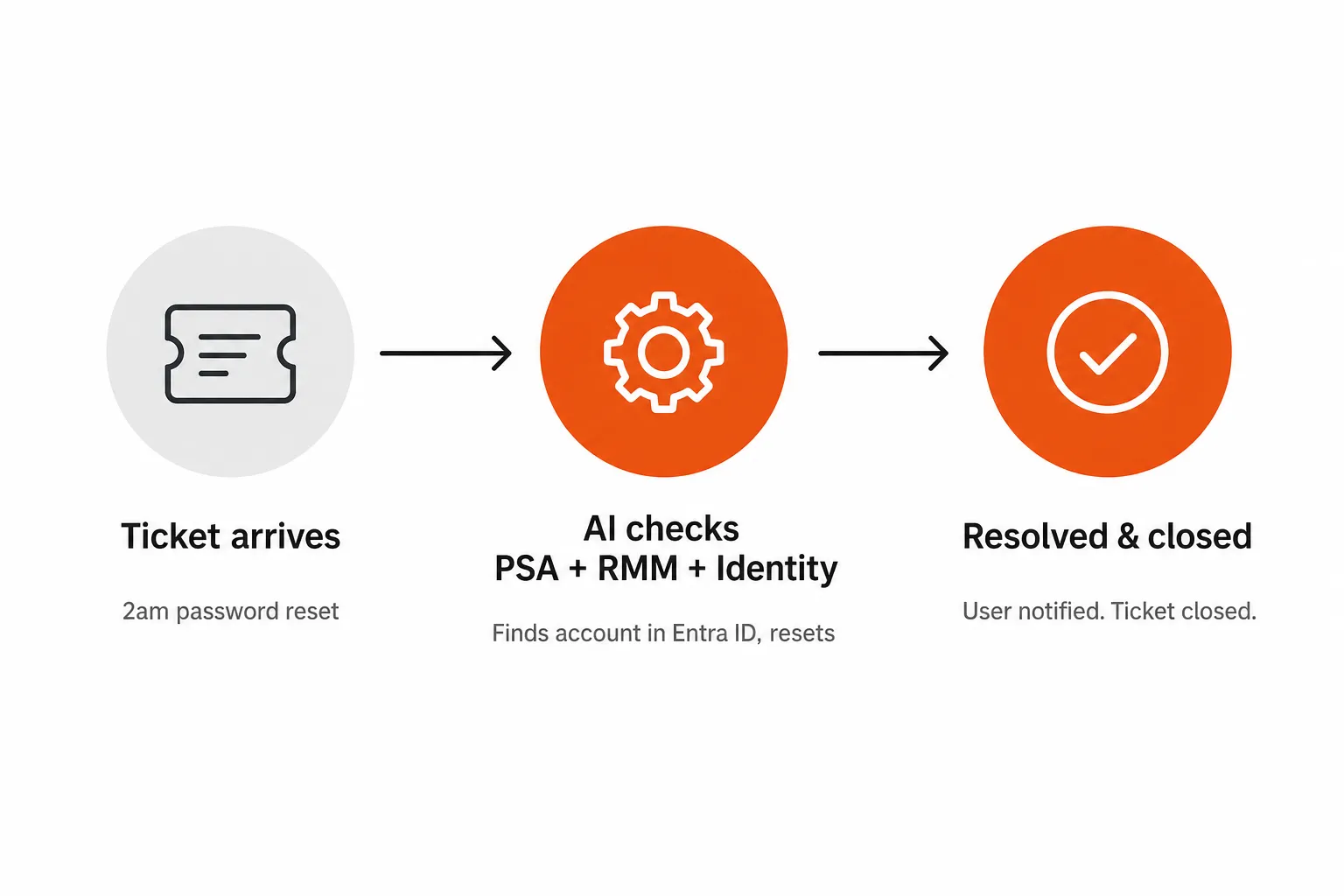
Resolution-focused systems - what the industry is now calling agentic AI - go further. They access live systems, execute actions, and close the loop without a human in the chain. A password reset ticket arrives at 2am. The AI reads the ticket, finds the account in Entra ID, resets the credential, emails the user, and closes the ticket. Nobody woke up. Nobody billed 15 minutes of technician time. Deflection rates for well-scoped L1 work run 50-75%.
For most businesses, either approach has value. For MSPs, only one of them moves the needle. The difference between suggesting a fix and executing a fix is the difference between saving your junior tech 20 minutes of research and returning $15,000/month in technician capacity to your bottom line.
Why MSPs specifically need resolution, not answers
An MSP's economics are built around technician hours. When a tech handles a password reset, they're burning 15 minutes at your fully-loaded labor cost - call it $150/hr, so roughly $37.50 per ticket. That's not because it's a hard problem. It's because the work still has to get done.
At 200 L1 tickets/month, that's $7,500 in labor that doesn't generate margin. At 400, it's $15,000. These are tickets your MSP probably handles every month, right now - password resets, account unlocks, MFA resets, new hire provisioning, contractor offboarding. Gartner estimated in 2023 that conversational AI would eliminate $80 billion in contact-center labor costs by 2026 across industries. In the MSP world, that reduction is concentrated in exactly this category of work.
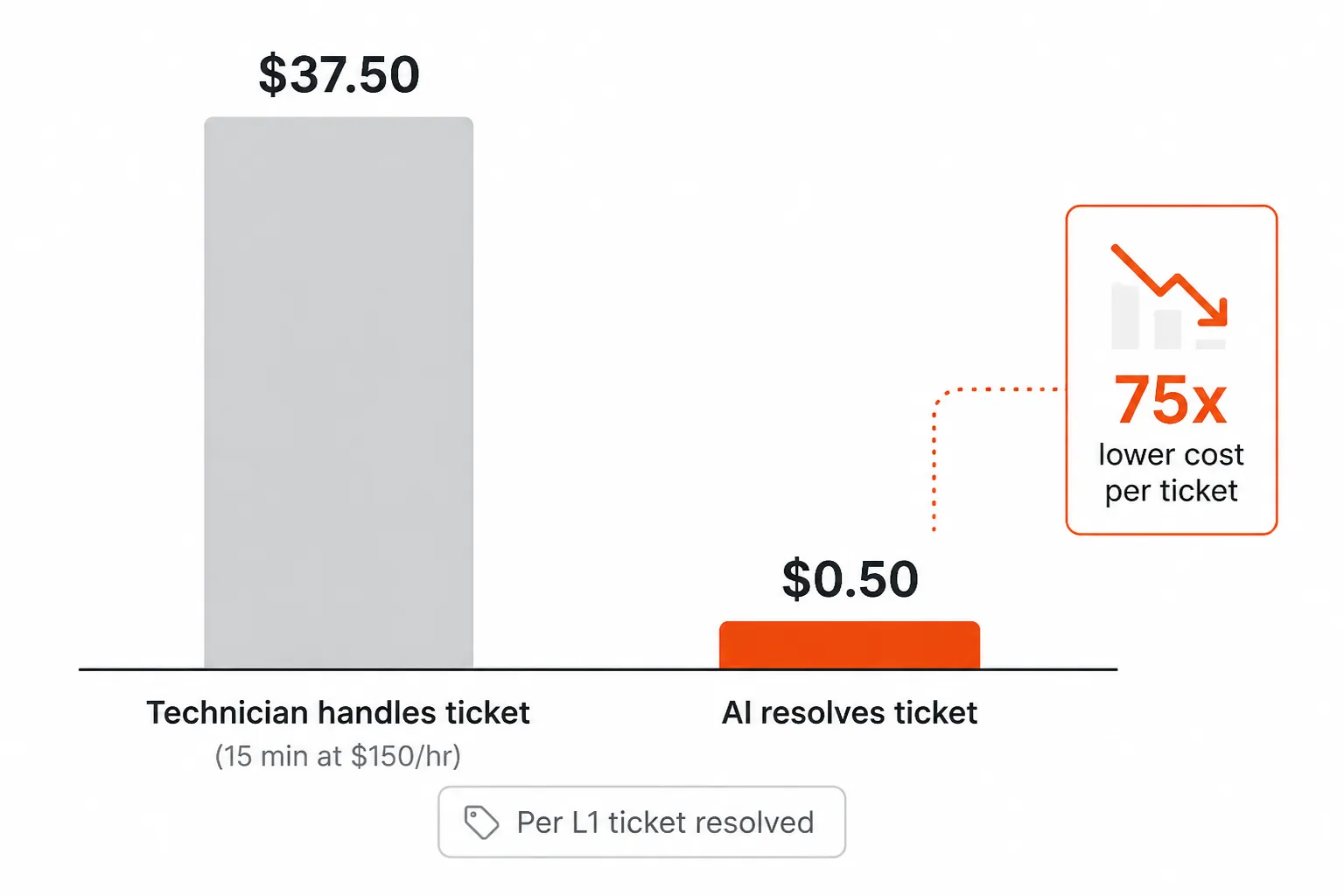
The numbers work out bluntly. At $3 per ticket outcome (Rallied's rate), a month of 300 L1 tickets costs $900 in AI instead of $11,250 in tech time. That's not a rounding error - it's the difference between breaking even on your service desk and running it as a profit center.
But here's what makes the MSP case distinct from a general customer service operation: the integration requirements are brutal. A consumer chatbot that handles retail returns just needs to talk to one order management system. An MSP AI technician needs to reach into your PSA (ConnectWise, Autotask, Halo, SuperOps), your RMM (NinjaRMM, Datto), your identity systems (Entra ID, Okta, JumpCloud, Google Workspace), your documentation platform (IT Glue, Hudu), and your communication channels - all simultaneously, for every ticket. That's not a chatbot. That's a full stack integration.
Which is exactly why most general-purpose conversational AI fails in MSP environments. It's not built for this stack. It answers questions about your product. It doesn't reset passwords in your clients' Azure tenants.
What actually works: the three-layer MSP AI stack
The clearest framework we've seen for thinking about AI in the MSP space comes from Rev.IO's breakdown of the AI agent stack. It segments into three layers:
Layer 1: Dispatch and triage. Tools that route tickets, categorize urgency, and surface relevant context. Thread does this. So does ConnectWise AI Sidekick. These tools help your team work faster without replacing them. Genuinely useful, genuinely limited.
Layer 2: Workflow automation. Platforms like Rewst that let you build multi-step automation flows - "if ticket type is X and client is Y, run script Z." Powerful when configured correctly. The catch: configuration is the job. These platforms require near-full-time admins to build and maintain. More than one MSP owner on r/msp has described Rewst as requiring "a dedicated trainer for 2 years" before it delivers consistent ROI.
Layer 3: Autonomous L1/L2 resolution. The newest layer - tools built to actually close tickets without human intervention. Rallied, Pia, NeoAgent sit here. The differentiator is depth of integration and speed of deployment. A tool in this layer needs to reach every system in your stack and ship in days, not months.
For most MSPs, the missing piece is Layer 3. Layers 1 and 2 are well-served. The "actually resolves tickets autonomously, deployed this week" space is where the real ROI lives - and where the market has the fewest credible options.
How conversational AI for MSP help desks actually works (the technical reality)
The gap between "chatbot" and "AI technician" comes down to four things:
1. Natural language understanding vs. rigid flows
Old chatbots needed you to phrase requests a specific way. "Reset my password" worked; "I can't log in to Outlook" didn't, because the bot was listening for keywords. Modern LLM-based systems understand intent from natural language. "Hey I can't get into my email" resolves to the same action as "password reset request." The practical result: end users interact normally and the AI figures it out.
2. Context from multiple systems, not just one
An answer-focused system pulls from a knowledge base. A resolution-focused system reads the ticket, cross-references the PSA for client context and SLA, checks the RMM for device status, looks up the user in the identity platform, and pulls the relevant runbook from IT Glue or Hudu. The response is grounded in the actual state of the environment, not a generic documentation page.
3. Execution authority, with guardrails
This is where most organizations get nervous - and reasonably so. An AI that can reset passwords and provision accounts needs guardrails. The credible tools in this space handle this with spending caps (a monthly ceiling on automated actions), human approval gates for higher-risk operations (like modifying security groups or adding admin privileges), and clear escalation protocols when confidence is low. Rallied's approach: set a monthly spend cap, define which actions require human sign-off, and escalate with full context when the AI isn't sure.
4. Escalation that doesn't drop context
When the AI can't resolve something - or hits its confidence threshold - it escalates. The quality of that escalation matters enormously. A good escalation hands off the ticket with full context already populated: what was tried, what the system state looks like, what documentation is relevant. A bad escalation hands off a blank ticket and costs the tech 10 minutes just to understand what they're looking at. This is underappreciated in vendor evaluations, but it's one of the clearest signals of a mature implementation.
The community has already run the tests
If you spend time on r/msp, you've seen the thread pattern. Someone asks "is anyone actually running AI on their service desk?" and gets 60 replies ranging from "we automated 5,000 tickets" to "Fin burned us and we're done with AI." Both are real experiences.
The failures cluster around a few common patterns:
- Per-resolution pricing that didn't pencil out. Several MSPs describe paying more per AI "resolution" than the ticket was worth, especially when the AI required human review to actually close. The pricing model matters as much as the capability.
"Running a SaaS product and tried Intercom Fin and Drift but are too expensive for what they deliver." - r/CustomerSuccess
Setup complexity that defeated the ROI. Workflow builders that required weeks of configuration before doing anything useful. By the time the automation was working, the team had already burned more hours than the tool would ever save.
Hallucinations that poisoned trust. One confident wrong answer in front of a client tends to set back an entire AI initiative. The practical fix is constraining scope: build confidence on well-defined, low-risk tasks (password resets, account unlocks) before expanding to anything with client-visible impact.
The wins are equally consistent:
"5000 tickets that didn't hit our EXPENSIVE human help desk staff!" - r/sysadmin on successful ticket automation
The pattern in successful implementations: start narrow (one ticket type, one action), prove the economics, expand. Don't try to automate everything on day one.
What to look for in a conversational AI tool for your MSP help desk
We'd evaluate on these five dimensions:
Integration depth. Does it reach your actual stack - PSA, RMM, identity, docs - or just your ticketing system? A tool that only reads tickets without executing in connected systems is a suggestion engine. That's useful; it's just not what you're paying for in this category.
Time to value. When does the ROI clock start? Workflow-builder platforms have a 6-month ramp before you see meaningful automation. Purpose-built tools with pre-built connectors should be operational the same week. This isn't a small distinction - a 6-month implementation is 6 months of paying for a tool that isn't working yet.
Pricing model. Pay-per-ticket-resolved is the model most aligned with your interests. You pay when something gets fixed. If the AI attempts but doesn't resolve, you shouldn't pay full price. Subscription models with no direct tie to resolution volume tend to create misaligned incentives.
Guardrails and approval flows. What happens when the AI is unsure? How granular are the approval gates? Can you set a monthly spending cap? The right answer is "yes to all of those, configurable without engineering help."
Escalation quality. When the AI hands off to a human, what does the technician see? Full context should be there already - no reconstructing what happened, no re-reading the entire thread.
The market is still early. Gartner predicts that agentic AI will autonomously resolve 80% of common customer service issues without human intervention by 2029. That's three years away. The MSPs that deploy credible resolution tools now are building a cost structure that their competitors in 2029 will struggle to match.
Try Rallied
Rallied is an AI technician purpose-built for MSPs. It connects to your full stack - ConnectWise, Autotask, Halo PSA, SuperOps, NinjaRMM, Datto RMM, Entra ID, Okta, JumpCloud, Google Workspace, IT Glue, Hudu - and resolves L1/L2 tickets end-to-end without a technician touching them. Password resets, account unlocks, onboarding, offboarding, phone triage, RMM execution. The differentiator: same-week deployment, no implementation fee, no dedicated admin overhead.
Pricing is $3 per ticket outcome with a $150/month minimum, and a 14-day trial with no card required. You only pay when Rallied actually does the work; tickets it can't move cost nothing. At 300 tickets/month, that's $900 in AI cost against $11,250 in technician time. The math is straightforward.
If you're evaluating AI for your service desk, Rallied is worth a look.
Frequently Asked Questions
What is conversational AI for customer service?
Conversational AI for customer service uses natural language processing and large language models to understand and respond to customer or employee requests in real time. Unlike older rule-based chatbots, modern conversational AI understands context and intent - and when connected to backend systems, can actually execute fixes (resetting passwords, unlocking accounts) rather than just suggesting them. Tools like Rallied are purpose-built for IT/MSP environments, resolving L1 tickets autonomously without a technician touching them.
How is conversational AI different from a regular chatbot?
A traditional chatbot responds to specific keywords or decision-tree flows. It can only answer what its scripts allow. Conversational AI - especially LLM-powered systems - understands natural language, context, and multi-turn conversations. More importantly, modern agentic AI can connect to live systems (your PSA, RMM, identity provider) and take action, not just provide information. The practical difference: a chatbot tells your customer how to reset their password; a conversational AI agent resets it for them.
What is the ROI of conversational AI for IT help desks?
For MSPs, the ROI math is straightforward. A typical L1 ticket (password reset, account unlock) takes about 15 minutes of technician time at roughly $150/hr - that's ~$37.50 per ticket. At 200-400 such tickets a month, that's $7,500-$15,000/month in automatable technician time. AI resolution at $3 per ticket outcome is roughly a 12x cost difference per ticket resolved. Tools like Rallied use a per-outcome model ($3 per ticket outcome, $150/month minimum), making the ROI calculation simple.
What kinds of tickets can conversational AI resolve autonomously?
The most reliable candidates are well-structured L1 tasks: password resets, MFA unlocks, account unlocks, software installs, new-hire onboarding provisioning, offboarding access revocation, and permission grants. These share common traits - known inputs, clear outcomes, low hallucination risk, and clean integration paths to your PSA, RMM, and identity systems. More complex L2 issues (network troubleshooting, custom configurations, hardware failures) still need human escalation - and good AI agents know the difference and hand off cleanly with full context.
How long does it take to deploy conversational AI for an MSP help desk?
It depends heavily on the tool. Workflow-builder platforms like Rewst can require 6+ months and a near-full-time admin to train and maintain. Purpose-built MSP tools with pre-built integrations are faster - Rallied, for example, deploys in the same week with no dedicated admin required, using pre-built connectors to ConnectWise, Autotask, Halo PSA, NinjaRMM, Datto RMM, Entra ID, Okta, IT Glue, Hudu, and others. The difference is between a platform you configure and a product that works out of the box.
