How to Eliminate Your Help Desk Ticket Backlog with AI
TL;DR
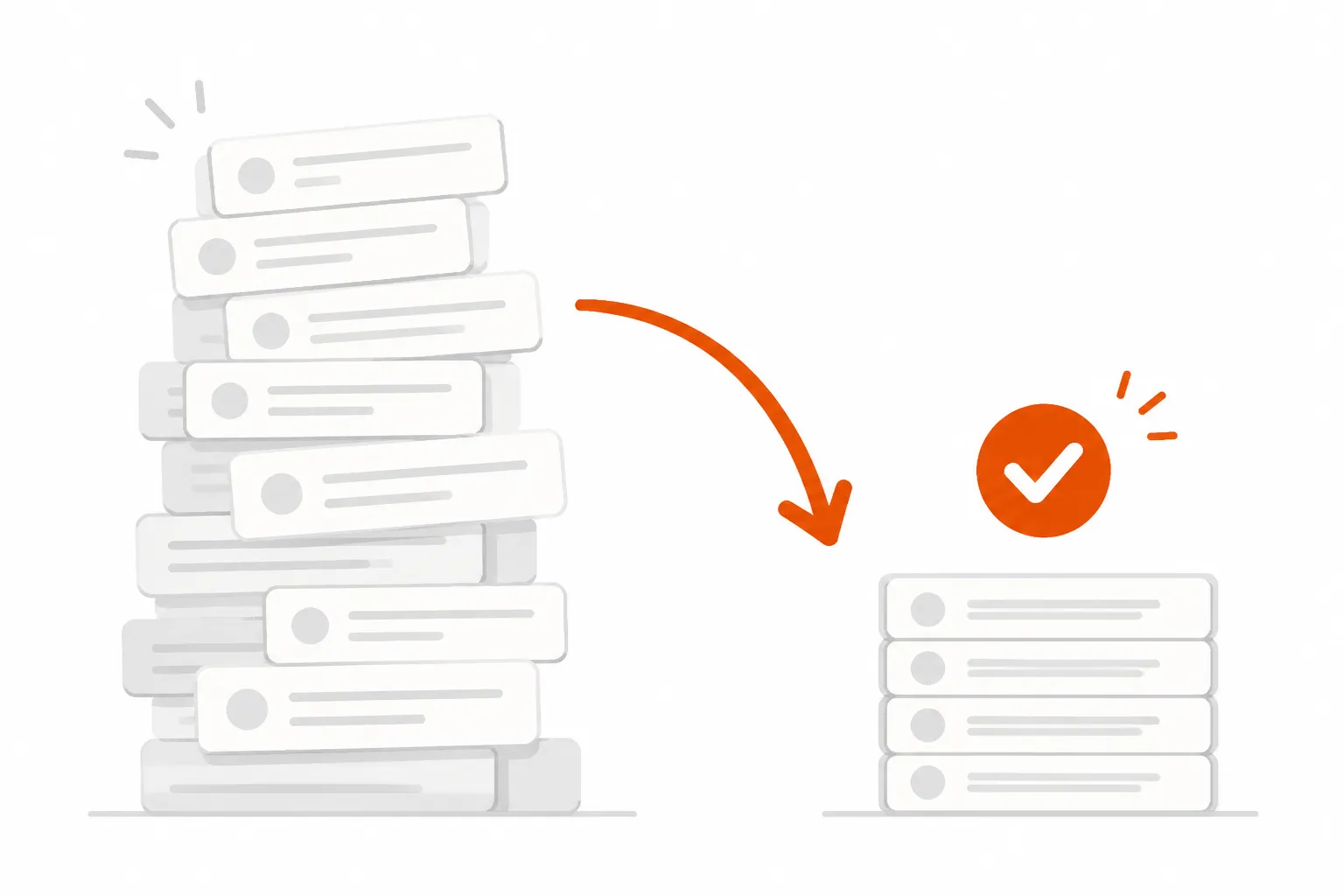
The average help desk ticket sits open for 82 hours. The average technician handles 21 tickets per day. Most MSPs get 20-30 new tickets per day - per technician. The math doesn't close. The fix isn't hiring (40% annual staff turnover makes that a treadmill). It's AI that actually executes L1 tickets - password resets, account unlocks, onboarding provisioning - instead of suggesting what a human should do. Purpose-built AI technicians now handle 40-60% of typical MSP ticket volume autonomously, recovering 50-100 hours of tech time per month. That's the lever. The rest of this post explains how to pull it.
The math that makes your backlog inevitable
You probably know something is off with your ticket volume. The tell is usually a technician who arrives Monday morning to 40 open tickets, handles 21, and watches 25 more come in. By Friday, they're further behind than they started. Repeat.
Here's the Jitbit benchmark from an analysis of 1,000 companies: the average technician closes 21 tickets per day. The average MSP receives 20-30 new tickets per day. At the low end, you're breaking even. At the high end, you're running a deficit every single day. And that's before accounting for sick days, meetings, vacation, and the phone calls that interrupt focused ticket work.
Reddit's r/msp community puts it plainly:
"I constantly have 20+ I'm assigned to and need to work on while also answering phone calls and emails. It's ridiculous, especially when I'm the only one here."
That comment has hundreds of upvotes because it's everyone's experience.
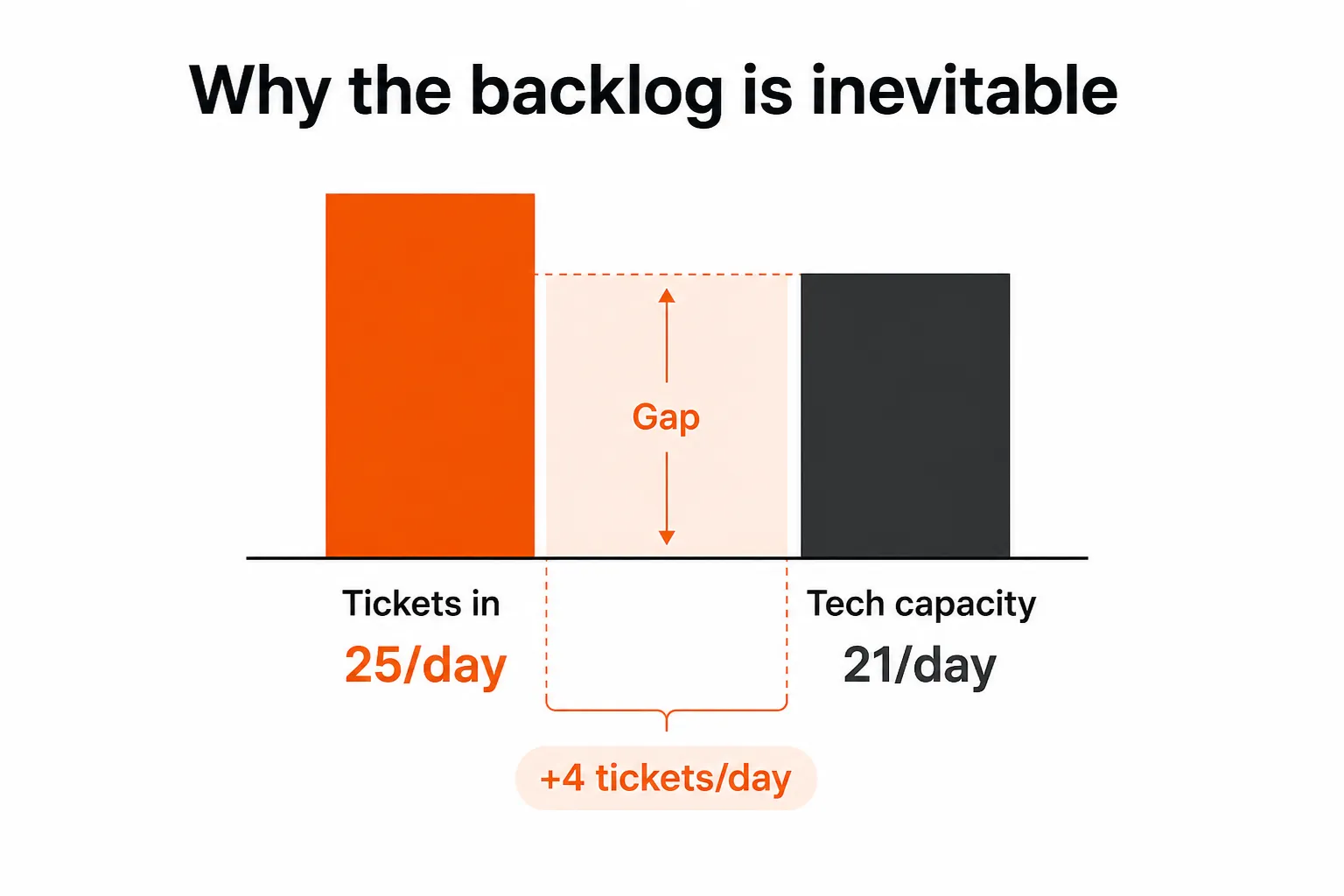
The hidden multiplier: many open tickets aren't being worked - they're waiting. Waiting on client response. Waiting on a vendor ticket. Waiting on a callback. Those stale tickets clog the queue and mask how many tickets are actually being actively resolved. When HDI defines a healthy backlog as 5-10% of daily volume, they assume the rest of the queue is moving. A lot of MSP queues aren't.
The ripple effects are expensive. Every unresolved ticket costs the affected employee 3.22 hours of lost productivity on average (HappySignals research). Multiply that by 50 employees and 200 monthly tickets - and the number of hours burned company-wide while waiting for IT to catch up gets uncomfortable fast.
Why hiring your way out doesn't work
The instinct is understandable. More tickets, more technicians. But the math on hiring is brutal.
IT service desk agent turnover runs 40% annually - more than triple the 12-15% U.S. average across all industries. You hire a new L1 technician, spend three months getting them up to speed, and statistically, they're gone within 18 months. You've paid $50K+ in salary, absorbed the ramp time, and you're back to square one.
The financial structure of help desk staffing reflects this: 68.5% of service desk budgets go to staff costs, while only 9.3% goes to technology. That ratio made sense when technology couldn't do the work. It doesn't anymore.
The alternative - automation - is how you break the loop. A small MSP in the r/msp thread with 5-6 people and $4.5M in ARR captured it clearly: "need better automation or hire." Those really are the two options. Hiring compounds the turnover problem. Automation doesn't quit.
Two types of AI for help desks - and only one actually closes tickets
Not all AI is the same, and the difference matters more than most vendors will tell you.
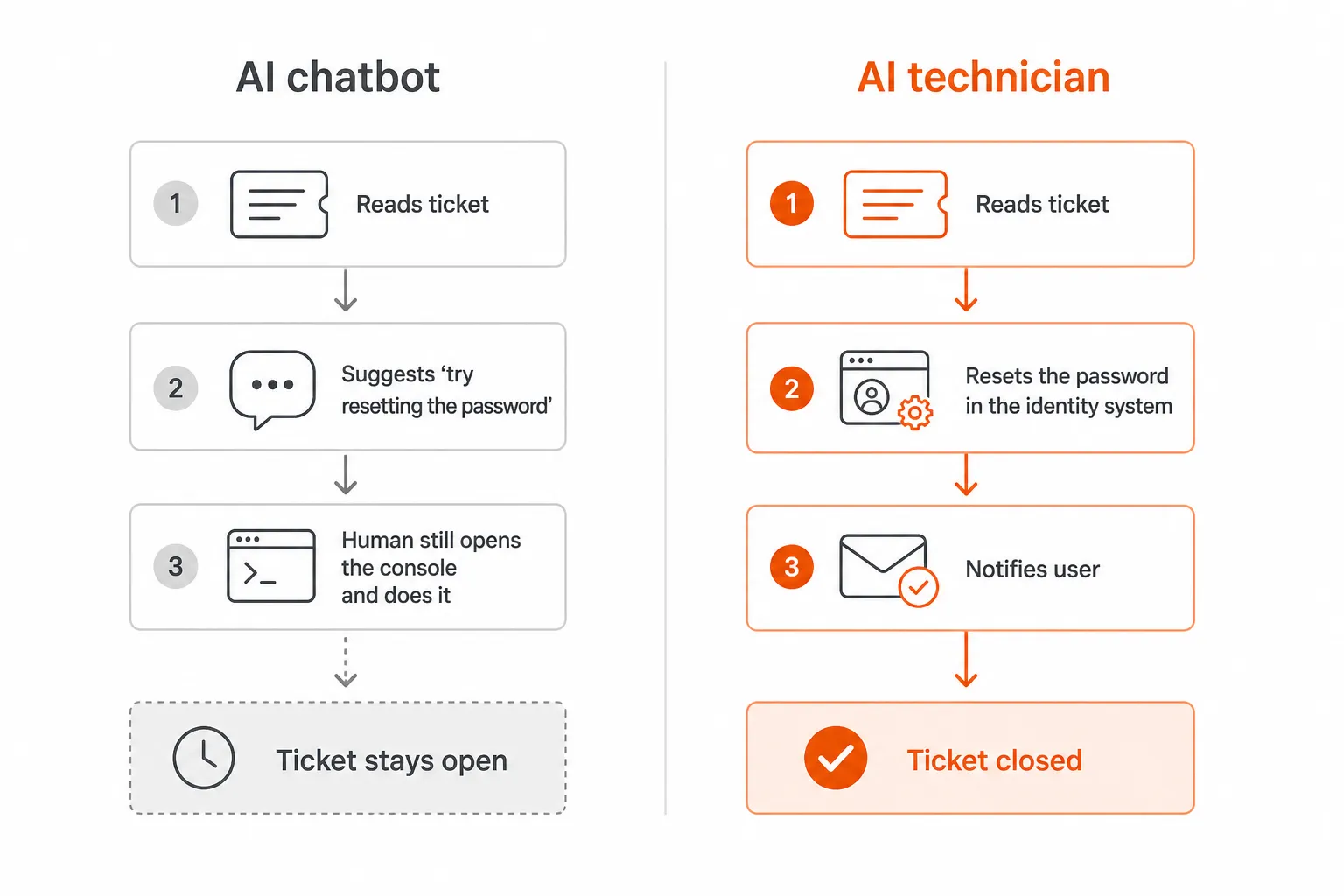
AI chatbots and copilots read a ticket, classify it, and suggest a next step. "This looks like a password reset - here's the knowledge base article." A human reads the suggestion, opens the admin console, executes the reset, notifies the user, and closes the ticket. The AI did some work. The ticket still needed a person.
AI technicians do the full loop. Read the ticket. Authenticate the user. Reset the password in Entra ID or Okta or JumpCloud. Verify the new credentials work. Notify the user via email or Teams. Post an audit note to the PSA ticket. Close it. Zero human touch.
The r/sysadmin community figured this out through trial and error:
"The only thing that really helps is when the AI tool is integrated with your actual systems so it can actually DO something. A chatbot that just suggests actions doesn't move the needle."
This is the failure mode of most first-generation AI help desk tools. They make triage faster. They don't reduce the work. Your technicians still execute every fix - they just get better context before they do it. AI that only classifies tickets achieves 98% classification accuracy versus 60-70% manually - genuinely useful, but the ticket still isn't closed.
Execution-first AI is the other category. It connects directly to your PSA, your RMM, your identity systems, your documentation platform. When a ticket arrives, it doesn't route it to the right queue - it resolves it.
What L1 AI actually handles
The "40-60% of ticket volume" claim sounds like a marketing number until you look at what L1 tickets actually are.
Password resets and account unlocks alone make up roughly 18% of L1 volume (per Rallied's own data from MSP deployments). Add shared mailbox access requests, permission and group membership changes, MFA re-enrollment, software installs triggered via RMM, user onboarding, and offboarding - and you're covering the majority of what fills an MSP queue every Monday morning.
What this looks like in practice, end-to-end:
Password reset: Ticket arrives. AI reads it, identifies the locked account. Verifies the requester's identity via MFA push. Resets the password in Entra ID (or Okta, or JumpCloud, or Google Workspace). Sends the user their temporary credentials. Posts an audit note to the ticket. Closes. Total time: seconds. Tech involvement: zero.
User onboarding: Ticket comes in for a new hire starting Monday. AI extracts name, department, manager, start date. Creates the AD account, sets a password, adds them to the right security groups based on department template. Assigns M365 licenses. Sets up shared mailbox access. Triggers RMM to configure their device. Notifies the manager and the new hire. Closes the ticket. What used to take a technician 30-90 minutes happens while they're on another call.
Offboarding: Contractor's last day. AI disables the AD account, revokes licenses, removes them from all security groups, disables email forwarding, revokes VPN/device access via RMM. Creates a documented audit trail of everything it did. The safety-critical part of offboarding - the part where a missed step leaves a former employee with system access - gets executed consistently every time, not mostly-consistently when a tech isn't rushed.
The tickets AI can't handle are the ones that need judgment: "why does the app keep crashing," complex network troubleshooting, anything that requires asking the client a series of questions before you even know what the problem is. Those still go to humans. But they go to humans with the relevant documentation already pulled from IT Glue or Hudu, attached by the AI before escalation. The technician who picks up the ticket isn't starting cold.
How to roll it out without the risk
The sensible approach is a two-phase rollout.
Phase 1 - Plan mode. The AI reads tickets, diagnoses the issue, and posts what it would have done as an internal note. "I would reset this password. I would add this user to the Finance-All-Hands group." A human reviews each recommendation and decides whether to execute. This phase runs for 1-2 weeks. It lets your team watch the AI work, build confidence, and surface any edge cases (accounts flagged as sensitive, customers with non-standard setups) before flipping to full autonomy.
Phase 2 - Execute mode. The AI handles common, well-defined ticket types autonomously. Password resets, basic access requests, standard onboarding workflows. Policy-based gates stay in place - C-suite accounts require approval, high-sensitivity changes get flagged, anything outside the defined scope escalates to a human with full context attached.
Most teams expand execute mode gradually: start with password resets, add permission changes after two weeks, add onboarding after a month. Trust accretes from evidence, not promises.
The key requirement is integration depth. An AI that can't write back to your PSA, authenticate users via your identity provider, and trigger your RMM is a chatbot wearing a technician's badge. The integration list matters: ConnectWise, Autotask, Halo PSA, SuperOps for PSA; Datto RMM and NinjaRMM for endpoint actions; Entra ID, Okta, JumpCloud, Google Workspace for identity; IT Glue and Hudu for documentation.
The ROI is less interesting than the time math
The cost savings case writes itself. The average service desk ticket costs $22; escalated tickets cost $84 (MetricNet benchmarks). Automating 200 tickets per month at $3 per outcome costs $600 - against $4,400 in avoided manual processing cost, and far more when you factor in escalation prevention.
But the number that actually moves MSP owners isn't cost-per-ticket. It's hours.
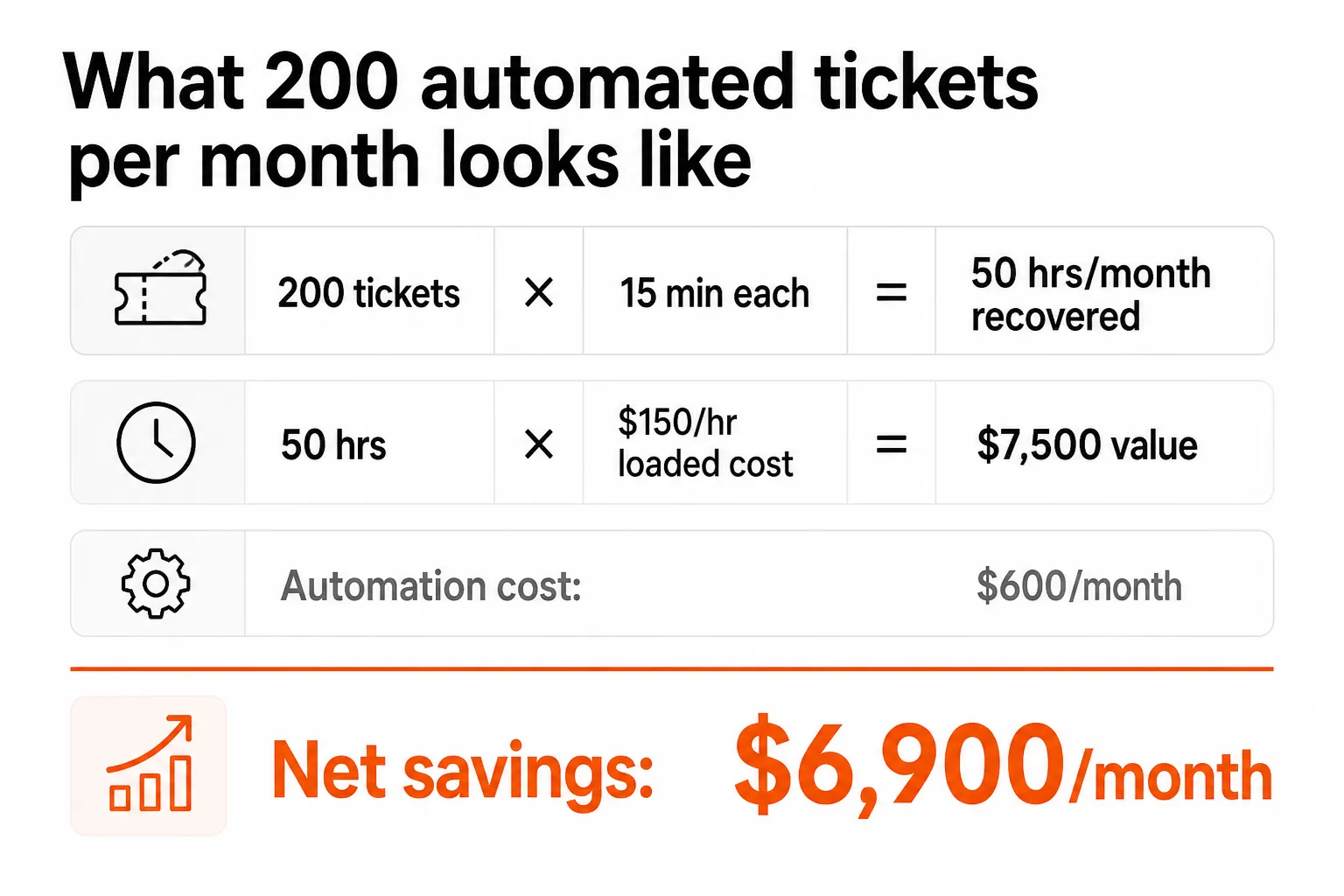
At 200 L1 tickets per month and 15 minutes of tech time per ticket, that's 50 hours per month. At a loaded tech cost of $150/hour, that's $7,500 in recovered capacity - for $600 in automation cost. The other 50 hours of net time freed are the real asset: those are billable hours your engineers aren't spending on password resets.
The r/sysadmin community, in a candid thread about whether AI help desks create more problems than they solve, landed on a line that captures this honestly:
"You're right, but the alternative is drowning in low-complexity tickets while your best people burn out. Pick your problem."
Backlog isn't neutral. Every ticket that sits for 82 hours is 3.22 hours of a user's productivity gone. Every hour your L2 engineer spends on a password reset is an hour they're not spending on a problem that actually needs their skills. The backlog has a cost whether you're measuring it or not.
Level 1 AI automation, per the Ksolves case study, produces a 55% backlog reduction and 40% faster resolution. Broader AI automation research shows 52% faster resolution on average and first response times improving by 37%. These are consistent enough across sources to treat as realistic targets for a well-integrated L1 execution layer.
Try Rallied
Rallied is an AI technician built specifically for MSPs. It connects to your PSA (ConnectWise, Autotask, Halo PSA, SuperOps), your RMM (Datto, NinjaRMM), your identity stack (Entra ID, Okta, JumpCloud, Google Workspace), and your documentation platform (IT Glue, Hudu) - and autonomously resolves L1 tickets the same week it's deployed.
Pricing is $3 per ticket outcome and a $150/month minimum - no charge for tickets Rallied can't resolve. Most MSPs running 200-400 automatable tickets per month recover $7K-$15K in tech time per month against a $600-$1,500 monthly cost. There's a 14-day free trial and no credit card required - setup in under a week, real tickets closing before the trial ends.
The distinction from workflow builders like Rewst: Rallied doesn't require you to build workflows. It reads tickets, understands what needs doing, and does it. A password reset doesn't require a flowchart. It requires a technician who knows what a password reset is.
Start a 14-day free trial at rallied.ai - the backlog you close in the first week pays for months of the service.
Frequently Asked Questions
What is a help desk ticket backlog and how do you measure it?
A ticket backlog is the accumulation of unresolved support requests beyond your team's current capacity to handle. A healthy backlog is 5-10% of daily ticket volume (per HDI benchmarks); 10-20% signals a problem; beyond that it's a structural capacity issue. The simplest way to measure it: count all open tickets older than your SLA target, track the trend week-over-week, and compare daily intake to daily throughput. If intake consistently exceeds resolution, the backlog grows regardless of how hard your team works.
How much can AI actually reduce a help desk ticket backlog?
Research shows Level 1 AI automation reduces backlogs by 55% and cuts resolution time by 40% (Ksolves case study). Broader research puts AI-driven backlog reduction at 35-55% depending on ticket composition and how much of the volume is L1-automatable. The honest caveat: these numbers assume the AI actually executes the fix - not just triages or suggests. AI that only categorizes tickets doesn't reduce backlog; it just reorganizes it.
What types of tickets can AI resolve automatically?
The highest-value targets for AI automation are password resets and account unlocks (~18% of L1 volume), user onboarding and offboarding across M365 and identity providers, permission and group membership changes, shared mailbox access requests, software installs triggered via RMM, and MFA re-enrollment. These are tickets that follow a predictable pattern: read the request, authenticate the user, make a change in an external system, verify, close. Complex troubleshooting, network architecture questions, and vendor escalations still need humans.
How long does it take to deploy an AI help desk technician?
Deployment timelines vary by tool. Workflow-builder platforms like Rewst typically require 6+ months and a dedicated admin to configure. Purpose-built AI technicians designed for MSPs can be live in a week - connecting to your PSA, RMM, and identity stack and handling real tickets within days. Most teams start in 'plan mode' (the AI reads and recommends, human approves) for the first 1-2 weeks before shifting to full autonomous execution for low-risk ticket types like password resets.
What happens to tickets that the AI can't resolve?
Well-designed AI technicians escalate gracefully: they read the ticket, pull relevant documentation from your knowledge base (IT Glue, Hudu), attach all context to the ticket, and route it to the right human with a clear handoff note. The technician receives a pre-diagnosed ticket with the relevant docs already pulled - instead of a raw support request they have to interpret from scratch. Rallied only charges for tickets it actually resolves (a real system change), so escalated tickets cost nothing. No outcome, no charge.