How to reduce first response time in your MSP help desk
TL;DR
Most MSPs try to improve first response time by adding people. The data says that's usually the wrong lever. Routing bottlenecks and automation gaps account for the majority of FRT delays - and both are fixable without a hire. Fix email-to-PSA intake, build priority-based assignment rules, add auto-acknowledgment and response macros, then address the after-hours gap that inflates your overnight metrics. If 24/7 L1 coverage is the problem, Rallied handles it autonomously - password resets, account unlocks, and access management at any hour, without on-call burnout.
We had a client submit a P1 ticket at 9 PM on a Tuesday. Power outage affecting six workstations. The ticket sat unassigned until 8:07 AM - 11 hours later. First response recorded: 11 hours and 7 minutes.
The technician who picked it up is fast. The team is good. None of that mattered because nobody saw the ticket until morning.
That's the most common FRT problem in MSP shops, and it has nothing to do with how skilled your technicians are. It's a structural problem: coverage gaps, routing bottlenecks, and manual processes that introduce delays before anyone even opens the ticket.
This guide walks through how to fix it - in order of impact.
Why first response time matters more than you think
Research from HubSpot puts it plainly: 90% of customers view an immediate response as very important. 82% expect a reply when they contact support. These aren't general SaaS customers - this applies to SMB owners watching a server stay down.
The CSAT correlation is stark.
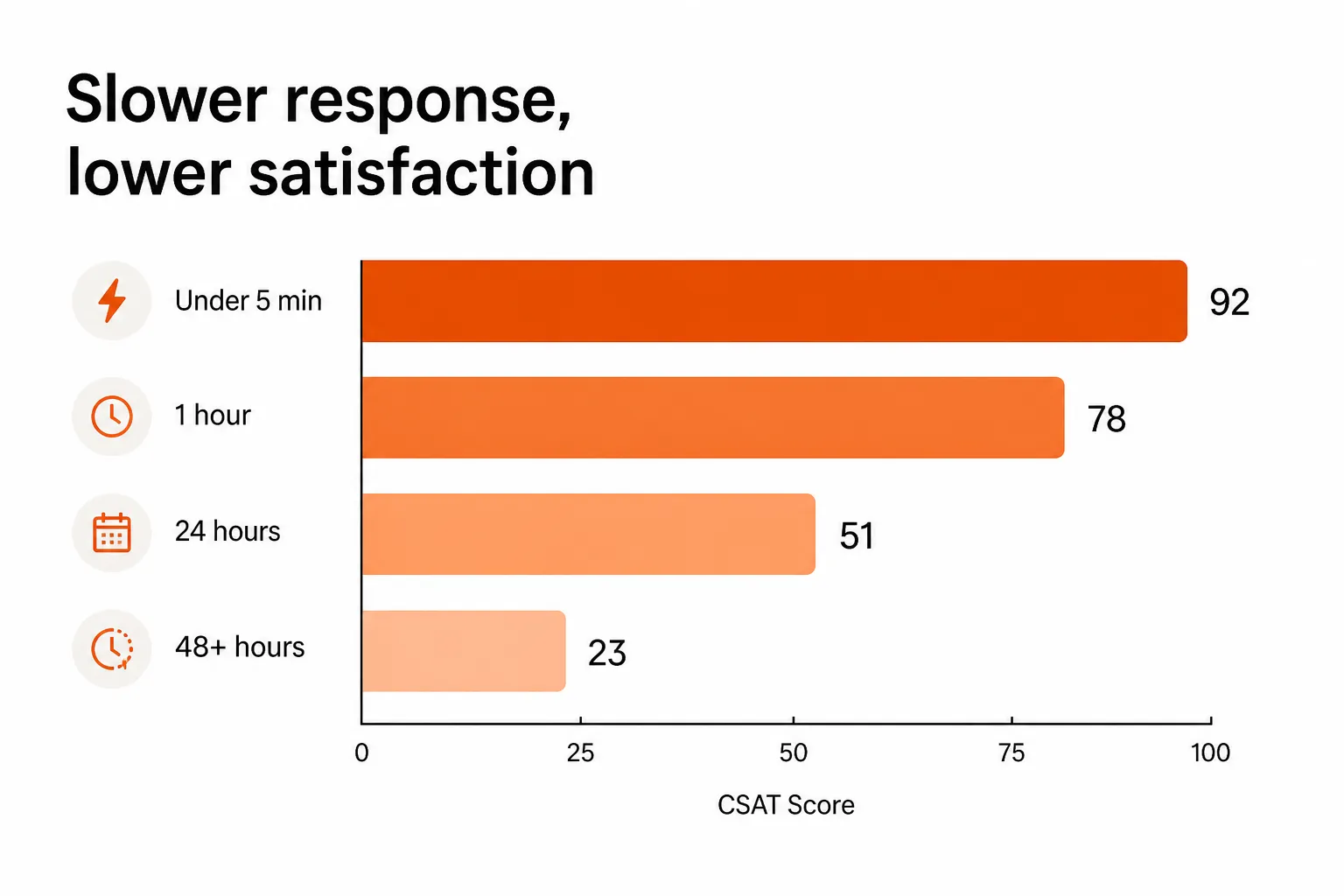
GreetNow data cited by LTVPlus shows CSAT at 92% when response comes under 5 minutes. Wait an hour and you're at 78%. Wait 24 hours and you're at 51%. Wait 48+ hours - which overnight tickets routinely do - and you're at 23%.
Beyond satisfaction, there are real cost consequences:
- Downtime: Small and midsize businesses average $150,000 in annual downtime costs. Industry-wide, the number is $5,600 per minute.
- Security exposure: When systems are down, defenses may be offline too. Slow response times correlate with elevated breach risk during outages, when attackers look for misconfigurations and overlooked updates.
- Churn: 85% of decision-makers believe service speed directly impacts revenue growth. Missing SLAs is a top reason clients switch providers at contract renewal.
The contract renewal math is simple: every client evaluating whether to stay is also recalling whether their specific SLA commitments were met. Not a monthly average - their specific tickets, their specific incidents.
The FRT trap most MSPs fall into
Before optimizing anything, there's a definitional problem worth naming.
LTVPlus makes this point clearly: "An MSP can report a respectable one-hour average while still missing every critical-ticket SLA, simply because lower-priority tickets pull the average down."
Looking at overall average FRT is misleading. P4 tickets resolved in 20 minutes mask P1 tickets that waited 3 hours. The fix is to benchmark FRT by priority tier, not as a single number.
There's also the question of what counts as "first response." Community discussions on r/msp reveal how much this varies:
"Generally in our contracts we have two SLAs - one of them is to acknowledge we receive the ticket, that's 2 hours for emergencies."
Automated acknowledgments ("We received ticket #XXXX") can satisfy the PSA's FRT clock while clients are still waiting for any human contact. If your contracts count automation as first response, that's fine - but align the definition explicitly, or you'll report healthy FRT while clients feel ignored.
The three root causes of slow FRT
Most FRT problems trace to one of three places. They're different problems with different fixes.
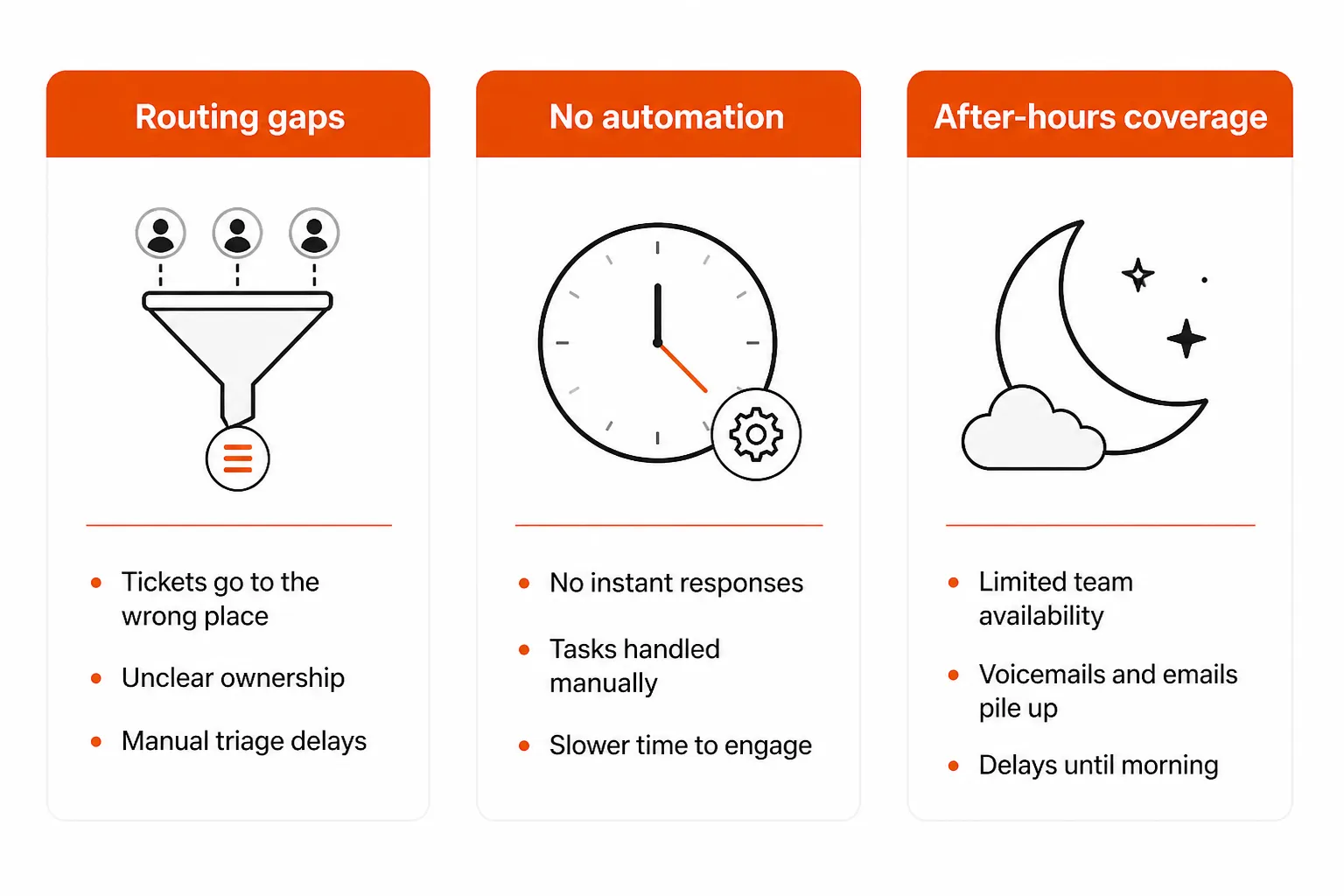
Routing and triage gaps - tickets don't reach technicians quickly because of shared mailboxes, unassigned queues, or manual dispatch. Diagnosis: if FRT is consistently slow during business hours across all ticket types, this is usually the problem.
Insufficient automation - technicians spend time composing first responses to the same common issues rather than having macros or auto-acknowledgment handle it. Diagnosis: if routing is clean but FRT for password resets and common requests is still slow, this is the gap.
After-hours coverage - tickets submitted after 5 PM wait until morning. Diagnosis: segment FRT by ticket creation time. If overnight and weekend FRT is dramatically worse than business-hours FRT, coverage is the issue, not process.
Worth stating plainly: the instinct is always to hire. More technicians would help with all three. But LTVPlus research consistently finds that routing and automation gaps account for the majority of FRT delays - and both are fixable without adding headcount.
Fix routing first
Routing bottlenecks are the highest-leverage fix because they affect every ticket in your queue, not just common ones.
The most common routing problem is the shared mailbox handoff:
Customer email → Shared mailbox → Technician manually reviews → Forwards to PSA
Every manual step introduces delay. The fix: connect client-facing support addresses directly to your PSA so tickets are created automatically, without anyone touching them first.
Once tickets are in the system, they should reach the right technician without manual dispatch. Build assignment rules based on:
- Client
- Ticket category
- Priority level
- Service board
- Technician availability and skill set
Add escalation rules for tickets that sit unassigned beyond a defined window - the system should alert a manager or re-assign before the SLA breach, not after.
ScopeStack recommends a tiered support structure to prevent misrouted tickets from clogging queues:
| Tier | Scope |
|---|---|
| Tier 1 | Password resets, software installation, common issues |
| Tier 2 | Complex troubleshooting, no workaround available |
| Tier 3 | Senior engineers, infrastructure and network issues |
| Tier 4 | Vendor escalation |
A quick diagnostic: pull the last 30 FRT breaches and measure how long each ticket waited between creation and assignment. If that gap accounts for most of the delay, routing optimization has more impact than any other change you can make.
Add automation for common issues
Once routing is clean, the next highest-value fix is automation for high-volume, predictable ticket types.
Auto-acknowledgment is the lowest-friction starting point. An immediate system response ("We received your request, Ticket #XXXX, a technician will follow up within [SLA window]") stops clients from sending follow-up emails and reduces perceived wait time - even before a technician is involved.
One important caveat: confirm how each client contract defines first response before implementing. If contracts require human acknowledgment, automation won't satisfy the SLA even if it stops the worry emails.
Response macros eliminate the composition time for the most common request types. LTVPlus research identifies the highest-impact categories:
- Password resets
- VPN connectivity issues
- Software or account access
- Printer problems
- Device enrollment
- Common application errors
Start with your 10 highest-volume ticket types. A technician using a macro for a password reset responds in 30 seconds instead of 3 minutes. At 50 password tickets a week, that's meaningful time recovered.
AI-powered categorization goes further: automatically classify tickets by type, client, and severity as they arrive. This eliminates the manual sorting that slows triage and ensures tickets reach the right tier without human intervention. Ixvara's research also points to duplicate detection - when a widespread outage generates 40 identical tickets, merging them into a single incident and broadcasting one response is far faster than handling each separately.
Close the after-hours gap
For most MSPs, after-hours FRT is the largest single contributor to a bad overall number. A ticket submitted at 9 PM records 11 hours of FRT if the first response comes at 8:05 AM - regardless of how fast the technician worked once they saw it.
Before changing anything, segment your FRT data by ticket creation time. If business-hours FRT is strong and overnight/weekend FRT is the problem, process optimization won't fix it. You need coverage.
The options, in order of increasing cost:
| Approach | When it works | Real trade-off |
|---|---|---|
| Internal on-call rotation | After-hours volume is low | Cheap at first; causes burnout as ticket counts grow |
| Dedicated overnight team | Overnight demand is consistently high | Reliable coverage but expensive to recruit and retain |
| Outsourced after-hours coverage | Volume is unpredictable | Consistent without headcount cost; requires careful partner selection |
| AI-driven 24/7 automation | L1 work dominates after-hours volume | Eliminates burnout and cost; only works for ticket types the AI can handle |
NinjaOne's guidance on SLA setting is worth following here: build in buffer zones rather than promising what you can't reliably deliver. Committing to 2-hour emergency response and consistently delivering in 90 minutes beats committing to 1 hour and breaching it during high-demand periods.
The Bully Max case study from LTVPlus is illustrative: after the supplement brand outgrew its 9–5 in-house desk and added 24/7 coverage, it held average FRT to 7 minutes 19 seconds and lifted support-driven revenue by 120%.
The 30-day improvement plan
Ixvara's implementation timeline is a reasonable starting point for an MSP working through all three areas:
Days 1–7: Fix intake. Audit the slowest 50 recent tickets. Identify which missed SLAs because of intake delays vs. routing delays vs. technician capacity. Build response templates for the 10 highest-volume request types. Revise intake forms to capture diagnostic information upfront.
Days 8–14: Clean up routing. Map request categories to technical ownership. Eliminate shared mailbox handoffs. Configure automatic assignment rules. Document escalation paths for stalled tickets.
Days 15–21: Reduce noise. Automate duplicate ticket merging for widespread incidents. Set SLA reminders and escalation triggers for aging tickets. Configure auto-acknowledgment for standard requests.
Days 22–30: Measure. Track FRT per queue and issue type. Audit the percentage of tickets routed correctly on first pass. Report on merged tickets and queue size reduction. Establish baseline metrics for next quarter.
How AI automation changes the equation
The three traditional fixes - routing, macros, coverage - have real limits. Better routing helps, but can't create capacity. Macros reduce composition time, but a technician still has to do the work. On-call rotations and outsourced coverage address after-hours, but at ongoing cost and often with technician burnout.
AI automation breaks a different constraint: it handles the work entirely for a defined set of L1 ticket types.
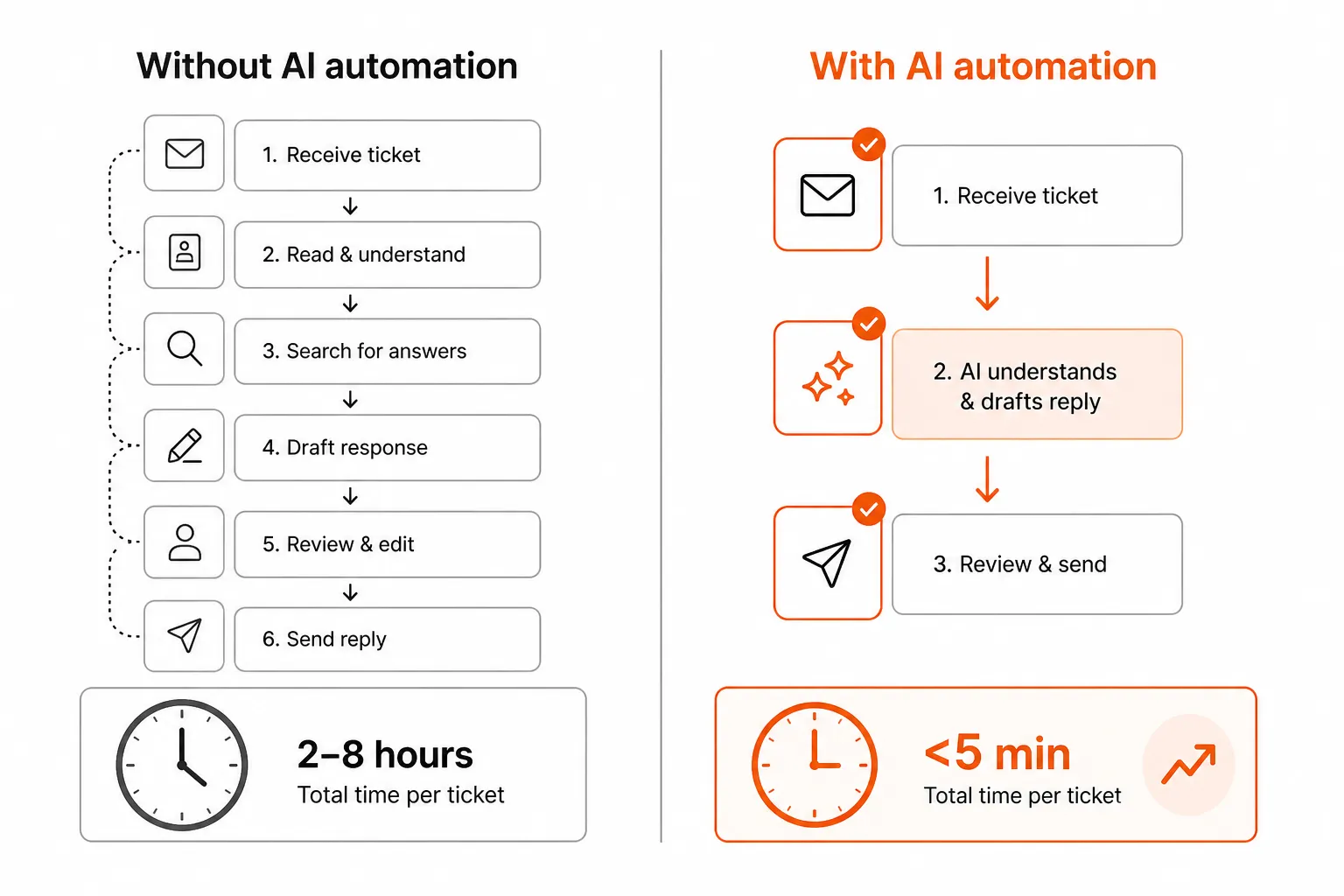
For password resets, account unlocks, MFA issues, onboarding and offboarding tasks, and software access management, an AI technician can:
- Provide first response immediately (eliminating FRT for that ticket class)
- Resolve the issue without human involvement
- Do this 24/7 without an on-call rotation
The economics are meaningfully different from hiring. Ixvara notes that better triage reduces escalation rates by up to 40% and expands capacity without increasing headcount. Automation takes that further by eliminating the technician-hours for routine work entirely.
The honest caveat: automation only works on ticket types it can actually execute. Complex troubleshooting, novel issues, and anything requiring judgment still need humans. The win is that routine L1 work - which often represents 40–60% of ticket volume at a typical MSP - gets handled without creating queue backup that delays everything else.
From r/msp, the practitioner take is consistent:
"Don't hire more people just to hit a number. Hire more people when the work actually justifies it."
AI automation is how you stop the work from justifying it.
Try Rallied
Rallied is an AI technician built for MSPs. It connects to your PSA, RMM, and identity tools (Entra ID, Okta, JumpCloud, Google Workspace, M365) and autonomously resolves L1 and L2 tickets - password resets, account unlocks, onboarding, offboarding, software access - without workflow builder overhead or a 6-month implementation.
Pricing is $3 per resolved outcome, $150/month minimum. If Rallied can't resolve a ticket, there's no charge. The 14-day trial requires no credit card.
For MSPs where after-hours FRT and routine ticket volume are the core problem, that's the specific gap Rallied closes.
Frequently Asked Questions
What is a good first response time for an MSP?
It depends on ticket priority. P1 critical issues should get a first response within 15 minutes. P2 high-priority within 30–60 minutes. P3 medium within 2–4 hours. P4 low-priority same business day. Top-tier MSPs average around 24 minutes for critical tickets, placing them in the top 2–3% nationally. The industry average sits closer to 2 hours.
What's the difference between first response time and mean time to resolution?
First response time (FRT) measures how quickly a technician acknowledges a ticket - the initial 'we're on it.' Mean time to resolution (MTTR) measures how long it takes to fully close the ticket. Both matter, but FRT is the metric clients feel most immediately. A 5-minute FRT with a 4-hour MTTR still reads as responsive. An 8-hour FRT feels like abandonment even if the fix itself is fast.
How do I measure first response time in my PSA?
Most PSAs (ConnectWise, HaloPSA, Autotask, SuperOps) track FRT natively in their reporting dashboards. The critical step is aligning how your PSA measures FRT with how your contracts define it. Some contracts count automated acknowledgments; others require a human response. If those definitions differ, your reported FRT can look fine while clients feel ignored. Segment FRT by priority tier, not just overall average - a healthy average can mask consistent misses on P1 tickets.
How can a small MSP offer 24/7 support without burning out staff?
There are three practical options: an internal on-call rotation (works at low volume, causes burnout as ticket counts grow), outsourced after-hours coverage through a dedicated NOC partner, or AI-driven automation that handles L1 tickets autonomously around the clock. Rallied takes the automation route - resolving password resets, account unlocks, and access issues 24/7 without a human on-call. For MSPs where after-hours volume is mostly routine L1 work, automation tends to be the most cost-effective path.
Does AI automation actually improve first response time for MSPs?
Yes, in specific and measurable ways. For L1 tickets (password resets, account unlocks, MFA issues, software access), AI can respond and often resolve within minutes rather than hours. It eliminates the after-hours gap entirely - no ticket waits until morning because there's no human to wake up. The caveat: automation only helps on ticket types it can actually handle. Complex or novel issues still need technicians. The win is removing the routine work that creates queue buildup and delays everything else.