IT Help Desk Procedures: The MSP Guide to Getting L1 Right

TL;DR
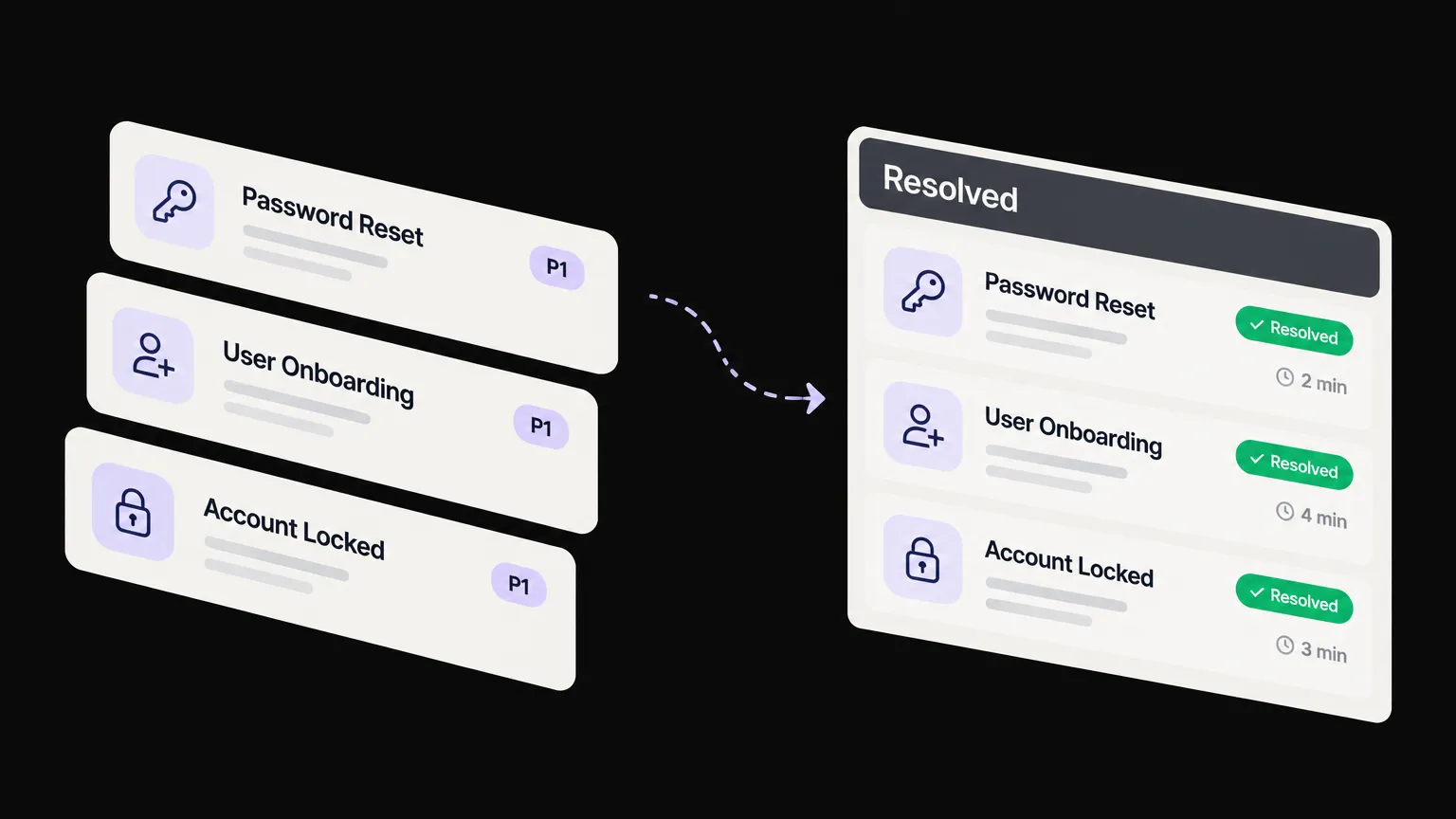
Most MSP help desks are structured around the same procedures - ticket intake, password resets, onboarding, offboarding, access management, escalation - but the pain isn't in knowing what those procedures are. It's in the execution: the same L1 tickets landing on the same techs every day, eating hours that should go to billable work. The Fixify 2026 IT Help Desk Benchmark puts median resolution at 71 hours without AI automation and 4.4 hours with it - a 16x gap that's almost entirely in the Tier 1 workload. This guide covers the core IT help desk procedures every MSP needs, how to structure the tiers that run them, and where automation now does the work instead of just logging it. If your team is still manually resetting passwords and processing offboards in 2026, that's worth fixing.
What are IT help desk procedures?
An IT help desk procedure is a documented, repeatable process for handling a category of user request or incident. For MSPs, that means everything from how a ticket gets created and triaged, to how a password reset is handled, to when and how an escalation happens, to how an offboard is closed out.
The word "procedure" does a lot of work here. A procedure isn't just "the tech resets the password." It specifies who does it, under what conditions, using which systems, with what verification steps, and how the ticket is documented and closed. The difference between an MSP that runs clean and one that runs chaotic is usually not talent - it's whether those procedures are defined, enforced, and measurable.
The Acronis service desk guide breaks the core function into three ITIL-aligned areas: incident management (restore service fast), problem management (eliminate the root causes of recurring incidents), and change management (make sure changes don't create new incidents). In practice, most MSP Tier 1 work lives entirely in incident management - which is also where the repetition is highest, and where automation has the most to offer.
The four-tier model
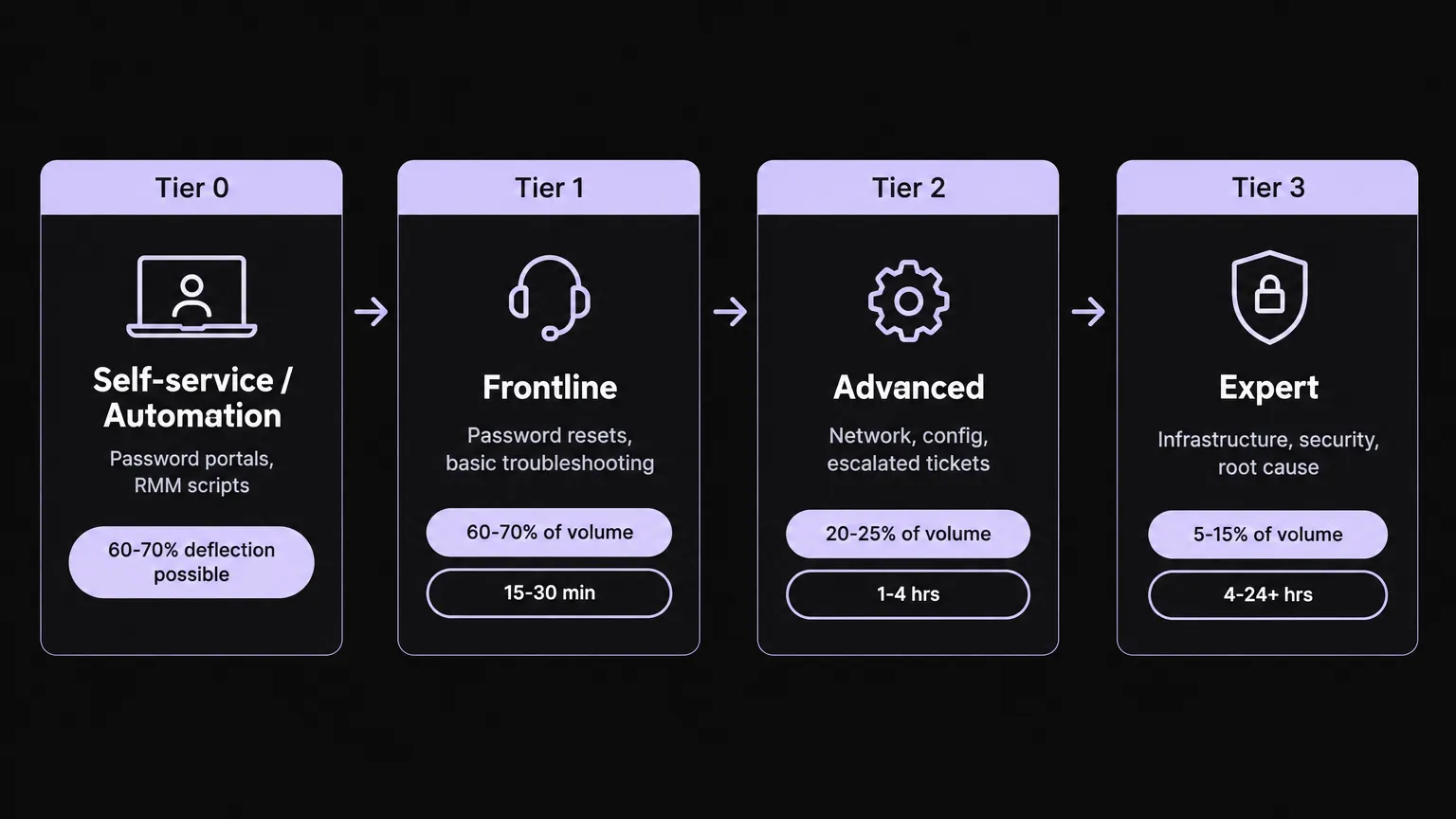
Before you can optimize your procedures, you need a structure to run them through. Most MSPs that have sorted this out operate on a four-tier model:
Tier 0 - Deflection. This is the layer you don't staff. Self-service portals, automated password reset tools, scripted RMM remediations. The goal is to resolve tickets before they need a human. This is where most MSPs are underinvested - not because the technology isn't there, but because setting it up has historically required significant admin time. That's changing fast.
Tier 1 - Frontline. The highest-volume layer. Tier 1 handles password resets and account unlocks, basic troubleshooting for M365, printers, and VPN, ticket triage and categorization, and first customer communication. LTVplus puts Tier 1 at roughly 60-70% of total ticket volume, with a resolution target of 15-30 minutes and escalation expected within 1-2 hours if unresolved. This is the layer that burns the most tech time and produces the least billable work per hour.
Tier 2 - Advanced technical. Network diagnosis, software configuration, system-level troubleshooting, managing escalated tickets with documentation, coordinating with Tier 3. Around 20-25% of volume. Resolution target 1-4 hours. Selective outsourcing for after-hours and overflow makes sense here, but most MSPs keep the core Tier 2 function in-house.
Tier 3 - Expert engineering. Infrastructure failures, root-cause analysis, security incidents, architecture decisions, vendor escalations. About 5-15% of volume. These tickets can run 4-24+ hours. This almost always stays in-house - and should.
The most common mistake we see is Tier 3 engineers routinely handling Tier 1 work. It happens when PSA routing rules aren't enforced, or when Tier 1 over-escalates out of uncertainty. The fix is clear escalation criteria (not just "after 30 minutes") and a Tier 1 knowledge base that actually covers the common cases. ConnectWise's MSP help desk guide suggests a junior tech escalates after 30 minutes, but that's a rule of thumb, not a standard - the better trigger is capability, not elapsed time.
Core IT help desk procedures
Here's where the rubber meets the road. These are the eight procedures every MSP help desk needs documented and enforced.
1. Ticket intake and triage
Every request goes into one system. This sounds obvious and is routinely violated. Techs taking direct calls or emails that never get ticketed, clients texting their account manager, teams using Slack as a support channel - all of it creates work that's untracked, unrouted, and unbilled.
The procedure: one intake channel per client (or a consolidation layer that catches them all), auto-creation on inbound email, immediate routing by category and priority. ConnectWise recommends centralized contact methods in your PSA so every team member can see status. The first tech to touch a ticket sets the category - and that initial categorization determines routing, SLA clock, and reporting accuracy, so it matters more than people treat it.
Automation opportunity: routing rules in the PSA handle the mechanical part. AI triage can now read the ticket body and assign the right category and priority before a human sees it, which means the ticket is already in the right queue when the tech opens their dashboard.
2. Password resets and account unlocks
The most common L1 ticket in almost every MSP. Pylon's January 2026 survey of 200 IT teams, as cited by Flamingo AI, puts password resets alone at 18% of Tier 1 volume. Forrester research cited by Unthread puts the cost of a single help desk password reset at around $70 when you load in the tech time.
The procedure: verify the requester's identity before touching anything (MFA or manager approval), clear the lockout, reset credentials, communicate to the user, close the ticket with time entry. The verification step is the one teams skip under volume pressure - and the one that matters for security.
At Tier 0, this should be handled by a self-service portal or an AI agent that can verify identity and execute the reset without a human in the loop. At Tier 1, it should take under 5 minutes. If it's taking longer, that's a tooling or documentation problem, not a staffing one.
3. Onboarding new users
Fixify's 2026 benchmark puts employee onboarding at 5.7% of ticket volume. It's also one of the slowest categories to resolve - Fixify reports that AI-automated onboarding runs 25-75+ hours median, partly because onboarding involves multiple systems and often gets batched by start date.
A solid onboarding procedure covers: create M365 account and assign licenses, configure email and distribution groups, provision access to required applications, set up device (or prepare imaging), add to relevant documentation groups in IT Glue or Hudu, create the client's PSA contact record, and confirm with the manager.
What makes this hard at scale isn't complexity - it's consistency. Every new hire at every client needs the same checklist executed in the same order. When it's manual, steps get missed. When it's documented as a runbook and executed by an AI agent that can touch M365, your RMM, and your PSA simultaneously, the checklist becomes enforcement.
4. Offboarding departing users
At 5.8% of ticket volume (Fixify), offboarding is roughly symmetric to onboarding but higher stakes - a missed step here means active credentials for a departed employee, which is a security incident waiting to happen.
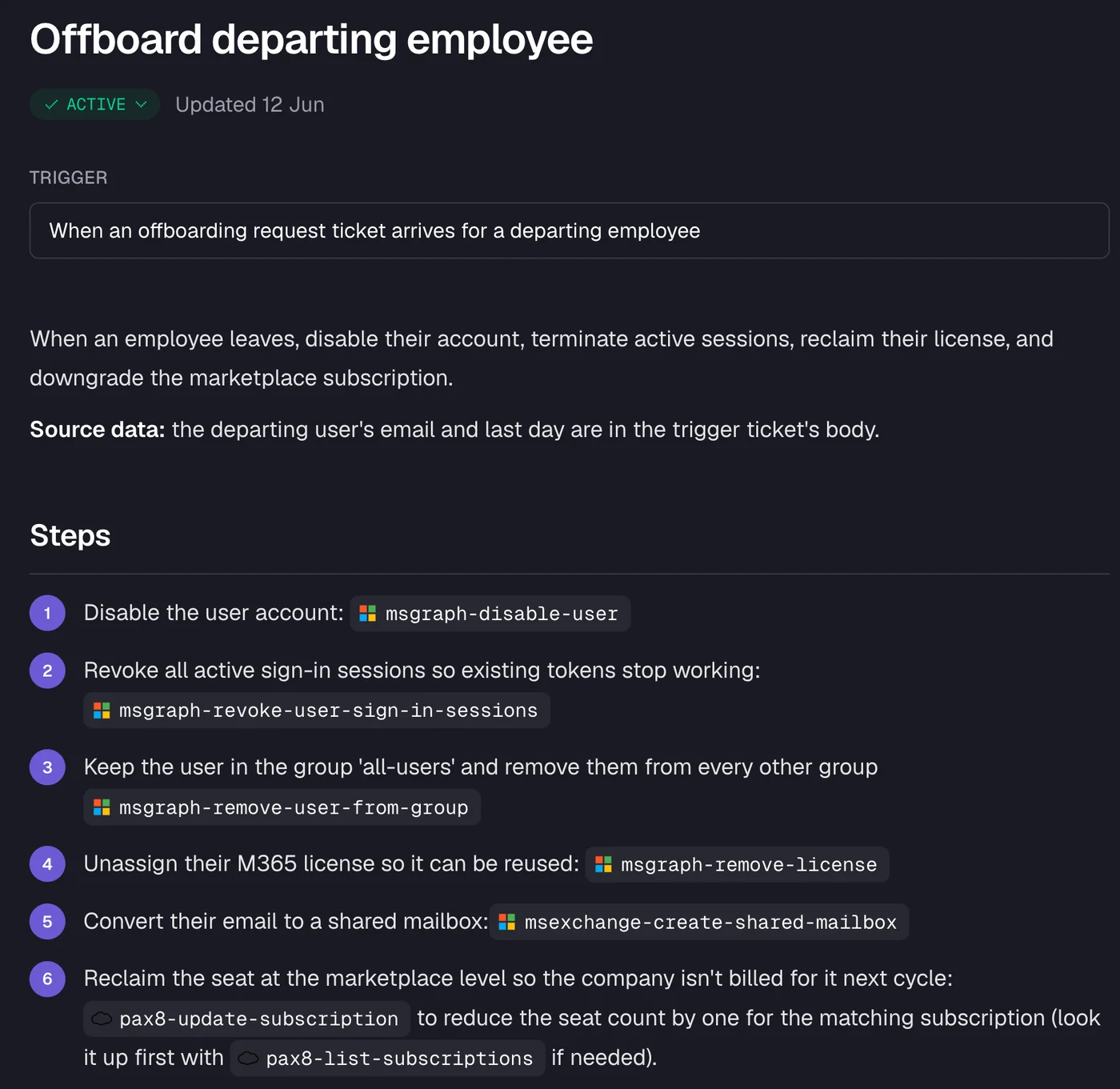
The procedure: disable the M365 account immediately, revoke all active sessions, remove from all security groups except a catch-all for mail continuity, unassign and reclaim licenses, convert email to a shared mailbox with appropriate delegation, downgrade marketplace subscriptions to remove the seat.
This is where a documented runbook enforced by automation pays off most visibly. The screenshot below shows Rallied's offboarding workflow - each step runs in sequence, touching Microsoft Graph, M365 Exchange, and Pax8, and every action is logged back to the PSA ticket:
5. Access and permissions management
Identity and access management (IAM) is 15.9% of ticket volume, and permissions management drives 28% of productivity-blocking tickets - the largest single category (Fixify). App assignment alone is 28.1% of total volume.
The procedure varies by request type: shared mailbox delegation requires an approval step, distribution list changes need manager confirmation, software license assignment should trigger a cost notification to the client. The common thread is that access changes touch identity, billing, and security simultaneously - which is why they need defined approval gates, not ad-hoc decisions.
Access requests are also where MSPs most often run into undocumented client environments. The procedure depends on having current documentation in IT Glue or Hudu - otherwise techs spend the first 10 minutes of every ticket finding out what access structure the client even has.
6. Escalation
A good escalation procedure has three components: trigger criteria (when to escalate, not just "after 30 minutes"), a handover package (what information the escalating tech provides - steps attempted, environment details, error messages, client impact), and clear tier ownership so a ticket doesn't bounce.
LTVplus recommends escalating on three triggers: elapsed time (Tier 1 at 30 minutes), complexity (anything needing system-level access Tier 1 doesn't have), and user request (if the client asks for a senior tech, honour it). The handover package prevents the Tier 2 tech from starting over - which is the main source of the "I've been dealing with this for three days" client complaint.
Over-escalation is a real problem. LTVplus flags it as the most common Tier 1 failure mode - techs escalating out of uncertainty rather than out of genuine scope limits. The counter is better Tier 1 documentation and knowledge base coverage, not more Tier 2 headcount.
7. SLA management
An SLA is a promise. The procedure around it covers what happens before a breach, not just after. LTVplus's recommended targets:
| Tier | First response | Resolution / escalation |
|---|---|---|
| Tier 1 | 15-30 minutes | 1-2 hours |
| Tier 2 | Within 1 hour of escalation | 4-8 hours |
| Tier 3 | Engaged within 4 hours | Varies |
ScopeStack gives a simpler version: critical issues within 30 minutes, lower priority within 24 hours. Either way, the procedure is: set SLAs per priority tier, configure PSA alerts before breach, review SLA performance monthly, and - critically - align escalation rules with client-specific SLA commitments. A client on a premium SLA should escalate faster than one on a standard plan.
8. Documentation and knowledge management
This one is infrastructure, not a procedure in the traditional sense - but it enables everything above. Every resolved ticket should produce a knowledge artifact: a note, a procedure update, or a confirmation that the existing documentation is accurate.
LTVplus recommends a monthly tier-accuracy audit: pull 50 random closed tickets and check that each was handled at the right tier. It's a quick way to catch routing drift before it becomes a cost problem. ScopeStack adds that documentation drives the automation success rate KPI - you can't automate what isn't written down.
KPIs to measure your help desk
You can't improve what you don't track. The metrics that matter:
First contact resolution (FCR). The share of tickets resolved without escalation or follow-up. Industry range for IT desks is 70-75%, high performers at 85%+ (ScreenMeet). Track by tier - a low Tier 1 FCR often signals a documentation gap, not a staffing one.
Mean time to resolution (MTTR). Time from ticket creation to final close. A rising MTTR when volume is flat usually means escalation is broken or Tier 1 is being underutilized.
First response time (FRT). Time to acknowledge. Fixify's benchmark shows a median of 5 minutes for their customer base; Macha's broader benchmark shows about an hour for the industry. The gap between the two reflects how much automation matters to first response.
Escalation rate. The share of L1 tickets going to Tier 2 or above. Mizo recommends an 80%+ first-contact target, meaning fewer than 20% of Tier 1 tickets should escalate. Track by original category - escalation rates for onboarding will look different from password resets.
Reopen rate. Tickets that come back after closure. Unthread's compilation puts a healthy benchmark at under 5%, with over 10% as a red flag. A high reopen rate on a specific category often points to a procedural gap - the fix is being applied but the root cause isn't.
Technician utilisation. HDI research cited by LTVplus benchmarks healthy loads at 20-40 active tickets per day; over 50 correlates with burnout and SLA breaches.
Where AI changes the equation
Here's the uncomfortable truth about most MSP help desks in 2026: they're running the same procedures they ran five years ago, with the same manual execution, and the same burnout cycle for Tier 1 techs. The procedures themselves are fine. The problem is who - or what - runs them.
The Fixify 2026 benchmark is worth sitting with: median resolution of 4.4 hours with AI automation versus 71 hours without - based on 50,000+ tickets across 30+ organizations. That's not theoretical. That's the gap between MSPs that have integrated AI into their help desk procedures and those that haven't.
The highest-ROI procedures to automate are the ones that combine high volume, low complexity, and repeatable steps:
- Password resets and account unlocks: identity verification + credential reset + ticket closure. No judgment required.
- Access management: app assignment, distribution list changes, shared mailbox delegation - all executable against your M365 and identity provider with the right integration.
- Onboarding: a multi-step runbook that touches M365, your RMM, IT Glue, and your PSA simultaneously. Slow when done manually; fast when an agent owns the sequence.
- Offboarding: the security-critical version of onboarding. Every step needs to happen, in order, and be logged. This is exactly where automation is hardest to do wrong.
The ticket categories where automation is not the answer: hardware failures, onsite work, security incidents, anything requiring judgment about an undocumented environment. Those stay with humans - and they should. The goal is to clear the repeatable volume so your senior techs are actually doing senior tech work.
Try Rallied
Rallied is an AI technician built specifically for MSPs. It connects to your PSA (ConnectWise, Autotask, Halo, SuperOps), your RMM, M365, Entra ID, Okta, IT Glue, and Hudu - and it executes the actual ticket resolution, not just the suggestion.
When a ticket lands, Rallied reads it, checks the client's live state in the relevant systems, runs the approved fix, and closes the ticket with notes and a time entry. Password reset: done. Account unlock: done. Offboard with license reclaim and shared mailbox conversion: done. For anything it's not sure about, it hands off with a full diagnosis in the notes so the tech isn't starting from scratch.
Every action is set to Auto, Approval, or Off at the action level and per client - so you control exactly what runs autonomously and what needs a human sign-off. No workflow library to build before it starts working, no dedicated admin, deploys in the same week.
Pricing:
| Plan | Monthly cost | Credits included | Avg. tickets covered |
|---|---|---|---|
| Standard | $300/month | 2,000 credits | ~700 tickets/month |
Credits are consumed per ticket based on complexity: 1 credit for simple (routing, status, close), 3 credits for standard (password reset, account lookup, M365 check), 8 credits for complex (multi-system offboard, RMM script + PSA update). Extra credits at $0.10 each, with optional auto top-up and a monthly spend cap. You're only charged when Rallied actually does work - not for tickets it couldn't finish or wasn't allowed to touch.
If your Tier 1 is still handling 60-70% of volume manually, Rallied is worth a look. The help desk procedures haven't changed. Who executes them has.
Frequently Asked Questions
What are the most common IT help desk procedures for MSPs?
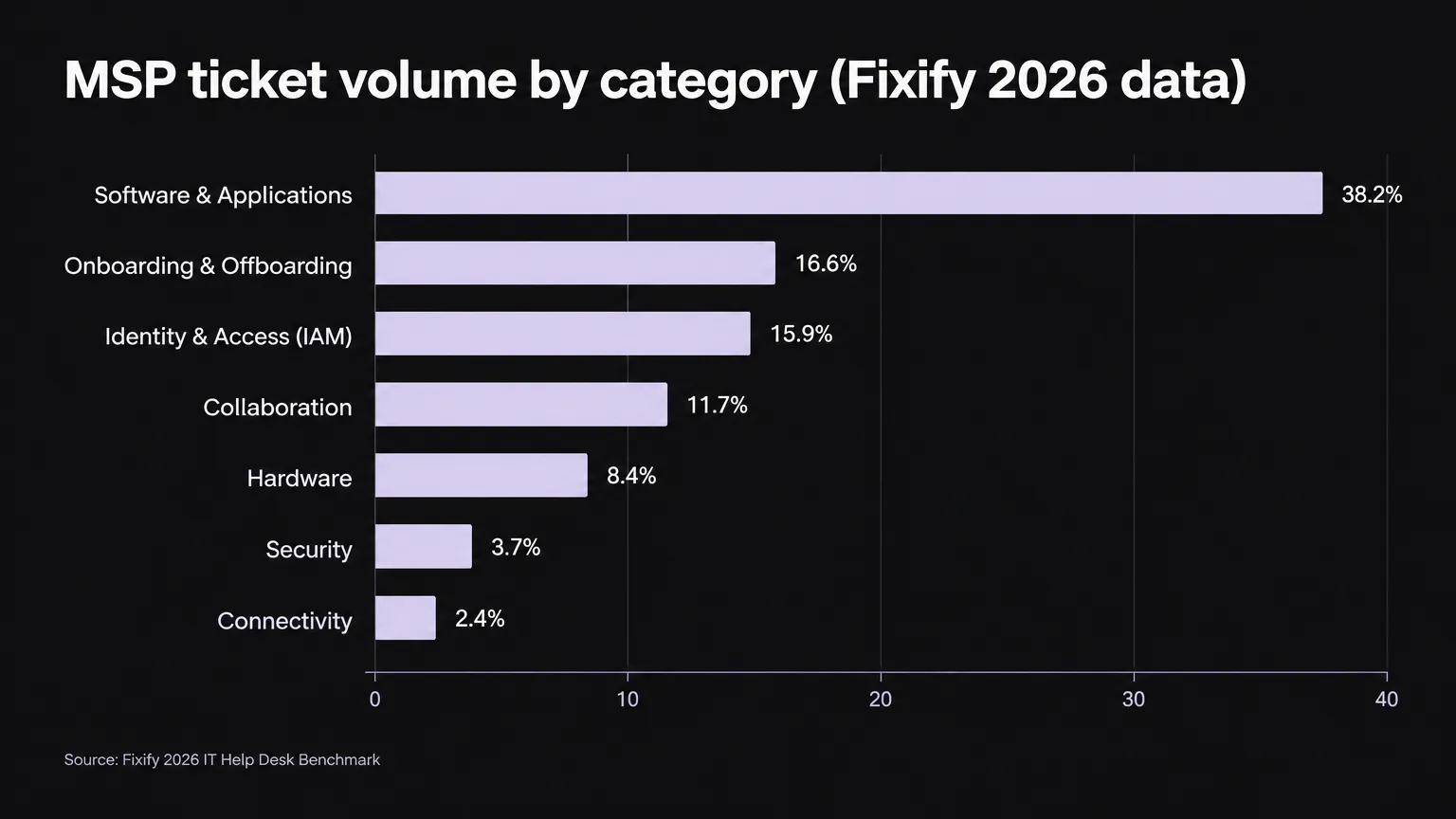
The most common IT help desk procedures for MSPs are password resets and account unlocks, user onboarding and offboarding, access and permissions management, software troubleshooting, and escalation workflows. According to the Fixify 2026 IT Help Desk Benchmark, software and applications account for 38.2% of ticket volume, followed by onboarding/offboarding at 16.6% and identity and access management at 15.9%. Tools like Rallied can automate many of these recurring L1 procedures.
What is the difference between Tier 1, Tier 2, and Tier 3 help desk support?
Tier 1 is frontline support handling high-volume, routine tickets like password resets, basic troubleshooting, and account unlocks - roughly 60-70% of total volume with a target resolution of 15-30 minutes. Tier 2 handles more complex technical issues like network configuration and software diagnosis, making up around 20-25% of volume with a 1-4 hour target. Tier 3 is expert-level support for infrastructure failures, security incidents, and root-cause analysis - about 5-15% of volume. Many MSPs now add a Tier 0 layer of self-service portals and AI automation to deflect repetitive tickets before they reach a human.
What is a good first contact resolution (FCR) rate for an IT help desk?
For IT service desks, a good FCR rate is generally 70-75%, with high performers reaching 85% and above, per ScreenMeet's 2026 benchmark data. Structured help desks with clearly defined tier responsibilities tend to achieve 70-79% FCR versus around 45% for unstructured approaches, according to HDI data cited by LTVplus. Tracking FCR by tier and ticket category helps identify where your team is losing ground.
How can MSPs automate IT help desk procedures?
MSPs can automate IT help desk procedures by deploying AI agents that connect directly to their PSA, RMM, identity providers, and documentation tools. Password resets, account unlocks, onboarding workflows, and access management are the highest-ROI automation targets - they're high volume, repeatable, and low-risk. Tools like Rallied connect to ConnectWise, Autotask, Halo PSA, M365, Entra ID, IT Glue, and NinjaRMM to execute these procedures autonomously on inbound tickets, closing them with notes and time entries without a tech touching them.
What SLA targets should MSPs set for their help desk?
A common benchmark is Tier 1 first response within 15-30 minutes with resolution or escalation within 1-2 hours; Tier 2 acknowledged within 1 hour of escalation with resolution in 4-8 hours; Tier 3 engaged within 4 hours with resolution varying by complexity. For priority-based SLAs, critical incidents (P1) are often targeted at a 30-minute response, while lower-priority issues may have 24-hour windows. The Fixify 2026 benchmark found that resolving tickets in the 15-minute to 4-hour window converts frustrated users at 93-97%.