AI acceptable use policy template for MSPs (2026)

TL;DR
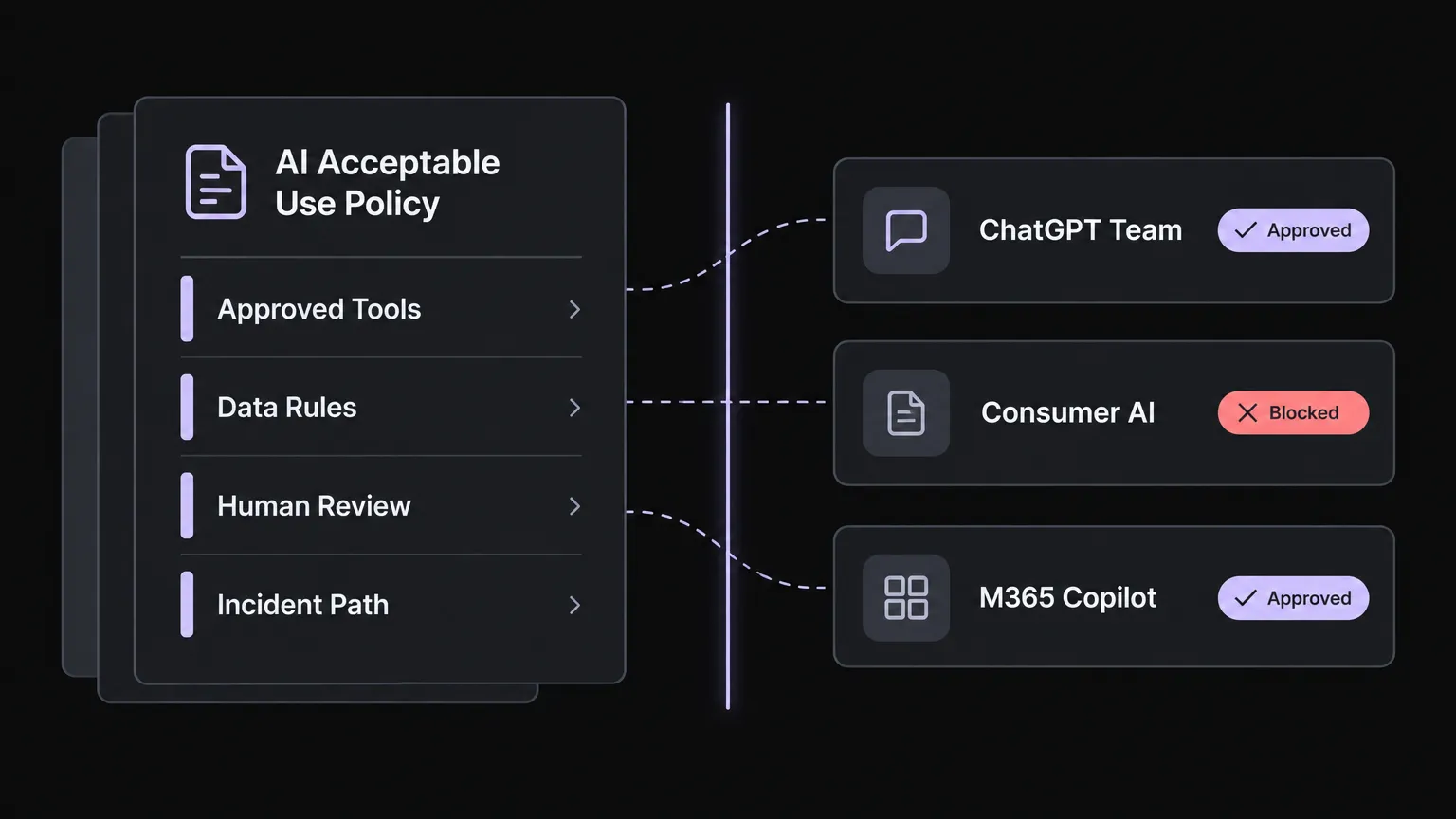
Your technicians are already using AI tools. The question isn't whether to write a policy; it's how fast you can get one in place before a tech pastes a client's config into a consumer ChatGPT account and you spend the next week explaining it to that client. An AI acceptable use policy for an MSP needs to cover two things most generic templates miss: client data handling, and autonomous AI agents that work inside your PSA. The template in this post gives you the full structure - five sections, ready to adapt in an afternoon: approved tools list by name and account tier, data classification rule for prompts, corporate-accounts-only rule, human review gate for client-facing output, and a named incident reporting path. If you work with EU-based clients, Article 4 of the EU AI Act requires AI literacy measures for staff - which a well-structured AUP training component directly addresses.
Get the template
We turned the policy below into a free AI acceptable use policy template in Google Docs. It has the full policy text with bracketed fields to fill in, an approved tools register, extra checks for autonomous AI agents, a data classification table, an incident report form, a staff acknowledgement block and a review log. Open it and use File > Make a copy to edit your own version.
The MSP's two-policy problem
Most AI acceptable use policy templates are written for a company with one set of staff, one set of data, and one set of rules. MSPs have a more interesting problem.
You need policy number one for your own technicians - the people who are, right now, probably using AI tools to help draft client communications, summarise tickets, or search for fixes. That policy governs your internal operations and your exposure.
You need policy number two because your clients are asking for help writing theirs. West McDonald, founder of GoWest.ai, told CRN at XChange Security 2025 that shadow AI is "the biggest invisible threat that our clients have today with their data," and he prescribes a specific role for MSPs: recommend paid team tiers, configure Microsoft Copilot permission boundaries, and help each client write an organization-specific usage policy. That last part is the new billable conversation nobody was having two years ago.
And then there is a third layer that most AUP templates don't address yet: autonomous AI agents that work directly inside your PSA - reading tickets, accessing your RMM and M365 tenant, and taking action without a human initiating each step. These tools need to be on your approved list and covered by your policy, but they also need vetting that goes beyond what you'd apply to a text generation tool. We'll come back to that.
The cost of no policy
Before we get to the template, a quick case study in why this matters.
In April 2023, engineers at Samsung's semiconductor unit pasted three distinct pieces of sensitive material into ChatGPT: faulty source code for a facility measurement database, code for identifying defective equipment, and a meeting recording converted into minutes. LegalDive reported Samsung's response was to cap prompt uploads to 1,024 bytes. That is an expensive way to discover you need a data classification rule.
Samsung's engineers weren't careless. They were solving a problem with a tool that was readily available and genuinely useful. The policy gap is what let it happen.
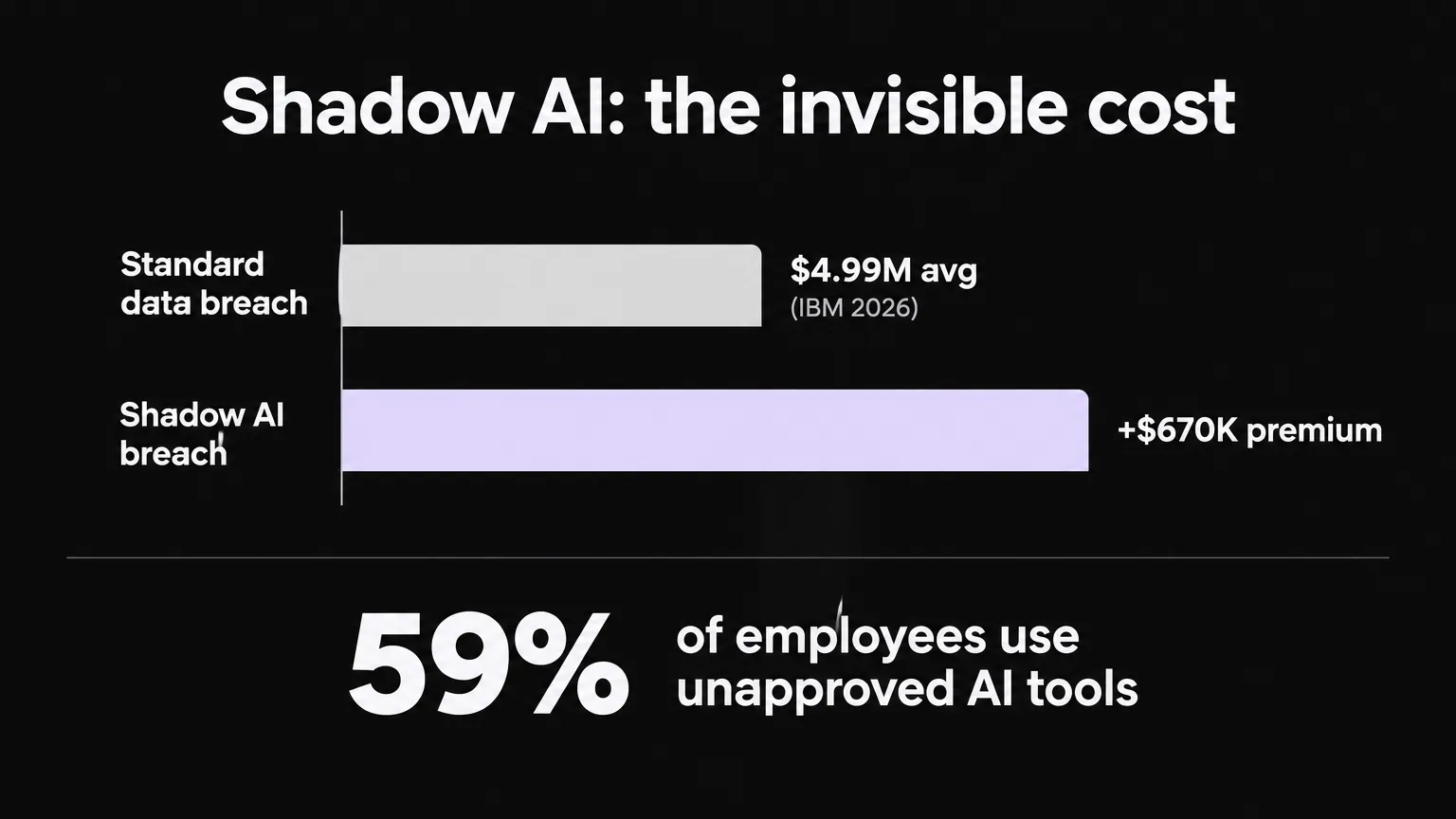
The numbers in aggregate point in one direction. The IBM Cost of a Data Breach 2025 report, as summarised by Northdoor, puts a $670,000 cost premium on breaches involving shadow AI compared to standard data breaches, on top of a 2025 global average of $4.88M. Shadow AI breaches also take around 10 more days to identify and contain.
For MSPs, the exposure is compounded. A survey of 1,000+ employees reported by CRN found 59% use unapproved AI tools. If a technician pastes a client's ticket or config into one, the MSP has created a sub-processor relationship nobody contracted for.
The 5 sections every MSP AI AUP needs
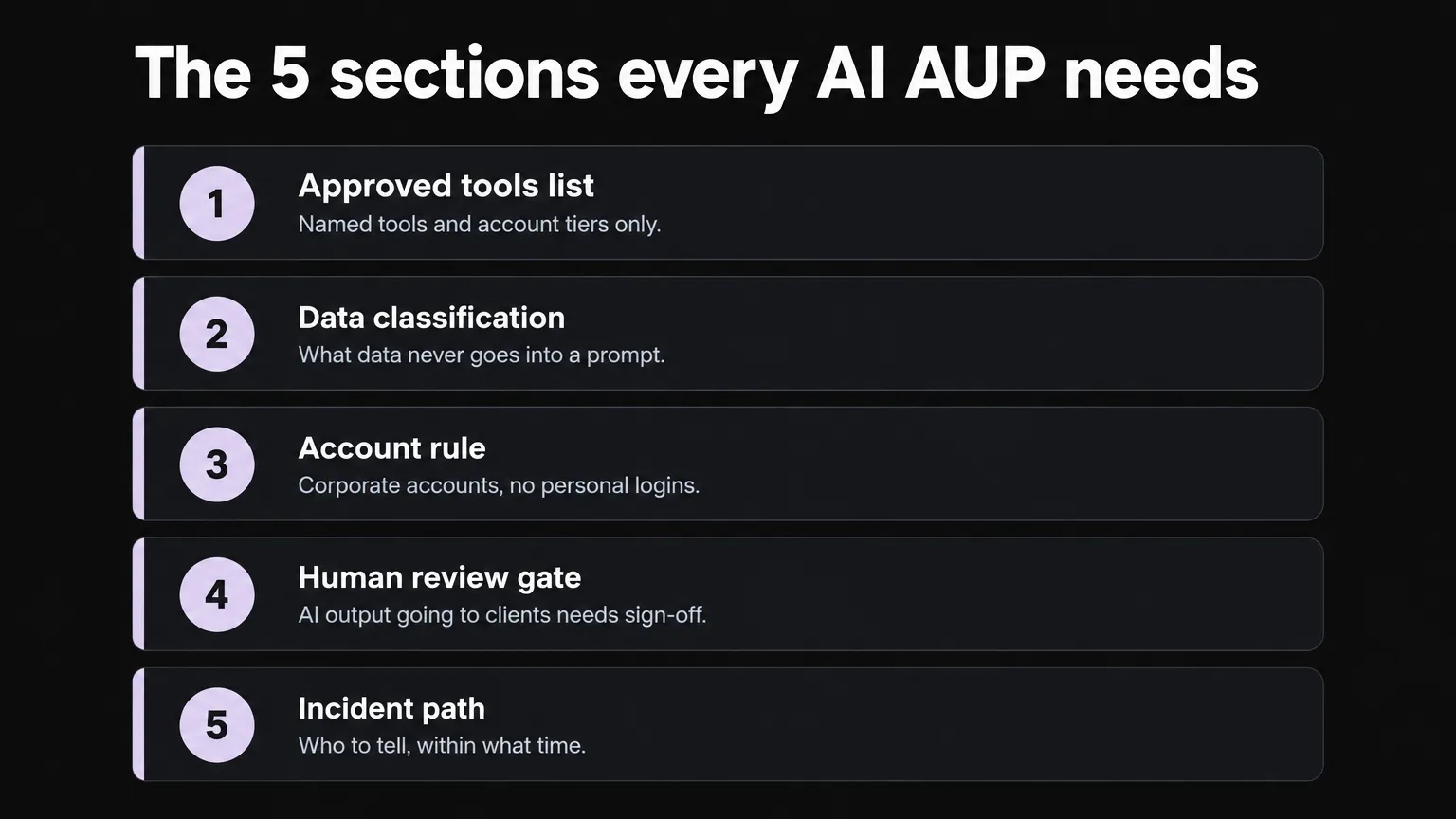
Every usable AI acceptable use policy reduces to the same five questions. Templates that balloon to 11 or 13 sections are usually padding these five with sub-clauses that belong inside each section, not as top-level headings. Here are the five, with MSP-specific notes for each.
1. Approved tools list
The most common mistake in AI policies is writing "approved AI tools" as the standard and leaving the list unspecified. That is not enforceable. "ChatGPT Team, Microsoft Copilot under our M365 tenant, and [tool] under a corporate account" is enforceable.
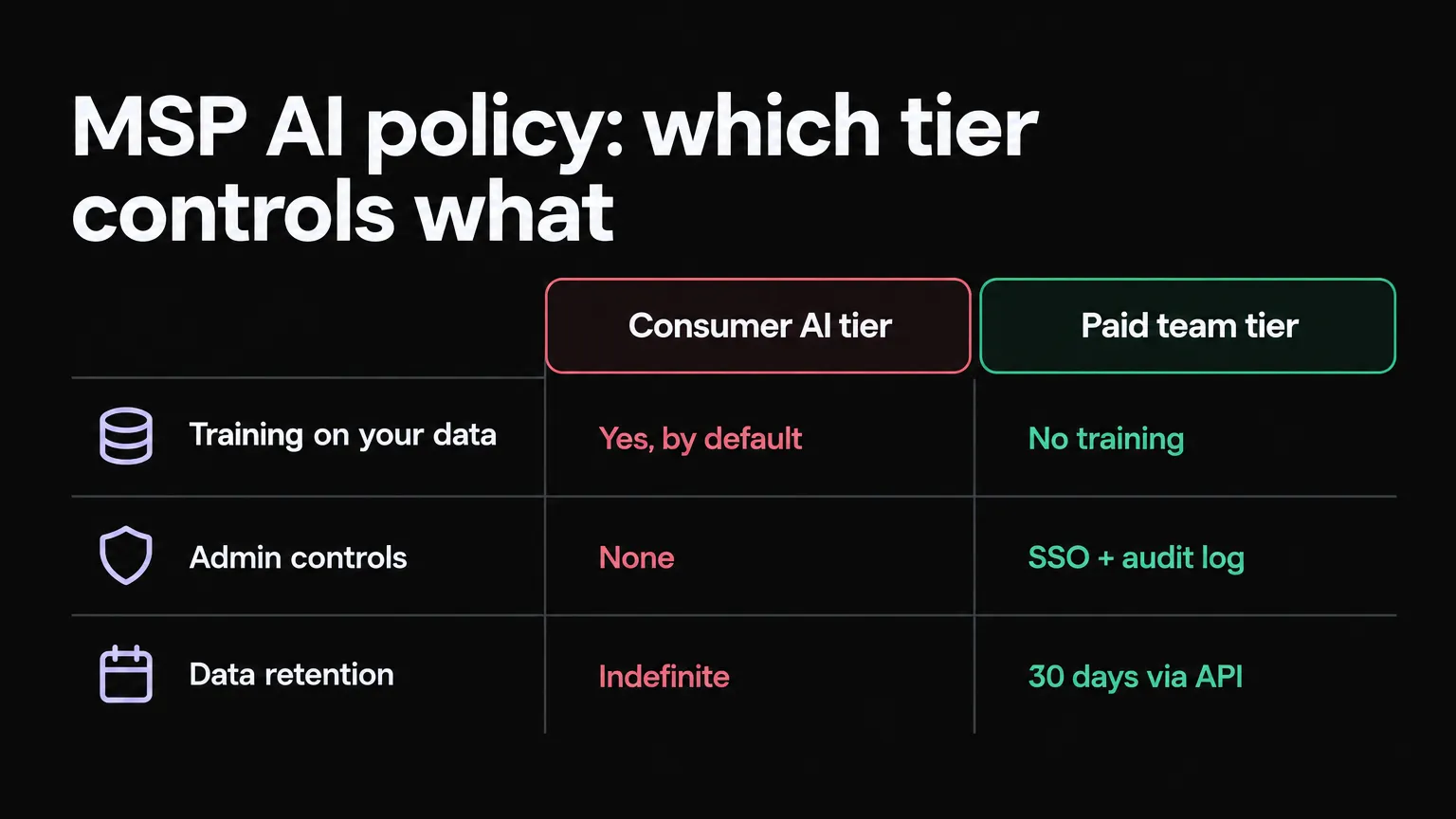
The named tool has to include the tier. This matters because consumer tiers and paid team tiers are fundamentally different products from a data handling standpoint.
Consumer-tier ChatGPT trains on user inputs by default unless the user opts out - and most don't. OpenAI's consumer terms allow training on conversations. The API and team tiers carry no-training-by-default terms and a 30-day retention window. Microsoft Copilot under a business M365 tenant has tenant isolation and admin controls consumer accounts don't.
For MSP technicians handling client data, the account tier is not a preference - it is the line between having a sub-processor agreement and not having one.
PDQ's AI acceptable use policy guide frames this well: include specific DOs ("use only tools on the approved list, under a corporate account") and DON'Ts ("do not enter customer information into unapproved tools, do not use personal accounts for work data").
A practical addition for MSPs: treat tool approval as a recurring agenda item on your vendor review cycle. New AI tools ship constantly and your approved list will be out of date within a quarter if nobody owns it.
2. Data classification rule for prompts
This section maps your data classification tiers to what may and may not go into an AI prompt. If you already have a data classification policy, this is an addendum to it. If you don't, this is the prompt to write one.
A practical four-tier structure:
- Public - information already on your website or in public documentation. May be used freely in AI prompts.
- Internal - internal process documentation, non-client operational data. May be used in approved tools under corporate accounts.
- Confidential - client configuration details, internal financials, HR records, non-public business strategy. May only go into tools with a signed DPA and, for client data, a sub-processor agreement.
- Restricted - client credentials, PII, PHI, legal matter files, M&A information. Hard no for AI prompts of any kind.
The MSP-specific clause that most templates leave out: client data is confidential or restricted by default. A ticket body, a client's firewall config, a system log, an Active Directory export - these are client data. Your policy needs to say explicitly that technicians may not paste this material into any AI tool without checking the tier of that tool and the classification of that data.
The Samsung case is instructive here. The engineers didn't paste the data because they were careless; they pasted it because there was no rule that told them not to. The policy is the rule.
3. Account and access rule
This is the shadow AI section. Shadow AI lives almost entirely in one place: personal accounts, on personal devices, accessed during work hours. A technician who opens their personal browser, navigates to chat.openai.com, and pastes a work question has stepped outside every corporate control you have - no SSO, no MFA, no audit log, no admin visibility.
The rule is simple: no personal accounts for work data. All AI tool usage happens under corporate accounts, with SSO where the platform supports it.
A few implementation notes:
- SSO enrollment is the highest-leverage control here. If your M365 tenant manages authentication for your AI tools, you get audit log entries, conditional access policies, and the ability to revoke access immediately.
- Named admins for each approved tool. Someone needs to own the approved list, handle license assignments, and run the quarterly review. Diffuse ownership means no ownership.
- Device policy - note whether corporate AI tool usage is permitted on personal devices. For most MSPs, limiting it to managed devices is the right call, particularly for tools that access client data.
DeepInspect's enterprise AI policy template makes a good point that most templates skip: include a monitoring statement. Tell staff that AI usage is monitored. This is the legal and trust basis for any enforcement you might have to carry out, and staff deserve to know it.
4. Human review gate
This section answers: what AI output has to be reviewed by a human before it leaves the building?
For an MSP, the categories that should always require human review are:
- Anything going to a client - emails, ticket responses, reports, runbooks shared externally. AI-drafted, human-reviewed, human-sent.
- Any ticket close based on AI-generated resolution notes without a human verifying the resolution.
- Configuration changes proposed by an AI tool, before they're applied.
- Security-related decisions - firewall rules, access grants or removals, policy changes.
The rationale is accountability, not distrust of the AI. If something goes wrong with a client, you need a human in the chain who can say "I reviewed this before it went out." An AI that drafts but a human that sends is a defensible position. An AI that drafts, sends, and closes the ticket with no human touch is not, regardless of how accurate it usually is.
This section is also where you address autonomous AI agents - tools that can take action without a human approving each step. We'll cover that in more depth in the section on agentic tools below.
5. Incident reporting path
What happens when something goes wrong - a restricted data item gets into a prompt, a client data leak is suspected, an AI tool behaves unexpectedly?
This section needs three things:
- A named person (not just a role) who receives the report.
- A timeframe - most breach notification frameworks operate on 72-hour or similar windows. Your internal reporting path should be faster than your external obligation.
- What information to capture - which tool, what data classification, what was in the prompt, when it happened, who was logged in.
For MSPs with EU-based clients, Article 73 of the EU AI Act covers serious incident reporting for high-risk AI systems. Whether your tooling reaches that threshold depends on what you're running and for which clients, but the reporting path should be in place regardless.
"It really is the biggest invisible threat that our clients have today with their data." - West McDonald, founder, GoWest.ai, quoted by CRN at XChange Security 2025
The complete MSP AI acceptable use policy template
The following is a ready-to-adapt template. Replace the bracketed fields with your company-specific values. Have your legal counsel review the data classification and incident reporting sections before distributing, particularly if you hold PHI or operate under specific contractual obligations. The same text is in the Google Docs version of this template, with the registers and forms already laid out.
AI Acceptable Use Policy [Company Name] Version 1.0 - Effective [Date] Policy owner: [Name, Title] Next review: [Date + 12 months]
1. Purpose and scope
This policy governs the use of artificial intelligence tools by all staff, contractors, and any individual accessing [Company Name] systems. It applies to AI tools used for work purposes, regardless of whether the device is company-issued or personal.
The purpose is to protect client data, protect company data, and define the conditions under which AI tools may be used productively and safely.
2. Approved tools
The following AI tools are approved for use by [Company Name] staff:
- [Tool name] - [Tier, e.g. ChatGPT Team under corporate account] - Approved for: [use cases]
- [Tool name] - [Tier] - Approved for: [use cases]
- [Tool name] - [Tier] - Approved for: [use cases]
No AI tool outside this list may be used for work purposes. The approved list is reviewed quarterly by [Policy Owner] and updated as needed.
Using a personal account on an approved tool is not permitted. All use must be under a corporate account, with SSO where the platform supports it.
3. Data classification rules
Before entering any information into an approved AI tool, staff must verify the data classification of that information.
- Public data may be entered freely.
- Internal data may only be entered into approved tools under a corporate account.
- Confidential data (including but not limited to: client configuration files, internal financials, HR records) may only be entered into approved tools with a signed Data Processing Agreement and, for client data, a sub-processor agreement in place.
- Restricted data (including but not limited to: client credentials, personally identifiable information, protected health information, legal matter files) must not be entered into any AI tool under any circumstances.
Client data is classified as confidential or restricted by default. When in doubt, treat it as restricted.
4. Human review requirements
The following categories of AI-generated output require human review before use:
- Any communication sent to a client, including ticket responses, reports, and runbooks.
- Any ticket close based on AI-generated resolution notes.
- Any configuration change proposed by an AI tool, before application.
- Any security-related decision (access grants or removals, firewall rules, policy changes).
Staff are responsible for verifying the accuracy of AI output before using it. AI tools make errors. Passing an unchecked error to a client is a staff error, not an AI error.
5. Incident reporting
If you believe restricted or confidential data has been entered into an AI tool, or if an AI tool has behaved unexpectedly in a way that may have exposed client or company data:
- Stop the session immediately and do not re-enter the data.
- Report to [Policy Owner Name] at [contact] within [timeframe, e.g. 4 hours] of discovery.
- Capture: the tool name, the data classification of the information involved, what was entered, the time and date, and your account name.
[Company Name] will assess whether notification obligations apply and take appropriate action.
6. Training and acknowledgement
All staff covered by this policy must complete an AI acceptable use training module [on/before hire date / annually]. Completion is logged and available to [Policy Owner].
Staff must sign an acknowledgement that they have read and understood this policy [on hire / annually]. Signed acknowledgements are retained for [retention period].
This policy is in addition to, not a replacement for, the general IT Acceptable Use Policy and the Data Classification Policy.
Compliance frameworks: what they actually require
An AI acceptable use policy is not yet a universal legal obligation for US private-sector companies - but the compliance landscape is moving fast enough that "voluntary now" doesn't mean "voluntary in 18 months."
The NIST AI Risk Management Framework 1.0, released January 2023, is voluntary and not certifiable. Its Govern function maps directly to AUP ownership and review cycles; its Map function maps to tool inventory and use-case classification. The NIST Generative AI Profile (NIST-AI-600-1), released July 2024, adds a layer specific to GenAI deployment.
ISO/IEC 42001, published December 2023, is certifiable. Its Annex A.2.4 requires review of the AI policy - which means a named policy owner and a documented review cycle are not optional if you're pursuing or maintaining ISO 42001. For MSPs whose clients already hold ISO 27001, ISO 42001 is a natural extension.
The EU AI Act is the furthest-reaching framework. Article 4 requires deployers to take measures to ensure sufficient AI literacy of their staff. That is a training obligation, which your AUP's training and acknowledgement section directly addresses. Article 26 covers deployer obligations for high-risk AI systems, including the requirement to notify affected persons where the system makes decisions about them. Article 73 covers serious incident reporting. Penalties at the top tier are up to EUR 35M or 7% of global turnover.
Whether any of this directly applies to your operation depends on what you're running, for which clients, and in which jurisdictions. The practical point is that a properly structured AUP - with a named owner, a review cycle, documented training, and an incident path - satisfies the intent of all three frameworks for the vast majority of MSP use cases.
A note on autonomous AI agents in your PSA
There is a category of AI tool that most AUP templates aren't built to handle: tools that work autonomously inside your PSA, accessing your RMM and M365, and taking action on tickets without a human approving each step. These are not text generation tools. They are execution tools.
The same five policy sections apply - approved tools list, data classification, account rule, human review gate, incident path - but the vetting for an execution tool is more involved.
Before adding an autonomous AI agent to your approved tools list, verify:
- Per-client scoping - the agent should only be able to access systems for the client whose ticket it's working. Broad credentials that span all clients is not an acceptable permission model for an autonomous tool.
- Approval gates on sensitive actions - password resets, account creation, deletions, policy changes. The right default is that the agent drafts the action and a human approves it; autonomous execution on sensitive operations should be something you unlock deliberately, per client, after you've validated the agent's judgment.
- Full audit logs - every action the agent takes should be logged with timestamp, client, action, result, and who approved it where applicable. The log should be queryable and exportable, not just visible in a dashboard.
- SOC 2 Type II - for tools handling client data and executing against client systems, SOC 2 Type II certification is the baseline compliance signal to look for.
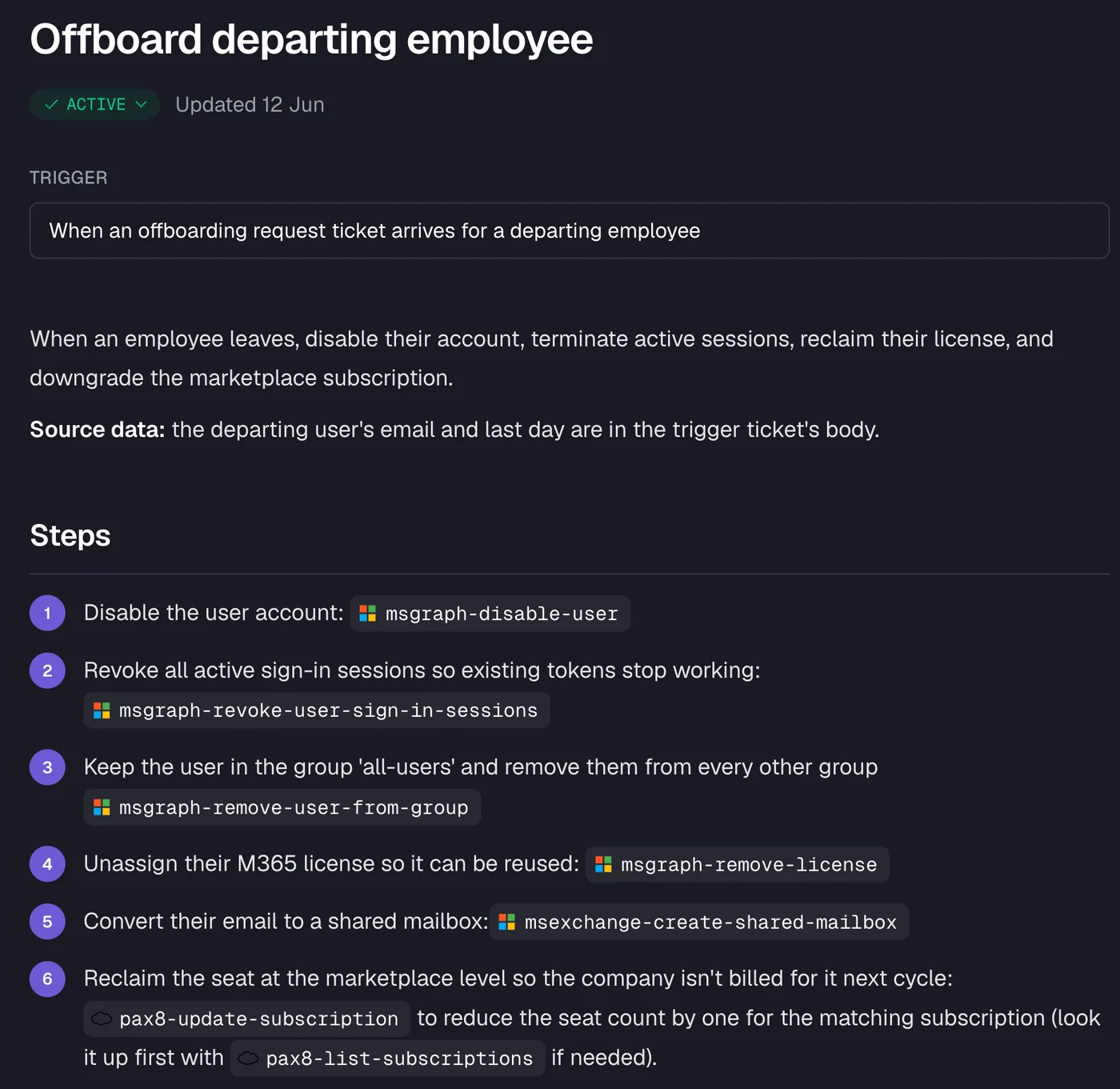
This is what proper agentic AI governance looks like in practice. The runbook above is written in plain English, every step is logged to the ticket, and each action can be set to Auto, Approval, or Off at the client and action level. The policy wrapper around this tool looks like: approved tool (verified), per-client scope (confirmed), approval gates in place (yes), audit log queryable (yes), SOC 2 Type II (certified).
That is a tool you can put on your approved list with a clean policy story. A tool that takes action with broad admin credentials, no audit log, and no approval gates is not - regardless of how good its resolution rate is.
The MSP permissions and AI governance post on the Rallied blog goes deeper on what SOC 2 auditors are asking about agentic AI and how the approval gate model answers it.
Try Rallied
Rallied is an AI technician built for MSPs - it takes first touch on every ticket in your PSA, runs fixes across M365, your RMM, and identity tools, and closes the ticket with notes and a time entry. It operates with per-client scoping, approval gates on sensitive actions, and full audit-ready logs, making it the kind of tool that belongs on a well-written approved list: SOC 2 Type II certified, one dedicated agent per client, every action logged.
Pricing is $300/month with 2,000 credits included - roughly 700 tickets at the production average of 2.7 credits per ticket. Tickets the agent couldn't finish, or wasn't allowed to act on, are never charged.
"One of the features we value most is the ability to customize workflows to guide the AI through troubleshooting steps tailored to our specific needs. Feedback from our technicians has also been positive, with AI-generated notes and workplans helping guide troubleshooting and, in some cases, resolving tickets entirely." - CTO at Cyber Solutions (part of Lyra), G2 review
To see how Rallied handles this inside your PSA, read about Microsoft 365 Management for MSPs.
Frequently Asked Questions
What should an AI acceptable use policy include?
A solid AI AUP covers five areas: an approved tools list (named tools and account tiers, not just 'approved AI tools'), a data classification rule for prompts (what data never goes into any AI tool), an account and access rule (corporate accounts only, no personal logins for work data), a human review gate (what AI output needs sign-off before reaching a client or a ticket close), and an incident reporting path (who to tell and within what timeframe when something goes wrong). For MSPs, every section needs an extra clause covering client data specifically, since a technician pasting a client's credentials or config into a consumer AI tool is a sub-processor relationship nobody signed.
Do MSPs need a separate AI policy for their own staff and their clients?
Yes, and this is the part most MSPs miss. You need one policy governing how your technicians use AI tools internally, and you're increasingly being asked to help clients draft their own. West McDonald of GoWest.ai told CRN that shadow AI is 'the biggest invisible threat that our clients have today with their data' and that MSPs should be helping each client write an organization-specific policy. Having your own policy in place is the proof you practise what you preach.
Is there a legal requirement to have an AI acceptable use policy?
For most US private-sector businesses, there is no federal mandate to maintain an AI acceptable use policy. The argument is practical and contractual: the NIST AI RMF is voluntary; ISO/IEC 42001 is certifiable but optional; the EU AI Act imposes obligations on operators of high-risk AI systems, with fines up to EUR 35M or 7% of global turnover at the top tier. For MSPs with EU-based clients, Article 4 of the EU AI Act requires AI literacy measures for staff - which an AUP training component addresses.
What is shadow AI and why does it matter for MSPs?
Shadow AI is staff using unapproved AI tools - typically consumer-tier ChatGPT or similar on personal devices - outside any corporate control. A Cybernews survey of 1,000+ employees found 59% use unapproved AI tools. For MSPs, the exposure is asymmetric: if a technician pastes client credentials, logs, or configuration files into a consumer AI tool, the MSP has created a sub-processor relationship without a contract, and training on that data is often on by default unless the user actively opts out.
How should an MSP handle AI agents that work autonomously in the PSA?
Autonomous AI agents - tools that read tickets, access your RMM and M365, and take action without a human initiating each step - should appear on your approved tools list with their specific integration scopes noted. The key controls to verify are: per-client scoping (the agent only accesses systems for the client whose ticket it's working), approval gates on sensitive actions (password resets, account creation, deletions), and full audit logs that are queryable and exportable. Rallied's security page documents these controls, and the SOC 2 Type II report is available via the Trust Center.