Microsoft 365 Copilot readiness assessment: the MSP checklist

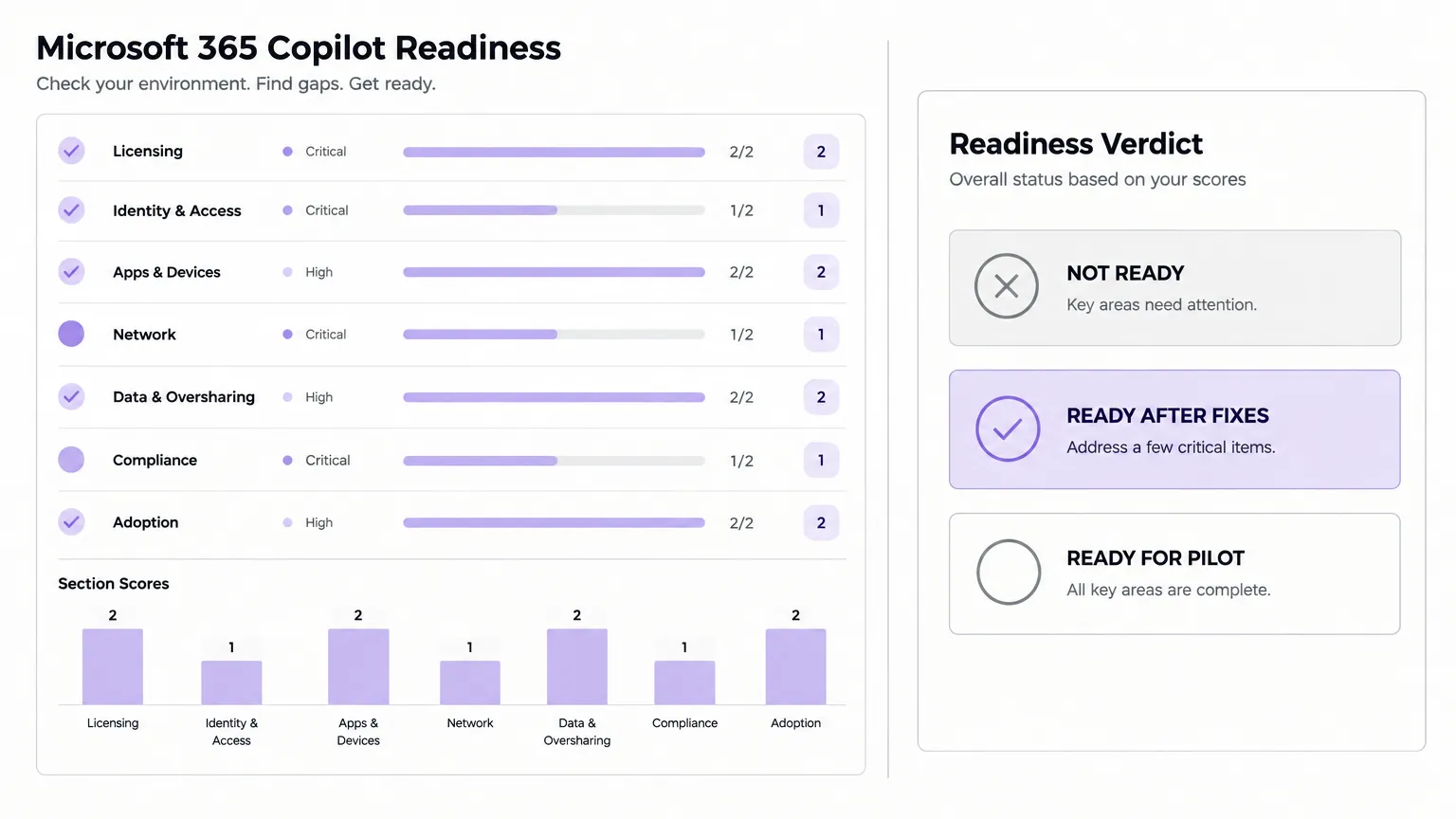
TL;DR
Microsoft 365 Copilot answers from whatever a user can already see. That makes the tenant's permission hygiene the single biggest variable in whether a rollout goes well or blows up in week one. Before assigning a licence, MSPs need to check 7 areas: licensing, identity, apps and devices, network, data and oversharing (the one that bites), compliance, and adoption planning. We built a free scorecard with 46 checks across all 7. Each check scores 0, 1, or 2 - any Critical check below 2 blocks the pilot. Use it to get a verdicted status: NOT READY, READY AFTER FIXES, or READY FOR PILOT. Then follow the 90-day plan to get there.
Get the template
The free Copilot readiness scorecard covers all 46 checks, how to verify each one, why it matters, a priority level (Critical, High, or Medium), and a 0/1/2 score. The Summary tab tallies scores by area and gives a verdict. The Pilot Plan tab lays out days 0-14 through 61-90. The Network tab lists every endpoint Copilot needs, including *.cloud.microsoft. Open it in view mode and use File > Make a copy to get your own editable version.
Why readiness matters before you assign a single licence
Copilot is different from most Microsoft 365 features you deploy. When you turn on Teams, a misconfiguration might break a call. When you turn on Copilot on a poorly governed tenant, it surfaces a file in a SharePoint library marked "Everyone" that nobody has opened in three years - except now it's the answer to an exec's prompt about salary bands.
That is not a Copilot bug. Copilot does not add permissions; it works inside whatever the user can already access. The permission sprawl was already there. Copilot just makes it findable. As one r/microsoft_365_copilot thread put it:
"If your tenant has ten years of oversharing, Copilot is the tool that finally makes that visible. Clean up the access, audit the access..."
- r/microsoft_365_copilot (search snippet)
A readiness assessment is how you find and fix this before the client finds it themselves.
The 7 areas of the assessment
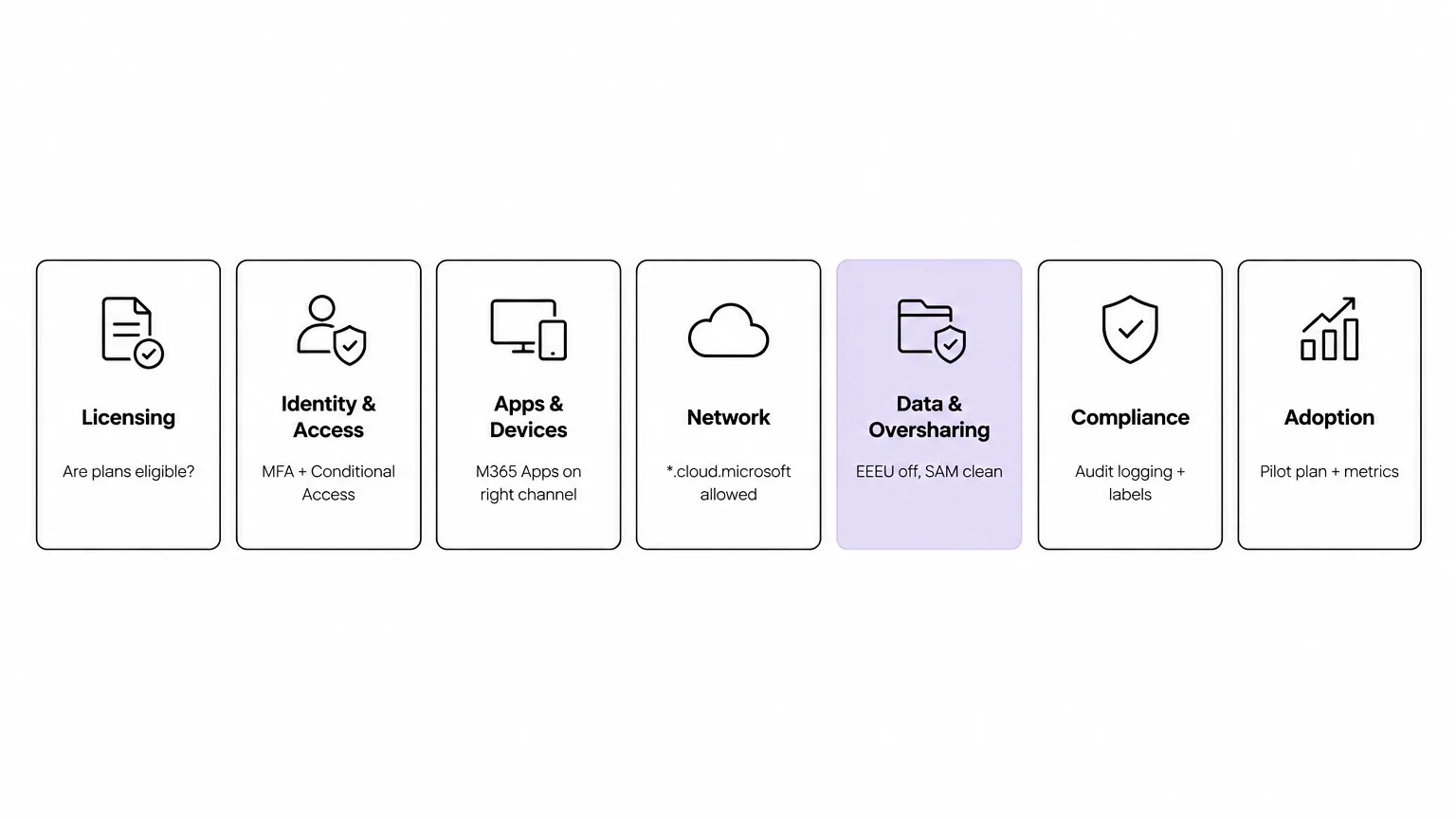
The scorecard groups its 46 checks into 7 areas. Here's what each one is actually checking for.
Licensing
The first thing to confirm is that each user is on an eligible base plan. Microsoft Copilot runs as an add-on on top of qualifying subscriptions - Microsoft 365 Business Premium, Business Standard, E3, E5, F1, F3, Apps for Enterprise, and others. Microsoft 365 E7 includes Copilot. The small-business version, Copilot Business, is $18.00 per user per month on yearly billing and caps at 300 users - so enterprise clients need the add-on route through a Microsoft partner.
Two things that trip up pilots:
- Device-based licensing doesn't work. Microsoft Copilot isn't available with device-based licensing for Microsoft 365 Apps for enterprise.
- Cross-tenant users and guests can't be licensed. If the client has many external collaborators, those users are out of scope for Copilot.
Run the Copilot License Details diagnostic against a test account before you assign to anyone else.
Identity and access
Every Copilot user needs a work or school account in Microsoft Entra ID. Apply MFA and Conditional Access to Copilot the same way you would to any cloud app. The AI Administrator role gives the right admin access for managing Copilot settings without needing Global Administrator.
The identity check is faster than the data check, but it's still worth doing: Conditional Access misconfigurations and missing MFA can block Copilot from appearing in apps entirely.
Apps and devices
Copilot in desktop apps needs Microsoft 365 Apps on a supported update channel. Semi-Annual Enterprise Channel is not supported - clients on that channel need to move to Current Channel or Monthly Enterprise Channel first.
Other things to check:
- Exchange Online mailbox required for any Copilot experience that touches mail, calendar, or meetings. Group mailboxes are not supported.
- Loop and Whiteboard need to be enabled at the tenant level.
- Third-party cookies must be enabled in the browser for Copilot in Word, Excel, and PowerPoint on the web.
Teams transcription or recording also needs to be enabled for Copilot to work on meeting content after the meeting ends.
Network
Copilot adds one domain that catches MSPs off guard: *.cloud.microsoft. The primary Copilot URL is copilot.cloud.microsoft, and the wildcard needs to be allowed on firewalls, proxies, URL filters, and tenant restriction policies. Blocking just copilot.cloud.microsoft and allowing the rest breaks the service.
Also check:
- WebSocket Secure (WSS) connectivity to
*.office.com,*.cloud.microsoft, andcopilot.cloud.microsoft. TLS inspection and aggressive proxy timeouts break Copilot integrations. - Run the Copilot connectivity test before the pilot - it surfaces network issues the license check doesn't catch.
Microsoft's guidance here is clear: do not allow only some URLs inside *.cloud.microsoft. Allow the wildcard.
Data and oversharing
This is where most pilots stall. It is also the area with the most Critical checks in the scorecard, so a client with significant oversharing will score NOT READY here regardless of how clean everything else is.
What oversharing means in practice: SharePoint libraries or sites with Everyone Except External Users (EEEU) access, organisation-wide sharing links, or ownerless sites that nobody reviews. Copilot treats those like any other file the user can open - which means a question like "what are the salary bands for this department?" might surface a spreadsheet that was technically accessible to everyone but never meant to be found.
The SharePoint Advanced Management (SAM) toolkit handles the cleanup. It comes included with Copilot licences. What to run:
- Content Management Assessment - flags sites with risky sharing. Microsoft recommends rerunning it every 30 days.
- EEEU report - covers the top 100 sites over the past 28 days. Use it to find and remove EEEU from libraries where it shouldn't be.
- Site Access Reviews - site owners review and prune who has access, down to file level.
- Restricted Content Discovery (RCD) - hides a site from Copilot and organisation search without changing its permissions. Use it as a stopgap for sites you can't fix this week.
- Restricted Access Control (RAC) - limits a site to a named Entra group while you clean up.
Also disable EEEU at the tenant level, not just per site.
"Copilot does not create a leak. It surfaces the oversharing you already had. Copilot respects SharePoint permissions exactly."
- r/microsoft_365_copilot (search snippet)
The MSPs who get this area right early have a much smoother pilot. The ones who skip it spend the first month in damage control.
Compliance
Two things that are easy to miss but block the pilot in regulated clients:
- Unified audit logging must be on in Microsoft Purview. This captures Copilot interaction activity - prompts and responses - and feeds the compliance reports.
- Sensitivity labels need EXTRACT and VIEW usage rights on encrypted content. Without those rights, Copilot cannot return content from labelled files. Enable labels for SharePoint and OneDrive - if you don't, encrypted files are limited to in-app data in Office on Windows.
DLP for Copilot lets you block label-based and prompt-based access to restricted content. Configure it alongside the label rollout, not after.
On data handling: Microsoft states that prompts and responses are not used to train foundation models, and Copilot respects the tenant's existing sensitivity labels and IRM settings. That's the answer to the client who asks before signing off.
Adoption and measurement
This area exists because the scorecard's job isn't just to confirm technical readiness - it's to confirm the rollout is set up to succeed. A pilot without a plan is a budget line that produces anecdotes.
Before assigning licences:
- Define the pilot group (small, high-usage users who will actually try the thing)
- Set the deployment wave schedule
- Decide what you're measuring (Copilot usage in Viva Insights, ticket deflection, time saved on specific workflows)
- Have a communication plan for users
Once the pilot is live, measure with the Copilot Dashboard in Microsoft Viva Insights and the M365 readiness reports in the admin center.
How the verdict works
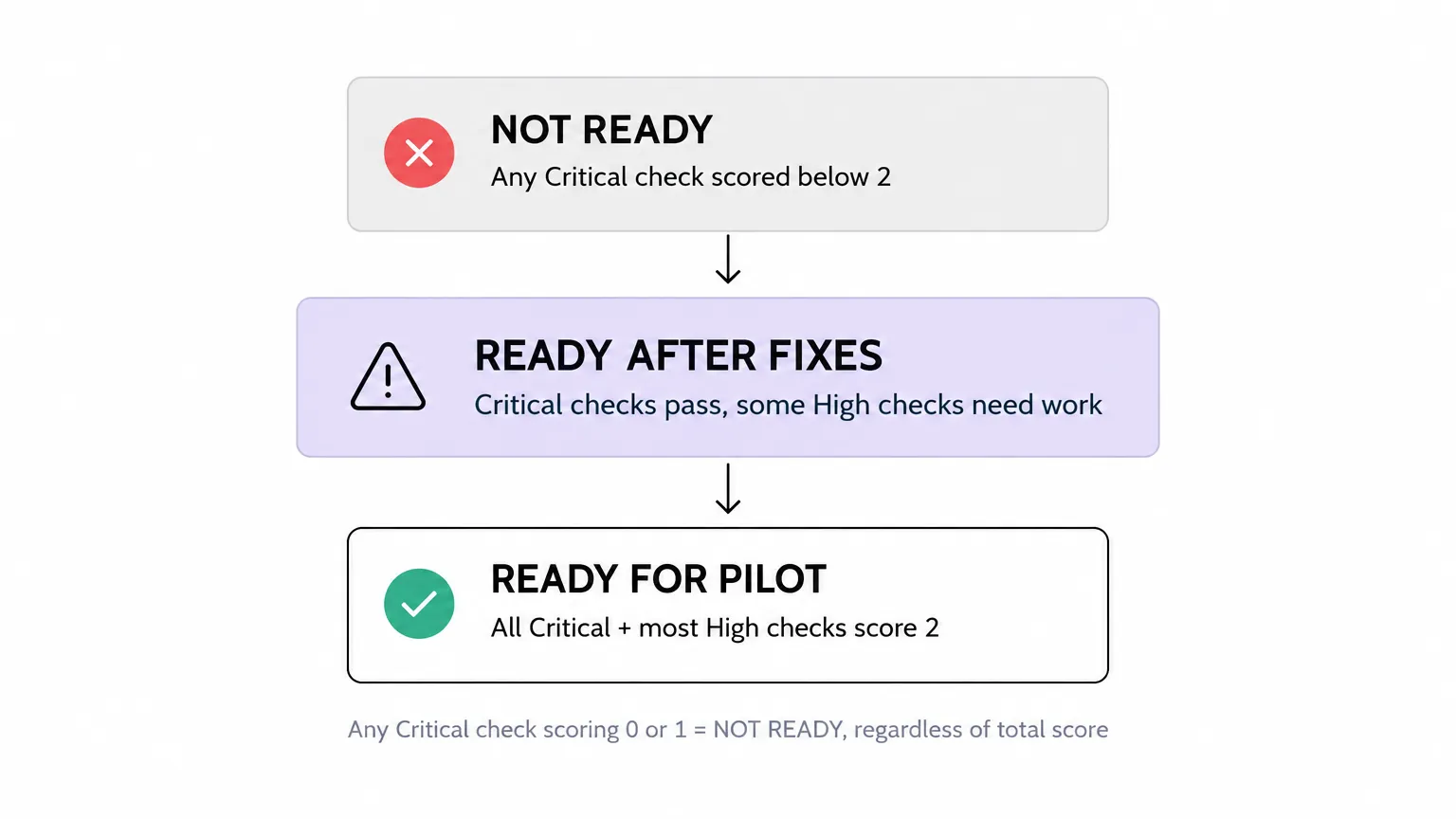
The scorecard Summary tab gives one of three verdicts based on how the scores land:
NOT READY - any Critical check scores below 2. Critical checks are prerequisites, not nice-to-haves. A missing Entra ID account, EEEU enabled at the tenant level, or a blocked network endpoint each puts the whole pilot on hold.
READY AFTER FIXES - all Critical checks pass, but some High checks need work. The client can start limited testing with the pilot group, but the fixes should happen in parallel.
READY FOR PILOT - all Critical checks and most High checks score 2. Assign licences to the pilot group and start.
The Medium-priority checks are about operational quality, not blockers. Score them too - a client who scores 2 on every Medium check before go-live will have a smoother first 90 days.
The 90-day pilot plan
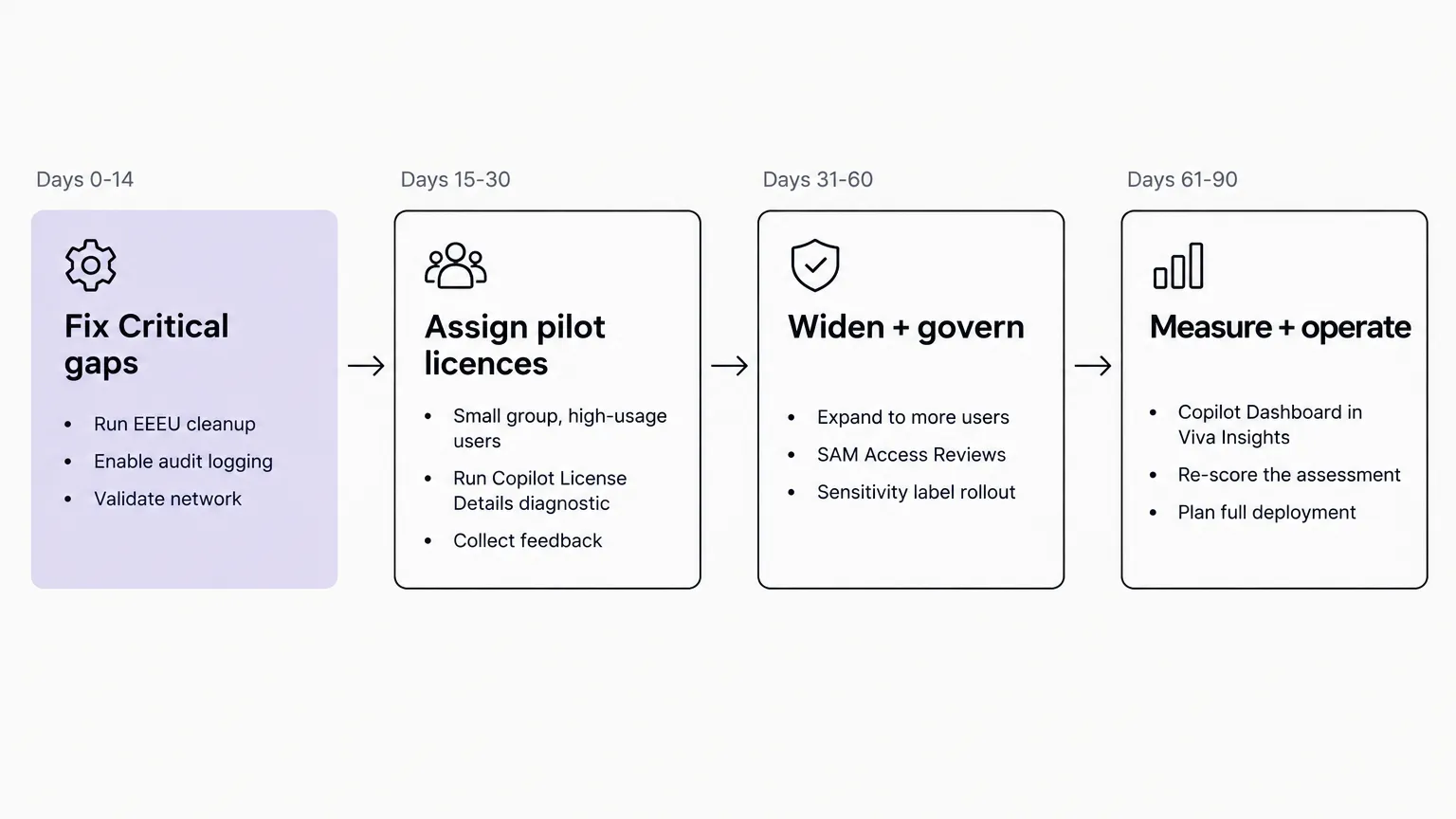
The scorecard Pilot Plan tab breaks the rollout into four phases. Here's the logic behind each one.
Days 0-14: Fix Critical gaps. Run the EEEU cleanup, enable audit logging, validate the network (run the connectivity test), and confirm licensing on the test accounts. Nothing else gets done until the Critical checks pass.
Days 15-30: Assign pilot licences. Start with a small group of high-usage users - the ones who'll actually use it and tell you when something's wrong. Run the Copilot License Details diagnostic on each user before assignment. Collect feedback weekly.
Days 31-60: Widen and govern. Expand to more users. Run Site Access Reviews on the next tier of sites. Roll out sensitivity labels if they weren't in place at go-live. Rerun the Content Management Assessment and confirm the oversharing count is falling.
Days 61-90: Measure and operate. Pull the Copilot Dashboard from Viva Insights. Re-score the assessment. Brief the client on what the numbers mean and what the full deployment looks like. Rerun the scorecard every 30 days as a maintenance habit.
What MSPs consistently get wrong
A few patterns come up in every Copilot readiness conversation we've had.
Starting with the AI, not the data. The natural instinct is to focus on Copilot features - what it can do in Teams, what it does with email. The actual work is in SharePoint, and it's not glamorous. Teams that delay the oversharing cleanup consistently hit the same wall two weeks into the pilot.
Treating EEEU as a per-site setting. Disabling EEEU on individual libraries while it's still enabled at the tenant level doesn't fix the problem. The tenant-level setting is the one that matters. Check it in the Microsoft 365 admin center > Settings > Org settings > SharePoint.
Skipping the network check. *.cloud.microsoft is new enough that it's still missing from a lot of allow-lists that were set before Copilot shipped. The connectivity test at connectivity.m365.cloud.microsoft/copilot takes five minutes and has saved more than a few pilots from a confusing first week.
Assigning licences without a pilot group. A "rollout" that's really just "we gave everyone a licence and emailed them a tip sheet" produces usage data that tells you nothing useful. Define the pilot group, set the metrics, and treat the first 30 days as a structured experiment.
Using outdated licensing guidance. Copilot licensing has changed several times since 2023. Forum answers that reference the old 300-seat minimum for the enterprise add-on, or cite plans that no longer qualify, are still circulating. Check the current licensing page before quoting anything to a client.
Try Rallied
The readiness work - licence assignments, account cleanup, group changes, access reviews - is exactly the kind of M365 work that Rallied handles. Rallied is an AI technician for MSPs that connects directly to your clients' Microsoft 365 tenants via GDAP and resolves L1 and L2 tickets autonomously: user provisioning, licence changes, password resets, security group membership, shared mailbox access. The same workflows that make a Copilot rollout work (licence assignments in bulk, account hygiene, onboarding and offboarding) run through Rallied without a technician opening the tenant. After Copilot goes live, Rallied handles the access-related tickets the pilot generates - the ones where a user asks why they can't see a file Copilot mentioned. $300/month for up to 2,000 credits, no annual commitment.
To see how Rallied handles this inside your PSA, read about Microsoft 365 Management for MSPs.
Frequently Asked Questions
What licence do I need for Microsoft 365 Copilot?
You need a Microsoft Copilot licence on top of an eligible base plan. Qualifying base plans include Microsoft 365 Business Premium, Business Standard, E3, E5, F1, F3, and Apps for Enterprise, among others. Microsoft 365 E7 includes Copilot without an add-on. Copilot Business, aimed at organisations up to 300 users, costs $18.00 per user per month on yearly billing. Enterprise add-on pricing is sold through Microsoft partners. Use the Copilot License Details diagnostic to verify any account before rollout.
What is the biggest blocker for Microsoft Copilot deployment?
Oversharing in SharePoint. Copilot answers from whatever a user can already open, so broad permissions (Everyone Except External Users, organisation-wide sharing links, ownerless sites) become visible instantly. MSPs consistently find that cleaning up SharePoint access takes longer than any other readiness step. Run the SharePoint Advanced Management Content Management Assessment first and budget several weeks for remediation on a messy tenant.
How long does a Microsoft 365 Copilot readiness assessment take?
Running through the 46 checks in the scorecard takes a few hours for a well-documented tenant and a day or two for one you're inheriting. Remediation is where the time goes: identity cleanup and network validation are fast (hours to a day), but a SharePoint oversharing cleanup can run several weeks if the tenant has years of accumulated permissions. The Rallied pilot plan in the scorecard gives a 90-day window for a reason.
How do I fix SharePoint oversharing before enabling Copilot?
Start with the SharePoint Advanced Management (SAM) Data Access Governance reports. Pull the EEEU (Everyone Except External Users) report for the top 100 sites, start Site Access Reviews on the riskiest ones, and use Restricted Access Control or Restricted Content Discovery as a holding measure on sites you can't fix before rollout. Disable EEEU at the tenant level, not just per site. Then rerun the Content Management Assessment every 30 days.
Can I skip the readiness assessment and just assign Copilot licences?
You can, but you'll regret it. Clients who skip the assessment and find Copilot surfacing sensitive files in week one lose confidence in the rollout fast, and rebuilding that trust is harder than the pre-work. The assessment also catches licensing mismatches, app version issues, and network blocks that prevent Copilot from appearing at all. An hour on the scorecard before go-live saves a support queue after it. Get the free Copilot readiness scorecard here.