What your patch management policy is actually missing (an MSP guide for 2026)
TL;DR
A patch management policy tells your team what to patch, when, and in what order. A good MSP patch management policy also tells them what to do when it fails - because it will fail, and the fallout lands in your helpdesk. According to the Verizon 2025 DBIR, 22% of all breaches involved exploiting a vulnerability for which a patch was already available. The gap isn't usually the patch itself - it's the policy around it. Below are the seven things every MSP patch management policy needs, plus the one section most templates skip entirely: handling the L1 ticket flood that follows every patch cycle. If you want those tickets - lockouts, reboots, failed-patch alerts - handled without a human, Rallied does that automatically.
Why patching is a different problem in 2026
The threat landscape has quietly changed the math on patch response windows.
The Verizon 2025 Data Breach Investigations Report puts it plainly: 22% of breaches involved exploitation of vulnerabilities where patches were already available. The fix existed. The breach happened anyway - because the policy, the process, or the prioritization wasn't there.
The window keeps shrinking. Security Magazine research reports organizations take an average of 256 days to patch known severe vulnerabilities. Attackers don't wait 256 days. Syncro's 2026 MSP analysis shows the median time to exploit a disclosed CVE is now under 5 days, and 29% of vulnerabilities see exploitation activity on or before the day they're publicly disclosed.
For MSPs, a single unpatched client isn't just that client's problem - it's a breach vector, a liability exposure, and potentially a contract breach if you have documented patching SLAs.
What a patch management policy actually is
Most MSPs confuse patching with patch management policy. They're related but not the same thing.
Patching is the act of deploying a software update. A patch management policy is the documented framework governing how that happens across your entire book of business: who owns each step, in what order patches get applied, on what schedule, with whose approval, and what happens when something breaks. SuperOps captures it well: it's "a document that spells out how the IT patch management process will be executed, and the consequences if it is not followed."
Without a policy, patching happens - but no one can prove it, no one knows the SLAs, and every client gets whatever level of care happens to be available that week. With one, patching becomes a measurable, auditable, contractually defensible service.
For MSPs, the policy isn't a nice-to-have. It's a product you sell.
The 7 components your policy needs
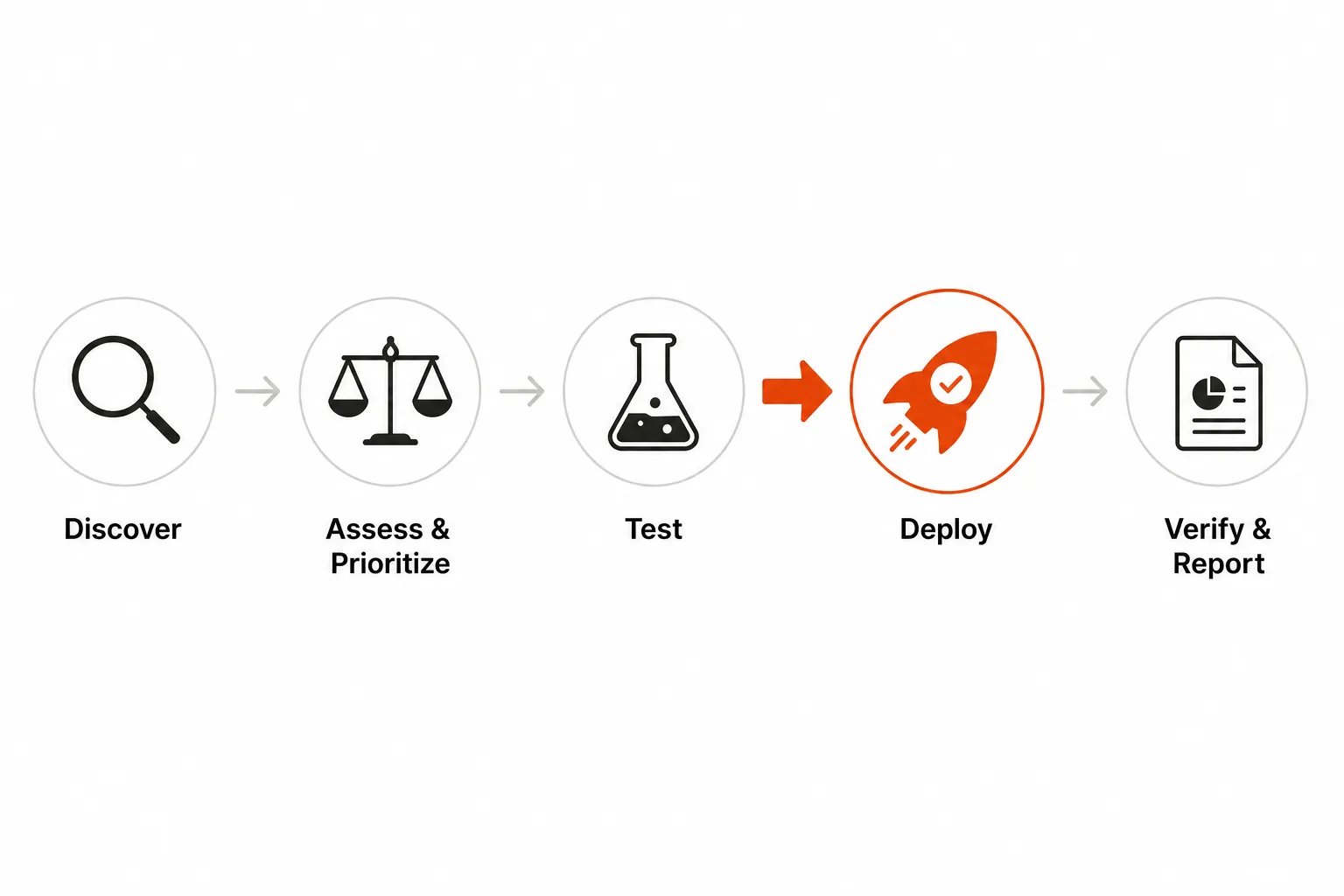
Here's what each component needs to actually say, not just list.
Asset inventory
You can't patch what you can't see. Asset inventory is the complete, current list of every device, OS, and application across every client that your policy covers.
The failure mode is stale inventory. Devices added without proper onboarding, shadow IT apps nobody ever catalogued, network equipment that falls outside the standard RMM deployment - every gap is a potential unpatched endpoint. ConnectWise's guidance is direct about this: "A complete asset inventory ensures patching workflows and automated policies apply to every device and application, eliminating blind spots that could expose the environment to risk."
For MSPs, this means per-client asset lists maintained in your RMM with normalized metadata, so the same policy logic applies regardless of which client owns the device.
Risk-based prioritization
Treating all patches equally is how techs spend time on low-severity cosmetic fixes while a critical CVE sits undeployed. Risk-based prioritization means ranking patches by their actual threat to your clients, not just by release date.
The baseline is CVSS scores - the industry-standard vulnerability severity framework. Layer in context: a critical vulnerability on an internet-facing server ranks higher than the same CVSS rating on an isolated development machine. Syncro's 2026 research adds vendor advisories and business context to the mix - a patch that breaks a client's EHR platform needs different handling than the same patch on a spare workstation.
Testing environment
CrowdStrike's July 2024 outage is now the canonical case study for what happens when updates skip proper testing. The honest lesson: test environments reduce risk significantly but don't eliminate it - the specific failure condition wasn't in their test matrix.
For MSPs without dedicated lab infrastructure, ring-based deployment is the practical equivalent: push first to a small representative group of less-critical devices, monitor for 24-48 hours, then expand. The gap between "approved" and "deployed everywhere" is what saves you. Syncro also flags a procurement point worth writing into your policy: ask every new vendor whether their patches are deliverable through your RMM. A vendor that requires manual patching isn't just inconvenient - it's a permanent ongoing overhead tax.
Patch schedule and SLAs
The schedule tells you when patches go out. The SLAs tell you how fast they must. Both need to be explicit.
For schedules: most MSPs use maintenance windows - Sunday nights, early weekday mornings, or whatever their clients' business hours allow. The r/MSP community is clear that one universal schedule doesn't work across a diverse client book. The approach that actually holds up is schedule templates per client tier - a 24/7 manufacturer gets a different deployment window than a 9-to-5 professional services firm.
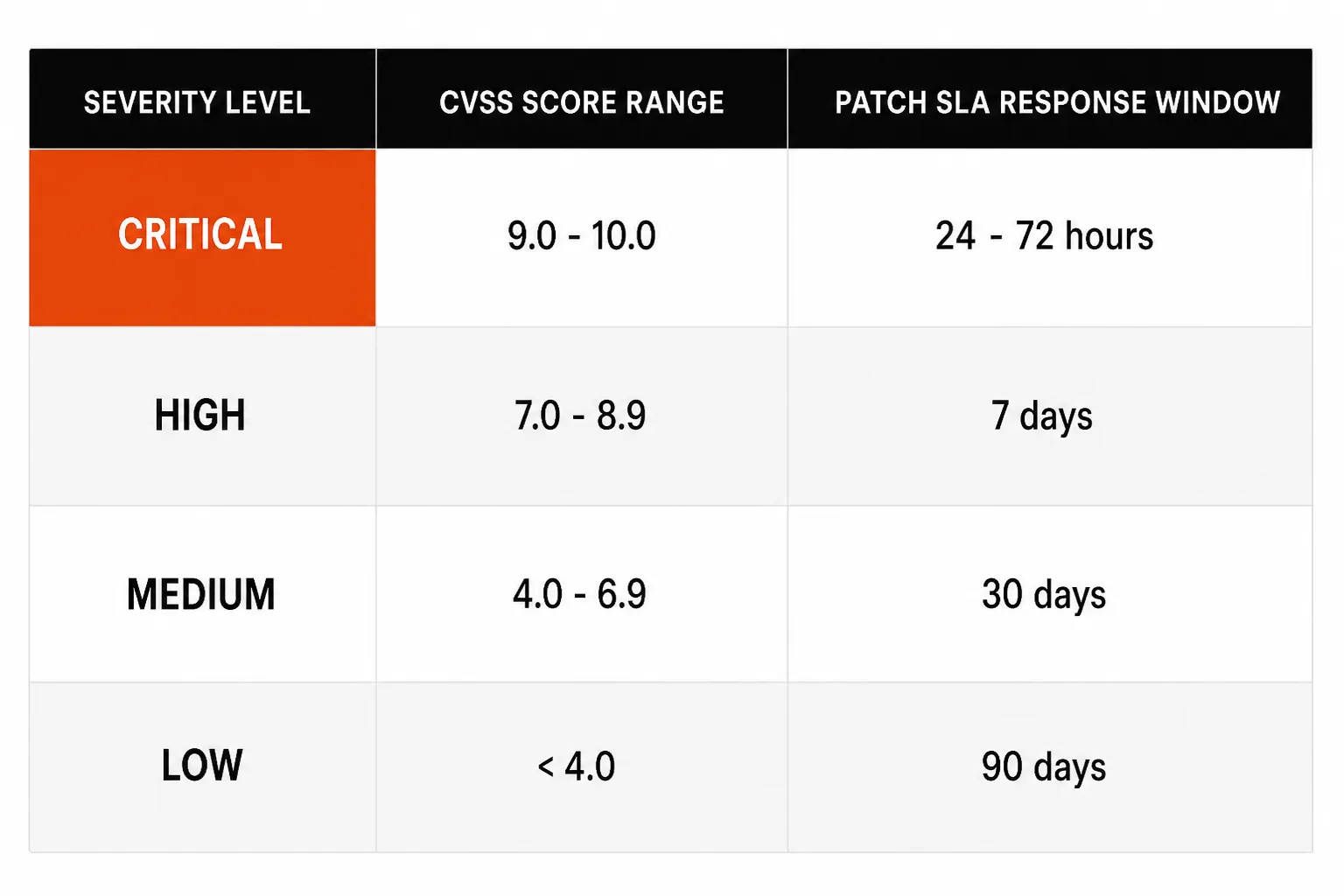
For SLAs, Syncro's priority matrix provides a solid starting point:
| Severity | CVSS score | Patch SLA | Reboot strategy | Approval model |
|---|---|---|---|---|
| Critical | 9.0-10.0 | 24-72 hours | Forced after business hours | Auto-deploy, notify client |
| High | 7.0-8.9 | 7 days | Scheduled maintenance window | Auto-deploy with ring test |
| Medium | 4.0-6.9 | 30 days | User-prompted | Test ring first |
| Low | <4.0 | 90 days | User discretion | Standard ring |
These timelines need to appear in your client contracts. Missing a critical SLA window creates credit obligations and renewal risk - it's a contract breach, not just a security miss.
Exception handling
Some patches get deferred. A known incompatibility with a client's line-of-business application, a 24/7 system that can't take a reboot, a vendor-recalled patch - these are legitimate situations where the answer is "not yet." Your policy needs a process that doesn't let exceptions quietly become permanent.
Each exception should have: a documented reason, an alternative mitigation where one exists, a recheck date, and a named owner. Without recheck dates, exceptions accumulate indefinitely and your coverage metrics become fiction.
Heimdal's guidance flags one common exception scenario worth naming explicitly: third-party software. Browsers, PDF readers, conferencing clients, and runtimes don't always respond well to automated deployment - but Windows updates alone leave roughly half the attack surface unaddressed. Handle third-party patches in a separate policy section with its own schedule and exception handling.
Rollback procedures
Patches fail. They break applications, corrupt configurations, or cause compatibility issues that didn't surface in testing. Your rollback plan needs to be ready before the first patch goes out.
ConnectWise's framework specifies immutable backups - recovery data that can't be encrypted by ransomware or tampered with - combined with chain-free backup architectures for faster, more reliable restores. Automated backups aligned to your patch schedules. Recovery procedures tested regularly with known restore times.
The practical test: can you restore a client's key system within two hours of a failed patch? If you don't know the answer, your rollback plan isn't ready.
Documentation and compliance reporting
This is where policy pays off at audit time. Every patch deployed, every exception logged, every failed patch investigated - all of it recorded in a way that can be pulled on demand.
For clients in regulated industries, compliance reporting is contractually required. CIS Critical Security Control 7 (Continuous Vulnerability Management) and NIST SP 800-40 Rev. 4 are the standard frameworks MSPs build from. Map your documentation to at least one.
The practical output: a per-client monthly compliance report showing coverage percentage, critical patches applied within SLA, and deferred exceptions with justification. That report is both a client deliverable and your liability protection.
The MSP-specific challenges generic templates don't cover
Templates written for a single internal IT team assume one organization, one risk tolerance, one set of business hours. MSPs run dozens or hundreds of parallel instances of this policy simultaneously. The challenges compound.
Multi-client SLA management means a single missed critical patch doesn't affect one organization - it potentially affects every client where that vulnerability exists. You need per-client reporting and visibility, not aggregate dashboards that mask individual compliance status.
Diverse stacks mean the same patch might succeed on one client's Windows 11 fleet and fail on another's Windows 10 environment due to a missing prerequisite. Patch policies can't be copy-pasted across clients - they need to be templatized and customized per environment.
24/7 systems compress deployment windows to hours, not days. A client running a manufacturing floor or a healthcare system can't take a Sunday night maintenance window. Those clients need their own schedule section in your policy.
And then there's the one nobody writes down.
The section your policy is missing: what happens after patching
Every patch cycle ends the same way for most MSPs - with a wave of support tickets that arrive Monday morning. The r/MSP community has been documenting this for years.
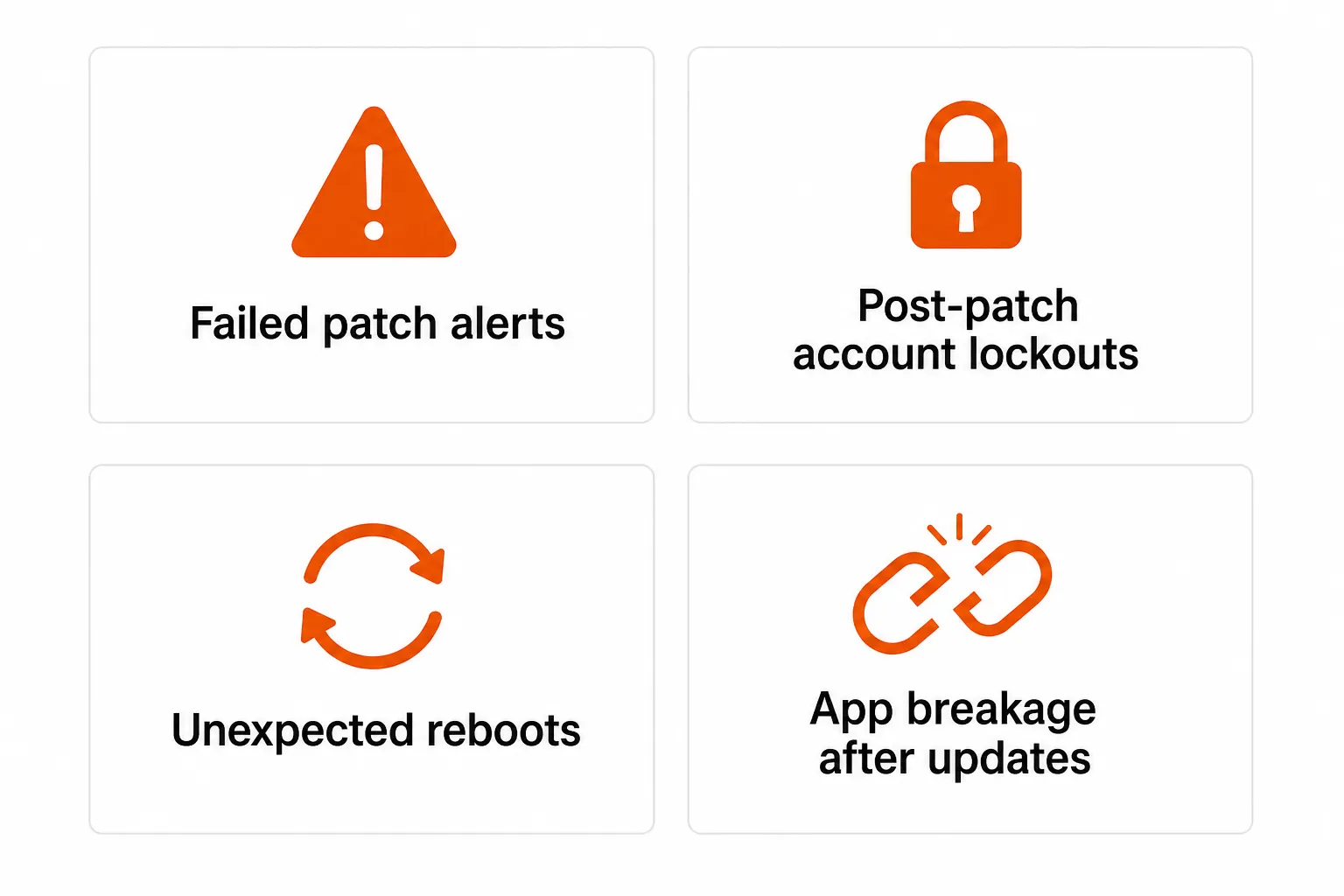
The four most predictable ticket categories:
Failed patch alerts - users see a notification and call in. Usually a missing prerequisite. Usually resolves on the next retry. But the ticket still gets opened and assigned.
Post-patch account lockouts - a patch applies, the system reboots, and the user can't log back in. Often a credential sync issue or an MFA state disrupted by the reboot. These are the most time-sensitive.
Unexpected reboots - patches apply overnight and the user arrives to find their machine rebooted, losing unsaved work. Low severity, high complaint volume.
Application breakage - a Windows or third-party app patch breaks a business-critical application. The most variable and hardest to pre-empt.
The community's pragmatic answer for category 1:
"We would suspend patch failure tickets on workstations for 10 days and almost always they could be closed the following week when the failed patches would install." - r/msp
For device state issues:
"With this in place we've found the biggest problem is machines with incorrect power settings that go to sleep." - r/msp
And the root cause most MSPs rediscover independently:
"When we used the RMM for patching, we found that the biggest cause of failed patches was a missing prerequisite update that prevented an update from actually installing." - r/msp
None of these are edge cases. They're the expected output of any patch cycle at scale. Your policy should have a section on each of them - not just the patching itself, but the response to what patching generates.
What that section should cover:
- Retry logic and ticket suppression - don't escalate transient patch failures immediately. Suspend and retry within 7-10 days.
- Power settings audit as a prerequisite to enabling patch automation. Devices using Windows Fast Startup won't fully shut down, leaving patches in limbo.
- Post-patch check-in monitoring - a device that doesn't check in within a defined window after a patch cycle needs investigation.
- Account lockout resolution path - post-patch lockouts are L1 and should resolve automatically, not wait in a queue for 2 hours.
Where to start if you're building from scratch
Don't start from a blank document. Two frameworks have done the work for you.
NIST SP 800-40 Rev. 4 is the authoritative enterprise patch management guide, updated in 2022. It covers the full lifecycle with implementation guidance that maps well to MSP environments.
CIS Critical Security Control 7 (Continuous Vulnerability Management) is the practitioner's companion - it's the control your regulated clients' auditors reference for patching evidence.
Start with one of these as the foundation, then add the MSP-specific layers: per-client SLAs, maintenance window templates, exception handling per client tier, and the patch failure response section that generic templates leave out. Syncro and ConnectWise both publish reference policies you can adapt.
Try Rallied
Even the best patch management policy generates L1 tickets - post-patch account lockouts, password resets from credential sync issues, MFA disruptions after a reboot. These are predictable, repeatable, and don't need a human to handle them.
Rallied is an AI technician built for MSPs that connects to your PSA, RMM, M365, and identity providers and resolves these tickets automatically - password resets, account unlocks, MFA re-enrollments - without a tech ever opening them. At $0.50 per ticket worked, a typical MSP handling 200-400 automatable tickets a month recovers 50-100 hours of tech time - roughly $7,500-$15,000/month in labor reclaimed for higher-value work.
Rallied deploys the same week. No workflow builder, no dedicated admin, no months of setup. Connect the stack, it starts working.
Frequently Asked Questions
What should a patch management policy include?
A complete patch management policy covers seven areas: asset inventory, risk-based prioritization with CVSS-based SLAs, a testing environment, a documented patch schedule with maintenance windows, exception handling, rollback procedures, and compliance documentation. For MSPs, it should also address multi-client management, per-client SLAs, and how to handle the L1 support tickets that failed patches generate - the section most generic templates skip.
How quickly should critical patches be applied?
For critical vulnerabilities with CVSS scores of 9.0-10.0, the standard SLA is 24-72 hours. According to Syncro's 2026 MSP research, the median time to exploit a disclosed CVE is now under 5 days - which means any window beyond 72 hours for critical patches is a real exposure. High-severity patches (CVSS 7.0-8.9) should be deployed within 7 days.
What is a good patch management SLA for MSPs?
A standard MSP patch management SLA ties response windows to CVSS severity: Critical (9.0-10.0) within 24-72 hours, High (7.0-8.9) within 7 days, Medium (4.0-6.9) within 30 days, and Low (below 4.0) within 90 days or the next scheduled maintenance window. These timelines should appear in client contracts and be tracked with your RMM's compliance reporting - missing a critical SLA window is a contract breach, not just a security oversight.
How do MSPs handle patch failures without overwhelming their helpdesk?
The MSP community's pragmatic answer: suspend patch failure tickets for 7-10 days and retry. Most transient failures resolve on the next cycle once a missing prerequisite update has been installed. For recurring failures, check device power settings (Windows Fast Startup prevents true reboots) and verify patch prerequisites. Post-patch lockouts, unexpected reboots, and app breakage are best handled with an AI technician like Rallied that resolves them automatically without human touch.
What is the difference between patch management and vulnerability management?
Patch management is the operational practice of applying software updates to known vulnerabilities. Vulnerability management is the broader continuous process of discovering, prioritizing, and remediating security weaknesses - patching is one possible action, but not the only one. A vulnerability scanner feeds patch management by identifying what's exposed; the patch program closes the gaps that have available patches. When no patch exists yet, vulnerability management handles interim mitigations while you wait.