Automated ticket triage for MSPs: what actually works in 2026
TL;DR
Ticket triage is the dispatch tax every MSP pays, and it's quietly one of the most automatable parts of the job. At 40 tickets a day, 10 minutes of manual triage each, you're burning 7 hours of tech time before anyone has fixed a single thing.
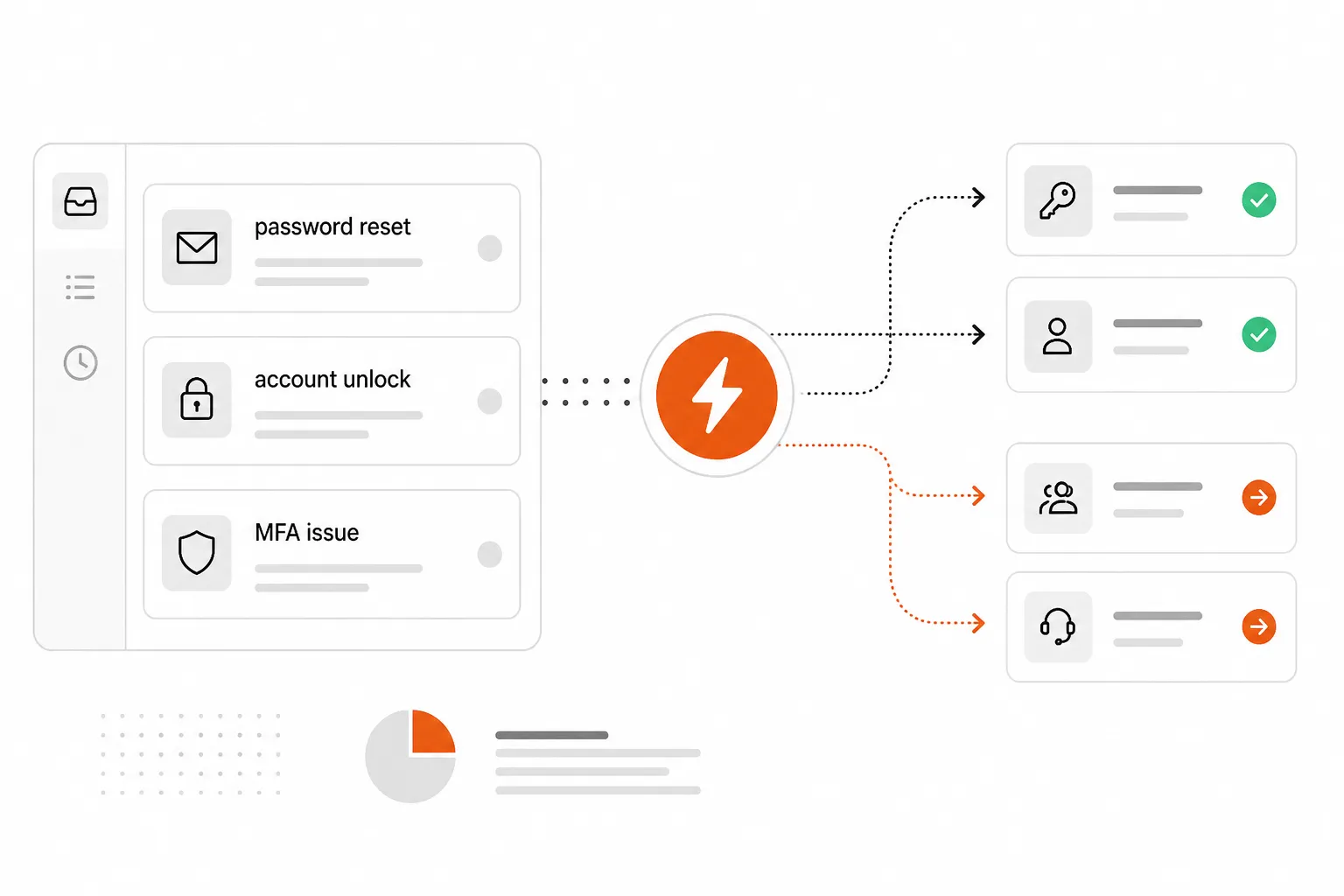
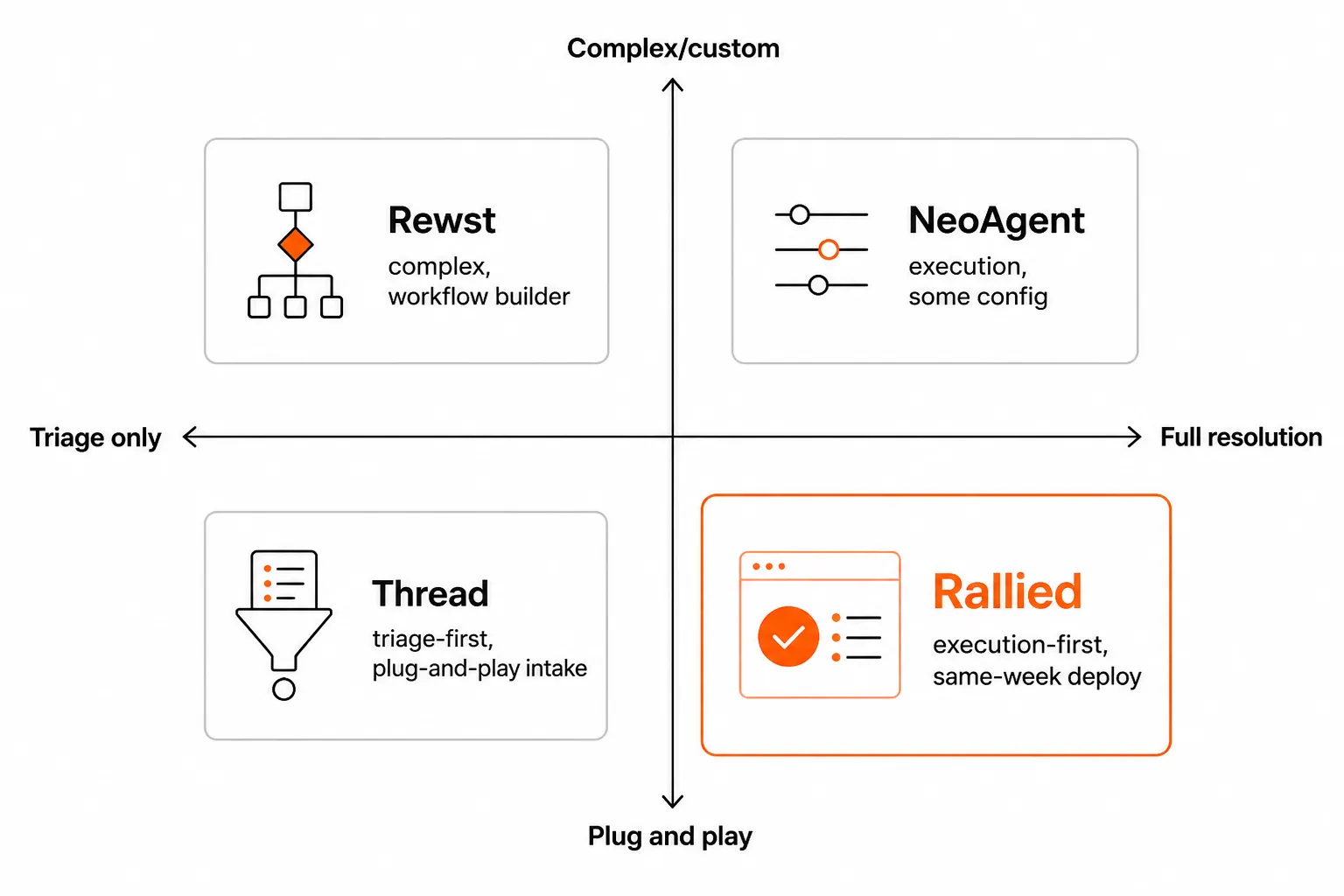
The tools that actually help do one of two things: they either make triage faster (Thread, Pia), or they skip triage entirely by closing the ticket automatically (Rallied, NeoAgent). The second category is more valuable, but also narrower in what it handles today - mostly the 15 L1 patterns that make up the bulk of repetitive ticket volume: password resets, account unlocks, MFA issues, onboarding, offboarding, software installs.
If you're still manually triaging 100% of your tickets in 2026, you're leaving money on the table. The tools are production-ready, the ROI math checks out, and the setup timelines are measured in days, not months.
The dispatch tax nobody talks about
Every MSP has a dispatcher, whether that's a dedicated person, a rotating junior tech, or - most commonly - whatever senior engineer happened to look at their queue first that morning. They read the ticket, figure out what it's actually asking, pull context from the PSA, assign a priority, and route it to whoever has bandwidth.
That process takes 3-15 minutes per ticket, according to MSP benchmarks from NeoAgent's research across their customer base. Multiply that by 40-80 tickets per day in a growing shop, and you're looking at 4-10 hours of tech capacity consumed daily on work that doesn't fix anything.
The indirect costs are worse. Misrouted tickets bounce between technicians before landing in the right queue. SLA clocks run while tickets wait for manual triage. Junior techs who could be building skills on real problems spend their day reading and re-reading ticket descriptions to figure out which bucket they go in.
The math on fixing this is unusually clear. An MSP saving 20-30% of triage time across 40 daily tickets - at a $75/hour loaded tech rate - recovers roughly $30,000-$50,000 in annual labor costs. That's before counting the downstream gains from better routing, faster response times, and fewer SLA breaches.
What "triage" actually means (four separate jobs)
Most vendors conflate these, which is where a lot of buyer confusion comes from. Automated ticket triage covers four distinct jobs:
1. Intake - gathering enough context to actually process the ticket. Did the user submit via email with no subject line and "it's not working" as the body? Intake automation asks the clarifying questions: what device, what error, what were you doing when it happened. Some tools do this conversationally (Thread's approach); others do it via structured forms pre-submission.
2. Triage - classifying the ticket (category, subcategory, affected service), setting priority (impact + urgency + client tier), and flagging duplicates. This is where most of the AI classification work happens, and where current tools are genuinely good.
3. Dispatch - routing the fully-classified ticket to the right technician, queue, or automation based on skills, availability, and workload. Essentially replacing the dispatcher function. Most tools handle this reasonably well.
4. Resolution - actually closing the ticket by making a change in a connected system. Reset the password. Unlock the account. Provision the mailbox. Send the confirmation. This is where most triage tools stop pretending and hand off to a human.
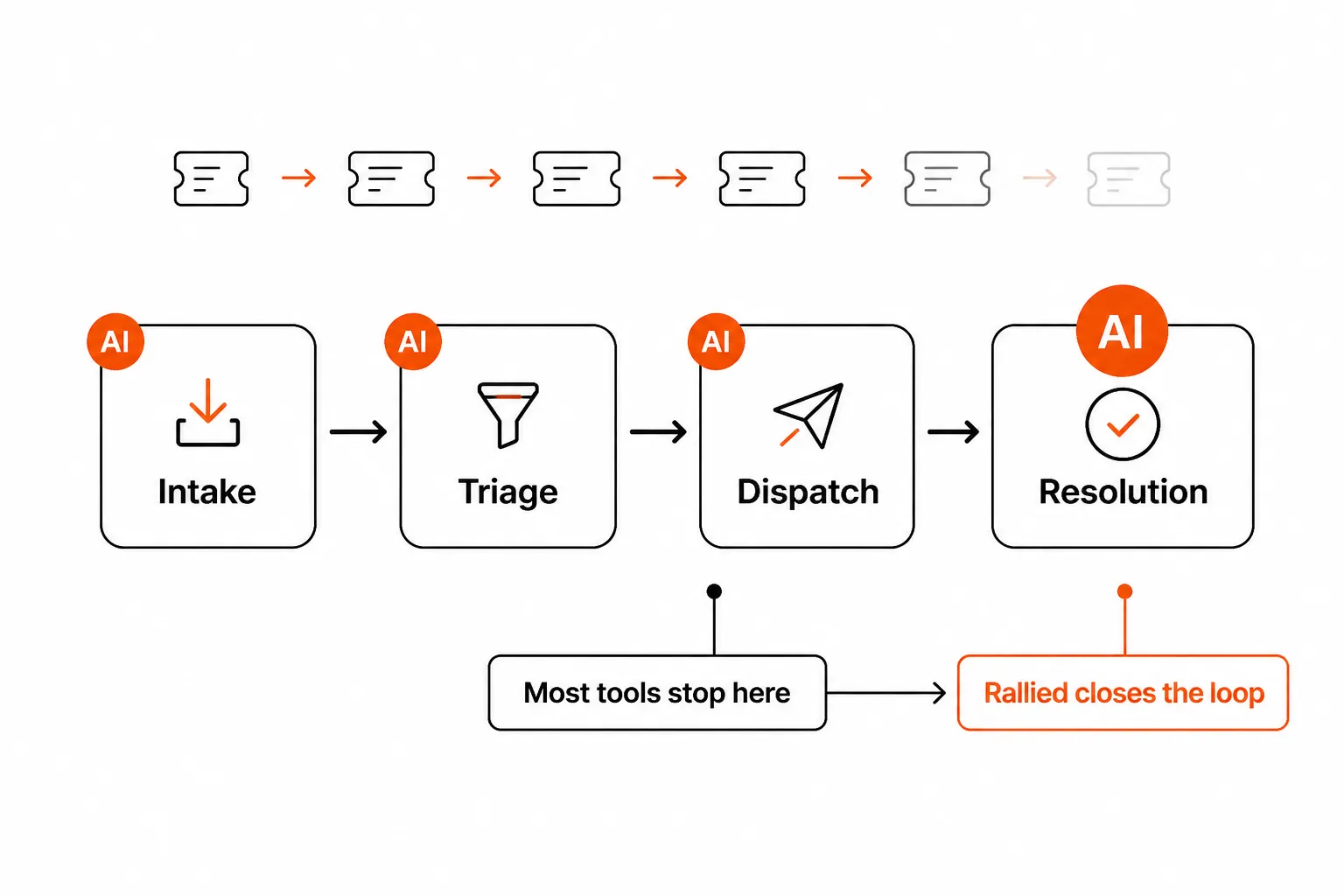
The distinction matters because stages 1-3 reduce tech time on overhead; stage 4 eliminates tech time on the ticket entirely. If you're automating triage but still sending every ticket to a human for resolution, you've made your dispatching faster without reducing your actual ticket backlog.
The math that makes this worth fixing
Let's run through a realistic scenario. An MSP running a 10-tech shop manages 200 tickets per week. Roughly 40-60% of that volume falls into repeatable L1 patterns - password resets, account unlocks, MFA issues, software installs, onboarding/offboarding steps - where the fix is deterministic and the execution path is the same every time.
That's 80-120 tickets per week that, in principle, don't need a human to close them.
At 15 minutes of tech time per ticket (triage + resolution), that's 20-30 hours per week of L1 work. At a $75/hour loaded rate, you're burning $1,500-$2,250 per week, $78,000-$117,000 per year, on the most repetitive part of the job.
Automation tools price differently, but Rallied's per-outcome model gives the cleanest comparison: $3 per ticket where the AI actually did the work, nothing if it didn't. At 300 outcomes/month, that's $900. Versus the ~$30,000/month in tech time you'd otherwise spend. The ROI isn't close.
The caveat: these numbers assume you've scoped automation to what it's actually good at. Forcing AI onto complex, ambiguous tickets blows up the accuracy numbers and erodes trust fast. Start with the patterns that are genuinely repetitive; let the tool handle those well before expanding scope.
What's actually working today - and what isn't
The MSP AI market has a credibility problem. Too many vendors claimed fully autonomous resolution, shipped a suggestions engine, and left MSPs with another tool to manage on top of the ones that weren't working.
Here's an honest read of where things stand in 2026:
What works reliably
Ticket classification - Categorizing and prioritizing inbound tickets based on text analysis has gotten genuinely good. Tools like NeoAgent claim 97.3% classification accuracy; Thread reports 96% accuracy in their triage pipeline. These numbers hold up in production for well-defined categories with consistent ticket language.
Auto-enrichment from PSA data - Pulling device info, site records, and contact history into the ticket automatically before a tech touches it is table stakes at this point, and it works. The time saved on manual PSA lookups adds up.
Duplicate detection and merging - When five users submit tickets about the same outage, smart deduplication prevents five separate resolution threads. This sounds minor but saves real time during incidents.
Execution on deterministic L1 patterns - Password resets, MFA unlocks, account unlocks, software installs from approved lists, standard onboarding steps across M365 and identity providers. When the fix is the same every time and the tools are connected, AI execution is fast and reliable. Rallied handles all of these natively with Entra ID, Okta, JumpCloud, Google Workspace, and M365.
What's still maturing
Conversational intake - The ideal is multi-turn dialogue that gathers context naturally before the ticket even hits the queue. The reality is still sometimes clunky, especially for non-technical end users who don't answer structured questions well. Thread is furthest along here; it's getting better but it's not seamless yet.
Learning from corrections - Truly adaptive systems that improve when techs override them remain more marketing promise than shipping feature. Most tools need manual configuration updates when behavior needs to change.
What's overhyped
Any vendor claiming "fully autonomous resolution" without a clear fallback-to-human mechanism should raise your skepticism. Confidence thresholds - the AI knowing when it doesn't know - are critical for MSP use and still underemphasized in most pitches. As one r/msp commenter put it about AI tooling in general: "We've heard this before. Let's see if it works in six months." That skepticism is earned.
The tools landscape in 2026
These are the main options worth knowing, mapped against what they actually do:
Thread
Thread is a conversational-first service desk platform. It handles the intake and triage side of the pipeline - AI agents that call, chat, and email with end users to gather context and resolve the simpler issues before a ticket hits the queue. Thread claims it resolves 10-25% of inbound tickets autonomously and auto-prepares the rest with full context for the tech.
Used by 750+ MSPs, processing over 173 million tickets per year. Starts at $399/month for 2,000 credits. Integrates with ConnectWise, Autotask, and HaloPSA. Deploys in 24 hours.
Where it fits: MSPs who want to improve the intake and triage experience - fewer back-and-forth messages, better-prepared tickets - without necessarily closing tickets autonomously. Thread makes your techs more efficient on the tickets they do handle; it doesn't replace them on the ones they don't.
Where it doesn't: Thread's autonomous resolution rate (10-25%) is meaningful but still means 75-90% of tickets still land on a tech's desk. If the goal is reducing overall ticket volume, you'll want execution-layer tools alongside it.
Pia
Pia is an MSP-native automation platform with pre-built workflows for the most common service delivery tasks. It's PSA-connected (ConnectWise, Autotask, Halo) and recently launched a Teams-native chat interface (Pia Chat, Q3 2026) that handles conversational intake within Microsoft Teams. Pia claims 90% faster resolution and a 60% automation rate on their marketing pages.
Where Pia is strong: it's been purpose-built for MSPs since the beginning, with workflow templates that match how MSP service delivery actually works. Where it's limited: the execution is more PSA-bound - Pia orchestrates workflows within and around your PSA, but the execution layer still often depends on connected tools being configured correctly by a tech.
Where it fits: MSPs already deep in Microsoft 365 who want tight Teams integration and pre-built workflow templates. Pia and Thread have a formal partnership, meaning some MSPs run them together.
Where it doesn't: If you need cross-stack execution across identity providers (Entra + Okta + JumpCloud + Google Workspace in the same shop), Pia's PSA-centric architecture can be limiting.
NeoAgent
NeoAgent is an execution-first AI technician that reads the ticket, checks your documentation and playbooks, runs the fix across connected tools (M365, Entra, Pax8, Intune, RMM), and closes the ticket in the PSA. Their new-hire onboarding example is illustrative: the agent receives the request, checks the client's onboarding policy, provisions across M365/Entra/Pax8/Intune, sends credentials, and closes the ticket in about 52 seconds versus 29+ minutes manually.
100+ MSPs deployed, 2-hour claimed deployment time, focused primarily on ConnectWise environments.
Where it fits: ConnectWise-centric shops that want deep PSA/RMM integration and fast deployment. NeoAgent is in the same execution-first lane as Rallied - they're the most direct competitors.
Where it doesn't: If you're on Autotask or HaloPSA, NeoAgent's integrations are thinner. Their public metrics are compelling but not independently verified at scale yet.
Rewst
Rewst is a workflow automation platform - no-code/low-code, multi-tenant by design, with an integrations library that spans PSA, RMM, M365, identity, and beyond. It's not a ticket-driven automation tool in the same way as the others. Rewst lets you build automations for any business process, not just ticket queues.
The tradeoff: that flexibility comes with a 6-month-plus implementation timeline and real admin overhead to build and maintain workflows. The ROI is there - Rewst customers report 75-80 hours/week in time savings - but you're essentially building a custom automation layer rather than deploying a product.
Where it fits: Mature MSPs with technical staff who want complete control over their automation logic and are willing to invest the implementation time.
Where it doesn't: If you want something working this week, Rewst is not that. The MSP community is clear on this - Rewst is powerful but demanding.
How to set up automated ticket triage at your MSP
The biggest setup mistake is trying to boil the ocean. Start narrow, prove the ROI, and expand. Here's the sequence that actually works:
Step 1: Map your ticket categories
Before touching any tool, pull your last 90 days of tickets and categorize them manually. What percentage are password resets? Account unlocks? MFA issues? Onboarding requests? Software installs? New hardware setups?
You're looking for patterns that are high-volume, deterministic, and fully documented. These are your automation targets. A realistic starting list for most MSPs: password resets (usually 15-25% of all tickets), account unlocks (10-15%), MFA resets (5-10%). Together, that's often 30-50% of volume.
Step 2: Connect your PSA and identity stack first
Don't try to automate what you can't see. Get your PSA connected and pulling ticket data before anything else. Then add your identity provider (Entra ID, Okta, JumpCloud, or Google Workspace depending on your client mix). These two connections unlock the most common L1 patterns.
Rallied connects to ConnectWise, Autotask, and HaloPSA on the PSA side, plus the full range of identity providers. The setup happens in under a week - there's a 14-day free trial with no card required, and real tickets start closing before the trial ends.
Step 3: Start with password resets
A password reset is the ideal automation pilot: the intent is unambiguous, the fix is deterministic, the success criteria are clear (did the user get back in?), and the volume is high enough to generate meaningful data quickly. Let the AI handle password resets for two weeks. Track what percentage resolved without tech involvement, what escalated to humans, and why.
If the numbers look good, expand to account unlocks. Then MFA issues. Then onboarding requests.
Step 4: Set approval gates for riskier actions
Not everything should resolve without a human checkpoint. Offboarding in particular - revoking access, disabling accounts, removing data - should go through an approval gate even when it's automated. Most tools support this natively. Rallied includes per-tool permission controls and approval gates as part of the core product; use them.
Step 5: Review the escalation data weekly
Every ticket that escalated to a human is a data point. Why did the AI not handle it? Was it an edge case in the ticket language? A connected system that wasn't in scope? A policy the AI didn't know about? Build a short weekly review habit: look at what bounced, document why, and either add it to automation scope or document it as a known exclusion.
This is how the automation gets better over time without vendor hand-holding.
Try Rallied
Rallied is an AI technician built specifically for MSPs - deployed in under a week, connected to your PSA and identity stack, closing L1 tickets without a tech touching them. Password resets, account unlocks, onboarding and offboarding across M365, Entra ID, Okta, JumpCloud, and Google Workspace. You pay $3 per outcome - only when Rallied actually does the work, nothing when it doesn't.
If you've been burned by tools that suggested next steps instead of taking them, or that required six months and a dedicated admin to get running, Rallied is built for that frustration. The 14-day free trial has no card requirement. Deploy on Friday, see real tickets closing by Monday.
Frequently Asked Questions
What is automated ticket triage for MSPs?
Automated ticket triage uses AI to classify, prioritize, and route support tickets without manual dispatcher work. In an MSP context, it covers four jobs: intake (gathering context), triage (assigning category and priority), dispatch (routing to the right tech or queue), and - in the best implementations - resolution (actually closing the ticket without a human touching it). Tools like Rallied handle all four stages for common L1 requests.
How much time can automated triage save per month?
An MSP handling 40 tickets/day and saving 20-30% of manual triage time recovers $30,000-$50,000 in annual labor costs, based on 10 minutes per ticket at a $75/hour loaded tech rate. At 200-400 outcomes per month with Rallied's per-outcome model, you're typically recovering $3,750-$15,000/month in tech time while paying $600-$1,500 for the automation.
What's the difference between triage and ticket resolution?
Triage classifies and routes a ticket to the right human or queue. Resolution actually closes the ticket by making a system change - resetting a password, unlocking an account, provisioning a mailbox. Most triage tools handle the first; tools like Rallied and NeoAgent handle both. The distinction matters because triage alone still requires a tech to do the work - resolution eliminates that step entirely.
How long does it take to set up automated ticket triage?
Rallied deploys in under a week with real tickets closing inside the 14-day free trial. Thread claims 24-hour deployment with a 60-day ROI guarantee. NeoAgent targets 2-hour deployment. Contrast with Rewst, which typically takes 6+ months to configure end-to-end workflows. The fastest path: start with a tool that handles common L1 patterns out of the box and expands from there.
Do I need to replace my existing PSA to use automated ticket triage?
No. Most modern triage and resolution tools work as a layer on top of your existing PSA. Rallied integrates with ConnectWise, Autotask, and HaloPSA, reading and closing tickets natively. Thread does the same. NeoAgent focuses specifically on ConnectWise. You keep your PSA; the automation tool works alongside it.