RPA for MSPs: what it is, what it does, and when AI agents are the better call

TL;DR
"RPA for MSPs" gets used to mean three different things: endpoint scripting in your RMM, cross-tool workflow automation (what Rewst does), and AI-native ticket resolution (what Rallied does). These are genuinely separate categories with different trade-offs. Rewst is the go-to for MSPs that want to build deep, custom automations across their stack - but it requires a dedicated engineer and months to reach meaningful depth. AI-native tools like Rallied skip the workflow-builder altogether: connect your PSA and RMM, and it starts resolving L1 tickets on its own. If your pain is tickets piling up, not a missing workflow canvas, that distinction matters.
MSPs have been chasing automation for years, and the conversation gets confusing fast. One vendor says "RPA." Another says "workflow automation." A third says "AI agents." They're all describing something different, and if you buy the wrong one for your actual problem, you spend six months building automations before discovering the gap.
We spent time in the research, talked to what MSPs say publicly on Reddit and LinkedIn, and came away with a clearer picture: RPA for MSPs is really three separate layers wearing the same label. This post breaks down what each layer does, what the main tools look like in practice, and where the new generation of AI-native execution tools fills a gap that traditional RPA was never designed to close.
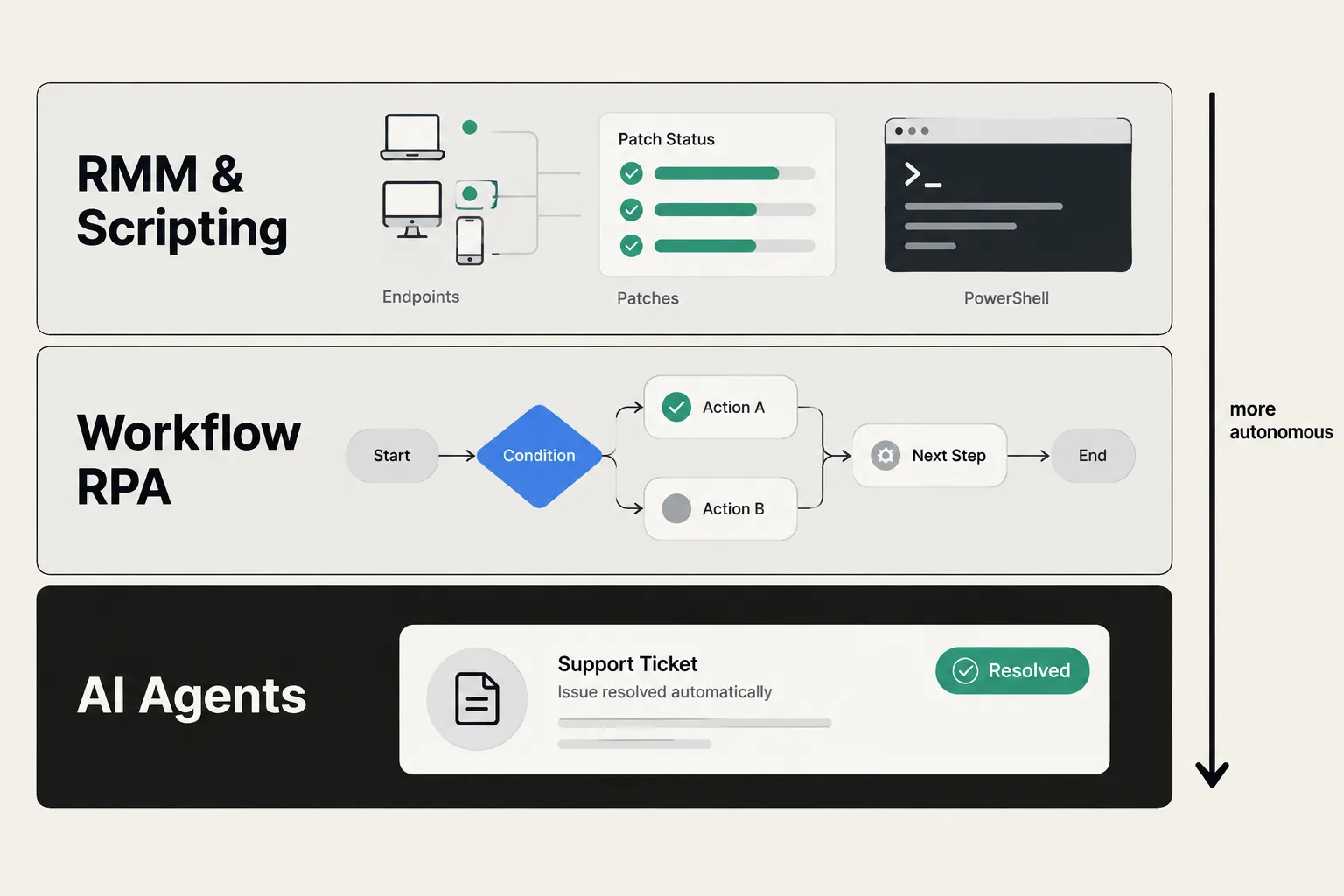
MSP automation is really three different things
Before we get into tools, it's worth naming the layers - because lumping them together is the single biggest source of confusion in this market.
CloudRadial's 2026 MSP automation guide draws the split cleanly:
Infrastructure automation (your RMM). Patching, scripting, monitoring, and remediation on endpoints and servers. This is what ConnectWise Automate, NinjaOne, N-able, and Datto RMM do. It's a category of its own, and patching belongs here - not in an RPA workflow.
Workflow orchestration. Cross-tool automations that pass output from one system to another: trigger a workflow in the PSA, check a user in M365, create a ticket in one platform from an alert in another. This is where platforms like Rewst live.
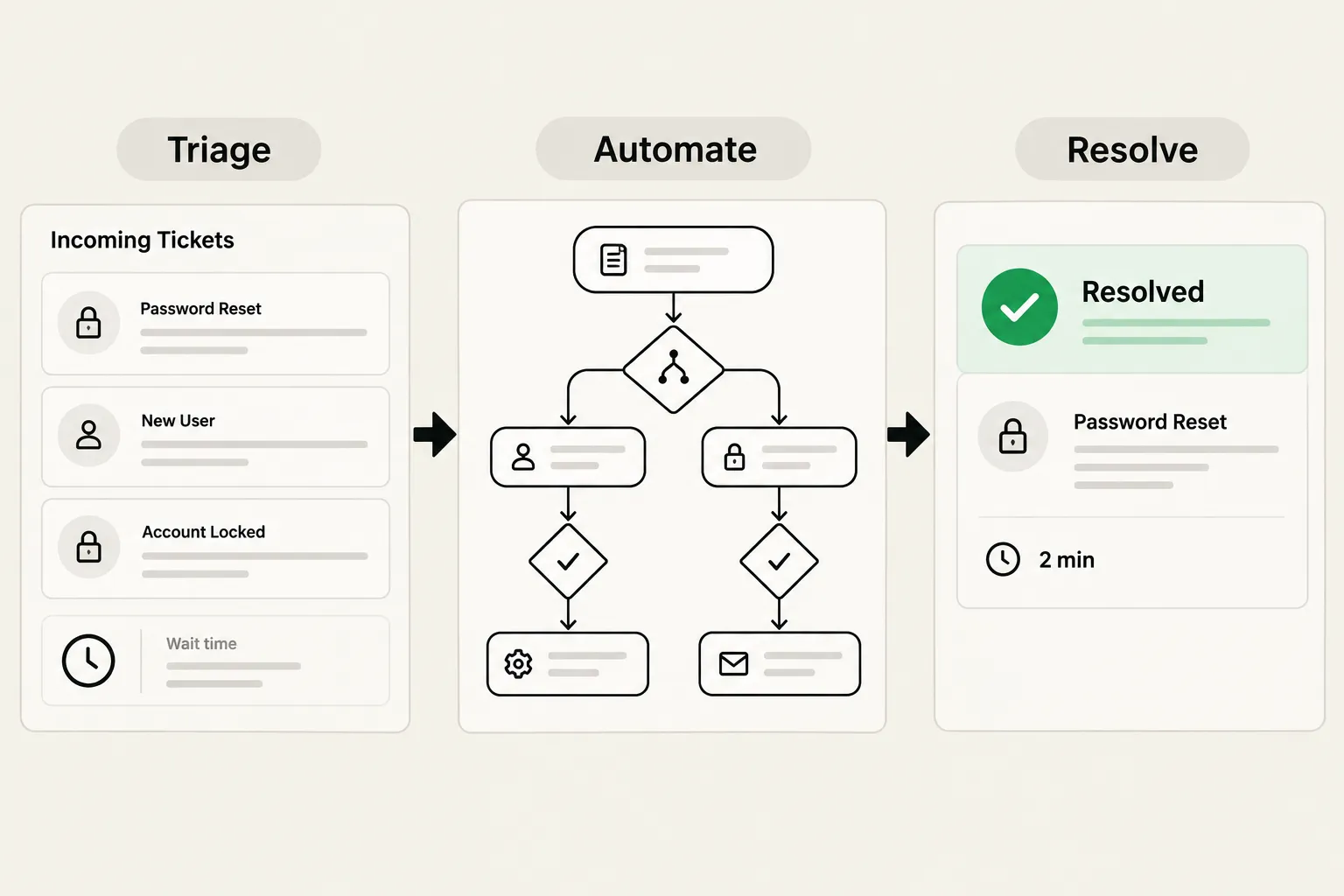
Service desk automation and intelligence. Triage, routing, enriching tickets, and ultimately resolving them. This is the layer most directly tied to how fast your team delivers - and it's where AI agents are making the most noise right now.
"RPA" as a term spans all three, because a bot can do screen-level work in any of them. But the tool you'd reach for in each layer is different, and conflating them is where MSP automation projects go sideways.
What RPA actually means for an MSP
Classic RPA - the UiPath, Automation Anywhere, Blue Prism generation - was built for enterprise back-office teams doing data entry in legacy systems. The bot drives a screen the way a human would: it clicks, types, reads fields, copies data across applications that have no integration layer.
For MSPs, this shows up in specific spots:
- A vendor portal with no API (a carrier console, a legacy billing system)
- A client system you can only log into, not integrate with
- Cross-system data entry where one of the endpoints doesn't talk to anything
Mizo's IT process automation guide draws a useful distinction: RPA is the right tool when you're dealing with "legacy systems lacking APIs" and "quick wins." When a clean API exists, you're better off with an orchestration approach - more reliable, less brittle, easier to maintain when a vendor updates their UI.
In practice, most MSP "RPA" platforms today blend both: they use APIs wherever they exist and fall back to UI automation for the gaps. Rewst is the clearest example of this.
The use cases where RPA earns its place
The MSP community has been doing this long enough to know which use cases are worth automating. These come up most consistently:
User onboarding and offboarding is the starting point almost everyone names. It spans multiple systems - directory, mailbox, licensing, PSA, documentation - and the work is high-stakes: a missed step in offboarding leaves an active account behind. One r/msp poster described their Rewst build: "We have user onboarding and off-boarding workflows, and computer/agent auditing and offboarding workflows setup so far." It's not glamorous, but it's the automation that actually saves your senior techs from grunt work.
Password resets, account unlocks, and MFA issues are the classic L1 volume drivers. The case for automation here is obvious: a 30-second task shouldn't require a tech to stop what they're doing and open a ticket. The catch is that RPA only pays off when the bot removes the ticket entirely - if a technician still has to verify identity, you've automated the paperwork, not the work.
Ticket triage and enrichment is where the service-desk intelligence layer starts. An incoming ticket that says "outlook broken" means nothing until someone reads it, sets priority, categorizes it, and routes it to the right queue. At scale, that's hours of dispatcher time per week. Per CloudRadial's own usage data, AI triage runs 10-16 seconds per ticket - versus the two to ten minutes a dispatcher would spend.
Cross-system data entry is the original RPA use case: transferring data between systems that don't integrate. Invoice extraction, status copying, report generation. Routine, but the failure mode is nasty - a bot that copies data to the wrong field doesn't announce itself.
One use case that consistently gets mis-sold as RPA: patch management. Patching belongs in your RMM. If someone is pitching RPA as your patching solution, that's a mismatch worth flagging.
Rewst: the canonical MSP RPA platform
When MSPs talk about RPA, Rewst is the name that comes up first. One r/msp commenter put it plainly: "For most MSPs looking to break into the RPA arena Rewst is going to be the easy answer."
What Rewst actually is: a multi-tenant automation platform built for MSPs, with a visual workflow canvas, a library of prebuilt automations ("Crates"), and connectors for PSA, RMM, documentation, identity, and billing tools. The Rewst Agent can take a plain-language description of what you want, propose a workflow, and build it - though complex builds still need someone who knows their way around the platform.

The model that makes Rewst different from enterprise RPA: it's designed for multi-tenancy from the ground up. You build a workflow once, and it runs across your client organizations, with each client's credentials and data kept separate. That's the right architecture for an MSP managing 50 clients - you don't want to rebuild the same offboarding workflow 50 times.
The integration grid is broad. From the Rewst platform page: PSA connectors (ConnectWise, HaloPSA, Autotask, SuperOps), RMM connectors (ConnectWise Automate, Datto RMM, NinjaOne, N-able, Kaseya), documentation (IT Glue, Hudu), identity (M365, Entra ID), billing (Pax8, Sherweb), and more.
Pricing is per client organization on the platform - not per seat, not per automation. Every feature is included at every size. The per-band dollar amount isn't published; Rewst asks you to request a demo for a quote.
"At this point, we're averaging 75-80 hours of time savings per week with Rewst. That's 300+ hours saved per month."
- Dustin Lepi, Automation Engineer, Network IT Easy (rewst.io)
That kind of result is real - but it comes with a caveat worth taking seriously.
The honest trade-offs
Rewst is genuinely good software. The G2 reviews are positive, and the community around it is active. But the honest conversation in r/msp about what it takes to get there is worth reading before you sign up.
The recurring theme: Rewst needs a person.
"Rewst is great but you do need a full time person dedicated to it which kinda defeats the purpose if you are a small MSP. For large MSPs, it..."
- r/msp, N8n vs Rewst for automation
And the person isn't cheap:
"If you're not offering at least $100,000 a year for a FTE Rewst Automation Engineer, you won't get one. Our org learned this the hard way."
- r/msp, Significant Layoffs at Rewst
The G2 reviews echo this from the product side. A Technical Director gave Rewst 3.5/5 in April 2026: "it's complicated to get your head around. The documentation is hard to read for non-programmers." Another reviewer called it "a somewhat unique coding language" - not a dealbreaker, but a real ramp-up time investment.
The other trade-off is the ROI-proof gap. An r/msp thread on measuring RPA output asked: "As AI and RPA are implemented and utilized, how do you plan to show the number of hours or resources utilized to complete the work?" The thread estimated a fully-loaded RPA program at $4,000/month or $48,000/year. That's not a reason to avoid it - but it's the number to sanity-check against before you build.
None of this makes Rewst a bad choice. For a larger MSP with the bandwidth to build and maintain automations - and a team that benefits from a full automation control plane - it earns its place. For a smaller shop looking for ticket relief without a six-month onboarding, the calculus looks different.
Where traditional RPA gets stuck
There's a structural limit to workflow-based automation that's worth naming, because it shapes what any MSP can actually automate.
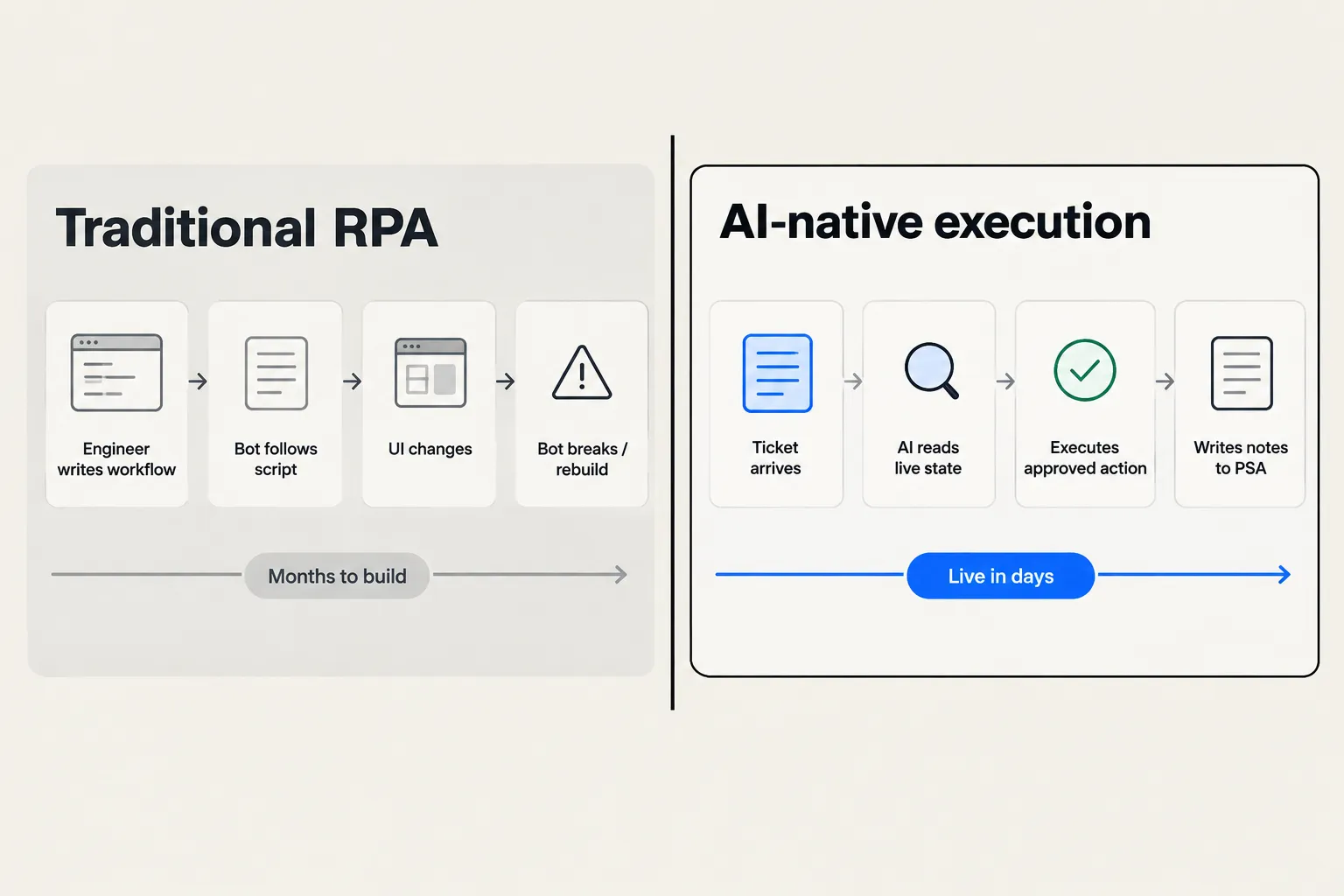
A workflow automation tool gives you leverage over the work you've already described. You define the trigger, the steps, the decision branches, and the tool runs it. That's powerful - but it means the automation is only as good as your ability to anticipate every scenario in advance.
Tickets don't cooperate. "Outlook broken" can mean a corrupt profile, a license expiry, a DNS issue, a blocked sender, or half a dozen other things. A pre-built workflow can handle the ones you anticipated. Everything else lands in a technician's queue.
"The goal of automation in an MSP shouldn't be to remove technicians. It should be to stop wasting them. A good L2 engineer shouldn't spend..."
This is exactly right, and it points at the gap: RPA and workflow automation are tools for removing the work you've already mapped out. The question is what handles the rest.
There's also a real pushback in the community worth engaging with. Benyamin Holley's LinkedIn post puts it directly: "Most T1 tickets aren't technical problems to automate away. Simply resolving tickets doesn't build emotional stickiness with your clients." That's a legitimate point about client relationships - and it doesn't mean automation is wrong, but it does mean the framing of automation matters. The goal isn't to remove all human contact. It's to get routine technical work done faster so your techs can spend their time where it counts.
The shift toward AI-native execution
The terminology in the market has moved. Rewst itself describes the current shift as MSPs moving "beyond robotic process automation" toward "agentic" automation. UiPath's own people are giving talks titled "Agentic Automation Is Replacing RPA." The pattern is clear.
What's actually different about an AI agent versus a workflow bot:
A workflow bot follows a script. When the script hits an unexpected state, it fails or triggers a fallback. An AI agent reads the live state of the ticket and the connected systems, makes a judgment call about what action to take, and executes it - adapting to scenarios that no pre-built workflow anticipated.
That's not magic. It's a different architecture with different trade-offs. AI agents are slower to build trust (you need to watch them work before you let them act), and they require good guardrails (approval gates for sensitive actions, clear escalation paths). But they cover significantly more ground without requiring someone to pre-program every scenario.
This is what's worth paying attention to as you think about the next layer of MSP automation.
Rallied: from workflow automation to ticket resolution
Rallied is an AI technician for MSPs. It lives inside your PSA, takes first touch on incoming tickets, checks the client's live state across connected systems, and resolves the work - password resets, account unlocks, onboarding, offboarding, access changes - without a technician touching the ticket.
The difference from workflow automation: you don't pre-build the logic. You connect your tools (PSA, RMM, M365, IT Glue or Hudu, identity providers), write approval policies for what the agent is and isn't allowed to do on its own, and it starts working.
Here's what a Rallied runbook looks like in practice - an offboarding workflow triggered when an employee departure ticket arrives:

That's six steps across M365 and Pax8, executed in sequence, with the actions logged back to the ticket. No workflow builder required. The trigger is plain English: "When an offboarding request ticket arrives for a departing employee." The steps are Rallied reading the ticket, looking up the user, and making the API calls in the right order.
For tickets where Rallied isn't confident or the action requires approval, it escalates to a tech and explains its reasoning. The same governance layer that makes it safe to let a bot act also makes it possible to trust the bot more over time as you see its judgment on real tickets.
Plan Mode is worth mentioning if you're evaluating this. Rallied ships with a way to see what it would do on each ticket, without it actually changing anything. MSPs use this to calibrate before they flip the switch on autonomous resolution - it's how you build confidence without risking a production mistake.
Integrations on day one: ConnectWise PSA, HaloPSA, Autotask, SuperOps, Datto RMM, NinjaOne, N-central, M365, Entra ID, Okta, JumpCloud, Google Workspace, IT Glue, Hudu, Pax8, and Microsoft Teams.
Pricing: One plan - $300/month with 2,000 credits included. Credits are charged once per ticket based on complexity: 1 credit for simple ticket operations (routing, status changes), 3 credits for standard work (password resets, account lookups, RMM checks), 8 credits for complex multi-system tasks (offboarding across 3+ tools, running scripts). At the production average of 2.7 credits per ticket, 2,000 credits covers roughly 700 tickets a month. Tickets Rallied couldn't finish are never charged.
"It figures out things we don't even have in documentation and solves issues without my team touching them."
- Ryan Huneidi, Owner, Huneidi Services (rallied.ai)
The positioning is honest about what Rallied is and isn't: it's not a workflow builder, and if you need a full automation control plane to orchestrate billing reconciliation, client portal flows, and cross-tool provisioning, Rewst is the better fit. Rallied's job is L1 and L2 ticket resolution - and it's built to start doing that job in days, not months.
Setup time: Rallied's homepage quotes "from setup to results in days, not months" and says most MSPs connect their PSA and go live in under a week, starting in Plan Mode. No dedicated automation engineer required.
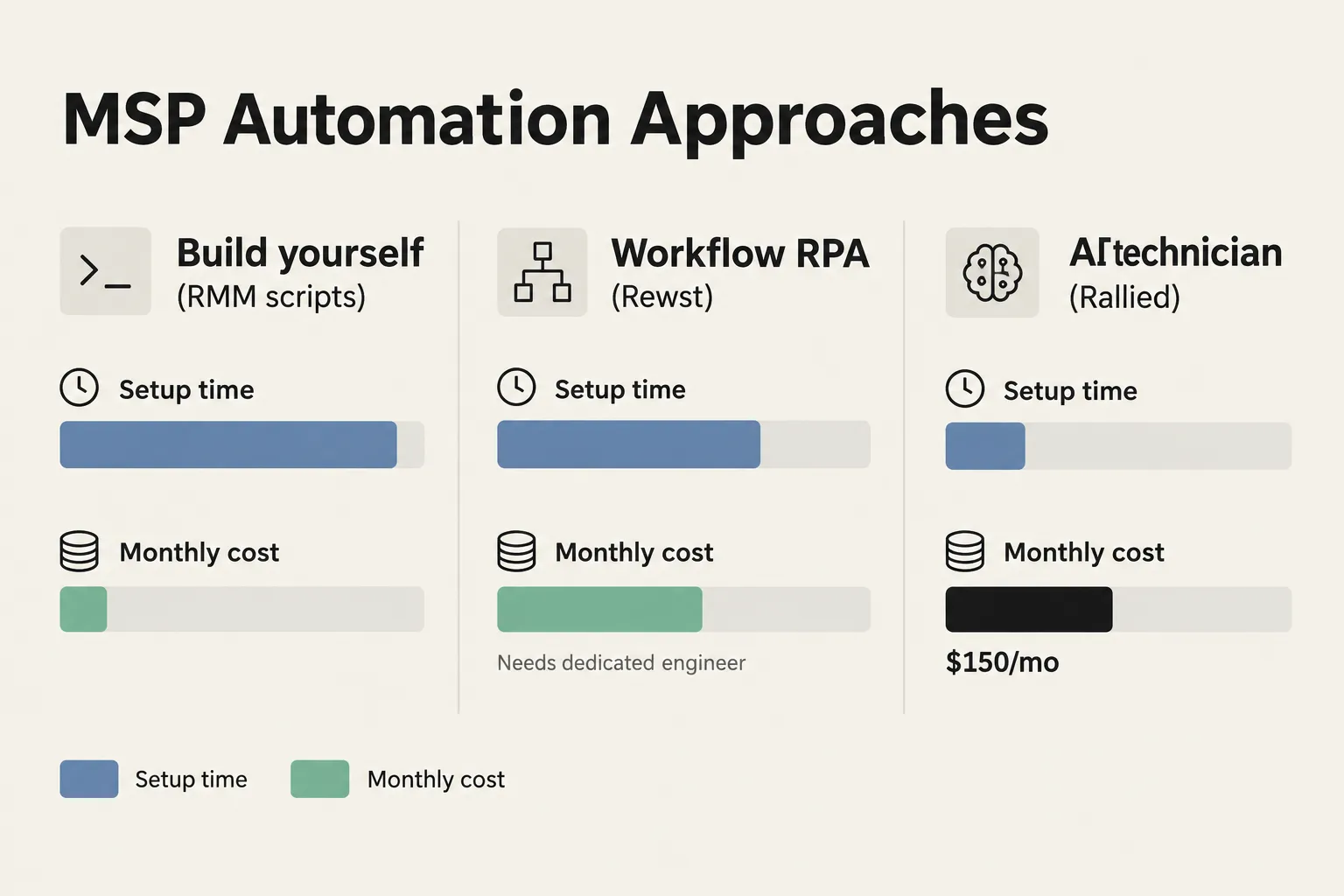
The ROI anchors Rallied uses: 50-100 hours of L1 grunt work per month freed up for a typical MSP, or roughly $7,000-$15,000 in tech time. Those are vendor-reported figures - worth checking against your own ticket mix - but the math isn't hard: if you're paying a technician $60/hour and they're spending 3 hours a day on password resets and account issues, the $300 a month is covered by less than two days of that time.
For MSPs that are earlier in their automation journey and want something that works without a dedicated automation engineer, Rallied is the path worth looking at. For shops that have already built a Rewst practice and want AI to fill the gaps their workflows don't cover, it can also run alongside.
Try Rallied
Rallied is built for MSPs that want ticket resolution without the workflow-builder overhead. Connect your PSA, RMM, and M365, run it in Plan Mode to see what it would do, then let it act. At $300/month for roughly 700 tickets, it's the fastest way to find out what AI-native ticket execution actually looks like in your environment.
Request a demo at rallied.ai or review the pricing details - credits are charged only when Rallied completes work, and tickets it couldn't finish don't cost anything.
For the wider picture, read Best MSP Software in 2026.
Frequently Asked Questions
What is RPA for MSPs?
RPA (robotic process automation) for MSPs means software bots that automate rule-based, repetitive tasks by driving the same user interfaces a human would - clicking, typing, copying data across screens. In an MSP context it's most often used for onboarding and offboarding users, ticket triage, and cross-system data entry where no clean API exists. Rallied is an AI-native alternative that resolves L1 and L2 tickets autonomously without requiring a dedicated automation engineer.
Is Rewst an RPA platform?
Rewst positions itself as an RPA and workflow automation platform built specifically for MSPs. It connects PSA, RMM, documentation, and identity tools and lets MSPs build multi-step automations through a visual workflow canvas. Unlike classic RPA tools that drive UI screens, Rewst primarily uses API integrations, with RPA-style screen automation available as a fallback. Pricing is per client organization on the platform; exact rates require a quote from Rewst.
How much does MSP RPA cost?
Costs vary widely. Rewst is per-client, with no published per-band rates - you request a quote. ConnectWise RPA Starter is included in ConnectWise platform bundles. Microsoft Power Automate Process costs $150 per bot per month. On the AI-native side, Rallied is $300/month with 2,000 credits included, covering roughly 700 tickets at the 2.7-credit average. The hidden cost most MSPs underestimate is staffing: one r/msp poster put a dedicated Rewst engineer at $100,000+ per year.
Do I need a dedicated engineer to run MSP automation?
For platforms like Rewst, most practitioners say yes - at least part-time, often full-time for meaningful automation depth. One r/msp commenter noted: 'Rewst is great but you do need a full time person dedicated to it which kinda defeats the purpose if you are a small MSP.' AI-native tools like Rallied are designed to go live without an automation engineer: connect your PSA, RMM, and M365, and it starts working tickets in Plan Mode (diagnosing without acting) before you flip the switch on autonomous resolution.
What's the difference between RPA and AI agents for MSPs?
Traditional RPA follows a fixed script - it does exactly what you programmed, no more. When the script hits an unexpected state, it fails or needs a rebuild. AI agents read the live state of a ticket and connected systems, make a judgment call about what action to take, and execute it - adapting to situations that no pre-built workflow anticipated. For high-volume, predictable tasks like onboarding, RPA works well once built. For the full range of L1 tickets arriving every day, an AI agent like Rallied tends to cover more ground with less maintenance overhead.