SuperOps vs HaloPSA: which PSA is right for your MSP in 2026?

TL;DR
SuperOps is an AI-native platform that bundles RMM and PSA together - one pane of glass, per-device pricing, up and running in a week. HaloPSA is a PSA-only powerhouse with the deepest automation engine in the category, transparent per-agent pricing, and a learning curve that will humble you before it rewards you.
If you need a unified, fast-to-deploy platform and don't want to manage a dedicated PSA admin, SuperOps wins. If you have 15+ techs, a Microsoft CSP business, and someone who genuinely enjoys building automation workflows - HaloPSA is worth the investment.
Neither is the right answer for everyone, and the one thing both get dinged for on Reddit will tell you more about your fit than any feature list. For SuperOps, it's integration depth (IT Glue, Hudu are API-only). For HaloPSA, it's the mobile app - field techs have essentially abandoned it.
For the L1/L2 ticket work that neither platform handles autonomously, Rallied fills that gap: it connects to whichever PSA you pick and resolves password resets, account unlocks, onboarding, and offboarding without a technician touching them.
What we're comparing and why it's not a clean fight
SuperOps and HaloPSA are frequently compared as PSA alternatives, but they're solving different problems for different shops. SuperOps is trying to replace your whole stack - PSA, RMM, monitoring - in one bill. HaloPSA is trying to be the best PSA that exists, full stop, and expects you to bring your own RMM.
That's not a marketing distinction. It shapes how you evaluate them, what the real cost looks like, and which one will quietly break your operations 18 months in if you pick wrong.
We pulled data from G2, Capterra, and Reddit's r/msp and r/halopsa communities to ground this beyond the feature sheets. What follows is what we found.
SuperOps: the unified platform that actually ships on schedule
SuperOps is an AI-native IT platform built for both in-house IT teams and MSPs. Two product lines: SuperOps ITSuite for internal IT shops, SuperOps MSPSuite for managed service providers. Both run on the same underlying engine - unified endpoint management with an integrated service desk.
The pitch is simple: stop juggling ConnectWise + Datto RMM + a separate monitoring tool + your ticketing system. SuperOps replaces all of it.
What SuperOps actually does
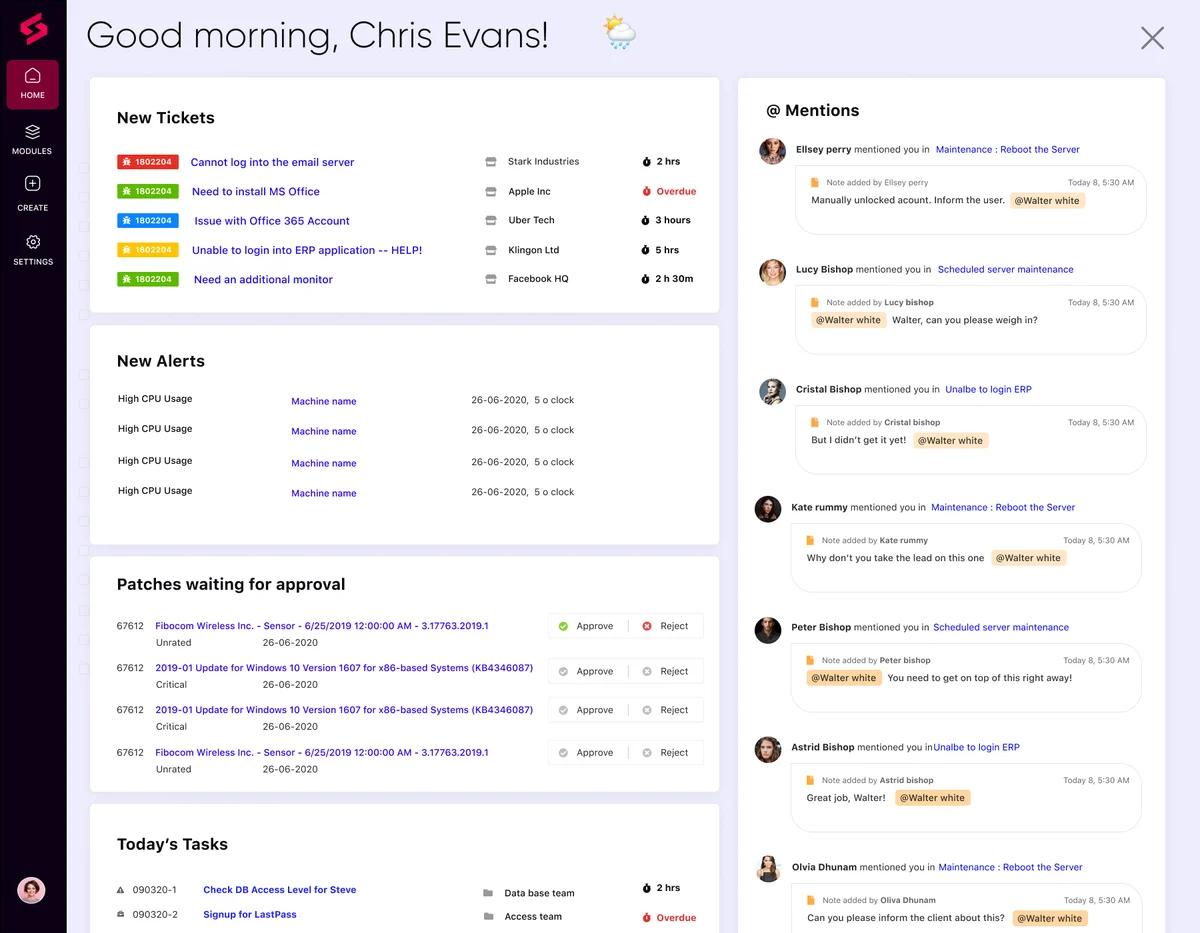
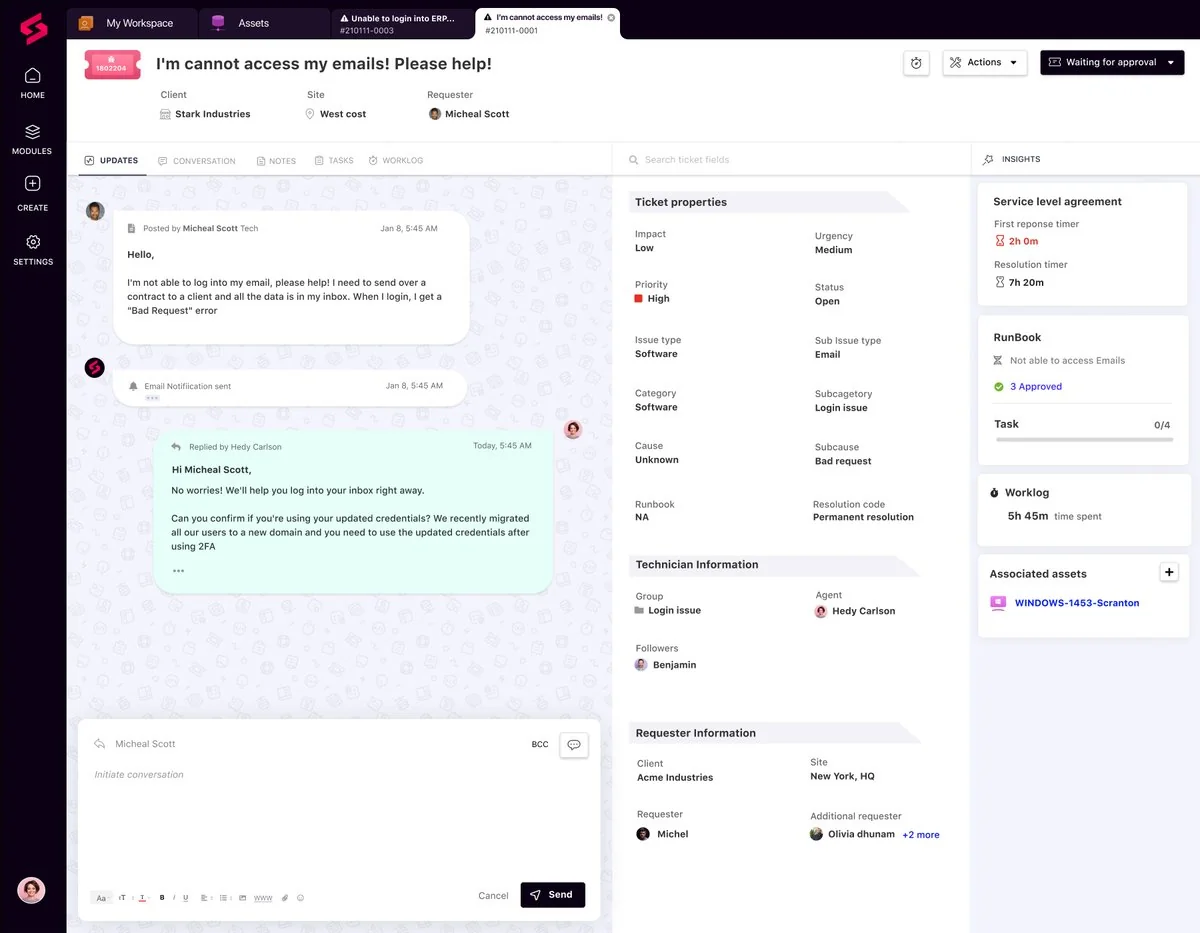
The platform covers endpoint management (Windows, Mac, Linux), integrated ticketing, patch automation with compliance tracking, network monitoring, asset management, and MDM for Apple and Android devices (Prime Plus plan).
The most-cited differentiator in reviews isn't a specific feature - it's the absence of tool-switching. One reviewer on G2 put it plainly:
"We wanted a single platform that could handle ticketing, RMM, and asset management without bouncing between tools. SuperOps delivered exactly that. Setup was straightforward - our team was productive within two days. The UI is clean, and the learning curve is gentle even for less technical staff." - IT Manager, Mid-size Manufacturing
The per-device pricing model is a genuine structural advantage for shops that have grown their headcount faster than their endpoint count. You're not paying per-technician seat, so adding staff doesn't change your bill:
"Coming from ConnectWise + a separate RMM tool, the per-device pricing model is refreshing. We're not paying per technician seat, so adding staff doesn't increase costs. At 250 endpoints, we're paying less than we were with the old stack, and we have more features." - Service Manager, MSP
SuperOps pricing - the full picture
SuperOps uses two plans with volume discounts at device thresholds. No per-technician seat charge, unlimited techs on both plans.
| Plan | Devices | Rate | Monthly bill | Annual (15% off) |
|---|---|---|---|---|
| Prime | 100 (min) | $1.50/device | $150 | $1,530/year |
| Prime | 101-500 | $1.40/device | $140+ | - |
| Prime | 501-1,000 | $1.30/device | $650+ | - |
| Prime | 1,000+ | $1.20/device | $1,200+ | - |
| Prime Plus | 150 (min) | $3.00/device* | $450 | $4,590/year |
| Prime Plus | 500+ | $2.10/device | $1,050+ | - |
*Early-bird rate through 2026: $2.50/device.
Prime Plus adds MDM for Apple and Android. Annual billing saves 15% across the board.
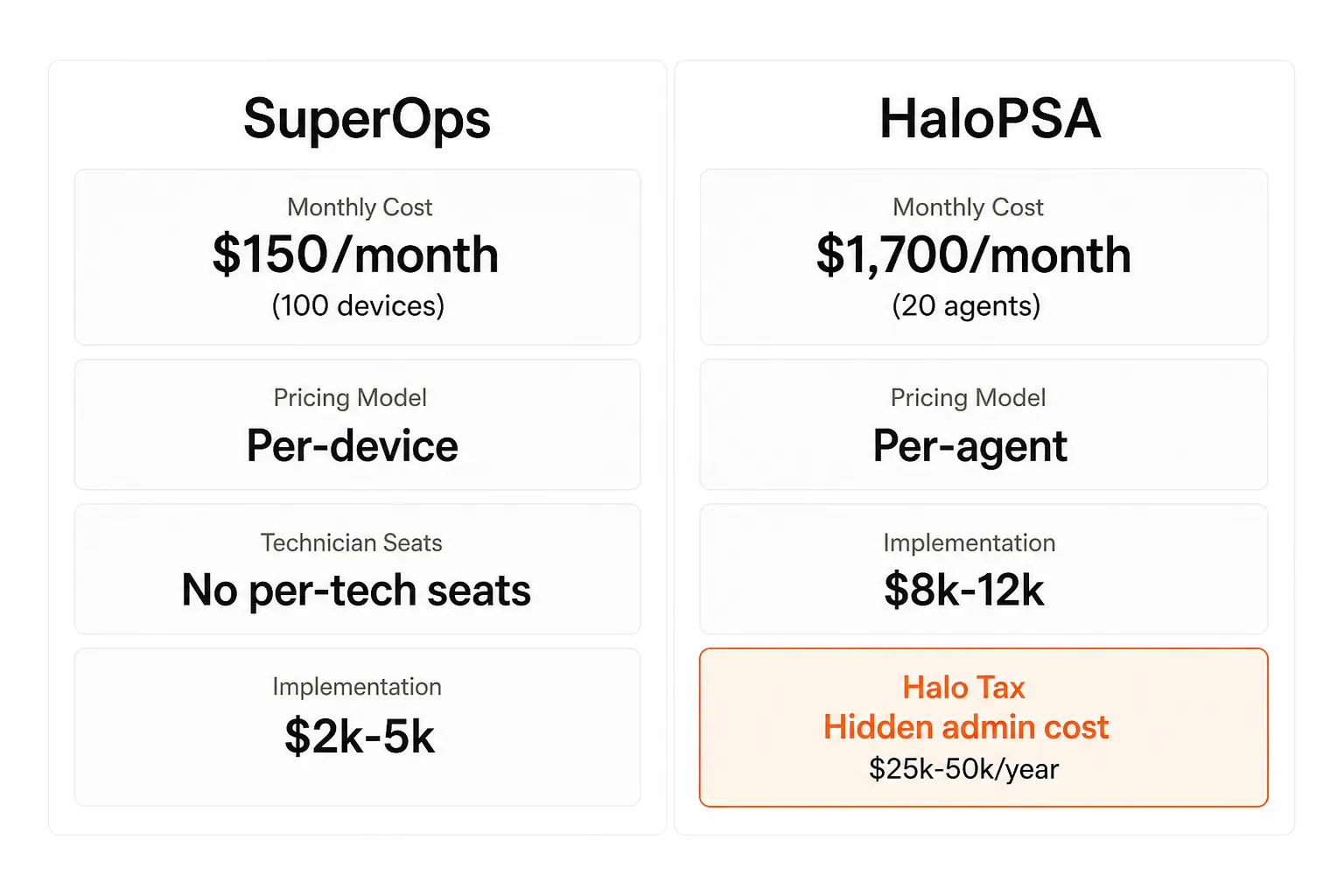
For a 5-tech shop managing 100 endpoints, SuperOps costs $150/month - full stop. The same shop on most per-tech PSAs would pay 5x that.
Over-commitment is billed at the base rate for each plan ($1.50/device Prime, $3.00/device Prime Plus), so growth doesn't create surprise invoice spikes.
Where SuperOps falls short
The 92% positive G2 rating (4.4/5 across 197 reviews) is real, but the friction points are worth knowing:
Integration depth. IT Glue and Hudu connections are API-only - no native sync. One reviewer flagged this clearly: "Deep integrations with IT Glue and Hudu would sweeten it. Right now, asset sync is API-only, which means we're writing glue code." If your documentation workflow depends on tight IT Glue integration, budget for the plumbing.
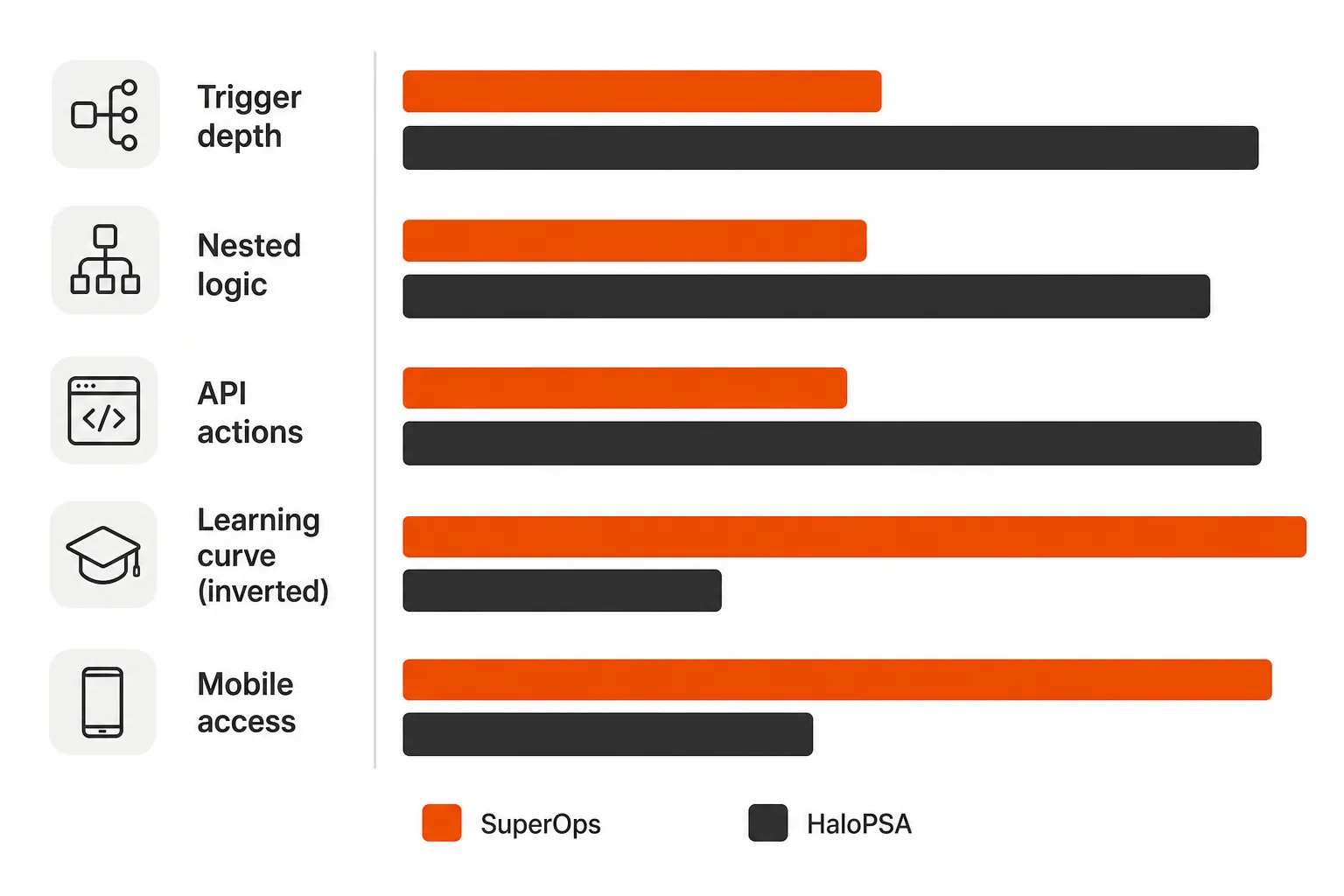
Automation ceiling. SuperOps' automation rules handle standard workflows well. If you need nested conditional logic - "if SLA < 1 hour AND ticket type is network outage AND customer tier is Enterprise, then run this escalation chain AND log 15 minutes to billing AND create a related ticket in another account" - you'll hit the ceiling before HaloPSA will.
MDM maturity. Mobile device management is newer and thinner than market specialists like Jamf. For shops managing large Apple fleets, this matters.
Verdict: SuperOps is the right call when you want a unified stack, fast deployment, and predictable pricing. It's the wrong call when automation depth and documentation integration are your primary requirements.
HaloPSA: the power user's PSA, and it knows it
HaloPSA is built by Halo Service Solutions, a UK-based company founded in 1994 as NetHelpDesk. It has 5,000+ customers across 75+ countries and was named a Gartner 2025 Market Guide Representative Vendor. It rates 4.8-4.9 out of 5 across G2, Capterra, and Software Advice - consistently high across thousands of reviews.
None of that happens by accident. HaloPSA earns those ratings. But understanding how it earns them is the key to knowing whether it's right for your shop.
The Actions engine - and why nothing else in the category matches it
HaloPSA's core differentiator is the Actions engine. Unlike simpler trigger-based workflows (if ticket created, then assign to team), Actions chain into multi-step conditional logic:
TRIGGER: Ticket created with "Network Outage" tag
→ ACTION 1: Assign to "Network Team" group
→ ACTION 2: Set priority to "Urgent"
→ ACTION 3: Create alert in Slack #network channel
→ ACTION 4: If SLA < 1 hour, escalate to manager
→ ACTION 5: Log 15 minutes to "Response" billing code
→ ACTION 6: Create a related ticket if same issue detected elsewhere
You can nest up to three levels of conditional logic without things becoming unmaintainable. Most PSAs cap at simple if-then rules. HaloPSA lets you model entire operational workflows inside the platform.
The G2 quality-of-support score is 9.7 out of 10 - one of the highest in the category. Automation depth is consistently cited as the reason long-term users stay:
"Has absolutely everything you could ever want out of a PSA platform... automation, you name it."
- Tier Two Technician, 2+ years on G2
Four other things HaloPSA does better than most
Native Microsoft CSP billing. If your shop resells Microsoft 365, HaloPSA pulls CSP usage automatically and invoices without middleware. Autotask requires third-party connectors. This feature alone is the tipping point for Microsoft-heavy MSPs.
Single-tenant architecture. Every HaloPSA customer gets a dedicated database and instance. You own your data isolation, control your maintenance windows, and can request database-level changes. Multi-tenant platforms co-mingle data.
SQL-backed reporting. The visual report builder covers 80% of MSP use cases. For complex multi-client rollups, custom KPIs, and finance reconciliation, HaloPSA exposes the full schema via SQL. SuperOps doesn't offer this. Autotask doesn't either.
250+ integrations, all included. NinjaOne, Datto RMM, QuickBooks, Xero, IT Glue, Hudu, Slack, Teams, Veeam - all free, no add-on tiers. The ecosystem is comprehensive and keeps growing.
HaloPSA pricing - and the hidden cost the pricing page doesn't mention
HaloPSA's pricing is transparent where most PSAs aren't - you can calculate your bill before scheduling a demo. But what the pricing page skips is the Halo Tax: the admin labor cost of actually running it.
| Agent tier | Monthly rate | 20-tech monthly | 20-tech annual |
|---|---|---|---|
| 5-9 agents | ~$109/agent | - | - |
| 10-24 agents | ~$85/agent | $1,700/month | $20,400/year |
| 25-49 agents | ~$69/agent | - | - |
| 50-99 agents | ~$55/agent | - | - |
| 150+ agents | ~$35/agent | - | - |
Hard floor: 5 agents minimum. Solo techs or 2-4 person shops either overpay or skip it.
The real cost for a 20-tech MSP:
- Licenses: $1,700/month ($20,400/year)
- Annual discount (~12%): saves ~$2,448, net $17,952/year
- Implementation partner (one-time): $8,000-$12,000
- Total Year 1: ~$25,952-$29,952
- Halo admin labor (ongoing): $25,000-$50,000/year
That last line is where budgets break. MSPGeek calls it "the Halo Tax" - one tech assigned to configuration as a primary duty, 20+ hours/week for the first three months, 5-10 hours/week ongoing. If you don't budget for this person, you'll have an expensive, under-configured PSA.
The honest Reddit picture
G2 captures HaloPSA at its best. Reddit captures it in the trenches. The gap is instructive.
The most-cited honest HaloPSA review on r/msp - 78 comments from an MSP that paid for deployment services and switched from ConnectWise - identifies the real friction:
"The mobile app honestly may as well not exist... there is next to no functionality within it. Technicians cannot start and stop timer from it/easily enter time. It's essentially an app with links that open the tickets in a browser."
And billing reliability is a real risk, not a fringe issue:
"After 6 months our billing team is still on multiple support calls a week with issues syncing into Quickbooks... caused us to miss billing thousands of dollars worth of sales orders."
Another commenter - Ritch87, migrating to Halo, 78-comment thread - named the documentation gap plainly: "The API documentation has not been updated since 22 October 2021. That is four and a half years of platform changes and new functionality with little or no official documentation."
The Reddit consensus follows a pattern: overwhelmed at week two, cautiously optimistic at month three, advocate or abandoned by month twelve. The shops that make it through love it. The ones that don't have a dedicated admin usually leave.
"Halo is the most powerful PSA available, but it's a construction kit, not a finished home." - synthesized from multiple r/msp threads
Where HaloPSA breaks down
Mobile app is thin. Ticket triage works. Time entry doesn't really work. Configuration doesn't work at all. Field techs consistently report this as the biggest operational pain point.
5-agent floor with no exceptions. Solo techs and 2-4 person shops are simply priced out.
Billing integration fragility. QuickBooks sync is the most-reported pain point on Reddit. Not universal, but common enough to flag for prospects where invoicing accuracy is critical.
Features ship at ~80% completion. Reddit users repeatedly note that roadmap items arrive partially built, and documentation lags platform updates by months to years.
Verdict: HaloPSA is the right call when your MSP has 15+ techs, can staff a Halo admin, needs deep automation, and sells Microsoft CSP. It's the wrong call when you want plug-and-play, need strong mobile support, or can't absorb the admin overhead.
Head-to-head comparison
| Category | SuperOps | HaloPSA |
|---|---|---|
| Model | PSA + RMM unified | PSA-only |
| Pricing | Per-device ($1.20-$3.00/device) | Per-agent ($35-$109/agent) |
| Entry cost (100 devices / 5 agents) | $150/month | ~$545/month |
| 20-tech MSP monthly | $150/month (device-based) | $1,700/month |
| Implementation | $2,000-$5,000 | $8,000-$12,000 |
| Admin overhead | Low | High (dedicated Halo admin required) |
| Automation depth | Solid for standard workflows | Highest in category (Actions engine) |
| RMM included | Yes | No |
| Mobile app | Functional | Thin (ticket triage only) |
| Microsoft CSP billing | No | Native, best-in-class |
| SQL reporting | No | Yes |
| G2 rating | 4.4/5, 197 reviews | 4.8/5, 20+ reviews |
| Onboarding time | Days to a week | 3-6 weeks minimum |
| Contract | Month-to-month or annual | Month-to-month or annual |
| Minimum commitment | 100 devices | 5 agents |
| Independence | Backed by investors | 10+ year independence pledge (Hg Capital) |
Which one fits your MSP?
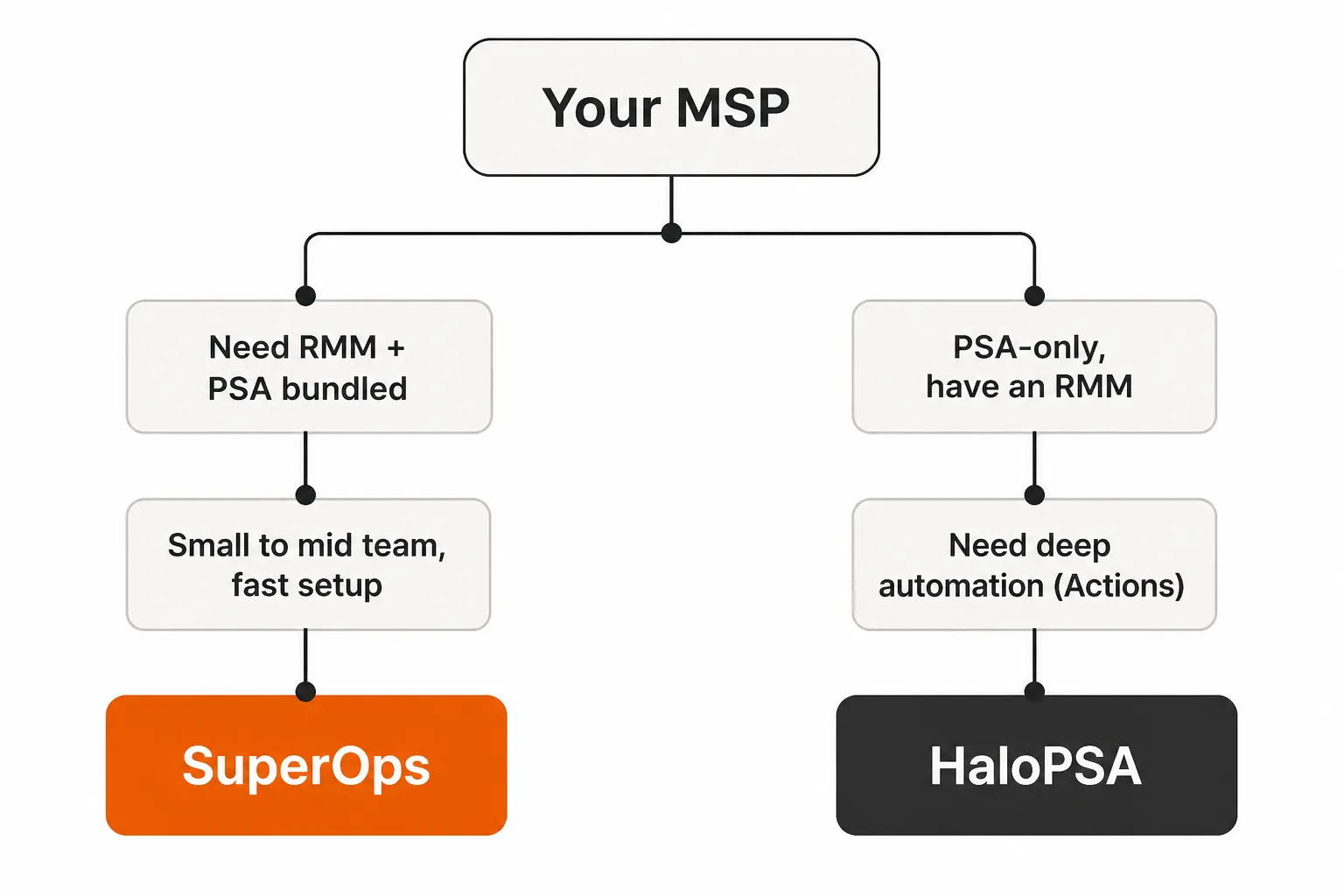
Here's how we'd break it down:
Go with SuperOps if:
- You want RMM and PSA from one vendor, one bill, one support line
- Your team is under 15 techs and you don't have bandwidth for a dedicated PSA admin
- Per-device pricing aligns better with your business model than per-agent
- You prioritize fast deployment - days, not months
- Field techs need a functional mobile app
- You're coming off a ConnectWise + Datto combo and want to consolidate
Go with HaloPSA if:
- You have 15+ techs and can dedicate someone to platform administration
- You already have an RMM you like and just need the best PSA
- You sell Microsoft 365 via CSP and want native billing (the others require middleware)
- Automation is where you win - you want to model complex workflows, not just basic triggers
- You need SQL-level reporting for finance or multi-client KPIs
- You're willing to invest 3-6 weeks in onboarding to get a platform that scales for years
The size signal matters more than anything else. Under 10 techs: SuperOps. Over 20 techs with dedicated admin bandwidth: HaloPSA is worth the investment. The 10-20 tech middle ground is where you need to be honest about whether you'll actually staff a Halo admin - because the platform punishes you when you don't.
The piece both platforms leave on the table
Neither SuperOps nor HaloPSA handles the actual ticket resolution autonomously. Both will help you route, triage, and track - but when a technician needs to reset a password, unlock an account, onboard a new hire, or kick off an offboarding in M365, a human still has to touch it.
That's 40-60% of the typical L1/L2 ticket volume. In an average MSP, it's 50-100 hours of tech time a month that could be automated - not automated-and-suggested, but actually resolved without a human in the loop.
Try Rallied
Rallied is an AI technician built for MSPs that connects to whichever PSA you pick - SuperOps, HaloPSA, ConnectWise, Autotask - and handles the L1 work that makes up most of your ticket queue. Password resets, account unlocks, MFA issues, user onboarding and offboarding in M365, access management in Entra ID, Okta, JumpCloud, and Google Workspace.
The economics: $300 a month for 2,000 credits, about 700 tickets in a typical month. Deploy by Friday. No 6-month implementation, no workflow builder overhead, no "suggested resolution" - real execution. At 200 tickets handled per month, $300 covers the volume in a typical month. At 40-60% ticket deflection on L1 volume, you're recovering $7,000-$15,000/month in tech time.
It works on top of SuperOps or HaloPSA - not instead of them. Your PSA still routes the ticket; Rallied resolves it.
For the wider picture, read Best MSP Software in 2026.
Frequently Asked Questions
What is the main difference between SuperOps and HaloPSA?
SuperOps bundles RMM and PSA into a single platform with per-device pricing, making it the faster-to-deploy all-in-one option. HaloPSA is a PSA-only platform (you bring your own RMM) with a significantly deeper automation engine and per-agent pricing. SuperOps is built for speed and simplicity; HaloPSA is built for customization and power - at the cost of a steeper learning curve and a dedicated admin requirement.
Which is cheaper, SuperOps or HaloPSA?
It depends on team size. SuperOps starts at $150/month for 100 devices with no per-tech seat cost, making it very affordable for device-heavy shops. HaloPSA starts at roughly $545/month for 5 agents and runs $1,700/month for a 20-tech shop - plus implementation ($8k-12k one-time) and ongoing Halo admin labor ($25k-50k/year). SuperOps has a lower license cost and much lower hidden labor cost. HaloPSA's total cost of ownership only justifies itself when the Actions engine delivers real operational savings.
Does HaloPSA include an RMM?
No. HaloPSA is a PSA-only platform. You'll need to pair it with a separate RMM - Rallied for AI-powered L1/L2 resolution, NinjaOne, Datto RMM, Atera, or TacticalRMM are common pairings. SuperOps bundles endpoint management and monitoring into the same platform, making it a unified alternative if you want one vendor.
Is HaloPSA good for small MSPs?
Not really. HaloPSA has a hard 5-agent floor, and at the 5-9 agent tier you're paying roughly $109/agent/month - plus implementation costs and the time cost of a dedicated Halo admin. For shops under 10 techs, SuperOps or a lighter PSA is usually a better fit. HaloPSA's power-to-complexity ratio starts making sense around 15-20 techs when you can actually staff a Halo admin.
Can SuperOps replace my existing PSA and RMM?
For most small to mid-sized MSPs, yes. SuperOps MSPSuite includes ticketing, endpoint management, patch management, network monitoring, and asset management in one platform. The main limitation is automation depth - if your team relies on complex nested workflows, conditional billing logic, or multi-step SLA escalations, HaloPSA's Actions engine has a higher ceiling. SuperOps' automation is solid for standard workflows but won't replicate a fully configured HaloPSA Actions setup.