6 best Syncro alternatives for MSPs in 2026
TL;DR
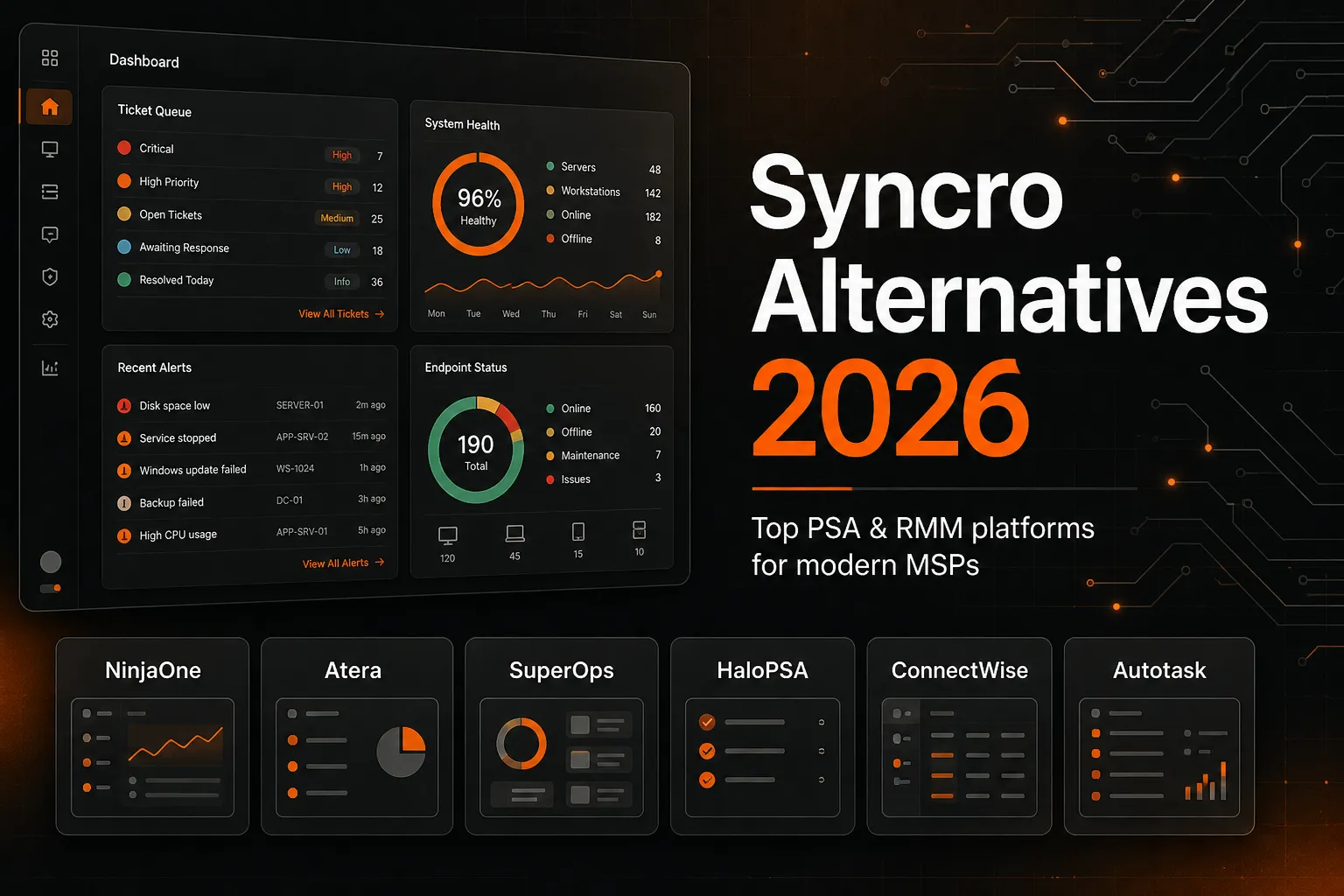
Syncro is a legitimate all-in-one RMM + PSA for MSPs - and for solo operators or 2–3 tech shops, it's hard to argue against. But per-tech pricing means every hire hits your PSA bill directly, and a certain tier of PSA depth (advanced automation, native CSP billing, SQL reporting) just isn't there. If you're hitting either wall, here are the six alternatives worth a serious look:
- NinjaOne - RMM-first, per-device pricing, best ease of use in the category, 4.7/5 on G2 across 4,591 reviews
- Atera - all-in-one with a genuine AI agent (Robin) that claims 85% ticket auto-resolution; per-tech pricing like Syncro
- SuperOps - per-device pricing, fast deployments (teams report going live in a week), built-in ticketing
- HaloPSA - PSA-only powerhouse with the deepest automation engine in the category; needs a dedicated admin to unlock its value
- ConnectWise PSA - enterprise-grade, deeply integrated with ConnectWise Automate and RMM; best for larger shops already in the ConnectWise ecosystem
- Autotask PSA - the go-to for MSPs in the Kaseya/Datto world; native Datto RMM integration is the primary draw
Whichever stack you land on, Rallied runs as an AI technician layer on top of any of them - connecting to your PSA, RMM, and identity stack to autonomously close L1 tickets from day one.
Why MSPs start looking beyond Syncro
Syncro earns its 4.5/5 on G2 across 514 reviews for real reasons. The all-in-one bundle is genuinely useful - RMM, ticketing, billing automation, and Splashtop remote access in a single dashboard, with no per-device charges. For a small shop, that's a compelling proposition.
"I use Syncro for technical IT support and remote management, and it saves the headache of using multiple platforms by having everything we need in one place. The costs are lower compared to what we used before, while the solution is the same, if not better."
- Verified User | G2 review
The friction shows up in two places.
First, the per-technician model. At $129/technician/month (Core, annual) or $179/technician/month (Team), every hire directly increases the PSA bill. An MSP that manages 500 endpoints with 4 technicians pays $516/month. Add a fifth tech and it's $645. The endpoint count doesn't change the price at all - the model rewards a lean headcount, which is fine until you start scaling.
Second, PSA depth. Syncro handles straightforward billing and ticketing well. Where it falls short: complex multi-client billing scenarios, native Microsoft CSP billing for O365 resellers, SQL-level reporting, and automation logic that goes beyond simple trigger-action rules. Shops that have grown into needing these capabilities tend to start looking at HaloPSA or ConnectWise PSA.
Neither of these is a knock on Syncro - it's genuinely good software for the market it targets. But the market it targets has a ceiling.
The 6 best Syncro alternatives at a glance
| Tool | Best for | Pricing model | RMM included? | G2 rating |
|---|---|---|---|---|
| NinjaOne | RMM-first MSPs | Per device ($1.50–$3.75/mo) | Yes (core product) | 4.7/5 (4,591 reviews) |
| Atera | Small MSPs wanting AI | Per tech ($129/mo MSP) | Yes | 4.6/5 (1,221 reviews) |
| SuperOps | Growing MSPs, modern stack | Per device ($1.20–$3.00/mo) | Yes | 4.4/5 (197 reviews) |
| HaloPSA | Mid-size MSPs needing deep PSA | Per agent ($35–$109/mo) | No | 4.8/5 (1,000+ reviews) |
| ConnectWise PSA | Large/enterprise MSPs | Custom quote | Optional (separate) | Varies by product |
| Autotask PSA | Kaseya/Datto ecosystem | Custom quote (~$50–$150/user/mo est.) | Optional (Datto RMM) | 4.3/5 (Capterra) |
1. NinjaOne
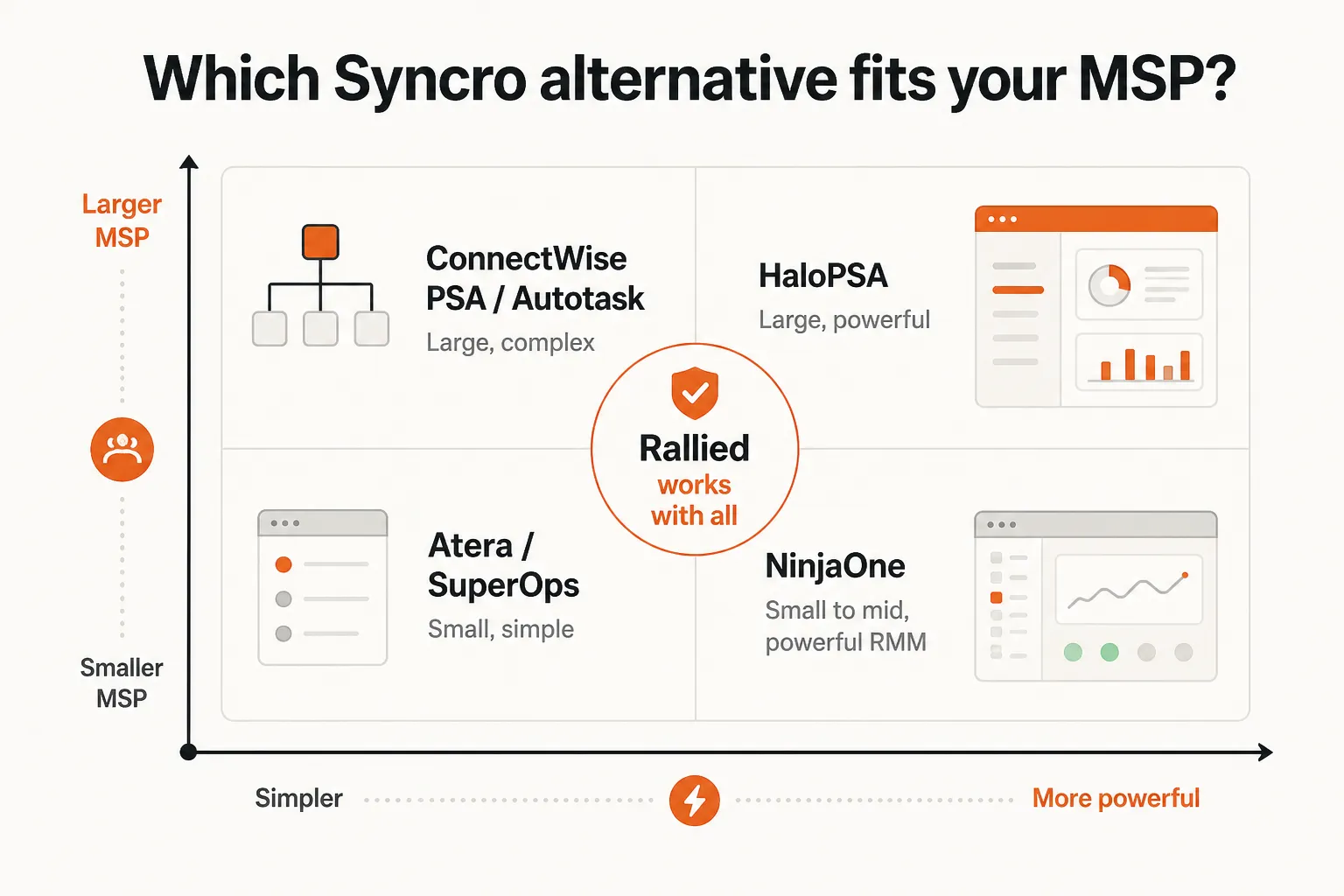
Best for: MSPs that want best-in-class RMM with per-device pricing
NinjaOne is the most direct answer to Syncro's per-tech pricing problem if your bottleneck is device scale, not headcount. You pay per managed device, not per technician seat - so hiring your fifth tech doesn't move the needle on your NinjaOne bill.
Pricing runs $1.50–$3.75 per device per month depending on volume (10,000+ devices vs. 50 or fewer). Free implementation, setup, training, and unlimited support are included - an unusual move in a category where Datto, Kaseya, and others charge support tiers. A 14-day free trial is available with no credit card required.
The platform earned G2 Leader status (Summer 2026) and Capterra Best Ease of Use 2026 - the latter matters because NinjaOne's main competitive claim against ConnectWise Automate isn't features, it's the UI and time-to-value. Most teams are fully operational in under a week, with an average learning curve under 3 hours.
What NinjaOne does well
- Unified endpoint management: Windows, Mac, Linux, servers, network devices in one console
- Autonomous patching that deploys and rolls back without manual intervention
- Backup, remote access, and MDM bundled alongside endpoint management
- 605 monthly hours saved per NinjaOne's ROI calculator (patching time drops from 175 hours to 21.9 hours monthly in a typical environment)
Where it falls short
NinjaOne is RMM-first. It has native ticketing, but it is not a full PSA. If your operation depends on contract lifecycle management, advanced billing automation, or deep invoice workflows, you'll need to pair NinjaOne with a dedicated PSA. Most shops that go this route use HaloPSA, Autotask, or ConnectWise PSA alongside it - which adds cost and a second system to manage.
Our take: NinjaOne is the first call if you're on Syncro primarily for RMM and endpoint management, you're scaling device count faster than headcount, and you don't need billing automation baked into the same platform. The trade-off is you'll need a separate PSA, which adds cost. If you want one bill for both, look at Atera or SuperOps instead.
2. Atera
Best for: Small to mid-size MSPs that want AI triage built in
Atera is the closest like-for-like Syncro swap: per-technician pricing, full RMM + ticketing in one dashboard, and a similar "designed for IT people" philosophy. The distinguishing factor is Robin, Atera's patented AI agent that handles ticket intake, autonomous resolution, and closed-loop optimization.
Atera's MSP Pro plan runs $129/technician/month billed annually - essentially the same as Syncro Core. Higher tiers (Growth, Power) add expanded features including additional concurrent remote sessions and deeper custom reporting.
4.6/5 on G2 across 1,221 reviews.
What Atera does well
- Robin AI agent: early adopters report 85% ticket auto-resolution and 2+ days saved per technician per week. These numbers are Atera's own reporting, but the direction of the signal - AI that actually closes tickets rather than just suggesting next steps - matches what early MSP adopters describe.
- Ease of use: 386 G2 mentions of "ease of use" don't happen by accident. The UI is genuinely intuitive.
- Integration depth: 60+ integrations including ConnectWise PSA, Autotask, IT Glue, Hudu, M365, Entra ID, and Okta.
- Trusted at scale: 13,000+ organizations in 120+ countries.
Where it falls short
Reporting is the most common G2 complaint - 161 mentions of "missing features" and 135 of "limited features" skew heavily toward custom analytics and reporting flexibility. At lower tiers (Professional), concurrent remote sessions are capped at 2, which strains larger tech teams. And per-tech pricing means the same scaling math as Syncro applies.
A recent price increase generated genuine Reddit pushback from r/msp - worth knowing before you commit.
Our take: Atera makes most sense for shops that want to stay in the per-tech model (predictable budgeting), value fast onboarding, and want native AI triage that actually executes rather than just suggesting. If reporting depth matters to you, test the tier you'd actually buy before committing - the reporting gap is real.
3. SuperOps
Best for: Growing MSPs that want per-device pricing and a modern all-in-one stack
SuperOps hits a specific gap: all-in-one RMM + ticketing + asset management, per-device pricing, and a genuinely fast deployment story. Where Syncro and Atera bill per technician, SuperOps bills per endpoint - which matters a lot if you're managing a large device estate with a lean tech team.
Pricing for the Prime plan starts at $1.50/device/month at 100 devices, dropping to $1.20 at 1,000+. Prime Plus adds Apple and Android MDM at $3.00/device/month. No long-term contract required.
4.4/5 on G2 across 197 reviews.
What SuperOps does well
The G2 reviews are specific enough to trust:
"Coming from ConnectWise + a separate RMM tool, the per-device pricing model is refreshing. We're not paying per technician seat, so adding staff doesn't increase costs. At 250 endpoints, we're paying less than we were with the old stack, and we have more features."
- Service Manager, MSP | G2 review
"We went live in a single week. No multi-month implementation, no dedicated admin tax. The onboarding team walked us through connector setup and workflow mapping, and we were managing our full fleet by day five."
- Operations Manager, Healthcare IT | G2 review
The native ticketing is a genuine differentiator - it talks directly to the RMM layer without webhooks or third-party connectors.
Where it falls short
IT Glue and Hudu integrations are API-first, not native - a friction point for shops that live in those documentation tools. Advanced features take longer to master than the basic setup suggests. And per-device pricing, while transparent, gets steep above 2,000+ endpoints (volume discounts apply, but they don't fully offset it).
Our take: SuperOps is the pick for shops that are tired of the ConnectWise + separate RMM juggle and want something modern, fast to deploy, and priced in a way that doesn't penalize hiring. The integration depth with IT Glue/Hudu is the one thing to check before committing.
4. HaloPSA
Best for: Mid-size MSPs that have outgrown basic PSA logic and need a dedicated admin
HaloPSA is not an all-in-one. It's a PSA-only platform - no bundled RMM, no built-in remote access. What it is: the deepest automation engine in the PSA category, weekly release cadence, native Microsoft CSP billing, and SQL-backed reporting. For the right shop, it's the most powerful PSA available. For the wrong shop, it's expensive complexity.
Pricing scales by team size: $109/agent/month at 5–9 agents, $85/agent at 10–24, $69/agent at 25–49, $55/agent at 50–99, $35/agent at 150+. No add-ons or feature tiers - the full platform ships at one price. For a 10-tech MSP on the 10–24 tier, that's $850/month in licensing.
What the pricing page doesn't show: there's a 5-agent floor (no solo option), and a real 20-tech rollout typically runs $5,000–$15,000 in implementation costs. Year 1 all-in for a 20-person team is typically $28,000–$32,000 - more than Autotask at the same headcount, but usually more capable and more transparent.
Rated 4.8–4.9 on G2, Capterra, and Software Advice across 1,000+ reviews.
What HaloPSA does well
- Actions engine: automation that chains multi-step logic - triggers, field updates, API calls, conditional escalations, up to 3 nesting levels. Most PSAs cap at simple if-then rules. HaloPSA lets you model entire operational workflows.
- Native Microsoft CSP billing: if you're an O365 reseller, HaloPSA pulls usage automatically and invoices without middleware. Autotask needs third-party connectors for the same job.
- SQL reporting: power users write reports against live data for multi-client rollups, finance reconciliation, and custom KPIs that the visual builder can't handle.
- 250+ integrations included in the base price.
- Independence pledge: in June 2023, Halo Service Solutions committed to a 10+ year rolling independence pledge - no acquisitions, no PE exit. For a tool you're betting your business on, that matters.
Where it falls short
The PSA-only design means you still need a separate RMM - so you're managing two platforms instead of one. HaloPSA rewards investment: shops without a dedicated "Halo admin" (20+ hours/week for the first 3 months) consistently bounce off the depth and call it inadequate. Support is UK-based, which means slower response for North American MSPs after 10 AM PT.
Our take: HaloPSA is the right answer for 10–50 tech shops that have grown past what Syncro's PSA module can handle, can staff a Halo admin, and sell Microsoft 365 as resellers (the CSP billing is that good). Don't walk into HaloPSA expecting Syncro's plug-and-play simplicity - it requires real configuration investment.
5. ConnectWise PSA
Best for: Large MSPs already in the ConnectWise ecosystem
ConnectWise PSA (formerly ConnectWise Manage) is the enterprise standard - the platform thousands of larger MSPs have run on for years as the central nervous system for their operations. Service desk, project management, time tracking, billing, CRM, reporting, and procurement all live in one system.
ConnectWise doesn't publish pricing - it's a custom quote process. The broader ConnectWise Asio platform bundles PSA with ConnectWise RMM, Automate, ScreenConnect, and BCDR, so pricing depends heavily on which modules you're buying and how many technicians you have.
The platform added ConnectWise Sidekick, a Microsoft Teams-integrated AI assistant for ticket triage and business insights. It's a genuine productivity tool, though the bar for "AI that executes" vs "AI that suggests" is a relevant question to ask in your demo.
What ConnectWise PSA does well
- Enterprise-grade breadth: billing, project management, procurement, and client relationship all in one platform
- Deep integration with ConnectWise RMM, Automate, and ScreenConnect - if you're already in that ecosystem, PSA is a natural addition
- The Asio shared data layer means automation can run across the full ConnectWise stack
- 40+ years of iteration means the platform handles edge cases that newer tools haven't seen yet
Where it falls short
Pricing opacity is a real friction point - you can't benchmark ConnectWise PSA without talking to sales. Implementation is complex; the learning curve is steeper than newer platforms. And the history of acquisitions (ConnectWise has bought and bundled extensively) means you're sometimes using multiple systems that are integrated rather than built together from the start.
Our take: ConnectWise PSA makes most sense if you're already running ConnectWise Automate or RMM - the shared data layer is a genuine advantage, and switching PSA without switching the rest of the stack is painful. If you're starting fresh or coming from Syncro with no existing ConnectWise dependencies, the complexity and cost overhead probably doesn't justify it relative to HaloPSA or SuperOps.
6. Autotask PSA
Best for: MSPs in the Kaseya/Datto ecosystem
Autotask PSA is owned by Kaseya - the same parent that owns Datto RMM, IT Glue, and a growing stack of MSP tools. If you're already running Datto RMM, Autotask is the path of least resistance for PSA: the two platforms share a native integration that eliminates the connector tax you'd pay with any other PSA.
Pricing is custom (sales call required). Estimates from user reviews and industry context range from $50–$150/user/month depending on module selection and volume. The full Kaseya IT Complete ecosystem bundles multiple tools at a negotiated rate - if you're going all-in on the stack, that changes the math.
Core modules: service desk, contract and account management, time tracking, billing, project management, reporting, and CRM. Integration with IT Glue (documentation) and Datto Backup is native.
What Autotask does well
- Native Datto RMM integration is the strongest in the category for that combination
- Full PSA feature set covering ticketing through invoicing
- Part of the Kaseya IT Complete bundle - if your shop runs multiple Kaseya tools, consolidated pricing is available
- Established product with a long track record in MSP operations
Where it falls short
Pricing opacity (like ConnectWise, no published rates). The Kaseya acquisition history generates some community skepticism on Reddit - concerns about direction, pricing trajectory, and what happens to features that don't fit the bundle strategy. Custom pricing also makes benchmarking against alternatives harder.
Our take: Autotask is the right answer if your shop is already anchored to Datto RMM and you want tight native integration without third-party connectors. If you're not in the Datto ecosystem, the lack of published pricing and the Kaseya bundle complexity make it harder to justify over HaloPSA or SuperOps for a fresh evaluation.
How pricing models actually compare
The per-technician vs. per-device split is the most consequential decision point here, and it plays out differently depending on your operation.
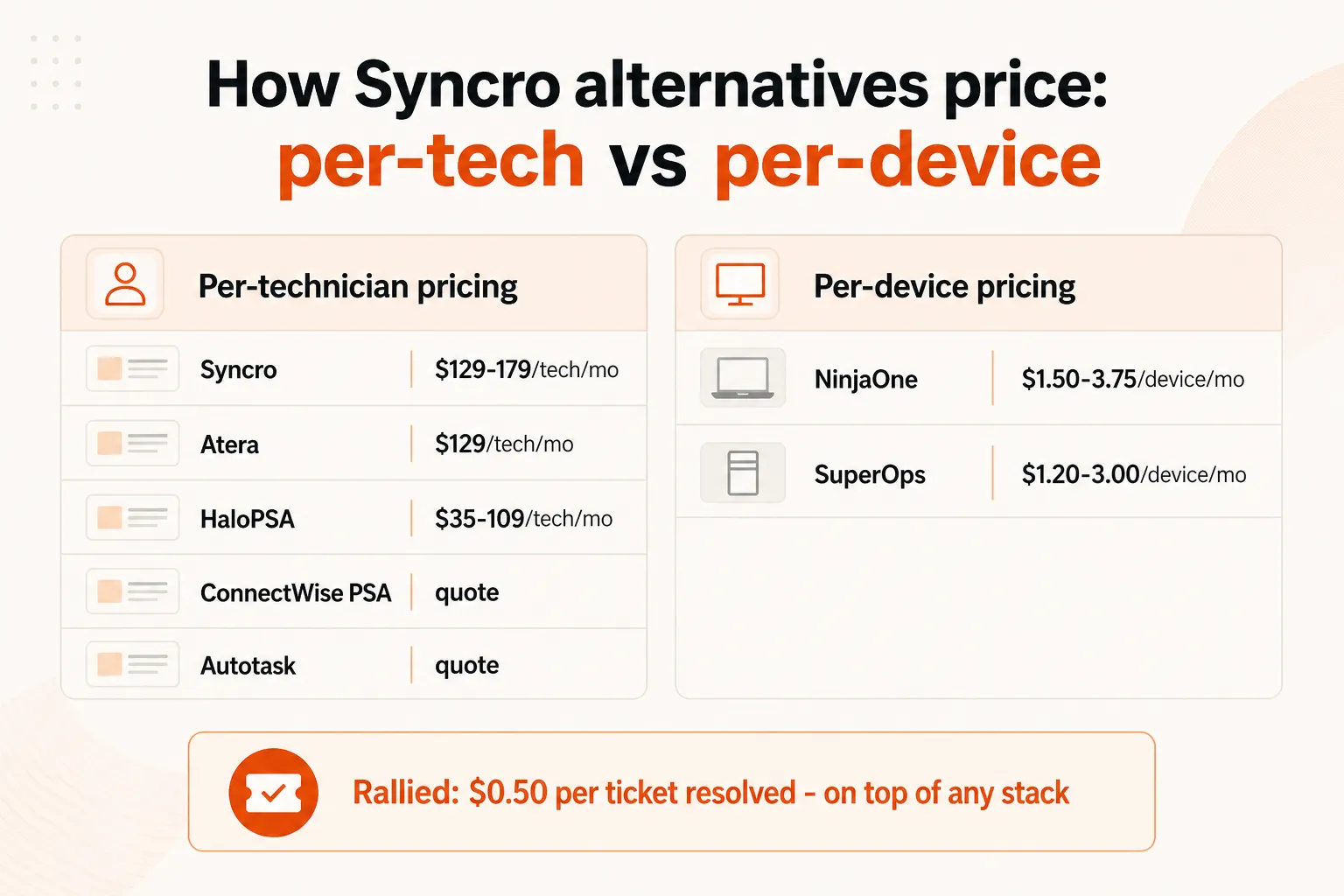
Here's the real-world math for a shop running 500 endpoints with 5 technicians:
| Tool | Monthly cost (500 endpoints, 5 techs) | Notes |
|---|---|---|
| Syncro Core | $645/month | 5 techs × $129/tech |
| Syncro Team | $895/month | 5 techs × $179/tech |
| NinjaOne | ~$750–$1,500/month | 500 devices × $1.50–$3.00/device |
| Atera (MSP Pro) | $645/month | 5 techs × $129/tech |
| SuperOps Prime | $750/month | 500 devices × $1.50/device |
| HaloPSA (10–24 tier) | $425/month | 5 techs × $85/tech (PSA only; add RMM separately) |
| ConnectWise / Autotask | Contact sales | Custom quote |
The per-tech model (Syncro, Atera) feels cheaper when your team is lean relative to your device count. The per-device model (NinjaOne, SuperOps) gets more attractive as you scale endpoints without growing headcount proportionally. HaloPSA is legitimately cheaper on license cost - but add a separate RMM and you close that gap quickly.
The layer most of these tools don't talk about
There's a category of work that sits underneath all these PSA/RMM decisions and doesn't get solved by any of them: the L1 ticket volume that chews through technician time regardless of which platform you're running.
Password resets. Account unlocks. MFA issues. Onboarding new users. Offboarding departing ones. These tickets show up in every PSA - Syncro, HaloPSA, ConnectWise, all of them - and they're handled the same way on all of them: a tech sees the ticket, works it manually, closes it.
Rallied is built to sit on top of your PSA and RMM - whichever ones you choose - and handle that layer autonomously. It connects to your PSA (ConnectWise, Autotask, HaloPSA, SuperOps, Syncro), your RMM (NinjaOne, Datto), and your identity stack (M365, Entra ID, Okta, JumpCloud, Google Workspace), then resolves L1 tickets end to end without a tech touching them.
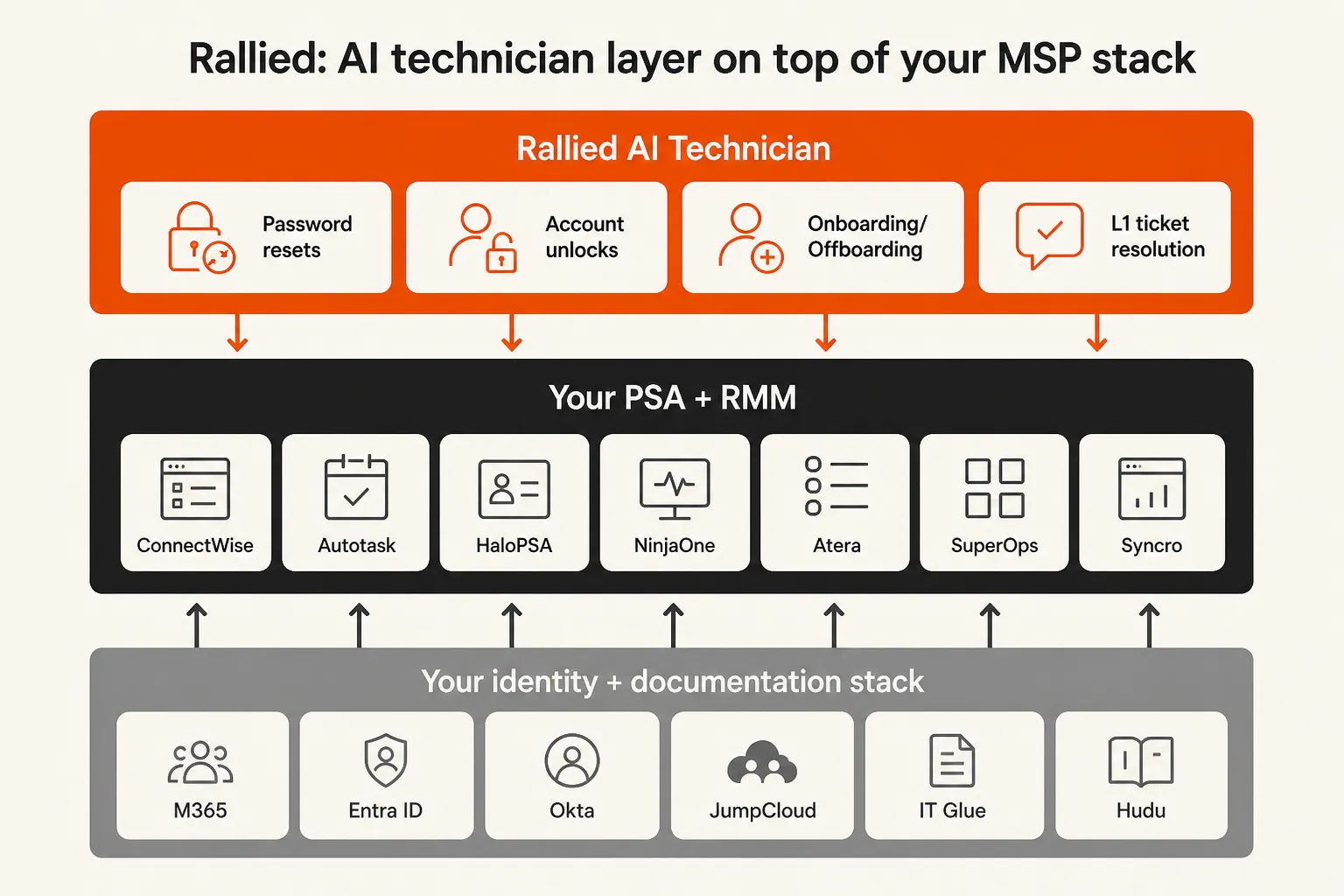
The economics are real: 50–100 hours/month of L1 grunt work at 15 minutes per ticket is 200–400 tickets. Automated, that's $7,000–$15,000/month in recovered tech time. Rallied deploys the same week - no 6-month implementation, no dedicated admin, no forward-deployed engineer.
Pricing is $0.50 per ticket worked, billed by outcome rather than seat. A 500-ticket/month tier runs $250/month.
The honest framing: Rallied doesn't replace your PSA or RMM decision. It's the layer that makes your tech team more productive on whatever stack they're running. Pick the PSA/RMM that fits your operation, then drop Rallied on top.
Try Rallied
Rallied is an AI technician built specifically for MSPs. It connects to your PSA, RMM, and identity stack and autonomously resolves L1 tickets - password resets, account unlocks, onboarding, offboarding, MFA issues - from day one of deployment. No 6-month implementation, no workflow builder overhead, no dedicated admin. Deploy it Friday, it starts working.
The 14-day free trial includes $50 in credit with no card required.
Frequently Asked Questions
Is Syncro worth it for a small MSP?
For solo operators and very small shops (1–3 technicians), Syncro is genuinely solid. The all-in-one bundle, unlimited endpoints, and predictable per-tech pricing make it a strong starter platform. The friction starts appearing at 4–6 technicians, where the per-tech bill climbs fast and you may start hitting PSA depth limits on complex billing or multi-location reporting.
What is the biggest reason MSPs leave Syncro?
The most common reason is the per-technician pricing model: every time you hire, your PSA bill goes up proportionally, regardless of endpoint count. Shops managing large device estates with a lean tech team find NinjaOne or SuperOps (per-device models) more economical at scale. A secondary reason is PSA depth: shops that need advanced automation logic, native Microsoft CSP billing, or SQL-backed reporting tend to outgrow Syncro and look to HaloPSA.
Does NinjaOne include a PSA or just RMM?
NinjaOne is primarily an RMM and endpoint management platform. It has native ticketing, but it does not include a full PSA with billing, contract management, and advanced invoicing the way Syncro, HaloPSA, or Autotask do. Most MSPs pair NinjaOne with a dedicated PSA like HaloPSA, Autotask, or ConnectWise PSA to cover billing and client management.
Can I run an AI technician on top of any PSA or RMM?
Yes - that's exactly what Rallied is built for. It connects to your existing PSA (ConnectWise, Autotask, HaloPSA, SuperOps), your RMM (NinjaOne, Datto, Ninja), and your identity stack (M365, Entra ID, Okta, JumpCloud), then autonomously handles L1 tickets like password resets, account unlocks, and onboarding tasks. It deploys in the same week and works regardless of which PSA or RMM you pick.
How much does HaloPSA cost for a 10-technician MSP?
HaloPSA pricing at 10–24 agents runs around $85/agent/month, putting a 10-technician shop at roughly $850/month or $10,200/year in licensing. Factor in $5,000–$15,000 for a real implementation if you're doing a full rollout, and Year 1 all-in cost sits around $15,000–$25,000. That said, at 10 techs HaloPSA's automation depth, weekly update cadence, and transparent pricing still beat ConnectWise PSA and Autotask on total value.