Unified IT management for MSPs: a practical guide
TL;DR
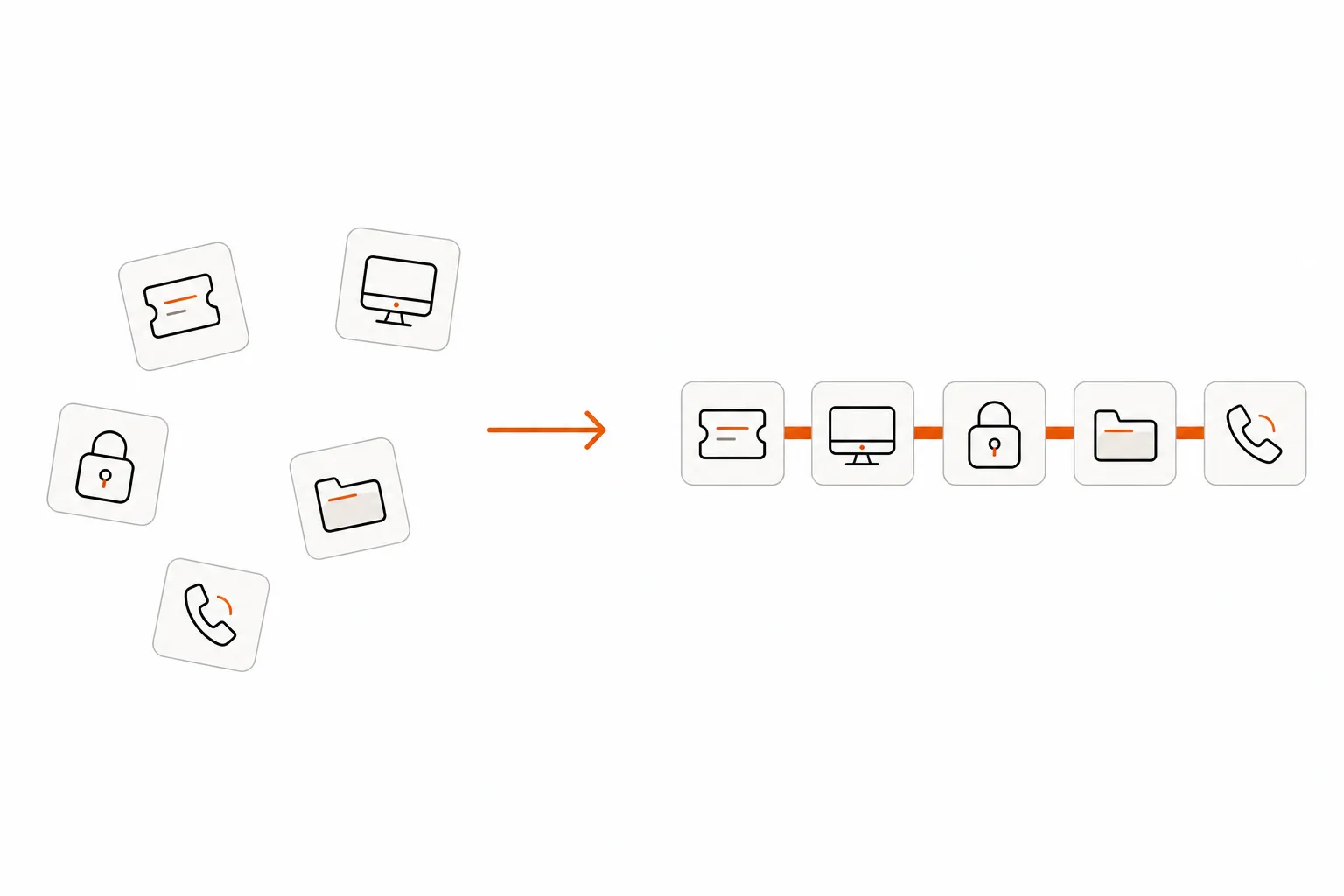
Unified IT management for MSPs isn't about endpoints. It's about tying your PSA, RMM, identity layer, and documentation into something that actually moves work from open to closed without a human touching every step.
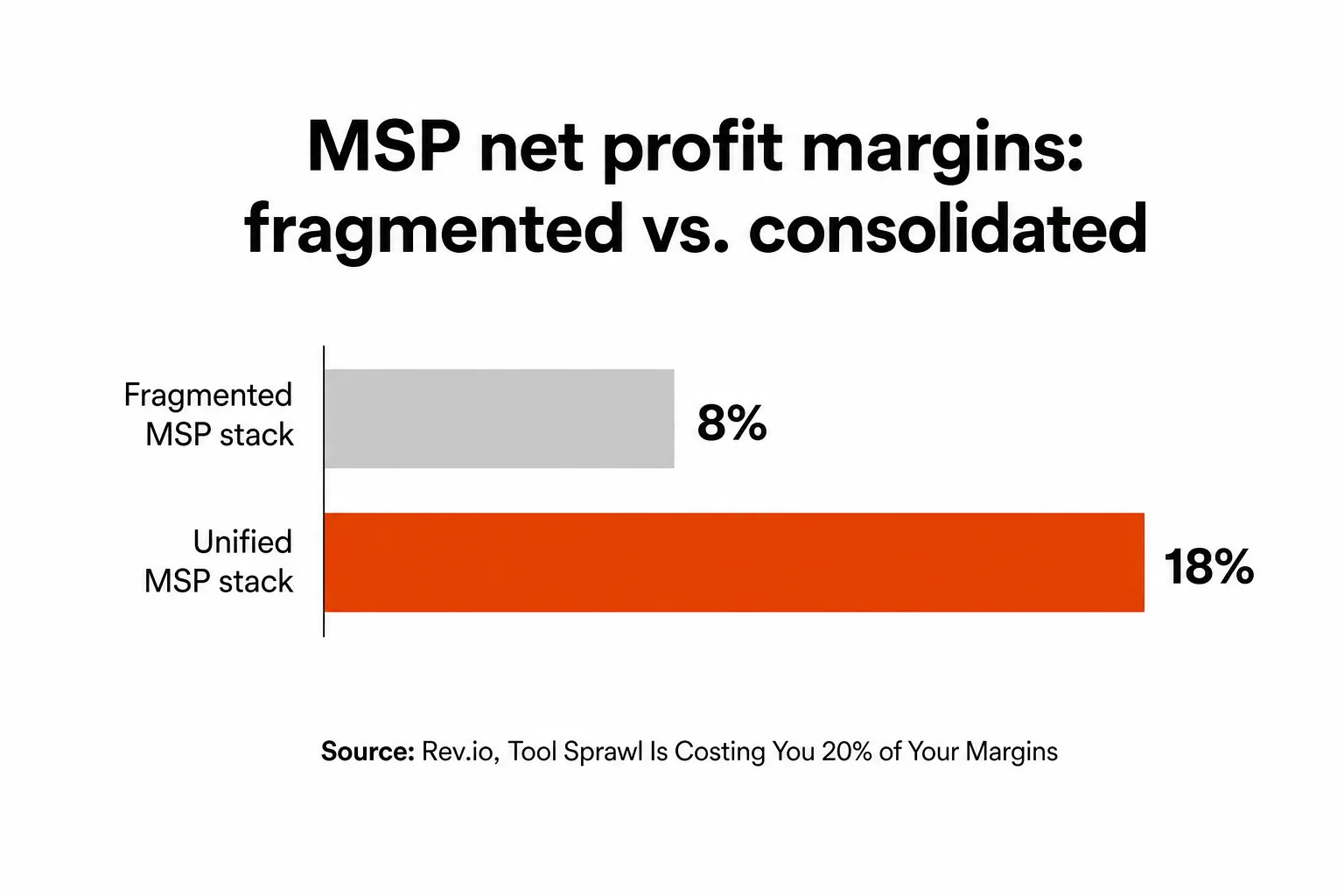
Fragmented MSPs average 8% net profit. Consolidated ones hit 18%. That 10-point gap is mostly explainable by one thing: L1 grunt work done by hand across tools that don't talk to each other. Fifty to a hundred hours a month of password resets, account unlocks, and permission changes - each one requiring a tech to log into multiple systems, manually execute a fix, update the ticket, and notify the user.
The market has been selling "unified management" for years. What it's actually delivered is unified visibility - one dashboard to see everything, with humans still doing all the work. The missing piece is autonomous execution: a system that reads the ticket, runs the fix across your stack, and closes it without a tech ever getting involved.
That's the gap Rallied was built to fill.
What "unified IT management" actually means for MSPs
There's a terminology problem. Search for "unified IT management" and you'll get results about UEM - Unified Endpoint Management - which is an enterprise concept about managing laptops and phones from a single console. Products like Microsoft Intune, Jamf, and VMware Workspace ONE all live in this category.
MSPs don't need endpoint management only. They need their entire operational stack unified.
For a managed service provider, unified IT management means the RMM (what monitors client environments and allows remote execution), the PSA (what tracks tickets, time, and billing), the identity platform (what manages user accounts and access), and the documentation layer (what holds client runbooks and configs) all sharing data and executing workflows without manual handoffs.
In practice, that looks like: an RMM alert fires, a PSA ticket is created automatically, the agent pulls the relevant runbook from IT Glue, executes the remediation against the identity provider, documents what it did, and closes the ticket. No human in the loop unless escalation is genuinely needed.
The distinction matters because the solutions are completely different. UEM for MSPs is a real need - but it addresses one layer. What most MSPs are actually missing is the cross-system execution layer that connects RMM + PSA + identity + documentation into a single coherent workflow.
The real cost of fragmentation
Here's the math Rev.io did on this: the average MSP runs on 8% net profit margins. Best-in-class operators hit 18%. The difference between those two numbers often comes down to how much manual L1 work is being done by expensive technical staff.
That's a 10-point margin gap. On a $5M book of business, that's $500,000 a year sitting on the table because your techs are resetting passwords instead of delivering billable value.
The mechanism is simple. A fragmented MSP has:
- A PSA like ConnectWise Manage or Autotask for tickets and billing
- An RMM like Datto, NinjaOne, or Kaseya for endpoint monitoring
- Microsoft 365, Entra ID, or Okta for identity
- IT Glue or Hudu for documentation
Each of these tools is excellent at its job. The problem is the handoffs between them.
A password reset request arrives in ConnectWise. A tech sees it, logs into M365 admin, finds the user, resets the password, goes back to ConnectWise, updates the ticket, emails the user, marks it resolved. That's four to five context switches for a task that should take ten seconds.
"I keep seeing orgs respond to every issue by layering on another platform, workflow, or AI tool. Each decision makes sense in isolation, but collectively..." -- r/sysadmin, "At what point does adding tools start creating more problems?"
The cognitive overhead compounds. A mid-size MSP handling 200 to 400 tickets a month - with 40 to 60% of those being L1 work - burns 50 to 100 hours a month on this. At a burdened tech cost of $30 to $40 an hour, that's $1,500 to $4,000 a month in labor doing work that a well-configured system should handle automatically.
There's also a hiring problem baked in. New technicians spend two to four weeks learning the tool ecosystem before they're useful. Every tool has its own UI, its own auth, its own quirks. Documentation about client configurations is scattered across IT Glue, SharePoint, archived email threads, and old tickets. SLA compliance breaks because information flow between systems is manual and slow.
"The documentation is fragmented, its not named correctly and its all done differently for each client which frustrates our helpdesk people." -- r/msp manager complaint
This isn't a people problem. It's an architecture problem.
What vendors mean when they say "unified"
Every major MSP platform vendor now claims to offer unified management. Most of them are telling the truth - with a significant asterisk.
NinjaOne is the most honest about the tradeoff: it unifies RMM and endpoint management well, with strong ticketing and remote tools built in. If you're running a straightforward endpoint-heavy MSP, NinjaOne is genuinely unified for your use case. But it doesn't own your PSA, your identity layer, or your billing. You still need ConnectWise or Autotask for resource management, and you're still context-switching between them.
ConnectWise tries to cover the full stack - Manage for PSA, Automate for RMM, and various other tools. It's probably the most comprehensive suite in the market. In practice, many MSPs find the integrations between ConnectWise products feel bolted on rather than native, and non-ConnectWise tools (like Datto RMM or NinjaOne) remain awkward.
Atera and SuperOps are building toward all-in-one from the ground up, which means better data sharing between RMM, PSA, and billing. But neither owns the identity layer - M365, Entra ID, Okta, and JumpCloud are still separate systems you're bridging manually.
The honest summary: no vendor has fully unified the MSP operational stack. Everyone covers RMM + PSA reasonably well. The identity layer (where most L1 work actually happens - password resets, group changes, account unlocks) is almost always separate. Documentation is almost always separate. Security and EDR are definitely separate.
| Platform | Unified RMM + PSA | Identity layer | Documentation | True unified execution |
|---|---|---|---|---|
| NinjaOne | Partial (RMM-first) | No | No | No |
| ConnectWise suite | Yes (with friction) | No | No | No |
| Atera | Yes | No | No | No |
| SuperOps | Yes | No | No | No |
| HaloPSA + any RMM | No (PSA-only) | No | No | No |
That last column - true unified execution - is where every platform falls short. And it's the most expensive gap to leave open.
The execution gap: why unified still leaves you holding the work
Here's the thing nobody says out loud in the vendor marketing: even a perfectly unified platform with RMM and PSA sharing a single database still requires a human to execute most L1 work.
The ticket comes in. You see it in one dashboard. You have the runbook one click away. You have the RMM alert context right there in the sidebar. But you still have to be the one who opens M365, finds the user account, resets the password, confirms access is restored, updates the ticket, and emails the user.
Unified visibility is a real improvement over jumping between six separate tabs. But it doesn't take the work off your plate. It just makes the work slightly less painful to see.
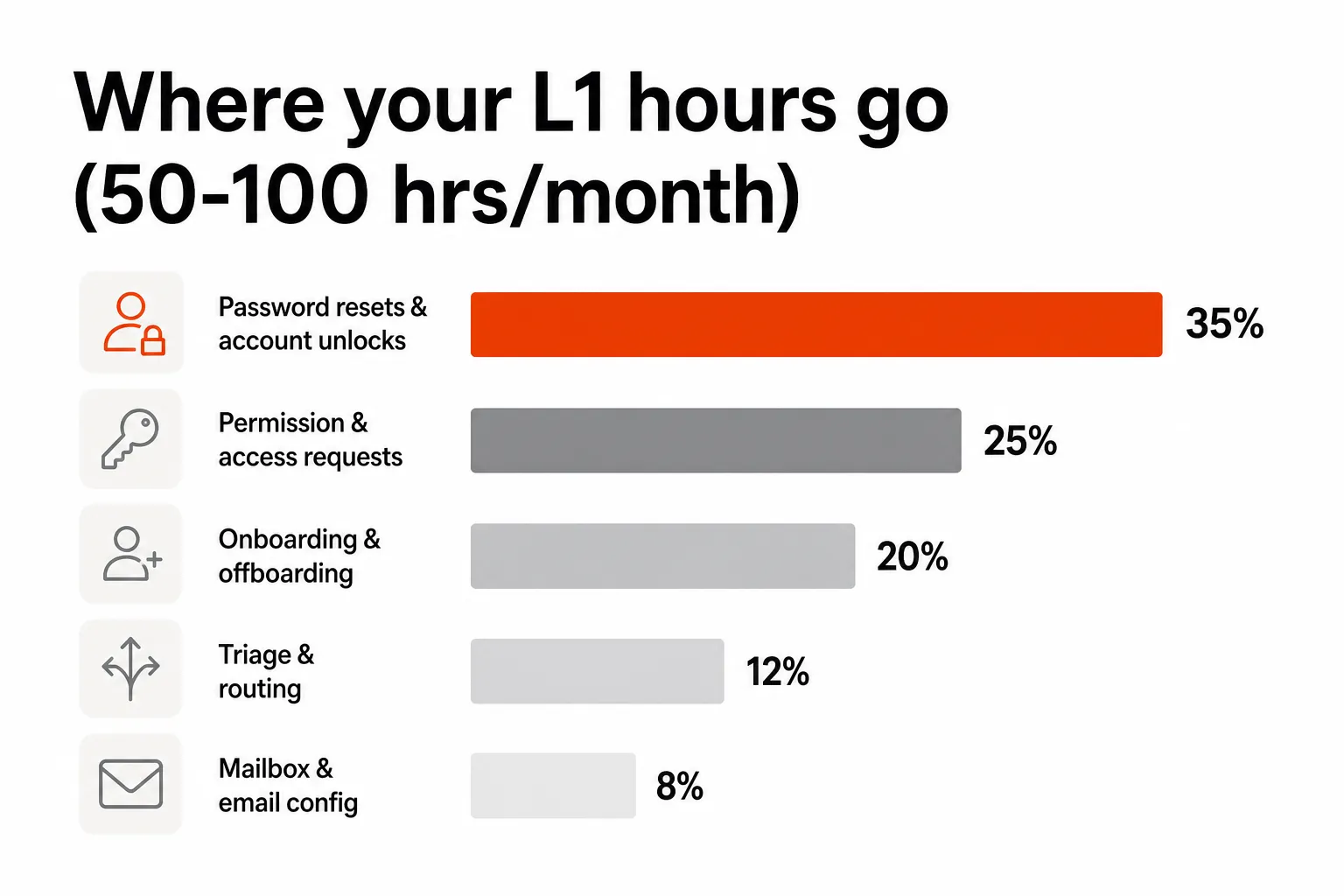
Password resets alone account for roughly 18% of L1 ticket volume across MSPs. Add account unlocks, permission changes, and mailbox configuration, and you're looking at 50 to 60% of your total L1 queue - all tasks that follow predictable, repeatable patterns across every client.
The automation tools that existed before were workflow builders: Rewst, Pia, and older RPA approaches. These can help, but they require significant setup. Rewst is powerful and flexible, but most MSPs report two to six months of implementation time and a dedicated admin to manage it long-term. The MSP community is direct about this:
"You gave Pia or Rewst a real shot. Months of setup. Someone's full-time job to manage it. And it still suggests next steps instead of doing the work." -- Amaresh Ray, Rallied founder, on LinkedIn
That's the execution gap: the distance between "we have a unified platform" and "tickets close without a human touching them."
How AI technicians close the loop
The shift that makes unified IT management actually deliver on its promise is moving from unified visibility to unified execution. That's what an AI technician does.
The concept is straightforward. Instead of a tech reading the ticket and manually executing the fix, an AI agent reads the ticket, diagnoses the issue, executes the resolution across your connected stack, verifies the result, and closes the ticket - with a full audit trail posted back to the PSA.
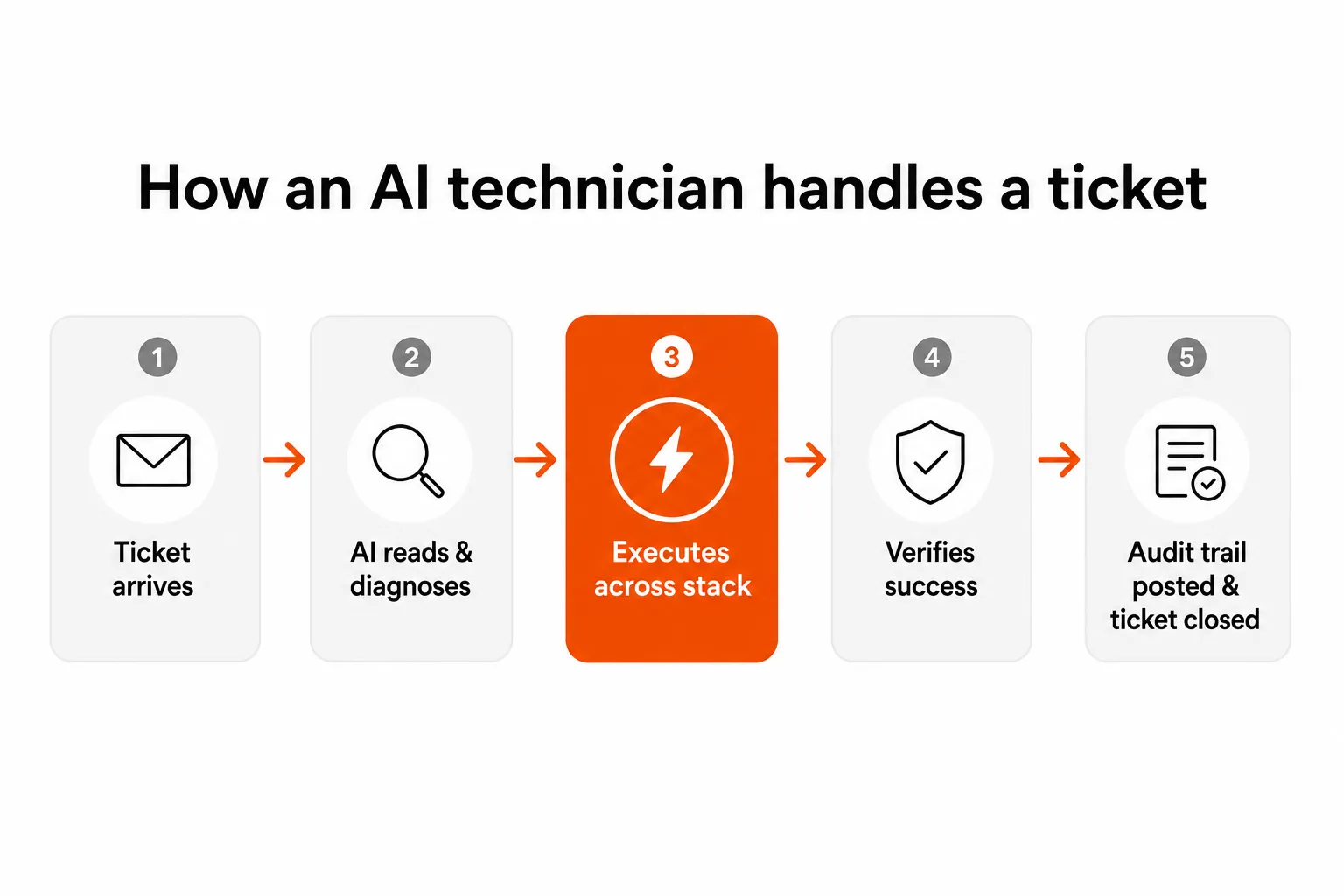
The important distinction from older automation approaches is that this isn't a workflow builder. You don't configure a sequence of if-then steps for each ticket type. The AI reads the ticket the same way a tech would - from the description, the subject line, any clarifying questions it asks the user - and determines what to do based on the content, not on a pre-built trigger you had to write.
Rev.io, in their analysis of the AI agent stack for MSPs, framed this clearly: "Rallied and NeoAgent close L1 tickets end-to-end. The tools work, and they all have customer wins to back them up." Rev.io positioned Rallied specifically as the execution layer of a three-part stack - triage, orchestration, and resolution - and noted it handles 40 to 60% of typical MSP ticket volume.
One MSP running 200+ tickets a month reported Rallied closing 150 of them in the first week. That's 75% ticket deflection for the category of work that was previously eating 80-plus hours of tech time a month.
What this looks like in practice
An account unlock request arrives from a client employee. It lands in ConnectWise. Rallied reads it, identifies the user in Entra ID, checks the account status, unlocks the account, confirms access is restored, posts an internal note documenting every action, notifies the user, and marks the ticket resolved. Total human involvement: zero.
An onboarding request arrives for a new hire starting Monday. Rallied reads the ticket, extracts the employee's name, department, and manager from the ticket text, creates the AD account, assigns the appropriate M365 licenses based on the department template, adds the user to the right security groups, triggers an RMM deployment for their device, notifies the manager and the user, and logs time against the ticket. What used to take 30 to 90 minutes of manual work across four systems now happens autonomously.
The policy framework matters here. Rallied lets you set gates - require manager approval before offboarding runs, require MFA verification before sensitive account actions, auto-execute for common resets but flag C-suite accounts for human review. You build trust by watching the agent work in Plan Mode first (it tells you what it would do without doing it), then flip to Execute Mode for the categories you're comfortable with.
The pricing math
One of the reasons AI execution hasn't taken off until recently is that the pricing models made it risky. Subscription-based automation platforms charge whether you get value or not.
Rallied prices at $0.50 per ticket, no base fee, no minimum, no implementation cost. A mid-size MSP handling 150 L1 tickets a month pays $75. Those same 150 tickets, at 15 minutes of tech time each, were costing $1,125 a month in labor. The net savings after Rallied: $1,050 a month.
| Item | Rate |
|---|---|
| Per ticket resolved | $0.50 |
| Voice calls | $0.50/min |
| Base fee | $0 |
| Implementation | $0 |
| Contract lock-in | None |
| Annual discount | 20% ($0.40/ticket) |
If you set a monthly spending cap, Rallied alerts you at 50%, 75%, and 90% of the limit and pauses when you hit it. No surprise invoices.
CRN named Rallied one of the 10 Hot MSP Tools for AI and agentic capabilities in May 2026, specifically calling out the same-week deployment and the distinction between tools that suggest work and tools that do work.
A practical roadmap: from fragmented to unified to autonomous
This isn't a single move. It's a sequence. Most MSPs are somewhere in the middle already.
Step 1: Unify RMM and PSA. This is the highest-ROI, lowest-lift consolidation. If you're running separate systems that don't share data, moving to an integrated pair (NinjaOne + HaloPSA, or staying on ConnectWise) cuts context switching for your most common workflows. This is where most "unified management" conversations start and end.
Step 2: Connect documentation to the ticket layer. IT Glue and Hudu both have PSA integrations. Getting client runbooks surfaced automatically when a ticket opens - not hunted manually across tabs - saves five to ten minutes per ticket for techs who know what they're doing, and much more for junior staff still learning the client environments.
Step 3: Unify the identity layer. This is the step most vendors don't talk about because they don't own it. Your M365 tenant, Entra ID, Okta, or JumpCloud instance is where most L1 work actually happens. Connecting it tightly to your PSA (so password reset requests automatically trigger identity actions, not just ticket notes) is where the real automation opportunity lives.
Step 4: Add an AI execution layer. Once your RMM, PSA, identity, and documentation are connected, an AI technician can span all of them. This is where Rallied comes in - it connects to your existing stack as-is, without requiring you to replace any of it. You keep your ConnectWise, your NinjaOne, your M365. Rallied handles the execution that was previously manual.
Step 5: Measure and expand. Start with Plan Mode, watch what the AI would do, correct anything that looks off. Flip to Execute Mode for password resets and account unlocks first - the highest-volume, lowest-risk category. Expand to permission changes and onboarding once you've built confidence. Track the hours saved and the margin improvement. It's not abstract at this point.
The sequence matters because AI execution without the right connected stack is just another siloed tool. Get the foundation in place, then add the layer that makes it autonomous.
Try Rallied
Rallied is an AI technician for MSPs that connects to your existing stack - ConnectWise, Autotask, NinjaOne, Datto, M365, Entra ID, Okta, IT Glue, Hudu - and autonomously resolves L1 and L2 tickets end to end. No implementation project, no dedicated admin, no workflow builder. You connect your PSA and you're live within the week.
The 14-day free trial comes with $50 in credit and no credit card required. If it doesn't work for your shop, you've lost nothing. If it does, you've got a tech that works every shift, never burns out, and costs 50 cents a ticket.
Try Rallied free - or read through the pricing page to see the math for your ticket volume.
Frequently Asked Questions
What is unified IT management for MSPs?
Unified IT management for MSPs means consolidating your core operational tools - RMM, PSA, ticketing, and identity - into a stack that shares data and executes workflows without manual handoffs. It's different from enterprise UEM (Unified Endpoint Management), which only covers endpoints. For MSPs, true unification spans the full operational layer: from monitoring alerts through to ticket resolution, billing, and client communication. Rallied adds an AI execution layer on top of a unified stack to close tickets autonomously.
How does fragmented IT management hurt MSP margins?
Fragmented MSPs average 8% net profit margins against 18% for consolidated ones. The gap comes from duplicated tool costs, admin overhead, and the 50–100 hours of L1 grunt work per month that techs spend jumping between systems to handle repetitive tickets. Each context switch - from PSA to RMM to identity provider and back - adds 5–15 minutes per ticket that compounds across hundreds of requests each month.
What's the difference between UEM and unified IT management for MSPs?
UEM (Unified Endpoint Management) covers endpoints only - managing laptops, phones, and tablets from a single console. Products like Microsoft Intune and Jamf are UEM tools. Unified IT management for MSPs is broader: it encompasses RMM (remote monitoring and management), PSA (professional services automation), ticketing, identity management, and documentation. An MSP needs all of these unified, not just endpoint control.
Can MSPs use best-of-breed tools and still have unified management?
Yes - and many should. The MSP community is rightly skeptical of mediocre all-in-one platforms that promise unified management but deliver compromised feature sets. The better approach is best-of-breed tools with a unified execution layer. AI technicians like Rallied span your existing stack - ConnectWise, NinjaOne, M365, IT Glue - without requiring you to replace any of them. You keep best-in-class tools; the AI handles cross-system execution.
How does Rallied fit into a unified IT management stack?
Rallied connects to your existing PSA (ConnectWise, Autotask, HaloPSA, SuperOps), RMM (Datto, NinjaOne, Kaseya), identity layer (M365, Entra ID, Okta, JumpCloud), and documentation (IT Glue, Hudu). It reads incoming tickets, executes L1/L2 resolution autonomously across those systems, and posts a full audit trail back to the ticket. No workflow builder, no forward-deployed engineer, no base fee. It deploys the same week you connect your PSA and costs $0.50 per ticket resolved.
