7 Best Patch Management Software Tools for MSPs in 2026
TL;DR
Unpatched endpoints are the most reliable ransomware entry point - and manually tracking patches across a dozen clients is how MSPs get burned. The best patch management software in 2026: NinjaOne is the strongest all-in-one for MSPs who want RMM and patching in one place. Action1 is the obvious choice if you want to start free - 200 endpoints, no credit card, no expiration. Automox wins for cross-platform coverage. Atera is worth serious attention if you're scaling endpoints fast and want a flat per-tech fee. Once you've got patching handled, the next problem is the flood of L1 tickets every patch window generates - Rallied resolves those automatically through your existing PSA and RMM.
Why patch management matters more than MSPs think
The math here is uncomfortable. Most MSPs have patching processes. Almost none have patching confidence. A technician manually checks Windows Update on 400 endpoints across 30 clients, and somewhere in that process a server running accounting software misses a critical patch, or a laptop on a VPN never gets the update because it wasn't on the network during the maintenance window.
60% of breaches involve unpatched vulnerabilities, according to Verizon's Data Breach Investigations Report - and for MSPs, a single client breach can trigger contractual liability, reputational damage, and a very bad Monday morning call.
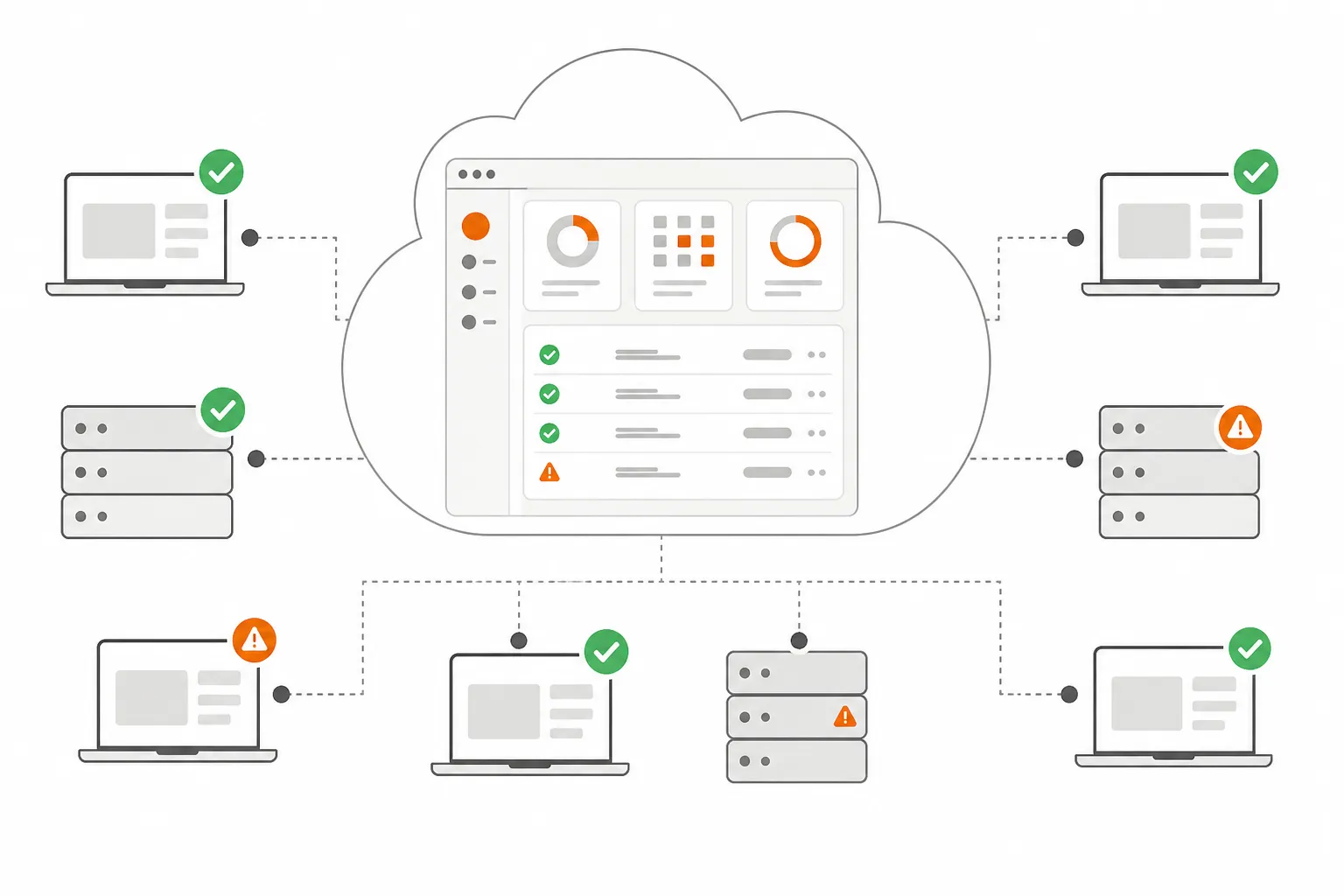
Modern patch management software solves the coverage problem: cloud-native agents reach endpoints wherever they are, whether in the office, at home, or on a hotel Wi-Fi. The tools in this list all handle that baseline. Where they differ is in pricing model, third-party application coverage, how well they integrate with the rest of your stack, and whether they're a focused patch tool or a full RMM platform you happen to want patching from.
What to look for
Before getting into the specific tools, the evaluation criteria worth caring about for MSPs:
- OS coverage - Windows is table stakes. macOS and Linux are increasingly real in client environments and distinguish the serious tools from the Microsoft-only ones.
- Third-party application patching - Chrome, Adobe, Zoom, Java. WSUS doesn't touch these. A patch tool that only handles OS updates misses the most-exploited software on the endpoint.
- Deployment flexibility - Can it patch endpoints that aren't on the corporate network? Cloud-native agents that work over the internet without a VPN are now the baseline for any real MSP use case.
- Pricing model - Per-device versus per-technician changes the economics dramatically as you scale.
- RMM integration - Does it plug into your existing PSA and RMM, or does it replace them?
Quick comparison
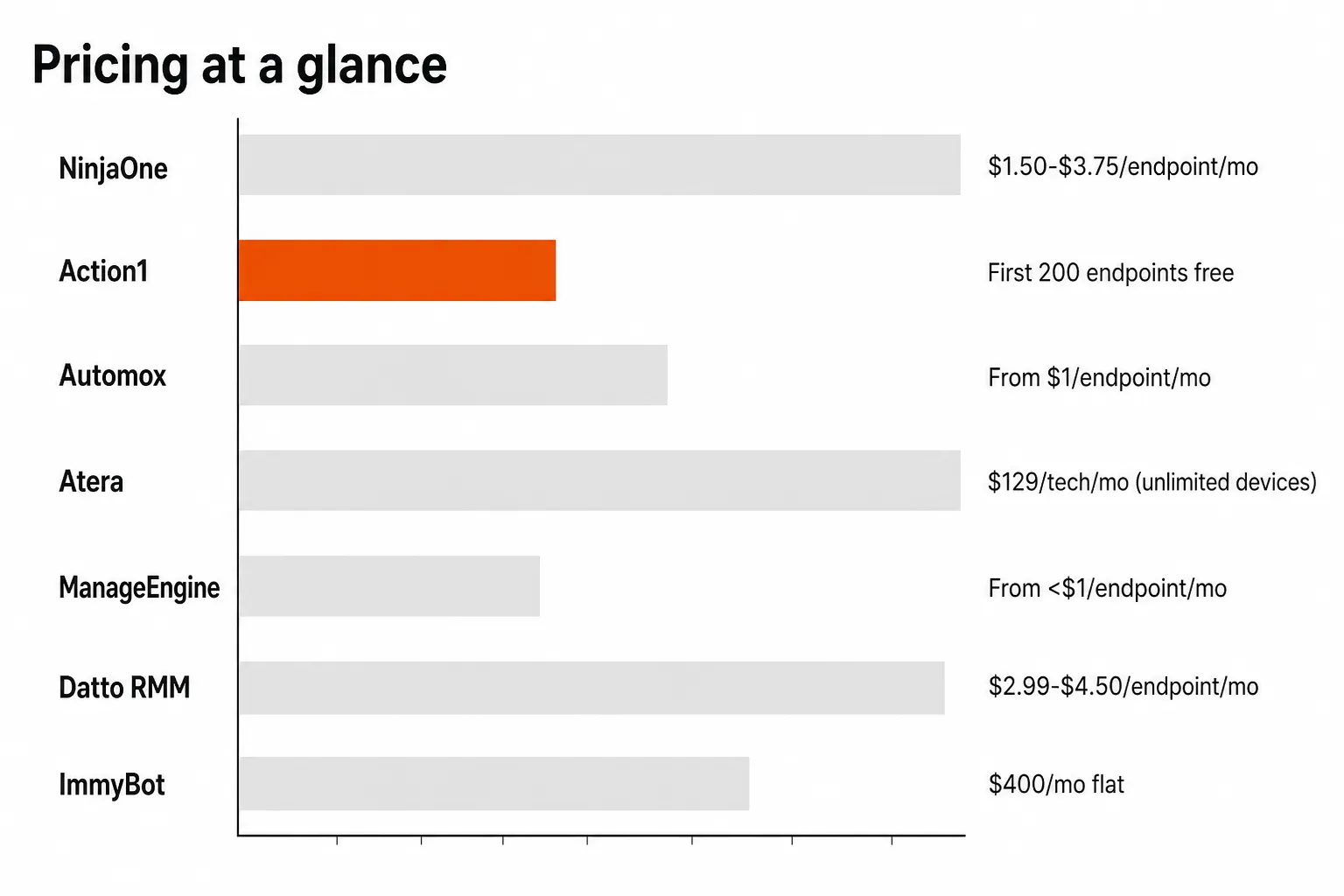
| Tool | Best for | Pricing | Free tier |
|---|---|---|---|
| NinjaOne | All-in-one RMM + patch | $1.50-$3.75/endpoint/month | 14-day trial |
| Action1 | Free-to-start standalone | ~$4/endpoint/month after 200 | 200 endpoints free, forever |
| Automox | Cross-platform / remote-first | From $1/endpoint/month (OS only) | 15-day trial |
| Atera | Per-tech pricing, unlimited devices | $129-149/tech/month | 30-day trial |
| ManageEngine | Enterprise scale | From <$1/endpoint/month | 30-day trial |
| Datto RMM | Kaseya-stack MSPs | $2.99-$4.50/endpoint/month | Contact required |
| ImmyBot | Third-party app deployment | $400/month onboarding + $500/month maintenance | - |
1. NinjaOne - best overall for MSPs
NinjaOne earned the #1 spot on G2's Patch Management category with a 93% ease-of-use score - and if you're looking for a single platform that covers RMM, monitoring, and patch management without stitching three tools together, it's the strongest candidate on this list.
The standout feature for MSPs is Patch Intelligence AI, which analyzes deployment signals and community telemetry to flag unstable updates and pause risky patches before they go out fleet-wide. That's the kind of guard rail that keeps a bad Microsoft Patch Tuesday from wrecking a Friday night. NinjaOne covers 8,800+ third-party applications - Chrome, Adobe, Zoom, Java - without requiring a separate tool.
The IDC-sponsored ROI study puts three-year ROI at 720%, with payback reportedly in month 4. We'd weight that with the usual skepticism applied to vendor-commissioned research, but the headline efficiency gains ($1M+ in savings per 5,000 endpoints) align with what MSPs report in practice: 20-40 hours saved per week on endpoint management once NinjaOne's automation is tuned in.
On the community side, Reddit puts NinjaOne squarely as the "technician experience" choice - the UI is cleaner, the setup less painful, and the G2 recognition (Gartner Magic Quadrant Leader in Unified Endpoint Management for 2026) is real.
Pricing: Per-device, $1.50-$3.75/endpoint/month depending on scale. No separate fees for support or training. 14-day free trial.
Our take: The go-to choice if you want to consolidate RMM and patch management into one platform with genuine enterprise credibility. If you already have an RMM you're happy with, NinjaOne's per-device cost may be harder to justify against the standalone options below.
2. Action1 - best free-to-start option
Action1 earns its place with the most generous entry point on this list: 200 endpoints, completely free, forever. Not a trial. Not a feature-limited tier. The full platform, free, for as long as you want it, up to 200 endpoints. For MSPs managing small clients or wanting a low-commitment way to prove patch automation value before committing budget, that's a hard offer to pass.
Beyond the free tier, Action1 is a serious tool. 99% patching success rate, cross-OS support (Windows, macOS, Linux), and cloud-native architecture that patches endpoints anywhere without VPN. The Update Rings feature is worth calling out: staged rollouts that advance patches from inner to outer rings based on success rates, and automatically stop problematic patches before they reach the whole fleet.
The ROI story from real MSPs is credible. Essential Tech Support's CEO reported saving approximately 125 hours per month via Action1 automation - margin recovery at a scale most MSPs would notice. And the community take is consistent. From Reddit's r/sysadmin: "Action1 was dead simple to setup and manage." And from r/msp: "Action1 is a great patch management solution. It really just works."
Third-party app patching uses a custom Software Repository with pre-tested common applications - not the 630+ library of a NinjaOne or Automox, but meaningful for core MSP software. Action1 also integrates with Rapid7, CrowdStrike, Tenable, and ServiceNow for vulnerability management workflows.
Pricing: 200 endpoints free permanently. Beyond that, roughly $4/endpoint/month at standard Growth tier rates, with exclusive lower pricing for MSP/MSSP partners.
Our take: The strongest starting point for MSPs who want to validate patch automation before spending. The free tier is real, the tool is competent, and the upgrade economics are solid once you're past 200 endpoints.
3. Automox - best cross-platform coverage
If your client environments include meaningful macOS and Linux footprints - and more do every year - Automox is where we'd look first. It's cloud-native, remote-first, and patches Windows, macOS, and Linux from a single dashboard without needing VPN access or separate tools for each OS.
The 630+ third-party application library is one of the largest on this list. Chrome, Zoom, Slack, Adobe, Firefox, Java - these are the actual attack surface most MSPs aren't covering well, and Automox covers them without the WSUS-only limitation that trips up legacy solutions.
The Worklets feature separates Automox from simpler patch tools. Worklets are plug-and-play automation scripts - pre-built configurations for compliance enforcement, software deployment, and device hardening. The Enterprise plan ships with 432+ pre-built Worklets, which means a lot of the tedious "patch this, configure that" work becomes a click rather than a custom script.
Community reception is strong. Gartner Peer Insights gives Automox a 4.7/5 and the audit-purpose feedback on Reddit is consistent: "Recommend checking out Automox. It checks all of our boxes and has nice touches for audit purposes like how long devices went without an update." For MSPs under cyber insurance or compliance requirements, that audit trail is material.
Pricing: Patch OS at $1/endpoint/month (annual) for OS-only patching. Full third-party coverage (Automate Essentials) and Worklets (Automate Enterprise) are custom pricing with volume discounts. 15-day free trial available.
Our take: The right pick for mixed-OS environments and anyone who wants Worklet-based automation beyond basic patching. The $1/endpoint entry for OS-only is one of the lowest starting prices on this list.
4. Atera - best per-tech pricing model
Every other tool on this list charges you per endpoint. Atera charges you per technician - $129-149/tech/month - and covers unlimited devices. That pricing structure inverts the usual MSP math: as you onboard more client endpoints, your cost stays flat.
Patch management is bundled into every Atera plan at no extra cost. You get 1,100+ third-party applications covered via WinGet, Chocolatey (Windows), and Homebrew (macOS), a 99%+ patch success rate, and a five-minute setup that's become a consistent selling point in community discussions. The 90% reduction in manual patching figure they cite aligns with what teams typically report when moving from ad-hoc processes to scheduled, policy-based patching.
The AI Copilot integration is worth noting. 90% of Copilot users report accurate diagnostics, and MSPs using the AI features report saving 11-13 hours per week on average. That's not specific to patching - it spans monitoring, ticketing, and diagnostics - but it's meaningful signal that Atera is invested in reducing tech time per endpoint.
For comparison: a team of 3 techs on Atera's Pro plan runs $387/month and can manage unlimited endpoints. That same team managing 1,000 endpoints on NinjaOne at $2/endpoint/month costs $2,000/month. The break-even point depends on your endpoint-to-tech ratio, but for MSPs scaling aggressively, the math is real.
Pricing: $129/tech/month (MSPs) or $149/tech/month (IT departments), billed annually. Unlimited devices and end users. 30-day free trial.
Our take: The most MSP-friendly pricing model on the list if your endpoint count is growing faster than your headcount. The bundled all-in-one (RMM + ticketing + PSA + patch) also removes the need to justify multiple tools.
5. ManageEngine Patch Manager Plus - best for enterprise scale
ManageEngine Patch Manager Plus is where enterprise-scale requirements live. Over 2 million endpoints managed globally, with production deployments at Boeing, BMW, Coca-Cola, and Hitachi. For MSPs serving enterprise or government clients with complex compliance requirements, ManageEngine has the depth.
The 1,100+ third-party application library puts it alongside Atera in coverage breadth. The Enterprise Edition adds something none of the other tools here offer: driver and BIOS patching, which matters in regulated environments where firmware currency is a compliance requirement. Bandwidth optimization (throttling patch traffic to avoid network congestion during deployments) is also Enterprise-only - relevant for clients with constrained WAN links.
The automated patch testing and approval workflow is another Enterprise-tier differentiator. Patches get staged through a test group before production deployment, with automated rollback for faulty updates. For MSPs managing production systems where a bad patch causes downtime, that staged validation is the difference between a controlled change and a 2am emergency.
Community ratings are consistently strong: 4.6/5 on Capterra, 4.6/5 on Gartner, and 4.4/5 on G2. The County of Madison, New York documented using ManageEngine to maintain patch compliance and eliminate per-machine manual patching - the kind of reference that matters when a public sector client asks for a certified tool.
Pricing: Professional Edition from less than $1/endpoint/month; Enterprise Edition from $1+/endpoint/month. Both cloud and on-premises deployment. 30-day free trial.
Our take: The right call for MSPs with large enterprise clients or government contracts where compliance documentation, driver patching, and deep integration with vulnerability scanners are actual requirements.
6. Datto RMM - best for existing Kaseya-stack MSPs
Datto RMM is the choice for MSPs already running on the Kaseya ecosystem - tight integration with Autotask PSA, Datto SIRIS for backup, and a patching workflow that feeds directly into your existing ticketing and documentation stack.
The platform's patch agent checks endpoints every two hours for missing updates - a more frequent scan interval than most tools on this list. Third-party coverage comes via Advanced Software Management, extending to 200+ applications. That number trails NinjaOne's 8,800+ or Automox's 630+, but the recent update to version 14.9.0 added fully automated Windows feature updates - a gap that had frustrated Datto users for years.
From a security standpoint, Datto is the only channel-vendor RMM evaluated by the Building Security In Maturity Model (BSIMM), ranking in the top 20% of all first assessments. For MSPs under cyber insurance pressure to demonstrate vendor security posture, that's a meaningful credential.
One documented MSP deployment reported achieving 95% patch compliance across remote environments - a number that matters when renewal season comes and clients ask for evidence.
Pricing: $2.99-$4.50 per endpoint/month depending on volume and contract length. Minimum 10-endpoint commitment. Advanced Software Management pricing requires a conversation with an account manager.
Our take: Not the strongest standalone patch tool - the third-party app coverage is more limited than Automox or NinjaOne, and the pricing is higher than Action1 or ManageEngine. Worth it if you're already invested in the Kaseya ecosystem and want patching tightly wired to Autotask PSA.
7. ImmyBot - best for third-party application deployment
ImmyBot solves a different problem from most tools on this list. Where NinjaOne and Automox are broad RMM-adjacent platforms, ImmyBot focuses on software deployment and third-party application maintenance - onboarding endpoints with the right software and keeping it patched. The community verdict is blunt: from r/msp, "ImmyBot is the clear answer here" for third-party patching coverage.
The pricing model is unusual and worth understanding. ImmyBot charges $400/month to onboard unlimited computers and $500/month starting for maintenance slots - a flat fee model that doesn't scale with endpoint count. That economics profile works well for MSPs with large endpoint counts who would find per-device costs painful, but requires a certain volume before the flat fee makes sense.
The platform integrates with ConnectWise Manage, ConnectWise Automate, HaloPSA, Autotask, NinjaOne, and N-Able N-Central, which means it slots in alongside an existing RMM rather than replacing it. ImmyBot's value proposition is the application coverage and the onboarding workflow automation - cutting the 2-hour-per-workstation setup time that MSPs typically eat when a new client comes on.
Pricing: $400/month for onboarding (unlimited computers) + $500/month and up for maintenance. Flat fee, no per-device scaling.
Our take: A niche pick that earns its reputation for third-party application coverage. If your biggest gap is patching Chrome, Adobe, and the long tail of client-specific apps that your RMM misses, ImmyBot is worth evaluating as an add-on rather than a replacement.
How to pick the right tool
The decision usually comes down to two questions: do you want patching inside your RMM, or separate from it? And how does your pricing scale as you add endpoints?
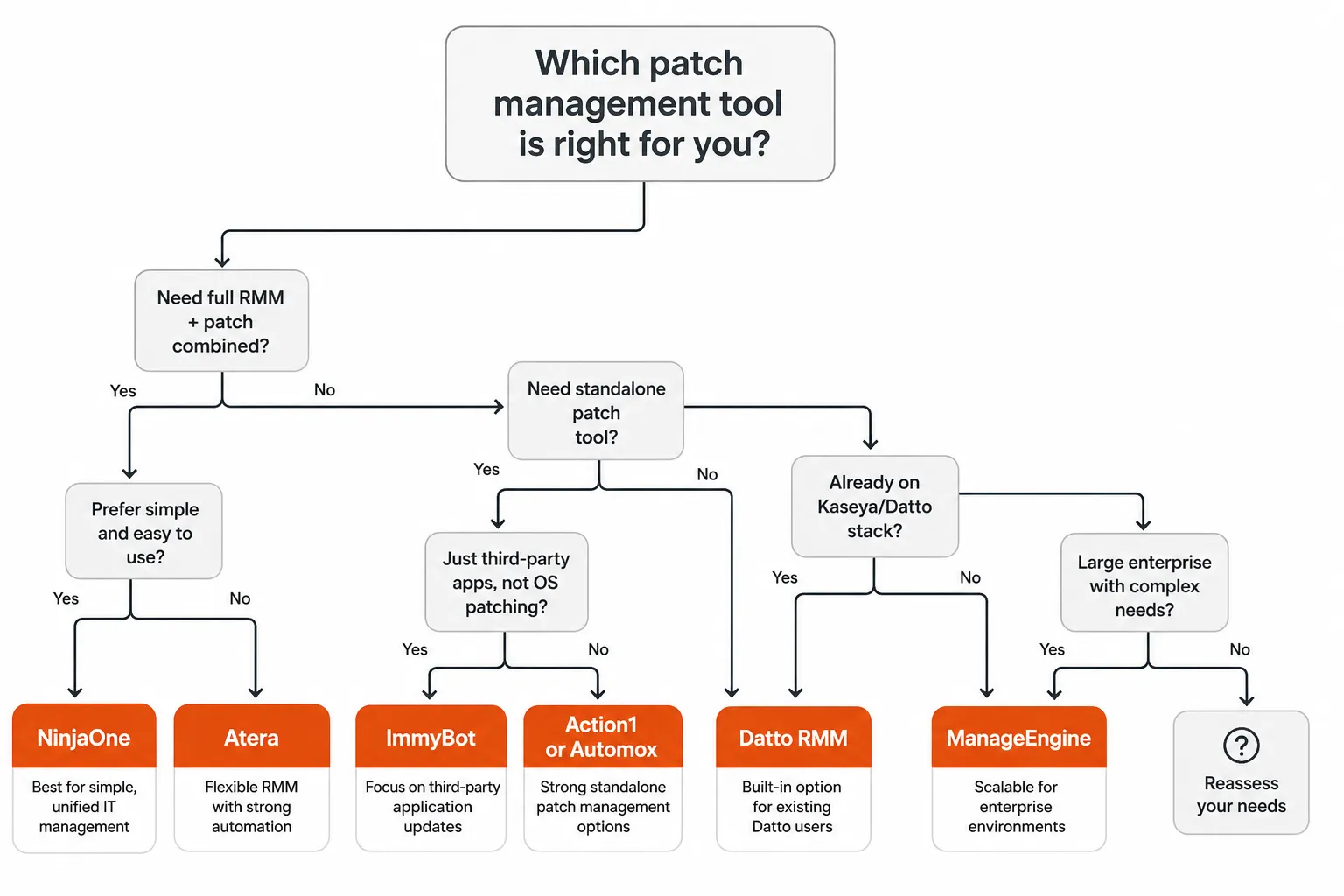
If you want RMM and patch in one platform: NinjaOne if technician UX is the priority and you want the largest third-party library. Atera if you want the same combination but want pricing that doesn't scale with device count.
If you want a dedicated patch tool alongside your existing RMM: Action1 if you want to start free and prove the value. Automox if cross-platform is the priority. ImmyBot if third-party app deployment is the specific gap.
If you're on the Kaseya stack already: Datto RMM is the path of least resistance - the PSA integration alone justifies the slight pricing premium.
If you're serving enterprise clients: ManageEngine for the BIOS/driver patching, compliance depth, and vendor recognition in regulated procurement.
One thing none of these tools solves: what happens when the patch window ends. Every maintenance window generates a predictable cluster of L1 tickets - broken apps, software conflicts, restart prompts. That's where your techs spend Monday morning.
Try Rallied
Patch management tools handle deployment. Rallied handles what comes next.
Every patch window generates a wave of L1 tickets: "my Outlook is broken," "Teams won't open," "my computer keeps asking me to restart," "a new policy is blocking a tool I use." These tickets are low-complexity, high-volume, and eat hours that should go to real work. Rallied is an AI technician built for MSPs that integrates with your PSA (ConnectWise, Autotask, Halo PSA) and RMM (NinjaOne, Datto RMM) to resolve those tickets automatically - password resets, account unlocks, software installs, and RMM script execution, handled without a tech touching them.
The deployment story is same-week, no implementation consulting, no dedicated admin overhead. MSPs using Rallied report recovering 40-60% of L1 ticket volume from the human queue, which typically translates to $7K-$15K/month in recovered tech time. Pricing is $0.50/ticket - you pay for what gets resolved, not a platform fee.
If you're investing in better patch management tooling, it's worth asking what you're going to do with the support tickets that tooling generates. Rallied is the answer to that question.
Frequently Asked Questions
What is patch management software and why do MSPs need it?
Patch management software automates the discovery, testing, approval, and deployment of security updates across client endpoints - Windows, macOS, Linux, and third-party applications. MSPs need it because manually tracking patches across dozens of clients is error-prone and time-consuming, and unpatched vulnerabilities are the #1 ransomware entry point. A good patch management tool keeps clients compliant and reduces your team's manual workload. Rallied can then handle the L1 support tickets that patching windows generate, so your techs stay focused on real work.
Which patch management tool has the best free tier for MSPs?
Action1 offers the most generous free tier: 200 endpoints, forever, with no feature limitations. That's not a trial - it's a permanent free tier you can use with real clients. For MSPs managing small clients or wanting a no-commitment way to evaluate patch automation, Action1 is the clear starting point.
How does per-technician pricing compare to per-endpoint pricing for patch management?
Per-endpoint pricing (NinjaOne, Action1, Automox, ManageEngine, Datto RMM) scales with the number of devices you manage - costs go up as you onboard more clients. Per-technician pricing (Atera at $129-149/tech/month) stays flat regardless of how many endpoints you add. For MSPs growing their endpoint count quickly, per-tech pricing can be significantly cheaper. For smaller MSPs with fewer endpoints, per-device often wins.
What is the difference between standalone patch management tools and full RMM platforms?
Standalone patch management tools like Action1, Automox, and ImmyBot focus specifically on patch deployment and third-party app updates - they're lighter, easier to set up, and often cheaper. Full RMM platforms like NinjaOne, Atera, and Datto RMM bundle patching alongside remote monitoring, alerting, scripting, and PSA integrations. If you already have an RMM, a standalone tool may fill gaps; if you're building your stack from scratch, an integrated platform saves you buying multiple tools.
What happens to the support tickets that patch management windows generate?
Patch windows reliably generate a wave of L1 tickets - broken apps, software conflicts, restart prompts, and end users confused by update notifications. Most MSPs handle these manually, burning tech time on repetitive low-complexity work. Rallied is an AI technician that integrates with your PSA (ConnectWise, Autotask, Halo) and RMM (NinjaOne, Datto) to resolve these tickets automatically - no tech required for the routine ones.