Microsoft 365 Copilot deployment checklist: a 90-day MSP guide

TL;DR
Most Microsoft 365 Copilot pilots never reach scale -- a Gartner survey of 132 IT leaders found 60% had started pilots but only 6% had finished one and moved toward broader deployment. The two blockers are almost always the same: data oversharing that no one fixed before handing out licenses, and no agreed measure of success that anyone can point to at week 30.
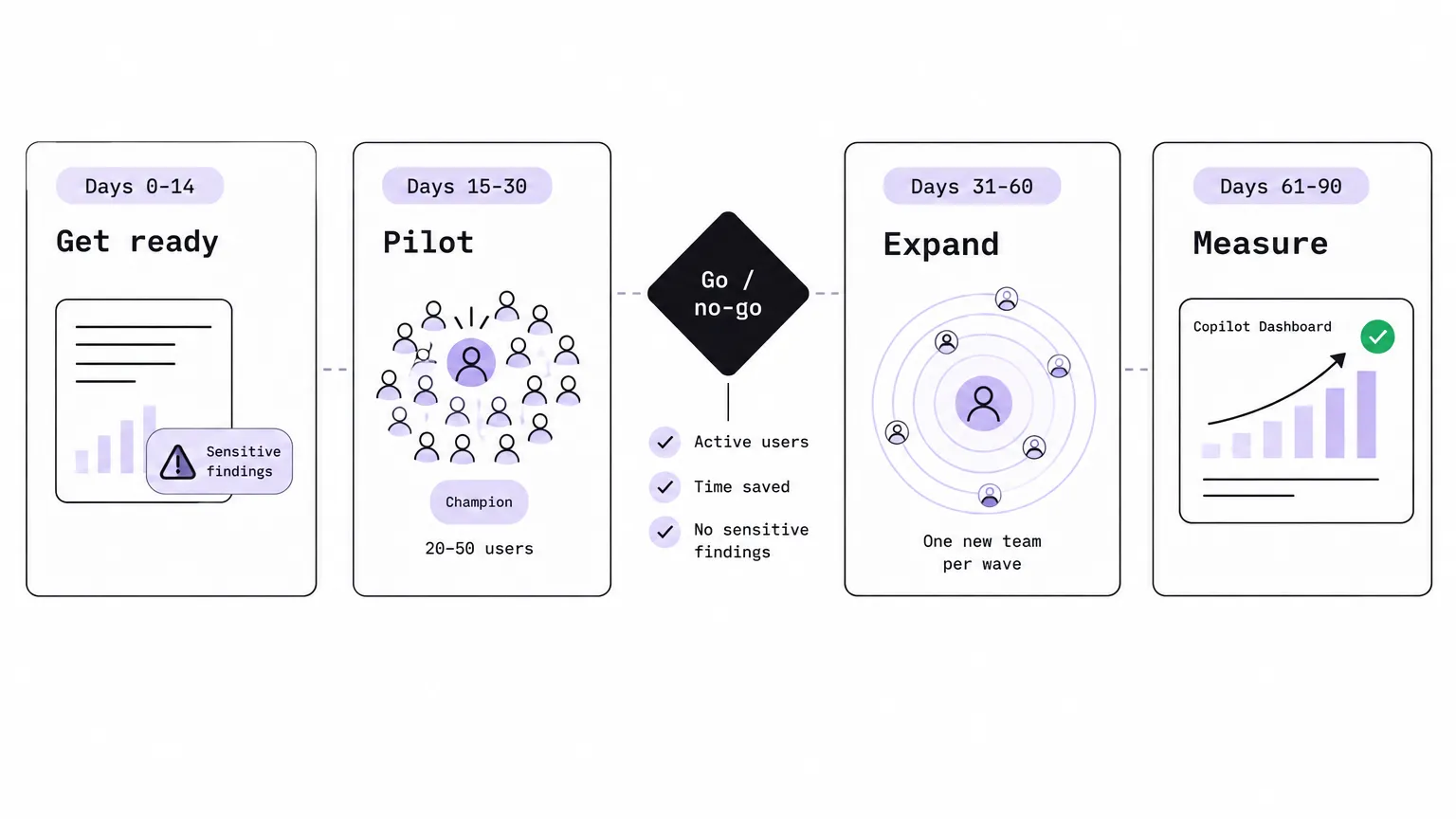
This checklist fixes both. It covers four phases over 90 days, a go/no-go gate before you widen the rollout, and the communications and measurement setup that keeps adoption from falling off a cliff after the launch email.
Start this checklist once the Copilot readiness scorecard in your admin center reads READY FOR A PILOT. Before that point, run the Microsoft Copilot setup guide -- it catches licensing gaps, update channel issues, and MFA gaps before they become your problem at week 15.
Get the template
We built a free Google Doc that follows exactly this structure -- phases, tasks, owners, due dates, go/no-go checks, comms plan, and measures table, all in one place. Open it and use File > Make a copy.
the free Copilot deployment checklist
The rest of this post walks through every section of that checklist in depth.
Why Copilot pilots stall
Before diving into the phases, it is worth naming what kills pilots specifically -- because the failure mode is specific enough that you can engineer around it.
The Gartner 2024 data is striking: 40% of organizations delayed rollout by three months or more over data oversharing alone. That is a quarter of your deployment window, burned on a problem that could have been scoped in the first two weeks if you had known where to look.
The other main killer is measurement theater. Most rollouts never capture a baseline before licenses go out, so when the executive sponsor asks for ROI at week 30, the answer is "users seem to like it" -- which is not a number. Devsoft's six-week Copilot plan, one of the more rigorous public guides we found, argues that a rollout without a baseline has no defensible result at the end, regardless of how good the product actually is.
The UK government's cross-government trial -- 20,000 users, run in Q4 2024 -- reported an average 26 minutes saved per user per day, with peak weekly adoption above 80% in one cohort. Those numbers came from an experiment that set baselines, defined cohorts, and measured outcomes. Without that structure, the same deployment reads as a shrug.
This checklist gives you the structure.
Before you start: roles and the readiness scorecard
The template assigns six named roles. Every task in the checklist maps to one of them. Before the clock starts on day 0, fill in the names.
| Role | Responsible for |
|---|---|
| Executive sponsor | Sets the business goals, announces the pilot, removes blockers |
| Project lead (MSP) | Plan, timeline, weekly status |
| Technical lead (MSP) | Licensing, security, data access, app deployment |
| Client champions | One per team; first line of help, collect feedback |
| Data owner (client) | Decides what sensitive content Copilot should not surface |
| Help desk (MSP) | Takes Copilot tickets and tags them so you can count them |
The champions role is the one most rollouts understaff. One champion per team is not a nice-to-have -- the BCN Group's internal Copilot rollout found that shared tips and concerns between peers moved adoption more than any formal training material. A central forum or Teams channel run by champions does more work than a tenant-wide webinar.
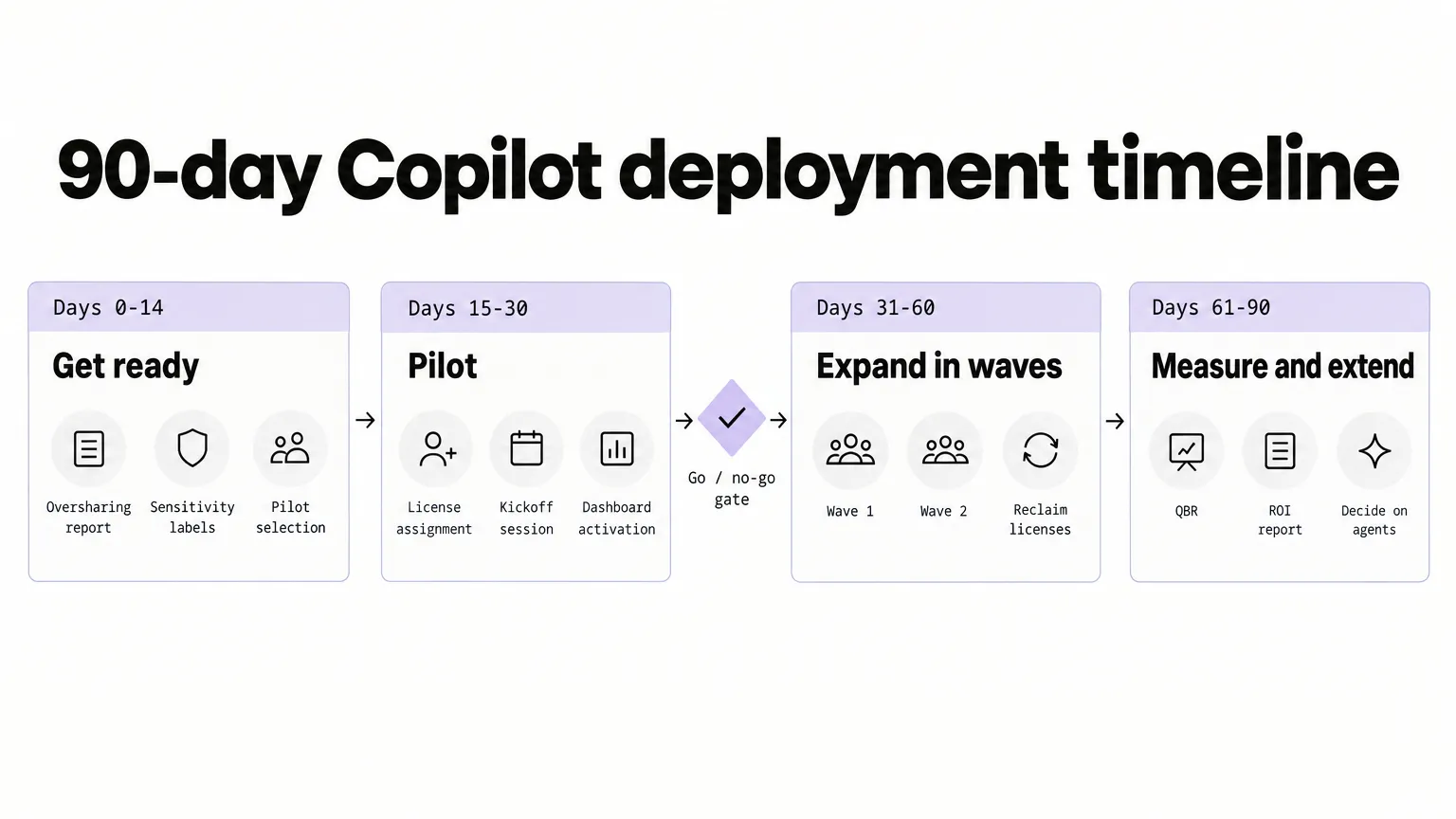
The 90-day deployment map
Phase 1: Get ready (days 0-14)
The first two weeks are entirely pre-license work. No one gets Copilot access yet. The goal is to fix the environment so that when licenses land, they land safely.
Fix data access first
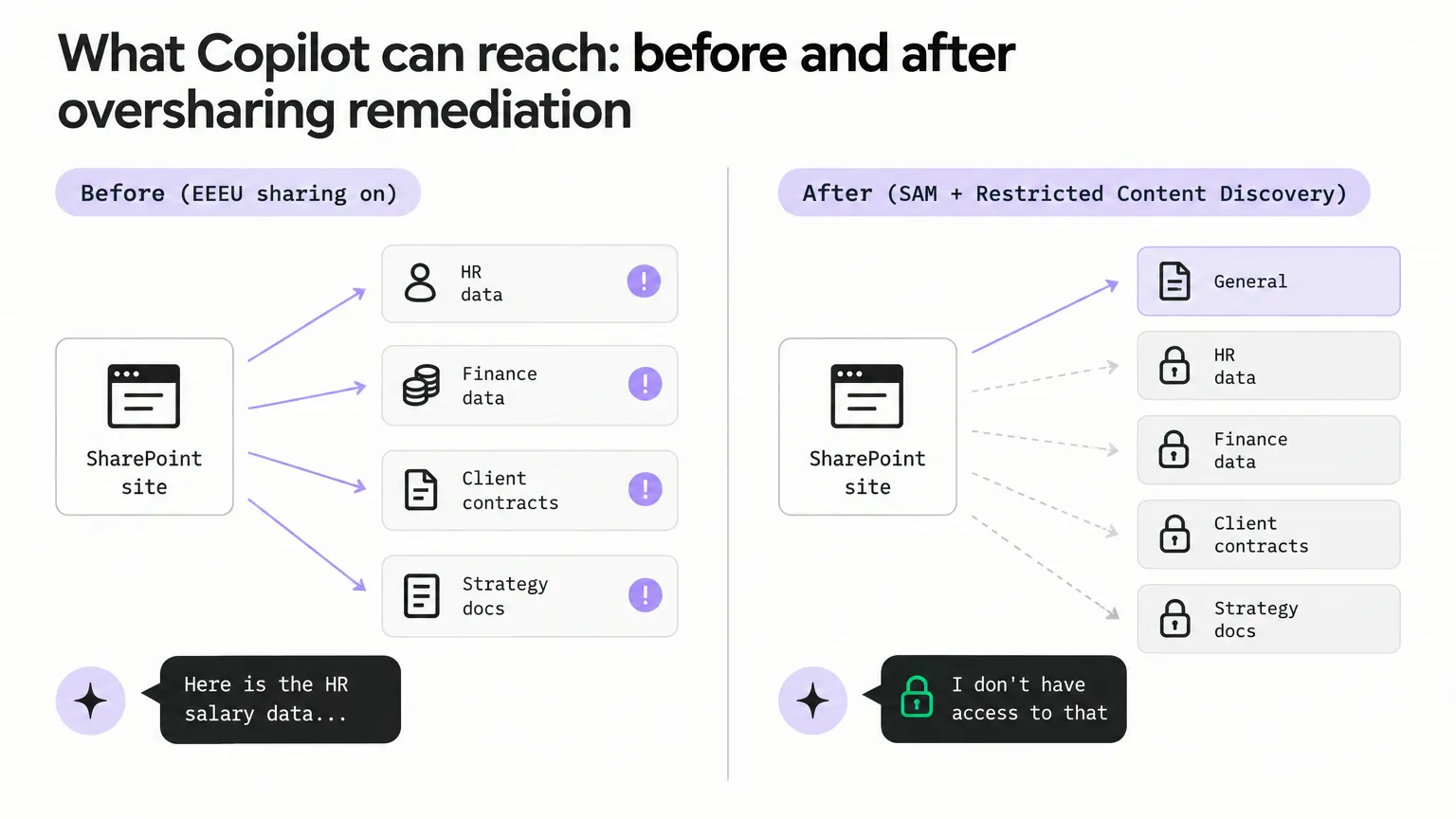
Microsoft Learn's setup guide is direct: identify the most popular SharePoint sites, run the SharePoint Advanced Management permission state report, and cross-reference overshared sites with the Purview DSPM oversharing assessment.
Copilot answers from anything a user can already reach. If a site was shared with "Everyone except external users" (EEEU) two years ago and nobody cleaned it up, Copilot can surface HR salary data in a meeting recap for anyone in the tenant. That is not a Copilot problem -- it is a permissions problem that Copilot makes visible.
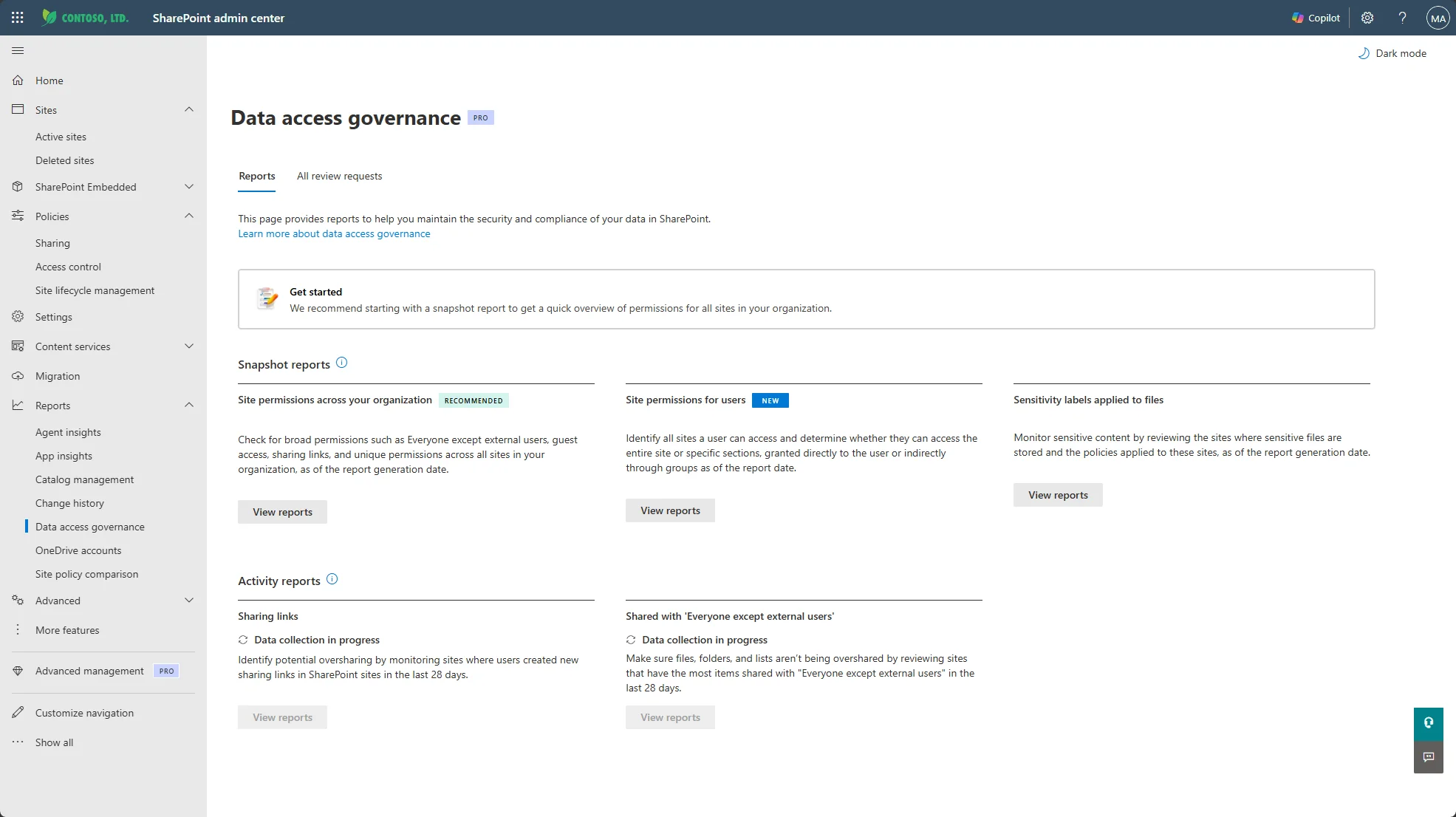
The SharePoint Advanced Management Content Management Assessment hub runs a set of reports that surface exactly this kind of risk. Start there, then rerun it every 30 days.
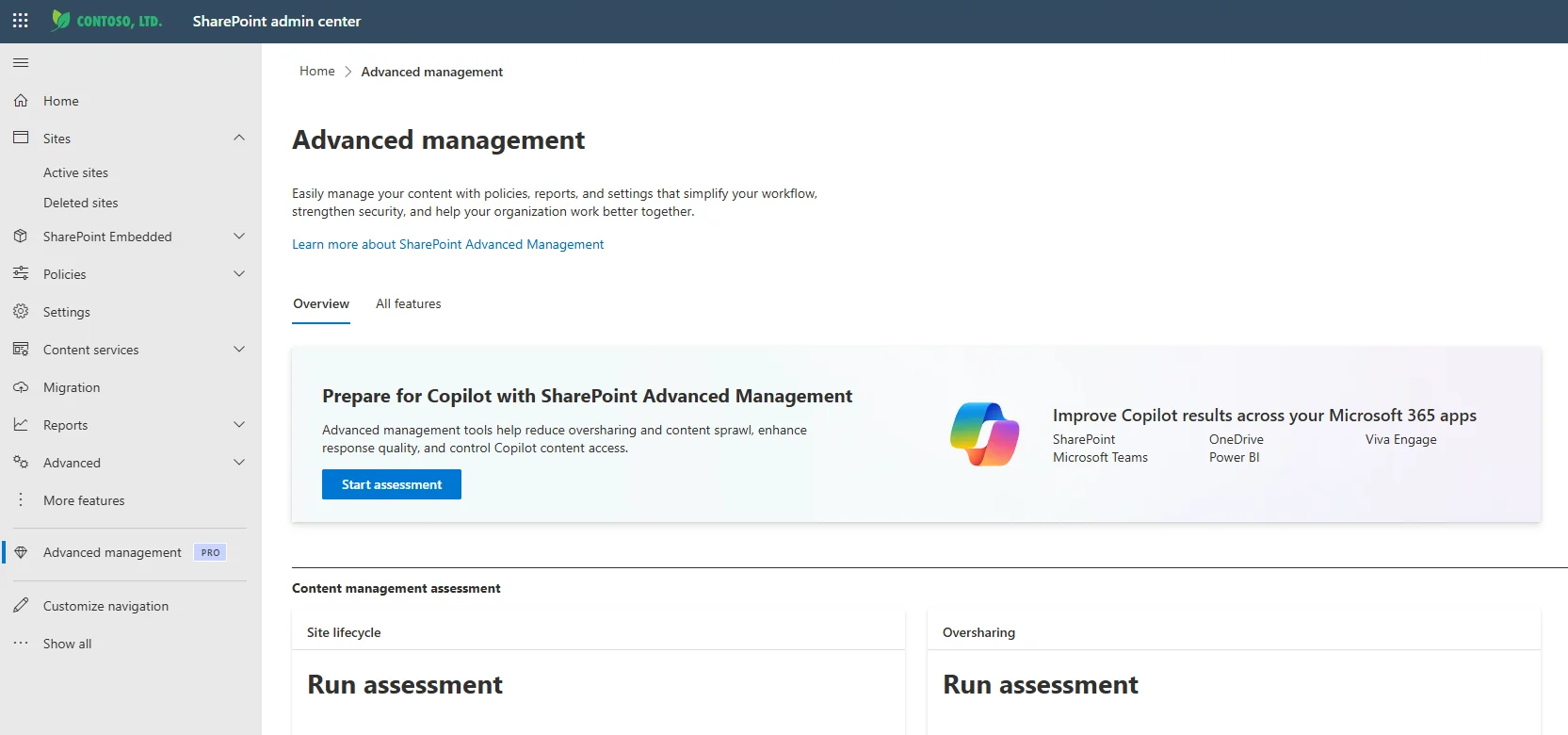
For the highest-risk sites, you have two tools. Restricted Access Control limits a site to a named security group -- anyone outside the group loses access, even with a link. Restricted Content Discovery keeps a site out of Copilot and organization-wide search while leaving the permissions structure in place -- useful for sites that must stay accessible to specific people but should not be broadly discoverable.
Apply sensitivity labels
Sensitivity labels from Microsoft Purview let you classify content -- Confidential, Highly Confidential, Public -- and attach real enforcement to each label: encryption, access restrictions, watermarks, and specific behavior inside Copilot.
The Copilot-specific behavior matters here: if a label applies Purview encryption, Copilot checks whether the user has the EXTRACT usage right on that item before surfacing anything from it. A properly labeled HR directory will not leak into a Copilot summary for someone without explicit access.
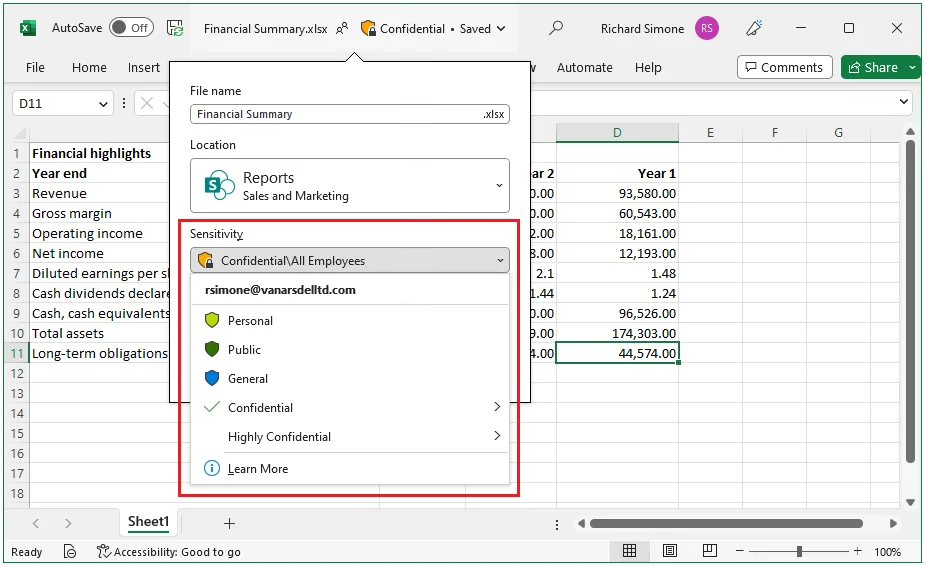
Microsoft's real-world guidance is to keep the label scheme to around five main labels and five sublabels per main. More than that, and users stop applying them consistently. Start with the most sensitive sites used by your pilot cohort and expand from there.
Define success before anyone gets a license
This is the step that determines whether you have anything to show the sponsor at day 90.
Pick three to five business scenarios -- meeting recaps, first drafts of client proposals, summarizing long email threads, searching SharePoint for a policy document. Time how long those tasks take today. That is your baseline. Everything you measure in phases 3 and 4 gets compared against that number.
Agree the measures with the sponsor at this stage, in writing, in the project plan. If "Copilot saves time" is not defined as a specific number before the pilot starts, you will not be able to prove it later.
Check the technical prerequisites
Per Microsoft's setup documentation:
- Microsoft 365 Apps must be on Current Channel or Monthly Enterprise Channel (not Semi-Annual Enterprise Channel, which does not get Copilot features)
- New Outlook and Teams should be deployed
- The network must allow
*.cloud.microsoftand WebSocket connections - MFA must be enabled for all users in scope
Assign the technical lead to tick these off before day 14.
Phase 2: Pilot (days 15-30)
The pilot phase is the only window where you can learn cheaply. Mistakes made here cost you a corrected process; mistakes made at full rollout cost you seat-license waste and a burned executive sponsor.
Assign licenses through a group, not one by one
Per the Microsoft admin center licensing guide, assign licenses to a security group rather than to individuals. It makes the go/no-go decision -- whether to add or reclaim licenses -- operationally clean. Adding individual users to a group is faster than hunting down individual license assignments at scale.
After assignment, users may need up to 24 hours for Copilot to appear in some apps. The file must be editable (not read-only). Build this into the kickoff timing.
Run a live kickoff, not a launch email
A kickoff session built around your agreed scenarios -- not a generic "here is Copilot" walkthrough -- is what separates a rollout that holds adoption from one that peaks at week 2. The UK DWP trial (3,549 users, six months) found that 89% of users relied on self-directed exploration, and the clear request back from users was for role-specific sessions rather than product training. Teach the job, not the product.
Give champions a one-page prompt guide for each scenario on launch day. Open a Teams channel for questions and wins. The channel matters more than the kickoff -- it is where adoption compounds after the initial session fades.
Turn on the Copilot Dashboard
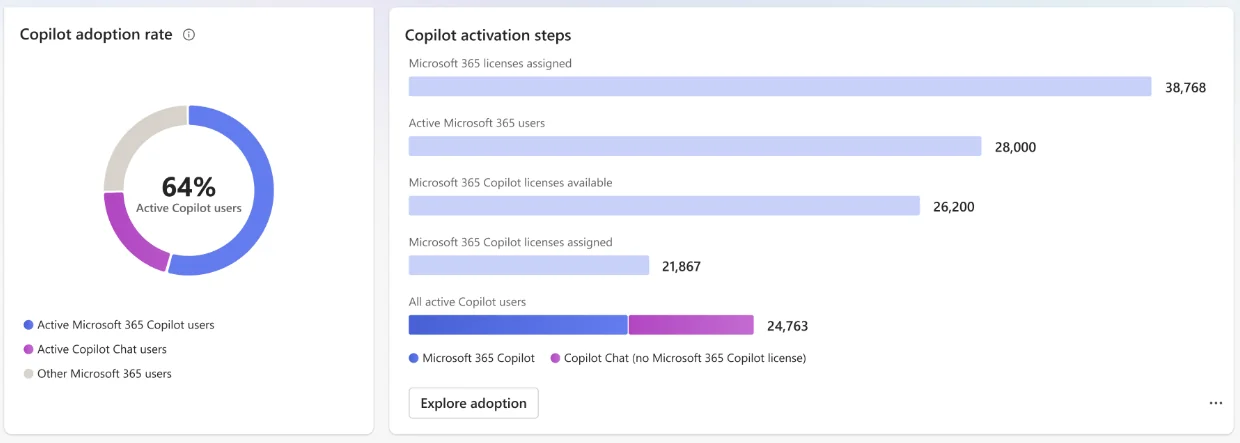
The Copilot Dashboard in Viva Insights is where your go/no-go data lives. Turn it on during the pilot phase so it is reading real data by day 30. Any customer with a Microsoft 365 or Office 365 business or enterprise subscription can access it -- a paid Viva Insights license is not required.
The dashboard covers four metric categories: readiness (licenses, update channel, blockers), adoption (weekly active users, usage levels, per-app breakdown), impact (Copilot assisted hours, estimated time saved), and sentiment (survey results). Data processing starts within seven days of license assignment.
Set up a Copilot ticket category in your PSA
Tag Copilot-related help desk tickets from day one. The volume of Copilot tickets in weeks 1 and 2 is expected and normal -- users are learning. The signal you care about is whether that ticket volume trends down after week 2. If it does not, something in the training or the environment needs fixing before you expand.
Week 2: check in with every champion
Each champion runs a one-on-one or small-group check-in with their team. What is working? What prompts failed? What good answers did people get that were worth sharing? Champions collect this, share it in the Teams channel, and feed blockers back to the project lead.
The go/no-go gate
Before widening the rollout -- to any user who was not in the pilot -- all four checks in the template must pass.
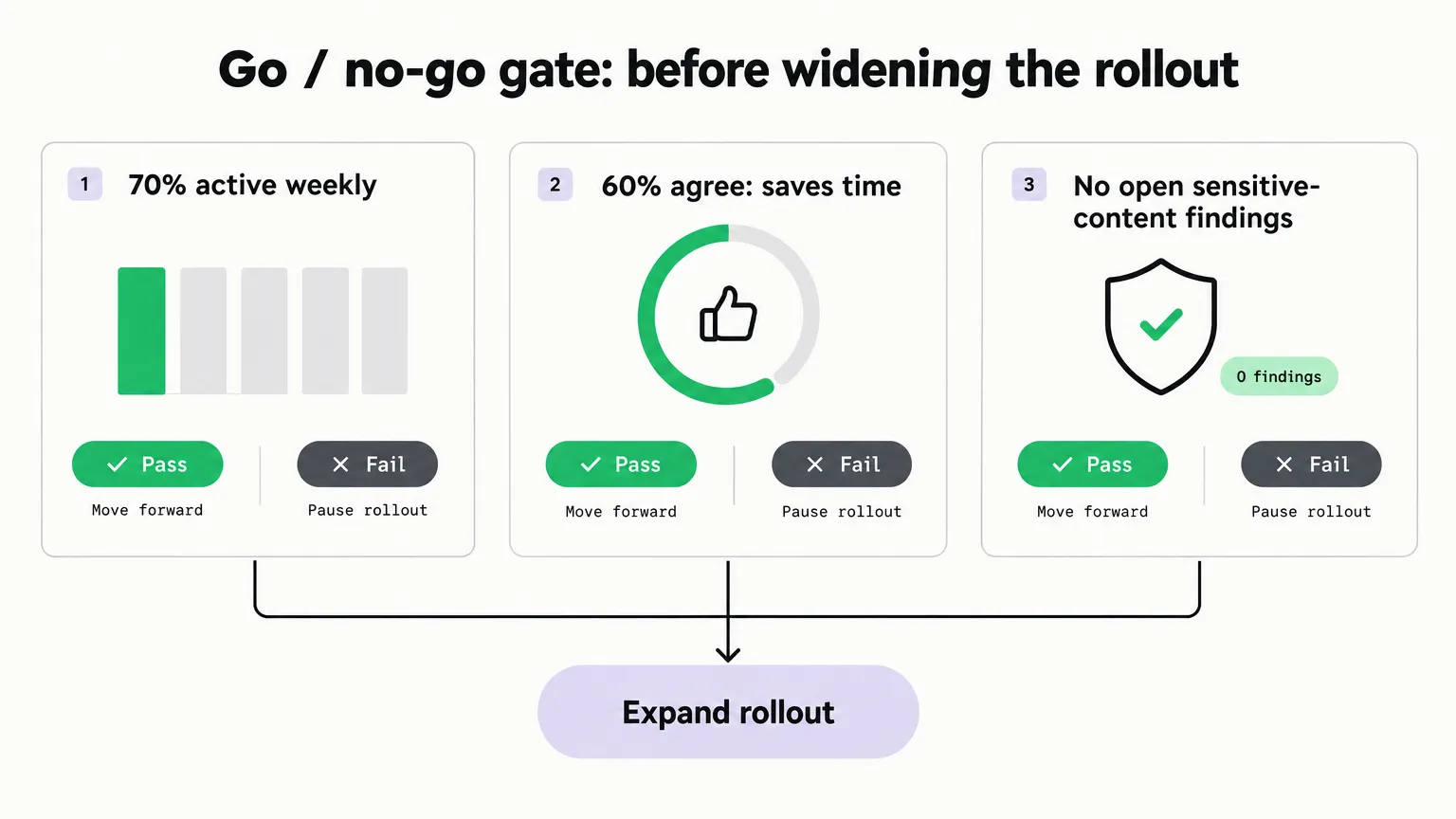
| Check | Target | Where to read it |
|---|---|---|
| Active users in the pilot | 70% or more used it in the past 7 days | Copilot Dashboard, Adoption page |
| Survey: "Copilot saves me time" | 60% or more agree | Dashboard sentiment or your own survey |
| Sensitive content surfaced in answers | No open findings | Purview DSPM audit log |
| Copilot tickets | Trending down after week 2 | PSA ticket category |
If you fail any of these, you do not expand. You investigate the gap, fix it, and re-evaluate. Expanding on a failed gate is the most reliable way to spend license budget on an adoption problem rather than on value.
"The Copilot pilots that reach scale are the ones where someone actually looks at the numbers before expanding. Most don't bother -- they just start assigning more licenses and wonder why the second wave engagement is even lower than the first."
Phase 3: Expand in waves (days 31-60)
The expansion phase reuses what the pilot built, team by team. Do not try to roll out to the whole organization in one wave. The pilot produced champion experience, tested prompts, and a known adoption rate -- the value of wave-by-wave expansion is that those things transfer.
For each new wave:
- Buy and assign licenses through the same group model used in the pilot. Add the new wave to the existing license group.
- Run the kickoff session for the new wave with pilot-cohort champions in the room. Pilot users sharing their best prompts is the most credible training the new wave can get -- it beats any vendor material.
- Add one champion per new team. The champion network should grow with the rollout.
- Repeat the oversharing review for the SharePoint sites that the new teams use heavily. The pilot's governance work covered the pilot cohort's sites. Each new team has its own footprint.
- Reclaim licenses from pilot users who have not used Copilot in 30 days. QueryNow's analysis illustrates the cost: a 3,000-seat purchase at 25% weekly active use carries approximately 2,250 idle seats. At ~$30/user/month, that is around $67,500 per month in licenses that are not returning value. Reclaim and reassign.
Publish a monthly tips email during this phase -- one real use case, from a real user, with the actual prompt they used. It does more for adoption than a feature overview.
Phase 4: Measure and extend (days 61-90)
Phase 4 is the sponsor conversation. Everything in phases 1 through 3 was preparation for this: a report that compares the agreed measures against the baselines you set on day 0.
What to take to the quarterly business review
Compare each scenario against its baseline:
- Time saved per task (from self-report surveys or manager observation)
- Active user rate vs the 70% target
- Copilot help desk ticket volume trend
- Copilot assisted hours from the Dashboard (a broad estimate -- Microsoft calculates 6 minutes per search/summary action and 6 minutes per creation action, based on studies of 147-163 knowledge workers)
The Copilot Dashboard's impact page shows a Copilot assisted value figure: assisted hours multiplied by an hourly rate (default $72, based on US Bureau of Labor Statistics data, adjustable by the admin). Present this as a floor estimate rather than a precise figure, and note that it covers meeting summaries, search, and creation actions.
Decide what comes next
The QBR produces three decisions:
- Which scenarios proved ROI? Double down there. Expand to teams that do similar work.
- Agents or Copilot Studio for any repeat process? If the pilot surfaced a workflow that runs identically every week -- status report creation, meeting follow-up drafts -- an agent or Studio flow can automate it further. The QBR is when the sponsor makes this call.
- What is the ongoing service? License management, monthly data access reviews, training for new starters joining after the rollout, prompt library maintenance. Agree this before the engagement winds down. This is the standing service that turns a one-time deployment into recurring revenue.
The communications plan
The template includes this table. Every organization that holds Copilot adoption past the first month has something like it in place.
| When | Message | From | Channel |
|---|---|---|---|
| 2 weeks before | The pilot is coming, who is in it and why | Sponsor | |
| Kickoff day | How to start; the 3-5 scenarios; where to get help | Project lead | Live session and Teams |
| Weekly during pilot | One tip, one win, one known issue | Champions | Teams channel |
| End of pilot | What we learned and what happens next | Sponsor | |
| Each new wave | Kickoff invite and the prompt guide | Project lead | Email and Teams |
The sponsor announcement two weeks before licenses land matters more than it looks. The UK cross-government trial findings consistently point to leadership framing as a driver of first-week adoption. People who received a personal message from a senior leader explaining why the organization was doing this logged in faster and more consistently than people who received a general IT announcement.
What to track in the Copilot Dashboard
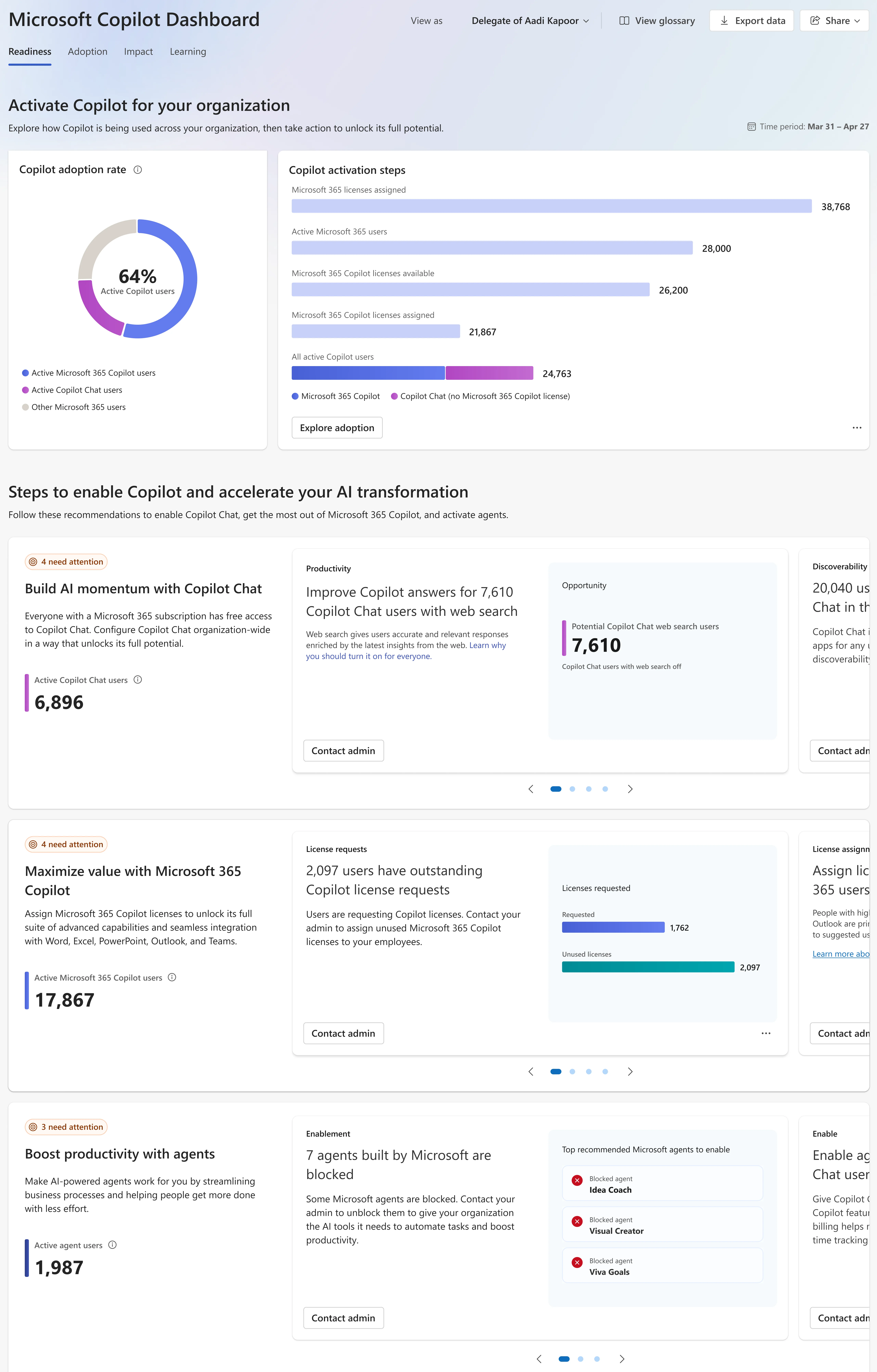
The Copilot Dashboard has four sections.
Readiness page: licenses assigned, update channel status, recommendation cards for blockers (Copilot chat blocked in Outlook, apps not on Current Channel, licenses available but not assigned). This is your ongoing technical health view.
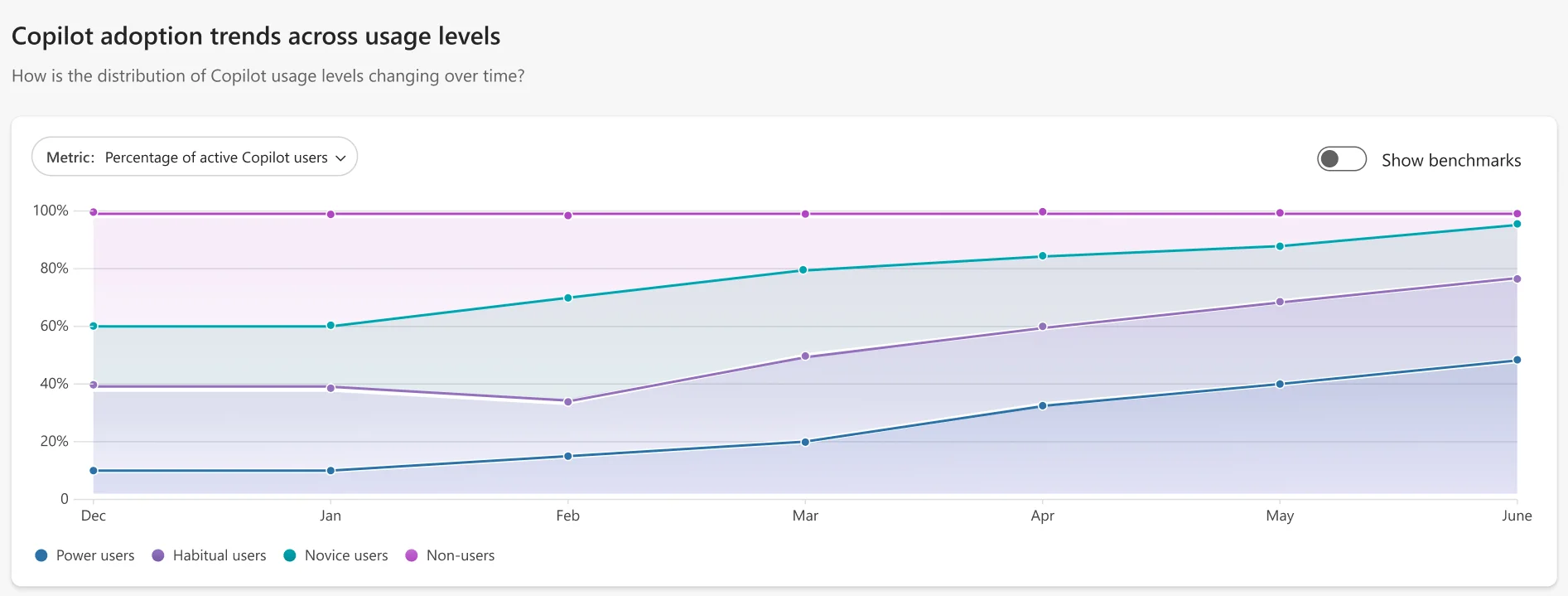
Adoption page: weekly active users broken into four usage levels -- Power users (15+ actions/week, active in 9 of the past 12 weeks), Habitual users (1-14 actions/week, 9 of 12 weeks), Novice users (at least one action but not yet habitual), and Other. The per-app breakdown shows where adoption lives: Teams, Outlook, Word, Excel, PowerPoint, and Copilot Chat individually.
Impact page: Copilot assisted hours and Copilot assisted value, with an adjustable hourly rate. Requires diagnostic data enabled in admin settings. Also shows satisfaction rate (thumbs-up as a share of all reactions, rolling 28 days, requires at least 30 responses from 5 unique users).
Sentiment: Viva Pulse, Viva Glint, or a CSV you upload. The four questions the Dashboard normalizes around are productivity, quality, mental effort, and task speed. If you run your own survey, map it to a 100-point scale using the conversion Microsoft specifies (1=0, 2=25, 3=50, 4=75, 5=100), and upload the CSV to get the sentiment view.
The measures table in the template maps each metric to its location in the Dashboard.
What not to do
Based on the research we pulled:
Do not count a single Copilot action as "active." Microsoft's active-user threshold requires at least one use in 28 days. That is a very low bar. Use the Power and Habitual user categories instead, and set your own internal target -- 70% weekly active is the bar in this checklist.
Do not expand before the go/no-go passes. Elantis's Copilot adoption failure analysis and multiple other guides name the same failure mode: positive vibes at the kickoff, then silence, then a QBR where nobody can explain the active user rate. The gate is not bureaucracy -- it is the signal that the value is actually there.
Do not skip the training budget. A Forrester Total Economic Impact study of a 25,000-employee composite found the training and discovery line exceeded the license line over three years. Most stalled rollouts spent the license line and skipped the training work.
Do not launch before governance is ready. A six-month tenant-wide data classification project before anyone gets value is the failure mode that QueryNow's post-stall analysis sees most often. The alternative -- cohort-scoped governance that expands sprint by sprint -- is exactly what this checklist structures.
Check CSP billing before quoting. Bright Ideas Agency flagged in October 2026 that new Copilot Business purchases through CSP may now get default usage-based spending policies. Their estimate for a 75-user tenant buying 5 Copilot Business licenses was up to $750/month in default credits -- well above the $150/month seat-license cost. Verify the spending policy in the partner center before the first invoice.
Try Rallied
A Copilot deployment changes the service requests coming into your PSA. New hires need M365 access so they can use Copilot from day one. Departing employees need clean offboarding -- shared mailboxes, license reclamation, access revocation -- before their data is reachable through someone else's Copilot session. Access change requests multiply when a client's team starts using AI tools and starts discovering exactly what they can and cannot reach.
Rallied is an AI technician for MSPs that handles these tickets autonomously inside your PSA -- password resets, account unlocks, M365 onboarding and offboarding, access management -- without a tech touching them. It connects to ConnectWise, HaloPSA, Autotask, and SuperOps, plus M365, Entra ID, Okta, and your RMM. When a Copilot rollout generates a new category of access request tickets, Rallied closes them while your techs focus on the governance and adoption work that actually needs judgment.
Named one of 10 Hot MSP Tools to Expand Automation, AI, Agentic AI Capabilities by CRN. Deployable in about a week. $300/month, 2,000 credits included, $0.10 per extra credit.
To see how Rallied handles this inside your PSA, read about Microsoft 365 Management for MSPs.
Frequently Asked Questions
What do I need before starting a Microsoft 365 Copilot deployment?
Run the Microsoft Copilot setup guide in the admin center and confirm the readiness scorecard reads READY FOR A PILOT. You also need an eligible Microsoft 365 license (Copilot is included in M365 E7 and available as an add-on to other plans), MFA enabled for all users, and a SharePoint Advanced Management oversharing scan completed before any licenses are assigned.
How many users should be in a Microsoft 365 Copilot pilot?
Aim for 20 to 50 users, roughly 10 percent of staff, drawn from at least three different teams. Weight the group toward heavy Teams and Outlook users, but include at least one team that is skeptical -- their feedback tells you whether Copilot works outside IT. Usage metrics in the admin center show which users already rely on Microsoft 365 most heavily.
What are the go/no-go criteria before expanding a Copilot rollout?
Three checks must all pass before widening access: 70 percent or more of pilot users active in the past 7 days (read from the Copilot Dashboard), 60 percent or more agreeing that Copilot saves them time (survey or Dashboard sentiment), and zero open sensitive-content findings in the DSPM audit log. Copilot help desk tickets should also be trending down from their week 2 peak.
How much does Microsoft 365 Copilot cost?
Copilot is included in Microsoft 365 E7 and available as an add-on to other eligible plans at around $30 per user per month. From July 2026, Microsoft has bundled Copilot into M365 Business Standard and Premium for qualifying tenants, so check the current terms in your partner center before quoting. MSPs buying Copilot Business licenses through CSP should also review Microsoft's new usage-based billing policies, which apply to purchases made after mid-October 2026.
What should I track in the Copilot Dashboard after rollout?
The Copilot Dashboard in Viva Insights tracks four categories: readiness (licenses assigned, update channel, blockers), adoption (weekly active users, power vs novice usage, per-app breakdown), impact (Copilot assisted hours, estimated time saved, satisfaction rate), and sentiment (survey results from Viva Pulse or your own CSV upload). The target is 70 percent or more weekly active users. Reclaim seats from anyone who has not used Copilot in 30 days.