How MSPs automate user onboarding in 2026: what to execute, what to approve, and what to keep human

TL;DR
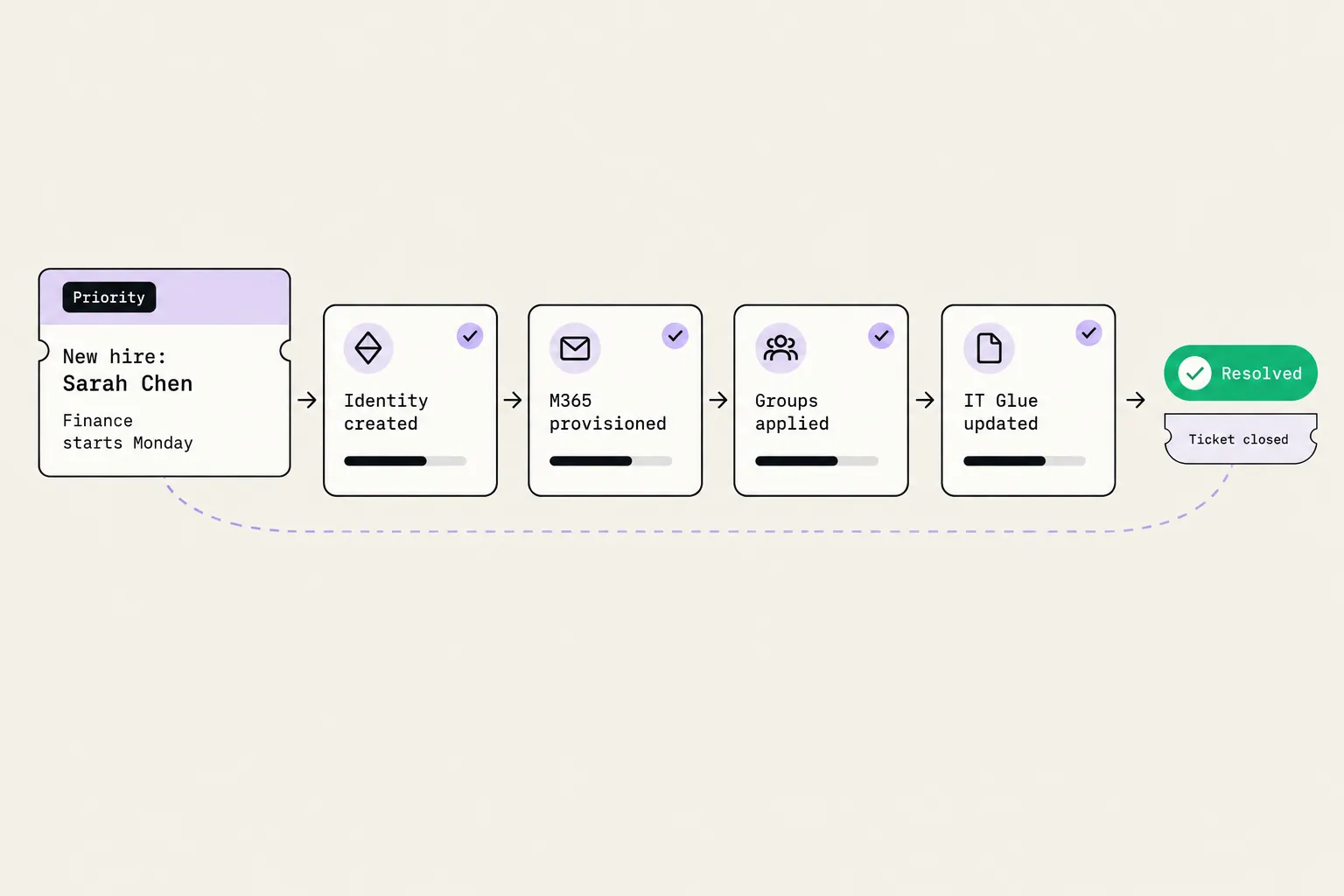
Automate the account creation, group membership, license assignment, mailbox provisioning, and documentation steps for every new hire - that's the part that can run without a human. Keep vendor-specific app access, hardware, and username exceptions with a person. Start with an approval gate on account creation so you can check the agent's calls on real tickets before it acts autonomously. With Rallied, 30 complex onboardings a month uses 240 of your 2,000 included credits - leaving the rest for L1 tickets, password resets, and everything else in the queue.
Why onboarding keeps eating your Monday
Here's the honest version of what manual user onboarding looks like: a new hire ticket arrives Friday afternoon. Someone bounces between the identity platform, the mailbox admin screen, the licensing portal, the RMM, and the documentation tool, copying a department template from one place to another. The Rallied onboarding checklist estimates 40 to 80 hours of manual data gathering per client onboarding for a new MSP client - and that's before the recurring per-user work each time someone joins.
The recurring work is where it compounds. User onboarding and offboarding combined can make up around 20% of MSP tickets, according to Bumblebee's LinkedIn data. That's not a rounding error - it's a meaningful slice of your queue running on manual, error-prone copy-paste.
Rewst puts the broader cost in dollar terms, citing Sherweb data suggesting MSPs spend between $50,000 and $100,000 a year on hiring and onboarding new technicians. The manual onboarding work is baked into that cost, and it scales badly - "as the client count grows, so does onboarding volume," as Rewst puts it. Manual steps become bottlenecks.
Three things make onboarding a natural first target for automation. The steps are known in advance. The inputs are structured - name, department, manager, start date. And the cost of a missed step is visible to the client on their first morning: no mailbox, wrong group, missing license. That's a support call you can prevent.
What a full onboarding actually touches
Before you can automate it, you need to know the scope. A complete onboarding for a new hire at a typical M365 client touches at least six systems:
- PSA: the ticket with the hire's details is the starting point. Everything gets written back here.
- Identity (Entra ID or Active Directory): account creation, password set, user enabled.
- Microsoft 365: license assignment, mailbox provisioning, manager and department attributes.
- Security groups: Entra ID group membership based on department or role, applied from a client template.
- RMM: device check-in, base image, monitoring agent deployment.
- Documentation (IT Glue or Hudu): the new user record logged automatically as setup runs.
The Rallied integrations page covers all of these: ConnectWise Manage, HaloPSA, Autotask, and SuperOps on the PSA side; NinjaOne, Datto RMM, ConnectWise Automate, and N-central on the RMM side; Microsoft 365 and CIPP for identity; IT Glue, Hudu, and Confluence for documentation.
Most onboarding automation starts with M365 - it's the most consistent step across clients. The Reddit/MSP community overwhelmingly names it as the first thing to automate: "Microsoft 365 account setup with the correct licenses" is how Rewst's onboarding post describes the universal starting point. RMM and documentation usually come next. The identity-to-mailbox-to-groups sequence is the core loop; everything else is layered on top.
What you can automate today
The reliable, automatable steps share three traits: the inputs are in the ticket, the output is deterministic, and a wrong result is recoverable. These are the steps worth handing to an AI technician or a workflow:
- Account creation in Entra ID - name, department, manager, and template from the ticket. The agent creates the account, sets the password to the client's policy, and logs the result back to the ticket.
- Security group membership - pull the department template, apply the groups, verify membership. This is the step most manual processes get wrong: the template says "Finance" and the directory says "Finance-All-Hands." An agent that checks membership after applying it catches the drift.
- M365 license assignment - assign the right license SKU based on the department template. This is a straightforward API call in the Microsoft Graph.
- Mailbox provisioning - enable Exchange Online, set the display name, assign the manager.
- Department and manager attributes - update the user record in Entra ID with job title, department, and manager. Affects org chart visibility and some policy applications.
- Documentation logging - write the new user record to IT Glue or Hudu as each step completes, not at the end. If the ticket fails partway through, the log tells you where it stopped.
- Welcome notification - email the new hire, their manager, and the client contact that setup is complete, with login details.
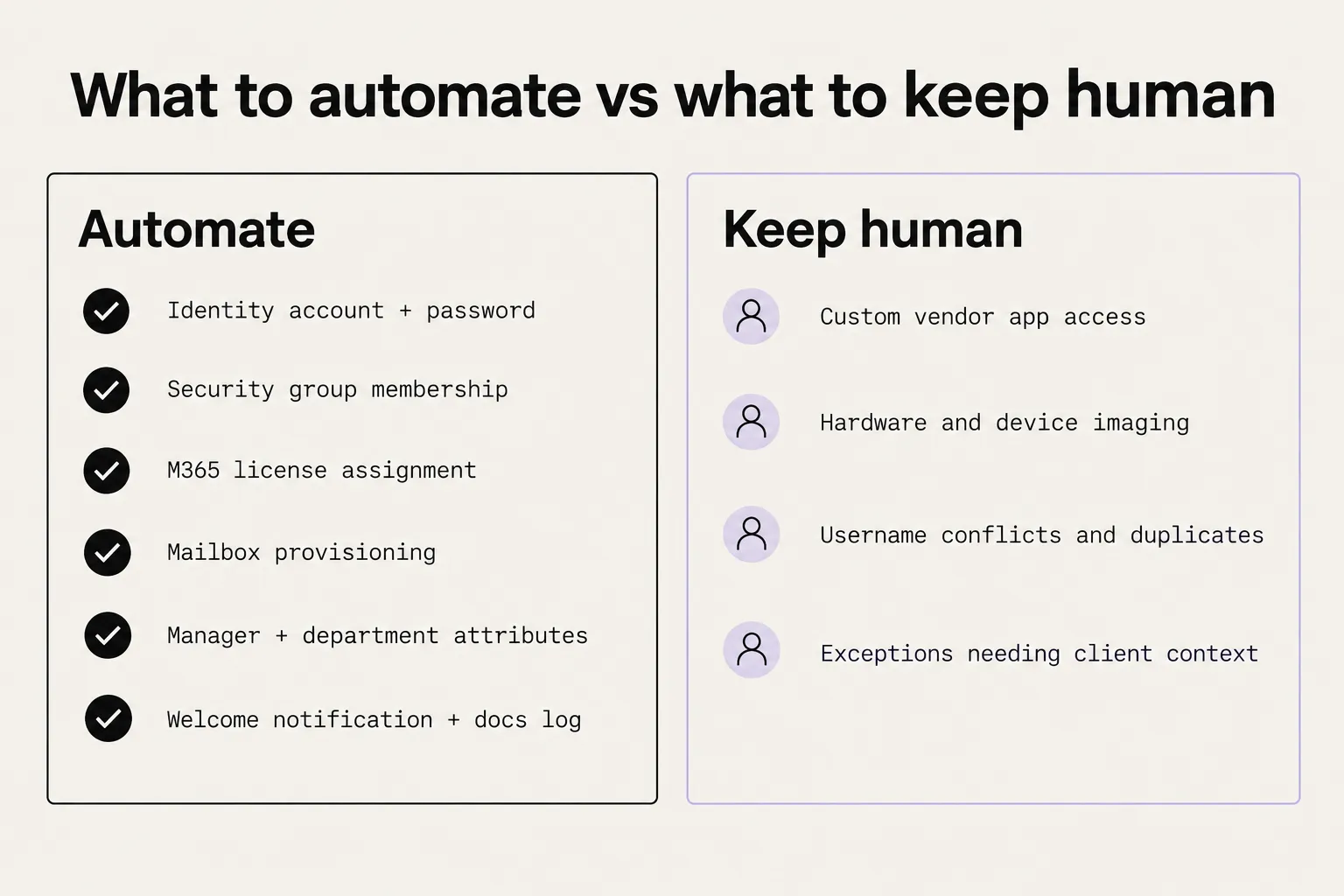
That list covers the repeatable core. Everything else - vendor-specific app access, hardware, exceptions - belongs with a person. We'll come back to that.
The DIY route: Microsoft Forms and Power Automate
It's worth being fair to the free route. A Microsoft Form as the intake, connected to Power Automate, can create the user in M365, assign a license, set the manager, apply group access, and send the welcome email - without any third-party tool. The Reddit/MSP community's most upvoted onboarding automation thread is exactly this pattern, and it works for M365-only shops where all clients share a similar setup.
The ceiling shows up fast, though. Power Automate covers the happy path; it does not read the PSA ticket, interpret the request, handle multi-tenant group naming inconsistencies, or know when to route an exception to a technician with the right context attached. When a step fails at 4pm on a Friday, you own the debugging - and the client's new hire is waiting.
Rewst is the purpose-built MSP alternative. It's an RPA canvas where you build visual workflows for onboarding, offboarding, and everything in between. Rewst doesn't require scripting, and it covers multi-system provisioning more completely than Power Automate alone. The trade-off is that you're building and maintaining the canvas - every client variation, every new integration, every exception path is a node someone drew.
The pattern both tools share is that you're describing the workflow, and the tool runs it. That works well when the workflow is stable and the client is standard. Where it breaks down is context: a ticket that says "Sarah is joining as a contractor, not a full-time employee, and she needs access to the vendor portal that's not in the template" requires reading, not running.
Where an AI technician changes the picture
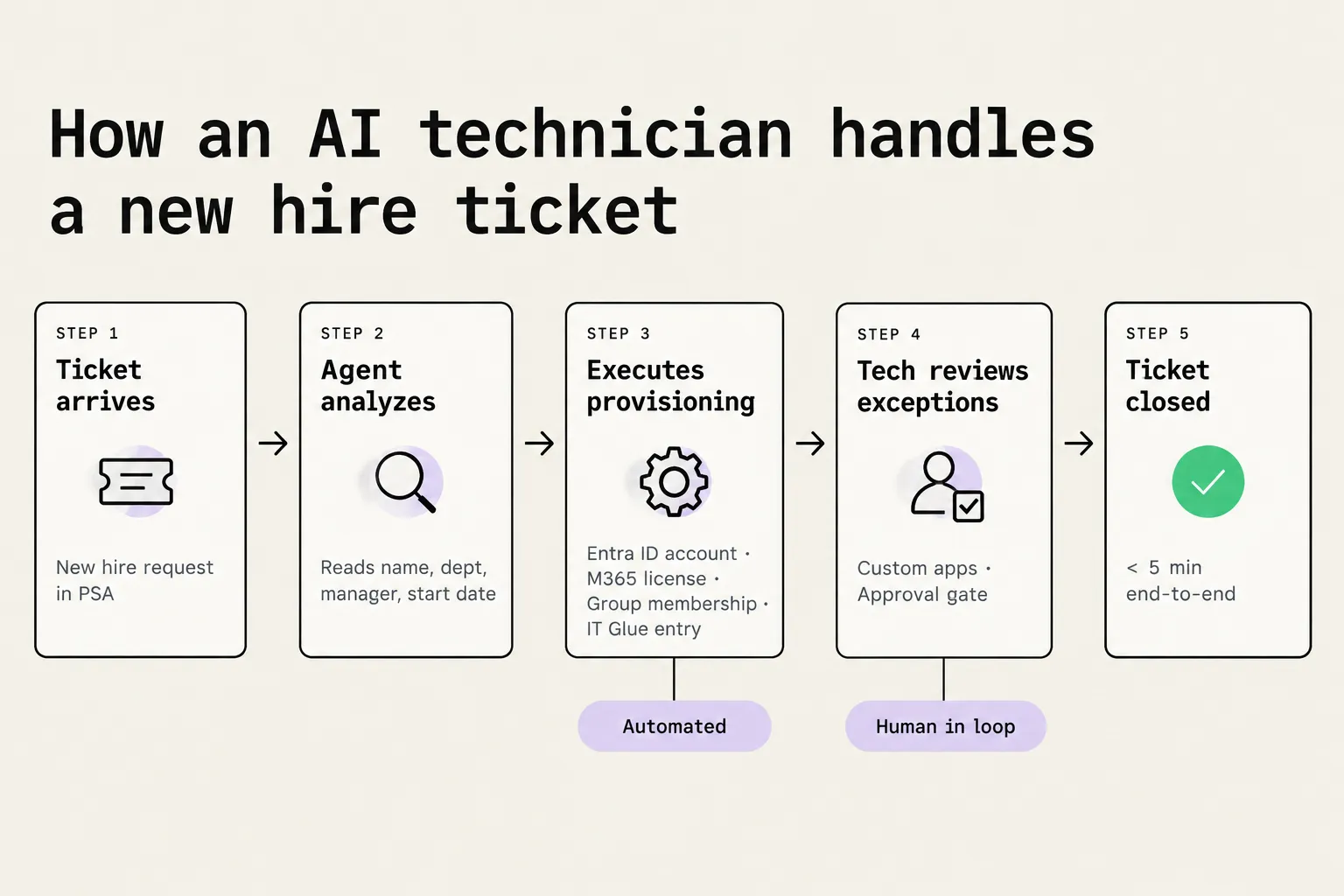
An AI technician reads the ticket first, then acts. It pulls the hire details, checks the client's existing user records, identifies the right department template, and plans the provisioning sequence based on what's actually in the systems - not what the flow was drawn to expect.
Rallied's onboarding checklist frames it this way: "Instead of just suggesting next steps, it executes the fix, notifies the user, and closes the ticket." The agent lives in the PSA - it connects to ConnectWise Manage, HaloPSA, Autotask, or SuperOps - and when a new hire ticket arrives, it works through the provisioning steps inside that ticket, writing back its progress at each stage.
The offboarding runbook below shows the format - each step is a plain-English instruction with the tool call named explicitly. Onboarding follows the same pattern: the agent reads the ticket, executes each step, and logs the result. The difference from a flow is that if step three fails, the agent understands why and routes the exception to a technician with the diagnosis already written.
 Source: rallied.ai
The key capability for onboarding is the approval gate. Account creation, group membership changes, and license assignments all sit behind it by default, as Rallied's permissions guide explains. The agent drafts the action, a technician approves it, and it runs - with the review taking "seconds" according to the same guide. That gate is what makes an AI technician usable on sensitive provisioning work before you fully trust its judgment on a client.
"Rallied tells the technicians exactly what to go do. They do it and it fixes the ticket." - Ammon Palmer, COO, Cyber Solutions
The permissions post is also where the SOC 2 Type II certification appears, alongside per-client credential isolation and a full audit log of every tool call, approval, and refusal. For an MSP selling onboarding as a managed service, that audit trail is worth having.
What to keep human
We want to be clear on this because vendors - including us - often aren't. Some onboarding steps should not be fully automated, no matter how good the agent is:
Custom vendor app access. When a new hire needs access to a third-party application that isn't in the department template, someone needs to decide what level of access to grant. That's a judgment call that depends on the client's internal policies, the vendor's licensing model, and sometimes a conversation with the client's manager. Route it to a tech with the relevant context attached, not to a retry loop.
Hardware and device imaging. A laptop that won't boot, a device that's not enrolled in the RMM, a hardware request that requires shipping - none of these are ticket-closeable via an API call. Flag them clearly and get them to the right person fast.
Username conflicts and duplicates. When an account already exists with the same name - a previous employee, a test account, a naming collision - the agent should escalate with the options spelled out, not pick one and proceed. Getting this wrong means account confusion that's painful to untangle.
New hire exceptions. Contractors with partial access, executives with elevated permissions, new hires with previous accounts in the tenant - these need a human to review the specifics before anything is provisioned.
The five-year-old Reddit thread that says "there is no scenario where onboardings are truly automated because by definition" they surface edge cases is correct. We'd put it this way: the goal is to automate the 70% that's always the same, and to make the 30% that isn't land on a technician with the diagnosis already done.
How to roll out without touching anything
The safest way to start is to run the agent in audit mode for the first week or two. Rallied's permissions guide describes this as an audit-only first phase: the agent reads every onboarding ticket, drafts what it would do, and posts it - but no API calls go out. Your technicians see exactly what it plans before anything changes.
After a week of reading drafts, you have a real sample of how the agent handles your clients' onboarding tickets. You know which steps it gets right consistently (identity creation, license assignment), which need review (group membership for clients with non-standard templates), and which should stay with a person (custom app access). Then you move the reliable steps to execute mode and keep the sensitive ones gated.
This is also where per-client scoping matters. Rallied's permissions model lets you enable autonomous execution per client, so you can run fully gated on a new client and progressively open it up as you build confidence. That's the opposite of "turn it on and hope" - it's the rollout approach that makes an MSP owner comfortable rather than nervous.
The AI agent permissions post also covers the related problem of offboarding, which is safety-critical and where getting the sequence wrong has real consequences. We'd recommend reading it alongside this one - the permission model is the same, and the decisions you make about gating onboarding apply directly to how you handle offboarding. There's a full offboarding SOP and a common mistakes post on the site as well.
The multi-system user provisioning mistakes post is useful for understanding the failure modes before you automate them in - a mistake that was occasional when done manually becomes systematic when automated.
What 30 onboardings a month costs with Rallied
Rallied prices by the ticket, not the seat. Credits are charged once per ticket at the level of the most work done: 1 credit for a simple ticket (routing and triage only), 3 for a standard one (looking something up or making a single change), and 8 for a complex one - which means working across three or more systems or performing six or more different actions. An onboarding ticket that touches identity, M365, groups, the RMM, and your documentation tool is a complex ticket at 8 credits.
The math for 30 onboardings a month: 30 × 8 = 240 credits. The plan is $300 a month with 2,000 credits included, which means 30 complex onboardings use 12% of your monthly allowance. The remaining 1,760 credits go to password resets, account unlocks, and the rest of your L1 queue.
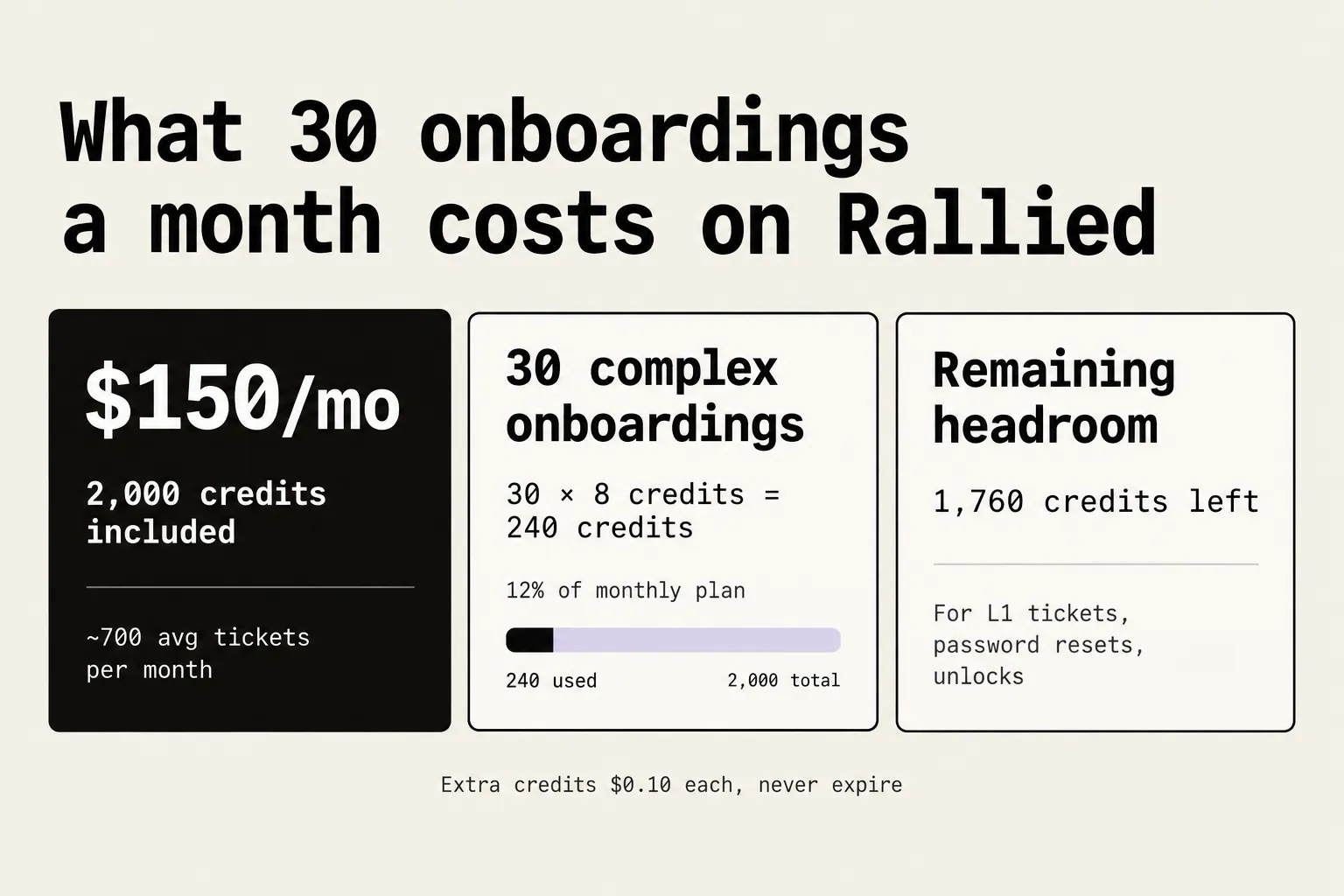
If your onboarding mix runs higher - 100 complex onboardings a month - that's 800 credits, still 40% of the included plan. Extra credits are $0.10 each and never expire. Setup, integrations, and any ticket the agent couldn't finish or wasn't allowed to act on are not charged.
The comparison to think about isn't Rallied's cost against zero - it's against the tech time the onboarding was consuming. At an average billing rate, one hour of a senior tech's time costs more than a month of Rallied credits covering 30 onboardings. The full pricing breakdown is on the site if you want to run your own numbers.
Try Rallied
Rallied is an AI technician that connects to your PSA, identity platform, RMM, and documentation tool, and starts in approval-gated mode - so you see exactly what it would do on every onboarding ticket before it changes a thing in your clients' systems. Most MSPs go live in under a week, according to the homepage.
The plan is $300 a month, billed monthly, with 2,000 credits included and no annual commitment. See integrations and start a trial at rallied.ai.
Source: rallied.ai
To see how Rallied handles this inside your PSA, read about Microsoft 365 Management for MSPs.
Frequently Asked Questions
What tasks can an MSP automate during user onboarding?
Most of the account work: creating the identity in Entra ID or Active Directory, assigning M365 licenses, applying security group membership, provisioning the mailbox, setting manager and department attributes, logging setup steps in IT Glue or Hudu, and sending a welcome notification. Hardware, custom vendor app access, and exceptions like duplicate usernames still need a human. See Rallied's MSP onboarding checklist for a full breakdown.
Is fully automated MSP onboarding realistic?
Honest answer: no, not yet. The account provisioning and licensing steps are very automatable, but onboarding always surfaces edge cases that need judgment - a username that already exists, a new hire who needs a vendor-specific app, a device that won't image. The right framing is assisted execution: an AI technician handles the repeatable steps, a human reviews exceptions.
How much does it cost to run 30 onboardings a month with Rallied?
An onboarding ticket that touches identity, M365, groups, and your RMM is a complex ticket at 8 credits. Thirty complex onboardings use 240 credits. Rallied's plan is $300 a month with 2,000 credits included, so 30 onboardings use 12% of the plan. The remaining 1,760 credits cover password resets, account unlocks, and other L1 tickets.
How do I start automating onboarding without breaking anything?
Start with the approval-gated mode: the AI technician drafts every action and a technician approves it before anything runs. Once you trust its judgment on the common steps, switch those to autonomous execution. Rallied describes running an audit-only first phase where no API calls go out - you see exactly what the agent would do before it does anything. More on the approach at AI agent permissions for MSPs.
What's the difference between Rewst and an AI technician like Rallied for MSP onboarding?
Rewst is an RPA canvas: you build the automation by drawing a workflow. If the flow breaks or a step fails, someone maintains it. An AI technician reads the ticket, reasons about the right steps, and executes - no canvas to maintain. For predictable, stable workflows, Rewst is solid. For anything that involves reading context, handling exceptions, or routing escalations back to a tech with the right information attached, the AI execution model is a better fit.