5 StackJack alternatives for MSPs in 2026

TL;DR
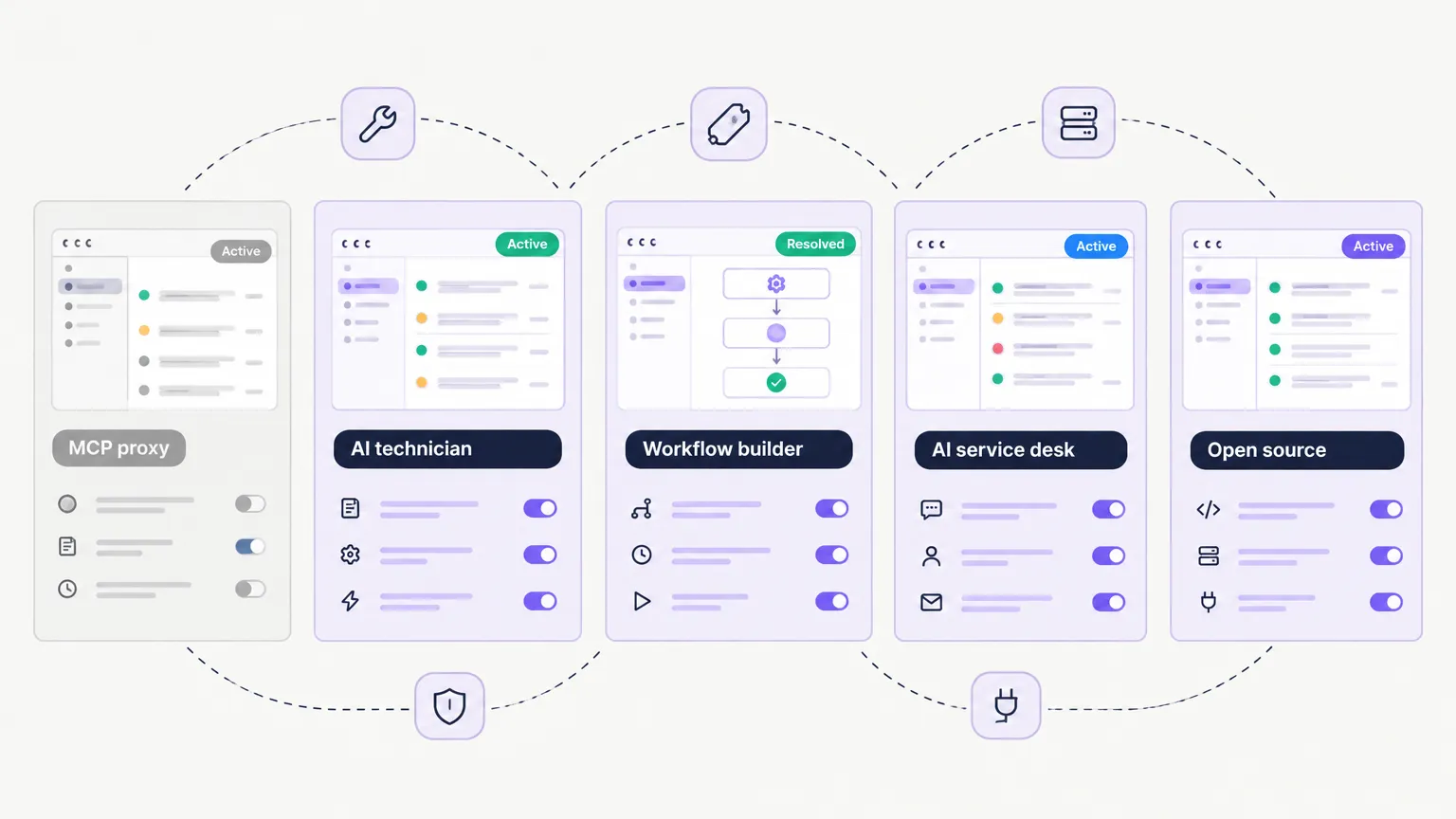
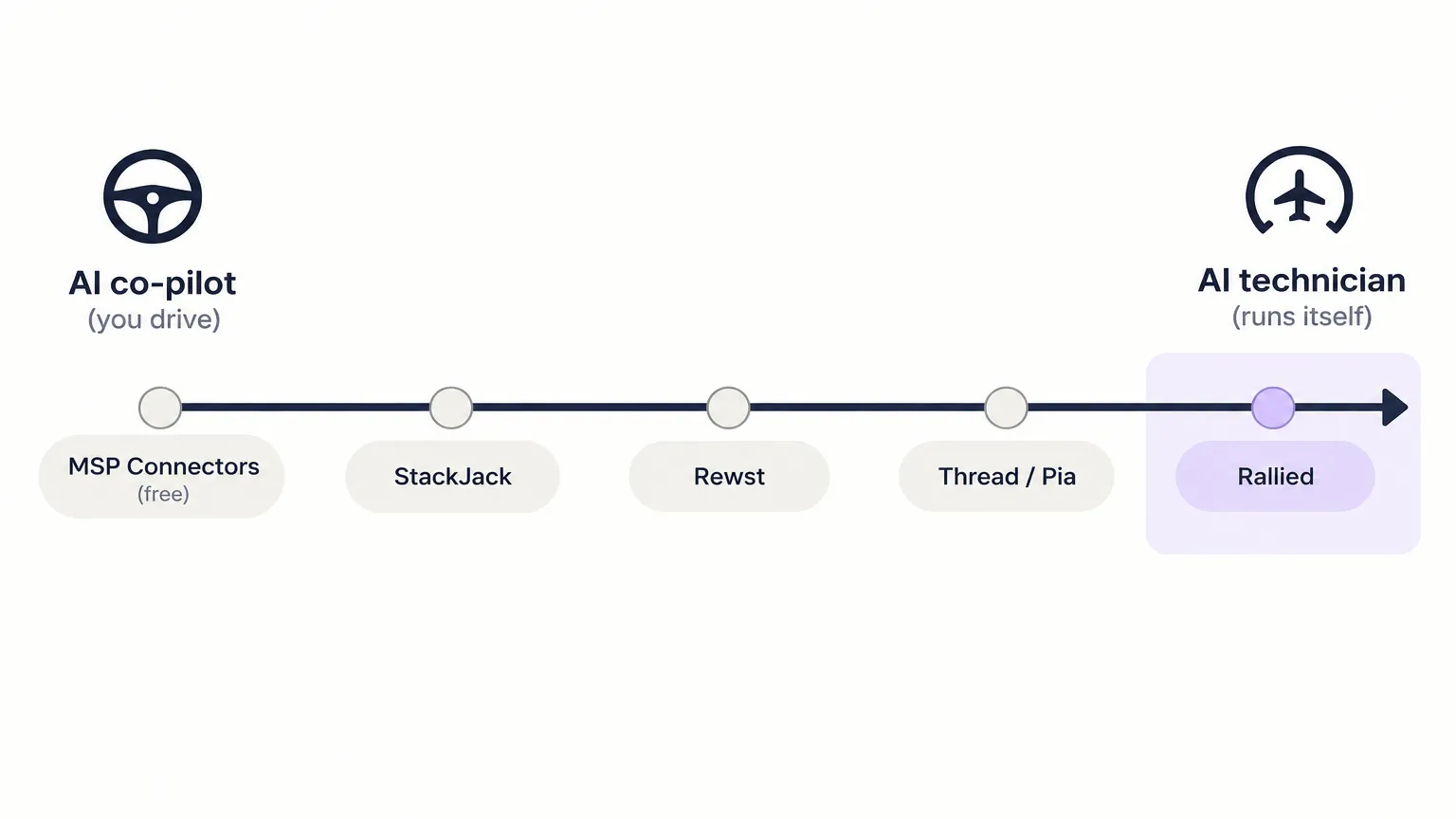
StackJack is an MCP proxy - it makes Claude and Cursor smarter about your MSP stack, but you're still the one prompting it. The five best alternatives in 2026 are: Rallied (AI technician that works tickets without a prompt, $300/month), Thread (AI service desk, $19–$34 per managed customer), Rewst (workflow automation with a natural-language AI agent, quote-based), Pia (pre-built MSP automation library, quote-based), and Compounding Teams MSP Connectors (free, open-source, 107 connectors). The core question is whether you want a smarter co-pilot or an AI that handles tickets while your team is doing other things.
What makes MSPs look for StackJack alternatives
StackJack is a genuinely impressive piece of infrastructure. The MSP Automator, Ceej, built something that most MSP vendors wouldn't have attempted - a single MCP gateway that connects your AI assistant to 130+ MSP connectors and 41,078 tools, complete with SOC 2 Type II certification and an AI Governance dashboard. If you've ever wanted Claude to actually look up a ticket in HaloPSA before answering a question, StackJack is the tool that makes that possible.
But there are three situations where MSPs start looking for alternatives.
The co-pilot ceiling. StackJack gives your AI tools read and write access - but someone still has to type the prompt. If you're a solo MSP owner experimenting with Claude or Cursor, that's fine. If you're running a service desk team and want AI handling L1 tickets autonomously while your techs focus on higher-value work, you need something that doesn't require a human in the loop for every request.
Pricing opacity. StackJack's connector plans don't show dollar amounts publicly. You click through to checkout to see what Pro or Business actually costs per connector. If you're trying to build a business case or compare tools in a spreadsheet, that's friction. The Automation credit packs ($5–$200) are shown, but the core subscription pricing isn't.
Purpose-built vs. general-purpose. StackJack is a great MCP gateway, but it doesn't know what an offboarding workflow should look like for an MSP, or which questions to ask before resetting a password, or what to do when a printer queue is stuck. The tools and alternatives below are purpose-built for MSP service delivery - they come with MSP-specific logic baked in.
What StackJack actually does (and what it doesn't)
Before we look at alternatives, let's be fair about what StackJack is.
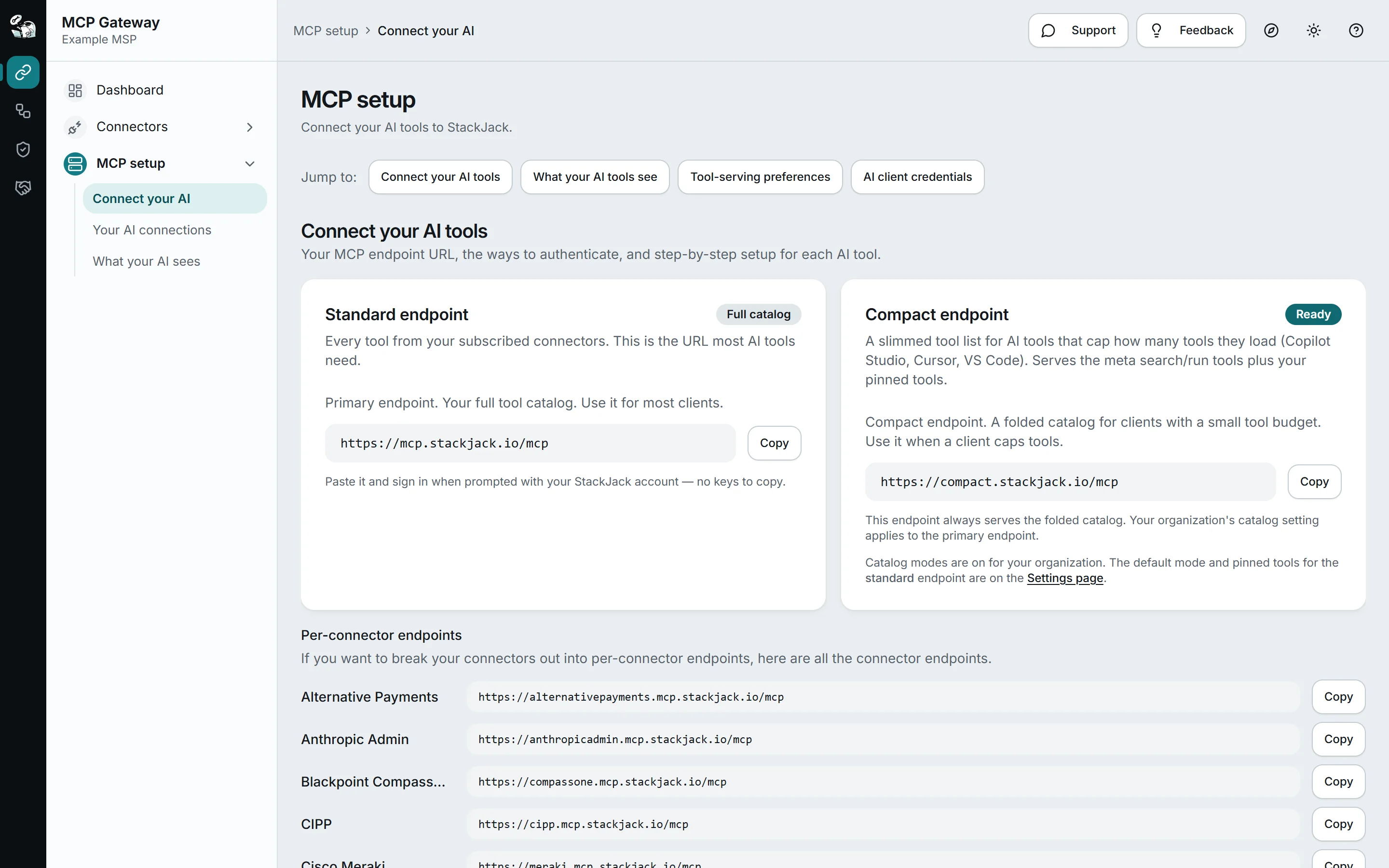
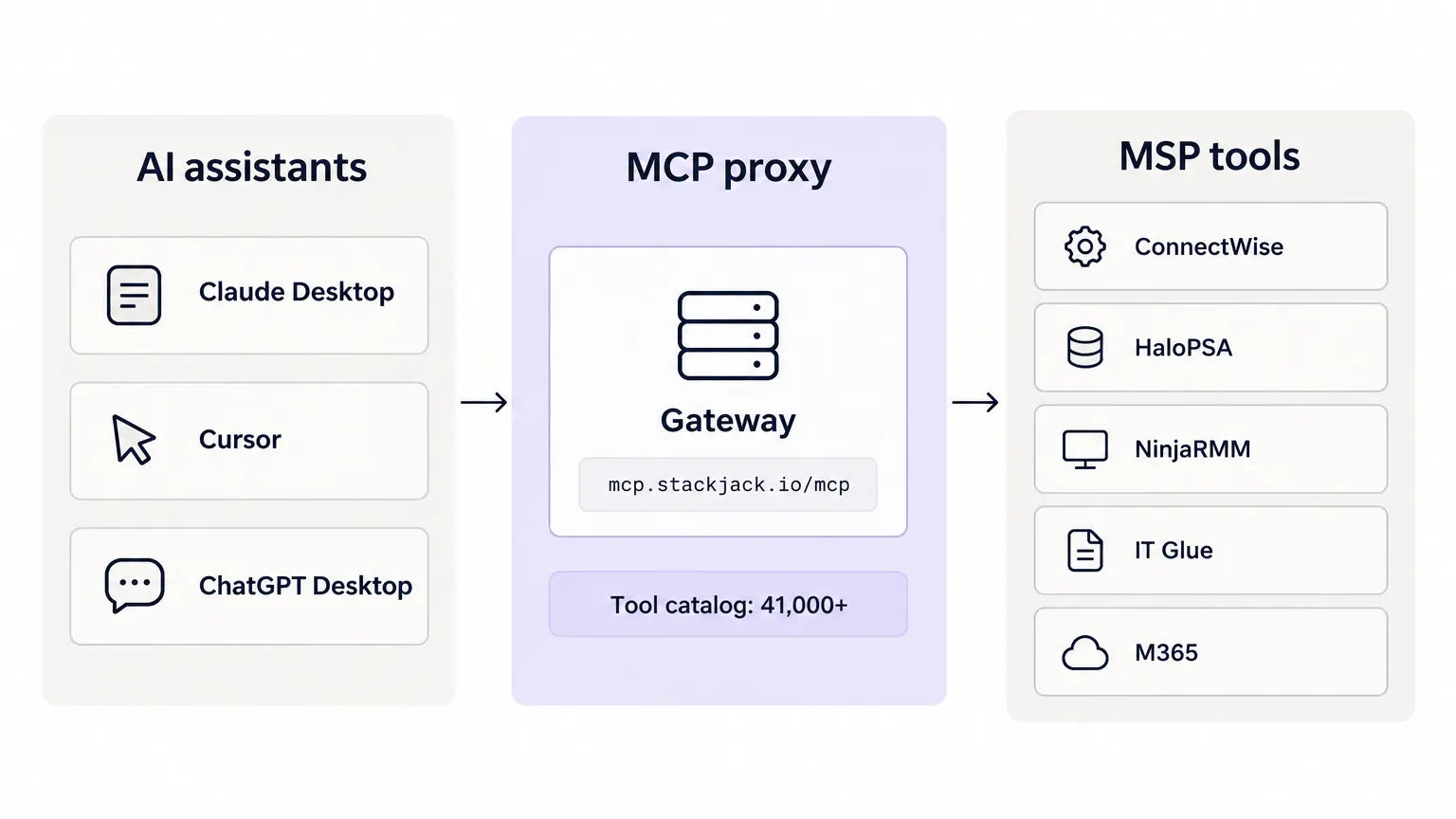
The core product is an MCP proxy. You point your AI client (Claude Desktop, Cursor, ChatGPT Desktop, Continue.dev, Cline, GitHub Copilot) at a single URL - mcp.stackjack.io/mcp - and suddenly that AI can call tools in ConnectWise, HaloPSA, NinjaRMM, Datto RMM, IT Glue, Huntress, Microsoft 365, and 130+ other connectors. The standard endpoint serves the full catalog; the compact endpoint serves a slimmed-down version for clients like Cursor and Copilot Studio that cap tool count.
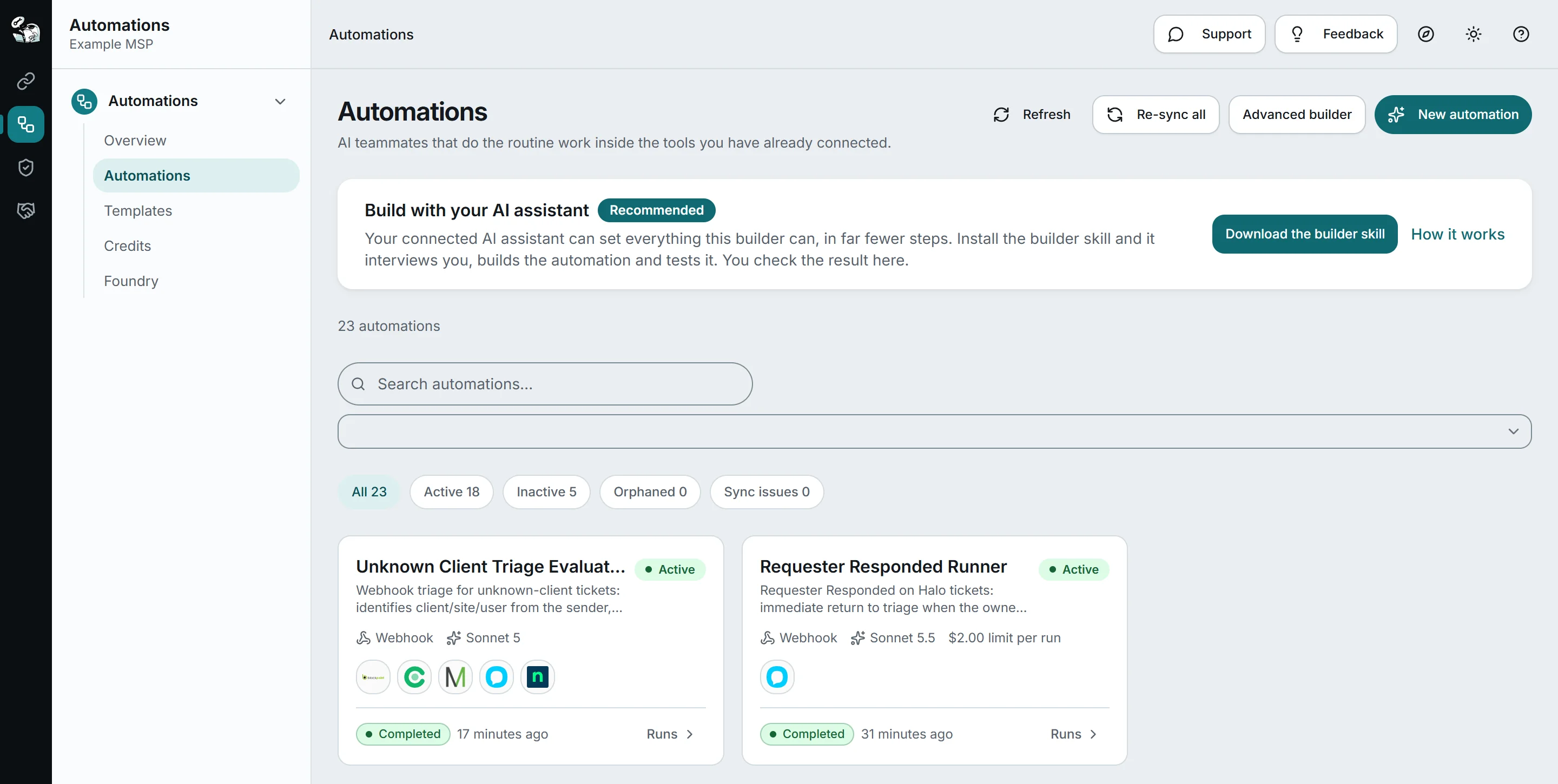
On top of the MCP proxy, StackJack has layered two more capabilities. Automations let you build webhook-triggered AI workflows - you describe the task, pick a model (Claude claude-sonnet-5, Sonnet 5.5, etc.), and StackJack runs it when triggered. Each automation run shows you its duration, tool calls, and estimated API cost. AI Governance (currently in public beta) gives you a cross-client dashboard showing AI spending, open findings, and compliance readiness for every organization you manage.
What StackJack doesn't do is make decisions. StackJack is a tool-access layer. When an automation runs, the AI follows the instructions you wrote - it doesn't apply MSP-specific judgment about what to check before resetting a password, or whether this user's account should actually be unlocked, or whether the printer issue is a one-time glitch or a symptom of a deeper problem. That reasoning is yours to build.
StackJack pricing (what's publicly visible): every connector has a free tier that never expires, with 20,776 tools available free across 130 connectors. Pro and Business connector tiers add higher call volumes (Business is 10x Pro's volume, at 50K calls/month). Automation credit packs run from $5 to $200, and credits never expire. Dollar amounts for the connector tiers aren't listed publicly - they come through Paddle at checkout. BYOK (bring your own Anthropic key) is available for teams that want flat-rate Automation costs.
The 5 best StackJack alternatives
Here's what we looked at before this list: NeoAgent (turned out to be an enterprise document-processing tool, not MSP-focused), generic MCP gateways (like TrueFoundry - real products, but not MSP-specific), and n8n/Make (viable for the technically adventurous, but overkill if you don't want to build from scratch). The five below are the ones we'd actually recommend to an MSP owner.
1. Rallied - AI technician that resolves L1/L2 tickets
Best for: MSPs that want AI resolving tickets in the PSA without a technician typing a single prompt.
Rallied is the furthest right on the autonomy spectrum. Where StackJack gives Claude access to your tools and waits for you to type a prompt, Rallied watches your PSA ticket queue, reads incoming tickets, pulls context from your RMM and documentation, and handles them - without anyone in the loop for routine requests.
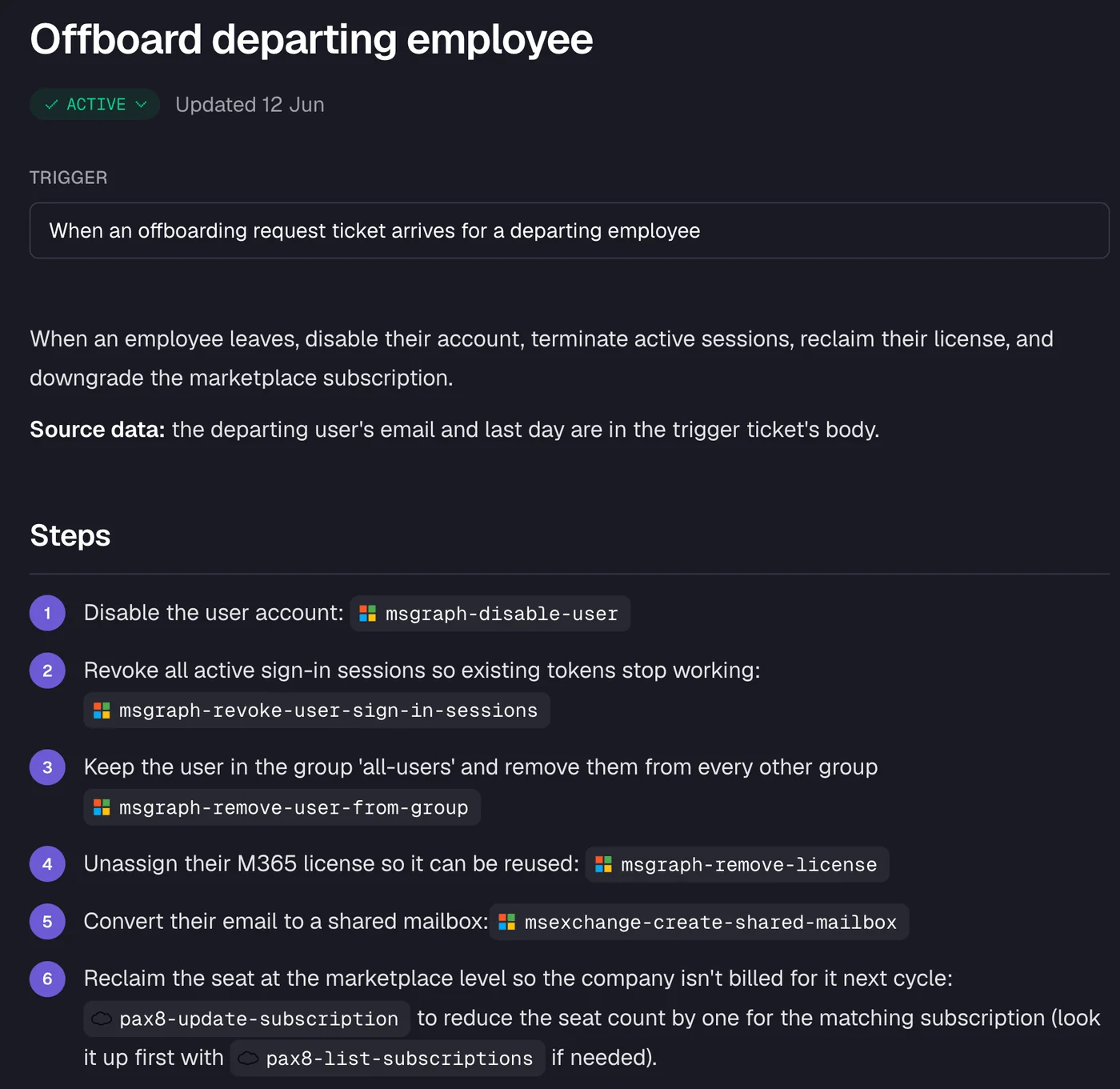
We looked at a sample offboarding workflow and it ran six steps after one approval: disable the account via Microsoft Graph, revoke active sign-in sessions, remove the user from groups, reclaim the M365 license, convert the mailbox to shared, and update the Pax8 subscription to reduce the seat count. Each step was written back to the ticket as an internal note, with time logged and the ticket closed.
The ticket types Rallied works include password resets, MFA re-enrollment, shared mailbox access, distribution list changes, onboarding, offboarding, software license assignments, and printer queue resets. Hardware issues, onsite requests, and security incidents always escalate to your team. When Rallied isn't confident, it posts its diagnosis as an internal note and assigns the ticket to a technician - which means the tech arrives with context instead of a cold ticket.
How it connects: PSA integrations are ConnectWise Manage, HaloPSA, Autotask, and SuperOps. RMM integrations include NinjaOne, Datto RMM, ConnectWise Automate, ConnectWise RMM, and N-able N-central. Documentation: IT Glue, Hudu, Confluence. Microsoft 365, CIPP, Pax8, and TimeZest are also supported.
Controls you keep: Every action can be set to Auto, Approval, or Off at the action level and per client. A common starting point is lookups on Auto and password resets on Approval. Plan Mode lets you see exactly what Rallied would do on your real tickets before it touches anything.
Rallied is SOC 2 Type II certified and was named by CRN as one of the 10 hot MSP tools for agentic AI capabilities in 2026.
"I had someone tracking printer tickets for me. After the first month, I found they had spent 232 hours on printer tickets - just one type of ticket." - Richard Scott, CTO at Cyber Solutions (Rallied homepage)
Pricing:
| Plan | Monthly fee | Credits | Approx. tickets |
|---|---|---|---|
| Standard | $300/month | 2,000 credits | ~700 tickets |
Credits are priced by complexity: simple ticket operations (assign, route, close) cost 1 credit; standard operations like a password reset or RMM device lookup cost 3 credits; complex multi-system workflows cost 8 credits. Extra credits are $0.10 each, and they never expire. No annual plan, no free tier, no per-technician seat.
Our take: If the problem you're solving is "my team spends too much time on L1 grunt work," Rallied is the most direct answer on this list. Rallied works the ticket in your PSA while your techs do something else, so nobody types a prompt. The 14-day free trial with no credit card required makes the ROI case easy to test before you commit.
2. Thread - AI service desk with per-customer pricing
Best for: MSPs that want clear, predictable pricing tied to managed customer count.
Thread calls itself an AI service management platform for MSPs, and the positioning is direct: "All hands on deck. Zero on payroll." It sits between StackJack and Rallied on the autonomy scale - purpose-built for MSP service delivery, with AI agents that work across Teams, Slack, email, chat, SMS, and phone, and sync back to ConnectWise, Autotask, or HaloPSA.
Thread's named agents include a Triage Agent (96% claimed triage accuracy), a Dispatch Agent, Reminders, and a Voice AI agent that handles inbound calls. Its Automagically feature builds automations from plain-language descriptions with human approval before anything goes live - a sensible guardrail for an MSP that hasn't vetted every possible edge case.
The stats Thread publishes: 750+ MSPs using the platform, 435K monthly agent sessions, go-live in 24 hours, and a 60-day money-back guarantee. Customer results cited on the site include Marco achieving 600+ hours saved and WheelHouse IT hitting 92% faster response times - though these are vendor-selected and not independently audited.
Pricing:
| Plan | Per managed customer/month | What's included |
|---|---|---|
| AI Essentials | $19 | Triage, ticket sync, basic agents |
| AI Pro | $34 | Adds Triage Agent, Reminder, Knowledge Base, Contact Intelligence, Automagically, Magic Analytics |
| Integrated Chat add-on | +$5/customer | Embedded chat widget |
| Voice AI add-on | +$15/customer (Pro only) | AI phone agent |
Unlicensed customers draw from a free credit pool (3x your license count, 1 credit per automated ticket). Thread offers a 60-day money-back guarantee - the most generous refund policy on this list.
Our take: Thread's pricing model is the most transparent here. You know exactly what you'll pay per managed customer, and you can model your total cost before signing anything. The per-customer pricing also scales naturally with your business - if you lose a client, your Thread bill drops. The tradeoff is that at scale (say, 150 managed customers on AI Pro), you're at $5,100/month, which is meaningfully more than Rallied's flat $300. Run the math against your ticket volume before committing.
See how Thread compares with Rallied.
3. Rewst - workflow automation for the technically adventurous
Best for: MSPs that want to automate complex, multi-system processes and don't mind the upfront build time.
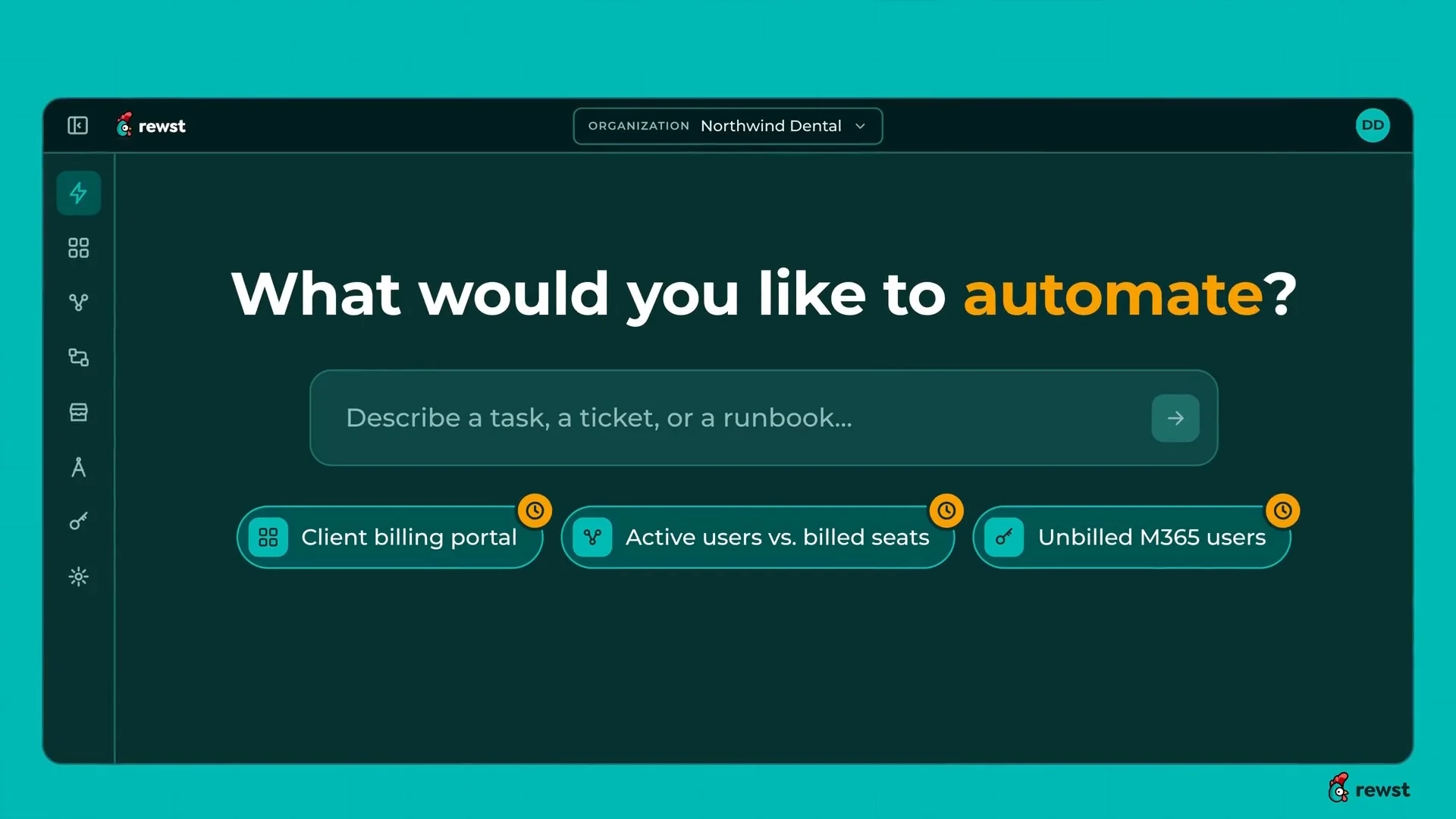
Rewst is the workflow automation platform that most established MSPs will have heard of. Its value proposition has evolved from a workflow builder into something with more AI ambition: the Rewst Agent lets you describe a task in plain language and it builds and tests the workflow. Integrations span ConnectWise PSA, HaloPSA, Kaseya BMS, SuperOps, Datto RMM, NinjaRMM, N-able, Microsoft 365, Pax8, Sherweb, Hudu, and IT Glue, among others.
The gap between Rewst and StackJack is the approach. StackJack makes an AI assistant smarter about your existing tools; Rewst gives you a workflow engine where you define what automation runs, when, and what it touches. The AI layer (Rewst Agent) is an interface on top of that engine - you can describe a task, but Rewst's real power is in the automation logic, not the AI prompting experience.
One published customer result: a billing reconciliation customer using Rewst found $100,000+ in annual missed revenue it had been leaving on the table. The 75–80 hours/week saved figure is from a separate customer. Both are vendor-selected cases; Rewst doesn't publish resolution rates or independent benchmarks.
Pricing: Rewst prices per client organization (the businesses you manage), not per seat or per user. Volume bands mean each additional client block costs less than the last. No dollar amounts are published - you book a demo to get a quote. Everything is included at any tier: unlimited users, unlimited automations, Rewst Agent access, 30-day execution history, and guided onboarding. The AI allowance is 5% of your monthly invoice, with BYOK (bring your own provider key) available.
Our take: Rewst is the right tool if you want to automate complex multi-system processes that go beyond standard L1/L2 - billing reconciliation, client onboarding that touches 10 different systems, custom SLA reporting. The setup investment is real; this isn't something you're live with in 24 hours. If your problem is specifically "too many routine tickets," the other options on this list are faster to value. If your problem is "we have bespoke workflows that nothing else can replicate," Rewst earns its place.
See how Rewst compares with Rallied.
4. Pia - pre-built MSP automation library
Best for: MSPs that want a library of pre-built MSP automations without building from scratch.
Pia positions itself as an MSP service delivery automation platform with "hundreds" of pre-built automations for the most common service desk use cases: password resets, onboarding, offboarding, shared mailbox changes, and access requests. Its product line includes aiDesk (the core automation engine), Pia Chat (a Microsoft Teams app that resolves tickets directly in Teams), AI Ticket Triage, and SmartForms for client self-service.
Pia integrates with ConnectWise, HaloPSA, Autotask, Microsoft 365, and Pax8 on the main stack, plus "dozens more." The key differentiator compared to Rewst is the starting point: Pia ships with MSP-specific automation libraries, so you're configuring rather than building from scratch. Customer results on the site include Accellis reporting that 35–40% of tickets are handled by automation, and Intalex saying onboarding dropped from roughly two hours to under ten minutes.
Pia announced a usage-based pricing model alongside an unlimited fixed-pricing option, but specific tier names and dollar amounts aren't publicly listed. Book a call to get a quote.
Community sentiment is mixed. One r/msp thread noted that some teams had to tweak workflows to avoid ticket loops when layering Pia on top of existing PSA automations. Another mentioned the PSA chatbot integration as a strong point. The setup is reportedly faster than Rewst but not as simple as Thread or Rallied.
Our take: Pia earns its place if you want to avoid the blank-canvas problem of Rewst while still having more customization than Thread. The Teams integration via Pia Chat is a differentiator if your clients live in Microsoft Teams. The flip side: pricing opacity makes it hard to build a business case without getting on a call, and the community signal suggests the automation logic can need some tuning before it runs smoothly.
See how Pia compares with Rallied.
5. Compounding Teams MSP Connectors - free, open-source MCP alternative
Best for: MSPs that want StackJack's connector model at zero cost and don't mind some CLI setup.
Compounding Teams MSP Connectors, built by Damien Stevens at Servosity, is the most direct like-for-like alternative to StackJack's connector model - except it's Apache 2.0 licensed and free. No per-tech fee, no API-access charge from Servosity, 107 connectors covering PSA, RMM, backup, security, Microsoft 365, and billing.
The architecture is different from StackJack. Rather than a cloud proxy, MSP Connectors runs locally: each connector builds a SQLite mirror of that tool's data, so cross-client queries run as local SQL rather than chained API calls. This avoids rate-limit issues on large cross-client questions ("which clients have unlicensed users in M365?") and keeps your data off a third-party cloud gateway.
Supported AI clients include Claude Desktop, Claude Code, ChatGPT Desktop, Codex CLI, GitHub Copilot in VS Code, Gemini CLI, Cursor, Windsurf, Cline, Continue.dev, and Zed. Each command is labeled read, write, or destructive - with a recommended --dry-run policy for write operations and a human approval step before mutations run.
The limitation the site is honest about: Claude.ai on the web, ChatGPT on the web, Microsoft 365 Copilot, and the Gemini app aren't supported, because they need a remote HTTP server rather than a local MCP server. This is a meaningful gap if your team uses Claude.ai as the primary interface rather than Claude Desktop or Cursor.
Pricing: Free. You still pay your AI provider (Claude API, OpenAI API, Gemini API - whatever you're using), but there's no Compounding Teams subscription fee.
Our take: If you're experimenting with AI-assisted MSP work and you're not ready to pay for a commercial MCP proxy, Compounding Teams is the most sensible starting point. The fact that it's free and open-source means zero risk. The tradeoffs are real, though: local setup required, no cloud-hosted gateway, narrower AI client support, and community support rather than commercial SLA. For a production MSP with clients to protect, most teams eventually graduate to a commercial option - but as a first step or a proof-of-concept, it's genuinely good.
Side-by-side comparison
| StackJack | Rallied | Thread | Rewst | Pia | MSP Connectors | |
|---|---|---|---|---|---|---|
| Model | MCP proxy | AI technician | AI service desk | Workflow automation | Pre-built automation | Open-source MCP |
| Works tickets without a prompt | No (you prompt) | Yes | Partial | Partial | Partial | No (you prompt) |
| Pricing | Per connector (Free + paid tiers) | $300/mo flat | $19–$34/customer/mo | Quote | Quote | Free |
| Go-live speed | Fast (URL config) | Day 1 | 24 hours | Weeks | Days | Hours (CLI setup) |
| PSA integrations | 130+ connectors | CW, Halo, Autotask, SuperOps | CW, Autotask, Halo | CW, Halo, Kaseya, SuperOps | CW, Halo, Autotask | CW, Halo, Autotask, Syncro |
| SOC 2 Type II | Yes | Yes | Not stated | Not stated | Not stated | N/A (self-hosted) |
| Free trial | Free tier (never expires) | 14-day, no CC | 60-day money-back | Demo only | Demo only | Always free |
How to choose
You want AI to handle tickets while you sleep. Go with Rallied. Rallied is the only tool here that resolves, notes and closes tickets end to end, with your tech approving changes on the ticket. The $300/month flat fee is easy to justify if you're currently billing 20+ hours a month to L1 grunt work.
You want per-customer pricing that scales with your book of business. Go with Thread. The $19–$34 per managed customer model means your AI cost tracks your revenue, and the 60-day money-back removes most of the risk of trying it.
You have complex custom workflows that standard tools can't replicate. Go with Rewst. The workflow engine is genuinely powerful, and if you have edge cases that require multi-system logic nobody has pre-built, Rewst gives you the tools to build them.
You want pre-built MSP automations and a Teams-native client interface. Look at Pia. The automation library is a faster starting point than Rewst's blank canvas, and Pia Chat makes it easy for end users to self-serve without opening a browser.
You want StackJack's connector model at zero cost. Use Compounding Teams MSP Connectors. Compounding Teams MSP Connectors is free, Apache 2.0, and covers 107 connectors. The setup is more involved than StackJack, but if you're running Claude Desktop or Cursor and you don't want another subscription, it's the right starting point.
You want to stay on StackJack but add autonomous execution. StackJack's Automations feature is worth exploring before you switch. The Automations builder can run webhook-triggered AI agents inside your existing MSP tools, and the AI Governance dashboard gives you multi-client visibility. StackJack Automations doesn't resolve tickets, but for a team already in the StackJack stack, it's the lowest-friction path to more automation.
Try Rallied
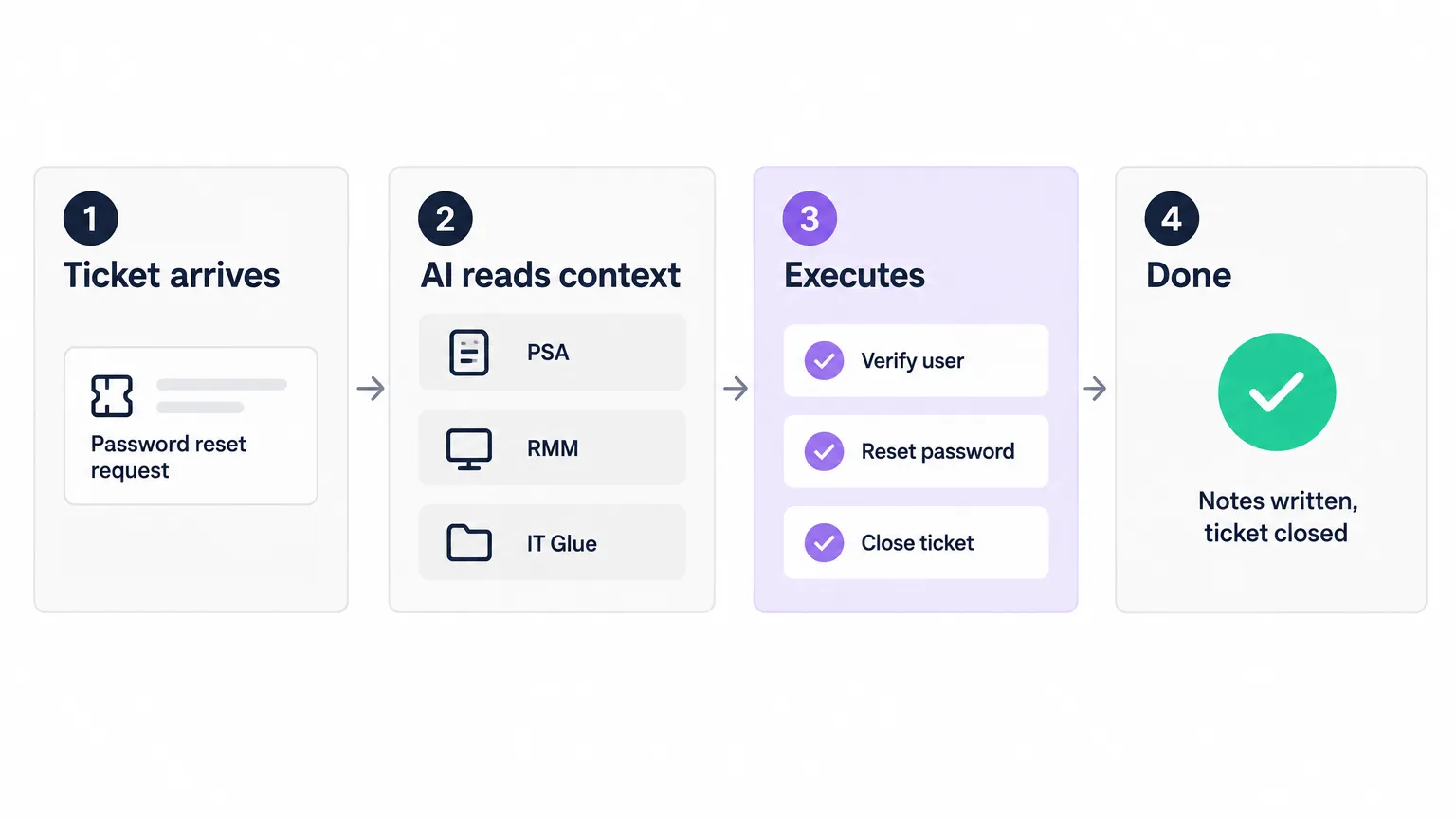
Rallied is built for the MSP that's tired of routing the same L1 tickets - password resets, shared mailbox access, printer queues - to a technician who could be doing something more valuable. Rallied connects to your PSA, RMM, Microsoft 365, IT Glue, and Hudu, then handles incoming tickets the same way a good tier-1 tech would: reads the ticket, checks the systems, executes the fix, writes the note, closes the ticket. No prompt required.
Pricing is $300/month for 2,000 credits - roughly 700 tickets at the standard 3-credit rate. A 14-day free trial with no credit card required lets you run it on your real tickets in Plan Mode before you turn on live execution. At $300/month, one prevented hire pays for the tool for years.
For the wider picture, read 7 Best MSP Automation Tools in 2026.
Frequently Asked Questions
What is StackJack used for in an MSP?
StackJack is an MCP proxy that lets AI assistants like Claude and Cursor access your MSP tools - PSA, RMM, Microsoft 365, security platforms, and documentation systems. When you ask Claude 'why is this ticket stuck?' it can actually look it up in ConnectWise or HaloPSA and show you the answer. It also includes an Automations builder and an AI Governance dashboard for tracking AI usage across client organizations. What it does not do is run on its own - you're still in the driver's seat typing prompts.
What is the best StackJack alternative for autonomous ticket resolution?
Rallied is the closest thing to an AI technician that works MSP tickets without a prompt. Rallied connects to your PSA, RMM, Microsoft 365, IT Glue, and Hudu, then works incoming tickets - password resets, onboarding, offboarding, printer queue resets - with your tech approving changes on the ticket and without a technician typing a prompt. It writes notes to the ticket, logs time, and closes it. Thread is the other strong option if you want per-customer pricing rather than a flat monthly fee.
How much does StackJack cost compared to alternatives?
StackJack doesn't publish dollar amounts for its Pro, Business, or Enterprise connector plans - pricing comes through its checkout flow. Its Automation credit packs run from $5 to $200, and credits never expire. For comparison: Rallied charges $300/month for 2,000 credits (roughly 700 tickets); Thread charges $19–$34 per managed customer per month; Rewst and Pia are quote-based; and Compounding Teams MSP Connectors are free.
Does StackJack work with Cursor, or only with Claude?
StackJack works with any AI client that supports the MCP protocol. The list includes Claude Desktop, Cursor, Continue.dev, Cline, ChatGPT Desktop, Copilot in VS Code, and GitHub Copilot. It provides two MCP endpoints: a standard endpoint with the full tool catalog and a compact endpoint for clients that cap how many tools they load - useful for Cursor and Copilot Studio, which have tighter tool budgets.
What is the difference between an MCP proxy and an autonomous AI technician for MSPs?
An MCP proxy like StackJack gives your AI assistant read and write access to MSP tools. You still type the prompt - 'reset this user's password', 'triage this ticket', 'list all open P1s for Acme'. The AI executes your instruction. An AI technician like Rallied watches the ticket queue and works each ticket, with your tech approving changes. When a password reset ticket arrives, Rallied reads your runbooks, verifies the requester, resets the password, writes a note, and closes the ticket - without anyone typing a prompt. Both are genuinely useful; the right choice depends on whether you want a smarter co-pilot or a technician who works while you sleep.