AI risk assessment template for MSPs (2026 edition)

TL;DR
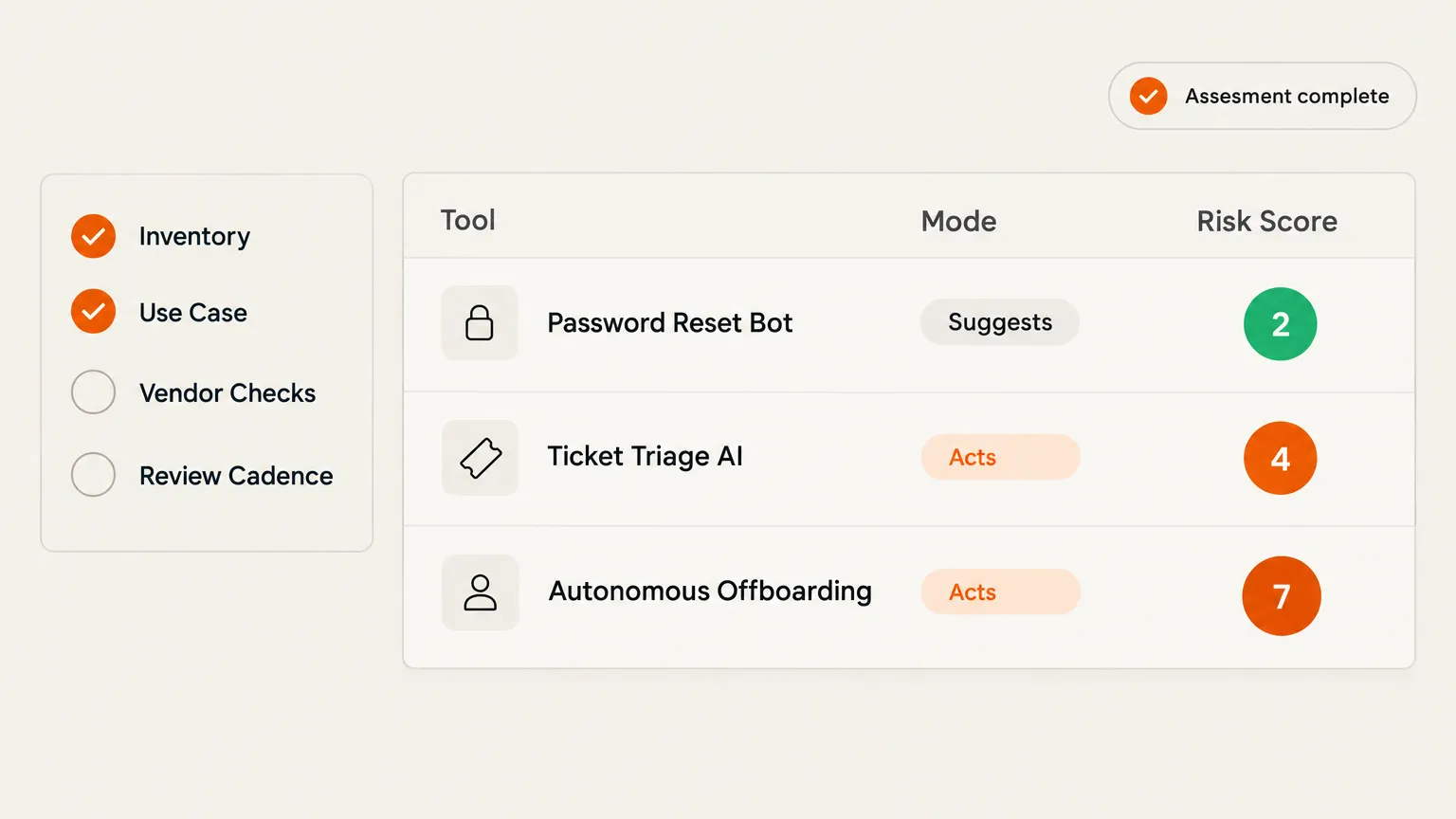
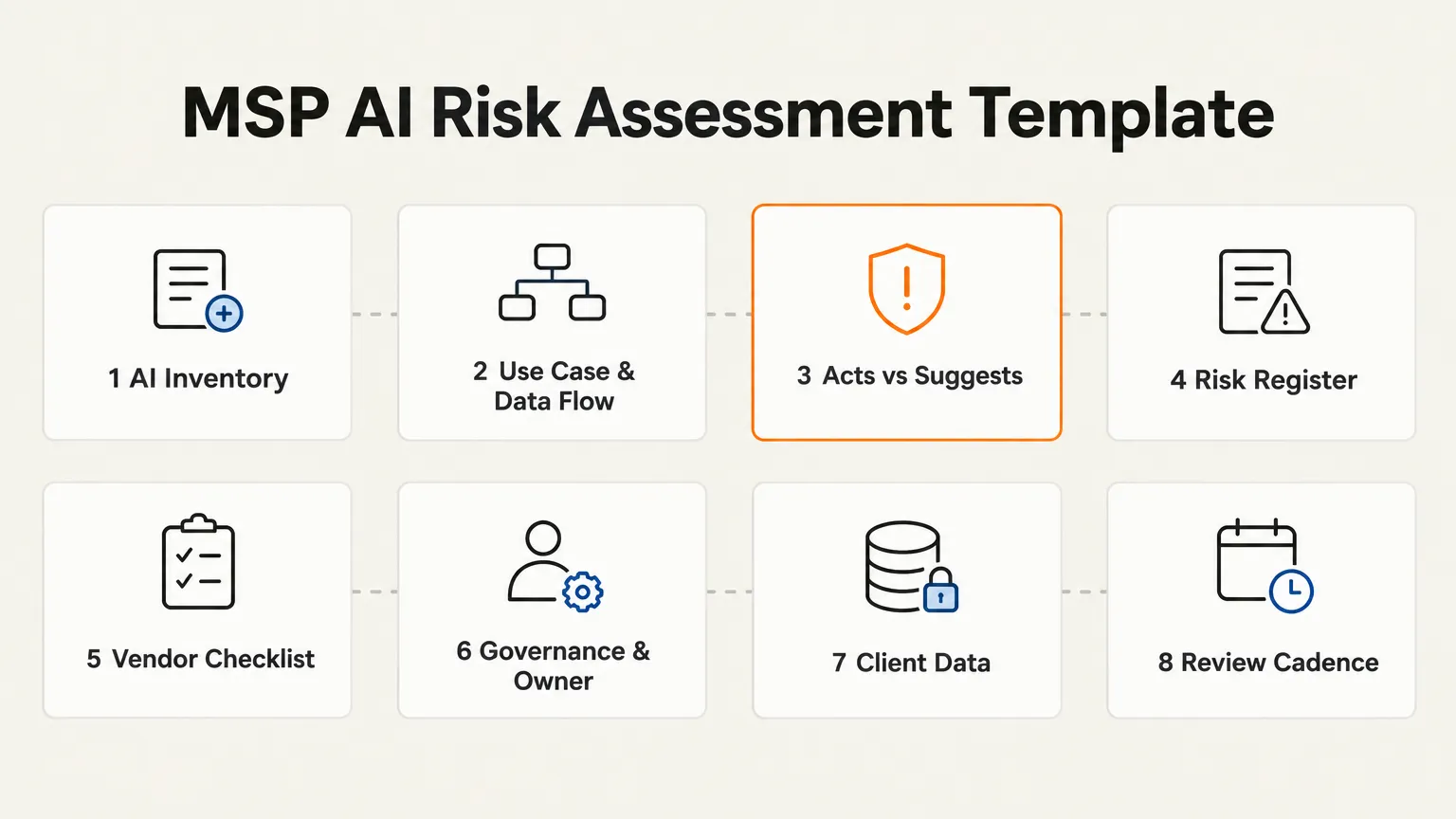
Most MSPs don't have an AI risk assessment process - they have a vague intention to get one. The gap matters because MSPs carry double exposure: AI touching their own operations, and AI touching their clients' environments simultaneously. This post gives you a practical 8-section template grounded in NIST AI RMF 1.0, adapted for the specific shape of MSP risk. The section most frameworks miss: an explicit "acts vs suggests" column, because an AI that resets passwords has a fundamentally different risk profile than one that drafts a reply. If you want an AI technician that was built with this accountability model from day one, Rallied is worth a look.
Why MSPs carry more AI risk than a typical business
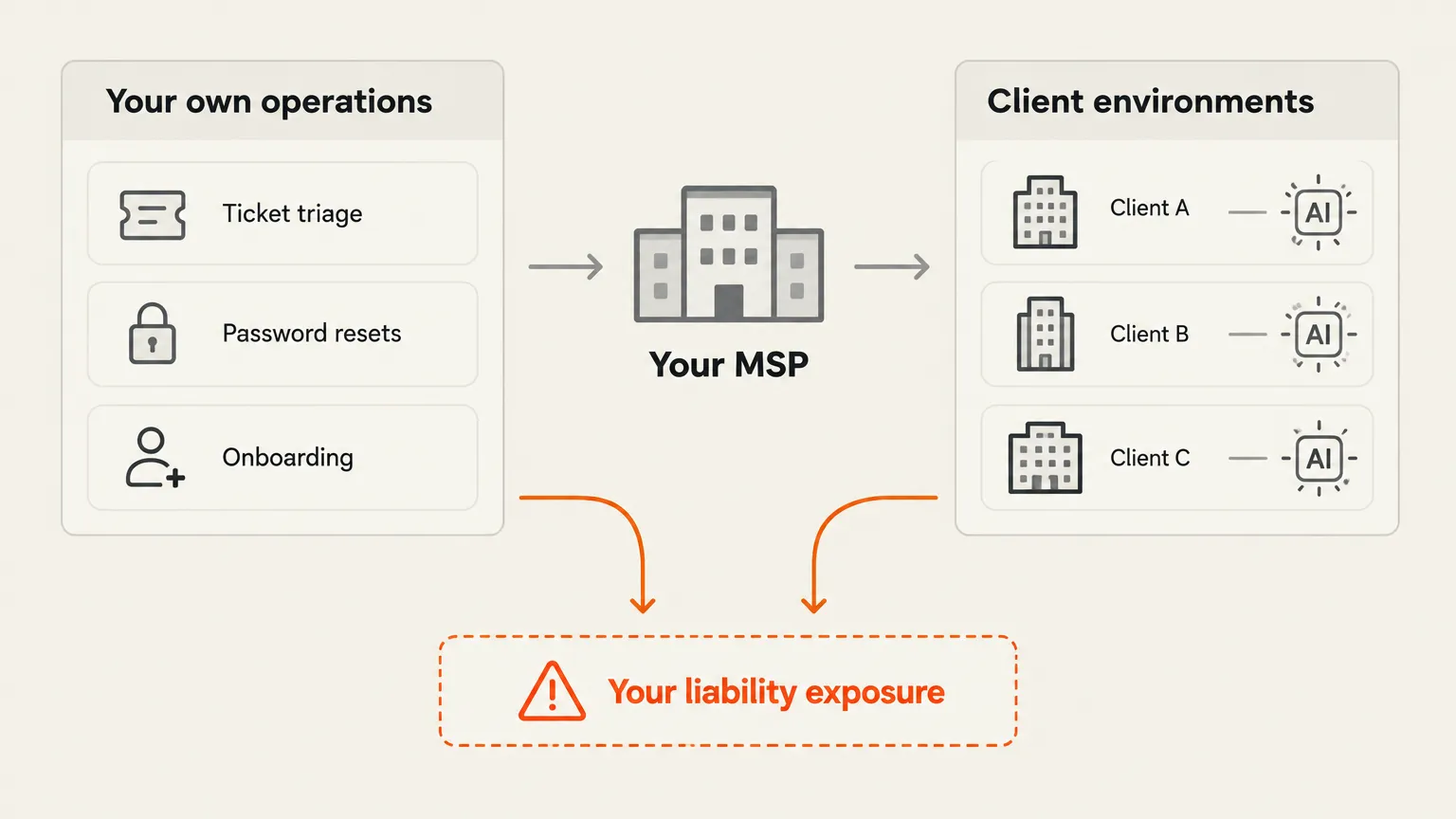
A law firm deploying an AI tool has one exposure: its own operations. An MSP deploying the same tool has two: its own operations, and however many client environments it manages.
That double exposure is increasingly on the radar of MSP executives. Revenue gains and cybersecurity risks from AI are both near the top of the 2026 concern list for MSP 501 leaders. What's less common is a formal process for actually quantifying that risk before a tool goes live.
The practical shape of the problem: when your AI touches a ticket, it usually touches the client data inside it - conversation history, credentials, documented configurations. When your AI acts on a ticket, it may be touching the client's identity provider, their M365 tenant, their PSA. Each of those is a different liability surface, and they compound across every client you manage.
A LinkedIn post from Stratova Consultants put it plainly: most MSPs don't have an AI problem, they have a governance gap. The same actions that reduce liability in other parts of the business - documented owners, clear approval gates, defined scope - apply to AI, but most MSPs haven't built them.
The framework anchor: NIST AI RMF
You don't need to build your assessment from scratch. NIST AI RMF 1.0 is the most practical voluntary reference available - developed over 18 months with more than 240 contributing organizations from industry, academia, and government. It won't tell you whether a specific tool is safe, but it gives you a durable structure for asking the right questions.
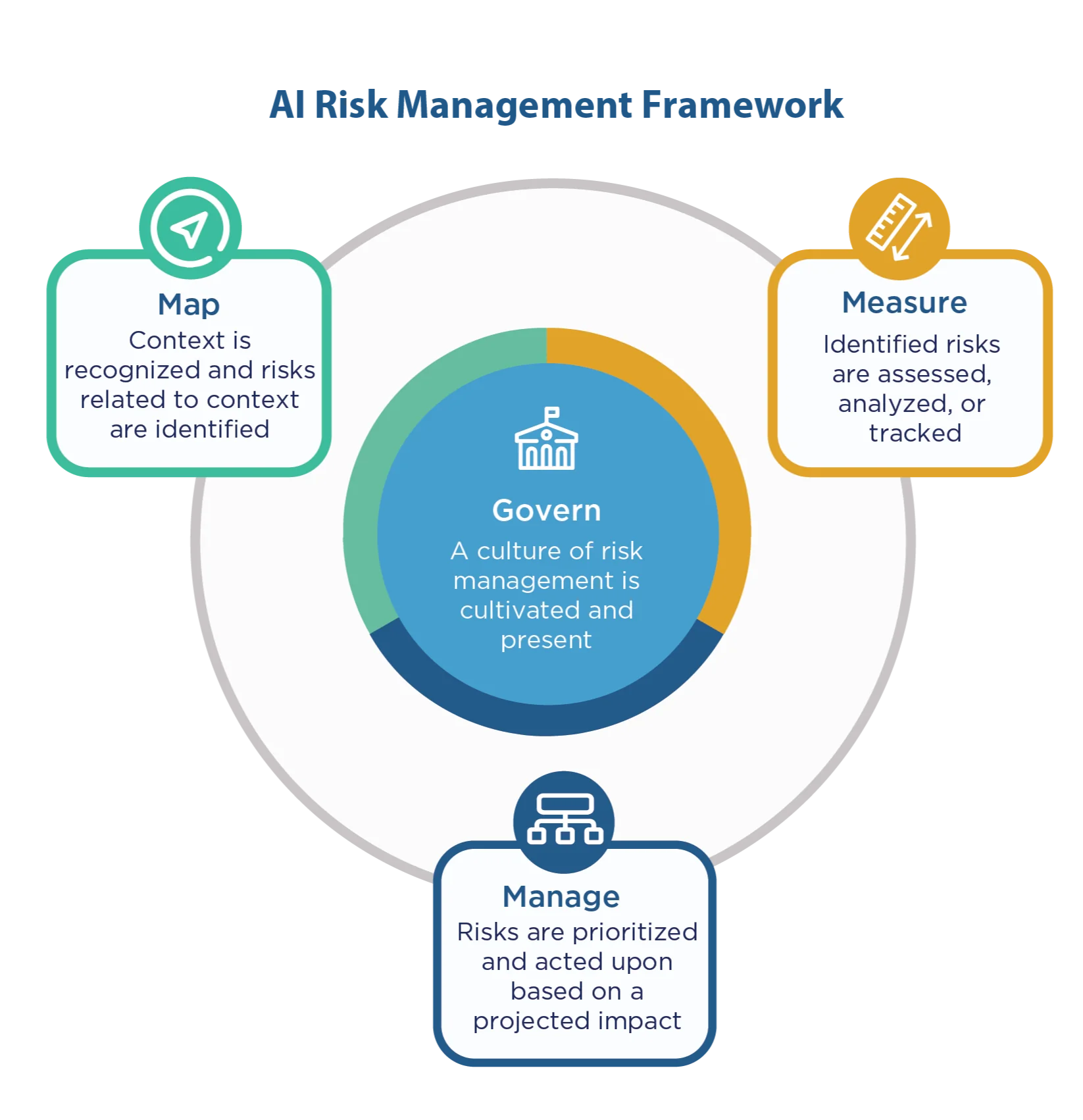
The framework has four functions:
- Govern - a culture of risk management is established and maintained. This is the ownership layer: who is accountable for AI decisions in your organization?
- Map - context is recognized and risks related to context are identified. This is where you inventory your AI tools and describe how each one is used.
- Measure - identified risks are assessed, analyzed, or tracked. This is where likelihood and impact scoring happen.
- Manage - risks are prioritized and acted upon based on projected impact. This is where mitigations get assigned to owners with deadlines.
One caveat worth flagging: NIST has indicated that AI RMF 1.0 is currently under revision. The four-function structure is stable and worth building on, but specific wording in subcategories may change. Check the AIRC for updates before you finalize any client-facing documentation.
The 8-section template
Here's the structure we'd recommend for an MSP AI risk assessment. It maps to the NIST AI RMF functions while adding the MSP-specific additions that general templates tend to leave out.
Section 1: AI system inventory
List every AI tool your organization uses or deploys for clients. That means standalone tools (a helpdesk AI, an AI technician like Rallied) and AI features embedded in existing products - the AI summarization in your PSA, Copilot in M365, the smart triage in your RMM. The embedded ones are easy to miss on a first pass.
For each tool, capture: tool name, vendor, version, which team uses it, which client environments it touches.
Section 2: use-case and data flow
For each tool in the inventory, describe what it does and what data it processes. "Ticket triage AI" is not enough - does it read ticket bodies? Does it access documentation? Does it write back to the PSA? Where does that data go, and is it processed on the vendor's servers or your own infrastructure?
This section feeds directly into the vendor checklist in Section 5. The questions you ask a vendor depend on what you know their tool actually does with data.
Section 3: acts vs suggests (the critical column)
This is the section most frameworks skip, and it's the most important one for MSPs.
An AI that suggests a reply or recommends a next step carries one risk profile. A human reviews and approves before anything changes in a connected system. An AI that acts - resets a password, changes access permissions, runs an offboarding script - executes directly in your stack.
The moment an AI can change something in a client's system without a human in the approval path, your risk rating should jump materially.
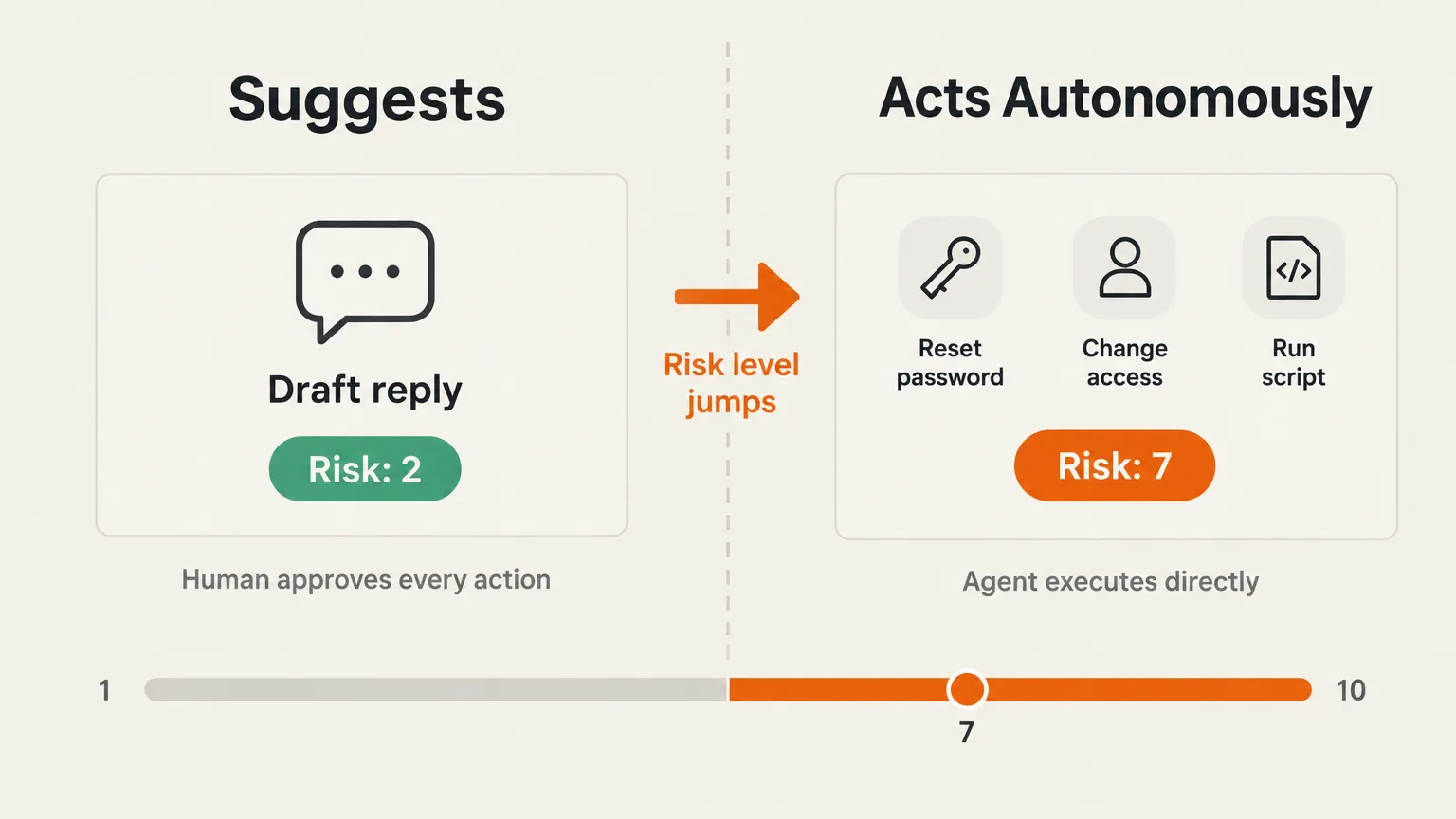
For each tool, add a column with one of three values: Suggests only, Acts with approval gate, or Acts autonomously. Any tool in the last category gets a mandatory review before go-live, and should have explicit controls documented: what actions are in scope, what triggers an escalation, what happens when the agent is uncertain.
Section 4: risk register
For each tool, score likelihood (how often could something go wrong?) and impact (what happens if it does?). A simple 1-5 scale on each axis is enough for most MSPs. Multiply them for a composite score.
The risk categories worth using in an MSP context, based on Infotech's AI Risk Register framework: data privacy, accuracy and reliability, unauthorized access, operational dependency, vendor stability, regulatory exposure, and client contract compliance.
Track the composite score over time. A tool that scored a 4 when you deployed it may score an 8 after a vendor update that added autonomous execution.
Section 5: vendor checklist
For every AI tool vendor, ask and document answers to:
- Where is data processed, and in which jurisdiction?
- Is client data used to train models?
- What is the data retention policy?
- Does the vendor have SOC 2 Type II or equivalent certification?
- What is the incident notification timeline?
- What controls exist on autonomous actions?
This matters more than most MSPs realize. An AI Governance Desk analysis notes that AI features arriving inside existing PSA, RMM, and M365 tools are routinely missed in vendor assessments - because they weren't present when the original vendor evaluation happened.
Section 6: governance and ownership
Each AI tool in your inventory needs a named owner - a person who is accountable for reviewing the tool's risk rating, approving changes to its scope, and responding if something goes wrong.
This is the NIST Govern function in practice. Without a named owner, risk assessments become documents that get written once and never updated.
Section 7: client data exposure
This section is specific to MSPs. For each AI tool, document which client environments it has access to, what data from those environments it processes, and whether clients have been informed that AI is involved in service delivery.
The last point is increasingly relevant as clients begin asking. An r/msp discussion flagged the specific problem of clients connecting their own AI tools (Claude, OpenAI apps) to M365 and Entra without informing the MSP - which creates a parallel exposure that the MSP may be contractually responsible for.
Your template should include a client notification clause and a process for handling client-deployed AI that your team discovers in a managed environment.
Section 8: review cadence
An AI risk assessment is not a one-time document. AI adoption moves fast enough that quarterly reviews are a minimum; any vendor update that changes a tool's capabilities should trigger an out-of-cycle review.
The MSPAlliance Cyber Verify program added continuous AI risk monitoring to its framework in 2026, which is a signal that the market is moving toward ongoing visibility rather than point-in-time snapshots.
Build the review into your operations calendar. Assign it the same owner as Section 6.
The hidden risk: AI inside your existing tools
The most common gap we see in MSP AI inventories isn't a rogue tool nobody knows about - it's the AI features that vendors quietly shipped inside tools the MSP already uses.
Microsoft's Copilot capabilities in M365 are the obvious example, but the same pattern applies to AI summarization in ConnectWise, smart routing in Autotask, and AI-generated workplans in tools like Hudu and IT Glue. These features arrived on the vendor's release schedule, not yours. Your vendor evaluation from two years ago didn't cover them.
A practical fix: set a calendar reminder to review each vendor's AI changelog quarterly. Most vendors publish release notes that call out new AI features. When one appears, run it through Sections 2, 3, and 5 of your template before it reaches production use.
Running it as a recurring client service
Once you have a working AI risk assessment process for your own operations, the same process is a billable service you can offer clients.
NHI Governance and AvePoint have both published guidance on MSPs packaging AI risk assessment as a recurring managed service - essentially an AI readiness audit on a quarterly cadence. The same 8-section template adapts directly: Section 7 becomes the primary deliverable (what AI tools are touching this client's environment and what's the exposure), and the review cadence becomes the recurring engagement.
The demand signal is real. An r/msp thread on unknown AI apps being connected to M365 and Entra by client admins had significant engagement, and the core anxiety - "how do I know what's touching my client's tenant?" - is exactly the gap a managed AI risk service addresses.
Try Rallied
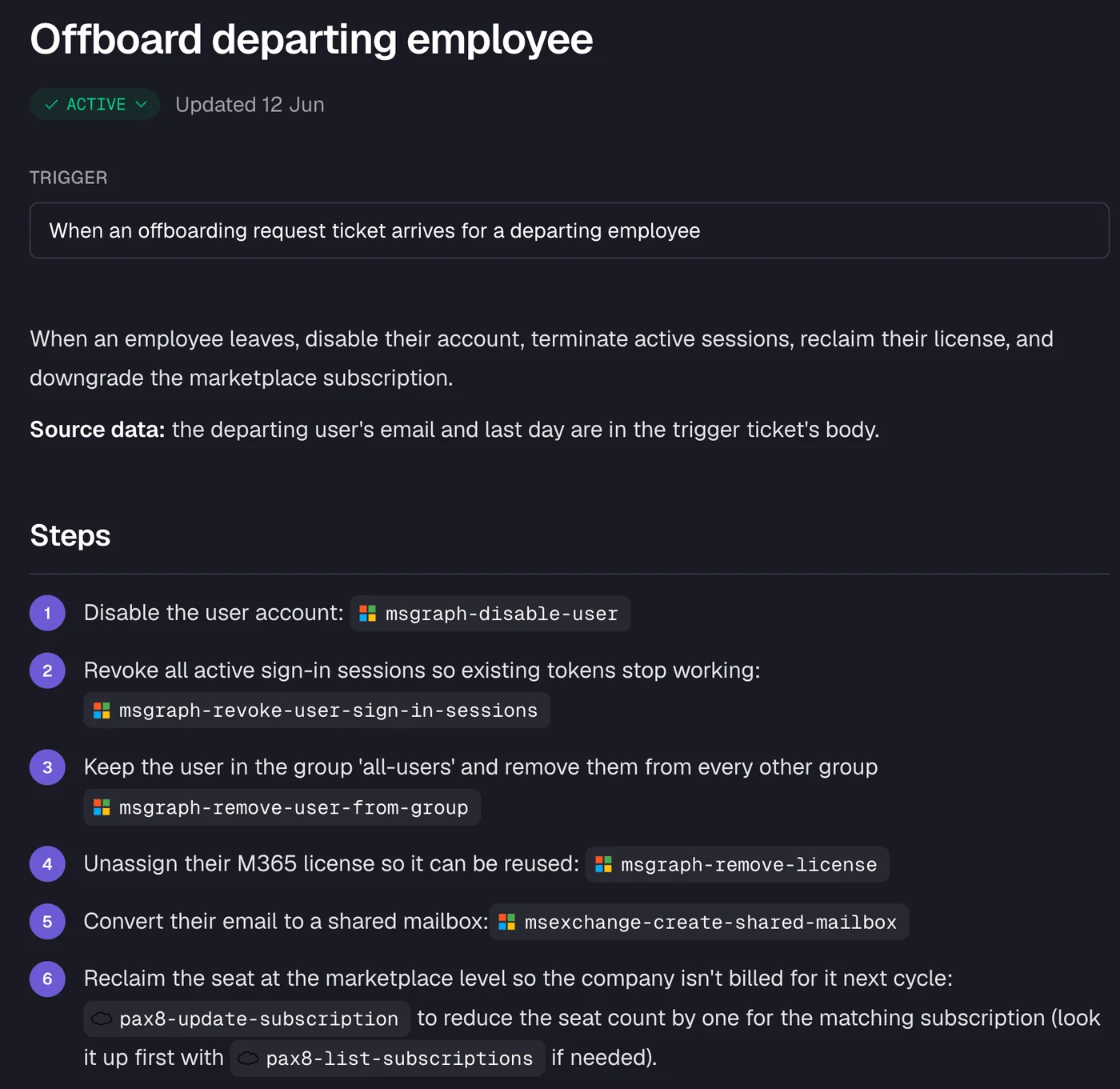
Rallied is an AI technician built for MSPs that handles L1 and L2 tickets autonomously - password resets, account unlocks, onboarding, offboarding, access management - directly inside your PSA. Every action is logged, approval-gated by default, and scoped with least-privilege access per client.
That last sentence is what makes it relevant to this post. The security architecture at Rallied was designed to pass exactly the kind of assessment we've described: SOC 2 Type II, per-client dedicated agents, MFA verification before credential changes, audit-ready logs on every tool call and refusal, and three-tier approval controls (Auto, Approval, or Off) configurable per action and per client. It lands squarely in the "acts with approval gate" category on your template - autonomous where you want speed, gated where you need control.
"Our last AI tool just repeated what the customer said, and my team took it from there. Rallied figures out things we don't even have documented and solves them without my team touching the ticket." - Ryan Huneidi, Owner, Huneidi Services (rallied.ai)
Here's what an offboarding workflow looks like in practice - every step is logged, the trigger is plainly stated, and the actions are scoped to exactly what's needed:
A CTO at Cyber Solutions (part of Lyra) gave Rallied a 4.5/5 on G2 in October 2026:
"One of the features we value most is the ability to customize workflows to guide the AI through troubleshooting steps tailored to our specific needs... we have several fully automated workflows deployed that are taking in dozens of tickets each day."
-- CTO at Cyber Solutions (part of Lyra), G2 review of Rallied, October 2026
Rallied is $300/month, billed monthly, with 2,000 credits included - roughly 700 tickets in a typical month. No implementation project, no dedicated admin, live in under a week.
To see how Rallied handles this inside your PSA, read about Microsoft 365 Management for MSPs.
Frequently Asked Questions
What is an AI risk assessment template?
An AI risk assessment template is a structured document for identifying and scoring the risks of AI tools your business uses or deploys for clients. It typically covers a system inventory, use-case description, risk register with likelihood and impact scores, vendor checklist, governance owners, and a review cadence. For MSPs, the template also needs an explicit column distinguishing AI that only suggests actions from AI that executes them autonomously - because those two modes carry very different risk profiles.
Is the NIST AI RMF mandatory for MSPs?
No - the NIST AI Risk Management Framework (AI RMF 1.0) is voluntary. It's a consensus reference developed with 240+ contributing organizations from industry, academia, and government, and it's the most widely used anchor for AI risk programs in the US. Using it gives your assessment credibility with clients and aligns with frameworks your enterprise clients are likely already referencing, but there's no regulatory requirement to follow it.
How often should an MSP update its AI risk assessment?
At minimum, quarterly - AI adoption inside MSPs and their client environments is moving faster than annual review cycles can track. A new AI feature rolling out inside your PSA or RMM, a vendor changing its data-retention policy, or a client enabling Microsoft Copilot are all events that can materially change your exposure before the calendar year turns. Build the review cadence into the template itself so it doesn't slip.
What's the difference between AI that suggests and AI that acts?
An AI that suggests drafts a reply or recommends a next step - a human approves before anything changes in a system. An AI that acts resets a password, changes access, runs a script, or offboards a user directly in your connected systems. The risk profile is fundamentally different: the first creates liability only if a human approves bad advice; the second creates liability the moment the agent executes. Any honest AI risk assessment scores these two modes separately, and autonomous execution should always carry a higher risk rating.
How do I handle AI features built into tools my MSP already uses?
Start by inventorying every AI-adjacent feature in your current stack - PSA, RMM, documentation tools, and Microsoft 365. Vendors are adding AI capabilities to existing products on their own release schedule, so a tool you assessed six months ago may have new AI features today. For each one, run the same acts-vs-suggests check you would for a standalone AI tool, and add it to your vendor checklist with specific questions about training data, data retention, and where processing happens. Rallied was designed with this accountability model built in - every action is logged, approval-gated by default, and scoped to least-privilege access per client.