Outsourced IT support for MSPs: the honest guide (2026)
TL;DR
Traditional outsourced IT support sounds good on paper. In practice, it costs more than advertised, degrades client relationships, and often requires months of integration work before it delivers anything. For most MSPs in 2026, the better answer for L1 tickets isn't an outsourced human team - it's an AI technician that resolves tickets directly, at $3 per ticket outcome, without touching your client relationships or requiring a dedicated admin to babysit it. That said, outsourcing still has a real role: overflow coverage, secondary clients, and specialized L2/L3 work where human judgment matters. This guide covers when each model earns its place - and how to build a stack that doesn't make you choose between margin and quality.
What "outsourced IT support" actually means for MSPs
The phrase covers a lot of ground. For most businesses, "outsourced IT support" means hiring a managed service provider to handle their technology. For MSPs, the math flips: you're the one evaluating whether to outsource pieces of your own service delivery.
In practice, MSPs run into this decision when L1 ticket volume starts outpacing capacity. Password resets pile up. Account unlocks stack. New hire onboarding stretches the team thin. The options look roughly like this:
- Dedicated outsourced helpdesk - an external team takes over your L1 queue, handling tickets on behalf of your clients. You pay per ticket, per user, or per month.
- Overflow model - your team handles priority and complex work; the outsourced partner absorbs surge volume when you're at capacity.
- AI automation - a software agent connected to your PSA, RMM, and identity stack resolves L1 tickets autonomously. No humans involved.
- Blended - some combination of the above. This is what most MSPs actually end up with.
About 45% of companies now outsource at least some first-line support, according to Gartner's 2025 estimates. Among MSPs specifically, around 35% have deployed some form of AI or automation for L1 tickets, and that number is climbing fast.
The model question matters because each option has a fundamentally different cost profile, integration requirement, and quality floor.
The L1 ticket problem is more concentrated than you think
Before evaluating any outsourcing model, it helps to know what you're actually outsourcing. The r/msp community captures it well:
"50% of my tickets are password resets and account unlocks. It's not hard - it's just... endless. We're billing $150/hr but spending $50/hr of labor on repetitive work. That's where the money goes."
That's not an outlier. For a typical MSP, ticket breakdown looks roughly like this:
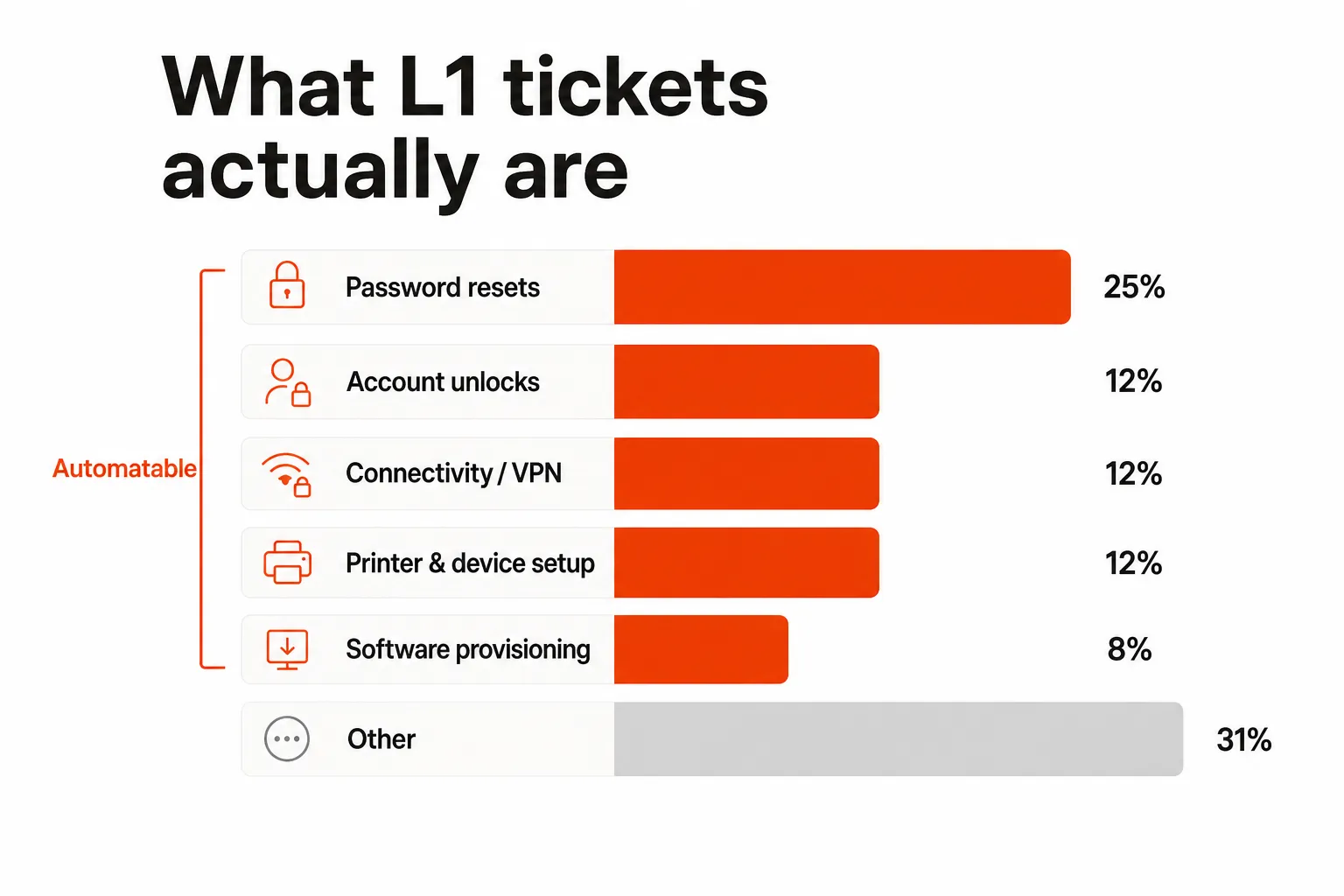
Password resets alone account for 20–30% of all helpdesk tickets. Add account unlocks (10–15%), connectivity triage (10–15%), and device/printer setup (10–15%), and you're looking at 50–70% of your volume that's theoretically predictable and repeatable.
That's the opportunity. It's also the source of every outsourcing mistake: teams outsource the whole queue when the actual problem is that one category is eating their time.
What outsourced IT support actually costs
The headline numbers make outsourcing look great. The real numbers are more complicated.
The visible costs
| Support model | Cost per ticket | Monthly cost (500 tickets) |
|---|---|---|
| In-house L1 (loaded labor) | $25–50 | $12,500–$25,000 |
| Outsourced helpdesk | $5–25 | $2,500–$12,500 |
| AI automation | $3 | $1,500 |
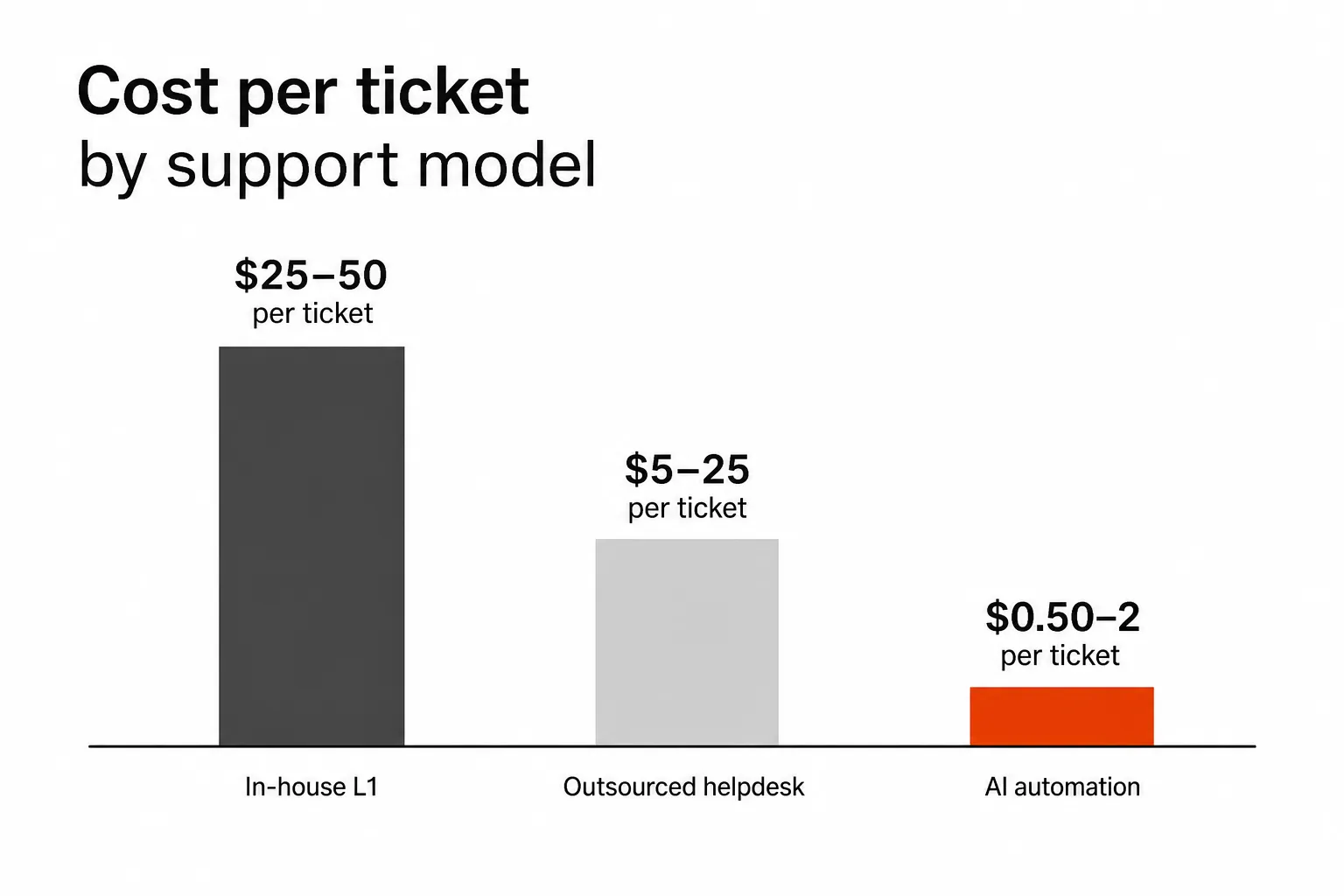
The in-house loaded cost of $25–50 per ticket assumes a technician at $50K–80K/year plus overhead and tooling. Outsourced helpdesk providers range from Mizo's transparent $0.50/ticket (primarily triage, not resolution) to Thread's $1,950/month for 50 clients - about $39/client/month regardless of ticket volume. NeoAgent prices at $1,300–$2,600/month for one AI agent with PSA-native scope only.
The hidden costs
This is where outsourcing budgets quietly blow up.
Integration overhead. Any outsourced team that isn't connected to your PSA, RMM, and identity provider is triaging blindly. They can't see the device state, can't check the user's AD account directly, can't pull runbooks from IT Glue or Hudu. They escalate to your team anyway - which defeats the point.
Setting up proper integration takes 4–12 weeks of technician time. That's a real labor cost that doesn't appear in the per-ticket pricing.
Onboarding and training. The outsourced team needs to understand your clients' environments, your escalation paths, your documentation conventions. That's weeks of back-and-forth before quality stabilizes.
Admin overhead. Someone on your team has to manage the outsourced relationship - quality reviews, escalation handling, SLA tracking. That's not free.
The admin ramp for automation tools. This is the biggest trap. Workflow-builder tools like Rewst or Pia are often marketed as outsourcing alternatives, but they come with their own overhead. From r/msp, quoted in Rallied's MSP AI tools breakdown:
"We hired a full-time admin to manage Pia. After 18 months, we finally automated 30% of our helpdesk. The tool works, but the ramp-up is brutal."
A "nearly full-time AI trainer/PIA Admin on staff for 2+ years" is $140K–$240K in hidden labor cost that doesn't show up anywhere in the per-ticket pricing.
Typical ROI timeline: traditional outsourcing and workflow tools take 6–12 months to break even on implementation costs. AI agents with full-stack integration get there in 3–6 months.
What goes wrong
The failure modes in outsourced IT support are predictable. Most MSPs hit at least two of them.
Integration friction kills resolution rates
The r/msp community consensus on this is pretty blunt:
"If I outsource, it has to see our RMM, our documentation, our identity provider. Otherwise, the outsourced team is flying blind." - r/msp
An outsourced team without full-stack access triages tickets and escalates. Your technician still does the actual work. You're paying for a dispatch layer, not resolution - and the client doesn't notice any speed improvement.
This is why tools that are PSA-native only - binding you to one platform without RMM or identity visibility - fall short in practice. Resolving tickets requires seeing PSA + RMM + identity + documentation at the same time. Tools that can only see one system escalate the rest.
Clients notice - and they don't love it
This one isn't talked about enough in the ROI models. From r/msp:
"Clients hate outsourced support. They want to know the person fixing their problem. We market our in-house team as a differentiator." - r/msp
Client relationships are one of the few defensible advantages an MSP has. An outsourced human team - especially one that rotates staff or has heavy churn - depersonalizes that relationship fast. MSPs that outsource all client contact for all clients tend to see elevated churn in their own books.
The practical outcome: most MSPs keep premium clients on in-house support and use outsourcing (human or automated) for secondary clients and overflow. That's not wrong - it's just worth being honest about upfront rather than discovering it 6 months in.
Vendor lock-in arrives late
PSA-native tools have a particular version of this problem. From r/msp:
"The last thing I want is another PSA-only tool. We use ConnectWise. If we ever move to Halo, we'd have to rebuild everything." - r/msp
Outsourced IT support contracts have their own version: once you've integrated a vendor team into your client workflows, documentation, and escalation paths, switching is a multi-month project. Evaluating the exit path before signing is worth the effort.
How AI automation is changing the model
Here's the practical shift happening in 2026: MSPs are increasingly replacing the "outsource L1 to humans" model with "deploy an AI agent for L1" - and keeping their technicians for everything else.
The economics work because the same ticket categories that make outsourcing attractive (high volume, predictable patterns, low judgment requirement) are exactly the ones AI handles well. Password resets, account unlocks, permission grants, onboarding sequences, offboarding checklists - these don't require human creativity. They require access to the right systems and reliable execution.
AI agents with full-stack visibility - connected to PSA, RMM, M365, identity providers, and documentation - can autonomously resolve 40–65% of L1 tickets. The remaining 35–60% escalates to your technicians with full context already attached: triage questions asked, relevant runbooks pulled, device state checked.
From the r/msp thread on AI adoption:
"Finally, a tool that actually resolves the ticket instead of just routing it. We tested one of the new AI agents for 2 weeks. It handled 65% of our L1 tickets autonomously. But we're waiting to see if it holds up at scale." - r/msp
The skepticism is healthy. The market has burned people before. But the difference between "routes tickets" and "resolves tickets" is the whole game, and the tools that cross that line with real stack integration are doing it now.
What distinguishes the AI tools that actually close tickets
Not all AI automation tools are equal. The categories from Rallied's comparison of MSP AI tools:
| Tool type | Resolves tickets? | Stack visibility | Time to deploy |
|---|---|---|---|
| Workflow builders (Rewst, Bumblebee) | Via documented workflows only | PSA + limited | Months |
| Pre-built automation (Pia) | Mostly identity-focused | PSA + identity | Weeks–months + dedicated admin |
| Autonomous AI agents (Rallied, NeoAgent) | Yes, end-to-end | Varies - see below | Days |
| Copilots (Atera's Robin AI) | Suggests only; doesn't act | PSA + RMM | Hours |
| Triage/dispatch (Mizo, Thread) | Triage + routing; partial | PSA-native | Days |
The critical split: tools that can see PSA + RMM + identity + documentation simultaneously can diagnose and resolve. Tools bound to one platform escalate anything that crosses system boundaries. For most L1 tickets, that's a lot of escalations.
The unstructured ticket problem
RPA workflow tools (Rewst, Bumblebee) hit a wall that AI agents don't. When a client writes "I can't get into my email on my laptop since the update," that's not a structured form. Workflow automation doesn't know what to do with it - no matching trigger, escalates to a human.
AI agents that understand natural language read the ticket, ask one clarifying question if needed, diagnose the likely issue, and execute. That's the capability gap that separates the categories.
How to choose: the decision framework
The right model depends on your volume, client mix, and how much implementation pain you're willing to absorb upfront.
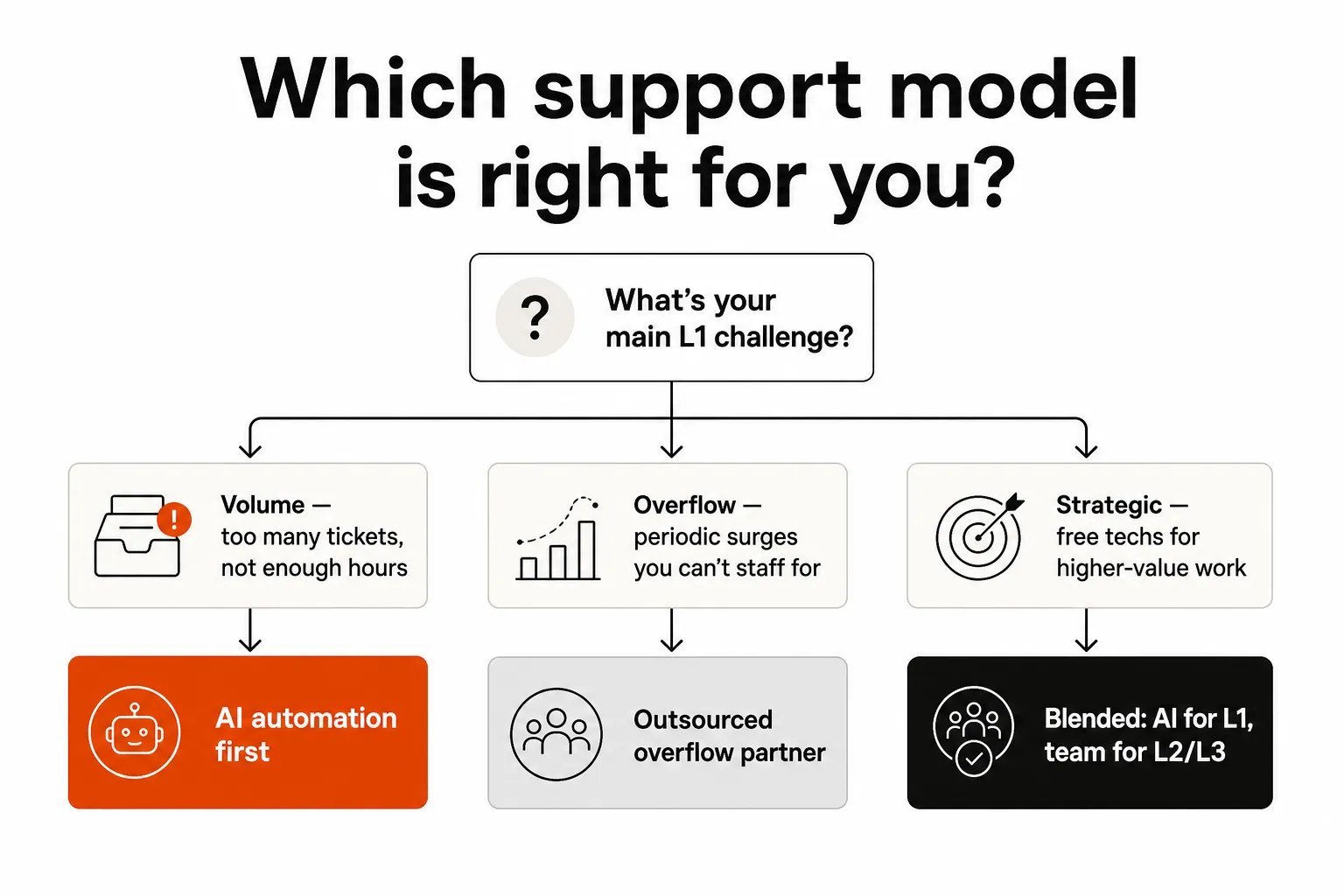
If your problem is volume: L1 tickets are eating your best technicians' hours - password resets stacking up, account unlocks taking 15 minutes each, onboarding sequences falling behind. AI automation is the right answer. It handles the volume without adding headcount, deploys faster than any outsourced partner, and costs a fraction of in-house.
If your problem is surge overflow: You're generally fine, but you get swamped during specific periods - client onboarding waves, post-holiday ticket backlog, seasonal peaks. An outsourced overflow partner handles the surge; your team handles the baseline. The integration friction is real but bounded.
If your goal is strategic reallocation: You want your technicians doing L2/L3 engineering work, client strategy, or new client acquisition - not resetting passwords. The blended model is where most successful MSPs land: AI for autonomous L1, human team for L2 and above, outsourced overflow for the truly exceptional surges.
What to avoid: Pure outsourcing for everything, especially to a team without full-stack access. The quality ceiling is low, the hidden costs are real, and client relationships take the hit.
"We don't have a pure outsourced helpdesk anymore. We have in-house L1 for priority clients, outsourced overflow for everyone else. Best of both worlds: we keep the high-value relationships, and overflow doesn't kill us." - r/msp
That's the practical wisdom. The tooling question is how to make L1 cost-effective without sacrificing quality on the clients who matter most.
Pricing models side by side
For MSPs evaluating specific tools, the pricing transparency varies dramatically.
| Tool | Pricing model | Approximate cost |
|---|---|---|
| Rewst | Annual contract | $30K–$50K+/year (admin not included) |
| Pia | Usage-based | $100–150K/year total (including required admin) |
| NeoAgent | Per-agent/month | $1,300–$2,600/month per agent |
| Thread | Per-customer | $1,950/month for 50 clients |
| Mizo | Per ticket | $0.50/ticket (triage + dispatch, not resolution) |
| Rallied | Per ticket outcome | $3/outcome, $150/month minimum (autonomous resolution) |
The critical distinction between Mizo and Rallied is what you're buying per ticket. Mizo dispatches tickets to the right person, which still leaves a technician doing the work. Rallied resolves them, and you only get charged when it does. That difference in scope is what the difference in price is paying for.
For an MSP handling 500 tickets per month:
- Rewst: $2,500–4,200/month (annual contract amortized) + admin salary
- NeoAgent: $1,300–2,600/month flat
- Thread: ~$1,950/month regardless of ticket volume
- Rallied: $1,500/month at 500 resolved tickets ($3 each)
The per-outcome model also handles the surge problem naturally. A busy month with 1,000 resolved tickets costs $3,000; a quiet month with 200 costs $600. Below 50 you're at the $150 monthly minimum, and there's no seat pricing to make slow periods feel like dead weight.
The integration question is not optional
Whatever model you choose, the integration question determines whether it works. An outsourced team or AI agent that can't see your PSA, RMM, identity provider, and documentation isn't resolving tickets - it's routing them. You're paying for a dispatch layer.
Full-stack integration means:
- PSA: Read ticket context, update fields, close or escalate tickets
- RMM: Check device state, trigger scripts, deploy software
- Identity: M365, Entra ID, Okta, JumpCloud, Google Workspace - actually reset passwords and unlock accounts
- Documentation: Pull runbooks from IT Glue or Hudu at resolution time
When all four are connected, a single ticket can be diagnosed, resolved, and closed without a human opening it. When even one is missing, you've got a triage layer.
Ask any vendor: "What happens when the ticket involves both an identity issue and an endpoint issue?" If they can't show you a demo of cross-system resolution, they're routing, not resolving.
Try Rallied
Rallied is an AI technician built for exactly this problem - the L1 ticket grind that burns your best people's time. It connects to ConnectWise, Autotask, Halo PSA, SuperOps, Datto RMM, NinjaRMM, M365, Entra ID, Okta, JumpCloud, Google Workspace, IT Glue, and Hudu. Password resets, account unlocks, onboarding, offboarding, permission changes - it handles them end-to-end, closes the ticket, and posts an audit trail. Your techs never open it.
It deploys the same week. No implementation fee, no dedicated admin, no 2-year ramp-up. The trial runs 14 days with no credit card - enough to see it work on your actual ticket types before committing anything.
The ROI calculator shows the math for your ticket volume specifically. For an MSP handling 400 tickets a month - 50–100 hours of L1 grunt work at current tech rates - that's $7,500–$15,000/month in labor you're not paying anymore.
If you've been burned by tools that promised autonomous resolution and delivered a workflow builder with a 2-year training requirement, Rallied was built for that exact frustration. It's built by the team that automated IT for Indeed, Webflow, OpenGov, and National Geographic - people who know what it takes to make automation actually work at scale, not just in a demo.
Frequently Asked Questions
What is outsourced IT support?
Outsourced IT support is when a business or MSP delegates helpdesk and IT support functions to an external vendor instead of handling them with an in-house team. For MSPs specifically, it typically means offloading L1 ticket handling - password resets, account unlocks, connectivity triage - to a third-party provider or, increasingly, to an AI automation tool that handles those tickets autonomously.
How much does outsourced IT support cost?
Cost varies significantly by model. In-house L1 support runs $25–50 per ticket (loaded labor cost). Traditional outsourced helpdesk providers charge $5–25 per ticket, depending on volume and service level. AI automation tools like Rallied bring that down to $3 per ticket outcome, with a $150/month minimum. For an MSP handling 500 tickets a month, that's the difference between $12,500/month and $1,500/month for the same L1 work.
When does outsourcing IT support make sense for an MSP?
Outsourcing makes the most sense for overflow coverage - when your team gets overwhelmed during surges - and for secondary clients where in-house relationship value is lower. For high-volume, repetitive L1 tickets (password resets, account unlocks, basic access requests), AI automation typically outperforms human outsourcing on cost, speed, and consistency. The blended model - in-house for priority clients, automation for L1, outsourced for overflow - is what most MSPs land on in 2026.
What are the biggest risks of outsourcing IT support?
Integration friction is the biggest one. Outsourced teams that can't see your PSA, RMM, and identity provider are flying blind - they triage and escalate, not resolve. Beyond that: quality issues that damage client relationships, hidden onboarding costs (4–12 weeks of setup time), and ongoing admin overhead that erodes the promised savings. Many MSPs find the real ROI takes 6–12 months, not the 2–4 weeks vendors promise.
Can AI fully replace outsourced IT support?
For L1 tickets, yes - in most cases. AI technicians like Rallied autonomously resolve 40–65% of helpdesk tickets (password resets, account unlocks, onboarding, offboarding) with full PSA, RMM, and identity integration. Complex L2/L3 issues, custom troubleshooting, and client relationship work still need humans. The practical answer for most MSPs: use AI for the repetitive volume, keep your best technicians for everything else.
