What is co-managed IT? (2026 guide for MSPs and internal IT teams)

TL;DR
Co-managed IT keeps your internal team and adds an MSP to cover the gaps: escalations, security monitoring, patching, vCIO, whatever your people don't have bandwidth or expertise for. It costs roughly $45 to $175 per user per month depending on scope, per 2026 vendor benchmarks. The model works well when responsibilities are written down before day one. It fails, consistently, when ownership is vague. If you're an MSP looking to offer co-managed services, Rallied handles the L1 tier autonomously so your techs stay focused on work that actually requires them.
What co-managed IT is
The name almost explains itself: shared management of an IT environment, split between an internal team and an MSP. Datto describes it as "a customized IT service model that combines the convenience of an internal IT department with the expertise of a managed service provider." Integricom puts it more plainly: the MSP provides only the services that the client's needs call for. The internal team stays. The MSP fills gaps.
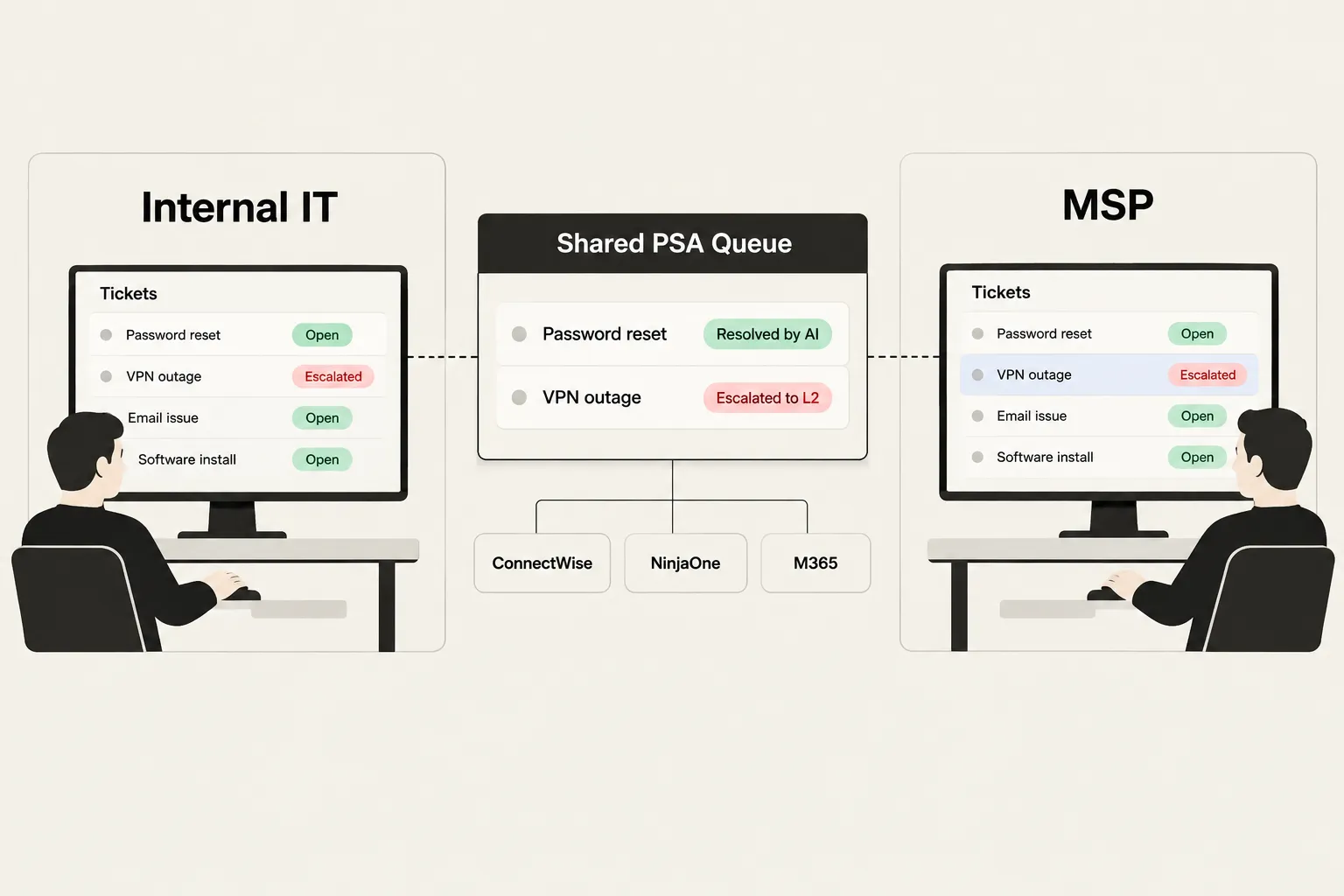
What it looks like in practice: the internal IT team handles day-to-day helpdesk, device management, and user requests. The MSP covers escalation, security monitoring, patching, backup, and strategic planning. Both teams work from a shared ticketing system. Tickets escalate when the internal team can't resolve something, and the MSP has visibility into the environment through shared RMM tooling and documentation.
The model has been around for years, but it's gotten real traction lately. Gartner's January 2025 forecast projected worldwide IT spending to grow 9.8% in 2025, and a rising IT budget usually means internal teams are being asked to cover more ground than they can reasonably staff for. Co-managed IT is one way to extend capacity without building a bigger department.
Co-managed vs fully managed IT
The core distinction: in a fully managed IT arrangement, the MSP is the IT department. The client has no dedicated internal IT staff. In a co-managed arrangement, the internal team stays and the MSP supplements it.
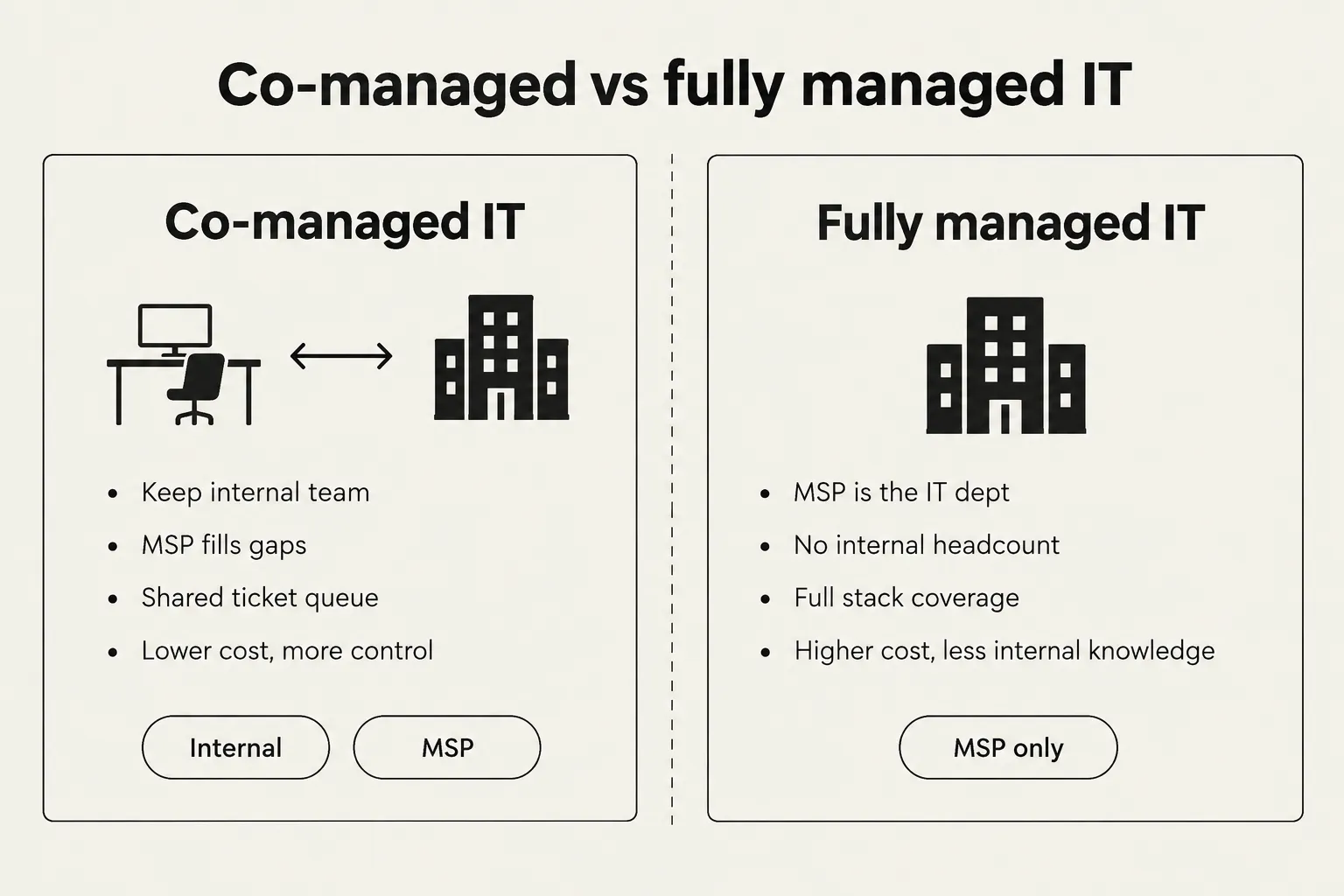
A few differences that matter when you're actually negotiating a contract:
| Co-managed IT | Fully managed IT | |
|---|---|---|
| Who runs IT | Internal team plus MSP | MSP is the IT department |
| Scope | Selected services (escalation, security, patching, vCIO) | Full stack, end to end |
| Internal headcount | Kept, usually with reduced workload | Usually none or minimal |
| Cost | Less than fully managed; does not remove internal costs | Higher per seat, more predictable |
| Main risk | Shared responsibility and ownership gaps | Vendor lock-in; less internal knowledge |
The cost difference is real but easy to misread. Integricom notes that co-managed IT "does not replace the internal costs." You still pay your internal team. The MSP fees are additive, not a substitution. The model only makes economic sense if there are genuine gaps to fill and the MSP's cost of filling them is lower than the cost of hiring for them internally.
Who co-managed IT is actually for
Three situations where the model fits:
The mid-market IT team that's stretched thin. A company with 200 to 500 employees and a two or three person internal IT team carrying a backlog of things that never get done: patching, security monitoring, documentation. The team is competent but underwater. An MSP covering the ops layer frees them to focus on the work that actually moves the business forward.
The IT director who needs specialist backup. A single-person IT department can't be expert in endpoint management, identity, backup, network monitoring, and security all at once. A co-managed MSP fills the specialist gaps without requiring the company to hire five separate senior engineers.
The company going through a transition. A merger, a compliance audit, a significant infrastructure change. The internal team knows the environment. The MSP brings the specialized skill for the project. Once the transition is done, the engagement scales back.
Where it doesn't fit as well: if your internal team is already at capacity on helpdesk and you don't have senior technical staff to coordinate with an MSP, the coordination overhead may outweigh the benefit. In that case, fully managed is probably a better frame.
What's typically included
Co-managed scope is customizable by design. The engagement should be built around what the internal team can't do, not a fixed package. That said, the most common services in a co-managed arrangement are:
- Escalation support for the internal helpdesk (L2 and L3 issues that exceed the internal team's expertise or authority)
- RMM-based monitoring and patching on endpoints and servers, usually through a shared platform
- Endpoint detection and response (EDR) and security monitoring, sometimes with SOC coverage
- Backup and disaster recovery, particularly for business-critical systems
- vCIO services, including strategic planning, vendor management, and budget guidance
- Shared tooling and documentation access, giving both teams visibility into the same environment
One thing Datto highlights is that MSPs in a co-managed arrangement can often provide software licenses at better rates than the client can source directly. If the MSP is a Microsoft partner or carries RMM and EDR licenses at volume, the procurement value is real.
Watch for this: if an MSP leads with a fixed package that doesn't map to your specific gaps, that's usually a sign the engagement is being priced for the MSP's convenience rather than your need. The scope conversation should start with "what does your internal team not cover today," not "here are our tiers."
Co-managed IT pricing in 2026
Per-user and per-device pricing are the most common models. Here's what the current market looks like, drawing on Meriplex's 2026 pricing guide and ITS ASAP's co-managed IT guide:
| Scope | Per user / month |
|---|---|
| Escalation support plus RMM monitoring | $45 to $75 |
| EDR, patching, and escalation | $85 to $130 |
| Full co-managed with SOC/SIEM | $130 to $175 |
| Per-device: workstation | $30 to $55 |
| Per-device: server | $90 to $180 |
| Full outsourcing (for comparison) | $150 to $225 |
ITS ASAP describes co-managed as roughly one-third less expensive than fully managed IT, while noting that the savings depend entirely on scope. The $45 to $175 range is wide enough to be nearly meaningless without a service list attached; treat it as a calibration frame rather than a budget number.
One-time onboarding fees are common and rarely mentioned upfront. Budget for them.
Where co-managed IT goes wrong
The Reddit community on this topic is usefully honest, and the failure patterns have a consistent shape.
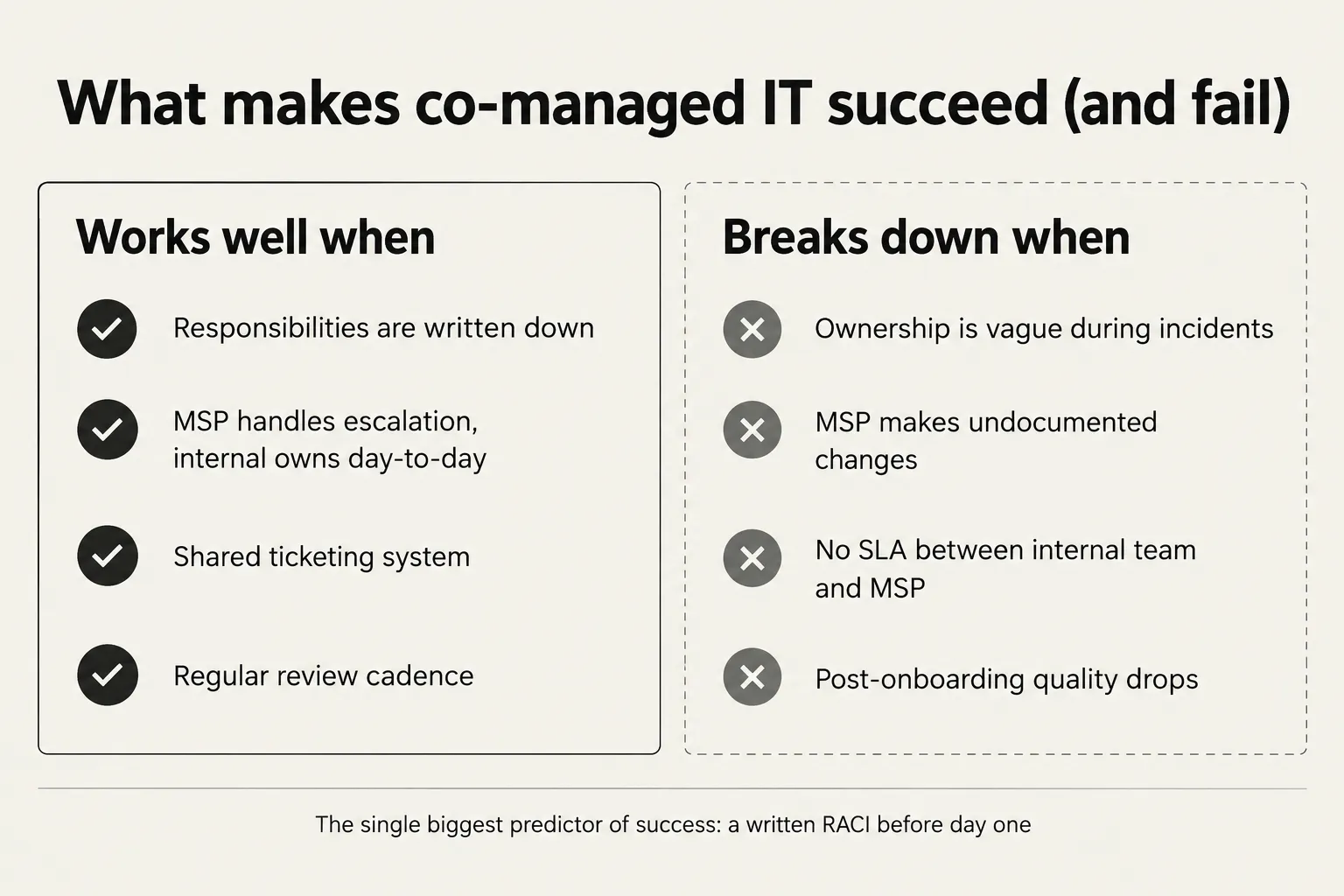
The most active thread in r/ITManagers (160+ comments) zeroes in on loss of control, specifically when the MSP makes changes that aren't documented. A separate thread in the same community lists the major objections in order: trust, control, accountability, cost, turnover, and post-onboarding decline. That last one, service quality dropping after the initial engagement period, is named often enough to be worth treating as a structural risk rather than an anecdote.
The accountability question is the hardest. In a fully managed arrangement, everything is the MSP's problem. In an internal-only setup, everything is internal IT's problem. Co-managed creates a third option where it's not always clear whose problem it is, which is manageable in normal conditions and breaks badly at 2am during a P1 outage.
"Co-managed IT can work really well when responsibilities are clearly defined."
That framing comes up enough that we'd treat it as the closest thing to a practitioner consensus: the model is structurally sound, but the documentation has to happen before the contract is signed.
How to structure it so it works
The engagements that hold together tend to have a few things in common:
A written scope document before signing. Not a general "we cover escalation and you cover day-to-day" agreement, but a specific breakdown: which ticket types go to the MSP, which stay internal, what the SLA is for each category, and who owns the ticket until it closes. ITS ASAP identifies leadership buy-in and friction between internal IT and the MSP as the two main failure points. Both trace back to scope ambiguity.
A shared ticketing system. Both teams working from the same PSA means tickets don't fall between two separate queues, and there's an audit trail of who did what.
A review cadence. Monthly or quarterly reviews where both teams look at ticket volume, resolution times, and what's falling through the cracks. The post-onboarding decline that Reddit threads describe is partly a symptom of no one reviewing whether the engagement is still delivering.
Clear escalation paths. For every ticket type, someone is the documented owner. If the internal team can't resolve it, it goes to the MSP. If the MSP can't resolve it, it goes to a senior engineer. The path should be documented and tested before it's needed at 2am.
Where AI fits in the co-managed model
The part of co-managed IT that creates the most friction is also the most automatable: L1 tickets.
Between 60 and 70% of MSP ticket volume is L1: password resets, account unlocks, MFA resets, and similar requests that follow a predictable resolution path. In a co-managed setup, these tickets often sit in a gray zone. The internal team can handle them but is frequently too busy. The MSP can handle them but charges for the time. Nobody clearly owns the L1 tier, so tickets sit longer than they should.
That's where autonomous L1 resolution changes the model. An AI technician takes first touch on every incoming ticket, reads context from the PSA and connected systems, resolves what it can autonomously, and routes everything else to the right person, internal tech or MSP engineer, with full context attached.
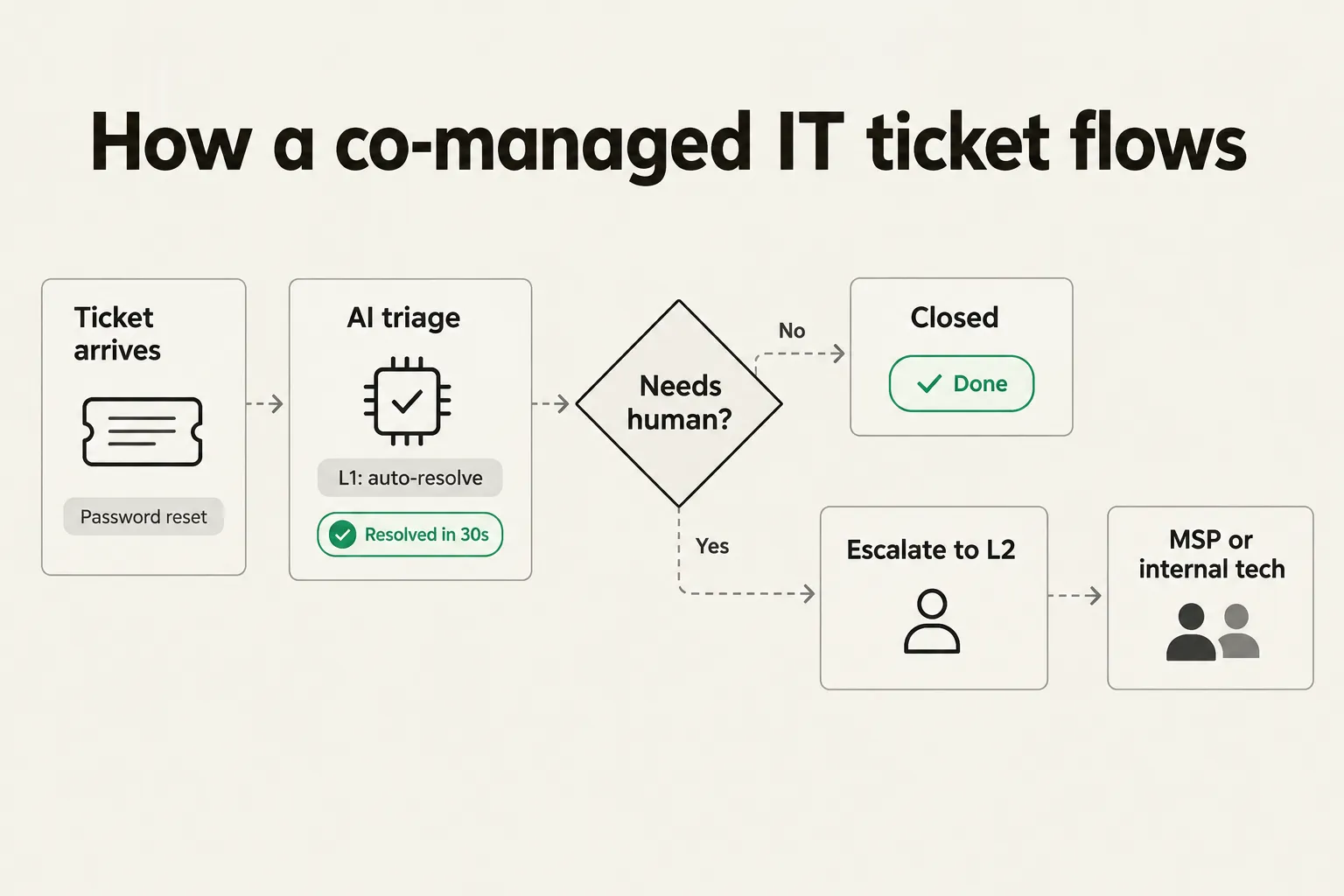
What this does for the ownership problem: if the AI resolves the ticket, it's closed with a complete audit log and no ambiguity. If it escalates, the escalation is explicit, documented, and comes with the full diagnosis attached. The gray zone shrinks considerably.
The IT process automation guide for MSPs covers the economics in detail. The short version: at $9 to $20 in fully-loaded labor per L1 ticket, resolving 500 of them per month autonomously is $4,500 to $10,000 in reclaimed technician time. For an MSP offering co-managed IT, that changes the unit economics enough to offer materially better SLAs at the same price point, or expand the number of clients the team can support without adding headcount.
Try Rallied
Rallied is an AI technician built for MSPs. It takes first touch on every ticket inside your PSA, resolves L1 and L2 requests autonomously, writes notes and time entries as it works, and escalates to a tech when the situation needs judgment. It connects to ConnectWise, HaloPSA, Autotask, and SuperOps, and integrates with NinjaOne, Datto RMM, Microsoft 365, Entra ID, IT Glue, and Hudu.
It starts in Plan Mode: you see exactly what Rallied would do on real tickets before it touches anything. Most MSPs go live in under a week.

Pricing starts at $300 per month, includes 2,000 credits, and runs month-to-month with no annual commitment. SOC 2 Type II certified.
For the wider picture, read Best MSP Software in 2026.
Frequently Asked Questions
What is co-managed IT?
Co-managed IT is a model where a company keeps its own internal IT staff and partners with a managed service provider (MSP) to fill capability or capacity gaps. The MSP supplements the internal team rather than replacing it. Common examples: the internal team handles day-to-day support while the MSP covers security monitoring, patching, escalations, and vCIO work.
What does co-managed IT typically cost in 2026?
Pricing runs roughly $45 to $175 per user per month depending on scope. Entry-level co-managed (escalation plus RMM monitoring) starts around $45 to $75 per user. A fuller package with EDR, patching, and security monitoring runs $85 to $130. Full-stack co-managed with SOC/SIEM reaches $130 to $175 per user. These figures come from Meriplex's 2026 pricing guide. Your actual cost will depend on which services you need and the MSP you choose.
What's the difference between co-managed IT and fully managed IT?
With co-managed IT, the client keeps an internal IT team and the MSP fills specific gaps. With fully managed IT, the MSP is the entire IT department and the client typically has no dedicated internal IT staff. Co-managed IT is generally less expensive per seat than fully managed, but it does not eliminate internal IT headcount costs.
What are the biggest risks of a co-managed IT arrangement?
The top risks named by practitioners are unclear ownership during incidents, undocumented changes made by the MSP, post-onboarding service quality decline, and friction between the internal IT team and the MSP. Most of these trace to one root cause: scope was not written down clearly before the engagement started.
How does AI fit into a co-managed IT model?
AI handles the high-volume L1 tickets (password resets, account unlocks, MFA resets) that no one clearly owns in a co-managed setup. An AI technician like Rallied takes first touch on every ticket, resolves L1 work autonomously, and escalates to the right human (internal tech or MSP engineer) when judgment is needed. That makes the ownership boundary cleaner and reduces the 'whose queue is it in?' problem that creates friction in most co-managed engagements.