Shadow AI detection for MSPs: a practical guide (2026)

TL;DR
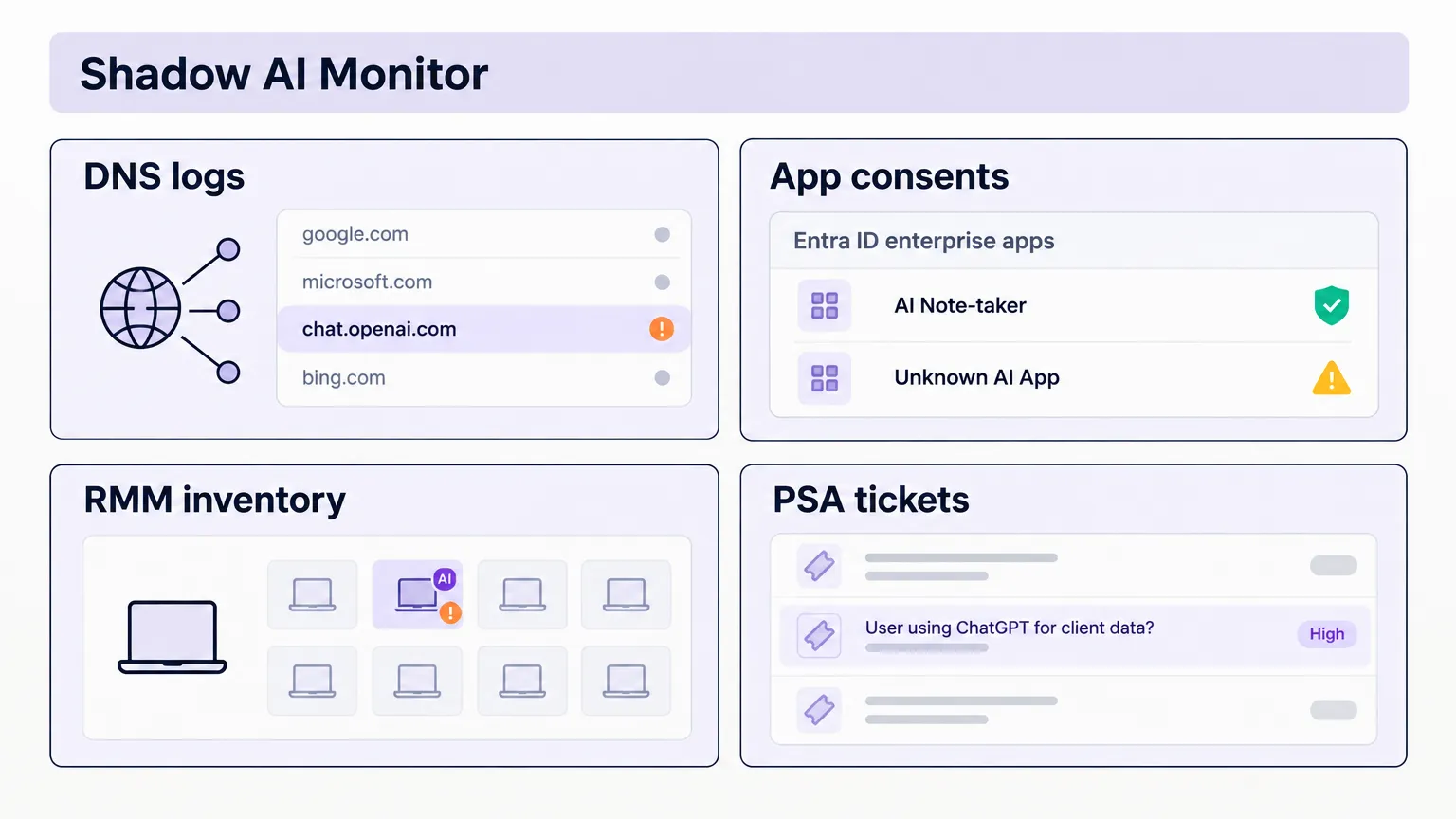
Shadow AI - staff using unapproved AI tools outside any corporate control - is already inside most of your clients' environments. IBM's 2025 Cost of a Data Breach report puts the premium at $670,000 in higher breach costs for organizations with high shadow AI use, and 10 extra days to identify and contain the incident. The good news for MSPs: you're already operating the four layers that catch this - DNS logs, M365 app consent audits, RMM inventory, and PSA tickets. Most just haven't pointed them at the shadow AI problem. This guide walks through how to do that, and what to do when something surfaces.
If you haven't written a shadow AI policy for your clients yet, that's the logical companion to this - detection tells you what's happening, policy tells everyone what's allowed.
What shadow AI actually is (and why it's not just shadow IT with new branding)
Shadow IT has been around since the first employee signed up for Dropbox on their own credit card. Shadow AI is the same instinct - using tools that make work easier without waiting for IT to approve them - but the data exposure is structurally different.
When someone routes work files through an unapproved file sync app, the risk is loss of visibility and potential compliance gaps. When they paste a client's ticket text, configuration data, or internal documentation into a consumer AI tool, that data goes into a model's training pipeline unless they've actively opted out - which most users haven't. The exposure is immediate and often irreversible.
Verizon's 2026 DBIR found 67% of AI use on corporate devices still runs through non-corporate accounts. Netskope's 2026 Cloud and Threat Report puts the average organization at 18,000 AI prompts per month - up roughly 6x from the year before. The volume is there. The question is where it's going.
West McDonald, founder of AI consultancy GoWest.ai, put it plainly at XChange Security 2025: shadow AI is "the biggest invisible threat that our clients have today with their data." He was talking to an audience of MSP and MSSP executives, most of whom already knew the concept and hadn't yet built a service around detecting it.
That gap is worth closing.
Why MSPs see it before anyone else
An MSP managing a 50-person architecture firm has three things an internal IT team at that firm probably doesn't: DNS log access across the full client network, an RMM agent on every managed endpoint, and admin access to the client's Microsoft 365 tenant.
That's most of the shadow AI detection surface, already in place.
The limiting factor isn't access - it's that nobody scheduled a check. Shadow AI detection, for most MSPs, is currently accidental: a tech notices an AI tool in an installed software list, or a user opens a ticket asking for access to something they're already using. Neither is systematic, and neither catches the worst case - the AI note-taker that's been reading every email for three months via an OAuth grant nobody remembers approving.
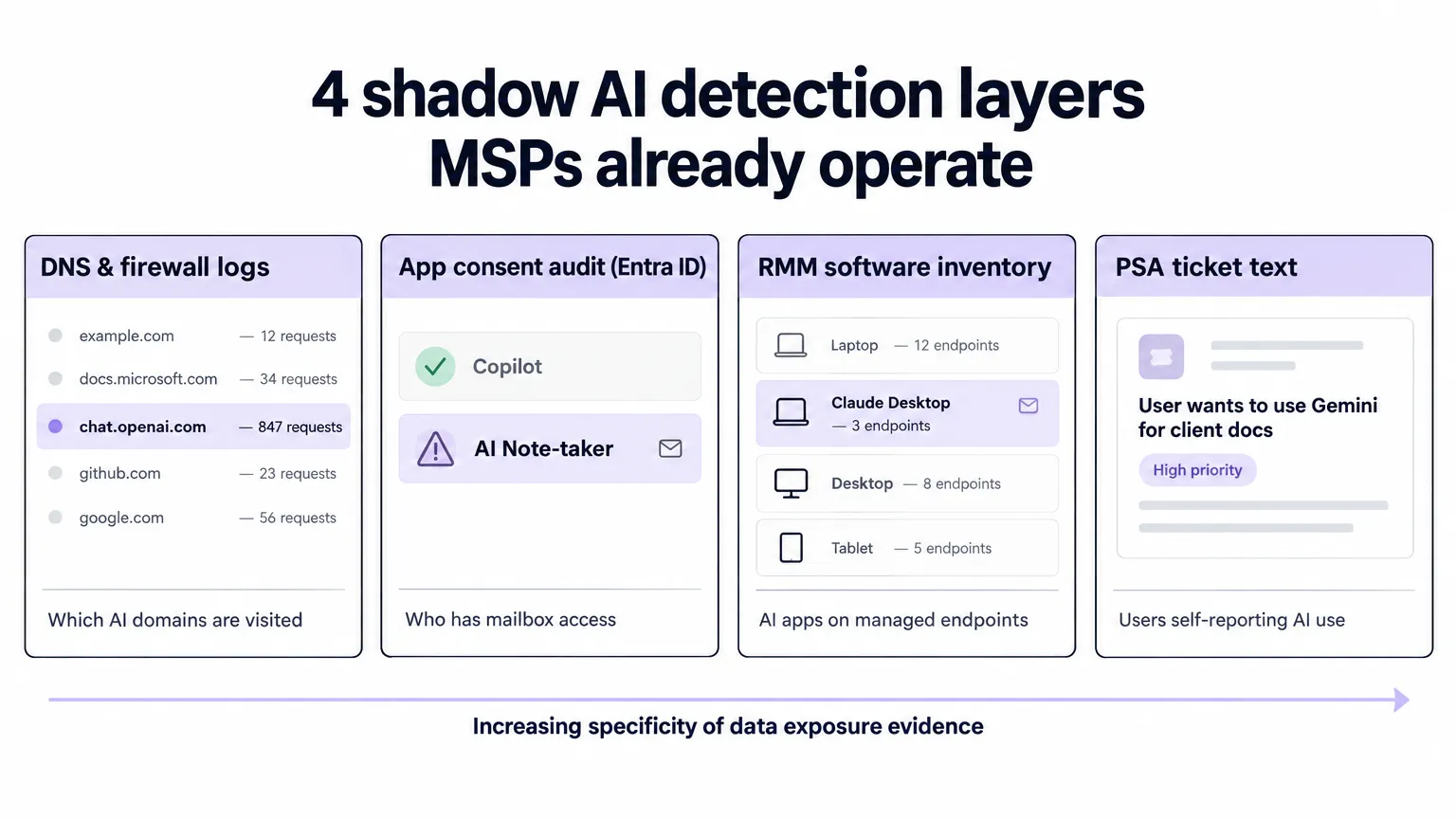
The four layers MSPs already operate, each covering a different slice of the shadow AI surface.
The four detection layers, and what each one actually sees
1. DNS and firewall logs
This is the broadest sweep and the right place to start. Every AI tool that runs in a browser or as a network-connected desktop app leaves a DNS trail. Pull the logs and filter for known AI domains: chat.openai.com, claude.ai, gemini.google.com, copilot.microsoft.com, character.ai, and a growing list of specialized models.
What it catches: which AI tools are being accessed, how frequently, and from which devices or network segments.
What it misses: whether the account is corporate or personal, and what data was actually shared. A device hitting chat.openai.com 200 times a day could be a legitimately licensed team user or someone pasting client config files into a free account.
Microsoft Defender for Cloud Apps Cloud Discovery analyzes firewall and proxy logs against a catalog of more than 31,000 cloud apps and can flag AI tools automatically. If your clients are on Microsoft 365 E5 or Defender for Business, this is worth turning on. It won't tell you what was shared, but it will tell you what's running.
For clients without Defender, most enterprise firewalls and secure web gateways have category filtering that catches consumer AI sites. Even a weekly export and review catches the volume patterns.
2. App consent audit in Microsoft Entra ID
This is the highest-signal layer for most MSP clients, and the one most likely to surface a real data exposure risk.
OAuth app grants in Microsoft Entra ID are how AI tools get access to email, calendar, files, and Teams. A user clicks "Connect with Microsoft," approves the permissions, and the AI note-taker now has read access to every email they receive - forever, or until someone revokes it. These grants persist long after the user stops using the tool, and long after anyone remembers granting them.
To run the audit: Azure portal → Microsoft Entra ID → Enterprise applications → All applications. Filter to show user-consented apps (as opposed to admin-consented, which IT typically knows about). Sort by date. Look for anything with Mail.Read, Mail.ReadWrite, Files.ReadWrite, Calendars.Read, or User.Read permissions that you don't recognize.
CIPP for Microsoft 365 makes this multi-tenant, which matters if you're managing more than a handful of clients. The audit that takes 20 minutes in one tenant takes 20 minutes total across 30 when you have a multi-tenant management layer.
"Shadow AI lives almost entirely in one place: personal accounts, on personal devices, accessed during work hours. A technician who opens their personal browser, navigates to chat.openai.com, and pastes a work question has stepped outside every corporate control you have - no SSO, no MFA, no audit log, no admin visibility."
The same principle applies to AI tools granted OAuth access with a personal Microsoft account. The enterprise app audit only catches apps that went through the corporate tenant's consent flow. Personal account grants don't show up here at all - they require the DNS layer or user surveys to surface.
3. RMM software inventory
Your RMM agent runs on every managed endpoint and reports installed applications. This catches desktop AI apps and locally installed coding assistants - things like Claude Desktop, Cursor, GitHub Copilot CLI, or any AI coding tool that installs as an application rather than running purely in the browser.
Filter the installed software report for known AI app names and anything with "AI," "GPT," "Copilot," "assistant," or "LLM" in the name. Set a recurring report to run weekly and email results to the account manager for each affected client.
The gap is unmanaged devices - personal laptops used for work, mobile devices, and anything outside the RMM footprint. The endpoint layer is thorough within its scope and blind outside it. For the unmanaged device problem, surveys are the only tool that reaches.
4. PSA tickets
The lowest-tech detection layer is also surprisingly effective: users who want permission, or who've hit a problem, often just open a ticket. "Can I use ChatGPT for this?" or "I'm getting an error with this AI writing tool" tells you the tool is in use and gives you a name.
This is worth a periodic keyword search across your PSA - not in real-time, but as a quarterly review. Search for "AI," "ChatGPT," "Claude," "Copilot," "Gemini," and variations. The results usually contain a mix of legitimate requests and self-reported shadow AI use, all in one place.
It doesn't catch users who know they're not supposed to be using the tool and don't open a ticket. But it's a free data source that requires no additional tooling.
The M365 app consent audit in depth
The app consent audit deserves more attention because it's both the highest-risk surface and the most systematically ignored one.
When a user grants an AI tool access to their corporate M365 account, they're often not reading the permission list carefully. "AI Note-taker wants to access your email and calendar" sounds reasonable for a productivity tool. What it actually means is: a third-party service now has a standing token to read every email the user sends and receives, in perpetuity, with no expiration unless the grant is explicitly revoked.
The illustrative scenario Centeye describes in their shadow AI detection guide maps closely to what MSPs typically find: a 40-person client "only using Copilot" turns out to have 14 AI apps connected to staff mailboxes or drives, 11 AI sites actively visited, and six AI browser extensions installed. None of it was malicious. All of it was invisible until someone actually looked.
The specific grants to revoke first are anything with Mail.ReadWrite or Files.ReadWrite.All from an AI tool you don't recognize. Read-only access to email is already a risk; write access compounds it. Any extension with "read and change all your data on all websites" permission on managed browsers is a priority too - these can intercept everything the user types on any page.
After revoking, the standard next step is an email to the client stakeholder documenting what was found and what was removed. This is where the work starts to become a service rather than a one-off fix.
The breach cost context
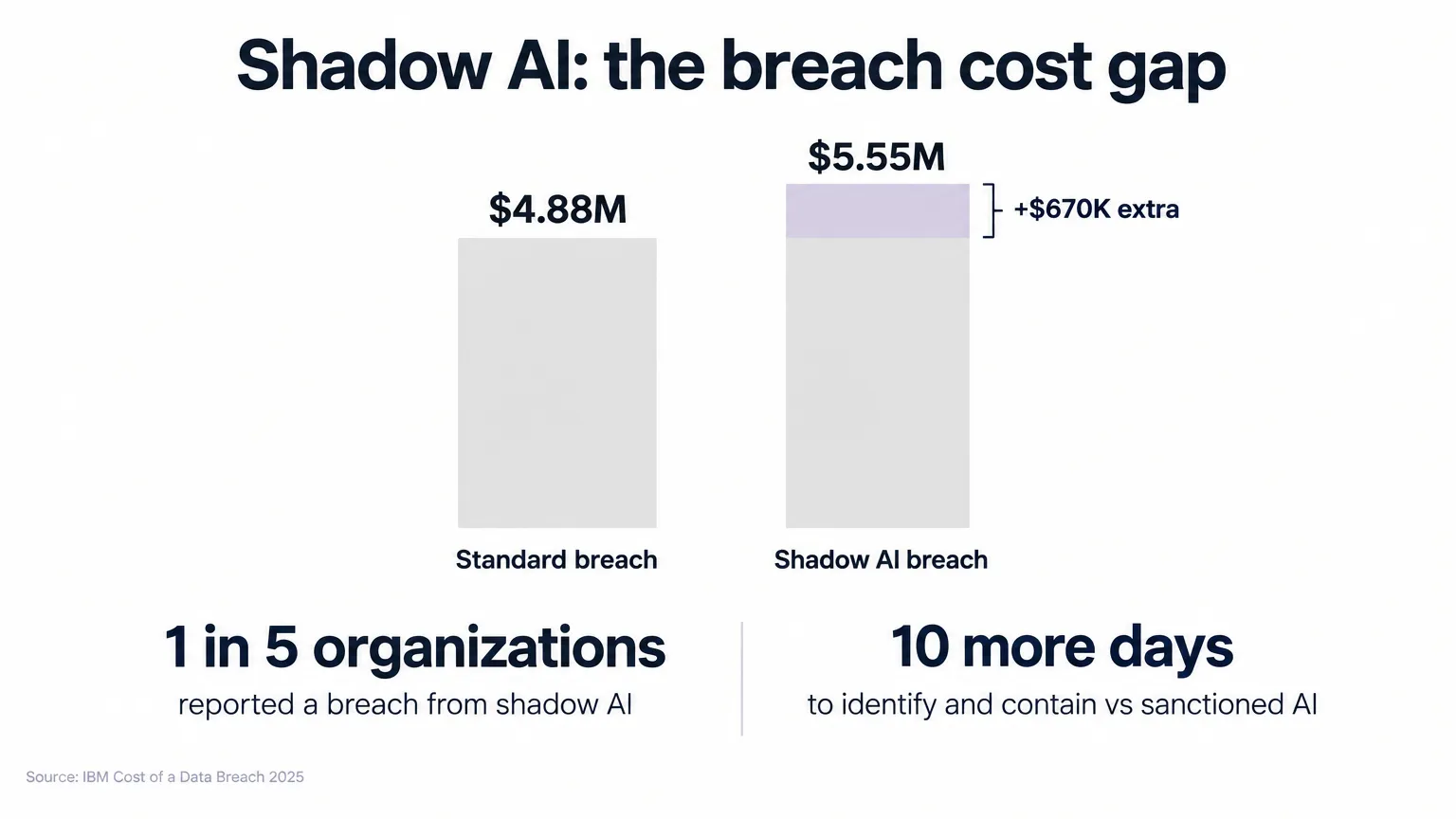
IBM's 2025 Cost of a Data Breach report (via IntelligentCISO) data on shadow AI breach costs, as taken from IBM.
The numbers bear repeating because they're the clearest case for why detection matters beyond compliance:
- Organizations with high shadow AI use see $670,000 in higher breach costs compared to those with low or no shadow AI use. That's not the total breach cost - it's the premium from having shadow AI in the environment.
- 1 in 5 organizations reported a breach due to shadow AI in the same study.
- Shadow AI breaches take 10 more days to identify and contain than those involving sanctioned AI tools - which makes sense, because unsanctioned tools don't generate the logs that help you trace what happened.
- 65% of shadow AI incidents compromised PII, compared to a 53% global average across all breach types. The data going into these tools tends to be sensitive by nature; people use AI tools on the problems they're stuck on, and hard problems usually involve real customer data.
The cost argument writes itself. A quarterly app consent audit across a client's M365 tenant is maybe two hours of work. The alternative is finding out about the AI note-taker after a client breach.
The remediation problem: where MSPs lose time
Detection is the part most guides focus on. The part that actually consumes MSP hours is what happens next.
When you find an unauthorized AI app with mailbox access, the remediation workflow goes roughly like this: revoke the OAuth grant in Entra ID, determine whether any credentials need to be reset, disable the account if the exposure is serious enough to warrant investigation, document everything in the PSA, create a time entry, notify the client stakeholder, and follow up with the user.
Manual, that's 45-90 minutes per incident. Multiply by the number of clients, and a quarterly sweep generates a material chunk of unscheduled remediation work.
The pattern is exactly what Rallied is built to handle. When a shadow AI detection ticket arrives in the PSA, Rallied reads it, identifies the action (revoke app consent in Entra ID, reset password, disable account), runs the Microsoft Graph calls, logs every action back to the ticket with a time entry, and closes it.
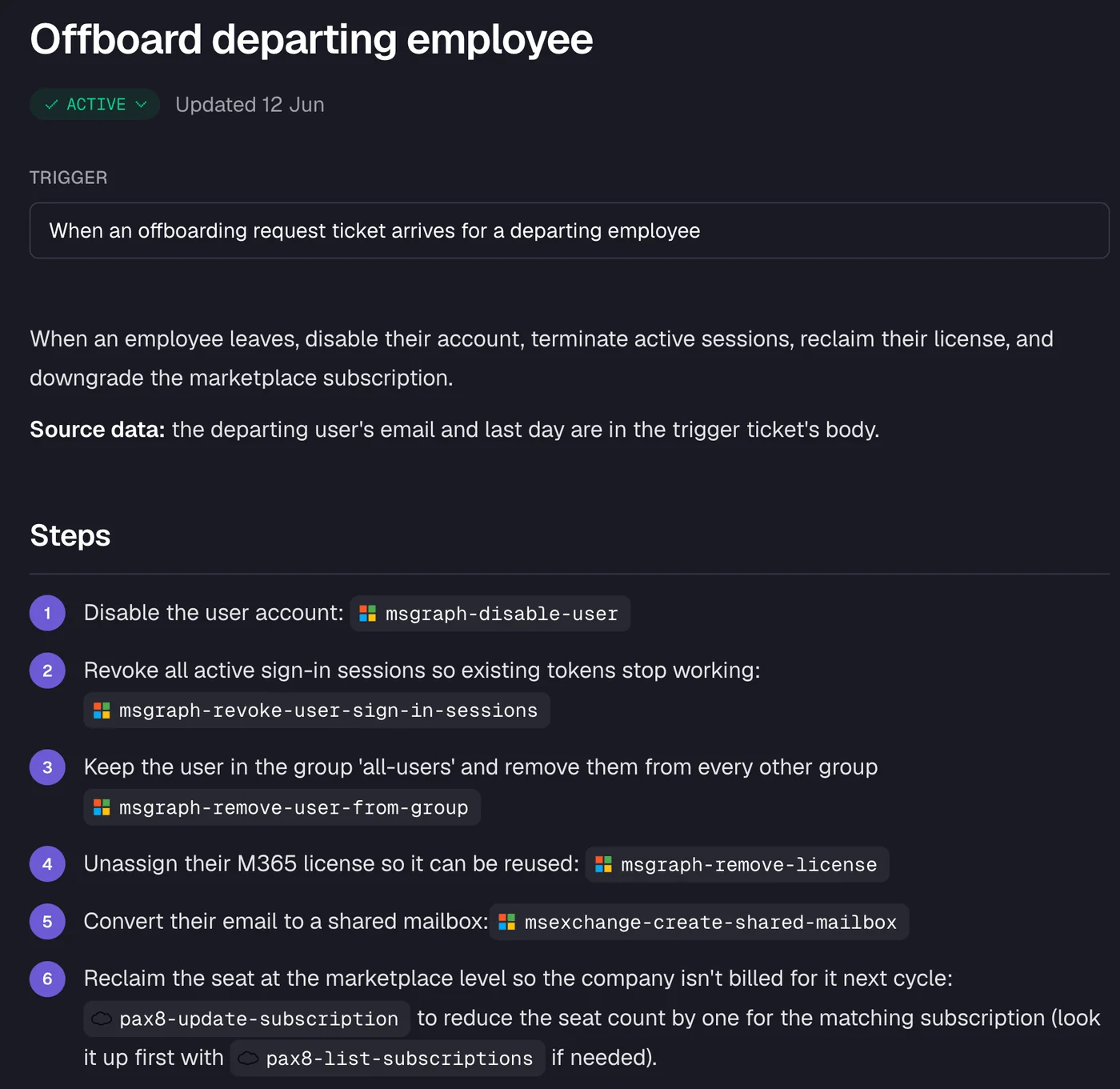
The offboarding workflow above - disable account, revoke sessions, remove from groups, reclaim license - is a close match for a shadow AI remediation involving a compromised or misused account. The specific actions vary, but the pattern is the same: several sequential steps across M365 and Entra ID, all of which Rallied runs from a single ticket.
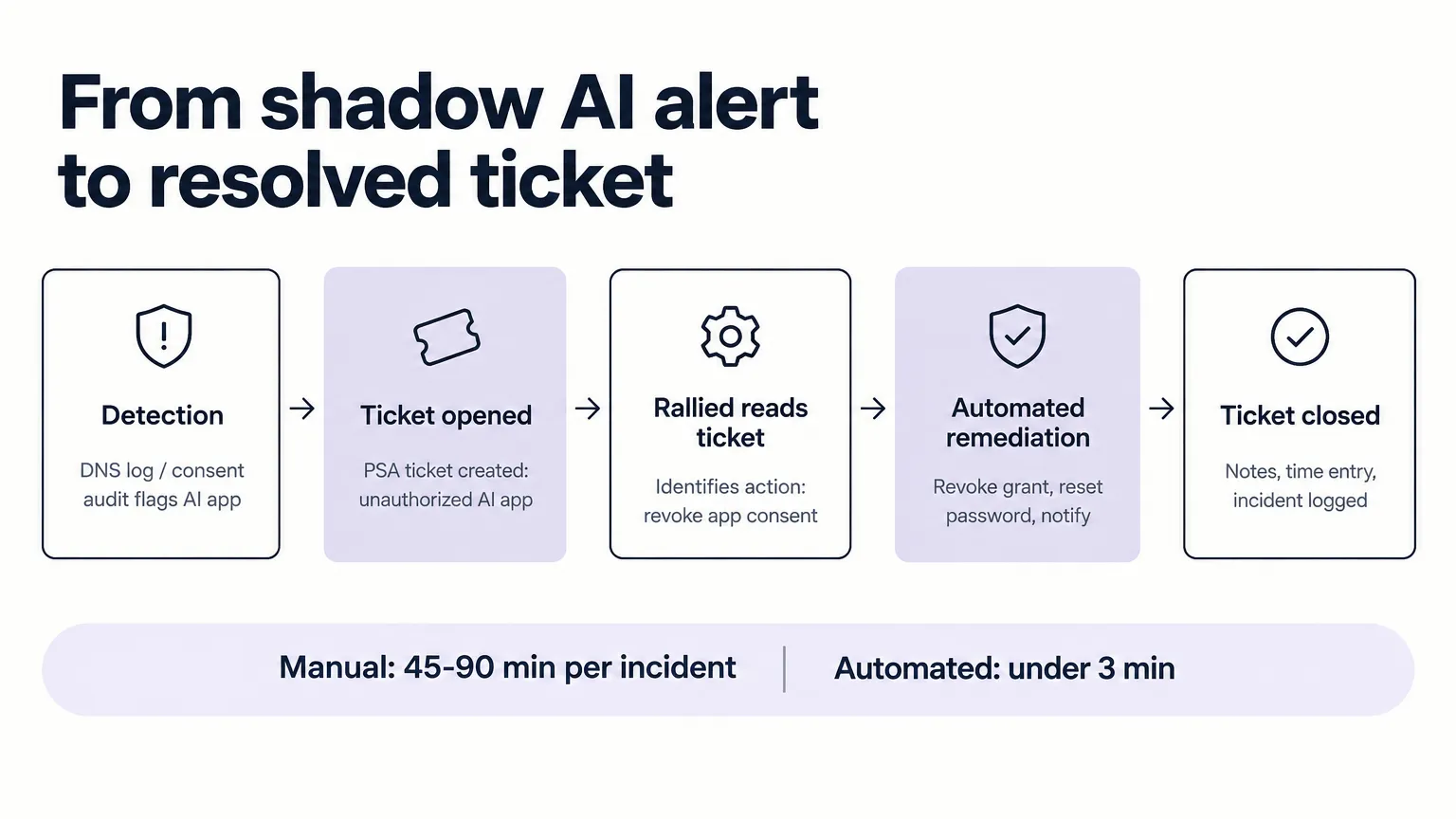
The full detection-to-resolution flow for shadow AI incidents handled by Rallied.
Building shadow AI detection as a client service
The four detection layers described here can be packaged as a recurring service. Here's one way to structure it:
Monthly sweep (1 hour per client, can be scripted):
- Pull DNS/firewall logs and filter for new AI domains not on the approved list
- Run the Entra ID app consent audit and flag any new user-consented AI app grants
- RMM software inventory delta - new AI apps installed since last month
Quarterly review (2-3 hours per client):
- Full app consent audit with revocation of stale grants
- Browser extension inventory across managed devices
- PSA ticket review for user-reported AI tool usage
- Updated approved tools list shared with client stakeholder
Annual policy refresh:
- Review and update the AI acceptable use policy
- Assess whether sanctioned tools (Copilot, ChatGPT Team) are being adopted
- Check whether detection controls need expanding for new tools
The monthly sweep is the kind of automated check that fits into a standardized L1 workflow. The quarterly review is billable advisory work. For MSPs building an MSSP practice, shadow AI detection is a natural add to the security baseline - it's visible, it produces findings, and it's genuinely useful to clients in a way they can understand.
IBM's 2025 data gives you the conversation-starter: only 37% of organizations have policies to manage or detect shadow AI. The other 63% are your client base, and most of them trust you to tell them when this is a problem.
Try Rallied
Rallied is an AI technician built for MSPs. It connects to your PSA (ConnectWise, HaloPSA, Autotask, SuperOps), your RMM, and your Microsoft 365 and Entra ID tenants, and handles tickets autonomously - from first touch to close, with every action logged.
For shadow AI remediation, that means revoking OAuth grants, resetting credentials, disabling accounts, and closing the ticket with a full audit trail, all without a tech manually stepping through the Entra ID admin center. The same M365 automation that handles password resets and onboarding workflows applies directly to the remediation steps that shadow AI detection generates.
Pricing is $300 a month for 2,000 credits - roughly 700 tickets at the standard mix. Shadow AI remediation tickets are Standard tier (3 credits) when they involve Entra ID changes, Complex (8 credits) when they span multiple systems.
Richard Scott, CTO at Cyber Solutions (part of Lyra), wrote in a G2 review: "Feedback from our technicians has also been positive, with AI-generated notes and workplans helping guide troubleshooting and, in some cases, resolving tickets entirely." Cyber Solutions has fully automated workflows handling dozens of tickets each day.
Request a demo to see the M365 and Entra ID actions in a live environment.
Frequently Asked Questions
What is shadow AI, and how is it different from shadow IT?
Shadow AI is staff using unapproved AI tools - ChatGPT on a personal account, an AI browser extension, an AI note-taker connected to company email - outside any corporate control. It's a subset of shadow IT, but the specific risk is data exposure: sensitive client and company data goes into systems that nobody contracted, and training is often on by default unless the user explicitly opts out. An AI acceptable use policy is the governance layer that sits alongside detection.
How much does shadow AI actually cost in a breach?
According to IBM's 2025 Cost of a Data Breach report, organizations with high levels of shadow AI use see an average of $670,000 in higher breach costs compared to those with low or no shadow AI use. Shadow AI breaches also take 10 more days to identify and contain, and 65% of shadow AI incidents compromise PII - versus 53% in standard breaches.
What's the fastest way for an MSP to start detecting shadow AI in a client environment?
The app consent audit in Microsoft Entra ID is the highest-signal starting point for most MSP clients. Go to the Azure portal → Enterprise applications → All applications, filter by user consent, and look for AI tools with mailbox or file access. These OAuth grants persist long after anyone remembers granting them and represent direct data exposure. For non-M365 environments, DNS and firewall logs are the broadest first sweep. CIPP for Microsoft 365 can help MSPs manage this across multiple tenants.
Should MSPs block AI tools entirely, or just monitor them?
Blanket blocking almost always backfires - it pushes usage to personal devices and unmanaged networks where you have zero visibility. The better path is an AI acceptable use policy that moves users to approved, corporate-tier accounts (ChatGPT Team, Copilot, etc.) while blocking the specific tools with the highest data-exposure risk. The goal is channeling AI use, not stopping it.
How can Rallied help MSPs respond to shadow AI incidents?
When shadow AI is detected and a remediation ticket is opened, Rallied handles the response workflow end-to-end: revoking the OAuth grant in Entra ID, resetting credentials if exposure is suspected, disabling the account during investigation, and closing the ticket with full notes and a time entry. This turns a 45-90 minute manual remediation into a 2-3 minute automated one. Rallied's Microsoft 365 automation covers the specific M365 and Entra ID actions most shadow AI remediations require.