How to reset a password in Active Directory: an MSP guide

TL;DR
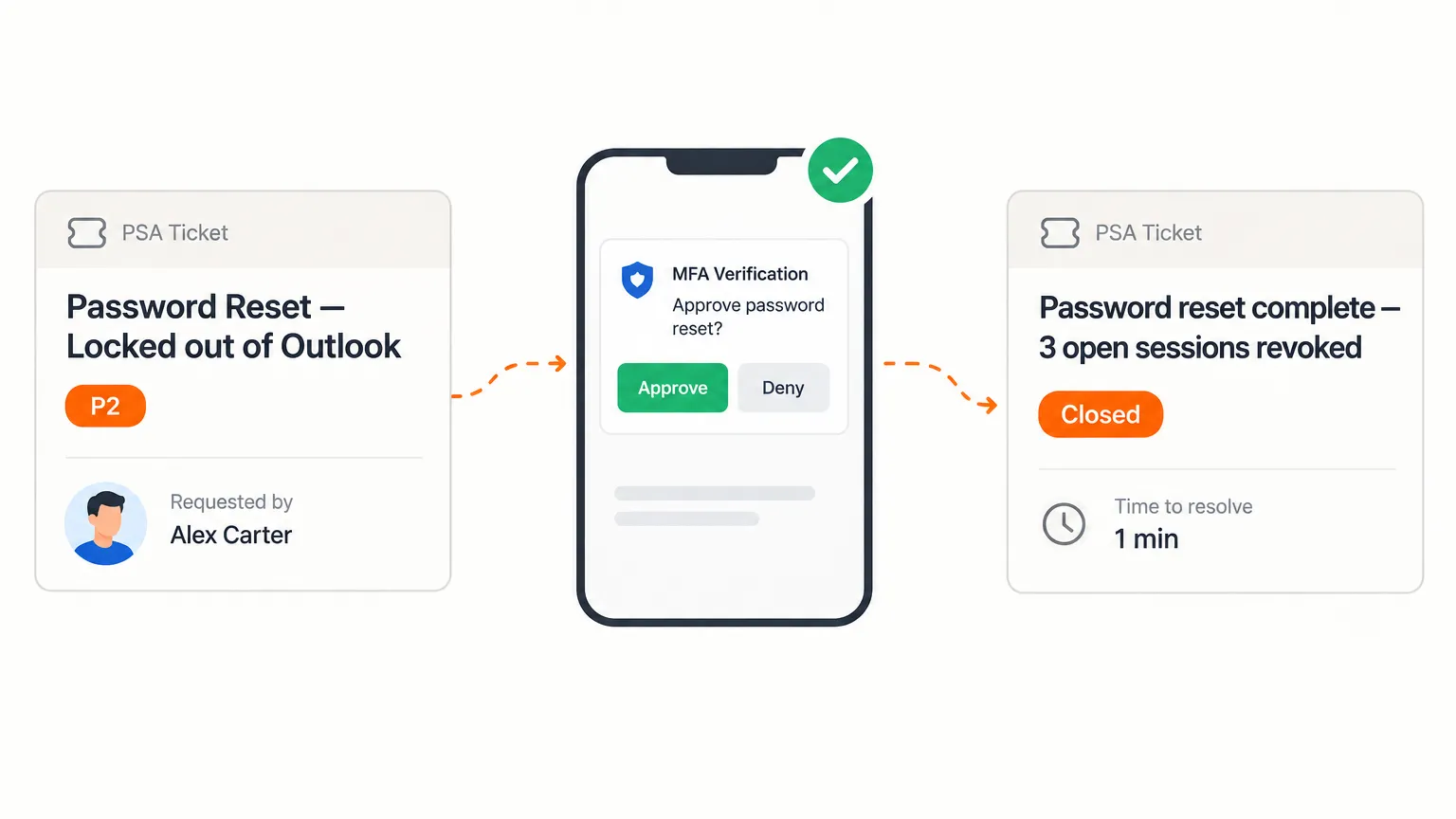
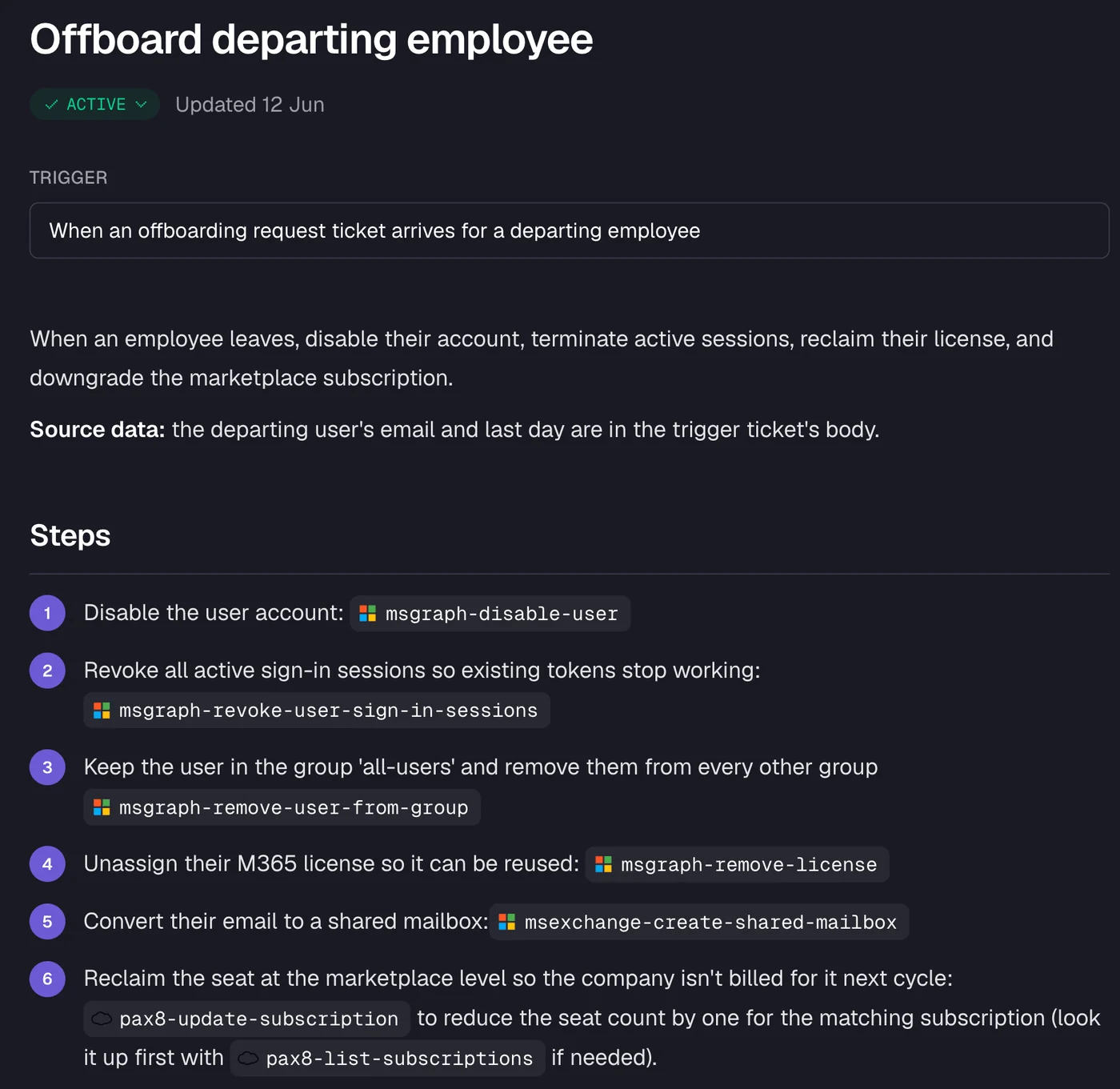
Resetting a password in on-prem Active Directory takes a PowerShell cmdlet (Set-ADAccountPassword -Reset) or a right-click in the ADUC console - and always needs an account unlock and a forced change at next logon paired with it. Entra ID resets work through the admin center or Microsoft Graph, but hybrid accounts require password writeback to be configured or the reset only lands in the cloud. Self-service password reset (SSPR) deflects volume, but it only helps users who already enrolled a method and still have it - everyone else still calls the help desk. For MSPs handling resets across dozens of client tenants, the real cost is not the two-minute reset; it is the verification, the per-client approval chain, and the ticket documentation - which can stretch a simple request to 15 minutes or more. Rallied automates that entire workflow: tenant matching, MFA identity check, reset, session revocation, one-time password delivery, and PSA closure - without a technician touching it.
Why password resets are still eating MSP time in 2026
The technical act of resetting a password has never been simpler. The problem is everything that wraps around it.
Gartner, as cited by The Hacker News, puts between 20 and 50 percent of all service desk calls in the password-related category. Fixify's 2026 benchmark, drawn from more than 50,000 tickets across 30+ organizations, puts identity and access work at roughly 16 percent of ticket volume - and that is at shops that already run self-service tools. Even conservatively, password resets are one of the highest-volume categories in any MSP's queue.
The reason they eat time is not the reset itself. It is the layers around it:
- Caller verification. CISA's Scattered Spider advisory flagged how attackers phone help desks and social-engineer resets out of techs. So verification is now mandatory - and per Fixify, the rules for how to verify are often stored in senior technicians' heads rather than in IT Glue or Hudu.
- Per-client approval chains. One client needs sign-off from a named person. Another wants a Duo push read aloud. Another wants a callback to the number on file. None of it is consistent and rarely documented.
- Multi-system execution. Unlock the account, reset the password, revoke active sessions, generate a temporary credential, deliver it securely, write the notes, close the ticket. At an MSP with 40 clients, every one of those steps might touch a different tenant, a different identity system, or a different PSA configuration.
A Reddit thread in r/msp with 60+ comments is titled "Just wasted 1.5 hours because of passwords." The problem is not the technology - it is the process wrapped around it.
This guide covers the technical steps for on-prem AD and Entra ID, the gaps in self-service, and how AI technicians are starting to handle the whole thing without a human in the loop.
Resetting a password in on-prem Active Directory
On-prem accounts live in Active Directory Domain Services. You have two options: the GUI, or PowerShell. For MSPs managing dozens of clients, PowerShell wins.
Using Active Directory Users and Computers (GUI)
- Open Active Directory Users and Computers (
dsa.msc) on a domain controller or a machine with RSAT installed. - Find the user - search by name or browse the OU.
- Right-click the account and select Reset Password.
- Enter and confirm the new temporary password.
- Check User must change password at next logon.
- If the account is locked, check Unlock the user's account.
- Click OK.
This works, but it is slow for high volume. Each tenant requires a separate session, and you cannot script it.
Using PowerShell
The Set-ADAccountPassword cmdlet from the ActiveDirectory module handles admin resets without needing the old password:
$NewPassword = (Read-Host -Prompt "New password" -AsSecureString)
Set-ADAccountPassword -Identity "jsmith" -NewPassword $NewPassword -Reset
Key flags:
-Identityaccepts a SAM account name, distinguished name, GUID, or SID. You can also pipe fromGet-ADUser.-Resetperforms an admin reset - no old password required.-Servertargets a specific domain controller, which matters when replication lag is a problem.-Credentiallets you run under a different account if your session does not have directory rights.
Always pair the reset with an unlock and a forced change at next logon:
Unlock-ADAccount -Identity "jsmith"
Set-ADUser -Identity "jsmith" -ChangePasswordAtLogon $true
If you skip the unlock, the user may still be blocked even after the reset. If you skip the forced change, the temp password becomes permanent.
Common failure points on-prem
- Minimum password age. Domain policy may block a reset if the account's password was set recently. Check the policy with
Get-ADDefaultDomainPasswordPolicy. - Password complexity. The new password must meet the domain's requirements - length, character classes, and any third-party password filter installed on the DCs.
- Replication lag. If you reset on one DC and the user authenticates against another, they may still see the old password for a few minutes. Use
-Serverto target the PDC emulator, or wait for replication. - Cached credentials. A laptop that has not connected to the domain recently will still use locally cached credentials. The user needs to be on the corporate network (or VPN) for the reset to take effect at login.
Resetting a password in Microsoft Entra ID (Azure AD)
Cloud accounts and hybrid accounts are different, and confusing the two is the most common reset error in an MSP environment.
Three identity models - and why they matter for resets
Microsoft's SSPR documentation describes three scenarios:
- Cloud-only tenant: the password is managed entirely in Entra ID. Reset it there, it is done.
- Hybrid tenant with password writeback enabled: reset in Entra ID, and the change propagates back to on-prem AD automatically via Microsoft Entra Connect.
- On-premises-only environment: Entra ID cannot manage identities that do not exist in the cloud. Reset must happen in AD.
For hybrid environments, writeback must be configured in Microsoft Entra Connect (or Entra Cloud Sync). If it is not, an Entra reset will appear to succeed - the cloud password updates - but the user will still fail authentication against on-prem resources because AD still holds the old password.
Admin reset in Entra
Via the Entra admin center: navigate to Users, find the account, and click Reset password in the toolbar. Entra generates a temporary password and forces a change at next sign-in.
Via Microsoft Graph: a POST to /users/{id}/authentication/passwordMethods/{id}/resetPassword performs the same operation programmatically.
Common failure points in Entra
- Wrong identity source. Resetting a synced (hybrid) account in Entra without writeback enabled updates the cloud but leaves AD unchanged. The user logs in with the new password on web apps, fails on on-prem systems.
- Passwordless accounts. Users signed in with a FIDO2 passkey or certificate-based auth do not have a traditional password. A self-service password change for passwordless accounts requires the new Passwordless password change setting, which Microsoft began rolling out across all clouds in late October 2026, with completion expected by end of November 2026.
- Admin accounts. Resetting a Global Administrator account requires another Global Administrator - a single-admin tenant is a problematic situation for more than just resets.
Self-service password reset (SSPR): what it covers and what it misses
SSPR lets users reset their own password at aka.ms/sspr without calling anyone. For high-volume MSPs, it is the right first line of defense - but it is not a full solution.
How SSPR works
When a user reaches the portal, Entra runs three checks:
- SSPR is enabled for that user.
- The user has the required number of authentication methods registered.
- For hybrid accounts, writeback is configured.
If any check fails, the user gets a "Contact your administrator" message and picks up the phone.
Authentication methods available for SSPR include Microsoft Authenticator push notifications, SMS, voice call, email OTP, software OATH tokens, and hardware OATH tokens. Policy can require one or two registered methods. Microsoft recommends requiring two methods so users are not stranded if one is unavailable - but that also means more users will fail the SSPR check if only one is registered.
One specific gotcha from the Microsoft docs: if you tighten the number of required methods from one to two, any user who only registered one method loses the ability to self-reset until they register a second. Check registration coverage before changing the policy.
The gap SSPR cannot close
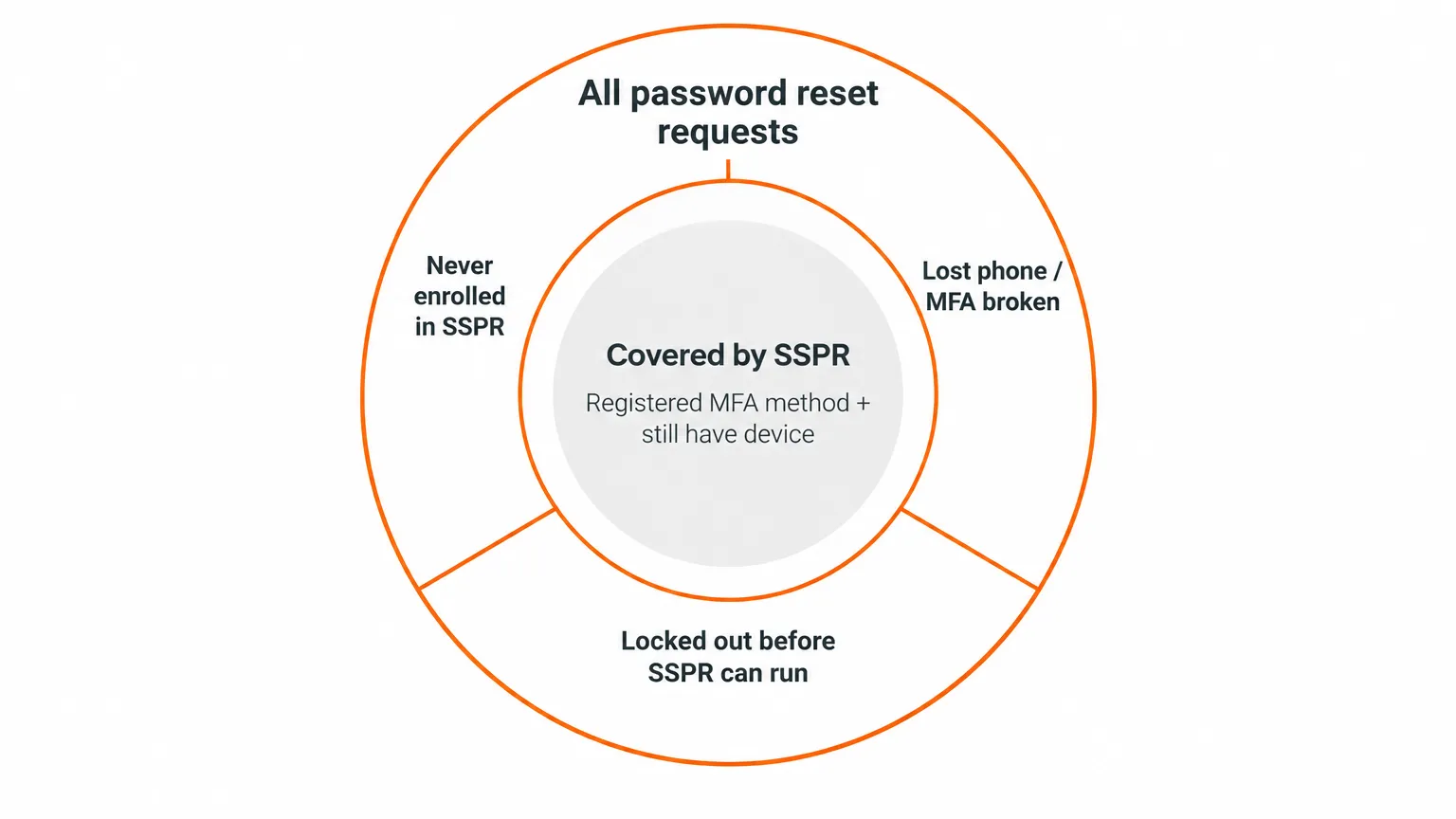
SSPR covers users who enrolled a method and still have access to it. It does not cover:
- Users who never enrolled (the registration prompt at sign-in is easy to dismiss).
- Users whose phone was lost or replaced, breaking their MFA registration.
- Users who are locked out before they can reach the SSPR portal.
- Guest accounts and B2B users from partner tenants with their own authentication setup.
"Most MSPs already have self-service reset tools, but the calls still come in, especially after hours or when MFA breaks." - r/msp discussion on MSP automation for password resets
That gap is precisely what lands in the help desk queue. And for an MSP, every one of those tickets requires not just the reset - but identity verification, tenant routing, and ticket documentation across potentially dozens of client environments.
The real cost of password resets for MSPs
Before we talk about automation, it helps to have an honest look at where the time actually goes.
A password reset in a single-tenant environment takes a skilled tech maybe two minutes. At an MSP, the same ticket runs longer because of the layers around it:
| Step | Time (approximate) |
|---|---|
| Find the right tenant from the user's email | 1-2 min |
| Verify the caller's identity (varies by client policy) | 2-5 min |
| Look up approval requirements for that client | 1-3 min |
| Perform the actual reset + unlock | 1-2 min |
| Generate and securely deliver temp password | 1-2 min |
| Update ticket notes and time entry | 2-3 min |
| Total | 8-17 min per ticket |
Multiply that by 50 resets a month - a reasonable estimate for a mid-size MSP - and you are looking at somewhere between 7 and 14 hours of technician time, every month, on a task with no diagnostic value and no escalation path.
Atomicwork's model, published in 2024, estimates $42,500 to $85,000 in annual productivity loss for a 1,000-employee organization on this category alone. Even at MSP scale, the numbers point in the same direction: this is grunt work, and grunt work is expensive when it has to touch a licensed engineer.
How AI technicians handle password resets end-to-end
The gap between "SSPR covers it" and "tech resets it manually" is exactly where automated AI agents operate.
Rallied is an AI technician for MSPs. When a password reset or lockout ticket arrives in the PSA, it handles the full sequence without a human touching it:
How Rallied handles a reset
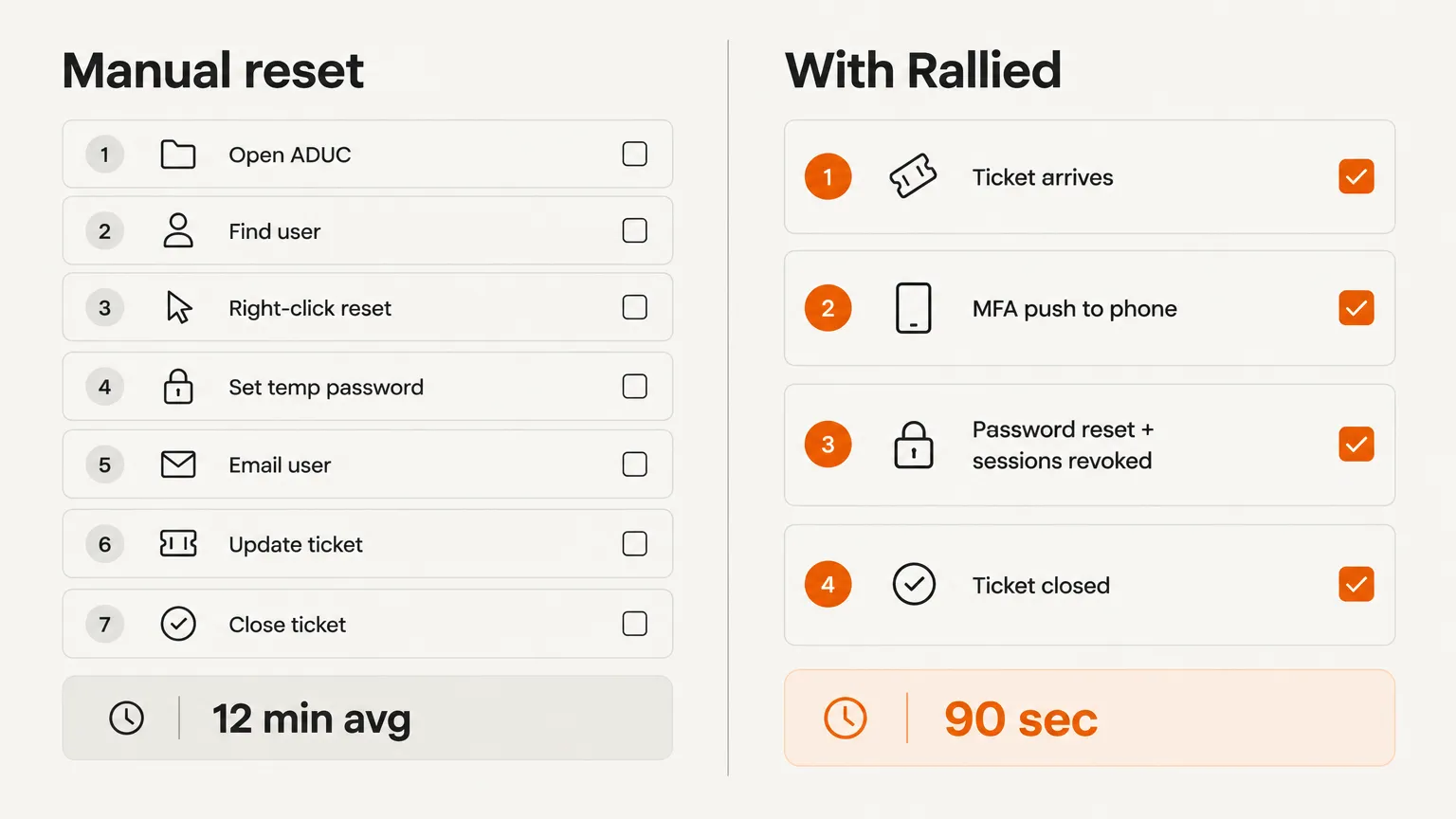
1. Match the requester. Rallied identifies the right customer tenant from the requester's email domain, then checks whether the account exists, whether it is locked, and whether Microsoft has flagged it as risky.
2. Verify the person - with MFA, not trivia. This is the part most help desks get wrong. Rallied does not ask for an employee ID or a manager's name - both are easy to find for a social engineer. Instead, it sends an MFA push via Traceless to the authenticator the employee already carries (Microsoft Authenticator or Duo Mobile). The reset does not proceed until they approve it on their own phone. A denial, a timeout (five minutes), or no response stops the reset entirely and flags the ticket for a technician.
"The push goes through Traceless to the factor that person already has, so a client base split across Microsoft Authenticator and Duo Mobile needs one integration." - Rallied password reset automation page
3. Reset and kill active sessions. Once the identity check passes, Rallied resets the password and revokes every open session. Revoking sessions matters: if a device or token is compromised, an attacker holding an existing session can keep using it even after the password changes. Rallied kills them all.
4. Deliver securely and close the ticket. The temp password goes out as a One-Time Secret link - it works once, it expires in 24 hours, and it never sits in the ticket body or the chat log. Rallied writes the internal note, posts the resolution to the client, and closes the ticket in the PSA with time entry already filled in.
A worked example from Rallied's feature page: ticket #5231, "Locked out of Outlook." Rallied matched the tenant (Harbor Dental) from the requester's domain, found 9 failed sign-ins since 7:50 AM, confirmed the account was not flagged as risky and had Microsoft Authenticator registered, sent a push at 9:37 AM, saw the employee approve it at 9:38 AM, then reset the password with change required at next logon, revoked 3 open sessions, delivered the temp password as a one-time link, and closed the ticket. One minute, no tech.
Where Rallied fits alongside SSPR
Rallied and SSPR solve different sides of the same problem:
- SSPR handles users who enrolled a method, still have it, and are not locked out. No ticket, no tech, no cost.
- Rallied handles everyone SSPR cannot: users who never enrolled, users who lost their phone, locked accounts, accounts that need a human-verified identity check before the reset runs.
That is the ticket volume that keeps landing in the queue regardless of whether SSPR is on. Rallied picks it up with the same identity rigor - an MFA push to the user's real device - rather than a knowledge-based question that can be socially engineered.
Pricing and what it costs per reset
Rallied runs at $300/month for 2,000 credits. A completed password reset costs 3 credits - so at the base plan, the per-reset cost is $0.45. A reset that fails the identity check is not charged. For an MSP doing 50 resets a month, that is $22.50 against 7-14 hours of technician time saved.
What Rallied does not replace
Hardware and onsite work always go to a technician. If the user's locked out because their laptop's encrypted drive needs a BitLocker recovery key, Rallied is not unlocking that - it escalates with the diagnosis already written in the ticket. Security incidents with indicators of compromise go to the team, not to automation. The boundary is explicit: Rallied handles the clearly-defined and repeatable, and hands the rest off with enough context that the tech picking it up does not start from zero.
A note on identity verification at the help desk
The CISA advisory on Scattered Spider is a useful anchor here. Attackers who called help desks and talked their way into password resets did not need technical skills - they needed a name, an employee ID, and a passable reason. Standard knowledge-based verification gave them everything they needed.
An MFA push to the employee's registered authenticator is fundamentally different. The attacker would need to control the user's enrolled device, not just know facts about them. That is why Rallied's approach - no reset without an approved push - provides a meaningful security guarantee, not just a process step.
For MSPs who build their verification process around call-back numbers, employee IDs, or manager names: these are still better than nothing, but they are weaker than device-bound MFA. The Rallied blog on help desk identity verification goes into the threat model in detail if you want the full picture.
Putting it together: which reset method belongs where
| Situation | Best approach |
|---|---|
| User enrolled in SSPR, has their device | SSPR at aka.ms/sspr - no ticket, no cost |
| User never enrolled, cloud-only tenant | Rallied handles the ticket, MFA push to verify |
| User lost their phone / MFA broken | Rallied escalates to tech with diagnosis; tech re-enrolls |
| Hybrid account, writeback configured | Reset in Entra (or Rallied) - syncs back to AD |
| Hybrid account, no writeback | Reset in on-prem AD; Entra follows on next sync |
| Account locked, can't reach SSPR portal | Rallied unlocks and resets; or tech resets via ADUC/PowerShell |
| Locked admin account | Another admin resets; Rallied escalates these by default |
| Security incident / risky sign-in flagged | Escalate to tech - not an automation candidate |
Try Rallied
Rallied is an AI technician for MSPs that handles password reset tickets end-to-end: tenant matching, MFA identity verification via Traceless, the actual reset with session revocation, one-time secret delivery, and PSA closure - without a technician involved. It runs on ConnectWise Manage, HaloPSA, Autotask, and SuperOps, connects to Microsoft 365 and Entra ID, and can be live in under a week in Plan Mode so you can see exactly what it would do before it touches anything.
At $300/month for 2,000 credits, password resets cost 3 credits each - about $0.45 per ticket fully resolved. The first 14 days are free and no credit card is required. If the ROI calculation on technician time saved is obvious for your shop, the pricing page has everything you need to run the numbers.
For the wider picture, read IT Help Desk Procedures.
Frequently Asked Questions
How do I reset a password in Active Directory without knowing the old password?
An admin reset with the Set-ADAccountPassword PowerShell cmdlet does not require the old password. Use the -Reset flag along with -NewPassword and your credentials. In the GUI, right-click the user in Active Directory Users and Computers and choose Reset Password - same result. Always pair the reset with Unlock-ADAccount and force a password change at next logon with Set-ADUser -ChangePasswordAtLogon $true.
What is the difference between resetting a password in on-prem AD vs Entra ID?
On-prem AD resets update the account in your domain controllers and require the ActiveDirectory PowerShell module or the ADUC console. Entra ID resets update the cloud directory via the Entra admin center or Microsoft Graph. For hybrid accounts with password writeback enabled, a reset in Entra automatically syncs back to on-prem AD - but writeback must be configured first, or the reset only takes effect in the cloud.
Why does self-service password reset (SSPR) in Entra ID still leave tickets on the help desk?
SSPR only works for users who already registered a qualifying authentication method and still have access to it. Users who never enrolled, who lost their phone, whose MFA broke, or who were locked out before they could reach the SSPR portal all end up calling the help desk. Fixify's 2026 benchmark (50,000+ tickets) puts identity and access work at roughly 16% of ticket volume even at shops that run SSPR - it deflects volume, but never eliminates the queue.
How much do password resets actually cost an MSP?
The honest answer is that the reset itself takes two minutes. The time sink is verifying the caller and navigating per-client approval rules - often undocumented and known only to senior techs. MSP techs on Reddit report specific tickets stretching to 1.5 hours for this reason. That is why MSPs on Rallied save meaningful technician time per reset: the agent handles tenant matching, MFA verification, the actual reset, and PSA closure automatically.
What is the most common reason a password reset fails in Active Directory?
The most common failures are: (1) minimum password age - the domain policy prevents a reset if the previous password was set too recently; (2) password complexity violations - the new password does not meet the domain's length or character requirements; (3) a third-party password filter blocking the reset before it reaches AD; (4) cached credentials on the user's device not updating until reconnecting to the domain. For Entra ID hybrid resets, a misconfigured or missing writeback connector causes the cloud to accept the reset while on-prem AD stays unchanged.