IT incident report template for MSPs (with post-incident review)

TL;DR
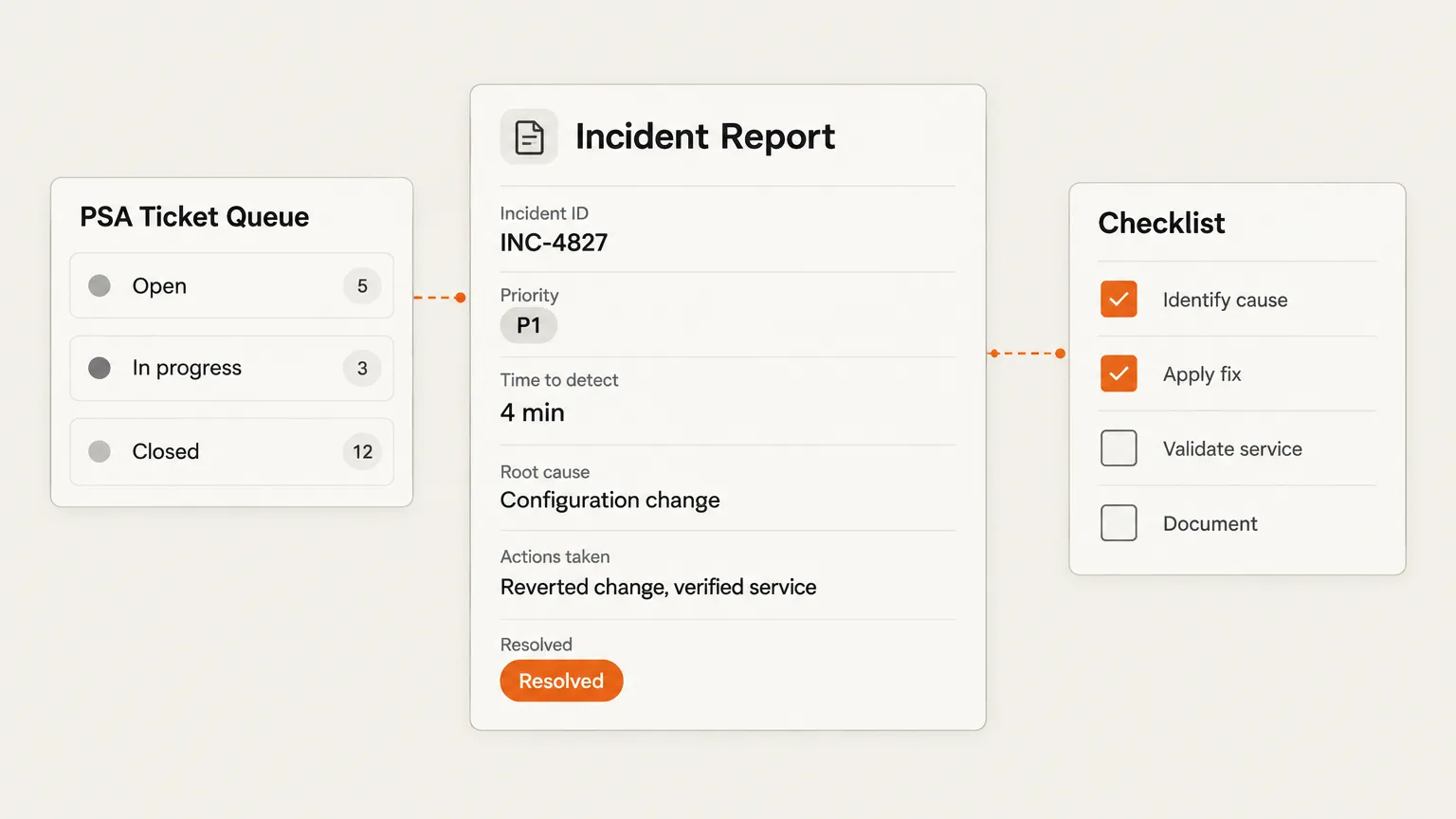
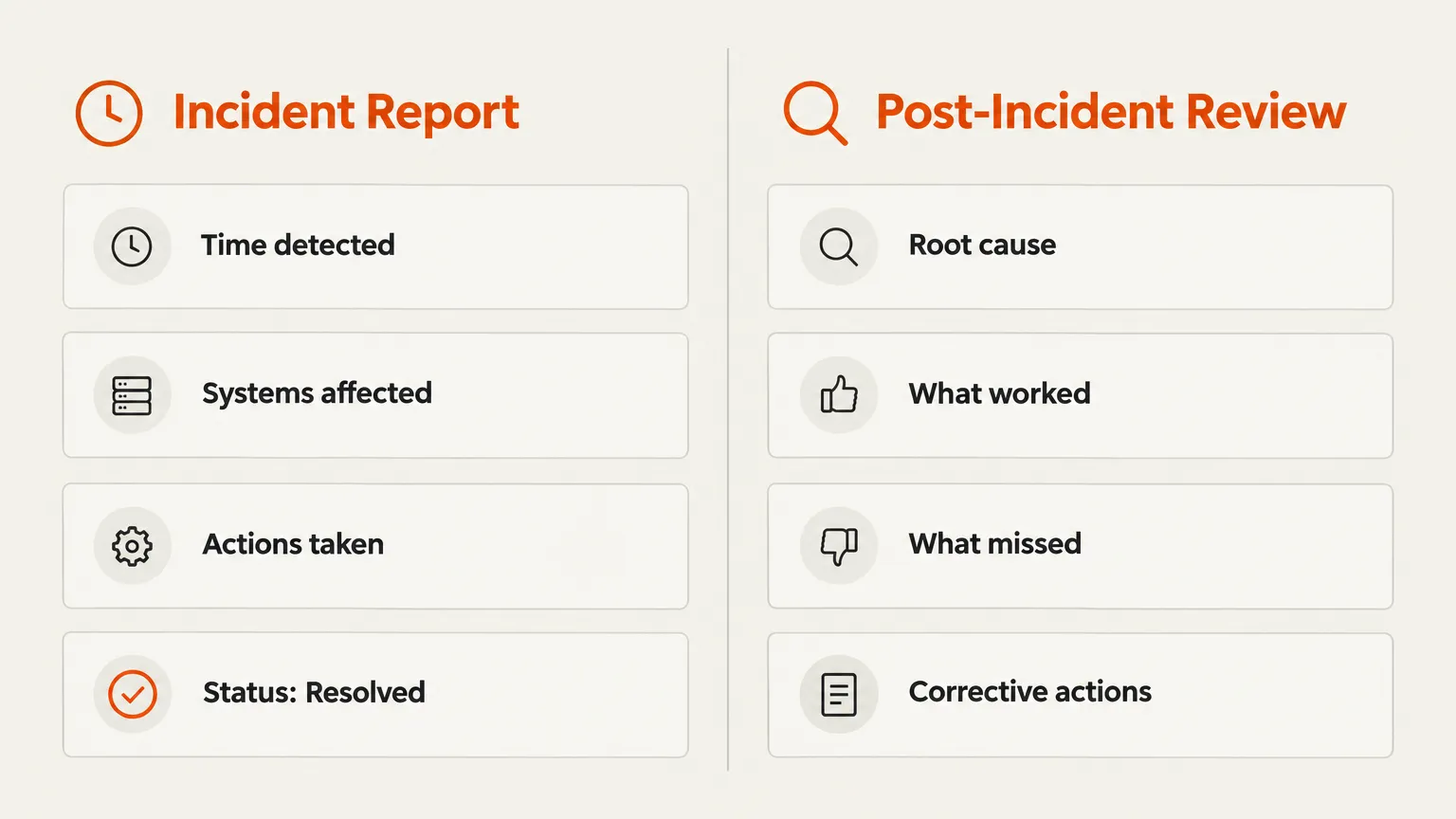
Most MSPs are using one generic form for both capturing incidents and reviewing them - and that's why the reports end up vague and the lessons don't stick. The incident report and the post-incident review are two distinct documents serving two different audiences. The incident report is for the ticket, the client, and the audit log: facts, timeline, what you did, resolved or escalated. The PIR is for your team: what broke systemically and what changes will keep it from repeating. This post gives you both templates, explains when each applies, and walks through the fields that actually matter.
Why most IT incident reports don't work
Here's the uncomfortable truth: a lot of "incident report templates" circulating in MSP forums are adapted from workplace injury forms. They have fields for "names of witnesses" and "location of incident" and absolutely nothing for root cause analysis, affected tenant scope, or regulatory notification triggers.
The ones that go the other direction - full IR plan PDFs aligned to NIST SP 800-61 - are genuinely useful for a major security incident, but they're 20-page planning documents, not something you fill in while you're still fighting a P1.
What MSPs actually need is two lightweight, purpose-built forms:
- The incident report - filled in during or immediately after the incident. Facts only. What happened, what you did, how it resolved.
- The post-incident review - completed within a few days of closure. Blameless. Root cause, contributing factors, corrective actions with owners and due dates.
The confusion between these two documents is what turns both of them useless. When you try to do root cause analysis in real time, you get speculation dressed up as fact. When you try to use a real-time capture form for a PIR, you get a report that lists what happened but never asks why.
The incident lifecycle
Before diving into the templates, it helps to see where each document fits in the full incident response flow. The incident report is created at the "Log" stage, as soon as the incident is confirmed. The PIR comes at the "Post-Incident Review" stage, after the incident is fully resolved and there's space to think rather than react.
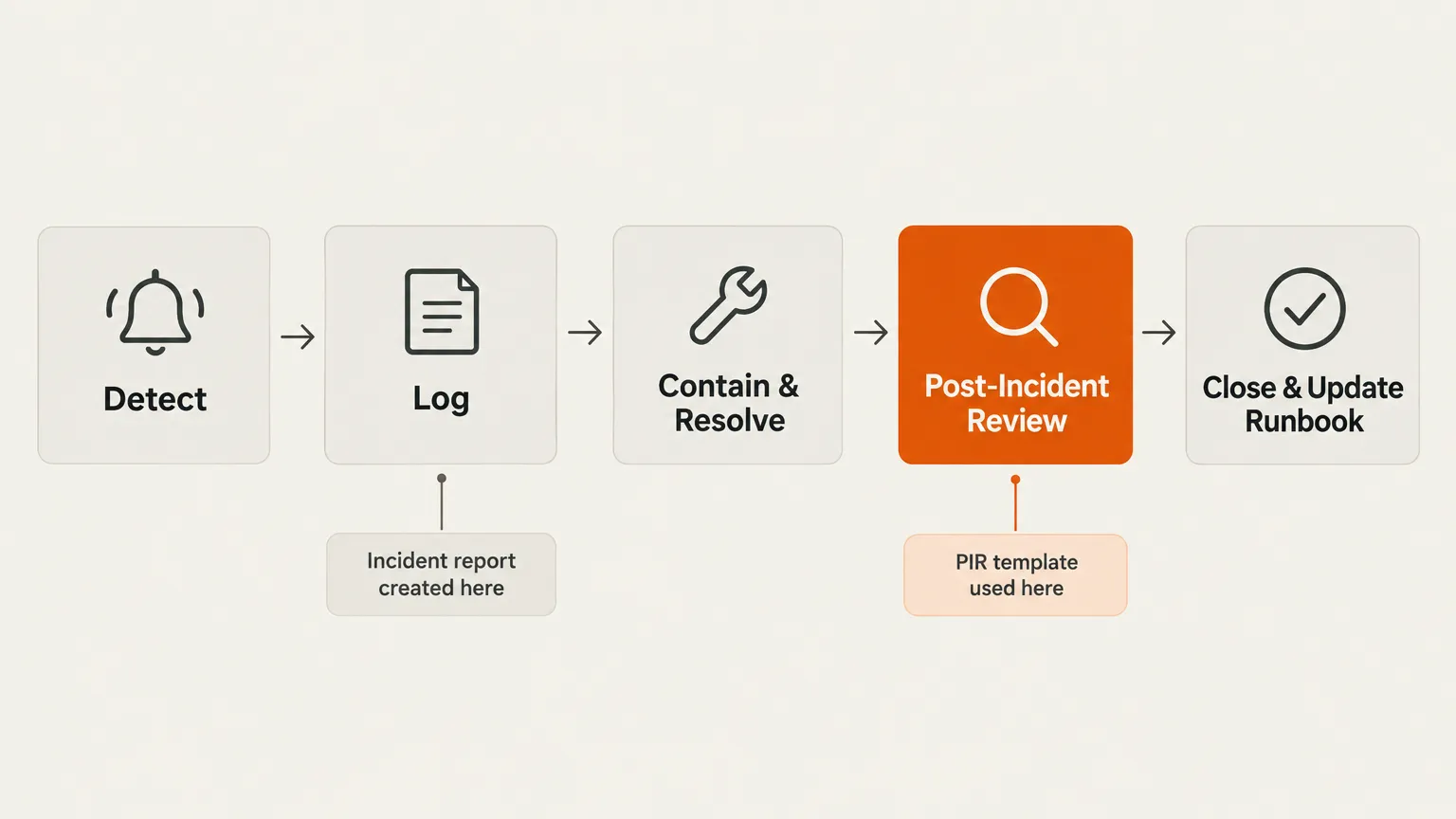
That "Close & Update Runbook" final step is worth calling out: a PIR that surfaces a gap in your documentation should end with the runbook being updated, not just a note that the gap exists. If the runbook for account lockouts doesn't mention that you need to check for active sessions in Entra ID before resetting - that gets fixed now, not at the next lockout.
Part 1: the IT incident report template
This template is designed to be filled in by the technician working the ticket, ideally in the PSA as an internal note, as soon as the incident is confirmed. It should take under ten minutes.
Fields
| Field | Notes |
|---|---|
| Incident ID | Your PSA ticket number, or a separate incident reference if you track them separately |
| Client name | Required for multi-tenant MSPs - scope is per-client |
| Reported by | End user name and method (ticket, phone, monitoring alert) |
| Detected | Date and time the incident was first identified |
| Resolved | Date and time the incident was confirmed closed |
| Affected systems | Hostnames, services, or applications; not just "the network" |
| Users impacted | Number and roles; "all users" vs "one user" changes the severity |
| Severity | P1–P4 (see the classification table below) |
| Incident type | Category: security, outage, degraded service, configuration error, hardware failure |
| Description | What happened, in plain language. 2–5 sentences maximum |
| Actions taken | Numbered steps, with the technician's name and timestamp for each |
| Resolution | What fixed it |
| PIR required? | Yes / No - see triggers below |
| Billable? | Yes / No; note if covered under agreement |
| Evidence preserved? | Logs, screenshots, hashes captured - yes/no, location |
| Regulatory notification triggered? | GDPR, HIPAA, state breach notification - yes/no, deadline if yes |
Severity classification
This is the single field that most templates either skip or define too vaguely. Without a consistent severity definition, every technician has a different idea of what "high" means, and the data becomes useless for trend analysis.
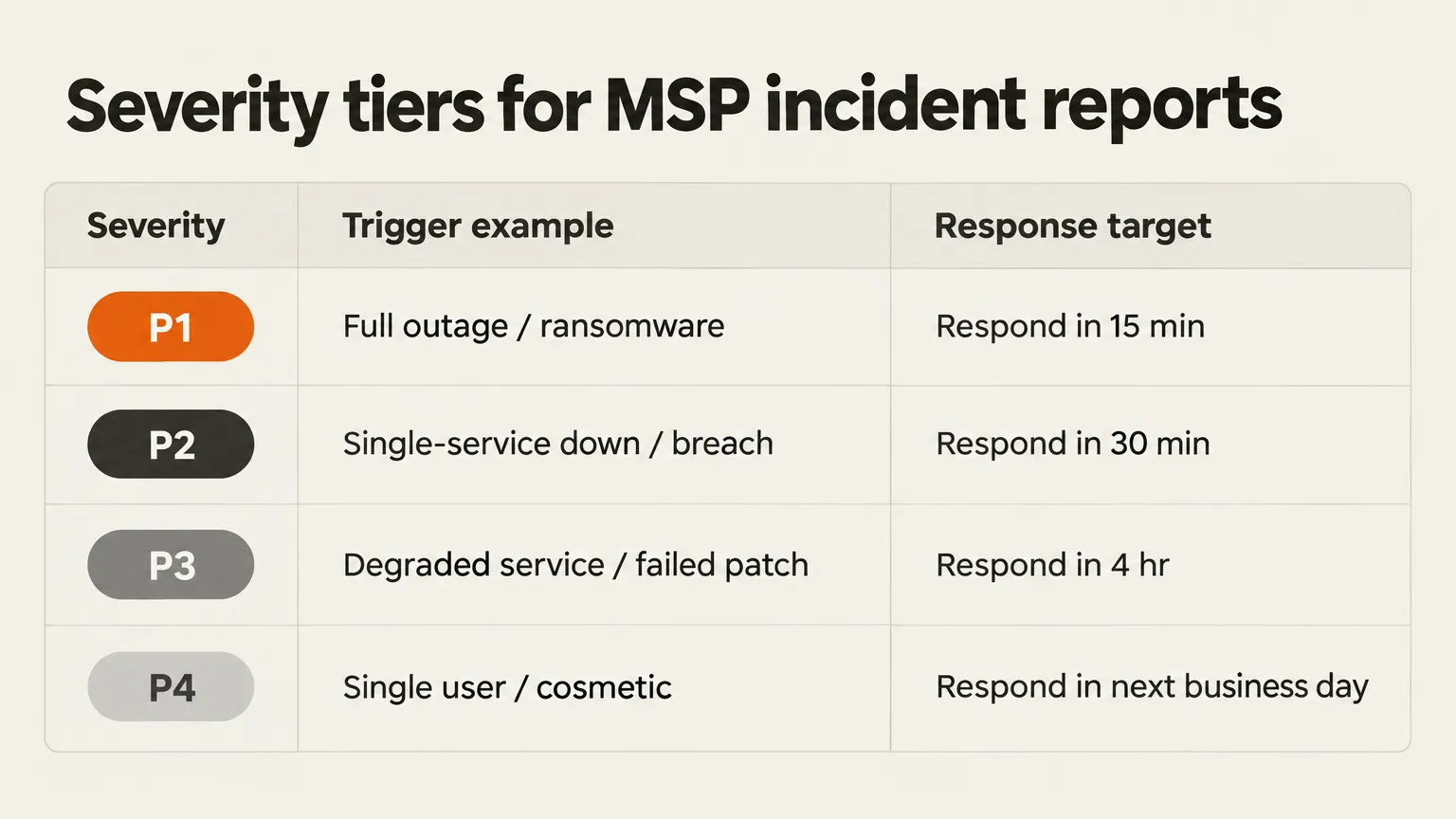
The Guardz MSP incident response plan template uses three tiers (Critical, High, Moderate) with specific activation windows - Critical activates within 15 minutes. We use four tiers here because the distinction between a single-user issue (P4) and a service degradation affecting most users (P3) is worth capturing separately; it changes both the response priority and the billing conversation.
One thing the severity field is not: a measure of how difficult the fix was. P1 is about impact and urgency, not technical complexity. A ransomware attack that gets contained in 30 minutes is still P1. A gnarly multi-hour configuration problem that only affected one user is still P4.
When a PIR is required
Not every incident needs a post-incident review. A blameless PIR takes real time to do well, and running one after every P4 ticket is a good way to make sure your team never does one at all.
Triggers that require a PIR, based on NHIMG's PIR policy template (aligned to NIST SP 800-61 Rev. 3 and NIST CSF 2.0):
- Any P1 or P2 incident
- Confirmed security incident or data breach
- Compromise of a privileged account, service account, or API key
- Any incident detected by the client, a third party, or a researcher - rather than your own monitoring
- A repeat of a cause that appeared in a previous PIR within 12 months
- Any incident triggering regulatory notification
For everything else (P3 and P4, first occurrence, no regulatory trigger), a good incident report with an honest description and resolution is enough.
A note on multi-tenant scope
For MSPs, the incident report needs one field that most generic templates don't include: potentially affected tenants. A compromised MSP credential may hold delegated privileges across multiple clients. The Guardz MSP incident response guidance is explicit about this: before treating a security alert as isolated, check which other tenants are reachable from the affected identity. Add a row to the template for "other tenants checked" and the outcome of each check.
Part 2: the post-incident review template
The PIR is a different document, with a different purpose and a different audience. It should be completed within five working days of the incident's closure - close enough that the facts are fresh, far enough that the heat is off. The goal is to surface systemic causes and produce specific corrective actions with owners and due dates.
The blameless rule comes first: assume everyone acted in good faith on the information available to them at the time. "Human error" is not a root cause in a PIR - it's a placeholder that stops the analysis before it gets useful. When you write "human error," you're really writing "we don't know why." Ask instead: what made this error easy to make? What would have caught it?
Fields
Section 1: Summary
| Field | Notes |
|---|---|
| Incident ID | Linked to the incident report |
| PIR date | Date of the review meeting |
| Facilitator | Who ran the session |
| Participants | Names and roles - everyone who worked the incident or made decisions during it |
| One-line summary | What happened, to whom, for how long |
Section 2: Impact
| Field | Notes |
|---|---|
| Client impact | Services affected, users affected, duration |
| Business impact | Revenue risk, SLA breaches, reputational exposure |
| Data impact | Personal data involved? Volume? Categories? |
Section 3: Timeline
A chronological log of events from first detection to closure. Each entry needs: UTC timestamp, event description, source of the timestamp (log file, ticket note, monitoring alert), and the name of who recorded it.
The NHIMG PIR policy template names this as one of the most common PIR failure patterns:
"Stopping at the trigger ('a token was leaked') instead of asking why it was long-lived and unmonitored."
The timeline is where you catch this -- if the entry just says "token leaked" with no context about how long the token existed or why it had no expiry, that's a gap.
Section 4: Detection and response analysis
| Field | Notes |
|---|---|
| How was it detected? | Monitoring, user report, third party, accident |
| Time to detect | From first occurrence to first alert |
| Time to contain | From first alert to containment |
| Time to resolve | From first alert to full resolution |
| Did your runbooks cover this? | Yes / No / Partially - which runbook, what was missing |
Section 5: What went well
Genuinely useful. Skipping this section is a mistake: it tells your team what to keep doing, and it makes the review feel less like a tribunal. At least three items.
Section 6: Root cause and contributing factors
The core of the PIR. Use at least one structured method:
| Method | Best for |
|---|---|
| 5 Whys | Single-thread incidents, P3/P4; run once per contributing factor, stop at the systemic cause |
| Fishbone (Ishikawa) | Several interacting causes - good for outages with multiple contributing systems |
| Timeline and control gap analysis | Security incidents, especially where you want to map the MITRE ATT&CK technique |
| Change analysis | Post-change outages; "what changed in the 48 hours before this happened" |
Document the root cause and each contributing factor separately. If you genuinely cannot determine the root cause, say so and list the hypotheses tested - per NHIMG's template, leaving the root cause field blank or writing "unknown" is not acceptable; "unable to determine; hypotheses tested: X, Y, Z" is.
Section 7: Corrective actions
| Field | Notes |
|---|---|
| Action | Specific and testable. "Improve monitoring" is not an action. "Add an alert for credential age > 90 days on all service accounts" is. |
| Owner | One named person, not a team |
| Priority | P1 (close within 30 days), P2 (90 days), P3 (180 days) |
| Due date | A real date |
| Evidence of completion | What the owner will show to prove the change is live |
Every root and contributing cause needs at least one corrective action - or a recorded risk acceptance signed off by a named decision-maker. An action is considered closed only when the owner has shown evidence that the change is live, not just that the ticket was closed.
Section 8: Framework and regulatory mapping (security incidents only)
If the incident was a security event, map it to NIST CSF 2.0 functions (Identify, Protect, Detect, Respond, Recover) and to the relevant MITRE ATT&CK technique where known. This is what your compliance clients - especially those under HIPAA, GDPR, or SOC 2 - will want to see in the event of a breach notification.
Formats: Word, PDF, or your PSA?
Freshworks' guide to IT incident report templates does a reasonable job of laying out the format trade-offs:
| Format | Best for | Watch out for |
|---|---|---|
| Word / Google Doc | Rich descriptions, screenshots, editable | Version conflicts when multiple techs are involved |
| Regulatory audits, formal client deliverables | Hard to update; not useful during an active incident | |
| PSA internal note | Real-time capture, linked to the ticket | Lacks structure unless your PSA supports custom templates |
Our take: the incident report should live in the PSA as an internal note, structured with headers matching the fields above. When you need a formal client deliverable - a P1 post-incident summary, a breach notification package - export a PDF from the PSA note. Don't maintain a separate Word document; version conflicts are real and you'll end up with three versions of the same incident with different resolution times.
The PIR is different. It benefits from a shared document environment (Confluence, Notion, a shared Google Doc) where multiple participants can add timeline entries and comment on root cause analysis in parallel. Keep it out of the PSA; it's an internal document, not a client-facing record.
Atlassian's ITSM post-incident review template for Confluence is a reasonable starting point for teams already in the Atlassian ecosystem. It's a three-step blameless postmortem page with follow-up task tracking linked to Jira.
The fields that trip people up
A few specific fields where we've seen MSPs consistently get it wrong:
"Description" becomes a wall of jargon. The incident report is likely to be read by a client contact or a compliance auditor who wasn't in the room. Write the description in plain language: "On Tuesday 14 November at 09:14 UTC, a technician noticed that all users at [Client] were receiving MFA prompts for accounts they had already authenticated. Investigation identified that an Entra ID Conditional Access policy had been modified at 08:47 UTC following a configuration change." That's enough. Spare the LDAP trace.
Severity gets inflated. When every incident is a P1, severity loses meaning and trend data becomes useless. P1 means you stop what you're doing right now, all hands. If that's not what's happening, it's not P1.
Root cause in the incident report is guesswork. The incident report asks "What was the resolution?" - not "What was the root cause?" Root cause belongs in the PIR, after a structured analysis. Writing a root cause in the incident report while you're still troubleshooting will produce a confident-sounding wrong answer that gets copied into the PIR and treated as fact.
Corrective actions without owners close themselves. An action owned by "the team" or "engineering" is not an action. It's a wish. One name, one due date, one evidence standard.
What Rallied handles and what it doesn't
Rallied's AI technician works tickets in your PSA - ConnectWise, HaloPSA, Autotask, SuperOps - executing runbooks, resetting passwords, offboarding leavers, running endpoint scripts, and writing the work back to the ticket notes with a time entry. That ticket note becomes the factual record for the incident report: what Rallied did, in what order, what the outcome was.
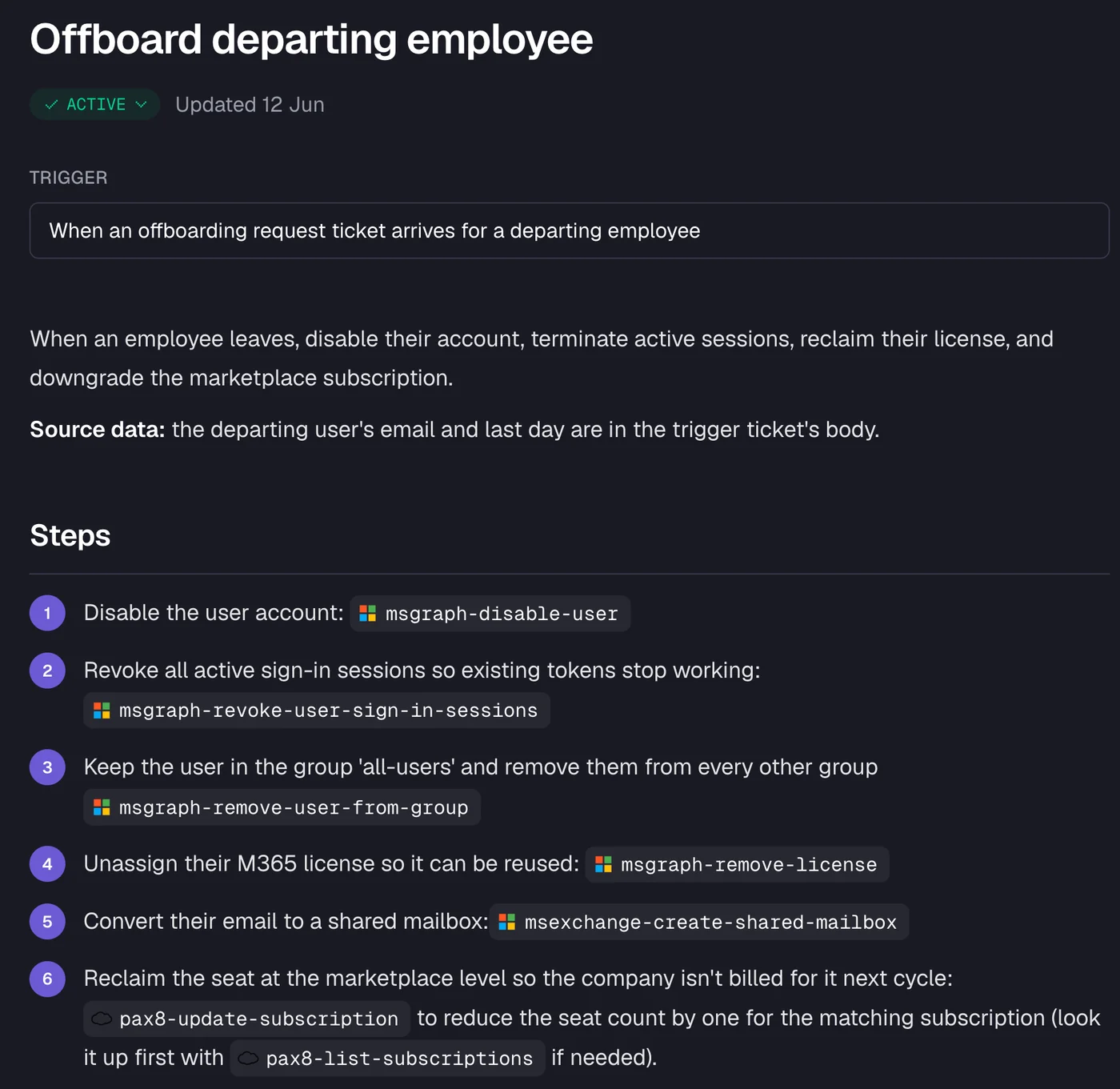
That changes the documentation overhead for L1 and L2 tickets considerably. The Rallied automation benchmarks suggest MSPs automating at this level free up 40–60% of time on repetitive tickets. The incident report isn't a separate exercise; it comes out of the ticket notes automatically.
What Rallied doesn't do is generate the post-incident review. The PIR requires judgment calls: deciding which of three contributing factors is the root cause, assigning corrective action owners, escalating risk acceptances to a named decision-maker. That stays human. What automation does is remove the data-collection burden from the PIR - if the ticket notes are complete (because an AI technician wrote them consistently), the timeline reconstruction in the PIR is fast.
For runbook gaps surfaced by a PIR - "we didn't have a runbook for this, so the technician had to improvise" - the MSP templates guide on the Rallied blog covers how to structure runbooks so they're automatable from day one. The PIR's corrective action "document this runbook" and the subsequent automation of that runbook are the same workstream.
Try Rallied
Rallied is an AI technician for MSPs that resolves L1 and L2 tickets inside your PSA. It executes the runbooks - password resets, account unlocks, offboarding, endpoint fixes - and writes every step back to the ticket notes, so the factual record for your incident report is already there when you need it. No separate logging step, no transcribing from memory.
Pricing is $300/month for 2,000 credits, with simple tickets at 1 credit, standard tickets (identity changes, system lookups) at 3 credits, and complex multi-system workflows at 8 credits. 14-day free trial, no credit card required.
Frequently Asked Questions
What is an IT incident report template?
An IT incident report template is a structured form for capturing the facts of an incident as it happens or immediately after: the incident ID, timestamp, affected systems, severity level, actions taken, and resolution status. It is a real-time record, not a root cause analysis. For MSPs, a good template also includes client name, billable vs. non-billable flag, and a space for the post-incident review to follow.
What is the difference between an incident report and a post-incident review?
An incident report captures what happened - the facts, the timeline, the actions taken, the resolution. A post-incident review (PIR) or postmortem analyses why it happened and what to change so it doesn't happen again. The incident report is created during or immediately after the incident; the PIR follows within a few days. MSPs need both: the report for the client record and audit trail, the PIR for the internal lessons. Using one document for both blurs the distinction and tends to produce reports that are neither useful nor honest.
What should be included in an IT incident report?
A solid IT incident report includes: an incident ID, the date and time of detection and resolution, the client name, the affected systems, the severity tier (P1–P4), a brief description of the incident, the actions taken and by whom, the resolution, and a flag for whether a post-incident review is required. For security incidents, also include evidence preservation notes and regulatory notification triggers.
What is a blameless post-incident review?
A blameless PIR assumes everyone involved acted in good faith on the information they had at the time. The goal is to find the systemic causes - a missing runbook, an unmonitored credential, a gap in the alert stack - rather than to assign personal fault. NHIMG's PIR policy template (aligned to NIST SP 800-61 Rev. 3) explicitly prohibits 'human error' as a root cause, requiring teams to ask what made the error possible instead.
Can an AI technician like Rallied fill in the incident report automatically?
Yes, partially. When Rallied works a ticket, it writes its diagnosis, the steps it took, and the outcome back to the ticket notes in the PSA - ConnectWise, HaloPSA, Autotask, or SuperOps. That becomes the factual record for the incident report without anyone transcribing it. What Rallied doesn't do is generate the post-incident review: the PIR requires human judgment about root cause, systemic fixes, and corrective action ownership.