Ticket deflection vs. ticket resolution for MSPs: why the distinction costs you money

TL;DR
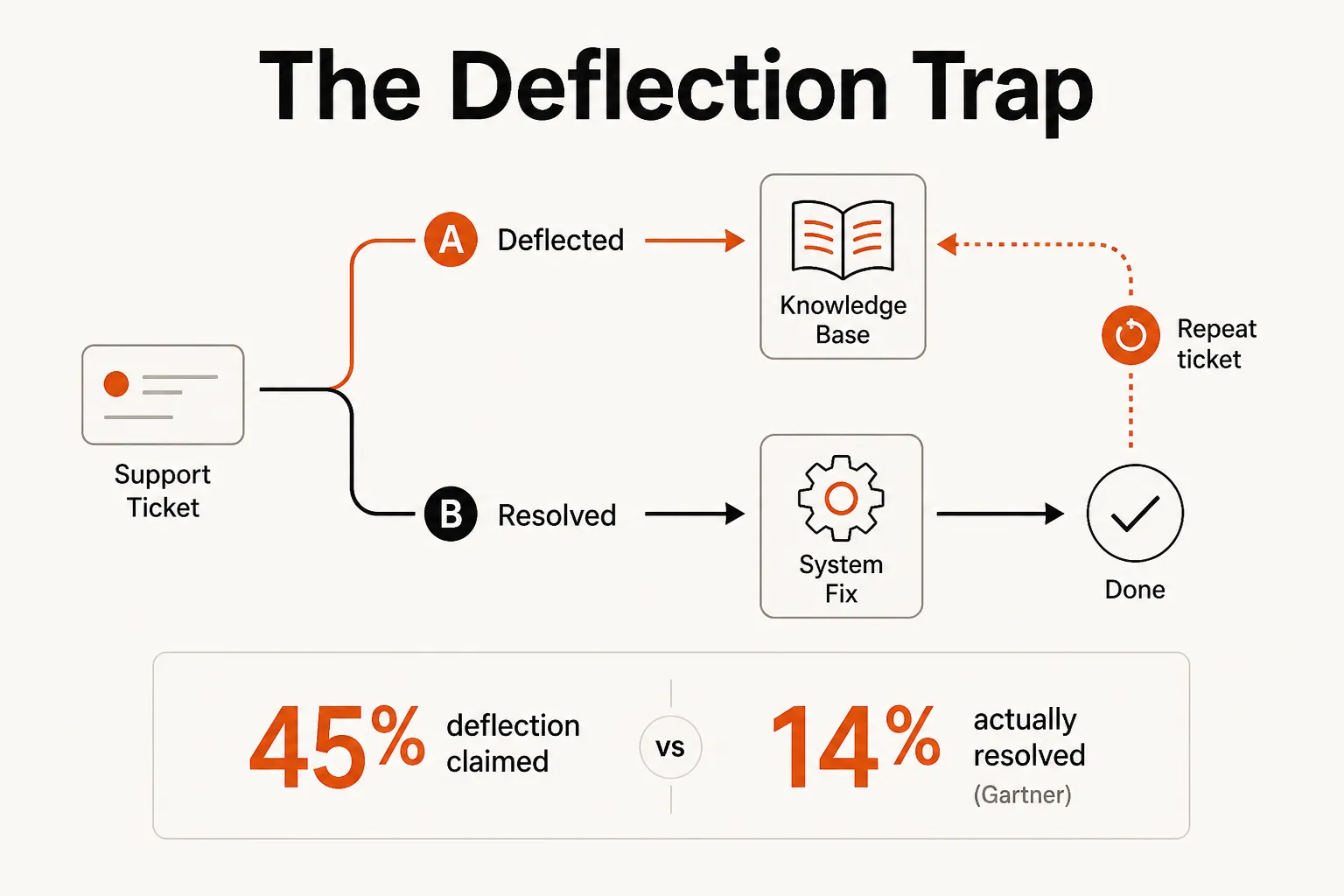
Most AI tools sold to MSPs deflect tickets - they route requests to knowledge base articles, post recommendations, or suppress queue volume. Very few actually resolve them. Gartner found that while AI claims to deflect 45% of support queries, only around 14% reach genuine self-service resolution. For MSPs running on billable hours, that gap isn't a reporting problem - it's a margin problem. Every "deflected" ticket that comes back as a repeat contact is a ticket you paid for twice. Autonomous resolution - where the AI reads the ticket, makes the system change, and closes it without a technician - is the only approach that actually removes the labor. That's a different category of tool, and knowing the difference before you buy is worth a meaningful amount of money.
The distinction nobody explains
"Ticket deflection" has become one of those terms that vendors define loosely because the loose definition is easier to sell. In most marketing materials, deflection means: fewer tickets reach a human. The metric is usually some version of "X% of queries handled without agent involvement."
The problem is that this definition conflates two very different outcomes: a ticket that was routed away from a human, and a ticket that was actually resolved. Those are not the same thing.
Here's a concrete example. An MSP sets up a knowledge base article on password resets. The article gets 5,000 views over the month. The team counts 1,500 deflected tickets - the users who presumably found the answer and didn't submit a ticket. But dig into the repeat-contact data: 200 of those 1,500 contacted IT anyway within 24 hours, because their account was locked at the directory level, not just expired - a case the article didn't cover.
The deflection rate looks great. The resolution rate is 87%. The other 13% just became slower, more expensive tickets.
Gartner's 2026 research put hard numbers on this gap: AI tools deflect more than 45% of queries on paper, but only around 14% reach genuine self-service resolution. That's a 31-point gap between the metric vendors lead with and the outcome MSPs actually need.
Why this matters more for MSPs than for anyone else
Consumer-facing companies that confuse deflection and resolution get repeat contacts. That's annoying and it hurts CSAT. MSPs that confuse them get something worse: a cost structure that doesn't improve no matter how many "automation" tools they add.
The reason is the billable-hours model.
Every L1 ticket carries a fully loaded cost of $15–$50, depending on your overhead rate. MetricNet benchmarks put the median at $22 per ticket. For a typical MSP handling 400 L1-eligible tickets per month, that's $8,800–$20,000/month in L1 overhead - $105,000–$240,000 per year. This is the math a lot of ownership teams haven't done explicitly, but every service manager feels it.
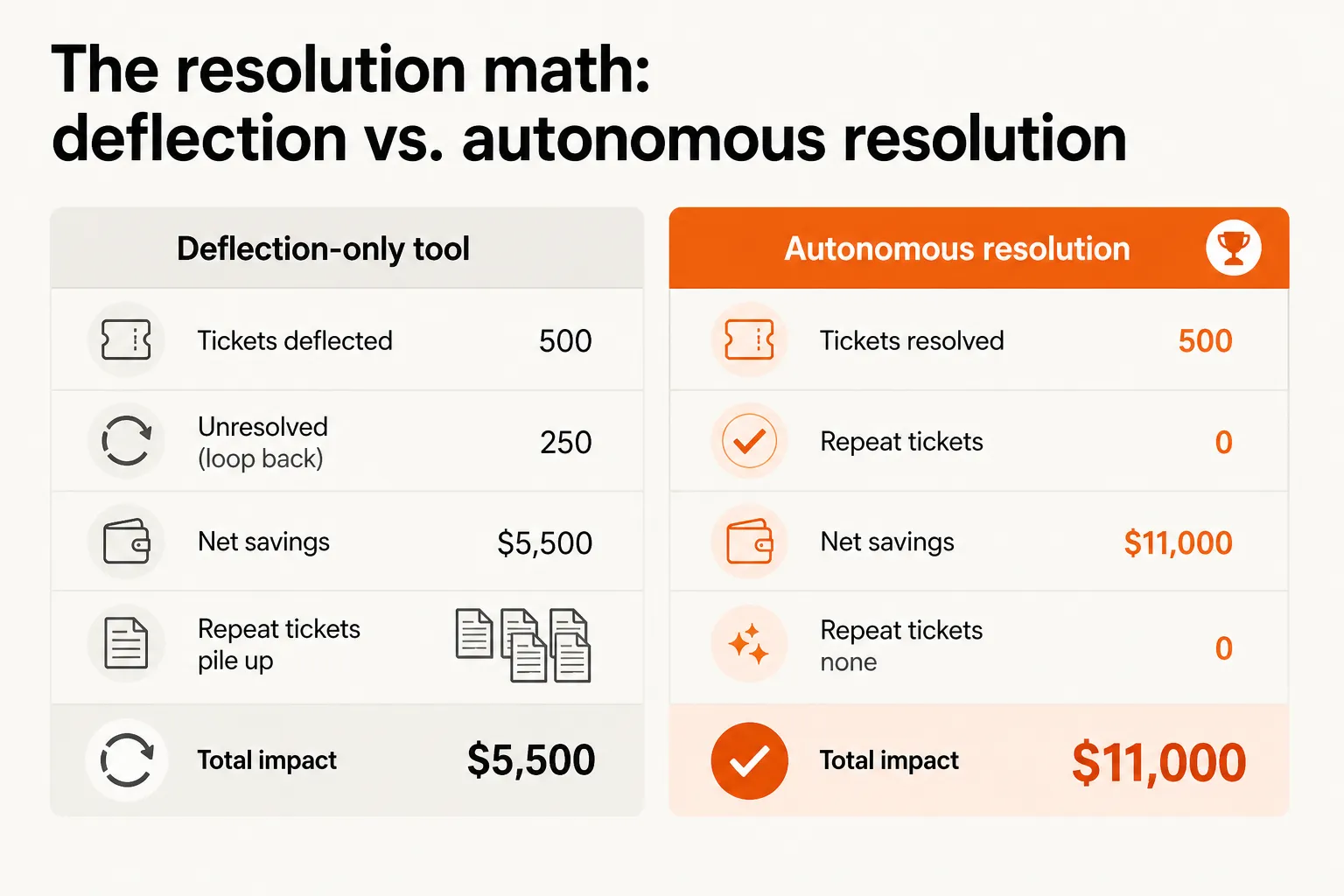
Now run the deflection scenario. Your tool claims a 50% deflection rate - 200 of your 400 monthly L1 tickets deflected. The expected savings: $4,400–$10,000/month. But if your resolution rate is 35% - meaning only 140 tickets were actually resolved by self-service, and the other 60 came back as repeats - your actual savings drop by 30%, and you've added 60 extra tickets to the backlog. Each of those repeat tickets arrives with more context to untangle, because the user already tried the self-service path and hit a dead end.
The SLA implications stack on top. Most MSP contracts include first-contact resolution (FCR) requirements. Deflecting without resolving tanks FCR scores - and depending on your contract, that can trigger 5–20% monthly service credits. So the tool you bought to save money is potentially costing you credits.
"Triage isn't the bottleneck. Resolution is."
This is the part that most automation vendors would rather you not think about too hard. Triage tools, AI summarizers, and intelligent routing all reduce friction in the queue. They're worth having. But they don't eliminate the work - a technician still has to execute the fix across your PSA, your identity platform, and your RMM. The labor cost barely changes. You made the preamble prettier.
What the actual breakdown looks like
The distinction between deflection and resolution maps roughly onto four levels of tool maturity, and understanding which level you're buying at is the most useful thing you can do before signing a contract.
Level 1 - Static self-service (10–20% deflection): Knowledge bases, FAQ pages, keyword search. The ticket never enters the queue if the user finds the article and successfully follows it. No system integration. Fails completely on any case not covered by existing documentation.
Level 2 - AI-assisted routing (30–50% deflection): Chatbots with intent detection, dynamic KB, NLP-powered triage. The tool reads the request and routes the user to the right troubleshooting flow. Still no system integration - it's a smart router, not a problem-solver. A tool that responds to "my account is locked" by sending the user a reset guide falls here.
Level 3 - Execution with system integration (40–60% deflection/resolution): This is where deflection and resolution start to converge, because the tool has read/write access to operational systems. It doesn't just point to the article - it resets the password, unlocks the account, verifies success, and closes the ticket. DevRev cites Descope achieving 54% faster resolution at this level. BILL reached 70%+ autonomous resolution for certain ticket categories.
Level 4 - Agentic autonomous resolution (60%+): Multi-step reasoning, full context from ticket history and system state, knowledge graph integration. Handles edge cases that rule-based tools break on. This is where the category is moving.
Most tools sold to MSPs in 2026 are still Level 1 or Level 2. The marketing material uses the word "resolution" but the underlying capability is routing. Asking vendors whether their tool has read/write access to your identity and PSA systems - or just reads them - cuts through most of the ambiguity fast.
What autonomous resolution actually looks like
For an MSP, the ticket categories where execution-based tools genuinely earn their keep are more numerous than most owners assume. The sweet spot is identity and access work: high volume, low ambiguity, structured enough that the decision logic is clear.
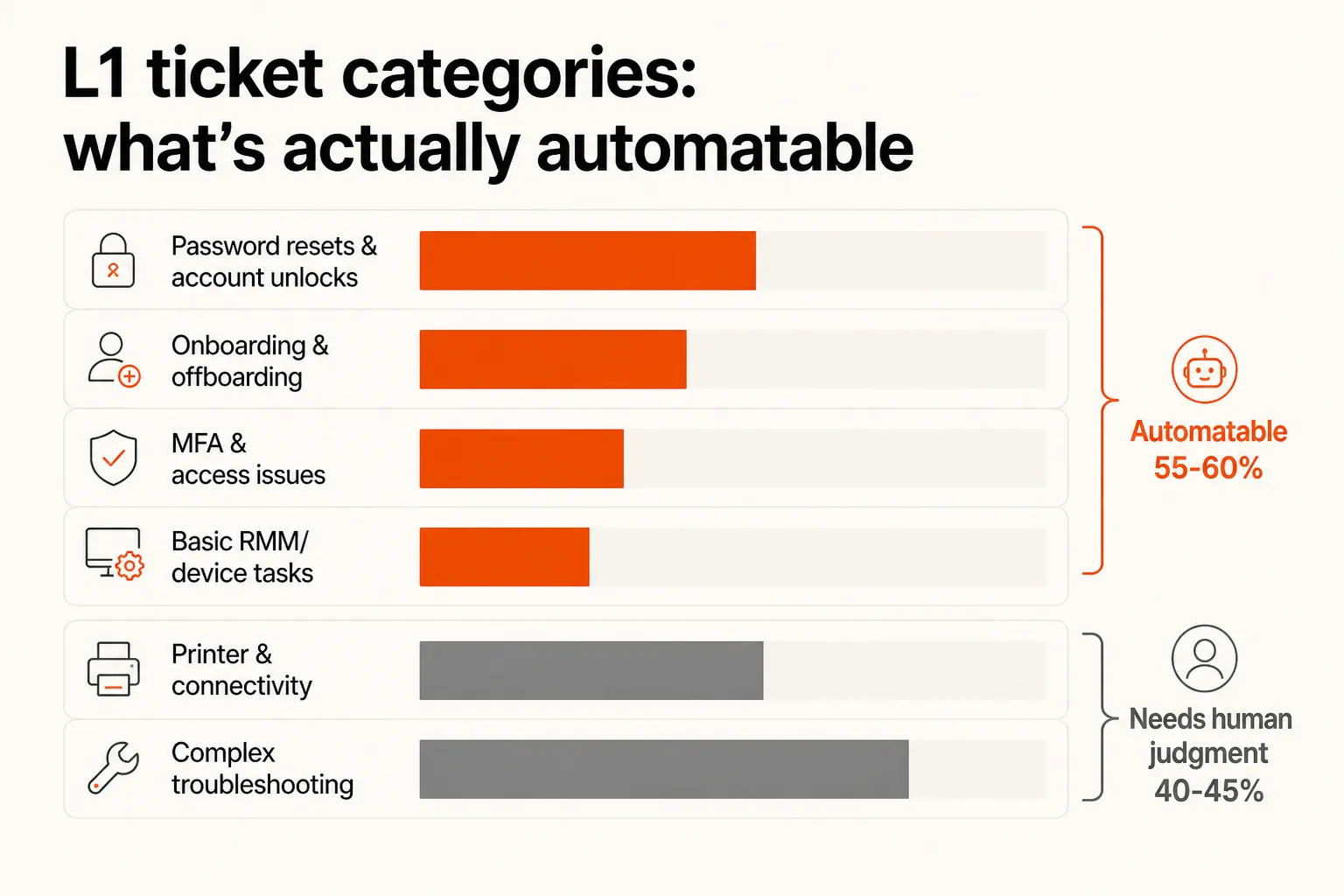
Password resets and account unlocks. The single largest L1 category - roughly 18% of L1 volume at the average MSP. With execution-based access to Entra ID, Okta, JumpCloud, or Google Workspace, a tool can verify the user's entitlement, trigger the reset, confirm access is restored, and close the ticket - in under two minutes, with no technician involved. This is not theoretical; it's the most commonly deployed automation category in production MSP environments today.
User onboarding and offboarding. A single standard onboarding - new M365 mailbox, license assignment, security group membership, documentation update - takes 30–45 minutes of technician time done manually. An execution-based tool with PSA and M365 integration handles the whole flow: provisions the mailbox, assigns the license, adds the user to the right groups, updates the documentation, and closes the ticket. Offboarding is if anything more valuable, given the security risk of delayed deprovisioning.
MFA and access issues. Re-enrollment requests, locked authenticator apps, permission grants for specific software or shared mailboxes. These are high-frequency, clearly defined, and safe to automate with appropriate identity verification.
Basic RMM-triggered remediations. Reboots, script execution, device status checks. With NinjaRMM or Datto integration, a tool can act on monitoring alerts without waiting for a ticket to be manually triaged.
Not everything in L1 lands cleanly in this bucket. Printer problems involve too many possible root causes. Connectivity issues require diagnostic steps that vary based on what the RMM shows. Complex troubleshooting still needs a human. The realistic number - and Rallied publishes theirs openly - is around 55–60% of L1 ticket volume falls within the automatable range. The other 40–45% still goes to a technician.
That's fine. A tool that handles 55–60% of L1 automatically, and escalates the rest with full context, is worth a lot more than a tool that routes 80% but resolves none of it.
The workflow builder trap
It's worth naming the category of tool that occupies the space between Level 2 and Level 3 without fully reaching either: the workflow builder.
Rewst, Power Automate, and similar platforms are genuinely powerful. They can be configured to execute complex multi-step workflows across your stack. The problem isn't the capability - it's the cost of getting and staying there.
A real Rewst implementation takes six months or more and typically requires a dedicated internal admin or a forward-deployed engineer. You're not configuring a setting; you're building and maintaining a library of workflows, each of which breaks when an upstream system changes, and each of which has to be manually updated to handle edge cases. At scale, you end up with a full-time employee whose job is maintaining workflows. That employee cost - plus the implementation - often exceeds the savings from what the workflows actually automate.
| Rule-based workflow builder | Agentic resolution | |
|---|---|---|
| Setup time | 6+ months | Days to one week |
| Handles edge cases | Rarely | Yes |
| Maintenance burden | High (breaks on system changes) | Low |
| Escalates intelligently | No | Yes |
| Admin overhead | High (full-time or near) | Low |
The comparison isn't academic. MSPs who've gone deep on Rewst know the maintenance reality firsthand. The r/msp community has a consistent thread: "Generally not worth it unless you have someone passionate about automation who can own it full-time." That's not a knock on the tool - it's an honest accounting of the organizational cost that the ROI calculation often ignores.
Agentic AI tools take a different approach. Instead of building explicit rules for every scenario, they reason over the ticket context and the available system integrations to determine the right action. They handle edge cases because they're not running a flowchart - they're actually understanding the request. Deployment is measured in days, not months, and the maintenance burden is low.
How to evaluate a tool on this axis
When you're looking at AI tools for your service desk, these are the questions that cut through the marketing copy:
Does it have read/write access to your identity systems, or just read? A tool that can read Entra ID to look up a user but can't reset the password is a Level 2 tool. It can route better; it can't resolve.
What happens after the AI acts? Does the ticket close automatically, or does the AI post a note and wait for a technician? The answer tells you whether you're buying execution or suggestion.
What's the repeat-contact rate for 'automated' tickets? Any vendor worth working with should be able to tell you the percentage of AI-handled tickets that come back as follow-ups within 24 or 48 hours. High repeat rate = deflection, not resolution.
How does it handle the edge case? Give them a specific scenario: "The user is locked out and also has a conditional access policy blocking their location. What does the tool do?" A suggestion engine posts a note. An execution engine either handles it with appropriate escalation logic or escalates cleanly with context.
What's the implementation timeline? Six months means you're buying a workflow builder. Days means you're buying an execution agent. Both can be worth it, but they're different investments.
Try Rallied
Rallied is an AI technician built specifically for MSPs that resolves L1 tickets autonomously - not deflects them. It connects to your PSA (ConnectWise, Autotask, Halo, SuperOps), your RMM (Datto, NinjaRMM), your M365 environment, and your identity layer (Entra ID, Okta, JumpCloud, Google Workspace), then reads the ticket, makes the change, verifies success, and closes the ticket. No technician touch. No recommendation posted for a human to act on.
Rallied is $300 a month for 2,000 credits, about 700 tickets in a typical month. Each ticket costs 1, 3 or 8 credits depending on how much work the agent did on it, and tickets it couldn't finish or wasn't allowed to act on are never charged. Deployment takes under a week.
At 200 tickets per month, $300 covers the volume in a typical month, against roughly $9,375 in recovered technician time (200 tickets × 15 minutes × $75/hour loaded rate). At 500 tickets per month, the same $300 plan typically still covers it, against $23,000+ in recovered capacity. The ROI is strong precisely because Rallied is resolving, not deflecting.
To see how Rallied handles this inside your PSA, read about AI Ticket Triage and Routing for MSPs.
For the wider picture, read Best MSP AI Tools for Ticket Automation in 2026.
Frequently Asked Questions
What is ticket deflection in an MSP context?
Ticket deflection is when a support request gets redirected to self-service resources - a knowledge base article, a chatbot, an FAQ - before a technician ever touches it. The goal is to prevent the ticket from entering the queue. Deflection reduces queue volume, but it doesn't guarantee the problem was solved. A deflected ticket only creates value when the end user actually finds the answer and doesn't contact support again.
What's the difference between ticket deflection and ticket resolution?
Deflection routes the request away from a human. Resolution actually fixes the problem. A knowledge base article viewed 5,000 times might count as 1,500 'deflected tickets' - but if 300 of those users contacted IT again within 24 hours, the resolution rate is far lower than the deflection rate. For MSPs, this distinction matters because repeat contacts eat margin, tank SLA scores, and burn out technicians. Deflection is a leading indicator; resolution is the only metric that tells you the problem is actually gone.
How much does an L1 ticket actually cost an MSP?
Industry benchmarks put the fully loaded cost of an MSP L1 ticket at $15–$50, depending on complexity and overhead. MetricNet's HDI benchmark puts the median at $22 per ticket. For a typical MSP handling 400 L1-eligible tickets per month, that's $8,800–$20,000/month in L1 labor - or $105,000–$240,000 per year. The ROI case for automation is largely built on this number.
Can AI autonomously resolve MSP tickets without human involvement?
For the right ticket categories, yes - and the categories that qualify are larger than most MSPs expect. Password resets, account unlocks, MFA re-enrollments, license assignments, onboarding and offboarding across M365 and identity platforms, and basic RMM-triggered remediations are all well within reach of execution-based AI tools today. Rallied, for example, handles these categories autonomously - reading the ticket, making the system change, verifying success, notifying the user, and closing the ticket - with no technician involved. The estimate across most MSPs is that 55–60% of L1 volume is automatable at this level.
How do I evaluate whether an AI tool is deflecting or actually resolving tickets?
Ask three questions: (1) Does it have read/write access to your identity, RMM, and PSA systems - or does it only read them? (2) Does it close tickets, or does it post a recommendation that a technician still executes? (3) What's the repeat-contact rate for 'resolved' tickets? A tool that suggests actions still leaves the labor on your team. A tool that executes them - makes the change, verifies it, closes the ticket - is genuinely resolving. For tools claiming high deflection rates, ask whether they track resolution confirmation or just queue suppression.