ITSM for MSPs: what it actually means (and where AI fits) in 2026

TL;DR
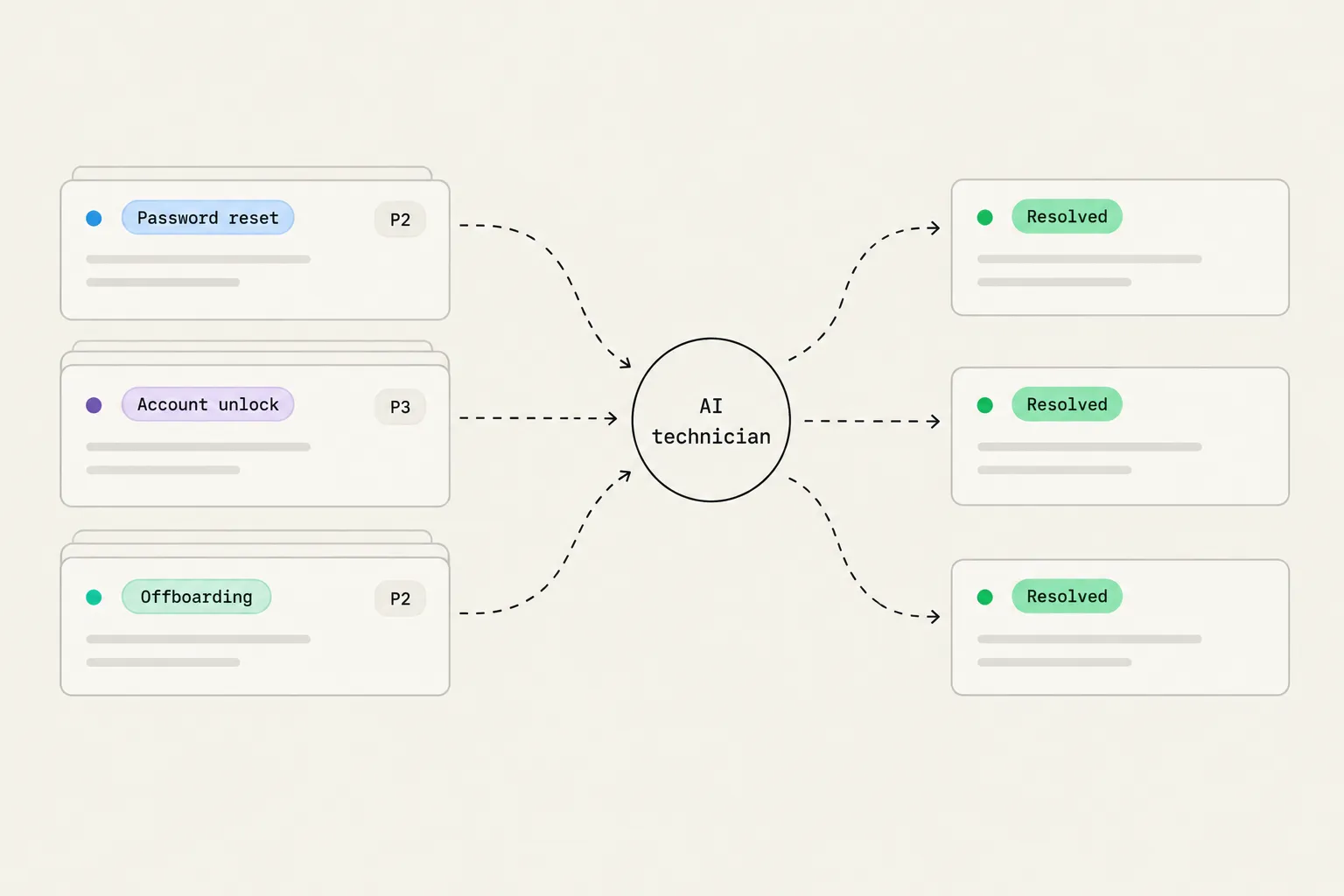
ITSM for MSPs isn't the same animal as enterprise ITIL. At its core it's the PSA holding your tickets, SLAs, and billing; the RMM feeding alerts and running scripts; and a documentation layer with runbooks for your most common request types. In 2026 a fourth layer is emerging on top of that stack: AI that actually resolves tickets, not just reads and routes them. The shift from "AI that assigns the ticket to L1" to "AI that resets the password, writes back to the ticket, and closes it" is where the real margin recovery lives. If your ITSM stack doesn't have that layer yet, this guide explains what it is, how to evaluate it, and where Rallied fits in.
What ITSM actually means for an MSP
ITSM stands for IT service management, and it sounds more bureaucratic than it needs to. The working definition - adapted from itsm.tools - is straightforward: managing IT as a service your clients consume, with quality, accountability, and process built in so the results are consistent.
The ITIL framework, which most people associate with ITSM, is a sound body of practice. But ITIL 4 now describes 34 management practices, and fully implementing them is a large project sized for enterprise IT organizations. MSP360's explainer makes the point directly: ITSM is a high-level strategy, not a certification program, and you can't be "ITSM-certified" as such. The certifications belong to frameworks like ITIL. Most small-to-mid MSPs don't need the full framework - they need the vocabulary, a working SLA structure, and documented runbooks for the ticket types they handle every day.
The vocabulary that actually travels into your PSA and your technician conversations:
- Incident - an unplanned interruption or degradation of a service. The client's VPN is down for five users. The goal is restoring service fast; finding the underlying cause is a separate problem record.
- Problem - the underlying cause of one or more incidents. If the print driver crashes every Tuesday across three clients, that's a problem to investigate, not just a recurring incident to close repeatedly.
- Change - a modification that could affect a service. Standard changes (pre-approved, routine) and normal changes (reviewed) cover most MSP work. A formal change advisory board is useful when client count and complexity justify the overhead; most growing MSPs don't need one yet.
- Request - a standard, low-risk ask from a user: a new laptop, a software license, a password reset. CloudRadial draws the distinction clearly: requests are not incidents, and conflating them is one of the most common reasons a service desk queue stays noisy even when volume is manageable.
The practical version of ITSM for an MSP: configure your PSA well, build an SLA matrix that matches your contracts, and document your ten most common request types as runbooks. That's 90% of what good ITSM looks like on the ground.
The MSP ITSM stack
The PSA is the operational core where ITSM lives. Everything else plugs into it.
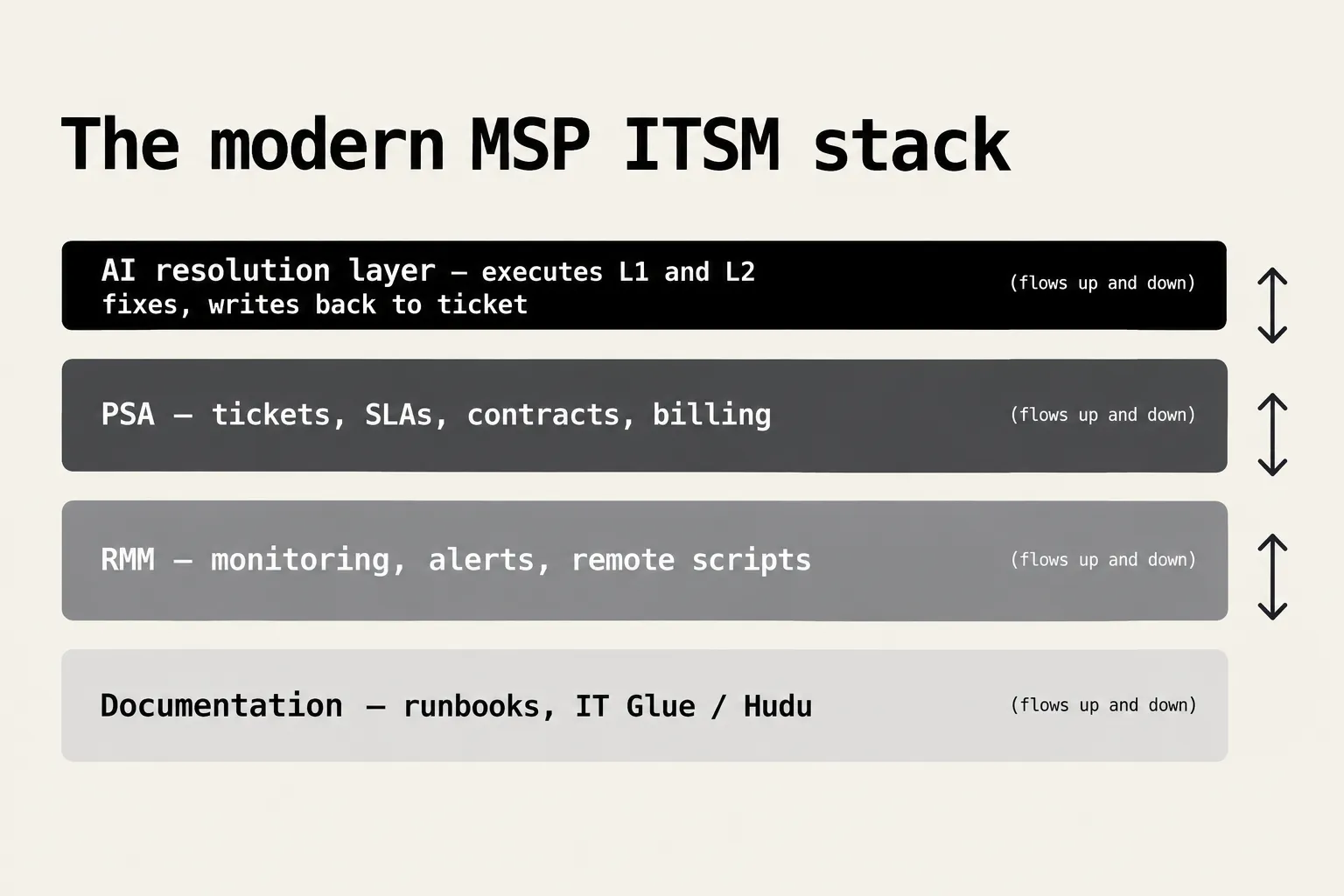
Documentation - IT Glue, Hudu, or a well-organized SharePoint. Runbooks, SOPs, and asset documentation live here. Every other layer depends on this one being accurate. If the runbook for offboarding a user is wrong, the offboarding fails - whether a human or an AI is following it.
RMM - Your remote monitoring and management platform (NinjaRMM, Datto RMM, N-central) provides monitoring alerts, remote access, and script execution capability. The RMM is how a technician - or an AI technician - acts on an endpoint without opening a remote session. More on what RMM automation actually looks like in practice.
PSA - ConnectWise Manage, Autotask, HaloPSA, and SuperOps each hold your ticket queue, time entries, client contracts, SLAs, and billing in one system. Teamwork's 2026 PSA roundup puts the global PSA market at $12.4B in 2024, projected to reach $40.25B by 2033 at a 14.7% CAGR - treat that as directional context rather than a precise forecast, but the consolidation pressure in this market is real.
AI resolution layer - the fourth layer, where 2026 is genuinely different from 2023. We'll spend the rest of this piece on it.
ITSM conversations that jump straight to "which AI tools should we use?" while skipping the three layers below usually produce expensive experiments on a shaky foundation. If your documentation is stale and your PSA configuration is messy, no AI layer fixes that.
The real cost of L1 grunt work
Before the AI layer, it's worth being clear-eyed about what it's solving.
The standard MSP ticket queue is mostly requests: password resets, account unlocks, access changes, onboarding packets, offboarding tasks. These are low-skill, high-frequency, and easy to get wrong when a technician is context-switching between three clients. They're also the tasks that eat L2 and L3 time when the L1 queue backs up.
Kaseya's 2026 State of the MSP report captures the macro tension: 48% of MSPs say AI and automation are the top thing clients ask for, but only 13% say they've turned it into revenue. Meanwhile, 75% of MSPs cite hiring and retaining IT staff as a top challenge (per V2Cloud citing MarketsandMarkets research). Ticket volume grows; headcount doesn't keep pace.
Scaling headcount in step with client growth erodes margin at exactly the moment the revenue line looks healthy. The alternative - growing service desk capacity without growing headcount - requires automating the L1 work that currently lands on human plates.
The Rewst writeup on automated MSP ticketing uses an offboarding example to make the cost concrete: one MSP's leaver process took 30 to 45 minutes per user before automation. At even 10 offboardings a month, that's 5 to 7.5 hours of tech time going to a task a well-configured runbook can close in minutes. DeskDay's 2026 challenges roundup names SLA pressure alongside staffing as the central operational strain - every minute a ticket waits in queue burns SLA clock before anyone has touched it.
"It figures out things we don't even have in documentation and solves issues without my team touching them."
- Ryan Huneidi, Owner, Huneidi Services (rallied.ai)
The more telling data point from Kaseya: the share of MSPs with customer spend above $25K per year fell from 75% to 41%. Smaller accounts, tighter budgets, same ticket volume. The only lever that doesn't involve hiring or losing margin is making each ticket cheaper to handle.
Where AI fits in MSP ITSM in 2026
"AI for MSPs" covers a wide spectrum, and the distinctions matter for evaluating what you're actually buying.
Most AI tooling in the PSA market right now operates in the triage tier: read the incoming ticket, classify it, enrich it with client and asset context, set the priority, route it to the right technician. Autotask's Cooper Copilot, for example, helps with ticket summaries and customer communication drafts. That's genuinely useful - it saves the technician a read - but it doesn't close a single ticket. The queue length is unchanged.
The more valuable category is resolution: AI that changes something in the client's environment and closes the loop without a technician in the middle.
CloudRadial's breakdown of AI ticket handling maps this as a five-stage pipeline:
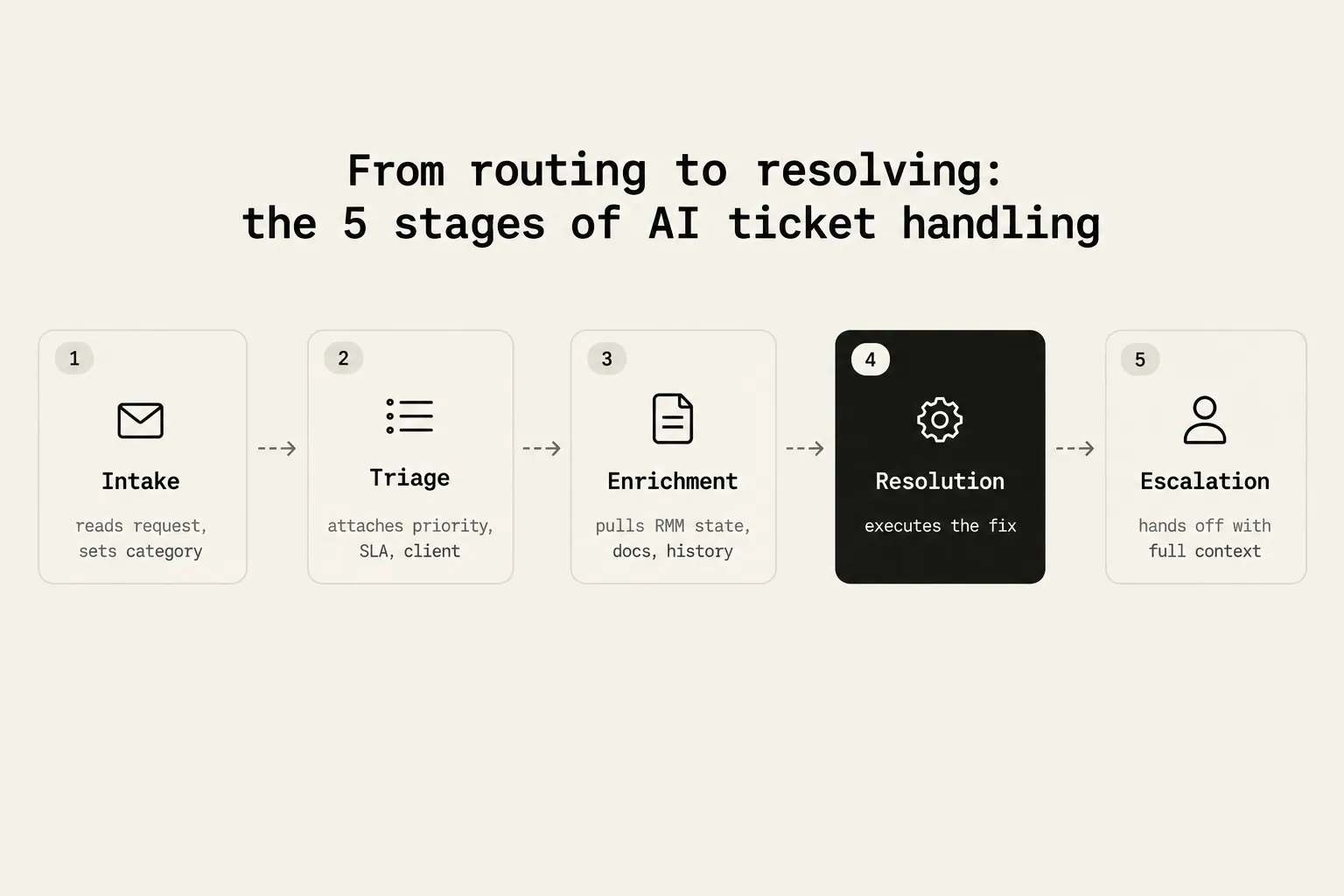
- Intake - reads the request as it arrives, sets the category and type
- Triage - attaches priority, client, SLA, and asset context
- Enrichment - pulls the client's RMM state, recent ticket history, and the relevant documentation
- Resolution - executes the fix through integrations: resets the password, runs the RMM script, creates the mailbox
- Escalation - when confidence is low or the issue falls outside the runbook, hands off to a technician with the full context already assembled
Most vendors are solid at stages 1-3. The gap is at 4 and 5, which is where the ROI is. Flexpoint's 2026 benchmark cites a comparison where median resolution time with AI automation was 4.4 hours, versus 71 hours handled primarily by humans - across full ticket lifecycles, not password resets alone, so treat it as directional rather than per-ticket math.
When you're evaluating a workflow automation tool versus an AI resolution agent, the question to ask is where in that pipeline their product actually operates. Triage and enrichment tools have their place, but they're not the same thing as resolution.
Which tickets AI can actually handle
Not everything in the queue is a good candidate for autonomous resolution. The best candidates share three traits: a known fix, a bounded set of systems, and a reversible action.
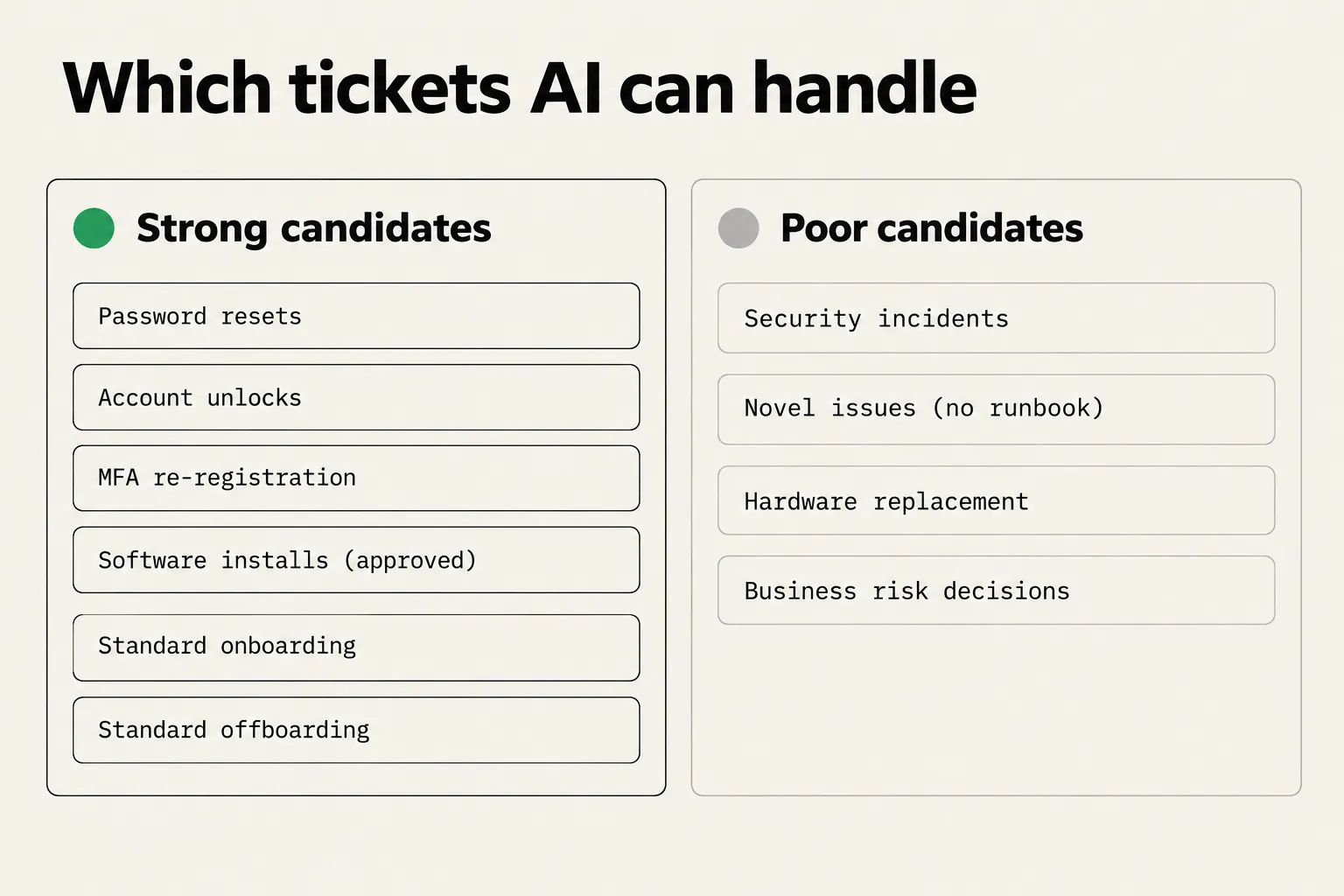
Strong candidates - what AI should be handling today:
- Password resets and self-service unlocks
- Account unlocks and MFA device re-registration (with identity verification)
- Software installs from an approved catalog
- Standard onboarding: create accounts, assign licenses, add to groups
- Standard offboarding: disable accounts, revoke licenses, forward mail, reclaim Pax8 seats
- Endpoint fixes via RMM script: service restarts, cache clears, print spooler resets, disk cleanup
Plausible with approval guardrails:
- Access changes that touch sensitive systems or billing
- M365 and Google Workspace mailbox and calendar fixes
- Anything that modifies license counts or subscription tiers
Poor candidates for now:
- Security incidents (need a human owner and a full audit trail)
- Novel issues with no runbook
- Hardware replacement and physical site work
- Judgment calls about a client's business risk
The practical test: if a technician could write down the steps in plain English, an AI can follow them. If the answer to "what do I do here?" depends on undocumented context, it can't - and shouldn't try.
What to look for when evaluating AI ITSM tools
If you're assessing AI tooling for your service desk, the questions that cut through vendor claims:
Does it actually resolve, or just route? Ask for a demo on a real ticket type - a password reset, an account unlock, an offboarding. Watch whether it changes something in your RMM or M365 and writes back to the ticket, or whether it drafts a note for a technician to read. Triage and enrichment are table stakes; resolution is the differentiator.
How long does deployment take? Workflow-engine tools like Rewst require meaningful build time before you see results - that overhead is a deliberate trade-off for maximum customization, but it means months, not days, before production value. If your primary need is L1 resolution on common ticket types, a faster path matters.
What's the governance model? Every sensitive action - password changes, license revocations, access grants - should be available in three modes: allow, require approval, or disable. If the tool doesn't give you that granularity per client and per integration, you're either blocked from running the actions or exposed on the ones that deserve a human sign-off.
How are you billed? Per resolution, per seat, or something else? Per-resolution pricing aligns incentives cleanly: if the AI doesn't finish the ticket, you don't pay. Ask what counts as a "resolution" under their definition, and whether diagnosis without a fix counts.
What's the integration depth? An AI technician that can only read ticket data is a smarter queue; one that can read and write across your PSA, RMM, identity stack, and documentation platform is the actual service desk layer. The integration list tells you which ticket types it can actually close.
Try Rallied
Rallied is the AI resolution layer - stages 4 and 5 in the pipeline above. It takes first touch on every incoming ticket, checks the client's live state across your connected systems (PSA, RMM, M365, Entra ID, Okta, JumpCloud, IT Glue, Hudu), executes the approved work, and writes its diagnosis and every action back to the ticket as it goes.
The runbook below shows what that looks like in practice: a plain-English trigger, numbered steps mapped to real tool calls, every action logged to the ticket.

Rallied connects to ConnectWise PSA, HaloPSA, Autotask, SuperOps, NinjaRMM, Datto RMM, and N-central, alongside the identity and documentation tools above. Sensitive actions are approval-gated at the per-client, per-integration level. Plan Mode lets you run it on real tickets in read-only before any changes are made - useful if you want to check its judgment on your actual queue before turning it loose.
CRN named Rallied one of 10 hot MSP tools to expand automation, AI, and agentic AI capabilities in 2026.
Pricing:
| Monthly | $300/month |
| Credits included | 2,000/month (~700 tickets at the 2.7-credit average) |
| Simple (ticket ops only) | 1 credit |
| Standard (lookup or change in one system) | 3 credits |
| Complex (3+ systems, 6+ actions, or a script) | 8 credits |
| Extra credits | $0.10 each, never expire |
| Contract | Month-to-month, cancel anytime |
The tiered model means you pay more only when the ticket is more complex - a simple assign-and-close costs 1 credit; a full offboarding across M365 and Pax8 costs 8. Diagnosis-only and tickets the agent couldn't act on aren't charged. There's no annual plan and no free plan, but there is a 14-day free trial with no credit card required.
→ Start a free trial at rallied.ai
For the wider picture, read Best MSP Software in 2026.
Frequently Asked Questions
What is ITSM for MSPs?
ITSM (IT service management) for MSPs is the practice of delivering contracted IT services across multiple clients with defined SLAs, ticketing, and billing in one system. Unlike enterprise ITSM, MSP ITSM is multi-tenant by design - every ticket, asset, and invoice belongs to a specific client. The PSA (professional services automation) platform is the operational core, with an RMM feeding alerts and a documentation tool holding runbooks. Rallied adds an AI resolution layer on top to handle routine L1 and L2 tickets without requiring a technician.
Do MSPs need to implement full ITIL to practice good ITSM?
No. ITIL describes 34 management practices, most of which are sized for large enterprise IT organizations. For a 10 to 30 person MSP, the practical approach is to adopt ITIL vocabulary (incident, problem, change, request), build a solid SLA and priority matrix, and document the handful of high-volume request types as runbooks. Full change advisory boards and CMDB projects usually aren't worth the overhead until client count and complexity demand them.
Which L1 and L2 tickets can AI actually handle for an MSP?
Strong candidates for AI resolution are request types with a known fix, a bounded set of systems, and a reversible action: password resets, account unlocks, MFA re-registration, software installs from an approved catalog, standard onboarding and offboarding, and RMM-scriptable endpoint fixes like service restarts or cache clears. Poor candidates include security incidents, novel issues with no runbook, hardware work, and anything requiring a judgment call about a client's business risk. Rallied handles the strong candidates autonomously, escalating to a technician with full context when an issue falls outside its runbooks.
How much does MSP ITSM software cost?
PSA platforms like ConnectWise Manage, Autotask, HaloPSA, and SuperOps are typically priced per technician per month. AI resolution tools sit on top of this. Rallied is $300 per month flat, which includes 2,000 credits covering roughly 700 tickets at the platform's 2.7-credit average. Credits are tiered: 1 for simple ticket operations, 3 for standard lookups and changes, 8 for complex multi-system workflows. Extra credits are $0.10 each and never expire. There is no annual commitment.
How do I know if my MSP is ready for AI ticket resolution?
Look at your last 30 days of tickets and count how many are password resets, account unlocks, onboarding requests, and offboarding tasks. If those four categories represent more than 30% of your volume, you have enough high-frequency L1 work to make AI resolution worth trialing. The other signal is tech utilization: if L2 or L3 techs are regularly pulled into L1 work, that's margin leaking visibly. Rallied's Plan Mode lets you run on real tickets in read-only mode before any changes are made, so there's no risk in starting the evaluation.