Best IT documentation software for MSPs in 2026

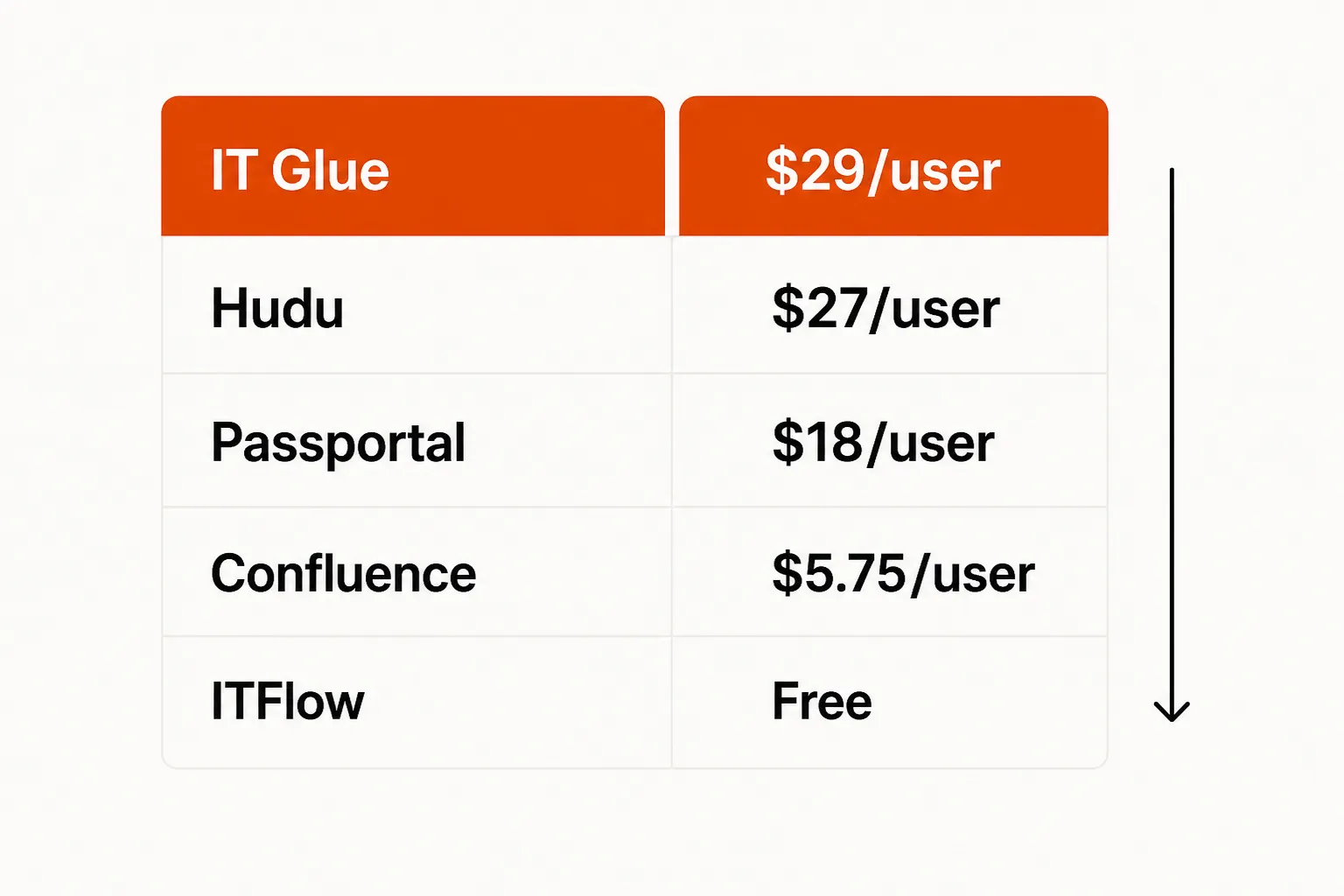
The best IT documentation software for most MSPs in 2026 is Hudu, at $27 per user per month billed annually with no user minimums and a self-hosted option. IT Glue is the better fit for Kaseya shops, starting at $29 per user with a five-user minimum. ITFlow is the free, open-source pick if you can run your own server.
This choice carries more weight than it did two years ago, because your documentation now feeds AI tools as well as your techs. An agent that resets a password or sets up a new hire reads the client's details from your docs during triage, so stale credentials and missing runbooks turn into escalations.
What bad IT documentation costs an MSP
A tech spends 15 minutes hunting for a password or network diagram that should be in the system. Multiply that across 20 tickets a day, five technicians and 250 working days, and you're looking at thousands of hours a year spent finding things instead of fixing them. Flamingo's MSP documentation guide runs the same math.
Most comparisons stop at that number. The second cost shows up when you add automation. AI tools that connect to your PSA can handle password resets, account unlocks and onboarding, but only when they can find the client's password policy, the right admin account and the SOP for that request. Sparse docs mean more escalations, and a vault full of stale passwords means the fix fails halfway through.
This guide compares the six tools MSPs most often shortlist, from the two market leaders to the free and bundled options. For the broader process side, see MSP documentation: a practical guide.
What to look for in MSP documentation software
Client-centric structure
When a ticket comes in for Client X, a tech or an AI agent should be able to open one view with that client's credentials, network info, SOPs and escalation contacts. General knowledge bases organise content by topic, so you end up rebuilding the client structure by hand and maintaining it forever.
A password vault inside the docs
Credentials should live in the documentation platform with encryption, role-based access, audit logging and ideally automated rotation. A separate password manager means two places to update, and one of them will drift. For credentials you hand to clients, see one-time secret sharing tools for MSPs.
PSA and RMM integration depth
Docs linked from inside the ticket get used, and docs in a separate tab get skipped. Check whether PSA sync is one-way or two-way, and whether RMM asset data lands in client records without manual entry. If you're still choosing the PSA itself, start with the best PSA software for MSPs.
SSO, permissions and audit logs
Every client environment you document is a target. Look for enforced SSO, MFA, permissions you can set per client, and an audit log of who viewed and changed what. Ferndesk's comparison lists SSO and audit logs as baseline requirements for regulated environments, and MSP clients increasingly sit in those industries.
A way out
Documentation is one of the stickiest tools in your stack, with thousands of client records, passwords and procedures. Before you sign, check how export works and whether a self-hosted option exists, because that's what you'll rely on if the pricing or the product changes.
Active development
Read the changelog. A platform that shipped real features in the last six months is a safer bet than one whose interface hasn't moved in years.
The best IT documentation tools for MSPs, compared one by one
1. IT Glue: best for Kaseya shops
IT Glue is the most widely used documentation platform among MSPs. It has been building MSP-specific features since 2013 and was acquired by Kaseya in 2019.
Its strengths are structured client documentation with a deep asset template library, the Vault for passwords, checklists, runbooks, and domain and SSL certificate tracking. Every tier now includes Cooper Copilot AI and the AI-powered SOP generator, which captures each click and keystroke as you work and turns them into a step-by-step guide. That's the kind of documentation automation that changes behaviour, because techs don't have to stop and write. More detail in what MSPs need to know about Cooper Copilot and our look at IT Glue's AI features.
The integration list is long and runs deepest across Kaseya and ConnectWise products. IT Glue lists ConnectWise Manage, Autotask PSA, Kaseya BMS, ConnectWise Automate, Kaseya VSA, NinjaRMM, ServiceNow, Microsoft 365, Cisco Meraki and Auvik. Network Glue, a $453/month add-on, adds automated password rotation and auto-documentation of devices, ports and connections, Microsoft users and groups, and BitLocker recovery keys.
The weak spots are support and contract terms. Support quality since the Kaseya acquisition is one of the most consistent complaints on r/msp. Every plan has a five-user minimum, a 36-month term and a one-time onboarding fee, so a small MSP pays for seats it may not need. Years of client passwords and procedures also make the platform hard to leave at renewal time, which is why the Kaseya ownership makes some owners nervous.
Pricing (pricing page):
| Plan | Price | Min users | Minimum monthly cost |
|---|---|---|---|
| Basic | $29/user/mo | 5 | $145/mo |
| Select | $38/user/mo | 5 | $190/mo |
| Enterprise | $44/user/mo | 5 | $220/mo |
All prices are per user per month on 36-month terms. Enterprise is also offered for 1 to 4 users at $49 to $102 per user. The three tiers share the same core features, including runbooks and Microsoft Cloud Editor. What changes is the number of integrations (one, two or unlimited) and PSA sync, which is one-way on Basic and two-way on Select and Enterprise.
Our take: if you run ConnectWise or Autotask and already rely on Kaseya products, IT Glue's integrations earn their place. For everyone else, the minimum and the contract length are reasons to look at Hudu first. See IT Glue alternatives for the wider field.
2. Hudu: best value for most MSPs
Hudu launched in 2020 as a direct IT Glue alternative and says it is now trusted by 6,000+ IT teams. It covers the same core as IT Glue (client docs, password vault, SOPs, asset management, API access) for less money, with no user minimums and a self-hosted option.
One $27 plan includes everything: IPAM, rack management, a knowledge base, process and SOP management, ScreenCapture, expirations, website and SSL monitoring, a client portal with unlimited free portal users, and the Hudini AI assistant. Hudu lists 60+ integrations across PSA, RMM, M365 and Slack, plus a REST API and webhooks. Security covers enforced SSO, MFA including Duo, granular permissions, audit logs, and encryption at rest and in transit, with SOC 2 Type II and ISO 27001 among its certifications.
Self-hosting is the real differentiator. You can run Hudu on your own servers, so the data sits on your infrastructure. On the cloud version, a cancelled account moves to limited access and you can still export your data.
MSPs who switched from IT Glue tend to cite support and the pace of product updates:
"We find Hudu to be far more consistent and reliable compared to ITGlue, we had no idea how used to mediocrity we were until we started using Hudu." - r/msp
The tradeoffs are real but smaller. IT Glue's integration list goes deeper into Kaseya products. Self-hosting means you're running a server, which is simple work but still work. Hudu Radar, the network discovery add-on, costs extra, starting at $44/month for five collectors. Some edge-case features IT Glue built over a decade are still on Hudu's roadmap.
Pricing (pricing page):
| Billing | Price | Minimum users | Contract |
|---|---|---|---|
| Annual | $27/user/mo | None | None |
| Monthly | About 10% more than annual | None | None |
Cloud-hosted and self-hosted run on the same plan. There are no setup fees, and the 14-day free trial needs no credit card.
Our take: for most MSPs that aren't committed to Kaseya, Hudu is the better default in 2026. IT Glue's minimum costs $145/month before you write a single page, while Hudu starts at $27/month for one user on annual billing. Read the full Hudu review or the head-to-head IT Glue vs Hudu comparison.
3. ITFlow: best free option if you can self-host
ITFlow is free, open source and self-hosted. It covers client documentation (contacts, locations, vendors, assets, software licenses and web domains), a password manager with AES encryption, ticketing, invoicing with Stripe payments, accounting and a client portal. It is modular, so you can switch off everything except documentation if that's all you want.
The project moved to stable releases in January 2025 and has added AI support, with self-hosted options like Ollama and LocalAI or external services like ChatGPT. For an MSP with Linux skills and a tight budget, ITFlow removes documentation as a line item, and the built-in ticketing and invoicing let a small shop consolidate tools.
The limits come from how it's built. There is no dedicated support team, and ITFlow's own site says the core team works on it outside their regular MSP jobs, so help comes from the forum. The interface trails IT Glue and Hudu, and while there is an API, you'll find fewer ready-made integrations. Setup is real server work, and if nobody on staff owns that, the savings disappear fast.
Pricing: free. You pay for hosting and the time to manage it.
Our take: a good fit for early-stage MSPs, budget-constrained shops, or teams with someone who enjoys owning infrastructure. It is not a replacement for IT Glue or Hudu at scale, but it shows that core documentation doesn't require $29 per user. More free options are in the best open-source MSP software.
4. N-able Passportal: best for N-able shops focused on credentials
N-able Passportal is now positioned as a privileged access manager for MSPs. It pairs a password manager with a documentation manager, automates password changes, controls access down to client, subfolder and individual password, keeps Active Directory credentials in sync both ways, and removes a departing employee's access in one click. Blink adds self-service password reset for end users.
Documentation is the thinner half. Passportal is a vault first with documentation features next to it, while IT Glue and Hudu are documentation platforms with a vault built in. If credentials are your main problem and you already run N-able, it fits. If you need full client documentation, it will leave gaps.
Pricing: contact N-able for a quote. A free trial is available.
5. NinjaOne: best if you want docs inside your RMM
NinjaOne describes itself as a unified IT operations platform covering endpoint management, MDM, patching, backup and remote access. Its documentation features sit in the same console, so a team that lives in NinjaOne all day switches tabs less.
Compared to dedicated platforms, the documentation is basic. There is no self-hosted option, template depth is shallower and the vault is simpler. It's good enough for shops that want documentation without paying for another tool, and too thin for complex multi-client environments.
Pricing: bundled with the NinjaOne platform rather than sold as a separate documentation product. See our NinjaOne pricing breakdown.
6. Confluence: best for internal IT, not MSPs
Confluence is the category leader in general knowledge management. It is a flexible wiki with strong Jira integration, good search and a solid permissions model, and it works well for internal IT teams with simple needs.
It wasn't built for MSPs. There is no built-in password vault, no client-centric structure and no PSA or RMM integration out of the box. MSPs have adapted it, but documenting 50 clients in Confluence takes a lot of customisation, and you keep working around features IT Glue and Hudu ship by default.
Pricing: a free plan, with Standard at about $6/user/month according to Ferndesk's 2026 comparison. Check Atlassian's pricing page for current tiers. If you mainly need an internal wiki, see free knowledge base software.
IT documentation software pricing at a glance
| Tool | Starting price | Self-host | Password vault | PSA integrations | Open source |
|---|---|---|---|---|---|
| IT Glue | $29/user/mo (5 min, 36-mo term) | No | Yes | Deep (Kaseya, ConnectWise) | No |
| Hudu | $27/user/mo (annual, no min) | Yes | Yes | 60+ integrations plus API | No |
| ITFlow | Free | Yes (required) | Yes | API, few prebuilt | Yes |
| N-able Passportal | Quote | No | Yes | N-able stack | No |
| NinjaOne | Bundled with platform | No | Basic | Native | No |
| Confluence | Free, Standard about $6/user/mo | Yes | No | General | No |
How to keep MSP documentation current
Every SERP comparison for this topic now ranks tools on how well they stay accurate, and for good reason. Ferndesk makes the point that a doc that's 90% accurate can be more dangerous than none, because people trust it. A runbook that references a decommissioned server sends a tech, or an AI agent, down the wrong path.
The tool helps, but the habits do most of the work:
- Make updating docs part of closing the ticket. Flamingo suggests a "Documentation Updated" checkbox on ticket templates, so a tech who solved something undocumented writes it up before the ticket closes.
- Use one template structure for every client, so a tech moving between 30 clients sees the same layout each time.
- Let the platform capture what it can. IT Glue's SOP generator and Hudu's ScreenCapture record procedures as you work, while Network Glue and Hudu Radar discover and document devices automatically.
- Give each document an owner and a review date, and watch failed searches. Document360's buyer's guide recommends review reminders and failed-search analytics so the gaps rank themselves.
Expiration tracking matters too. Both IT Glue and Hudu track domain and SSL expirations, which turns a common surprise outage into a scheduled task.
What AI needs from your IT documentation
Most comparisons ask which platform helps your techs find things faster. In 2026 there's a second question: which platform gives an AI agent enough structured context to act?
AI tools that close tickets don't work from memory. When a ticket arrives, they read the client's documentation during triage: the password policy, the admin account to use, where the user sits in the org, and whether there's a runbook for this exact request. If that context is complete, the agent can run the fix. If credentials are missing or the SOP doesn't exist, it hands the ticket back to a tech, and you're paying human rates for L1 work again.
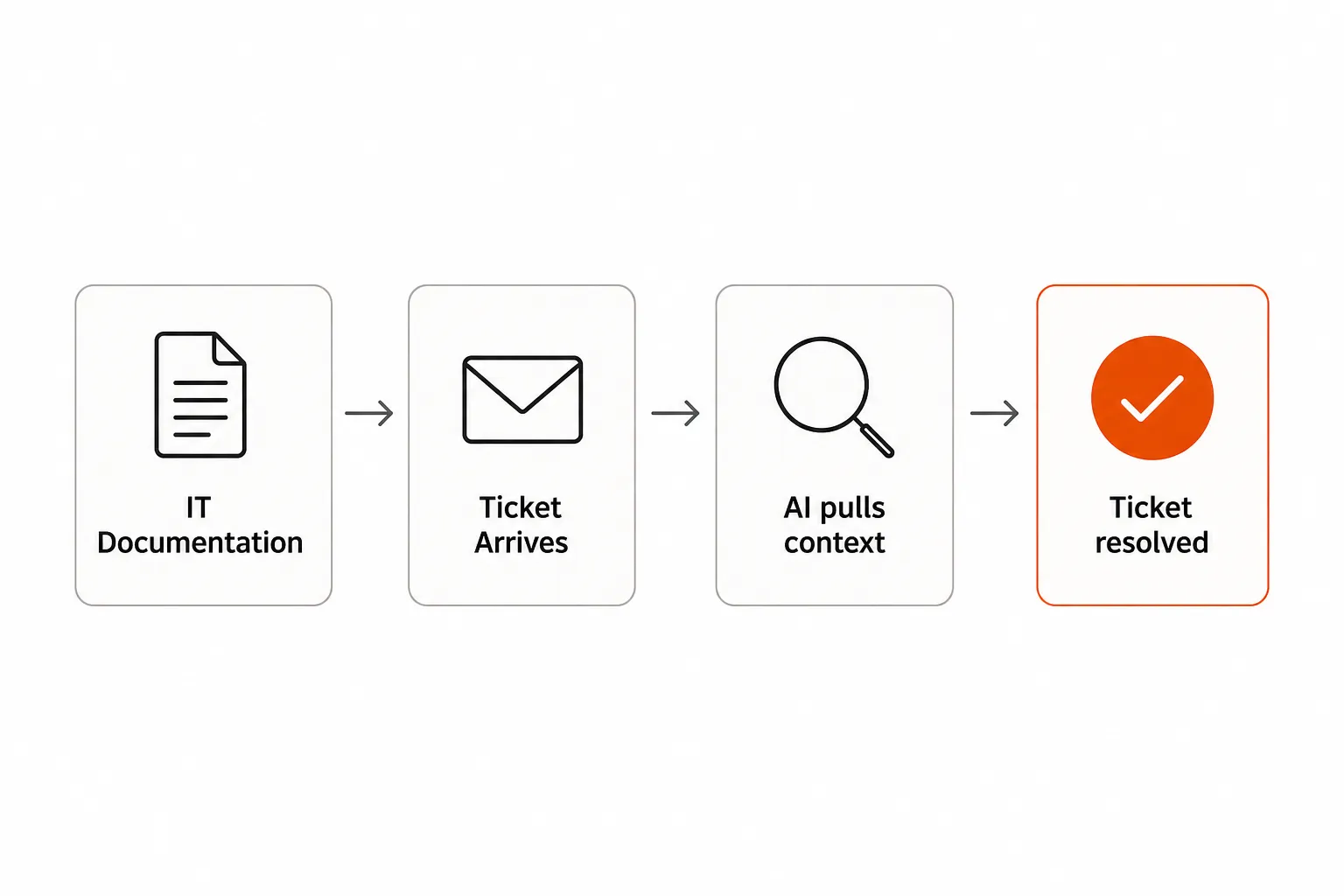
That changes how you should judge a documentation platform. IT Glue and Hudu both store client records with standard fields, credential vaults with clear access rules and SOPs with defined steps, which is the structure AI tools read reliably. Flat wikis are harder to connect and harder to query, so the platform choice becomes a dependency for any automation you plan to add. Password resets are a good place to see the effect, since they make up a large share of L1 volume (see password reset ticket volume statistics).
IT Glue vs Hudu: the real tiebreaker
The IT Glue vs Hudu debate on r/msp has settled into a clear pattern:
"Hudu isn't perfect, but also neither is IT Glue. Also one is getting updates...while the other one doesn't." - r/msp
The tiebreaker is data ownership. Once you've documented 50 clients with thousands of credentials, diagrams and SOPs, switching platforms is painful, and vendors know it. IT Glue asks for a 36-month commitment. Hudu has no contract, lets you self-host, and lets you export your data even after a cloud subscription ends. If pricing changes or the product stalls, your exit starts from your own server or your own export, and that's worth money even if you never use it.
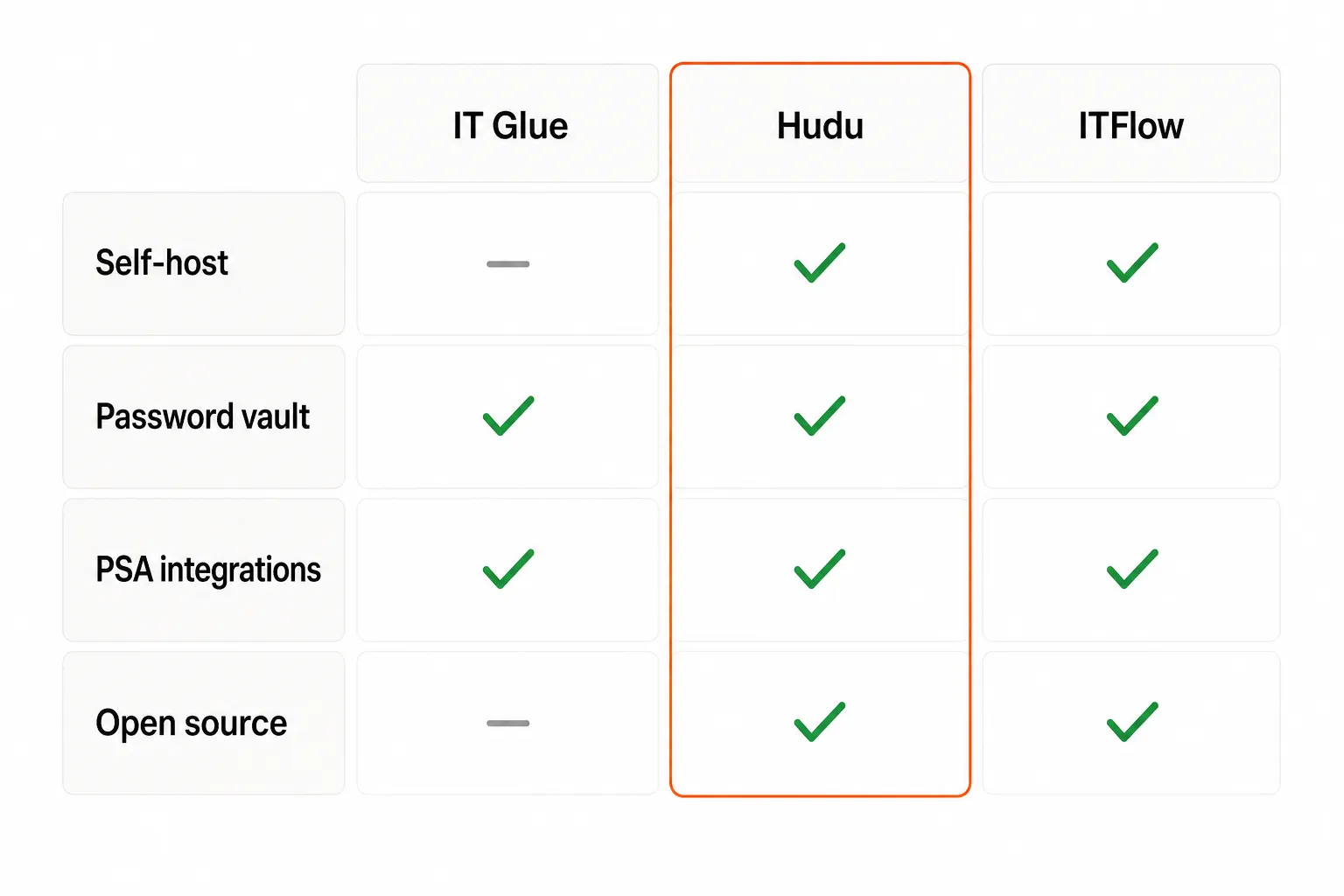
IT Glue wins on depth of integrations for Kaseya and ConnectWise shops. Hudu wins on data ownership, pricing flexibility and development pace. For an MSP choosing a documentation platform today, Hudu is the default recommendation unless you're committed to Kaseya in a way that makes those integrations worth the minimum and the contract.
Where Rallied fits with IT Glue and Hudu
Rallied is the AI agent that closes MSP tickets in the PSA. It connects to ConnectWise, HaloPSA or Autotask, plus Microsoft 365 and your RMM, and pulls the client's docs from IT Glue or Hudu during triage. It then runs the fix, such as resetting the password, unlocking the account or creating the mailbox, and writes the notes and time entry back to the ticket.
Rallied is $300 a month, billed monthly, with 2,000 credits included. Each ticket costs 1, 3 or 8 credits depending on how much work the agent did on it, so a typical month covers about 700 tickets. Any ticket Rallied looked at but couldn't finish costs nothing. Where your documentation is thin, Rallied leaves a write-up for the tech to pick up rather than guessing, which is another reason the docs work above pays off. You can set permissions per tool and require identity verification on resets. Admins get email alerts at 50%, 80% and 100% of the month's credits, and the agent pauses at 0.
Setup takes under an hour. That's a different setup cost from automation platforms where someone has to build and maintain the workflows, which is the tradeoff covered in Rewst vs Pia. For how this works on L1 queues, read autonomous L1 resolution, and for the rest of your stack, see the best MSP software in 2026.
Frequently Asked Questions
What is IT documentation software?
IT documentation software is a platform where MSPs and IT teams store structured records of client environments, including network diagrams, passwords, hardware inventories, SOPs and runbooks. The goal is to give any technician the context to resolve a ticket without hunting for it. IT Glue and Hudu are built for MSPs, while general tools like Confluence work but lack password vaults and client-centric layouts.
IT Glue vs Hudu: which is better for MSPs?
It depends on your stack. IT Glue starts at $29 per user per month with a five-user minimum on a 36-month term, and its integrations run deepest for Kaseya and ConnectWise shops. Hudu is $27 per user per month billed annually with no minimum, no contract and a self-hosted option. If you're not committed to Kaseya, Hudu is usually the better deal.
Is there a free IT documentation tool for MSPs?
ITFlow is free and open source, covering client documentation, passwords, ticketing, invoicing and a client portal. It moved to stable releases in January 2025. The tradeoff is that you self-host it and rely on community support, so it suits small MSPs with someone who can own the server.
How much does IT documentation software cost for an MSP?
IT Glue runs $29 to $44 per user per month with a five-user minimum, so the floor is $145 to $220 a month, plus a one-time onboarding fee. Hudu is $27 per user per month billed annually with no minimums and no setup fee. N-able Passportal is quote-based, NinjaOne bundles documentation into its platform, Confluence has a free plan, and ITFlow is free to self-host.
Can I self-host Hudu?
Yes. Hudu offers cloud-hosted and self-hosted deployment on the same $27 per user plan. Self-hosting keeps client data on your own infrastructure, though you take on running and patching the server.
Can AI use my IT documentation to resolve tickets?
Yes. Rallied, for example, pulls the client's docs from IT Glue or Hudu during triage, runs the fix in Microsoft 365 or your RMM, and writes the notes and time entry back to the ticket. The more complete and structured your documentation, the more tickets it can close; where docs are thin, it leaves a write-up for a tech instead.